1
Changing Screen Options
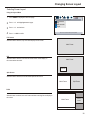
Changing the Scaling mode of Image
1
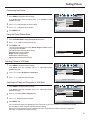
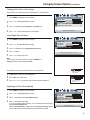
Press MENU to display the menu main page.
2
Press 3/4 to display window menu page.
3
Press 6 to select image size item.
4
Press 3/4 to select a proper image size.
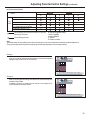
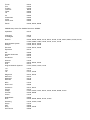
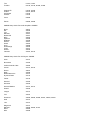
The image size can be selected between: fill all, normal, wide and zoom .
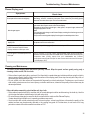
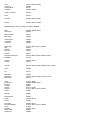
window
image size
h position
v position
freeze window
digital pan and zoom
fill all
50
50
off
on
right/left to change image size
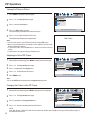
Fill All
The Fill All mode stretches the input vertically and horizontally to fill the display from edge to edge. This mode is the default mode.
Normal
The Normal mode fills the display vertically with a 4:3 aspect picture, preserving the geometry of the input format. It performs the same
as the Fill to Aspect Ratio mode..
Wide
The Wide mode only affects displays that are greater than 4:3 aspect. If the picture is less than or equal to 4:3, this mode acts as if it is
in Normal mode. It is intended to display 4:3 images on a 16:9 panel with the least picture deformity. The center of the picture is left
unstretched. The left and right sides of the picture are stretched in a non-linear fashion with the areas of greatest distortion on the
extreme left and right edges of the picture. The top and bottom five percent of the picture are cropped.
Zoom
If the display aspect ratio is greater than 4:3, this mode fills the panel horizontally, cropping 10 percent off the top and bottom of the
picture. If the display aspect ratio is less than 4:3, this mode crops the picture by 16.5 percent on all sides and fills the panel with the
remaining picture.
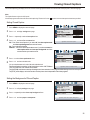
Freezing the Picture
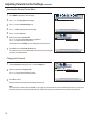
1
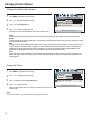
Press MENU to display the menu main page.
2
Press 3/4 to display window menu page.
3
Press 6repeatedly to select freeze window item.
4
Press 3/4 to select on or off.
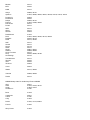
When you set this item to on, the current picture will be frozen until you set
this item to off.
Note:
This menu item appears only when the current screen layout is full screen.
19
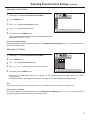
window
image size
h position
v position
freeze window
digital pan and zoom
fill all
50
50
off
left/right to freeze current window
on