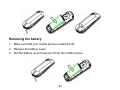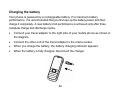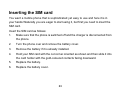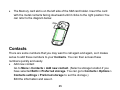
1
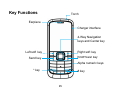
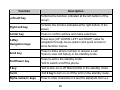
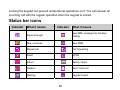
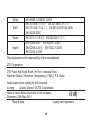
ZTE-G R228 Mobile Phone User Manual LEGAL INFORMATION Copyright © 2012 ZTE CORPORATION. All rights reserved. No part of this publication may be excerpted, reproduced, translated or utilized in any form or by any means, electronic or mechanical, including photocopying and microfilm, without the prior written permission of ZTE Corporation. The manual is published by ZTE Corporation. We reserve the right to make modifications on print errors or update specifications without prior notice. Version No. : R1.0 Edition Time : 2012.02.28 Manual No. : 2 Table of Contents SECURITY .............................................................. 4 SENDING AND RECEIVING MESSAGES ..... 30 SAFETY PRECAUTIONS .................................... 4 SENDING AND RECEIVING EMAIL................ 33 RF EXPOSURE.................................................... 12 USER PROFILES................................................ 34 LIMITATION OF LIABILITY............................... 13 SETTINGS ............................................................ 35 KEY FUNCTIONS................................................ 15 BLUETOOTH ....................................................... 38 TURNING ON / OFF AND WAKING UP YOUR APPLICATIONS .................................................. 40 PHONE.................................................................. 17 MULTIMEDIA ....................................................... 41 LOCKING / UNLOCKING THE KEYPAD........ 17 JAVA MIDLETS ................................................... 45 STATUS BAR ICONS ......................................... 18 SERVICES............................................................ 45 WRITING TEXT.................................................... 19 EC DECLARATION OF CONFORMITY .......... 47 BATTERY.............................................................. 20 INSERTING THE SIM CARD ............................ 23 INSERTING THE MEMORY CARD.................. 24 CONTACTS .......................................................... 25 MAKING AND RECEIVING CALLS ................. 27 CALL CENTER .................................................... 28 3 Security To protect your mobile phone from illegal use, take the security measures as follows: ¾ Set PIN codes of the SIM card. ¾ Set handset lock code. ¾ Set call restrictions. Safety Precautions This section includes some important information on safe and efficient operation. Please read this information before using the phone. Operational Precautions Please use your phone properly. When making or receiving a call, please hold your phone as holding a wireline telephone. Make sure that the phone is at least one inch (about two point five centimeters) from your body when transmitting. Do not touch the antenna when the phone is in use. Touching the antenna 4 area affects call quality and may cause the phone to operate at a higher power level than needed. Some people may be susceptible to epileptic seizures or blackouts when exposed to flashing lights, such as when watching television or playing video games. If you have experienced seizures or blackouts, or if you have a family history of such occurrences, please consult your doctor before playing video games on your phone or enabling a flashing-light feature on your phone. (The flashing-light feature is not available on all products.) Keep the phone out of the reach of small children. The phone may cause injury if used as a toy. Precautions While Driving Please pay attention to the traffic safety. Check the laws and regulations on the use of your phone in the area where you drive. Always obey them. Use hands-free function of the phone, if available. Pull off the road and park before making or answering a call if conditions require. 5 Precautions for Medical Devices and Facilities When using your phone near pacemakers, please always keep the phone more than eight inches (about twenty centimeters) from the pacemaker when the phone is switched on. Do not carry the phone in the breast pocket. Use the ear opposite the pacemaker to minimize the potential for interference. Switch off the phone immediately if necessary. Some phones may interfere with some hearing aids. In the event of such interference, you may consult your hearing aids manufacturer to discuss alternatives. If you use any other personal medical device, please consult the manufacturer of your device to determine if it is adequately shielded from RF energy. In those facilities with special demand, such as hospital or health care facilities, please pay attention to the restriction on the use of mobile phone. Switch off your phone if required. Mobile Phone Please use original accessories or accessories approved by the phone 6 manufacturer. Using any unauthorized accessories may affect your mobile phone’s performance, damage your phone or even cause danger to your body and violate related local regulations about telecom terminals. Turn off your phone before you clean it. Use a damp or anti-static cloth to clean the phone. Do not use a dry cloth or electrostatically charged cloth. Do not use chemical or abrasive cleaners as these could damage the phone. As your mobile phone can produce electromagnetic field, do not place it near magnetic items such as computer disks. Using the phone near electrical appliances such as TV, telephone, radio and personal computer can cause interference. Do not expose your mobile phone to direct sunlight or store it in hot areas. High temperatures can shorten the life of electronic devices. Keep your phone dry. Any liquid may damage your phone. Do not drop, knock or harshly treat the phone. Rough handling can break internal circuit boards. Do not connect the phone with any incompatible enhancement. Do not attempt to disassemble the mobile phone or battery. 7 Do not store the phone with flammable or explosive articles. Do not charge the mobile phone without battery. Some electronic devices are susceptible to electromagnetic interference sent by phone if inadequately shielded. Please use phone at least 20 cm or as far away as you can from TV set, radio and other automated office equipment so as to avoid electromagnetic interference. Operating phone may interfere with medical devices like hearing aides and pacemakers, or other medical devices in hospital. Consult a physician or the manufacturer of the medical device before using phone. Be aware of the usage limitation when using phone at places such as oil warehouses, or chemical factories, where there are explosive gases or explosive products being processed, because even if your phone is in idle state, it still transmits radio frequency (RF) energy. Therefore, power off your phone if required. Do not touch the antenna while calling. Otherwise it will affect the quality of calling and waste battery energy. The damaged antenna will cause slight burn while touching your skin. Keep phone out of the reach of small children. Phone may cause injury if 8 used as a toy. Do not put other things on the terminal to avoid overlaying radiator. Keep the antenna free from obstructions and position the antenna straight up. This will ensure best call quality. Precautions for Potentially Explosive Atmospheres Switch off your phone prior to entering any area with potentially explosive atmospheres, such as fueling areas, fuel or chemical transfer or storage facilities. Do not remove, install, or charge batteries in such areas. Spark in a potentially explosive atmosphere can cause an explosion or fire resulting in bodily injury or even death. To avoid possible interference with blasting operations, switch off your phone when you are near electrical blasting caps, in a blasting area, or in areas posted “Turn off electronic devices.” Obey all signs and instructions. Precautions for Electronic Devices Some electronic devices are susceptible to electromagnetic interference sent by mobile phone if inadequately shielded, such as electronic system of vehicles. Please consult the manufacturer of the device before using the phone if necessary. 9 Safety and General Use in Vehicles Safety airbag, brake, speed control system and oil eject system shouldn’t be affected by wireless transmission. If you do meet problems above, please contact your automobile provider. Do not place your phone in the area over an airbag or in the airbag deployment area. Airbags inflate with great force. If a phone is placed in the airbag deployment area and the airbag inflates, the phone may be propelled with great force and cause serious injury to occupants of the vehicle. Please turn off your mobile phone at a refueling point, and the same to the place where the use of two-way radio is prohibited. Aircraft Safety Please turn off your mobile phone before the airplane takes off. In order to protect airplane’s communication system from interference, it is forbidden to use mobile phone in flight. Safety regulations require you to have permission from a crew member to use your phone while the plane is on the ground. If the mobile phone has the function of automatic timing power-on, please check your alarm setting to make sure that your phone will not be automatically turned on during flight. 10 Battery Use Do not short-circuit the battery, as this can cause the unit to overheat or ignite. Do not store battery in hot areas or throw it into fire. Otherwise, it will cause explosion. Do not disassemble or refit the battery. Otherwise, it will cause liquid leakage, overheating, explosion and ignition of the battery. Please store the battery in a cool dry place if you don’t use it for a long period. The battery can be recharged for hundreds of times, but it will eventually wear out. When the operating time (talk time and standby time) is noticeably shorter than normal, it is time to replace it with a new one. Please stop using the charger and battery when they are damaged or show evidence of aging. Return the worn-out battery to the provider or dispose of it in accordance with environment regulations. Do not dispose of it in household rubbish. Please use original batteries or batteries approved by the phone manufacturer. Using any unauthorized battery may affect your handset performance or may cause danger of explosion, etc. 11 Warning: If the battery is damaged, do not discharge it. If the leakage does come into contact with the eyes or skin, wash thoroughly in clean water and consult a doctor. RF Exposure Specific Absorption Rate (SAR) Your mobile device is a radio transmitter and receiver. It is designed not to exceed the limits for exposure to radio waves recommended by international guidelines. These guidelines were developed by the independent scientific organisation ICNIRP and include safety margins designed to assure the protection of all persons, regardless of age and health. The guidelines use a unit of measurement known as Specific Absorption Rate, or SAR. The SAR limit for mobile devices is 2.0 W/kg and the highest SAR value for this device when tested at the ear was 0.834 W/kg*. As mobile devices offer a range of functions, they can be used in other positions, such as on the body as described in this user guide. 12 As SAR is measured utilising the device’s highest transmitting power, the actual SAR of this device while operating is typically below that indicated above. This is due to automatic changes to the power level of the device to ensure it only uses the minimum power required to communicate with the network. * The tests are carried out in accordance with EN 62209-1. Body Worn Operation Important safety information regarding radio frequency(RF) radiation exposure. To ensure compliance with RF exposure guidelines the phone must be used with a minimum of 15 mm separation from the body. Failure to observe these instructions could result in your RF exposure exceeding the relevant guideline limits. Limitation of Liability ZTE shall not be liable for any loss of profits or indirect, special, incidental or consequential damages resulting from or arising out of or in connection with using this product, whether or not ZTE had been advised, knew or should have known the possibility of such damages. The user should refer to the enclosed warranty card for full warranty and service information. 13 Note: The pictures and icons shown in the manual are just schematic drawings for function demonstration. If they are inconsistent with your handset, please take your handset as the standard. If the inconsistency exits in the manual because of the handset function updating, please refer to the follow-up public information from ZTE CORPORATION. 14 Key Functions Torch Earpiece Charger interface 4-Way Navigation keys and Center key Right soft key Left soft key End/Power key Send key Alpha numeric keys * key # key 15 Function Description Left soft key Performs the function indicated at the left bottom of the screen. Right soft key Performs the function indicated at the right bottom of the screen. Center key Press to confirm actions and make selections. 4-Way Navigation keys These keys (UP, DOWN, LEFT and RIGHT) allow for navigation through menu options and quick access to some function menus. Send key Press to dial a phone number or answer a call. Press to view call history in the standby mode. End/Power key Press to exit to the standby mode. Hold to switch on/off the phone. # key Hold to turn on or off Silent profile in the standby mode. Torch Hold 0 key to turn on or off the torch in the standby mode. Alpha numeric keys Press to enter characters 0-9 and the alphabets from a-z. 16 Note: In this User Manual, “press a key” means to press the key and release it immediately, while “hold a key” means to press the key for at least two seconds and then release it. Turning On / Off and waking up your phone Hold the Power key to turn your phone on or off. In Menu > Settings > Phone settings > Misc.settings > LCD backlight, set the LCD backlight time. If the phone is not operated within this time, the screen will turn black. Press any key to wake up your phone. Locking / unlocking the keypad In Menu > Settings > Security settings > Auto keypad lock, set the auto keypad lock time. If the phone is not operated in the standby mode within this time, the keypad will be locked. In the standby mode, press Left soft key or Center key and then press * key within two seconds to lock the keypad. The unlock method is the same. 17 Locking the keypad can prevent unintentional operations on it. You can answer an incoming call with the regular operation when the keypad is locked. Status bar icons Indicator What it means Indicator What it means Signal strength New SMS, message box full when blinking New voicemail New MMS Missed call Call forwarding Silent GPRS Indoor Battery status Outdoor Alarm clock set Meeting Keypad locked 18 Writing text You can use the keyboard to enter messages, contact information, notes, and more. • Change input mode: Press the # key to change the input mode. (input modes: ABC/abc/123) • Input letters: In ABC/abc mode, constantly press the corresponding letter key till the letter appears. • Input digits: In 123 mode, press digit key once to input a digit. In ABC/abc mode, constantly press the digit key until the number appears. • Input symbol: Press the * key to enter symbol mode, select the required symbol (common symbols) by pressing the Navigation keys and then press the Left soft key or Center key to confirm it. In ABC/abc mode, constantly press the 1 key until the required symbol (common symbols) appears. • Input space: Press the 0 key to input space. It does not work in 123 mode. • Delete character: Press the Right soft key to clear a character. Hold the Right soft key to delete all characters and clear the display. 19 • Move cursor to left or right: Among the text, press the Left/Right navigation keys to move the cursor to left or right. Battery The lithium ion battery of the mobile phone can be immediately used after unpacking. Installing the battery 1. Pull the battery cover from the notch on the bottom left edge and remove the cover. 2. Insert the battery by aligning the gold-coloured contacts with the contacts in the battery slot. 3. Push down the upper section of the battery until it clicks into place. 4. Replace the battery cover and close it gently until you hear a click. 20 Removing the battery 1. Make sure that your mobile phone is switched off. 2. Remove the battery cover. 3. Pull the battery up and remove it from the mobile phone. 21 Charging the battery Your phone is powered by a rechargeable battery. For maximum battery performance, it is recommended that you first use up the battery power and then charge it completely. A new battery’s full performance is achieved only after three complete charge and discharge cycles. • Connect your travel adapter to the right side of your mobile phone as shown in the diagram. • Connect the other end of the travel adapter to the mains socket. • When you charge the battery, the battery charging indicator appears. • When the battery is fully charged, disconnect the charger. 22 Inserting the SIM card You want a mobile phone that is sophisticated yet easy to use and here it is in your hands! Naturally you are eager to start using it, but first you need to insert the SIM card. Insert the SIM card as follows: 1. Make sure that the phone is switched off and the charger is disconnected from the phone. 2. Turn the phone over and remove the battery cover. 3. Remove the battery if it is already installed. 4. Hold your SIM card with the cut corner oriented as shown and then slide it into the card holder with the gold-coloured contacts facing downward. 5. Replace the battery. 6. Replace the battery cover. 23 Every mobile phone has a SIM card (Subscriber Identity Module). This is a micro-chip that holds your personal information such as names and phone numbers. Your phone won’t work without it. If you already have contacts on your SIM card, they can be transferred in most cases. Inserting the Memory Card You can use a Memory card to expand the storage of the phone. You can store or copy files such as videos, photos, music, and so on. Do not take out the card or switch off the phone while transmitting or storing data, which may cause data loss or damage to the phone or the card. Insert the Memory card as follows: 24 • The Memory card slot is on the left side of the SIM card holder. Insert the card with the metal contacts facing downward until it clicks to the right position.You can refer to the diagram below. Contacts There are some numbers that you may want to call again and again, so it makes sense to add these numbers to your Contacts. You can then access these numbers quickly and easily. • Add new contact Go to Menu > Contacts > Add new contact. (Select a storage location if you have selected Both in Preferred storage. You can go to Contacts > Options > Contacts settings > Preferred storage to set the storage.) Edit the information and save it. 25 • Save number to Contacts You can also save a number right after you’ve made or received a phone call or a message from someone who is not yet in your Contacts list. • Quick search To quickly search for the contacts, enter the first letter of your desired contact on the screen. • Delete one record To delete someone from your Contacts list, first select the name, then select Options > Delete. • Copy or move records You can copy or move the records to SIM or to phone. You can also copy the records to file. Select Options > Copy or Move. • Mark several records Select Options > Mark several and then select the records you want to mark. • View memory status Select Options > Contacts settings > Memory status to check the memory 26 status both of phone and SIM. Making and receiving calls • Basic way to make a call In the standby mode, press the Alpha numeric keys to input the number and then press the Send key to dial. • Dial from the Contacts Go to Menu > Contacts. Find the name of the person you want to call, and press the Send key. • Make an emergency call You can make emergency calls without the SIM card being inserted as long as you are in an area with network coverage. • Answer a call Press the Send key. • End a call Press the End key. 27 • Use call options During a call, you can select Options to enter the call options. You can put a call on hold, make a new call, and use applications such as Messages & Contacts while you’re on a call. Call center Go to Menu > Call center. • Call history Dialled calls, Received calls and Missed calls are saved in Call history. If the records are full, the earliest saved records will be deleted automatically. Select Options to enter the submenu. ♦ View: View the details of call record. ♦ Call: Call the record again. ♦ Send message: Send a message to the record. ♦ Save to Contacts: Save the current number to phonebook. ♦ Edit before call: Edit the number before you call. ♦ Delete: Delete the current call record. 28 ♦ Delete all: Delete all your call records. • ♦ Advanced: View call timers, call cost, text msg. counter and GPRS counter. Call settings ♦ Caller ID: You can select to Set by network, Hide ID or Send ID. ♦ Call waiting: After this function is activated, the system will inform you if there is another incoming call. Please contact your network provider for details. ♦ Call divert: The call divert service enables you to divert an incoming call from a service to a specified telephone number in preset conditions. You can contact the network provider to activate this service. You can set the call divert service so that voice calls and data calls are diverted to a preset number under different conditions. ♦ Call barring: You can bar outgoing and incoming calls. ♦ Line switching: Switch the call line. ♦ Advance settings: You can set auto redial, call time display and call time reminder. 29 Sending and receiving messages • Write a new message You can use your mobile phone to send and receive messages. 1. Go to Menu > Messages > Write message. 2. Write your message. For more information on input method, see section ‘Writing text’. The default message type is SMS. 3. If you want to change to MMS, you can press Options and choose Switch to MMS; or you can press Options and choose Add picture, Add sound, Add video or Add subject to directly insert multimedia contents to the message and it will be switched to MMS automatically. 4. You can select Options > Slide options to add a new slide. 5. When you finish writing SMS, press Options > Send to to enter recipient or add from Contacts. If you are writing MMS, after adding recipients, then you can select Options > Change to Cc or Change to Bcc to change the current contact to Cc or Bcc. 6. Select Options > Send to to send the MMS out. If you want to save the 30 MMS as a draft, select Options > Save to Drafts. If you are writing SMS, select Options > Save. • View messages Upon receiving a message, the mobile phone will alert you with a ringtone, prompt, or a new message icon. 1. Press View to open the Inbox. You can also go to Inbox through the main menu to read the message. 2. While the message is open, use Options to Reply, Delete, or Forward the message. You can also call back the sender. You can view the message boxes in the Messages interface. ♦ Select Inbox to view received messages. ♦ Select Drafts to view unsent messages. ♦ Select Outbox to view messages that failed to send. ♦ Select Sent messages to view messages been successfully sent and saved. ♦ Select Archive to view archive messages. 31 ♦ Select Email to send and receive emails. ♦ Select Voicemail server to call voicemail or edit voicemail. ♦ Select Broadcast message to view Broadcast messages. ♦ Select Templates to view message templates. • Message settings Go to Menu > Messages > Message settings > Text message. ♦ Profile settings: This is automatically set by the service provider, but please contact us if this is not available. ♦ Common settings: You can set Delivery report and Reply path on or off. You can select to save sent messages or not. ♦ Memory status: View the SIM and phone memory status. ♦ Preferred storage: Set the preferred storage to SIM or Phone. ♦ Preferred connection: Set the preferred connection to GPRS, GSM or GSM only. Go to Menu > Messages > Message settings > Multimedia message. ♦ Profiles: You can activate a preset profile or add new ones. 32 ♦ Common settings: In Compose, you can set Slide time, Creation mode, Picture resizing, Auto signature and Signature. In Sending, you can set Validity period, Delivery report, Read report, Priority, Delivery time, Send and save. In Retrieval, you can set Home network, Roaming, Filters, Read report and Delivery report. In Preferred storage, you can set the preferred storage to Phone or Memory card. In Memory status, you can view memory status. Go to Menu > Messages > Message settings > Service message. ♦ Enable push: You can set Accept all or Disable. ♦ Enable service loading: You can set Prompt, Auto launch or Disable. Sending and receiving email • Set up accounts First you have to setup your email accounts. If the account is not properly set or activated, you cannot send or receive any email. Go to Menu > Messages > Email > Email accounts. 1. Select Options, and then select New account. 33 2. Select a mail server, then enter your email address, protocol, data account and server information. 3. Activate your email account. • Send an email Go to Menu > Messages > Email > Write Email. When you finish writing, select to send or save the email. • Send and receive emails If you want to receive emails, go to Menu > Messages > Email. Press Send and receive, and the emails in your mailbox will be downloaded to your phone and the emails in the Outbox will be sent out. Go to Inbox to view your received emails. User profiles Go to Menu > User profiles. You can select your preferred profile in this menu. The profile options are: General, Meeting, Outdoor, Indoor, Silent, Headset and Bluetooth. The default settings for each individual profile are preset at the factory. You can change them in the Options > Customize menu. 34 • Tone settings: Set the tone for various conditions. • Volume: Set the Ringtone and Key tone. • Alert type: Choose among four modes. • Ring type: Choose among Single, Repeat and Ascending. • Extra tone: Let the phone alert when warning, error, camp on or connect. • Answer mode: Select Any key to answer a call. Note: The Headset mode can only be activated with the headset connected. And the Bluetooth mode can only be activated when the Bluetooth headset is connected. Settings You can adjust various settings of your phone. Go to Menu > Settings. • Phone settings ♦ Time and date: You can set home city, time and date and format. ♦ Schedule power on/off: Set auto power on and off time. ♦ Language: You can set the language. 35 ♦ Pref. input methods: You can set the preferred input method. ♦ Display: You can set Wallpaper, Screen saver, Show date and time and Show owner number. ♦ Dedicated Key: Set shortcuts for 4-Way Navigation keys. ♦ Auto update of date and time: Set Auto update of date and time on or off. ♦ Flight mode: You can select to use flight mode. In flight mode, all wireless functions are disabled. ♦ Misc. settings: You can set the LCD backlight brightness and time. ♦ Key backlight: Set the Key backlight On or Off. • Network settings In this menu, you can select Automatic/Manual to select the network service provider according to requests. If you have selected a service provider manually, you have to manually select again or return to the Automatic option to select the service provider when you switch to the SIM card of another network. The GPRS connection can be set to When needed or Always. • Security settings 36 ♦ SIM lock: If SIM lock is currently set Off, select it again then input the PIN code to turn it on. You need to input the correct PIN code to unlock your SIM card when you turn on your mobile phone next time. Note: The PUK code is required to unlock the SIM card if you have incorrectly input the PIN code for three consecutive times. The PIN code and the PUK code may be supplied along with the SIM card. If not, contact the network provider. ♦ Phone lock: Phone lock can prevent your mobile phone from unauthorized use. Select On/Off to enable or disable the handset lock protection. ♦ Auto keypad lock: Select a time for auto keypad lock, and the phone will automatically lock the keypad to prevent unintended touch. ♦ Change password: You can change the PIN, PIN2 and phone password here. Note: You may be required to input the phone lock code in some of the security setting interfaces. The default lock code is 1234. Go to Security settings > Change password > Phone password to change the phone lock code. • Connectivity ♦ Bluetooth: See chapter “Bluetooth”. 37 ♦ Data account: You can add data account and view your GSM and GPRS data usage. • Restore factory settings You need to input the correct phone password to restore factory settings. Bluetooth Go to Menu > Settings > Connectivity > Bluetooth. The Bluetooth devices must be paired before the communication is performed. • Turn on or off the Bluetooth on your phone Go to Power, you can turn on or off Bluetooth. • Make your phone visible Go to Bluetooth > Visibility, you can choose to be visible or not. When your phone is visible, and the Bluetooth is turned on, all other Bluetooth-enabled devices within range can detect your phone. • Create a Bluetooth partnership 1. Go to Bluetooth > My device > Search new device to search other Bluetooth-enabled devices and list them. 38 2. Select the desired device name in the list and press Pair. 3. Then press Yes, the connection will be established. • Beam information using Bluetooth After the Bluetooth partnership is established, you can beam information, such as contacts, and calendar items, as well as files from your phone to another Bluetooth-enabled device. For example, if you want to send an item from the Contacts list to the opposite party, find that item, press Options > Send contact > Via Bluetooth, and then select the device name. If you want to send a multimedia file, find the file from the media folder and then press Options > Send > Via Bluetooth, and then select the device name. • Connect a Bluetooth hands-free or stereo headset For hands-free phone conversations or to listen to music, you can use a Bluetooth hands-free or stereo headset. Go to Bluetooth > Search audio device to search for the Bluetooth hands-free or stereo headset. 39 Applications Go to Menu > Applications. • Calendar Enter Calendar, the calendar of the current month will be displayed on the screen and the current date will be marked with special colour. You can browse the dates, and press the 4-Way Navigation keys to switch the date; the information on the screen will also change consequently. • Tasks You can add tasks. • Alarm You can view, and edit the alarm clocks settings. You can also enable or disable the alarms. By pressing Edit, you can set the corresponding features of the alarm according to the instructions. • Calculator You can perform simple calculations. You can use 4-Way Navigation keys to perform add, subtract, multiply or divide calculation. 40 Note: This calculator has limited accuracy and rounding errors may occur especially in long division. • Unit converter Your mobile phone has a unit converter to convert weight and length. Input the value to perform the conversions. • World clock You can view the time in different cities. • Games Your mobile phone has classic games pre-loaded. For further information on this, access the menu and view game Help. Multimedia Go to Menu > Multimedia. • Camera ♦ Take a photo Go to Camera to take a photo. Aim the camera at the object and then press the Center key to take the shot. 41 Before capturing a photo, press the Left/Right Navigation keys to adjust brightness. ♦ Configure your camera Go to Camera. Press the Left soft key to configure your camera. • Image viewer The images you want to view in Image viewer must be put in the .. \Photos folder in the phone or memory card, and in Options > Storage, the storage must be set to phone or memory card correspondingly. You can select an image and view it. • Video recorder ♦ Take a video Go to Video recorder to record a scene. Aim the camera at the object and then press the Center key to start, press it again to pause, and press the Right soft key to finish recording. Before recording a video, press the 4-Way Navigation keys to adjust brightness and zoom to the right size. ♦ Configure your video recorder 42 Go to Video recorder. Press the Left soft key to configure your video recorder. • Video player The videos you want to play in Video player must be put in the ..\Videos folder in the phone or memory card, and in Options > Storage, the storage must be set to phone or card correspondingly. You can then select a video and play it. • Audio player You can play the audio in your phone or memory card. The music you want to play in Audio player must be put in the ..\ My Music folder in the phone or memory card, and in List > Options > Settings > Pre. playlist, the storage must be set to phone or memory card correspondingly. In List > Options, you can refresh your playlist and make personal settings. • Sound recorder Go to Options > New record to record a sound clip. Go to Options > Settings to set preferred storage and file format. Go to Options > List to view the sound clips you recorded. 43 • FM radio With the radio, you can search for radio channels, listen to them, and save them on your device. Note that the quality of the radio broadcast depends on the coverage of the radio station in that particular area. In the FM radio interface, you can press the Up/Down Navigation keys to adjust volume, press the Left/Right Navigation keys to tune the frequency. When you receive an incoming call while listening to the radio, the radio will be paused. Select Options to enter the submenu. Note: The wired headset works as an antenna, so always connect the headset when using the radio. • File manager You can check all the folders in the phone or memory card, create new ones, rename, delete or sort, etc. The files you download from the internet will be stored in these folders. Note: When you select Format, the data will be lost, so please be careful with this function. 44 Java MIDlets Go to Menu > Java MIDlets. MIDlets are Java™-based applications that can run on your phones. It supports Java 2 Edition, J2ME™. Java allows you to download Java-based applications, such as games and tools that are specifically designed for mobile phones. Java gives you the flexibility of installing and managing additional J2ME applications from the Internet. Services Go to Menu > Services. Services allows you to view internet content. In Services, you can use the STK and Internet service, and you can select Licence manager to manage the licences. • STK SIM card Toolkit (STK) services are value-added services provided by your network provider. Your mobile phone supports STK service, but if your SIM card and network provider do not support the service, these functions can’t be used. 45 • Internet service Your phone supports Wireless Application Protocol (WAP). You can get access to this service through your network provider. Internet service lets you get information about news, weather forecasts and more. You can perform the following operations: ♦ Homepage: Homepage is a WAP site you set in Settings > Profiles. ♦ Bookmarks: Access your phone’s preset websites. Select a bookmark and press Options > Go to to load the website. ♦ Input address: Input a URL and press Options > Done to visit the site. ♦ Recent pages: Display the pages you’ve visited recently. Select an item and choose Options > Go to to visit the page again. ♦ Settings: You can set Profiles, Browser options and Preferences. • Licence manager ♦ Licence list: Display the list of licences. ♦ Status: Check the version and time. ♦ Advance: Select Sweep to remove useless licences and reboot your phone. 46 EC Declaration of Conformity It is hereby declared that following designated product: Product Type: GSM/GPRS Dual-band Mobile Phone Model No: ZTE-G R228 Complies with the essential protection requirements of the Radio and Telecommunication Terminal Equipment Directive (EC Directive 1999/5/EC) and the Electromagnetic Compatibility Directive(2004/108/EC). This declaration applies to all specimens manufactured identical to the samples submitted for testing/evaluation. Assessment of compliance of the product with the requirements relating to the Radio and Telecommunication Terminal Equipment Directive (EC Directive 1999/5/EC) was performed by American TCB(Notified Body No.1588), based on the following standards: 47 Safety EMC Radio Health EN 60950-1:2006/A11:2009 EN 301 489-1 V1.8.1; EN 301 489-7 V1.3.1; EN 301 489-17 V2.1.1; EN 55013:2001/A2:2006; EN 55020:2007; EN 301 511 V9.0.2; EN 300 328 V1.7.1; EN 50360:2001; EN 62209-1:2006; EN 62209-2:2010; EN 50332-1:2000; EN 50332-2:2003 This declaration is the responsibility of the manufacturer: ZTE Corporation ZTE Plaza, Keji Road South, Hi-Tech, Industrial Park, Nanshan District, Shenzhen, Guangdong, 518057, P.R.China Authorised person signing for the company: Xu feng Quality Director Of ZTE Corporation Name in block letters & position in the company Shenzhen, 25th May 2011 Place & date Legally valid signature 48