1
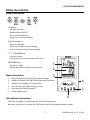
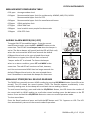
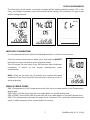
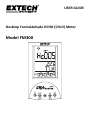
EXTECH INSTRUMENTS Meter Description Button Description SET Button: Set date and time Audible Alarm ON/OFF Alarm Limit Adjustment Short press to switch AM/PM SEL/Recall Button: Move to next digit Short press to save current reading Press and hold to recall stored reading o
C ‐ oF ‐ %RH ▲Button: Increase a value Press and hold to switch temperature units MODE ▼Button: Decrease a value Review Maximum and Minimum reading Meter Description 1.
2.
3.
4.
5.
6.
1
2
3
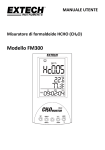
Top LCD display for HCHO (CH2O) ppm readings Middle LCD display for RH% and temperature readings Bottom LCD display for Time and Date LED indicator light (Red, Orange, Green) Push‐buttons (detailed above) Power adaptor jack 6
5
LED Indicator Description 4
Each time a reading is manually stored, the LED flashes green When the high alarm is tripped, the LED flashes red and the audible beeper sounds 3 FM300‐en‐GB_V1.5 12/14