1
NFC
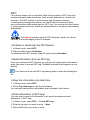
Your device allows you to read Near Field Communication (NFC) tags that
contain information about products, such as web addresses or service call
numbers. The NFC feature is a short-range high frequency wireless
connectivity technology that allows your mobile device to read and write
some information when placed near an NFC tag. You can also use this feature
to make payments and buy tickets for transportation or events by downloading
applications.
The battery includes a built-in NFC antenna. Handle the device
carefully to avoid damaging the NFC antenna.
››Activate or deactivate the NFC feature
1 In Menu mode, select NFC.
2 Drag the slide next to Activation.
To deactivate the NFC feature, drag the slide next to Activation.
››Read information from an NFC tag
Once you activate the NFC feature, your device will read product information
when you place it near an NFC tag. Available information will appear on your
display.
Your device will not read NFC tags during calls or when the backlight is
off.
››View the information at a later time
1 In Menu mode, select NFC.
2 Select Tag read logs to view the information.
You can also save product information and exchange it with others.
››Write information to NFC tags
You can write a variety of information, such as call numbers and web
addresses, to NFC tags.
1 In Menu mode, select NFC → Create NFC tag.
2 Select a tag type you want to write → Next.
3 Select information you want to write.