1
Troubleshooting
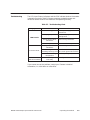
The LED Input Status Indicators and the CPU indicate whether the module
is operating correctly. Table 3-2 shows symptoms, probable causes and
corrective actions to take if the module is not operating correctly.
Table 3-2 Troubleshooting Chart
Symptom
Probable Cause
Not receiving power
Nonfatal error as a
result of the module
Check power supply and
connections.
User program problem
Check user program or I/O
configuration.
Wrong terminal block
connections
Trace wiring connections.
Faulty LED
Return module for repair.
Wrong terminal block
connections
Trace wiring connections.
LED is not lit
Incorrect values
Corrective Action
Noise on signal wire
Use shielded wire near power
exceeding immunity level wire; check ground wire to base.
Incorrect or missing
configuration
Correctly configure I/O.
Module configured
incorrectly
Reconfigure the module.
If you cannot correct the problem, contact your Siemens Industrial
Automation, Inc. distributor or sales office.
SIMATIC 505 Interrupt Input Module User Manual
Operating the Module
3-5