1
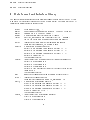
SELECT If SELECT is enabled particles with an extrapolated hit position outside a
circle of 16 m radius around the L3 vertex are not tracked.
REUSE REUSE smears the primary vertex again until a particle has a chance to hit
the L3 volume. This option requires SMEAR and SELECT to be activated.
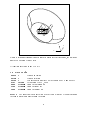
EVOL Particles are stopped at the borders of the specied volume. The two volumes
are LEP3, a cylinder of 9.5 m radius and 14.2 m length and TSCN a box of 12.35 m x
6.35 m x 0.33 m around the t0 detector position.
FINM The name of the input le is specied. The program can read CORSIKA les
and /L3CEVT/ formats. A CORSIKA le is assumed when the lename starts with
'DAT'. The /L3CEVT/ les are recognized via the le extensions '.l3c' and '.ntp'.
FONM This denes the output le path.
4.3 Output
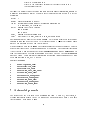
The output contains the particle coordinates in the selected stop volume. Two possibilities
can be enabled: The LEP3 volume, a cylinder of 9.5 m radius and 14.2 length and TSCN
a box of 12.35 m x 6.35 m x 0.33 m. The particles are stopped at the borders of the
volume. Output coordinates are L3 coordinates. The format used is described in chapter
6. If histogram output is selected the amount of matter traversed by the muon can be
plotted.
5 L3+Cosmic detector simulation SIL3C
The detector simulation SIL3C is part of the cosmics analysis code COL3. This code is
split into several PATCHY car les [7]. The most recent ocial version can be obtained
from /user/cosmic/col3 on the L3 HP{cluster at CERN.
The simulation includes the t0 detector and L3 setup. The complete underground geometry is present. Details on the detector simulation can be found in [8].
5.1 Installation
After unpacking the .tar le the execution of col3/Install Col3 creates necessary directory structures and builds the COL3 library.
The batch version is installed via col3/v211/bin/install l3c simu. Install le for the
interactive version is col3/v211/bin/install l3c simu int.
10