1
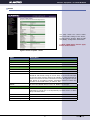
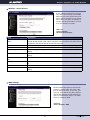
Wireless - Equipment - LP-1520ai WLAN AP
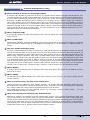
Item
Description
Authentication Type
Click to select the authentication type in Open System, Shared Key or Auto
selection.
Fragment Threshold
Set the data packet fragmentation threshold, value can be written between 256 and 2346
bytes. Refer to D.10 What is Fragment Threshold?
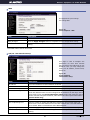
RTS Threshold
Set the RTS Threshold, value can be written between 0 and 2347 bytes. Refer to D.11
What is RTS(Request To Send) Threshold? Beacon Interval Set the Beacon Interval, value
can be written between 20 and 1024 ms. Refer to D.12 What is Beacon Interval?
Data Rate
Select the transmission data rate from pull-down menu. Data rate can be auto-select,
1.1M, 5.5M, 2M or 1Mbps. Preamble Type Click to select the Long Preamble or Short
Preamble support on the wireless data packet transmission. Refer to D.13 What is
Preamble Type? Broadcast SSID Click to enable or disable the SSID broadcast function.
Refer to D.14 What is SSID Broadcast? IAPP Click to enable or disable the IAPP function.
Refer to D.20 What is Inter-Access Point Protocol(IAPP)
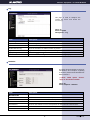
802.11g Protection
Protect 802.11b user.
Apply Changes
Click the Apply Changes button to complete the new configuration setting.
Reset
Click the Reset button to abort change and recover the previous configuration setting.
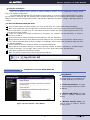
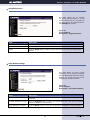
Wireless - Security Setup
This page allows you to setup the
wireless security. Turning on WEP,
WPA, WPA2 by using encryption keys
could prevent any unauthorized access
to your wireless network.
Figure 11.
Screen snapshot
Wireless Security Setup
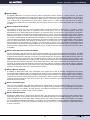
Item
Description
Encryption
Select the encryption supported over wireless access. The encryption method can be None,
WEP, WPA(TKIP), WPA2 or WPA2 Mixed Refer to D.9 What is WEP? D.15 What is Wi-Fi
Protected Access (WPA)? D.16 What is WPA2(AES)? D.17 What is 802. 1X Authentication?
D.18 What is Temporal Key Integrity Protocol (TKIP)? D.19 What is Advanced Encryption
Standard (AES)? Use 802.1x Authentication While Encryption is selected to be WEP. Click
the check box to enable IEEE 802. 1x authentication function. Refer to D.16 What is 802.
1x Authentication?.
WPA Authentication
Mode
While Encryption is selected to be WPA . Click to select the WPA Authentication Mode with
Enterprise (RADIUS) or Personal (Pre-Shared Key). Refer to D.15 What is Wi-Fi Protected
Access (WPA)? Pre- Shared Key FormatWhile Encryption is selectedto be WPA.
Pre-share key
Select the Pre-shared key format from the pull-down menu. The format can be Passphrase
or Hex (64 characters). [WPA, Personal(Pre-Shared Key) only] Pre-Shared Key Fill
in the key value. [WPA, Personal(Pre- Shared Key) only] Enable Pre-Authentication Click
to enable Pre-Authentication. [WPA2/WPA2 Mixed only, Enterprise only] Authentication
RADIUS Server Set the IP address, port and login password information of authentication
RADIUS sever.
Apply Changes
Click the Apply Changes button to complete the new configuration setting.
Reset
Click the Reset button to abort change and recoverthe previous configuration setting.
7
www.lanpro.com