1
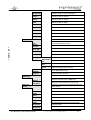
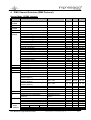
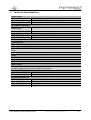
Channel
Function
Time and Value
DMX
HEX
%
7) Greencoarse
8) Greenfine
9) Bluecoarse
10) Bluefine
11) Whitecoarse
12) Whitefine
13) Shutter
Color mixing system – Green
0 - 100%
0..255
00..FF
0..100
0..255
00..FF
0..100
0..255
00..FF
0..100
0..255
00..FF
0..100
0..255
00..FF
0..100
0..255
00..FF
0..100
slow - fast
slow - fast
0..15
16..47
48..79
00..0F
10..2F
30..4F
0..5.5
6..18.5
19..31.5
slow - fast
80..111
50..6F
32..43
slow - fast
112..143
70..8F
44..56
5s - 1s
1 Hz - 10 Hz
144..199
200..239
240...249
251..255
0..255
A0..C7 57..77
C8..EF 78..94
F0..F9 95..97.5
FB..FF 99..100
0..FF
0..100
Color mixing system – Green-Low
Color mixing system – Blue
0 - 100%
Color mixing system – Blue-Low
Color mixing system – White
0 - 100%
Color mixing system – White-Low
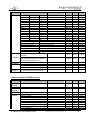
Shutter closed
Random Pulse effect
Up-dimming then Shutter closing
(random patterns)
Shutter open then down-dimming
(random patterns)
Up-dimming then down-dimming
(random patterns)
Strobe effect pause
Strobe effect, slow - fast
Shutter open
Shutter open
14) Dimmer- Dimmer
coarse
15) Dimmer- Dimmer - Low
fine
16) Zoom
Spot - Flood
17) Special Pattern Block 1
channel 18
Change PWM frequency
RESET
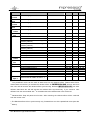
18) Pattern No pattern
Pre-defined patterns
Activates direct access to LED Pattern
19) Pattern
Direct access to Pattern of LED 1..7
Byte 1
1)
0 - 100%
0..255
0..FF
0..100
0…255 00…FF 0…100
0..3
00..03
0..1
100..200 64..C8 40..78
250..255 FA..FF 98..100
0..2
00..02
0..1
03..253 03..FD
2..99
254..255 FE..FF
100
0…255 00…FF 0…100
The predefined colors can be used as start-colors for the Rainbow effect. Please select first a
desired start-color before you activate the rainbow effect. All IMPRESSION X4S will then start from
that color and will execute the rainbow effect synchronously. Different IMPRESSION X4S can have
different start-colors but will still execute the rainbow effect synchronously. If you choose a color
different from the ones marked with 1) in the tables above the rainbow start-color will be red.
2)
Rainbow-effect Stop will pause this function. After resuming the rainbow-effect will be continued
from the current color.
3)
1)
The Rainbow-effect will run synchronously only if started from one of the predefined colors (see also
before).
GLP
German Light Products GmbH
(Instruction version: 1.0) / from software version: 1.0
16