1
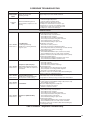
CORESENSE TROUBLESHOOTING
STATUS LED
Solid Green
“RUN”
Solid Red
“TRIP”
STATUS LED DESCRIPTION
STATUS LED TROUBLESHOOTING INFORMATION
Module has power and
operating normally
Supply voltage is present at module terminals
Thermostat demand signal Y is
present, but the compressor is not
running
1. Compressor protector is open
• Check for high head pressure
• Check compressor supply voltage
2. Outdoor unit power disconnect is open
3. Compressor circuit breaker or fuse(s) is open
4. Broken wire or connector is not making contact
5. High pressure switch open if present in system
6. Compressor contactor has failed open
ALERT Flash Codes
Yellow “ALERT”
Flash Code 1
Long Run Time
Low Refrigerant Charge
Compressor is running extremely
long run cycles
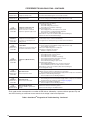
Yellow “ALERT”
Flash Code 2
Compressor (Pressure) Trip
High Refrigerant Charge Discharge
pressure out of limits or compressor
overloaded
Yellow “ALERT”
Flash Code 3
Pressure Switch Cycling
Compressor is running only briefly
due to pressure switch cycling
Yellow “ALERT”
Flash Code 4
Locked Rotor
Yellow “ALERT”
Flash Code 5
Compressor (Moderate Run)
Trip
1. Low refrigerant charge
2. Evaporator blower is not running
• Check blower relay coil and contacts
• Check blower motor capacitor
• Check blower motor for failure or blockage
• Check evaporator blower wiring and connectors
• Check indoor blower control board
• Check thermostat wiring for open circuit
3. Evaporator coil is frozen
• Check for low suction pressure
• Check for excessively low thermostat setting
• Check evaporator airfl ow (coil blockages or return air fi lter)
• Check ductwork or registers for blockage
4. Faulty metering device
• Check TXV bulb installation (size, location and contact)
• Check if TXV/fi xed orifi ce is stuck closed or defective
5. Liquid line restriction (fi lter drier blocked if present in system)
6. Thermostat is malfunctioning
• Check thermostat sub-base or wiring for short circuit
• Check thermostat installation (location, level)
1. Condenser fan is not running
• Check fan capacitor
• Check fan wiring and connectors
• Check fan motor for failure or blockage
2. High head pressure
• Check high pressure switch if present in system
• Check if system is overcharged with refrigerant
• Check for non-condensable in system
3. Condenser coil poor air circulation (dirty, blocked, damaged)
4. Return air duct has substantial leakage
1. Time delay relay or control board defective
2. If high pressure switch present go to Flash Code 2 information
1. Run capacitor has failed
2. Low line voltage (contact utility if voltage at disconnect is low)
• Check wiring connections
3. Excessive liquid refrigerant in compressor
4. Compressor bearings are seized
• Measure compressor oil level
1. Evaporator blower is not running
• Check blower relay coil and contacts
• Check blower motor capacitor
• Check blower motor for failure or blockage
• Check evaporator blower wiring and connectors
• Check indoor blower control board
• Check thermostat wiring for open circuit
2. Faulty metering device
• Check TXV bulb installation (size, location and contact)
• Check if TXV/fi xed orifi ce is stuck closed or defective
3. Condenser coil poor air circulation (dirty, blocked, damaged)
4. Low refrigerant charge
Table 3. CoreSenseTM Diagnostics & Troubleshooting
15