1
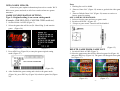
2. Select the game that will be set (Ex. Tank Force) and start the
game (Figure 40).
3. Press ADJ2 (Figure 28).
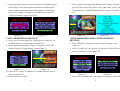
4. Select “Dip Switches” item (Figure 40) and press 1P START
button.
(Figure 41)
(Figure 42)
5. Select “Service Mode” item and set “On” by moving 1P joystick
left or right (Figure 41).
6. Press ADJ2 key (Figure 28) to close the current setting window
SYSTEM SETTING
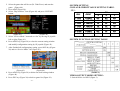
COIN AND CREDIT VALUE SETTING TABLE:
SW1:
COIN
CREDIT
1 COIN
SW1
4
2
1
1 CREDIT
OFF
OFF
OFF
1 COIN
2 CREDITS
ON
OFF
ON
1 COIN
3 CREDITS
ON
ON
OFF
1 COIN
4 CREDITS
ON
ON
ON
2 COINS
1 CREDIT
OFF
OFF
ON
3 COINS
1 CREDIT
OFF
ON
OFF
4 COINS
1 CREDIT
OFF
ON
ON
(TABLE 1)
SYSTEM FUNCTION SETTING TABLE
and modify configuration setting by 1P joystick (Figure 42).
7. After finished all configurations setting, press ADJ2 key (Figure
28) and set “Service Mode” Off (Figure 43).
(Figure 43)
(Figure 44)
8. Press ADJ2 key (Figure 28) to delete the small setting window
(Figure 44).
9. Press ESC key (Figure 28) to back to game list (Figure 29).
- 16 -
(TABLE 2)
VIDEO OUTPUT MODE SETTING:
1. Switch ON bit 4 of SW2 (Figure 3).
-5-