1
Software User Manual - EPC610-ToF-Module
4.9
Last change: 30 June 2014
Version 2
Manual Frame Trigger
There are two types of manual trigger. To enable the manual trigger you have to disable the video mode in
register Mode0, Bit[0].
4.9.1
Hardware Trigger
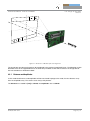
The camera provides an external connector where a hardware trigger can be applied. Please refer to 3.3 for
more information.
4.9.2
Software Trigger
In addition to the hardware trigger a software trigger is available. To start a frame capturing by software, set
the appropriate bit (Bit[4]) in register Mode0.
4.10 Over Temperature Protection
The module supports no automatic shutdown to prevent overheating.
4.11 Save Registers
The entire register map can be saved in the flash using the register CmdExec. It will be restored from flash
after a reboot or power cycle. This feature can be used to save a user specific configuration.
4.12 Reset to Factory Default
The Module can be reset to the factory default register settings by deleting the saved register map. This can
be done by writing a dedicated value to the register CmdExec.
4.13 Firmware Update
A firmware update can be performed over the UART boot protocol. See
https://support.bluetechnix.at/wiki/TinyToF for more details.
© Bluetechnix 2014
Page 21 | 31