1
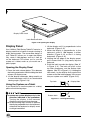
Using Keyboard to Adjust Brightness
Adjusting the brightness using the keyboard
changes the system setting (i.e., the settings you
make via the function keys automatically changes
the brightness settings in the system’s Pen and
Tablet Settings).
• [Fn+F6]: Pressing repeatedly will lower the
brightness of your display.
• [Fn+F7]: Pressing repeatedly will increase the
brightness of the display.
If using AC power your brightness setting
is set to its highest level by default. If
using battery power your brightness
settings is set to approximately mid-level
by default.
The higher the brightness level, the more
power the LifeBook T901 Series Tablet PC
will consume and the faster your batteries
will discharge. For maximum battery life,
make sure that the brightness is set as
low as possible.
22