1
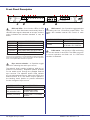
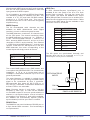
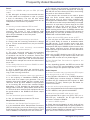
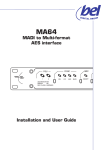
Front Panel Description
PSU
SDI
AES MADI
SAM64
SYNC
SRC
SDI LOCK
LED INDICATION
LED INDICATION
GREEN:
OK
RED FLASH: WARNING
1
2
WK
VID
AES
SDI-1
SDI-2
SDI-3
ON
SDI-4
1
2
1
3
4
3
4
RED:
GREEN:
AMBER:
SDI FORMAT
YELLOW
SD-SDI
GREEN
HD-SDI
RED
3G-SDI
FLASHING
NON-COMPLIANT SDI DETECTED*
OFF
NO SDI SIGNAL DETECTED
* SAM64 monitors all incoming embedded audio streams and if
found to be non-compliant in format will flash the appropriate LED.
Note that Bel Digital Group cannot guarantee correct operation
when non-compliant SDI streams are present.
D I GI
TAL GROUP
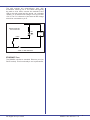
SRC control – four 2-position toggle switches
controlling the four 16-channel output SRCs. The
switch also enables external GPI control of each
SRC.
SWITCH POSITION
COLOUR
3G
HD
SD
NO VALID SIGNAL IF
SDI LOCK LED OFF
GPI CONTROL
SDI Lock LEDs – four tri-colour LEDs, for SDI
inputs 1 to 4. Each illuminates continuously when a
valid SDI video signal is detected at its input, and the
colour indicates the interface standard in use, as
below:
2
FUNCTION
UP
SRC ON
DOWN
SRC OFF, BUT UNDER
EXTERNAL GPI CONTROL
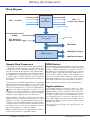
PSU status – two bi-colour LEDs confirming
the current status of each PSU. The LEDs are green
in normal operation and flash red if a PSU fault
condition is detected.
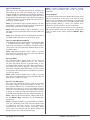
Sync source selection – a 3-position toggle
switch for selecting the audio sync source.
The switch’s ‘down’ position is latching, while its ‘up’
position is momentary. Repeated ‘upward’ presses
on the switch scroll through the possible external
sync sources. The adjacent amber LEDs indicate
the currently-selected source. When the LED for the
desired source is on, the switch may be placed in
the latching ‘down’ position to prevent inadvertent
further changes of sync source.
SWITCH POSITION
FUNCTION
CENTRE
NO ACTION
UP (MOMENTARY)
INCREMENTS SYNC
SOURCE SELECTION
DOWN (LATCHES)
LOCKS SYNC TO CHOSEN
SOURCE
Bel Digital Group Limited
SAM64 User Manual v1.6
7