1
9480, 4180, 4280, 4284 4000XA User Manual
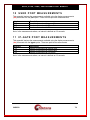
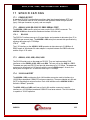
Stand-alone AC to DC power supply:
Stand-alone DC power supply:
17.8
115V @ 9 mA Nominal
115V @ 15 mA Maximum
48V @ 21 mA Nominal
48V @ 30 mA Maximum
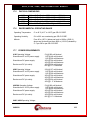
REGULATORY INFORMATION
17.8.1
xxxx Stand-Alone
Safety:
EMC:
European
Teleconnect
NEBS:
UL, CSA, Low Voltage Directive 73/23/EEC
FCC Part 15B Class A, ICES-003 Class A, EMC Directive
89/336/EEC
TTE Directive TBR 13
Level 3
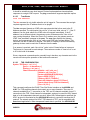
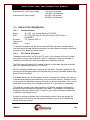
To maintain compliance with the above-mentioned EMC standards, shielded cables
must be used on all xxxx interface connections, and the shields must make an electrical
connection to the xxxx's grounding system.
17.8.2
FCC Part 68 Information
The xxxx complies with Part 68 of the FCC rules. On the bottom of the unit is a label
that contains, among other information, the FCC registration number for the xxxx. If
requested, this information must be provided to the telephone company.
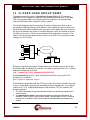
The RJ45-style jack labeled DSU, located on the front of the xxxx, has been tested as
part of the registration process for FCC Part 68.
An FCC-compliant modular jack is provided with the xxxx. This jack is designed to be
connected to the telephone network or premises wiring using a compatible modular plug
which is Part 68 compliant.
If the xxxx causes harm to the telephone network, the telephone company will notify you
in advance that temporary discontinuation of service may be required. If advance notice
is not practical, the telephone company will notify you as soon as possible. Also, you will
be advised of your right to file a complaint with the FCC if you believe it is necessary.
The telephone company may make changes to its facilities, equipment, operations or
procedures that could affect the operation of the xxxx. If this happens, the telephone
company will provide advance notice, in order for you to make necessary modifications
to maintain uninterrupted service.
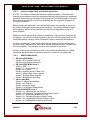
If trouble is experienced please refer to the warranty section of this user manual. No
repairs can be performed by the user going beyond the scope of the troubleshooting
section of this user manual.
04/09/09
104