1
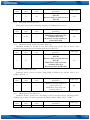
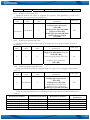
Minimum
value
Maximum
value
Recommended
value
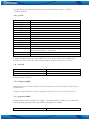
-180.0
180.0
-
Goes with (depends on)
parameters
GeoFence border width
(ID=20)
GeoFence Zone #1
Configuration Parameter
(ID=30)
Value type
Float
8.6.4 GeoFence y1 (ID=32)
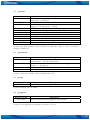
Parameter has two meanings dependent on zone shape. If shape is rectangular, then
ID=32 is left down corner Y coordinate in WGS. If shape is circle, then ID=32 is center of
that circle Y coordinate in WGS.
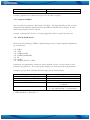
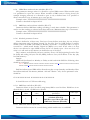
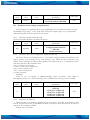
Minimum
value
Maximum
value
Recommended
value
-90.0
90.0
-
Goes with (depends on)
parameters
GeoFence border width
(ID=20)
GeoFence Zone #1
Configuration Parameter
(ID=30)
Value type
Float
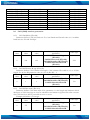
8.6.5 GeoFence x2 (ID=33)
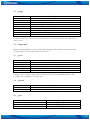
Parameter has two meanings dependent on zone shape. If shape is rectangular, then
ID=33 is right upper corner X coordinate in WGS. If shape is circle, then ID=33 is radius
of circle with center of ID=31 and ID=32.
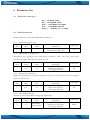
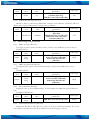
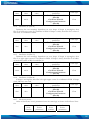
Minimum Maximum Recommended
Goes with (depends on)
Value type
value
value
value
parameters
GeoFence border width
(ID=20)
-180.0
180.0
GeoFence Zone #1
Float
Configuration Parameter
(ID=30)
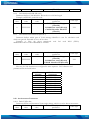
8.6.6 GeoFence y2 (ID=34)
If shape is rectangular, then ID=34 is right upper corner Y coordinate in WGS. If shape
circle, ID=34 is not used.
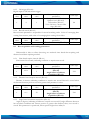
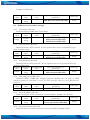
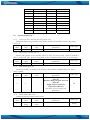
Minimum Maximum Recommended
Goes with (depends on)
Value type
value
value
value
parameters
GeoFence border width
(ID=20)
-90.0
90.0
GeoFence Zone #1
Float
Configuration Parameter
(ID=30)
8.6.7 All the rest zones
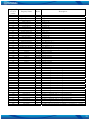
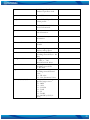
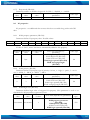
Other 19 GeoFence zone’s parameters have the same logic as shown in GeoFence Zone
#1.
GeoFence
GeoFence
GeoFence
GeoFence
Zone
Zone’s
Zone
Zone’s
Number
parameters
Number
parameters
60