1
Aid Management Platform version 2.0
So, now that we have an understanding of how a user is defined within a workspace, let’s visit the
next level of rights and permissions – Activity level rights and permissions which are defined as
Role Based Permissions.
Role-Based Permissions
The final level of rights refers to the permissions given to a user to edit and/or create
project/activity data. So, FIRST you have chosen the type of workspace, SECOND you have a
defined user role in the workspace, now the FINAL thing that needs to be done is to define the
rights a user has to create and/or edit project/activity data.
With all this discussion of Rights and Permissions you may wonder how Project/Activity
Permissions differ from Workspace Permissions that we just discussed. Especially since
projects/activities are created within workspaces. So, here is the difference:
1. Workspace Permissions are the user’s rights within a workspace and are defined by user roles such
as Workspace Manager and Workspace Member.
2. Activity Permissions are related to the rights a user has within an activity. In particular those rights
are based on the fields in the activity and consist of the right to Read and/or Edit certain fields.
Information Note: An exception to the rule is the user defined at the workspace level as Workspace Manager. This
Workspace Role will be given inherent rights to have full control of any project/activity within their workspace.
Overview of AMP Projects/Activities Workflow
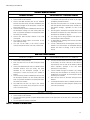
Before digging into the details of role-based permissions, let’s examine how the process of
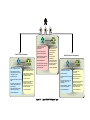
activities/projects works. Below is the overview of an activity/proje ct workflow.
1. Activities are created in any workspace that allows it.
2. Once they are saved, the Workspace Manager of that workspace must validate the data.
3. Once validated, the activity appears in other workspaces, as relevant:
a. Parent workspace (workspace type=Management)
b. Computed Workspace for which criteria are met.
c.
Public View
d. Or, it can be manually assigned to additional workspaces.
4. The activity can belong to/be edited by an unlimited number of workspaces. Whether specific users
can edit the activity depends on role-based permissions.
When an activity is edited, the flow begins again IF the Workspace Manager has opted to validate
every change (otherwise, he only validates the activity’s creation, and afterward there is no check
before the changes flow into other workspaces/Public View).
34