1
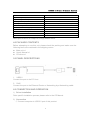
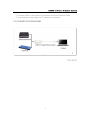
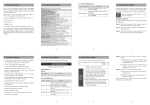
USB2.0 to Gigabit Ethernet Adapter Environmental Operating Temperature Operating Humidity Storage Temperature Storage Humidity Power Requirement External Power Supply Power consumption (Max) Accessories Adapter User Manual CD 0 ℃ to +70℃ 10% to 85 % RH (no condensation) -10℃ to +85℃ 5% to 90 % RH (no condensation) NO 0.95W English Version CD X1 Note: Specifications are subject to change without notice. 4.0 PACKAGE CONTENTS Before attempting to use this unit, please check the packing and make sure the following items are contained in the shipping carton: Main unit x1 User's Manual x1 CD driver x1 5.0 PANEL DESCRIPTIONS 1. USB2.0 Connect the port to the PC Host. 2. RJ45 Connect the port to the Ethernet Router or Networking by a Networking cable. 6.0 CONNECTION AND OPERATION 1) Driver installation Drive specific installation process please refer to the CD Manual. 2) Connection ① Connect computer to USB 2.0 port of this product 2