1
Stream live with RE
4.
43
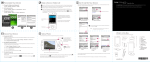
Tap Invitations will be sent to.
You'll see a list of your contacts on your phone.
5.
Tap a contact to add, and then tap the contact number to use.
Make sure that the contacts you select have valid mobile phone
numbers. To invite your friends via email or social networks, see
Sharing your live stream via email or social networks on page 46.
6.
Tap Add Contact again to add more.
7.
Tap
when done.
8.
Tap Video privacy to set your privacy settings.
9.
Tap Save.
RE app remembers your live streaming settings.
SMS invitations will be sent to your selected contacts when you
start live streaming.
On your Android phone
1.
Connect your phone and your RE.
2.
Go to Settings.
3.
Tap Live streaming.
4.
Tap Invitations will be sent to > Add contact.
You'll see a list of your contacts with mobile phone numbers and
email addresses. To invite your friends via your social networks, see
Sharing your live stream via email or social networks on page 46.