1
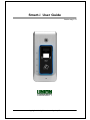
Smart-i 사용자 가이드
3
Table of Contents
<Revison History> .................................................................................................... 2
<Glossary> ................................................................................................................ 2
Table of Contents ......................................................... Error! Bookmark not defined.
1. Before use ............................................................................................................. 4
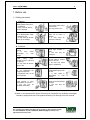
1.1. Safety precautions ...................................................................................... 4
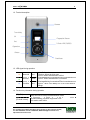
1.2. Terminal description ................................................................................... 5
1.3. LED signal during operation....................................................................... 5
1.4. Function key information during operation .............................................. 5
1.5. Voice information during operation ........................................................... 6
1.6. Buzzer sound during operation .................................................................. 6
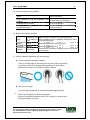
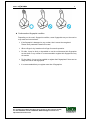
1.7. Correct fingerprint registartion and input methods ................................. 6
2. Introduction .......................................................................................................... 8
2.1. Features ....................................................................................................... 8
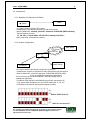
2.2. Configuration ............................................................................................... 9
2.2.1. Standalone Configuration (AP Mode) ................................................... 9
2.2.2. Network Configuration .......................................................................... 9
2.3. Specifications ............................................................................................ 10
3. Environment Settings ........................................................................................ 11
3.1. Check items before setting the environment .......................................... 11
3.1.1. Entering menu .................................................................................... 11
3.1.2. How to enter menu without admin authentication ............................... 11
3.2. Menu Configuration................................................................................... 12
4. How to use the terminal ..................................................................................... 12
4.1. Authentication method settings ............................................................... 12
4.2. Authentication .......................................................................................... 12
4.2.1. Fingerprint authentication ................................................................... 12
4.2.2. Card authentication ............................................................................ 12
UNION COMMUNITY CO.,LTd.
5Fl. Hyundai Topics Bldg, 44-3 Bangi-dong, Songpa-gu, Seoul, Korea 138-050,
Tel: 82-2-6488-3000, Fax: 82-2-6488-3099, E-Mail:[email protected],
http://www.unioncomm.co.kr