1
Smart-i 사용자 가이드
6
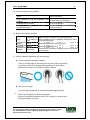
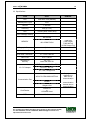
1.5. Voice information during operation
Action
Voice Information
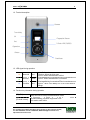
Enter fingerprint using the fingerprint input
“Please enter your fingerprint.”
window
Authentication successful
“You are authorized.”
Authentication failed
“Please try again.”
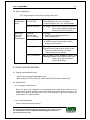
1.6. Buzzer sound during operation
“ppig”
Pressing a key When a button is pressed or a card is being read
or a reading a When fingerprint input is completed, allowing the user to
card
remove his fingerprint
“ppibig”
Failed
Authentication failed or wrong user input
“ppiriririck”
Waiting
Waiting for fingerprint input
“ppiiiick”
Successful
Authentication successful or settings for the current user
are completed.
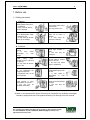
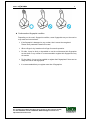
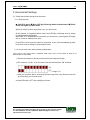
1.7. Correct fingerprint registration and input methods
Correct fingerprint registration methods
Place your index finger on the window just as you do with a finger stamp.
Finger tip touching is not an appropriate registration or input method.
Make sure the center of your finger touches the window.
Use your index finger.
The index finger guarantees an accurate and stable fingerprint input.
*
Check if your fingerprint is unclear or damaged.
It is tricky to recognize fingerprints on dry, wet, unclear, or injured fingers.
Use another finger in this case.
UNION COMMUNITY CO.,LTd.
5Fl. Hyundai Topics Bldg, 44-3 Bangi-dong, Songpa-gu, Seoul, Korea 138-050,
Tel: 82-2-6488-3000, Fax: 82-2-6488-3099, E-Mail:[email protected],
http://www.unioncomm.co.kr