1
XC960S30
4.Product
Operation
Instruction
1.
Overview
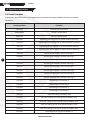
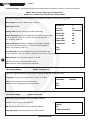
4.1 Preset Functions
Please Note: Not all functions are supported (we recommend using our XSDA-2 for alarm in and out
functions).
8
Preset Location
Function
95+CALL
Entering the main menu
XXX+PRESET
Saving a preset point
XXX+CALL
Calling a preset point
40+CALL
Operating the first group of preset location scanning
41+CALL
Operating the second group or preset location scanning
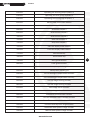
42+CALL
Operating the third group or preset location scanning
43+CALL
Operating the fourth group or preset location scanning
44+CALL
Set the left boundary of area scanning 1
45+CALL
Set the right boundary of area scanning 1
46+CALL
Set the left boundary of area scanning 2
47+CALL
Set the right boundary of area scanning 2
48+CALL
Set the left boundary of area scanning 3
49+CALL
Set the right boundary of area scanning 3
50+CALL
Set the left boundary of area scanning 4
51+CALL
Set the right boundary of area scanning 4
52+CALL
Operating area scanning 1
53+CALL
Operating area scanning 2
54+CALL
Operating area scanning 3
55+CALL
Operating area scanning 4
56+CALL
Start the setting of pattern scan
57+CALL
Save the setting of the first group of pattern scan
58+CALL
Save the setting of the second group of pattern scan
59+CALL
Save the setting of the third group of pattern scan
60+CALL
Save the setting of the fourth group of pattern scan
61+CALL
Operating the first group of pattern 1
www.xvision.com