1
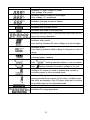
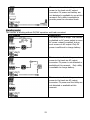
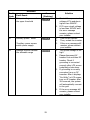
10-3. Button Definition
Button
Operation
Short press.
ENTER/ON
ESC/OFF
Up
Press and hold the button for
approximately 1 second when
the utility is detected or 3
seconds without the utility.
Short press.
Press and hold the button
until the buzzer continuously
sounds.
Short press.
Function
Enter query menu.
If it’s in query menu, press this button to
confirm selection or entry.
This inverter is able to provide power to
connected loads via AC output connector.
Return to previous menu.
Turn off power to the loads.
Select last selection or increase value.
If it’s in query menu, press this button to
jump to next selection or decrease value.
Down
Short press.
Mute alarm in standby mode or battery
mode.
NOTE: If backlight shuts off, you may activate it by pressing any button. When an error
occurs, the buzzer will continuously sound. You may press any button to mute it.
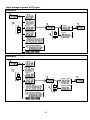
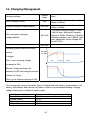
10-4 Query Menu Operation
The display shows current contents that have been set. The displayed contents can be
changed in query menu via button operation. Press ‘Enter’ button to enter query menu. There
are seven query selections:
z
Grid(Utility) voltage or frequency of AC input
z
Frequency, voltage, power or load percentage of AC output
z
Input voltage or power of PV input.
z
Battery voltage or capability percentage.
z
Date and time.
z
Today or total energy generated.
z
Mode of query energy generated.
14