1
plugging in your HOME GATEWAY
13
12
16 15 14
1
2
3
4
5
6
7
8
9 10 11
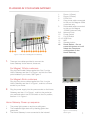
1. Phone 1 (Green)
2. Phone 2 (Green)
3.
PSTN Port
4. Grey phone cable connected to this port for Magnet 45Mb customers only
5. Red-ended cable connected to this port for Magnet 150Mb Customers only
6-9. Network Ports
10. Power Socket
11. On-Off Switch
12-13. USB Ports
14. WIFI
15. Standby button
16. Reset Button – Do not press this button as it will delete the Telephone
configuration on the Home Gateway.
Figure 1. Rear view of the Magnet Home Gateway
1. There are two cables provided to connect the
home Gateway to the internet, these are;
For Magnet 150mb customers
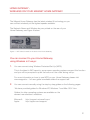
Plug the Red Ended Cable supplied into Port 5 on the Home Gateway, see item 5 in Figure 1 and into the Fibre point installed in your home, See Figure 2.
For Magnet 45mb customers
Plug the Grey phone cable supplied into Port 4 on the Home Gateway, see item 4 in Figure 1, and into a Phone socket in your home.
2. Plug the power supply into the power socket on the Home Gateway, see item 10 in Figure 1, and into the socket on your wall and switch the On/Off switch to the On position, see item 11 in Figure 1.
Figure 2. Fibre Point
Home Gateway Power up sequence
I.
II.
III.
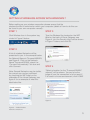
The power light comes on and turns solid green.
The broadband light starts off by flashing green then
goes solid.
The Home Gateway is now connected to the internet!
Figure 3. Home Gateway
Status Lights
1