1
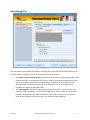
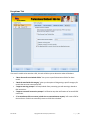
Settings and Utilities Tab
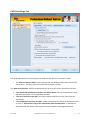
Figure 4.
There are two main areas on this tab, one for handling what to do with emails that fail to convert
successfully for any reason, and one that starts the process of converting entire folders of emails into
PDF files.
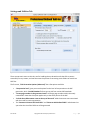
The first area, “PDF Generation Options (Advanced)” has a few options available.
•
•
•
•
“Compression level” gives you several options for the level of compression on the PDF
generation, while “Use PDF Standard” allows you to pick from various PDF standards.
“Create page numbers in the generated email” will assign page numbers within the newly
created PDF. Note that this option applies only to the email portion of the PDF.
“Include the mailbox owner name at the top of the email” adds the account name associated
with the email for easier organization.
The “Generate US Letter Size Email PDFs” and “Generate A4 Size Email PDFs” radio buttons let
you select the size of the PDF that will be generated.
Save As PDF
Copyright © 2012-2014 Sperry Software Inc.
P a g e |8