1
Datasheet
QUICK GUIDE
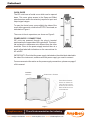
The ISC units have a frontal cover which can be opened
down. This cover gives access to the Span and Offset
potentiometers, and to the selection jumpers for input and
output signal ranges.
To open the frontal cover, press slightly the sides of the
cover at the upper side, close to the OUTPUT terminals, as
indicated on Figure1.
The cover is free to open down, as shown on Figure2.
POWER SUPPLY CONNECTIONS
ISC units are powered through the plug-in terminal
positioned on the upper side of the instrument. This terminal is placed in a transverse axis, different from the other
terminals. Close to the power supply terminal there is a
small yellow label with indications on the connections for
AC and DC
FIGURE1
FRONT VIEW WITH COVER
IMPORTANT !! Check that the power supply indicated on the white label attached to
the side of the instrument, matches with the power supply you want to connect.
For more accurate information on the power supply connections, please see page 6
of this manual.
FIGURE2
S IDE VIEW
POWER SUPPLY TERMINAL
FRONT COVER OPENING:
ACCESS TO JUMPERS FOR
INPUT AND OUTPUT RANGE
SELECTION, AND ACCESS TO
SPAN AND OFFSET ADJUST
POTENTIOMETERS
Page 4
Amplicon.com
IT and Instrumentation for industry
Sales: +44 (0) 1273 570 220 Website: www.amplicon.com Email: [email protected]