1
RocketRAID 2240
SATAII Host Adapter
User’s Guide
Revision: 1.0
Date: April 2005
HighPoint Technologies, Inc.
Copyright
Copyright © 2005 HighPoint Technologies, Inc. This document contains materials
protected by International Copyright Laws. All rights reserved. No part of this
manual may be reproduced, transmitted or transcribed in any form and for any
purpose without the express written permission of HighPoint Technologies, Inc.
Trademarks
Companies and products mentioned in this manual are for identification purpose only.
Product names or brand names appearing in this manual may or may not be registered
trademarks or copyrights of their respective owners. Backup your important data
before using HighPoint’s products and use at your own risk. In no event shall
HighPoint be liable for any loss of profits, or for direct, indirect, special, incidental or
consequential damages arising from any defect or error in HighPoint’s products or
manuals. Information in this manual is subject to change without notice and does not
represent a commitment on the part of HighPoint.
Notice
Reasonable effort has been made to ensure that the information in this manual is
accurate. HighPoint assumes no liability for technical inaccuracies, typographical, or
other errors contained herein.
Table of Contents
Table of Contents
Chapter 1
Introduction
About this Guide......................................................................................................1-1
Introducing the RocketRAID 2240 Host Adapter............................................... 1-1
Product Features...................................................................................................... 1-1
Understanding RAID Concepts and Terminology..............................................1-2
Chapter 2
RocketRAID 2240 Hardware Description/Installation
RocketRAID 2240 Hardware...................................................................................2-1
1 –RocketRAID 2240 Adapter Layout................................................................. 2-1
2 - LED Connections................................................................................................2-2
3 - Installing the RocketRAID 2240 Host Adapter.............................................. 2-3
4 - Verifying Installation.......................................................................................... 2-4
Chapter 3
RocketRAID 2240 BIOS Utility
RocketRAID 2240 BIOS Utility...............................................................................3-1
1 - BIOS Command Overview................................................................................. 3-1
2 - Creating RAID Arrays........................................................................................3-3
3 - Adding/Removing Spare Disks.........................................................................3-4
Chapter 4
RocketRAID 2240 Driver and Software Installation
Microsoft Windows (2000, XP, 2003 Server, x64 versions)
Driver and Software CD.......................................................................................... 4-1
Windows Driver Installation.................................................................................. 4-3
1 - Installing the RAID Management Console/ Interface Overview................ 4-5
2 - Software Interface - Overview of commands/functions............................... 4-7
3 - Creating an Array................................................................................................4-8
i
Table of Contents
4 - Deleting an Array............................................................................................... 4-10
5 - Configuring Spare Disks................................................................................... 4-10
6 - Recovering/Verifying Arrays............................................................................ 4-11
7 – OCE/ORLM........................................................................................................ 4-12
8 - Misc. Array/Device Options............................................................................. 4-13
9 - Managing Events............................................................................................... 4-15
10 - Configuring Remote Systems......................................................................... 4-20
11 - Configuring Users and Privileges.................................................................. 4-24
Chapter 5
Linux Driver Support
Fedora Core 3 Linux installation Overview.......................................................... 5-1
Red Hat Enterprise 3 Overview.............................................................................. 5-5
SuSE Linux Enterprise Server (SLES) installation Overview............................. 5-10
Chapter 6
FreeBSD Driver Support
1 - Installing FreeBSD on the RocketRAID 2240 Controller.............................. 6-1
2 - Installing RR2240 Driver on an Existing System............................................ 6-4
3 - Updating the Driver........................................................................................... 6-7
4 –Uninstalling the Driver..................................................................................... 6-7
Appendix
Customer Support
Customer Support.................................................................................................... A-1
ii
Chapter 1
Introduction
Contents of this Chapter:
About this Guide
Introducing the RocketRAID 2240 Host Adapter
Product Features
Understanding RAID Concepts and Terminology
Introduction
About this Guide
The RocketRAID 2240 SATAII Host Adapter’s User’s Guide provides information
about the functions and capabilities of the host adapter, and instructions for
installing, configuring and maintaining RAID arrays hosted by the adapter.
Introducing the RocketRAID 2240 Host Adapter
The HighPoint RocketRAID 2240 is a 16-channel Multi-Port Infiniband Serial ATA II
RAID controller. It utilizes a 64bit, 133MHz PCI-X interface. The RocketRAID 2240
solution is aimed at enterprise storage applications, NAS storage, workgroup and web
servers, video streaming / video editing workstations, back up, and security systems.
Product Features
•
16-Channel Multi-Port Infiniband SATA II RAID Controller
•
PCI-X 64 bit 133/100/66 MHz
•
4 Infiniband connectors for reliability and easy installation
•
RAID 0, 1, 5, 10 and JBOD
•
Native Command Queuing (NCQ)
•
Hot swap and hot spare support
•
Online Capacity Expansion and Online RAID Level Migration (OCE/ORLM)
•
SAF-TE Enclosure management ready
•
Staggered drive spin-up support
•
Hard disk activity and failed hard disk LED support
•
S.M.A.R.T monitoring of hard disk status for reliability
•
Automatic RAID rebuild
•
BIOS booting support
•
Online array roaming
•
Quick and Background initialization for quick RAID configuration
•
Supports 64-bit LBA for over 4TB partition
•
Web-based RAID management software
•
Command Line Interface (CLI) for Linux and FreeBSD operating systems
•
SMTP support for email notification
•
Operating systems support for Windows, Linux and FreeBSD
1-1
Introduction
Understanding RAID Concepts and Terminology
The following concepts and terminology is commonly used when describing the
functions of the RocketRAID 2240 Host Adapter.
Disk initialization
Initializing a disk writes necessary RAID configuration information to that disk. Disks
must be initialized before configuring them into RAID arrays. The initialization
process will destroy all data on the disk.
Disk Status
New
The disk contains no data and has not been initialized.
Initialized
The disk has been initialized and can be used for array creation.
Configured
The disk has been assigned to one or more arrays, or configured as a
spare disk.
Legacy
The disk was used on other controllers before use with the
RocketRAID 2240 (see legacy disk below).
Array initialization
A redundant array (RAID5, RAID1, RAID10) needs to be initialized to ensure full
performance and reliability. Non-redundant arrays (RAID0, JBOD) do not need to be
initialized.
When you create a redundant array using the RocketRAID 2240 controller’s BIOS
Configuration Utility, it will create the array in un-initialized state. The initialization
process can be completed after installing the driver and management software.
When creating an array using the HighPoint RAID Management Console software,
you can specify an initialization option (Skip initialization, foreground and
background).
1-2
Introduction
Foreground initialization
Foreground initialization will zero-out all data on the array. The array is not accessible
by the operating system until initialization is complete.
Background initialization
Background initialization allows the array to be used immediately. For RAID1 and
RAID10 arrays, initialization will results in data being duplicated identically to the
mirror pair. For RAID5 arrays, initialization will result in parity being generated from
all array members.
Note: An un-initialized RAID1 or RAID10 array can still provide redundancy in case
of a disk failure. A RAID5 array, however, is not fault-tolerant until initialization is
finished.
Online Capacity Expansion (OCE)
This feature allows disks to be added to existing RAID arrays, in order to increase the
array’s capacity, without fear of data loss. Any number of disks can be added to an
array, at any time. Data can be accessed and utilized even while being redistributed.
Online RAID Level Migration
This term describes the ability to change one type of array (RAID level), into a
different type of array (changing a RAID 1 array into a RAID 10 array for example).
Data is still accessible during the migration process, and a base level of security is
still active.
OCE, ORLM and the RocketRAID 2240
The RocketRAID 2240 supports both Online Capacity Expansion (OCE), and Online
RAID Level Migration (ORLM). Both features are supported by a single function - an
array can be transformed from one RAID level to another RAID level while simultaneously being resized, even under I/O load.
1-3
Introduction
Spare disk
A spare disk is a single disk that can be used to automatically rebuild a redundant
array in case of drive failure. Spare disks may also be members of a RAID array. Any
available space on these disks may be used to rebuild other broken arrays.
Legacy disk
Disks attached to the RocketRAID 2240 that contain valid partition tables will be
identified as legacy disks. A legacy disk attached to the RocketRAID 2240 can be
accessed by the operating system, but cannot be used to create RAID arrays. A
legacy disk must be initialized before assigning it to an array.
1-4
Chapter 2
RocketRAID 2240
Hardware Description/Installation
Contents of this Chapter:
RocketRAID 2240 Hardware
1 –RocketRAID 2240 Adapter Layout
2 - LED Connections
3 - Installing the RocketRAID 2240 Host Adapter
4 - Verifying Installation
RocketRAID 2240 Hardware Description/Installation
RocketRAID 2240 Hardware
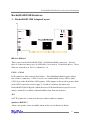
1 –RocketRAID 2240 Adapter Layout
IBPort1- IBPort4
These represent the RocketRAID 2240’s 4 Infiniband SATA connectors. Each of
these 4 connectors hosts up to 4 SATA disks, for a total of 16 hard disk drives. These
disks are referred to as “Port”or channels 1-16.
CON1 –CON8
LED connectors (disk-activity/disk-failure): Each Infiniband channel (port) utilizes
two of these connectors. CON1-4 are for use with hard disk activity LED’s, while
CON5-8 provides disk failure LED support. LED support is discussed in greater detail
in the LED Connection section (page 2-2), and in a separate document, the
RocketRAID 2240 LED guide (which discusses LED installation for specific server
chassis, and will be available in downloadable form from our website).
JP1
SAF-TE connector (connection between chassis and host adapter)
Speaker (“BEEP1”)
Alarm: the speaker emits an audible alarm in the case of disk/array failure.
2-1
RocketRAID 2240 Hardware Description/Installation
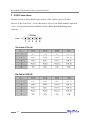
2 - LED Connections
The table below is also printed on the surface of the card for quick reference.
The use of the term “Port”, in the table below, refers to the SATA channel/ hard disk
(1-16), as reported by the RocketRAID 22240’s BIOS and RAID Management
software.
2-2
RocketRAID 2240 Hardware Description/Installation
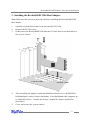
3 - Installing the RocketRAID 2240 Host Adapter
Note: Make sure the system is powered-off before installing the RocketRAID 2240
host adapter.
1.
Open the system chassis and locate an unused PCI-X slot.
2.
Remove the PCI slot cover.
3.
Gently insert the RocketRAID 2240 into the PCI slot, and secure the bracket to
the system chassis.
4.
After installing the adapter, attach the Infiniband connectors to the RR2240’s
Infiniband ports, and to chassis backplane. Each Infiniband cable supports up
to 4 hard disk drives. Consult the chassis’s manual for proper installation
procedures.
5.
Close and secure the system chassis.
2-3
RocketRAID 2240 Hardware Description/Installation
4 - Verifying Installation
Once the RocketRAID 2240 host adapter and hard disks have been installed into the
chassis, boot-up the system to verify that the hardware is properly recognized.
1.
Power on the system. If the system detects the presence of the adapter, the
RocketRAID 2240 BIOS will be displayed.
2.
Press Ctrl+H to access the RocketRAID 2240 BIOS Utility.
The BIOS Utility will display information about hard disks attached to the adapter.
Make sure all attached disks are detected by this utility. If any of the hard disks are
not detected, power down the system and check the power and Infiniband cable
connections. Make sure the hard disk in question is securely installed into the
corresponding removable drive tray.
2-4
Chapter 3
RocketRAID 2240 BIOS Utility
Contents of this Chapter:
RocketRAID 2240 BIOS Utility
1 - BIOS Command Overview
2 - Creating RAID Arrays
3 - Adding/Removing Spare Disks
RocketRAID 2240 BIOS Utility
RocketRAID 2240 BIOS Utility
The RocketRAID 2240’s BIOS Utility can be accessed using the “Ctrl+H”command.
This command should be displayed automatically when the RocketRAID 2240’s BIOS
screen appears during the system’s boot up procedure.
1 - BIOS Command Overview
The RocketRAID 2240 BIOS Utility provides a wide selection of RAID related
commands. These commands are displayed towards the top of the utility’s interface.
Use the← →arrow keys to scroll through the various commands, and the↑ ↓arrow
keys to browse through the corresponding command menus. Use the ENTER key to
execute the selected command.
The ESC button can be used to cancel the selected command, or return to the previous command menu.
Create - this command is used to create RAID arrays. Page 3-3 discusses this
command in detail.
Delete - this command will delete the selected RAID array.
Warning: This command may result in permanent data loss - it should only be used
if data stored on the target array is no longer relevant, or has been backed up to an
alternate storage device.
3-1
RocketRAID 2240 BIOS Utility
Add/Remove Spare - this command is used to assign hard disks to function as
spare disks. The controller is capable of using spare disks to automatically rebuild
broken or faulted RAID arrays. Page 3-4 discusses this command in detail.
Settings
Set Boot Mark - this function is used to designate a particular disk or RAID array to
function as the RocketRAID 2240’s boot device.
Note: This setting is only relevant if the motherboard’s BIOS has set the
RocketRAID 2240 to function as the system’s primary boot device.
Staggered spin up – This function is used to enable (or disable) staggered drive
spin up support. Staggered drive spin up, by default, is disabled. When enabled, the
RocketRAID 2240 will power up the hard disks one at a time, approximately every two
seconds.
View –this command is used to select between two views. Press the ENTER key to
change the view.
Devices –displays information about hard disks attached to the RocketRAID 2240.
Use the ↑ ↓ arrow keys to highlight the target hard disk, and press ENTER to view
the information.
RAID arrays –displays information about RAID arrays attached to the RocketRAID
2240. Use the ↑ ↓ arrow keys to highlight the target array, and press ENTER to view
the information.
Initialize - this function is used to prepare disks for use with RAID arrays.
Note: Arrays cannot be created between disks that have not been initialized.
Page 3-3 discusses this command in detail.
3-2
RocketRAID 2240 BIOS Utility
2 - Creating RAID Arrays
Initializing Disks:
Before creating a RAID array, the disks must be initialized.
Initialization writes necessary RAID configuration information to the hard disk.
Use the ← →arrow keys to select the Initialize command, and press ENTER.
Warning: Initialization will destroy all pre- existing data on the selected hard
disks.
Use the ↑ ↓ arrow keys to highlight the target hard disk(s) and press ENTER. Next,
press the Y (yes) key to initialize the selected disk(s), or N (no) key to cancel the
initialization process.
Once initialized, these disks can be utilized to create RAID arrays.
To create an array:
1.
Use the ← → arrow keys to highlight the Create command, and press ENTER to
open the Create Menu.
2.
Use the ↑ ↓ arrow keys to select the appropriate RAID level, then press ENTER.
3.
Next, use the ↓ arrow key to highlight the Array Name option and press ENTER.
The array name dialogue box will appear. Use the keyboard to input a new Array
Name, and press the Enter key.
Note: the Array Name command is optional –it is not necessary to name the
array. The array can be named at a later time, and the name of the array can be
changed at any time.
4.
On the Create menu, use the ↓ arrow key to highlight the Select Devices item and
press ENTER. A device list will appear, and display all available hard disk drives.
5.
Highlight the target disks that you want to use, and press ENTER to select them.
After all of the disks have been selected, press the ESC key to return to the
Create Menu.
3-3
RocketRAID 2240 BIOS Utility
6.
Next, Use the ↓ arrow key to highlight the Capacity (GB) option and press
ENTER. The total available capacity will be displayed. Press ENTER if you wish
to use all available space.
7.
If you wish to reserve disk space for additional arrays/single disks, use the
keyboard to input the amount of space (in GB) you wish to set aside for this
particular array, and press ENTER.
Note: Multiple arrays can be created using the same set of hard disk drives.
The Capacity option allows you to set aside disk space that be used to create
another array or set as a spare disk.
8.
To complete the creation procedure, use the ↓ arrow key to highlight the Start
Creation item and press ENTER.
3 - Adding/Removing Spare Disks
This command is used to assign a hard disk to act as a Spare Disk.
Spare Disks are used to automatically rebuild Redundant RAID arrays (RAID 1, 5, 10)
in the case of disk failure. To set a hard disk to act as a Spare Disk, use the ↑ ↓ arrow
keys to select a disk, and press ENTER.
To remove the Spare Disk setting from a hard disk, highlight the spare disk, and press
ENTER.
Generally, single disks are designated to act as spares (disks that are not configured
into RAID arrays).
However, in some instances, disks that are members of RAID arrays may also be
designated to act as a spare. If the disks in question are part of a RAID array that did
not utilize the full available capacity at the time of creation, these disks may be used
as spares.
For example: a RAID 0 array was created between two 200GB hard disks, but only
200GB of space (out of a grand total of 400GB), was assigned to that array. In this
example, 200GB of disk space remains unallocated. This unallocated space would
allow these disks to be set as spares for a separate redundant array that falls into the
same capacity range (200GB).
3-4
Chapter 4
RocketRAID 2240
Driver and Software Installation
Microsoft Windows
(2000, XP, 2003 Server, x64 versions)
RocketRAID 2240 Driver and Software Installation
Driver and Software CD
The RocketRAID 2240 retail box includes a Driver and Software CD.
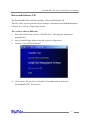
This CD can be used to generate driver diskettes, and install the RAID Management
software for a variety of operating systems.
To create a driver diskette:
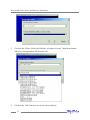
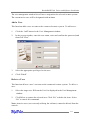
1.
Insert the CD into the system’s CD/DVD drive. The program should start
automatically.
2.
Insert a blank floppy diskette into the system’s floppy drive.
3.
Click on “Create Driver Diskette”.
4.
Click on the “Please Select a Product”drop-down button, and select
‘RocketRAID 2240”from the list.
4-1
RocketRAID 2240 Driver and Software Installation
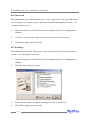
5.
Click on the “Please Select the Diskette you want to create”drop-down button,
and select the appropriate OS from the list.
6.
Click on the “OK”button to create the driver diskette.
4-2
RocketRAID 2240 Driver and Software Installation
To install the RAID software:
1.
Click on “Install RAID Management Software”.
2.
Select the desired software from the drop down menu, and click on the “OK”
button.
Windows Driver Installation
Before installing the RocketRAID 2240 device driver, make sure the RocketRAID 2240
host adapter and all required hard disks have been installed into the system’s chassis
(refer to the Hardware Installation section, page 2-3).
Installing the RocketRAID 2240 driver for an existing Windows XP/
2003/x64 system
After the operating system has booted, Windows XP/2003 will automatically detect
the RocketRAID 2240, and request that a device driver be installed. To install the
device driver, follow the steps outlined below:
4-3
RocketRAID 2240 Driver and Software Installation
1.
When the “Found New Hardware Wizard”window appears, select “Install from a
list or specific location (Advanced)”, and click Next to continue.
2.
Click on the “Include this location in the search”option, and select the system’s
floppy drive (generally Disk A). Next, insert the Driver Installation diskette into
the system’s floppy drive.
3.
At the Hardware Wizard screen, select the floppy drive as the source, then click
the Next button. Select the appropriate operating system folder, then click the
Next button.
4.
Windows will display a warning message that states the driver has “not been
signed”. Select “Continue Anyway”, then click Finish when prompted. When
windows asks to reboot the system, choose No.
5.
Windows will then display a second “Found New Hardware Wizard”window –
repeat steps 1 through 4.
6.
Remove the Driver Installation diskette from the floppy drive, then Shut down
and restart the computer.
Installation Verification
After the driver has been installed, and the system has been restarted:
1.
Click the Start button, select “Settings”, and then select “Control Panel”.
Double click the “System”icon.
2.
In the pop-up window, select the Hardware tab, and then click the “Device
Manager”button.
3.
Double click the “SCSI and RAID controllers”entry - two “RocketRAID 2240”
entries should be present. If either one of the RocketRAID 2240 device entries is
not displayed, or there are “?”or “!”marks displayed near the RocketRAID 2240
entries, the driver has not been installed properly. Delete the entries and reinstall
the driver.
4-4
RocketRAID 2240 Driver and Software Installation
Installing the RocketRAID 2240 driver during a fresh Windows 2000/
XP/2003/x64 installation
1.
After booting from the Windows 2000/XP/2003 CD-ROM, when the Windows XP
Setup blue screen appears, look towards the bottom of the screen. Windows will
prompt you to press the F6 key if you want to install a third party SCSI or RAID
driver. Press the F6 key at this time.
2.
The setup procedure will continue, and will later instruct you to press the “S”key
to specify additional adapters. Press the “S”key as instructed.
3.
Next, the setup program will prompt for the insertion of the driver diskette. Please
insert the driver diskette, and then press ENTER to continue.
4.
The next window will display several driver options. Please select the
RocketRAID 2240 Controller for the corresponding operating system, and press
ENTER to continue.
1 - Installing the RAID Management Console/ Interface Overview
To install the RAID software, locate the setup.exe file located on the floppy diskette
labeled “DISK 1”(or the Disk1 folder, if the software was downloaded).
Double click this file to start the Installation Wizard.
Note: If the system chassis supports SAF-TE, make sure to select the corresponding
chassis-type/manufacturer when prompted.
There is no need to restart the system after installing the software. To start the
software, click on the “Start”button, select “Programs”, and click on the “HPT
Management Console.”
Logging On
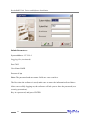
The RAID Management Console requires that a user (or Administrator) log on.
The software is incapable of working with RAID arrays or hard disks attached to the
RocketRAID 2240 until the user has logged on.
4-5
RocketRAID 2240 Driver and Software Installation
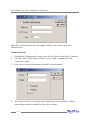
Default Parameters:
System Address: 127.0.0.1
Logging On (continued)
Port:7402
User Name: RAID
Password: hpt
Note: The password and user name fields are case sensitive.
The first time the software is used, make sure to enter the information listed above.
After successfully logging on, the software will ask you to alter the password (as a
security precaution).
Key in a password, and press ENTER.
4-6
RocketRAID 2240 Driver and Software Installation
2 - Software Interface - Overview of commands/functions
After logging on, several new options will become available.
These commands are displayed towards the top of the interface window:
Overview of Function-menus (tabs)
File
Remote Control - view information about remote systems
System Configuration - switch between available remote systems
User Management - Add or remove users, edit user profiles
Passw ord - change the password
Exit - exit the utility interface
Management
RAID Management –Create/delete/maintain RAID arrays
Device Management - check information or change settings for host adapters, and
hard disks
Spare management - create and assign spare disks
SAF-TE Management –monitor and view SAF-TE related attributes
Event Notification - Set up system notification options
Task Schedule Management –configure automated RAID management features
4-7
RocketRAID 2240 Driver and Software Installation
View
Event view - Views the event log
Icon view - view icon descriptions (legend)
Operation
This menu will list all available commands for the selected Function menu.
These commands are also represented in icon/button form (below the function-menu/
tabs selections)
Help
Search through help topics related to the RAID Management Console software
3 - Creating an Array
To create an array:
1.
Highlight the “Management”menu, then select the “Array Management”
function.
2.
Click the Create button on the toolbar or select the “Create”command from the
“Operation”menu. The array creation wizard will appear.
4-8
RocketRAID 2240 Driver and Software Installation
3.
Select the desired RAID level from the drop-down list.
4.
Enter a name for the array using the keyboard (this is optional), and click the Next
button.
5.
If you are creating a redundant array (RAID 1, 5, 10), select an initialization
option. If you are creating a RAID 0 or JBOD (volume), skip to step 6:
For RAID1 and RAID 10 arrays, the default initialization method is “No
initialization”.
For RAID5 arrays, the default initialization method is “Foreground”.
If you are creating RAID5, you will be asked to specify a cache policy:
Write-back - when the write-back setting is selected, all write requests sent to
the array are cached. This will result in higher performance, but data loss may
occur in case of a power failure.
Write-through - when the write-through setting is selected, all write requests
sent to the array are passed directly to the disks. However, subsequent reads
may still be completed from the cache if appropriate.
6.
Select which disks are to be used to create the array. Highlight the desired disk
from the left-side of the interface (available disks), then click on the
button
to move the disk to the right side of the interface (selected disks). Disks must be
selected one a time.
If you wish to remove a selected disk, highlight it from the selected disk section,
and use the
button to move it to the available disk section.
Note: The selection sequence is important - the order in which the disks are
selected will determine the disk sequence of the array.
7.
Select the capacity - the RocketRAID 2240 can create multiple arrays on the same
set of drives. As a result of this feature, you have the option of assigning a
physical disk to multiple RAID arrays.
Press Enter to use the default value (the maximum capacity for the array), or
specify the desired value using the keyboard, and press Enter to confirm this
selection. Then, click the Finish button.
4-9
RocketRAID 2240 Driver and Software Installation
Note: If you have specified an initialization option, the initialization process will start
automatically. A progress bar will be displayed towards the bottom of the interface
window, and will indicate % completion, and provide an estimate of the time needed
to complete the initialization procedure.
4 - Deleting an Array
To delete an array:
1.
Highlight the “Management”menu, then select the “Array Management”
function.
2.
Highlight the array you want to delete, then click on the “Delete Icon”or select
the Delete command from the “Operation”menu.
3.
A warning message will appear. Click Yes to delete the array. Click No to stop
this procedure.
Note: An array in use by the operating system cannot be deleted. Any data stored on
a deleted array will be inaccessible.
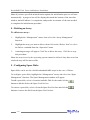
5 - Configuring Spare Disks
Spare disks can be used to rebuild redundant RAID arrays in the case of failure.
To configure spare disks, highlight the “Management”menu, and select the “Spare
Management”function. The Spare Management window will appear.
To add a spare disk, select it from the Available Disk list box and click the
button to add the disk to the Spare Pool list box.
To remove a spare disk, select it from the Spare Pool list box and click the
button to remove the disk from the Spare Pool list box.
4-10
RocketRAID 2240 Driver and Software Installation
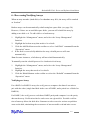
6 - Recovering/Verifying Arrays
When an array member (hard disk) of a redundant array fails, the array will be marked
as “broken”.
Broken arrays can be automatically rebuilt using hot-spare disks (see page 20).
However, if there are no available spare disks, you can still rebuild the array by
adding a new disk to it. To add a disk to a broken array:
1.
Highlight the “Management”menu, and select the “Array Management”
function.
2.
Highlight the broken array that needs to be rebuilt.
3.
Click the Add Disk button on the toolbar or select “Add Disk”command from the
“Operation”menu.
4.
If the disk is successfully added to the array, rebuild process will start
automatically.
Note: In some instances, a failed array will not rebuild automatically.
To manually start the rebuild process for a broken/critical array:
1.
Highlight the “Management”menu, and select the “Array Management”
function.
2.
Highlight the array that needs to be rebuilt.
3.
Click the Rebuild button on the toolbar or select the “Rebuild”command from the
“Operation”menu.
Verifying an Array
For a RAID 1 or RAID 10 array, the verify process compares the data of one mirror
pair with the other (single hard disk in the case of RAID1, and a paired set of disks for
RAID 10).
For RAID 5, the verify process calculates RAID5 parity and compares it to the parity
data on the array. Verification checks each sector on a given disk. Periodic verification of an array allows the disk drive firmware to take corrective actions on problem
areas on the disk, minimizing the occurrence of uncorrectable read and write errors.
4-11
RocketRAID 2240 Driver and Software Installation
To verify an array:
1.
Highlight the “Management”menu, and select the “Array Management”
function.
2.
Highlight the array you want to verify.
3.
Click the Verify button on the toolbar or select the “Verify”command from the
“Operation”menu.
4.
Verify process will start.
7 –OCE/ORLM
The RocketRAID 2240 supports both OCE (Online Capacity Expansion), and ORLM
(Online RAID Level Migration).
The RAID software provides support for these features through a single function,
known as OCE/ORLM.
With the OCE/ORLM function, you can transform an array from one RAID level to
another RAID level and/or resize the array dynamically, even under I/O load.
To perform OCE/ORLM on an array:
1.
Highlight the “Management”menu, and select the “Array Management”
function.
2.
Highlight the array you want to alter.
3.
Click the
button on the toolbar or select “OCE/ORLM”command from
the “Operation”menu.
4.
The OCE/ORLM window will appear.
5.
The interface is very similar to the Array Creation Wizard interface. Select the
type of array you wish to change the existing array into, then set any corresponding parameters (cache options, capacity, if relevant).
4-12
RocketRAID 2240 Driver and Software Installation
Notes:
1.
When expanding a JBOD array, all the original disks must be included in the
target array, and these disks must be selected in the same order (as the
original array). If you want to migrate a JBOD array to another RAID level,
only the first member disk can be included in the target array. For example, a
JBOD comprised of 3 disks (1, 2, 3), can only be “migrated”using disk 1.
Disks 2 and 3 cannot be used –disk 1 would have to be combined with other
disks attached to the RocketRAID 2240 (4, 5, 6, 7, 8).
2.
You cannot change an array to another type of array with a smaller capacity.
In some cases, a disk may need to be added to the RocketRAID 2240.
3.
During the OCE/ORLM procedure, the redundancy level of the array will be
the lowest of the source and target arrays; e.g. if you ORLM a RAID0 array
to a RAID1 array, the array will be non-redundant until the procedure is
complete.
4.
The OCE/ORLM process can be aborted and continued at later time.
However, you should always stop the transform progress from the RAID
Management software.
5.
An unexpected system crash may result in data loss while performing OCE/
ORLM on an array. We strongly recommend backing up data before starting
the OCE/ORLM process.
8 - Misc. Array/Device Options
Device Management
The Device Management window provides configuration information about controllers (the RocketRAID 2240 and other HighPoint host adapters), channels and hard
disks.
To access the Device Management window, highlight the “Management”menu, and
select the “Device Management”function.
4-13
RocketRAID 2240 Driver and Software Installation
Changing Device Settings
Depending upon the hard disk in question, and support provided by the current
device driver, you can adjust settings for disk: Read Ahead, Write Cache, TCQ, and
NCQ. Each feature can be enabled or disabled individually.
S.M.A.R.T Status
You can view S.M.A.R.T. (Self-Monitoring, Analysis, and Reporting Technology)
data about a drive to help troubleshoot any problems that occur. You can also setup
periodical S.M.A.R.T. status checks that send notification messages when S.M.A.R.
T. thresholds are exceeded.
To view the S.M.A.R.T status of a hard disk:
1.
Highlight the “Management”menu, and select the “Device Management”
function.
2.
Highlight the disk you want to examine.
3.
Select the “SMART”command from the “Operation”menu, or click on the
button to display the S.M.A.R.T status/settings window.
SAF-TE Management
This feature allows the administrator to view and monitor a variety of SAF-TE related
attributes, such as chassis temperature readings, disk failure, and the status of the
chassis cooling apparatus (cooling fans).
4-14
RocketRAID 2240 Driver and Software Installation
Note: This feature is dependent upon the system chassis –this function will not be
available unless the chassis supports SAF-TE.
Renaming an Array
1.
Highlight the “Management”menu, and select the “Array Management”
function.
2.
Highlight the array you want to rename.
3.
Click the Rename button on the toolbar or select the “Rename”command from
the “Operation”menu.
4.
Enter a new name for the array using the keyboard, and press the OK button to
confirm your selection.
Note: An array running background tasks cannot be renamed.
9 - Managing Events
The HighPoint RAID Management Console will log all events that have occurred on
any host adapter under its control.
Viewing Logged Events
To view logged events:
1.
Highlight the “View”menu, and select the “Event View”option.
2.
In the Event View window, you can filer events, clear events, and save events to
a file.
Configuring E-mail notification
To enable E-mail notification:
1.
Highlight the “Management”menu, and select the “Event Notification”function.
2.
Click the Setting button on the toolbar or select “Setting”option from the
“Operation”menu.
3.
Next, enter the necessary information in the E-mail Notification Setting window.
4-15
RocketRAID 2240 Driver and Software Installation
Note: The current software does not support SMTP servers that require user
authentication.
To add a Recipient:
1.
Highlight the “Management”menu, and select the “Event Notification”function.
2.
Click the “Add”button on the toolbar or select “Add”command from the
“Operation”menu.
3.
Enter the necessary information in the Add recipient window.
4.
The recipient will be listed in the main window. You can use Modify or Delete
button on the toolbar to modify or delete the recipient.
4-16
RocketRAID 2240 Driver and Software Installation
To test E-mail notification:
1.
Highlight the “Management”menu, and select the “Event Notification”
function.
2.
Select one recipient from the main window.
3.
Click the Test button on the toolbar or select the “Test”command from the
“Operation”menu.
4.
The software will send a “test”e-mail message to the selected recipient.
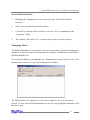
Managing Tasks
The RAID management Console can be used to setup routine, periodical backgroundrebuild or verify tasks that will help maintain the integrity of RAID arrays attached to
the RocketRAID 2240.
To setup and schedule tasks highlight the “Management”menu, and select the “Task
Management”function to open Task Management window.
The Task Schedule list displays all of the tasks assigned to the selected remote
system. To view detailed information about a specific task, highlight and Double-click
the task’s name.
4-17
RocketRAID 2240 Driver and Software Installation
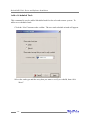
Add a Scheduled Task
This command is used to add a Scheduled task for the selected remote system. To
add a new scheduled task:
Click the “New”button on the toolbar. The new task schedule wizard will appear.
Select the task type and the array that you want to verify or rebuild, then click
“Next”.
4-18
RocketRAID 2240 Driver and Software Installation
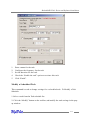
1.
Enter a name for the task.
2.
Configure the frequency for the task.
3.
Set the duration for the task.
4.
Check the “Enable the task”option to activate this task.
5.
Click “Finish”.
Modify a Scheduled Task
This command is used to change settings for a scheduled task. To Modify a Task
Schedule:
1. Select a task from the Task schedule list.
2. Click the “Modify”button on the toolbar, and modify the task settings in the popup window.
4-19
RocketRAID 2240 Driver and Software Installation
Delete a Scheduled Task
This command is used to delete a Scheduled Task for the selected remote system. To
delete a Task Schedule:
1. Select a task from the Task schedule list.
2. Click the “Delete”button on the toolbar.
10 - Configuring Remote Systems
Then HighPoint RAID Management Console manages a RAID controller through a
connection to the HighPoint RAID Management Service, which runs on the system
where the RAID host adapter is physically installed. This type of system is referred
to as a “remote system”.
Note: What the software classifies as a “remote system”may not always be an actual
remote computer. In some configurations, the local computer hosts both the RAID
host adapter and Management Service. The local system, in these cases, is still
generically referred to as a “remote system”.
Add a Connection
This command is used to add new connection to a remote system. To Add a
Connection:
1.
2.
3.
Highlight the “File”menu, and select the “Remote Control”function.
Click the Add button on the toolbar or select the “Add”command from the
“Operation”menu.
Enter the system address, name, and port information in the pop-up window.
4-20
RocketRAID 2240 Driver and Software Installation
The system address can be a host name, or an IP address. The default system port is
7402.
4.
Click “OK”to finish adding the new connection.
Modify a Connection
This command modifies connection information for a remote system. To modify a
connection:
1.
Highlight the “File”menu and select the “Remote Control”function.
2.
Highlight the system you want to modify.
3.
Click the Modify button on the toolbar or select the “Modify”command from the
“Operation”menu.
4.
Enter new connection information in the pop-up window, and click OK to apply
the changes.
Note: The System Address cannot be modified. If you insist on modifying this item,
you must first delete this connection and then add a new connection. In addition, the
connected system cannot be modified –you must first disconnect from this system.
Delete a Connection
This command deletes a remote system from the connection list. To delete a
connection:
4-21
RocketRAID 2240 Driver and Software Installation
1.
Highlight the “File”menu and select the “Remote Control”function.
2.
Highlight the system you want to delete.
3.
Click the “Delete”button on the toolbar or select the “Delete”command from
the “Operation”menu.
4.
A warning message will be displayed. Click “Yes”to delete the item. Select No
to cancel this command.
Connect to a Remote System
This command establishes a connection to a remote system for RAID management.
To connect to a remote system:
1. Highlight the “File”menu and select the “Remote Control”function.
2. Highlight the remote system you to establish a connection with.
3. Click the “Connect”button on the toolbar or select the “Connect”command from
the “Operation”menu.
4. Enter the appropriate Login information in the pop-up window.
Note: The initial user name/password for a remote system is RAID/hpt. You are free
to modify the username and password after the connection is established.
4-22
RocketRAID 2240 Driver and Software Installation
If the connection is successful established, the application will retrieve the event logs
from the remote system, then switch to Array Management view.
Disconnect Remote System
This function closes the connection from a connected system. To disconnect a
remote system:
1.
Highlight the “File”menu and select the “Remote Control”function.
2.
Highlight the system you want to disconnect from.
3.
Select the “Disconnect”command from the “Operation”menu.
System Configuration
This function is used to modify the service configuration on a remote system. To
change the service configuration:
1.
Highlight the “File”menu and select the “Remote Control”function.
2.
Highlight the remote system you want to modify.
3.
Select the “System Configuration”option from the “Operation”menu.
4.
Modify the information in the pop-up window.
4-23
RocketRAID 2240 Driver and Software Installation
System Port - This is the TCP port number that the RAID Management Service uses
to communicate with RAID Management Console. When you connect to the service,
the port value you enter must be in accordance with the system port value on the
service. The default value is 7402.
Event Port - The client software will retrieve events through this port. The default
value is 7403.
The System Port value must differ from the value assigned to the Event Port. After
you reset a system’s configuration, you should restart the service on that system for
the changes to take effect.
5.
Click “OK”to apply the changes.
11 - Configuring Users and Privileges
The RAID Management Console allows the Administrator to manage user accounts in
its own database. You can setup multiple users and assign different privileges levels
for the purpose of RAID management.
Users can be assigned to each individual Remote System controlled by the RAID
Management Console.
Highlight the “File”menu and select the “User Management”function to configure
User related options for the selected remote system.
4-24
RocketRAID 2240 Driver and Software Installation
The user management window lists all users assigned to the selected remote system.
The current/active user will be designated with an icon.
Add a User
This function adds a user account to the connected remote system. To add a user:
1.
Click the “Add”button in the User Management window.
2.
In the pop-up window, enter the user name, enter and confirm the password, and
then click “Next”.
3.
Select the appropriate privileges for the user.
4.
Click “Finish”.
Delete a User
This function deletes a user’s account on the connected remote system. To delete a
user:
1.
Select the target user ID from the User list displayed in the User Management
window.
2.
Click Delete to remove the selected user. Click “Yes”to delete the item. Select
“No”to cancel this command.
Note: An active user (user currently utilizing the software) cannot be deleted from the
console.
4-25
RocketRAID 2240 Driver and Software Installation
Set Password
The Administrator uses this function to set a user’s password – the password allows
a user to log on to a remote system, and utilize the RAID Management Console. To
set password for a user:
1.
Select the target user ID from the user list displayed in the User Management
window.
2.
Click the “Set Password”option, and enter the password for the user.
3.
Click OK to apply your selections.
Set Privilege
The Administrator uses this function set a user’s privileges for the selected remote
system. To set privileges for a user:
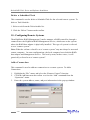
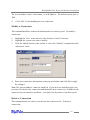
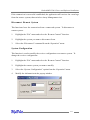
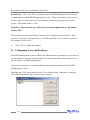
1.
Select the target user ID from the user list displayed in the User Management
window.
2.
Click the “Set Privilege”option.
3.
In the pop-up window, assign the privileges for the selected user.
4.
Click OK to apply your selections.
4-26
Chapter 5
Linux Driver Support
Contents of this Chapter:
Fedora Core 3 Linux installation Overview
Red Hat Enterprise 3 Overview
SuSE Linux Enterprise Server (SLES) installation Overview
Linux Driver Support
Fedora Core 3 Linux installation Overview
This section provides instructions describing how to install and utilize the
RocketRAID 2240 Adapter on a Fedora Core 3 Linux system.
1 - Installing Fedora Core 3 on the RocketRAID 2240 Host Adapter
Note: If the OS is running kernel that differs from the one supported by the
precompiled driver, the precompiled drivers cannot be used. A driver can be built for
this kernel using the OpenSource package for the RocketRAID 2240 controller. This
package is available from our website, and is posted on the BIOS/Driver page for the
RocketRAID 2240.
To install Fedora Linux onto hard disks or RAID arrays attached to RocketRAID 2240
controller, follow the steps outlined below:
Step 1 Prepare the Driver Diskette
The driver is contained in a floppy diskette image file.
On a DOS or Windows system, a Fedora driver diskette can be generated using
rawrite.exe. This utility is included on the Fedora Linux CD (under /dosutils). Run
rawrite.exe using a command prompt window, and follow the directions it provides.
On a Linux system, use the “dd”command to generate a boot diskette. Insert a
floppy disk into the floppy drive and type the following command:
# dd if=fc3-i386.img of=/dev/fd0
Note: The driver disk image file depends on your core version and hardware.
Step 2 Install Fedora Linux
Installation steps for Fedora Core 3
1) Boot from the Fedora Installation CD, and start the install procedure.
2) At the “Welcome to Fedora Linux”installation screen, a prompt labeled “boot:”will
appear at the bottom of the screen. Type in linux dd, then press Enter.
5-1
Linux Driver Support
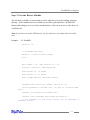
boot: linux dd
3) When prompted “Do you have a driver disk?”, select “Yes”. At the “Insert your
driver disk and press OK to continue”prompt, insert the driver diskette in the floppy
drive and then select “OK”.
4) The system will now load the RocketRAID 2240 driver automatically.
2 - Installing the RocketRAID 2240 driver for an Existing System
Note: If a SCSI adapter is used to boot the system, make sure the RocketRAID 2240
controller BIOS loads/posts after the SCSI adapter’s BIOS. It may be necessary to
move the adapter(s) to another PCI slot.
Step 1 Obtain the Driver Module
Extract the module file from the file modules.cgz (from the driver disk) using the
following commands:
# mount /dev/fd0
# cd /tmp
# gzip -dc /mnt/floppy/modules.cgz | cpio -idumv
Driver modules for all supported kernel versions will be extracted. The driver module
for the active kernel is located under the directory that matches the kernel version (/
tmp/‘uname –r‘/i686/hptmv6.ko).
After extracting the driver module, load it using the following commands:
# modprobe sd_mod
# cd /tmp/‘uname –r‘
# insmod hptmv6.ko
Arrays attached to the adapter can be accessed as SCSI devices (e.g. /dev/sda).
5-2
Linux Driver Support
Step 2 Mounting and Partitioning the Device
Example: A RAID array has been configured between several hard disks.
This array will be registered to the system as device “/dev/sda”.
To create a partition on this array (which will listed as /dev/sda1), use the “fdisk /
dev/sda”command.
Next, use the “mkfs /dev/sda1”command to setup a file system on this partition.
Use the command “mkdir xxxx”to create a mount point for the RAID array.
Then mount /dev/sda1 /xxxx in order to access it.
Note: xxxx represents the desired name of the mount point.
Step 3 Configure System to Automatically Load the Driver
To avoid typing in “insmod hptmv6.ko”each time the operating system is booted, the
system must be instructed to automatically load the module during bootup. To install
the module, type in the following commands (first change to the directory where the
proper hptmv6.ko file is located):
# cp hptmv6.ko /lib/modules/‘uname –r‘/kernel/drivers/scsi.
# depmod
Then, instruct the system to load the module when booting. Use the following
commands:
# echo “modprobe hptmv6”> /etc/init.d/hptdriver
# chmod 755 /etc/init.d/hptdriver
# ln –sf /etc/init.d/hptdriver /etc/rc.d/rc3.d/S01hptdriver
# ln –sf /etc/init.d/hptdriver /etc/rc.d/rc4.d/S01hptdriver
# ln –sf /etc/init.d/hptdriver /etc/rc.d/rc5.d/S01hptdriver
5-3
Linux Driver Support
Step 4 Configure System to Mount Volumes during Startup
The system can be instructed to automatically mount the array(s) during startup by
modifying the file”/etc/fstab”.
For example, add the following line to tell the system to mount /dev/sda1 to location /
mnt/raid after startup:
/dev/sda1
/mnt/raid
ext3 defaults 0 0
3 - Updating the Driver
1.
If the original driver is installed in the system’s initrd (Initial RAM Disk) file
(when using a system installed to RR2240 controller, for example), the driver
module in the initrd file should be updated using the mkini trd command (or
extract the initrd file and replace the driver module manually).
2.
If the original driver is installed in the /lib/modules/‘uname –r‘/kernel/drivers/
scsi/ directory, and loaded by the script file (Example /etc/init.d/hptdriver) during
the init process, or the configure file (Example /etc/modules.conf), please replace
it with the new driver (hptmv6.ko).
4 - Uninstalling the Driver
To uninstall the RocketRAID 2240 driver
Note: The driver cannot be uninstalled while the system is booted from a disk or array
attached to the RocketRAID 2240.
To uninstall the driver, remove the lines added to /etc/fstab, and remove the files
created in the /etc/init.d directory.
5-4
Linux Driver Support
Red Hat Enterprise 3 Overview
This section provides instructions describing how to install and utilize the
RocketRAID 2240 Adapter on a Red Hat Enterprise 3 Linux system.
1 - Installing Red Hat Enterprise 3 (AS, ES, WS) Linux on the
RocketRAID 2240 controller
To install Red Hat Enterprise Linux onto disks or RAID arrays attached to
RocketRAID 2240:
Step 1 Prepare the Driver Diskette
The driver is provided in a floppy diskette image file format.
On a DOS or Windows system, a driver diskette can be generated using rawrite.exe.
This utility is included on the Red Hat Enterprise Linux CD (under /dosutils). Run
rawrite using a command prompt window, and follow the directions it provides.
On a Linux system, use the “dd”command to generate a boot diskette. Insert a
floppy disk into the floppy drive and type the following command (amd64 driver for
example):
# dd if=rh3dd-amd64.img of=/dev/fd0
Step 2 Install Red Hat Enterprise Linux
1.
Start installing Red Hat Enterprise Linux by booting from the installation CD.
2.
At the “Welcome to Red Hat Linux”installation screen, a prompt labeled “boot:”
will appear at the bottom of the screen. Type in linux dd, then press Enter.
boot: linux dd
3.
When prompted “Do you have a driver disk?”. Select “Yes”.
4.
When prompted “Insert your driver disk and press OK to continue”, insert the
driver diskette into the system’s floppy drive, and select “OK”.
5.
The system will now load the RocketRAID 2240 driver automatically.
5-5
Linux Driver Support
6.
When prompted “Where do you want to install the boot loader? ”in the “Boot
Loader Configuration”dialog, select “Master Boot Record (MBR)”to instruct the
system be to boot from the RocketRAID 2240.
Continue the installation as normal. You can refer to Red Hat Enterprise Linux installation guide.
Note:The system device mapping order is the same as the order shown in
RocketRAID 2240 BIOS Setting Utility. If no other SCSI adapters are installed, the
device marked as “BOOT”or “HDD0”will identified as /dev/sda, “HDD1”as /dev/sdb,
“HDD2”as /dev/sdc, etc. When creating mount points, /boot must be mounted on /
dev/sda.
2 - Installing the RR2240 driver for an Existing System
Note: If a SCSI adapter is used to boot the system, make sure the RR2240 controller
BIOS loads/posts after the SCSI adapter’s BIOS. It may be necessary to move the
adapter(s) to another PCI slot.
Step 1 Obtain the Driver Module
Extract the module file from the file modules.cgz (from the driver disk) using the
following commands:
# mount /dev/fd0
# cd /tmp
# gzip -dc /mnt/floppy/modules.cgz | cpio -idumv
Driver modules for all supported kernel versions will be extracted. The driver module
for the active kernel is located under the directory that matches the kernel version (/
tmp/‘uname –r‘/hptmv6.o).
5-6
Linux Driver Support
# modprobe sd_mod
# cd /tmp/‘uname –r‘
# insmod hptmv6.o
Arrays attached to the adapter can be accessed as SCSI devices (e.g. /dev/sda).
Step 2 Mounting and Partitioning the Device
Example: A RAID array has been configured between several hard disks.
This array will be registered to the system as device “/dev/sda”.
To create a partition on this array (which will listed as /dev/sda1), use the “fdisk /
dev/sda”command.
Next, use the “mkfs /dev/sda1”command to setup a file system on this partition.
Use the command “mkdir xxxx”to create a mount point for the RAID array.
Then,mount /dev/sda1 /xxxx in order to access it.
Note: xxxx represents the desired name of the mount point.
Step 3 Configure System to Automatically Load the Driver
To avoid typing in “insmod hptmv6.o”each time the operating system is booted, the
system must be instructed to automatically load the module during bootup. To install
the module, type in the following commands (first change to the directory where the
proper hptmv6.o file is located):
# install -d /lib/modules/‘uname –r‘/kernel/drivers/scsi
# install -c hptmv6.o /lib/modules/‘uname –r‘/kernel/drivers/scsi
Then, instruct the system to load the module when booting. Use the following
commands:
# echo “modprobe hptmv6”> /etc/init.d/hptdriver
# chmod 755 /etc/init.d/hptdriver
5-7
Linux Driver Support
# ln –sf /etc/init.d/hptdriver /etc/rc.d/rc3.d/S01hptdriver
# ln –sf /etc/init.d/hptdriver /etc/rc.d/rc4.d/S01hptdriver
# ln –sf /etc/init.d/hptdriver /etc/rc.d/rc5.d/S01hptdriver
Step 4 Configure System to Mount Volumes during Startup
The system can be instructed to automatically mount the array(s) during startup by
modifying the file”/etc/fstab”.
For example, add the following line to tell the system to mount /dev/sda1 to location /
mnt/raid after startup:
/dev/sda1
/mnt/raid
ext2 defaults 0 0
3 - Updating the Driver
If you are not booting from disks attached to RocketRAID 2240 controller, you can
update the driver just by reinstalling it following the procedure outlined in the
previous section, “Installing the RocketRAID 2240 driver for an Existing System”.
If you are running the system installed to a disk or array attached to the RocketRAID
2240:
First, obtain the new driver module “hptmv6.o”. Refer to the previous section
“Obtain the Driver Module”. In following steps, we assume it has been
copied to “/tmp/hptmv6.o”.
Replace hptmv6.o in the boot RAM disk image, /boot/initrd-xxx.img (where xxx is the
kernel version).
Example: (2.4.21-4.EL for Red Hat Enterprise Linux 3.0):
# gzip -dc /boot/initrd-xxx.img > /tmp/initrd.ext2
# mkdir /mnt/initrd # mount -o loop /tmp/initrd.ext2 /mnt/initrd
# cp /tmp/hptmv6.o /mnt/initrd/lib/hptmv6.o # umount /mnt/initrd
5-8
Linux Driver Support
# gzip -c /tmp/initrd.ext2 > /boot/initrd-xxx.img
If you are using lilo to boot the system, use “lilo”to reinstall the RAM disk:
# lilo
Update hptmv6.o in /lib/modules:
# cp /tmp/hptmv6.o /lib/modules/‘uname –r‘/kernel/drivers/scsi/
hptmv6.o
Reboot your system to allow the new driver take effect.
4 - Uninstalling the Driver
To uninstall the RocketRAID 2240 driver
Note: The driver cannot be uninstalled while the system is booted from a disk or array
attached to the RocketRAID 2240.
To uninstall the driver, remove the lines added to /etc/fstab, and remove the files
created in the /etc/init.d directory.
5-9
Linux Driver Support
SuSE Linux Enterprise Server (SLES) installation Overview
This section provides instructions describing how to install and utilize the
RocketRAID 2240 Adapter on a SuSE (SLES) Linux system.
1 - Installing SLES Linux on the RocketRAID 2240 Host Adapter
Note: If the OS is running kernel that differs from the one supported by the
precompiled driver, the precompiled drivers cannot be used. A driver can be built for
this kernel using the OpenSource package for the RocketRAID 2240 controller. This
package is available from our website, and is posted on the BIOS/Driver page for the
RocketRAID 2240.
To install SLES onto hard disks or RAID arrays attached to RocketRAID 2240
controller, follow the steps outlined below:
Step 1 Prepare the Driver Diskette
The driver is contained in a floppy diskette image file (slesdd.img).
On a DOS or Windows system, a driver diskette can be generated using rawrite.exe.
This utility is included on the SLES Linux CD (under /dosutils). Run rawrite using a
command prompt window, and follow the directions it provides.
On a Linux system, use the “dd”command to generate a boot diskette. Insert a
floppy disk into the floppy drive and type the following command:
# dd if=SLESdd.img of=/dev/fd0
Step 2 Install SLES Linux
1.
Start the install procedure by booting from SLES installation CD.
2.
After the CD boots, select the “Installation”option and press F6 to load the
driver.
3.
Insert the Driver Diskette when it displays “Please insert the Driver Update
floppy”.
5-10
Linux Driver Support
4.
When the “Diver Update Menu”is displayed, press “OK”and “back”for back
to installer.
5.
Next. Select “back”to return to the installer.
6.
Installation will now proceed normally. Refer to SLES Linux documents for
additional OS installation procedures.
Additional Installation Notes:
The system device mapping order is the same as the order shown in RocketRAID
2240 BIOS Setting Utility. If no other SCSI adapters are installed, the device marked
as “BOOT”or “HDD0”will be identified as /dev/sda, “HDD1”as /dev/sdb, “HDD2”
as /dev/sdc, etc. When creating mount points, /boot must be mounted on /dev/sda.
2 - Installing the RocketRAID 2240 Driver on an Existing System
If you are currently running SLES and would like to access drives or arrays attached
to the Rocket RAID 2240 controller, follow the steps outlined below:
Note: If a SCSI adapter is used to boot the system, make sure the RocketRAID 2240
controller BIOS loads/posts after the SCSI adapter’s BIOS. It may be necessary to
move the adapter(s) to another PCI slot.
Step 1 Update Grub
If you are running an SLES 9 SMP System, you must first update the /boot/grub/
menu.lst.
Example:
default=0
timeout=8
title Linux
kernel (hd0,1)/vmlinux root=/dev/hda1 acpi=off
initrd (hd0,1)/initrd
Reboot the system to allow the new kernel parameters to take effect.
5-11
Linux Driver Support
Step 2 Install the Driver Module
Extract the module file from the file /linux/suse /[arch]-[version]/install/update.tar.gz
(from the driver disk), using the following commands:
# mount /dev/fd0 /media/floppy
# cd /
# tar xfz /media/floppy/linux/suse/i386-sles9/install/update.tar.gz
The driver modules will be extracted to the directory /lib/modules/[kernel-ver]/kernel/
drivers/scsi/ .
After you have extracted the driver module, you can load it by following commands:
# modprobe sd_mod
# insmod /lib/modules/‘uname –r‘/kernel/drivers/scsi/hptmv6.ko
Then you can access the arrays attached to the controller as SCSI devices (e.g. /dev/
sda).
Step 3 Mounting and Partitioning the Device
Note: Many versions of SuSE include YAST. YAST is a graphical configuration
utility that is capable of executing the commands described below. We recommend
using YAST, if available, as it may help simplify the installation process.
Example: A RAID array has been configured between several hard disks.
This array will be registered to the system as device “/dev/sda”.
1.
To create a partition on this array (which will listed as /dev/sda1), use the
“fdisk /dev/sda”command.
2.
Next, use the “mkfs /dev/sda1”command to setup a file system on this
partition.
3.
Use the command “mkdir xxxx”to create a mount point for the RAID array.
Then, mount /dev/sda1 /xxxx in order to access it.
Note: xxxx represents the desired name of the mount point.
5-12
Linux Driver Support
Step 4 Configure System to Automatically Load the Driver
To avoid typing in “insmod hptmv6.o”each time the operating system is booted, the
system must be instructed to automatically load the module during bootup. To install
the module, type in the following commands (first change to the directory where the
proper hptmv6.ko file is located):
1.
Edit the file “/etc/sysconfig/kernel”, and add the hptmv6 module to the line
“INITRD_MODULES=… ”
Example:
INITRD_MODULES=”reiserfs hptmv6”
2.
Run the “depmod”command to update the module configuration:
# depmod
3.
Next, run the “mkinitrd”command to update the initrd file:
# mkinitrd
4.
If you are using the lilo boot loader, run lilo again:
# lilo
Step 5 Configure System to Mount Volumes during Startup
The system can be instructed to automatically mount the array(s) during startup by
modifying the file”/etc/fstab”.
For example, add the following line to tell the system to mount /dev/sda1 to location /
mnt/raid after startup:
/dev/sda1
5-13
/mnt/raid
ext2 defaults 0 0
Linux Driver Support
3 –Updating the Driver
To update the driver, simply reinstall the driver following the steps in previous
section, “Install RocketRAID 2240 Driver on an Existing System “.
Note: If the driver is loaded in initrd (when system is installed onto a disk or array
attached to the RocketRAID 2240), you need to run the mkinitrd command to update
the initrd file. If you are using the lilo boot loader, run lilo again (# lilo).
4 - Uninstalling the Driver
To uninstall the RocketRAID 2240 driver
Note: The driver cannot be uninstalled while the system is booted from a disk or array
attached to the RocketRAID 2240.
To uninstall the driver, remove the lines added to /etc/modules.conf and /etc/fstab.
5-14
Chapter 6
FreeBSD Driver Support
FreeBSD Driver Support
1 - Installing FreeBSD on the RocketRAID 2240 Controller
If you would like to install FreeBSD onto arrays attached to the RocketRAID 2240
host adapter, please follow the steps below.
Step 1 Prepare the Driver Diskette
When installing FreeBSD to a disk or array attached to the RR2240, you must prepare
a RR2240 driver diskette before starting the installation procedure.
First, obtain the driver diskette image file from the driver package.
In a DOS or Windows system, create the boot diskette using the rawrite.exe utility.
This utility can be found on the FreeBSD CD (under \tools). Run it under a DOSPrompt window and follow it’s prompt.
On a FreeBSD system, use the “dd”command to make the driver diskette. For
example, Insert a floppy disk into the floppy drive and type the following command (if
you are installing FreeBSD 5.x versions):
# dd if=freebsd_5.x.img of=/dev/fd0
Step 2 Install FreeBSD
1.
Start the FreeBSD installation procedure by booting from installation CD.
2.
If you are installing FreeBSD 5.0 or earlier versions, skip this step. When the
“Welcome to FreeBSD”screen appears, select “6”.
3.
When the “Hit [enter] to boot immediately or any other key for command
prompt”screen appears, press the SPACE key to stop the loader from
autobooting.
BTX loader 1.00
BTX version is 1.01
Console: interna l video/keyboard
BIOS driver A: is disk0
BIOS driver B: is disk1
BIOS driver C: is disk2
BIOS 636kB/74512kB available memory
6-1
FreeBSD Driver Support
FreeBSD/i386 bootstrap loader, Revision 0.8
(mailto:[email protected], Sat Apr 21 08:46:19 GMT
20 01 )
Hit [Enter] to boot immediately, or any other key for
command prompt.
Booting [kernel] in 9 seconds…
<-press SPACE key
A prompted label “ok”will appear at the bottom of the screen.
4.
Insert the RR2240 driver diskette into floppy drive. Type in “load diskx:hptmv6-x.
x” (without quotation marks), and then press enter.
for FreeBSD 4.3-RELEASE
ok load kernel
ok load disk1:h ptmv6-4.3.ko
for FreeBSD 4.4-RELEASE
ok load kernel
ok load disk1:h ptmv6-4.4.ko
for FreeBSD 4.5-RELEASE
ok load disk1:h ptmv6-4.5.ko
for FreeBSD 4.6.2-RELEASE
ok load disk1:hp tmv6-4.6.2.ko
for FreeBSD 4.7-RELEASE
ok load disk1:h ptmv6-4.7.ko
for FreeBSD 4.8-RELEASE
ok load disk1:h ptmv6-4.8.ko
for FreeBSD 4.9-RELEASE
ok load disk1:h ptmv6-4.9.ko
for FreeBSD 4.10-RELEASE
6-2
FreeBSD Driver Support
for FreeBSD 4.11-RELEASE
ok load disk1:hp tmv6-4.11.ko
for FreeBSD 5.0-RELEASE
ok load disk0:h ptmv6-5.0.ko
for FreeBSD 5.1-RELEASE
ok load disk0:h ptmv6-5.1.ko
for FreeBSD 5.2.1-RELEASE
ok load disk0:hp tmv6-5.2.1.ko
for FreeBSD 5.3-RELEASE
ok load disk0:h ptmv6-5.3.ko
for FreeBSD 5.4-RELEASE
ok load disk0:hptmv6-5.4.ko
for FreeBSD 5.3-AMD64-RELEASE
ok load disk0:hptmv6-5.3-amd64.ko
for FreeBSD 5.4-AMD64-RELEASE
ok load disk0:hptmv6-5.4-amd64.ko
5.
After the driver has been loaded, remove the floppy diskette from the floppy
drive.
6.
Type in “boot”and continue with installation as normal. Refer to FreeBSD
installation guide for additional information.
ok boot
Note: On some systems, when ACPI is enabled, FreeBSD may not function
properly. Try disabling ACPI in the motherboard’s BIOS settings, or type the
command “set hint.acpi.0.disabled=”1””under the boot prompt, in order to
solve the problem.
7.
Before exiting installation, an additional step must be taken to copy the RR2240
driver module to the system. On the driver diskette, there is a setup script labeled
6-3
FreeBSD Driver Support
2 - Installing RR2240 Driver on an Existing System
If you are currently running FreeBSD and would like to access drives or arrays
attached to the RR2240 Controller, follow the steps outlined below:
Step 1 Copy the Driver Module
If you have made FreeBSD drivers into a diskette, you can insert the driver diskette to
floppy drive, then using the following commands to copy the driver module:
For FreeBSD 4.x:
# mount –o ro /dev/fd0 /mnt
# cp /mnt/hptmv6-xxx. ko /modules/hptmv6.ko
# umount /mnt
For FreeBSD 5.x:
# mount –o ro /dev/fd0 /mnt
# cp /mnt/hptmv6-xxx.ko /boot/kernel/hptmv6.ko
# umount /mnt
Alternately, it is possible extract the files from the .img files directly, without using a
floppy diskette:
For FreeBSD 4.x:
# vnconfig vn0c freebsd_xxx.img
# mount /dev/vn0c /mnt
# cp /mnt/hptmv6-xxx.ko /modules/hptmv6.ko
# vnconfig –du vn0c myfilesystem mount=/mnt
For FreeBSD 5.x:
# mdconfig –a –t vnode –f freebsd_5.x.img –u 0
# mount /dev/md0 /mnt
# cp /mnt/hptmv-xxx.ko /boot/kernel/hptmv6.ko
# umount /mnt
# mdconfig –d –u md0
6-4
FreeBSD Driver Support
Step 2 Test the Driver Module
Test the driver module to ensure that it works with the system, by loading it during
bootup. If the module has been loaded successfully you should see the RR2240
banner and a display screen of the attached drives. You can now access the drives as
a SCSI device.
Note: If you have no other SCSI device, the first device is /dev/da0, then /dev/da1,
etc.).
Example:
F1 FreeBSD
Default: F1
>> FreeBSD/i386 BOOT
Default: 0:ad(0,a)/boot/loader
boot:
BTX loader 1.00
BTX version is 1.01
Console: internal video/keyboard
BIOS driver A: is disk0
BIOS driver C: is disk2
BIOS 636kB/74512kB available memory
FreeBSD/i386 bootstrap loader, Revision 0.8
(mailto:[email protected], Sat Apr 21 08:46:19 GMT
2001)
Loading /boot/defaults/loader.conf
/kernel text=0x24f1db data=0x3007ec+0x2062c <- For FreeBSD 5.1 and later: select “6” on “Welcome to
FreeBSD” screen.
6-5
FreeBSD Driver Support
Hit [Enter] to boot immediately, or any other key for
command prompt.
Booting [kernel] in 9 seconds…
<-press SPACE key
Type ’?’ for a list of commands, ’help’ for more de
tailed help.
ok load hptmv6
/modul es/hptmv6.ko text=0xf57 1 data=0x2c8 +0x254
ok aut oboot
Note: If you have configured a RAID 10 using 4 disks, it will be registered to system
as device /dev/da0. You can use “/stand/sysinstall”to create partitions and
disklabels (like da0s1e) on da0. Then, create a new filesystem using “newfs /dev/
da0s1e”. Now you can mount /dev/da0s1e to somewhere to access it.
Step 3 Configure System to Automatically Load the Driver
To avoid typing in “load hptmv6”each time the operating system is booted, the
system must be instructed to automatically load the module during bootup. To
configure the system to automatically install the module, type in the following
commands:
# echo ’hptmv6_load=”YES”’ > > /boot/defaults/loader.conf
This command will instruct the loader to load the RR2240 module together with the
kernel. After using this command, reboot the system. The RR2240 module should
now automatically load each time the operating system starts up.
Note: When using FreeBSD 4.x, type in the follwing command to configure the
system:
# mknod /dev/hptmv6 c 200 0
Then, check to make sure the node “/dev/hptmv6”
, is present in the /dev directory.
6-6
FreeBSD Driver Support
Step 4 Configure the System to Mount Volumes at Startup
Instruct the system to automatically mount the array by modifying the file /etc/fstab.
Example: Add the following line to instruct the system to mount /dev/da1s1e to
location /mnt/hpt after startup:
/dev/da1s1e
/mnt/hpt
ufs rw 0 0
3 - Updating the Driver
To update the driver with a newer revision, simply reinstall the driver following the
steps discussed in the previous section, “Install the driver on an existing system”.
4 –Uninstalling the Driver
The driver can only be uninstalled when the system is not booting from devices
attached to the RR2240controller. To uninstall, remove the line hptmv6_load=”YES”
located in /boot/defaults/loader.conf, and then delete the driver module /modules/
hptmv6.ko or /boot/kernel/hptmv6.ko.
6-7
Appendix
Customer Support
Customer Support
Customer Support
If you encounter any problems while utilizing the RocketRAID 2240, or have any
questions about this or any other HighPoint product, feel free to contact our Customer Support Department.
Troubleshooting Checklist
Before contacting our Customer Support department:
Make sure the latest BIOS, driver and RAID Software have been installed for the
RocketRAID 2240. Updates are available from our website.
Prepare a list of the computer system’s hardware and software (motherboard, CPU,
memory, other PCI devices/host adapters, operating system, applications)
Contact Information
E-mail address: [email protected]
Phone: 510-623-0968 (request for support)
9:00AM-5:00PM, Pacific Standard Time
Additional information about HighPoint products is available from our web site:
http://www.highpoint-tech.com
A-1
FCC Part 15 Class B Radio Frequency Interference statement
This equipment has been tested and found to comply with the limits for a
Class B digital device, pursuant to part 15 of the FCC Rules. These limits are
designed to provide reasonable protection against harmful interference in a
residential installation. This equipment generates, uses and can radiate radio
frequency energy and, if not installed and used in accordance with the
instructions, may cause harmful interference to radio communications.
However, there is no guarantee that interference will not occur in a particular
installation. If this equipment does cause harmful interference to radio or
television reception, which can be determined by turning the equipment off
and on, the user is encouraged to try to correct the interference by one or
more of the following measures:
l Reorient or relocate the receiving antenna.
l Increase the separation between the equipment and receiver.
l Connect the equipment into an outlet on a circuit different from that to
which the receiver is connected.
l Consult the dealer or an experienced radio/TV technician for help.
Modifications not expressly approved by the manufacturer could void the
user’s authority to operate the equipment under FCC rules.
This device complies with part 15 of the FCC Rules. Operation is subject to
the following two conditions: (1) this device may not cause harmful
interference, and (2) this device must accept any interference received,
including interference that may cause undesired operation.
European Union Compliance Statement
This Information Technologies Equipment has been tested and found to
comply
with the following European directives:
l European Standard EN55022 (1998) Class B
l European Standard EN55024 (1998)