1
www.elationlighting.com
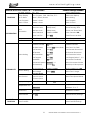
PERSONALITY - Display Setting – Shutoff Time
Shut off the Control Panel display after 02 to 59 minutes, default is 05 minutes.
1. Press MENU to access the main menu, press UP/DOWN until Personality is
displayed and press ENTER.
2. Press UP/DOWN until Display Setting is displayed and press ENTER.
3. Press ENTER and Shutoff Time=XX is displayed.
4. Press UP/DOWN to select desired time (=OFF, =02 ~ =59) and press ENTER
to confirm selection and press MENU to return to the previous menu.
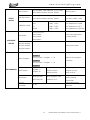
PERSONALITY – Temperature C/F
Display the temperature in Celsius or Fahrenheit, default is Fahrenheit.
1. Press MENU to access the main menu, press UP/DOWN until Personality is
displayed and press ENTER.
2. Press UP/DOWN until Temperature C/F is displayed and press ENTER.
3. Press UP/DOWN to select desired mode (=Celsius, =Fahrenheit) and press
ENTER to confirm selection and press MENU to return to the previous menu.
PERSONALITY – Initial Effect
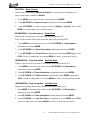
Display the initial effect position for DMX functions.
1. Press MENU to access the main menu, press UP/DOWN until Personality is
displayed and press ENTER.
2. Press UP/DOWN until Initial Effect is displayed and press ENTER.
3. Tap UP/DOWN to select desired function and press ENTER to confirm
selection.
4. Press UP/DOWN to select desired position (=000 ~ =255), and press ENTER to
confirm selection and press MENU to return to the previous menu.
PERSONALITY – Reset Default
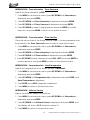
Restore factory settings function (ON or OFF), the default is OFF.
1. Press MENU to access the main menu, press UP/DOWN until Personality is
displayed and press ENTER.
2. Press UP/DOWN until Reset Default is displayed and press ENTER.
3. Press UP/DOWN to select desired mode (=ON, =OFF) and press ENTER to
confirm selection.
27 DESIGN WASH LED ZOOM CW™ User Manual ver 1