1
Keypad and Display
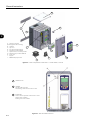
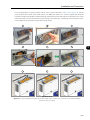
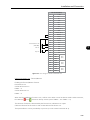
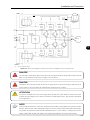
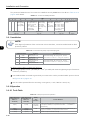
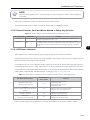
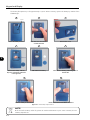
Installation:
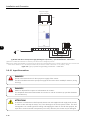
The keypad can be installed or removed from the inverter with or without AC power applied to the inverter.
The HMI supplied with the product can also be used for remote command of the inverter. In this case, use a
cable with male and female D-Sub9 (DB-9) connectors wired pin to pin (mouse extension type) or a market
standard Null‑Modem cable Maximum length of 10 m (33 ft). It is recommended the use of the M3 x 5.8
standoffs supplied with the product. Recommended torque: 0.5 Nm (4.5 lbf in).
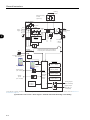
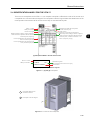
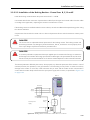
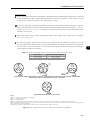
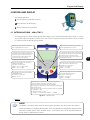
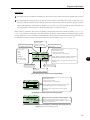
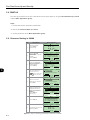
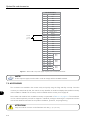
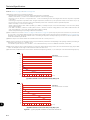
When power is applied to the inverter, the display automatically enters the monitoring mode. Figure 4.3 on
page 4-3 presents the monitoring screen displayed for the factory default settings. By properly setting specific
inverter parameters, other variables can be displayed in the monitoring mode or the value of a parameter can
be displayed using bar graphs or with larger characters as presented in Figure 4.3 on page 4-3.
Indication of the
control mode:
- LOC: local mode.
- REM: remote mode.
Indication of the direction
of rotation of the motor.
Inverter status:
- Run
- Ready
- Config
- Self-tuning
- Last fault: FXXX
- Last alarm: AXXX
- etc.
Run
LOC
1800
1.0
60.0
12:35
1800rpm
rpm
A
Hz
Menu
Indication of the motor
speed in rpm.
Monitoring parameters:
- Motor speed in rpm.
- Motor current in Amps.
- Output frequency in Hz (default).
P0205, P0206, and P0207: selection of parameters
that will be displayed in the monitoring mode.
4
P0208 to P0212: engineering unit for the speed
indication.
Right soft key feature.
Left soft key feature.
Clock.
Settings via:
P0197, P0198, and P0199.
(a) Monitoring screen with the factory default settings
Run
rpm
1800rpm
LOC
100%
10%
A
Hz
100%
12:35
Menu
Monitoring parameters:
- Motor speed in rpm.
- Motor current in Amps.
- Output frequency in Hz (default).
P0205, P0206, and P0207: selection of parameters
that will be displayed in the monitoring mode.
P0208 to P0212: engineering unit for the speed
indication.
(b) Example of a monitoring screen with bar ghaphs
Run
LOC
1800rpm
1800
rpm
12:35
Menu
Value of one of the parameters defined in P0205,
P0206 or P0207 displayed with a larger font size.
Set parameters P0205, P0206 or P0207 to 0 if it is not
desirable to display them.
(c) Example of a monitoring screen displaying a parameter with a larger font size
Figure 4.3 - Keypad monitoring modes
4-3