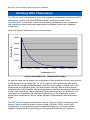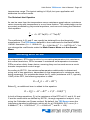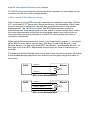
1
Page 46 · 5400 Series TECSource User’s Manual
User calibration can only be performed by sending appropriate commands to
the instrument over the computer interface (either USB or RS232). The
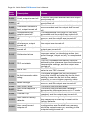
commands are more fully documented in the Computer Interfacing Manual, but
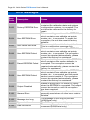
the essential commands are:
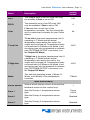
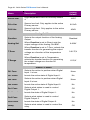
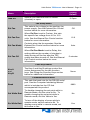
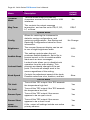
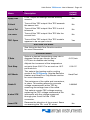
TEC:USERCAL:EDIT
TEC:USERCAL:PUT
TEC:USERCAL:GET
TEC:USERCAL:RESET
Enabled modification of user calibration settings
Changes user calibration settings
Retrieves user calibration settings
Resets all user calibration settings to factory defaults
NOTE
For sensors, the calibration is applied to the
measurement of the sensor, not the temperature. To
adjust the resistance-to-temperature conversion, change
the sensor coefficients as needed.
To prevent accidental modification of the calibration settings, the entries are only
editable when TEC:USERCAL:EDIT 1 command is sent remotely. By default, M
and B values are 1.000 and 0.00, respectively, but can be adjusted to change
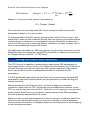
the sensor measurement. The calibrated measurement is computed as follows:
User calibrated reading = M * reading + B
For set point, such as ITE set and analog output, the set point is calculated as
follows:
User calibrated setpoint = M * set point + B
B is always in the units of the sensor or TEC measurement (for example, kiloohms (kΩ) for thermistors, and ohms (kΩ) for RTDs, Amps for ITE current, etc.).
Linking Instruments
The TECSource has the ability to link to a 4400 LaserSource to provide
extended functionality, including a laser interlock that prevents operation of the
laser without the TEC on and stable. When linked, the green Link LED will light.
Upon the release of the 4400 LaserSource, a firmware update of the
TECSource will be made available to enable this feature.