1
F.) Powering up the Control Box / Computer
1.) The unit will work automatically on either 115 or 230 VAC, however the unit has a
115 VAC power plug on the end. You may simply plug this into a 115VAC outlet.
Since electrical outlets vary worldwide, or if you need 230VAC, the power cord plug
may not match your outlet type. In this case, it must be replaced with the proper plug
by a licensed electrician.
2.) Plug the power cord into the outlet.
3.) The unit should stay on 24 hours a day.
4.) Monitor the LCD screen from time to time to be sure of continuous operation.
G.) LCD Indicator Screen
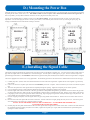
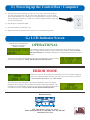
When the unit is operating normally
it will show the screen below.
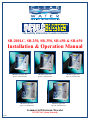
(SB-200LC & SB-250)
OPERATIONAL
The Scanning Frequency Screen to the left indicates the unit is functioning correctly
and is sweeping the full frequency range of the calcium resonance. When the SB-350,
SB-450 and SB-650 are operating normally they will alternate between the two screens
shown.
The screen to the right will intermittently show the coil output status in percent and the
internal system temperature. NOTE: SB-350, SB-450 and SB-650 ONLY
ERROR MODE
If there is an error (or the coil just isn't yet attached) the screen to the left will appear.
If the coil is connected and the message to the left is present, then contact your dealer
or Clearwater Enviro Tech for help. (ALL UNITS)
This screen to the right will appear if the internal temperature reaches 180 degrees
Fahrenheit. At this point the unit will shut down until the temperature subsides. This
can happen if you inadvertently short out the coil output for extended periods of time or
mount the unit in direct sunlight. NOTE: SB-350, SB-450 and SB-650 ONLY
Manufactured by
8767 115th Ave. N. • Largo, FL 33773
Phone: 800-756-7946 or 727-562-5186 • Fax: 727-562-5187
clearwater-enviro.com
MADE IN THE U.S.A.