1
TP-P6 Manual
Multifunctional Test Platform
Notice
Copyright, Precision Rated Optics®, All rights reserved.
No part of this manual may be reproduced in any form or by any means (including electronic storage
and retrieval or translation into a foreign language) without prior agreement and written consent from
Precision Rated Optics®, as governed by international copyright laws.
Warranty
The material contained in this document is subject to change without notice. Precision Rated Optics®
makes no warranty of any kind with regard to this material, including, but not limited to, the implied
warranties of merchantability and fitness for a particular purpose. Precision Rated Optics® shall not
be liable for errors contained herein or for incidental or consequential damages in connection with
furnishing, performance, or use of this material.
The battery is a consumable part and is not subject to the PRO TP-P6 warranty.
ISO 9001 Certification
Produced to ISO9001 International Quality System Standard as part of Precision Rated Optics®, objective
of continually increasing customer satisfaction through improved process control.
Precision Rated Optics® objective, which continually increasing customer satisfaction through improved
process control.
Safety Instructions
During each stage of operation of this instrument, please always observe the following safety
instructions. Not taking proper safety precautions, or not following the instructions, will violate the
safety standards of the design, manufacturing and application of these instruments. In no case will
Precision Rated Optics bear the responsibilities for consequences incurred by violation of the following
instructions.
Information contained in this manual is believed to be accurate and reliable. However, no responsibility is assumed by
Precision Rate Optics for its use nor for any infringements of patents or other rights of third parties that may result
from its use. No license is granted by implication or otherwise under any patent rights of Precision Rated Optics.
The information contained in the publications is subject to change without notice.
2
Tel: (888) 545-1254
•
www.PrecisionRatedOptics.com
Fax: (415) 358-4602 • Email: [email protected]
GENERAL
This product is a Safety Class 3 instrument. The protective features of this product may be impaired if it
is used in a manner not specified in the user manual.
Environmental Conditions
The TP-P6 is designed to operate at a maximum relative humidity of 95% and at altitudes of up to 2,000
meters. For more information, please refer to the Specifications section.
Before Applying Power
Verify that the product is set to match the available line voltage, the correct fuse is installed, and all
safety precautions are taken. Note: The PRO TP-P6’s external markings are described under Symbols.
Do Not Operate in an Explosive Atmosphere
Do not operate the PRO TP-P6 in the presence of flammable gases or fumes.
Do Not Remove PRO TP-P6 Cover
Operating personnel must not remove test equipment covers. Component replacement and internal
adjustments must be made only by qualified service personnel.
Any test equipment that appears damaged or defective should be made inoperative and secured against
unintended operation until they can be repaired by qualified service personnel.
Safety Terms Used in This Manual
Warning!!
Denotes a hazard. It calls attention to a procedure which, if not correctly performed or adhered to, could
result in personnel injury. Do not proceed beyond a Warning!! sign until the indicated conditions are fully
understood and met.
Caution
Denotes a hazard. It calls attention to an operating procedure which, if not correctly performed or
adhered to, could result in damage to or destruction of part or the entire product. Do not proceed beyond
a CAUTION sign until the indicated conditions are fully understood and met.
Note:
Denotes information that may be beneficial during the use and maintenance of the PRO TP-P6.
Tel: (888) 545-1254
•
www.PrecisionRatedOptics.com
Fax: (415) 358-4602 • Email: [email protected]
3
Laser Safety Announcements
Warning!!
PRO TP-P6 is a laser device. Users should avoid looking directly into the optical output. The use of a fiber
scope or magnifier should also be avoided. The use of such devices can focus a highly intense beam onto
the retina, which may result in permanent eye damage.
Make sure that the optical fiber or cable is not in use and there is no laser light in the fiber before testing
with the OTDR module. Failure to do so may result in an imprecise test trace, or even permanent damage
to the PRO TP-P6.
Caution
Laser Radiation: To avoid serious eye injury, never look directly into the optical outputs of fiber optic
network equipment, test equipment, patch cords or test jumpers.
● Always avoid looking directly into the optical output port, when PRO TP-P6 is operational.
● Always replace protective dust cap on the detector port when PRO TP-P6 is not being used.
● Always avoid looking directly at unconnected end of optical fiber in testing and make the unconnected end
pointing at a non-reflective object if available.
Warning!!
● The AC/DC adapter should only be used indoors.
● The PRO TP-P6 should be well ventilated to avoid overheating.
● Never use electric tools near flammable gas or flammable materials.
● In order to avoid electric shock, please do not use the device if there is obvious damage on the outside (top
cover, panel, etc)
● Only qualified repair personnel are authorized to perform adjustments, maintenance or repairs to the TP-P6.
● Even with the power off, the TP-P6 may still contain an electrical charge.
Caution
Battery: The battery used in the PRO TP-P6 is a rechargeable lithium battery. If the TP-P6 is to remain
unused for longer than two months, the battery should first be fully recharged before storage, and
charged again before being placed back into service. Do not recharge the batteries for more than 8
hours. Do not take the batteries out without the assistance of a qualified repair technician. Do not expose
batteries to fire or intense heat. Do not open or mutilate batteries. Avoid touching the electrolyte in the
batteries, which is corrosive and can cause injury to the eyes, skin or clothing.
External Power: The PRO TP-P6 can be powered externally, using the supplied AC/DC charger/power
adapter. For proper operation, the TP-P6 requires 24VDC.
4
Tel: (888) 545-1254
•
www.PrecisionRatedOptics.com
Fax: (415) 358-4602 • Email: [email protected]
How to Use This Manual
Button or Menu: The operating units in the Graphical User Interface (GUI) that can be clicked by using
the stylus are indicated by letters in square brackets, e.g. [Setup] and [Start].
Key: Function keys are on front panel, indicated by letter or icon in quotation marks, e.g.
and
(POWER)
(LIGHT).
Options: Indicated by letters in brackets, e.g. {Event} and {Trace Parameter}.
Tabs and Sub Options: Indicated by letters in angle brackets and square brackets:
e.g. <Mode> [Average], which stands for averaging mode option. <Wavelength> [1310nm], which stands
for 1310nm wavelength option.
Mode or Module: Indicated by letters in quotation marks, e.g. “OTDR” and “OCI”.
Desired Selections: Indicated by letter in quotation marks e.g.”Confirm” and “Cancel”
Tel: (888) 545-1254
•
www.PrecisionRatedOptics.com
Fax: (415) 358-4602 • Email: [email protected]
5
Table of Contents
1 General Information
10
2 Basic Operation
19
3 Common Settings and Special Settings
23
4 Basic Information of OTDR Module
27
5 Instruction of OTDR Modules of PRO TP-P6
30
1.1 Scope of this Manual
1.2 Unpacking and Inspection
1.3 Introduction
1.4 Product Appearance
1.5 Front Panel Indicators Introduction
1.6 Front Panel Keys Instruction
1.7 Control Methods
1.8 Instrument Interfaces Instructions
1.9 GUI Icons Instruction
1.10 Power the TP-P6
1.11 Using the Li-Ion Rechargeable Battery
2.1 Foreword
2.2 Power On/Off
2.3 Enter and Exit “Power Saving” Mode
2.4 Adjust LCD Brightness
2.5 Launching an Application
2.6 Installing a USB Keyboard or Mouse
2.7 Printer Configuration
3.1 Main Setup Menu
3.2 Select language
3.3 Automatic “Power Saving” Setting
3.4 Recalibrating the Touchscreen
3.5 Serious Deviation of Touchscreen
3.6 Date and Time Settings
3.7 Other Parameters Configuration
3.8 Load Default Settings
4.1 Basic Principles of the OTDR Module
4.2 Measurement Application of OTDR
4.2.1 Measurement Capabilities of the OTDR
4.2.2 Trace Analysis of OTDR
4.3 Basic Definition and Classification of Events
4.3.1 Events
4.3.1.1 Reflection Events
4.3.1.2 Non-reflection Events
4.3.1.3 Inspection Events
4.4 Optical fiber Span and Event Types
5.1 Main Features of the OTDR Module
5.2 Measurement Mode of OTDR module
5.2.1 Auto Mode and Manual Mode
5.2.2 Averaging Mode and Real-Time Mode
5.2.3 In-Service Mode and Normal Mode
5.3 OTDR Interface
5.4 Icons in the OTDR Interface
5.5 Trace Processing
6
Tel: (888) 545-1254
•
www.PrecisionRatedOptics.com
Fax: (415) 358-4602 • Email: [email protected]
Table of Contents
6 Preparing to use the OTDR
34
7 Testing with the OTDR
35
8 Testing Optical Fiber in “Auto” Mode
40
9 Test the Optical Fiber in “Manual” Mode
41
10 Using the OTDR to Test FTTx-PON Network Optical Fiber
Spans
46
6.1 Connectors
6.2 Cleaning and Connecting to Optical Fiber
7.1 OTDR Quick Test
7.2 Trace Processing
7.3 Unsaved Traces
7.4 Saving a Trace
7.5 Auto Naming
7.6 Opening a Saved Trace File
7.7 Trace Viewing and Analysis
7.8 Information and Function Windows
7.8.1 Switch Information and Function Windows
7.8.2 Events info reference
7.8.3 Reanalyze
7.9 Uploading a Trace to PC
7.10 Get help While Using the OTDR
8.1 Instruction of Auto Testing Mode
8.2 “Auto” Testing Mode
9.1 Common Parameters for OTDR Testing.
9.2 OTDR Test Parameters Configuration
9.3 OTDR Display and Other Configuration
9.4 “Real-time” and “Averaging” Testing Modes
9.5 Range Configuration
9.6 Pulsewidth Configuration
9.7 Averaging Time Configuration
9.8 Laser Wavelength Configuration
9.9 IOR Settings
9.10 Scatter Coefficient (Back scatter)
9.11 Non-Reflection Threshold (Splice Loss Detection Threshold) Configuration
9.12 Reflection Threshold (Reflection Detection Threshold) Configuration
9.13 End Threshold (Optical Fiber End-Face Detection Threshold) Configuration
10.1 Using the PON-Optimized OTDR Module
10.2 Selecting the Proper Distance Range
10.3 End Threshold (Optical Fiber End Detection Threshold)
10.4 Test Parameter - Recommended Values
Tel: (888) 545-1254
•
www.PrecisionRatedOptics.com
Fax: (415) 358-4602 • Email: [email protected]
7
Table of Contents
11 Trace and Event Analysis Settings
47
12 Manual Trace Analysis
65
13 Trace File Management
71
11.1 Opening a Trace File
11.2 Simultaneous Display MultipleTraces
11.3 Closing Trace Files
11.4 Trace Display
11.5 Switching and Moving Markers
11.6 Switching and Moving the Marked Point
11.7 Quickly Moving the Markers Outside of the Window
11.8 Locking the A/B Markers
11.9 Zooming in on the Trace
11.10 Cross Frame to Zoom-in on a Trace
11.11 Using the Zoom Toolbar to Zoom
11.11.1 Revert the Entire Trace View
11.11.2 Zooming in Horizontally
11.11.3 Zooming out Horizontally
11.11.4 Zooming in Vertically
11.11.5 Zooming out Vertically
11.12 Automatically Remember the Zoom Status
11.13 Move the Magnified Trace Window
11.14 Setting the Event Options
11.14.1 Locate and Display Events Within a Trace
11.14.2 Add an Event
11.14.3 Modifying an Event
11.14.4 Deleting an Event
11.15 Analysis Detection -Threshold Configuration
11.16 Set the Analysis Detection Threshold
11.17 Reanalyzing a Trace
11.18 Analyze the Optical Fiber in a Specific Optical Fiber Span
11.19 Set Trace Display Parameters
11.20 Setting the Unit of Measurement
11.21 Displaying or Switching Between Traces
11.22 Checking the Current Trace Parameters
12.1 Using Markers
12.2 Event Location and Loss Information
12.3 Measuring Insertion Loss (2-Point and 5-Point Method)
12.4 Measuring Attenuation (2-Point and LSA Method)
12.5 Measuring Reflectance
13.1 Choosing a Format to Save a Trace
13.2 To Copy, Move, Rename or Delete a Trace
13.3 Checking the Available Disk Space
8
Tel: (888) 545-1254
•
www.PrecisionRatedOptics.com
Fax: (415) 358-4602 • Email: [email protected]
Table of Contents
14 Print OTDR Report
73
15 VFL Application
16 Using the MPN Module
77
78
17 File Management
87
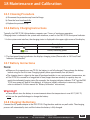
18 Maintenance and Calibration
88
19 Troubleshooting
91
20 Warranty
92
14.1 Reviewing Trace Information
14.2 Checking and Editing Trace Information
14.3 Printing an OTDR Report
16.1 Main Features of the MPN Module
16.2 MPN Module Interface
16.3 PON Power Meter of the MPN Module
16.4 Stabilized Laser Source of MPN Module
16.5 Optical Power Meter of the MPN Module
16.6 Loss Testing with the MPN Module
16.7 Optical Connector Inspection Using the MCI Module
17.1 Transferring Files or Folders Between the PRO TP-P6 and a USB Storage Device
17.2 Transferring Files or Folders Between the PRO TP-P6 and a PC
17.3 Deleting Saved Files
18.1 Cleaning Optical Interfaces
18.2 Necessity of Cleaning
18.3 Safety Instructions for Cleaning
18.4 Typical Cleaning Tools
18.5 Cleaning Procedure
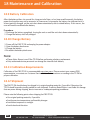
18.6 Battery Charging Instructions
18.7 Other Battery Information
18.8 Charging the Battery
18.9 Battery Calibration
18.10 Changing the Battery
18.11 Calibration Requirements
18.12 Shipment
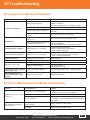
19.1 Common Problems and Solutions
19.2 Trace Measurement Problems and Solutions
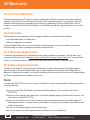
20.1 Terms of Warranty
20.2 Exclusion
20.3 Warranty Registration
20.4 Returning the TP-P6 for Service
20.5 Customer Service Contact Information
Tel: (888) 545-1254
•
www.PrecisionRatedOptics.com
Fax: (415) 358-4602 • Email: [email protected]
9
1 General Information
1.1 Scope of this Manual
Thank you for purchasing the Precision Rated Optics® TP-P6 test platform. Please read the user manual
carefully before using any of the Precision Rated Optics® series fiber-optic equipment. Always observe
the Warning!!s and cautions appearing throughout this, or any other user manual.
This manual contains the necessary information for the proper operation and maintenance of the
Precision Rated Optics® PRO TP-P6.
All Precision Rated Optics® PRO TP-P6 platforms are carefully assembled and undergo a rigorous
mechanical, electrical and optical inspection prior to shipment. Included with the PRO TP-P6, there
should also be a data transfer cable, a power adapter, a PC Analysis software installation disk and this
user manual. For detailed information, please refer to the packing list.
Upon receiving your PRO TP-P6, please check for any obvious signs of physical damage that may have
occurred during shipment. Report any damage to the shipping agent or the representative of Precision
Rated Optics immediately. Retain the original packing materials in case reshipment becomes necessary.
1.2 Unpacking and Inspection
This instrument has been carefully packed in accordance with standard shipping procedures. Examine
the PRO TP-P6 for damage that may have occurred during shipment. If you find any damage or PRO
TP-P6 is not operational, or if any of the included items are missing, please contact your nearest PRO
representative:
Precision Rated Optics, Inc.
Product Distribution Center
Manufacturing & Testing
9999 Hamilton Blvd
Breinigsville, PA 18031
Tel. (888) 545-1254
10
Tel: (888) 545-1254
•
www.PrecisionRatedOptics.com
Fax: (415) 358-4602 • Email: [email protected]
1 General Information
1.3 Introduction
The Precision Rated Optics® PRO TP-P6 Multifunctional Test Platform is a compact modular platform
supporting various functions, including a Laser Source, Power Meter, bi-directional span loss testing, inservice PON OTDR testing, fiber termination inspection, visible fault locating etc. It is specially designed
for FTTx/PON applications, and can meet all test requirements of installers, contractors and service
operators during optical network installation, service activation, maintenance and troubleshooting.
PRO TP-P6 is easy to handle and features a large, color touchscreen, accurate adjustment knob (AKA
“Jog Shuttle”) and an intuitive Graphical User Interface (GUI). The TP-P6 is compatible with Windows CE
and has a large built-in memory, which allows for the storage of test data, manipulation of stored data, or
transfer of stored data to a PC, via USB.
Primary Features of the TP-P6
● 8.4” color LCD touchscreen, featuring adjustable brightness
● Convenient and flexible handling: touchscreen, adjustment knob, keypad and external
USB mouse/keyboard.
● Data storage.
● USB data interface (Host and Client).
● PC software for test data analysis and reporting.
● Customizable screensaver feature for “Power Saving”.
● Optimized power management: 7 hours continuous operation.
● Direct printing through USB
Optional Functional Modules
● OTDR Module (with VFL)
● OCI Module (Optical Fiber Connector Inspection)
● Multifunctional Module (Laser Source, Optical Power Meter and Optical Loss Tester etc.)
Tel: (888) 545-1254
•
www.PrecisionRatedOptics.com
Fax: (415) 358-4602 • Email: [email protected]
11
1 General Information
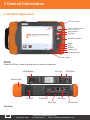
1.4 Product Appearance
LCD Touchscreen
3-Way Adjustment Knob
( AKA “Jog Shuttle”)
Laser Indicator
Start/Stop
Direction Keys/Enter
Return
Help
Backlight
Power On/Off
Charging Indicator
Power Indicator
Note:
Power On/Off key is lower than other keys to avoid miss-operation.
OTDR Module
VFL Port
OTDR Port
Battery Dock
DC Input
Probe Port
USB Slave
RJ-45 Port
USB Host x2
Top View
12
Tel: (888) 545-1254
•
www.PrecisionRatedOptics.com
Fax: (415) 358-4602 • Email: [email protected]
1 General Information
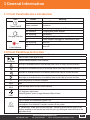
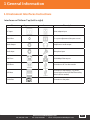
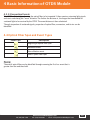
1.5 Front Panel Indicators Introduction
Icon
Status
Meaning
Off
System off
Power On/Off
Green, constant
System on
Charging Indicator
Red, bspaning
Red, constant
Red, bspaning
Green, constant
Off
Red, bspaning
Low battery, charging needed
Charging with power adapter
Low battery
Charging complete, with power adapter
Power adapter unplugged or connection is poor
Laser on
Off
Laser off
Laser Indicator
1.6 Front Panel Keys Instruction
Name
Function
Press to start. Press again to stop.
Start/Stop
Launch selected module in main interface.
Move up or extended function to be defined, please refer to Help of current interface.
Move down or extended function to be defined, please refer Help of current interface.
Move left or extended function to be defined, please refer Help of current interface.
Move right or extended function to be defined, please refer Help of current interface.
●
Enter (Temporarily no function assigned)
BACK
Back
?
HELP
Enter the Help section of the current interface.
LIGHT
LCD brightness adjustment.
4-level brightness, press to toggle between different levels.
Power on/off
Press to power on system when system is off.
POWER
When system is on, press and hold 1 second to enter “Screensaver” mode for lower power
consumption. Press and hold 3 seconds to power off the system.
In “Screensaver” mode, press any key and hold 1 second to restore normal status (Or by
clicking anywhere on the touchscreen with the stylus, by clicking the mouse left key or the
adjustment knob)
Tel: (888) 545-1254
•
www.PrecisionRatedOptics.com
Fax: (415) 358-4602 • Email: [email protected]
13
1 General Information
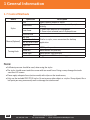
1.7 Control Methods
Name
Operation
Click
Double click
Stylus
Draw frame
Mouse (Optional)
Turning Knob
Click and hold
Left click
Left double click
Left key draw frame
Right click
Up
Rotate left
Rotate right
Down
Description
Select specific module or menu.
All major test functions can be operated by stylus
clicking.
1. Batch files selection in File Explorer.
2. Zoom-in/out selected part of displayed trace.
Similar to stylus, more convenient for desktop
application.
OTDR quick operation.
Move Marker left precisely.
Move Marker right precisely.
Toggle between Markers/assisting points
Note:
● Sufficient pressure should be used, when using the stylus.
● The stylus should never touch the screen with too much force. Doing so may damage the touchsensitive LCD screen.
● Please apply adequate force (not too much) with stylus on the touchscreen,
● Only use the included PRO TP-P6 stylus. Do not use any other object as a stylus. Sharp objects like a
ball point pen may permanently mark or damage the touchscreen.
14
Tel: (888) 545-1254
•
www.PrecisionRatedOptics.com
Fax: (415) 358-4602 • Email: [email protected]
1 General Information
1.8 Instrument Interfaces Instructions
Interfaces on Platform Top (Left to right)
Name
Appearance
Icon
Description
DC Input
Power adapter input
Serial Port
For system adjustment (Not open to user)
Audio Output
Headphone or audio output
Audio Input
Microphone input
RJ45 Port
10/100Mbps Ethernet port
USB Slave
Connection to PC for data transfer
USB Host
Connection to USB devices, e.g. printer,
mouse, keyboard and USB interface testing
devices (Driver needed)
Probe Port
Connection to the probe
Tel: (888) 545-1254
•
www.PrecisionRatedOptics.com
Fax: (415) 358-4602 • Email: [email protected]
15
1 General Information
Optical Ports
The PRO TP-P6 is equipment with FC/PC connectors (Interchangeable SC, ST)
Note:
The amount of connectors depends on the specific module configuration. Not all modules are equipped
with all ports.
Warning!!
Remember that the PRO TP-P6 is a laser instrument. Users should avoid looking directly into the optical
output. The use of a fiber scope or magnifier should also be avoided. The use of such devices can focus a
highly intense beam onto the retina, which may result in permanent eye damage.
Caution
Laser Radiation: To avoid serious eye injury, never look directly into the optical outputs of fiber optic
network equipment, test equipment, patch cords, or test jumpers.
● Always avoid looking directly into the optical output port, when PRO TP-P6 is operational.
● Always replace protective dust cap on the detector port when PRO TP-P6 is not being used.
● Always avoid looking directly at unconnected end of optical fiber in testing and make the
unconnected end pointing at a non-reflective object if available.
16
Tel: (888) 545-1254
•
www.PrecisionRatedOptics.com
Fax: (415) 358-4602 • Email: [email protected]
1 General Information
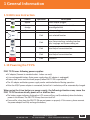
1.9 GUI Icons Instruction
Icon
Status
Operation
Appear
Description
Power adapter plugged
Green part
change
Showing battery power level with
percentage behind.
Appear
Battery unplugged or connection is poor.
Click
Start selected function
Click
Enter Setup interface, including Interface
style, Language and System setting etc.
Click
Enter Help of current interface
Click
Enter Help of current interface
Click
System off
1.10 Powering the TP-P6
PRO TP-P6 uses following power supplies:
● AC adapter (Connect to standard outlet - Indoor use only)
● Li-ion rechargeable battery (Auto power supply when AC adapter is unplugged)
● Battery dock cover must be closed properly when PRO TP-P6 is operational.
● The AC adapter and battery power supply can be switched without affecting operation
● After the AC/DC power adapter is connected, the built in Li-ion battery will be automatically charged.
When using the Li-ion battery as power supply, the following situations may cause the
PRO TP-P6 to automatically power off or malfunction:
● The battery power indicator displayed on LCD screen will turn red (Low battery) when the battery
power is insufficient. The PRO TP-P6 may then turn itself off.
● If unused for a long time, the PRO TP-P6 may not power on properly. If this occurs, please connect
the power adapter and fully recharge the battery.
Tel: (888) 545-1254
•
www.PrecisionRatedOptics.com
Fax: (415) 358-4602 • Email: [email protected]
17
1 General Information
1.11 Using the Li-Ion Rechargeable Battery
● The battery for PRO TP-P6 is a Lithium Ion rechargeable battery.
● It requires approximately 4 hours to fully charge from a completely depleted state.
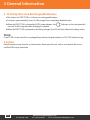
● When the PRO TP-P6 is charged by AC/DC power adapter, the
turn red. It will turn green when charging is complete.
indicator on the front panel will
● When the PRO TP-P6 is powered on and being charged, the LCD will also indicate the charge status.
Note:
If the TP-P6 is to be stored for a prolonged time, please charge the battery to 50%-70% before storing.
Caution
Keep the battery away from fire or intense heat. Never open the unit, unless instructed to do so by a
certified PRO repair technician.
18
Tel: (888) 545-1254
•
www.PrecisionRatedOptics.com
Fax: (415) 358-4602 • Email: [email protected]
2 Basic Operation
2.1 Foreword
This part introduces the basic operation on the PRO TP-P6. Please read this manual carefully for optimal
operation. Should you encounter any problems during operation, you are welcome to contact the
technical staff for assistance or more information.
2.2 Power On/Off
Power on:
Press the
button until the LED power indicator is on.
Power off:
Press the
button and hold 3 seconds until the LED power indicator is off.
Note:
Power off will completely shut down the platform and all connected modules. Powering on will restart the
platform, as well as all connected modules.
2.3 Enter and Exit “Power Saving” Mode
When the power is on, the user can set the PRO TP-P6 to “Power Saving” mode and return to normal
status. In “Power Saving” mode, the LCD backlight will turn off.
Two ways to enter “Power Saving” mode:
● Press the
button once to turn off the LCD backlight. The LED power indicator will remain on.
● When the power is on, the PRO TP-P6 will automatically enter “Power Saving” mode after its idle
time exceeds the pre-set value (adjustable by user).
To exit “Power Saving” mode you can:
● Press the
button
● Press any key on the front panel or the adjustment knob
● Click the touchscreen with the stylus
● Click the mouse
2.4 Adjusting the LCD Brightness
The LCD touchscreen has four (x4) levels of adjustment.
Press the
button to toggle between the different levels.
2.5 Launching an Application
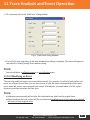
When the PRO TP-P6 is first powered on, the system will load the main GUI. (See Fig. 2.1)
Tel: (888) 545-1254
•
www.PrecisionRatedOptics.com
Fax: (415) 358-4602 • Email: [email protected]
19
2 Basic Operation
Launching the OTDR program
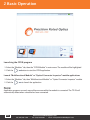
1. Select the “Modules” tab, then the “OTDR Module” in main menu. The module will be highlighted.
2. Click the
button to start the OTDR application.
Launch “Multifunctional Module” or “Optical Connector Inspector” module applications
1. Select the “Modules” tab, then “Multifunctional Module“ or “Optical Connector Inspector” module.
2. Click the
to launch the application.
Note:
Application programs are only accessible onscreen while the module is connected. The TP-P6 will
automatically detect when a module has been connected.
20
Tel: (888) 545-1254
•
www.PrecisionRatedOptics.com
Fax: (415) 358-4602 • Email: [email protected]
2 Basic Operation
2.6 Installing a USB Keyboard or Mouse
By default, there is a software-driven keyboard displayed onscreen. The user can select letter and
numbers by using the stylus. To input large amounts of data, or simply to input data faster, a USB
keyboard and/or mouse may be used
Installing a USB keyboard or mouse on the PRO TP-P6
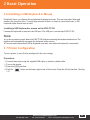
Connect the keyboard or mouse to the USB port. The USB port is on the top of PRO TP-P6.
Note:
● You do not need to power down the PRO TP-P6 before connecting the keyboard and mouse. The
platform will automatically recognize the keyboard and/or mouse.
● The onscreen keyboard will still be displayed onscreen, even when the keyboard is connected.
2.7 Printer Configuration
To use a printer, it must first be configured in the user settings.
Procedure:
1. Connect the printer using the supplied USB cable, or another suitable cable.
2. Turn on the printer.
3. Enter the OTDR interface.
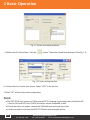
4. Click the
2.2)
button on the lower-right corner of the screen. Enter the {Print} interface. (See Fig.
Tel: (888) 545-1254
•
www.PrecisionRatedOptics.com
Fax: (415) 358-4602 • Email: [email protected]
21
2 Basic Operation
Fig. 2.2 Printer and setting interface
5. While in the {Print} interface, click the
button. The printer should been displayed. (See Fig. 2.3)
Fig. 2.3 Printer setting interface
6. In the printer list, choose your printer. Select “LPT1:”in the port list.
7.Select “OK” to finish the printer configuration.
Note:
● The PRO TP-P6 only supports a USB printer with PCL language. Approved printers include the HP
LaserJet 1022 and HP Laser P2015d, but others may be compatible as well.
● If the printer does not appear, remove the USB cable and reconnect the printer.
● You do not need to shut down the PRO TP-P6 when connecting the printer.
22
Tel: (888) 545-1254
•
www.PrecisionRatedOptics.com
Fax: (415) 358-4602 • Email: [email protected]
3 Common Settings and Special Settings
3.1 Main Setup Menu
In the Setup menu, the user can customize many settings, including the interface style, language ,
“Power Saving” mode, system settings, touchscreen calibration, etc.
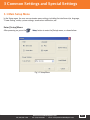
Enter [Setup] Menu:
After powering on, press the
button to enter the [Setup} menu, as shown below:
Fig 3.1 Setup Menu
Tel: (888) 545-1254
•
www.PrecisionRatedOptics.com
Fax: (415) 358-4602 • Email: [email protected]
23
3 Common Settings and Special Settings
3.2 Select language
Switching Language:
1. Enter the [System Setup] menu.
2. In the language area, choose the desired language.
3. Press “OK” to confirm your selection.
4. You will need to power off and power on again for the chosen language to initiate.
Note:
● After changing the GUI language and rebooting the platform, every function within the software will
then be displayed in the desired language.
● At the time of this printing, English and Chinese are the only two languages offered.
3.3 Automatic “Power Saving” Setting
For prolonged testing sessions, it is suggested that you use the TP-P6 in “Power Saving” mode.
The PRO TP-P6 is designed to automatically enter “Power Saving” mode after its idle time exceeds
pre-set value (adjustable by the user).
Setting “Power Saving” Mode:
1. Click the
button to enter into the [Setup] menu.
2. In the “Power Saving” area of setup menu, choose “Turn Off LCD.”
3. Press “OK” to exit.
Note:
“Power Saving” mode is on by default. The LCD backlight is programmed to turn off after 10 minutes of
non-use.
24
Tel: (888) 545-1254
•
www.PrecisionRatedOptics.com
Fax: (415) 358-4602 • Email: [email protected]
3 Common Settings and Special Settings
3.4 Recalibrating the Touchscreen
If the accuracy of the touchscreen seems abnormal, it is recommended that you recalibrate it.
Recalibrating the Touchscreen
1. Click the
button to enter into [Setup] menu.
2. While in the [Setup] menu, click [System Setup].
3. Double-click the “Stylus” icon.
4. Click [Calibration] and follow the onscreen instructions.
5. When the system shows “Press enter button to accept new setup,” click the touchscreen with the
stylus to complete the new setting.
Note:
The touchscreen can be calibrated as many times as required to achieve accuracy.
3.5 Serious Deviation of the Touchscreen
When the touchscreen is too far out of calibration, using the stylus may be difficult or even impossible.
Alternatively, you can use a USB mouse to enter into the stylus [Calibration window], and continue
calibration using a combination of the mouse and the stylus.
3.6 Date and Time Settings
The current date and time are displayed on the top-right of interface. When saving the test results, the
files contain the date and time. This is called “Time/Date Stamping.”
Tel: (888) 545-1254
•
www.PrecisionRatedOptics.com
Fax: (415) 358-4602 • Email: [email protected]
25
3 Common Settings and Special Settings
Note:
● The TP-P6 has a special internal battery to maintain the date and time.
● The internal battery is NOT servicable by the user.
● Modifying the time zone, date and time may affect some settings and operation of Windows CE.
To set the time and date:
1. From the opening GUI, click [Setup], then [System Setup], then [Date/Time].
2. Modify the time and date.
3. Confirm the modification.
Exit the [Time/Date] interface.
3.7 Other Parameters Configuration
Though the “Control Panel,” Windows CE allows for changes to be made on a system level, which is
beyond the scope of this manual. Please refer to your Windows CE information for further instructions.
Note:
It is always suggested that you maintain the factory-set default system settings, unless it is absolutely
necessary to change them.
3.8 Load Default Settings
This function is used to return the system settings to the factory defaults. These settings include:
“Interface Style”, “Language”, “Power Saving” and OTDR features and settings.
Load Default Settings:
From the main GUI, click the
button.
Click on [System Setup] , then [Load Default]. You will then see “Restore factory settings?”
Click “Yes” to restore to factory default settings, or “No” to cancel.
Note:
Keep in mind that restoring the TP-P6 to factory default setting will overide any settings you have made,
including preferences and saved trace data.
26
Tel: (888) 545-1254
•
www.PrecisionRatedOptics.com
Fax: (415) 358-4602 • Email: [email protected]
4 Basic Information of OTDR Module
4.1 Basic Principles of the OTDR Module
An OTDR (Optical Time Domain Reflectometer) is a measurement device for identifying optical fiber transmission
problems. The PRO TP-P6 is mainly used to measure the attenuation of a whole optical fiber span, and to provide
attenuation details relating to the length, location and characteristics of any event within the fiber optic span. An
event can refer to faults caused by splicing, contamination, faulty connectors and/or bending in the fiber. The
TP-P6 is non-destructive, and allows for one-end connection and rapid measurement during fiber manufacturing,
construction, repair or general maintenance.
The faults and heterogeneity of optical fiber itself cause “Rayleigh Scattering” of light pulses transmitted in optical
fiber. Part of the light pulse is scattered in the reverse direction of transmission, and is therefore called “Rayleigh
Backward Scattering,” which actually provides attenuation details directly relating to the optical fiber length.
Information relating to the distance is obtained by measuring the time it takes for the light to return to the OTDR.
That’s why it’s called an Optical TIME DOMAIN Reflectometer (OTDR). “Fresnel Reflection” occurs at the
boundary between two media at a different Index of Refraction (IOR), which can occur due to macro bends, faulty
connectors, dirty connectors or even by the other end (or “end-face”) of the fiber span. The reflection is used
to locate any discontinuous points along optical fiber. The magnitude of reflection (strength) depends upon the
difference between the IOR and the known characteristics of the transmitted light.
The OTDR sends a light pulse through the connected optical fiber, then identifies events by calculating the
reflection, backward scattering and magnitude that occur within a specific time frame. The events are then displayed
onscreen. The Y-axis is a decibel (dB value) of backward scattering power, and the X-axis is the distance from the
user.
4.2 Measurement Application of OTDR
The OTDR displays power relating to distance of returning signals. This information can be used to
identify the main properties of an optical fiber chain.
4.2.1 Measurement Capabilities of the OTDR
● Event location (Distance from user) or rupture of optical fiber span
● Attenuation coefficient of a fiber span
● Loss of a single event (e.g. one optic tie-in), or total loss
● Range of a single event, like reflection of connectors (or grade of reflection)
● Auto measurement of cumulative loss of a single event
4.2.2 Trace Analysis of OTDR
The trace analysis of OTDR is fully automatic. The trace locates:
● Reflection events of connections and mechanic tie-ins
● Non-reflection events (usually at spliced tie-ins)
● End-face of optical fiber
Note: By scanning the first loss event that is larger than the end threshold, the distance of the end of
the optical fiber can be accurately calculated.
● Information provided: event type, loss, reflection and distance
Tel: (888) 545-1254
•
www.PrecisionRatedOptics.com
Fax: (415) 358-4602 • Email: [email protected]
27
4 Basic Information of OTDR Module
4.3 Basic Definition and Classification of Events
4.3.1 Events
Events refer to any abnormal points causing attenuation or sudden change of scattering power, besides
the normal scattering of optical fiber, which include all kinds of losses, such as bending, connections and
breaks.
Event points are displayed on the LCD and illustrate any event that prevents the trace from continuing in
a straight line.
Events can be classified as either reflection events and non-reflection events.
4.3.1.1 Reflection Events
When some pulse energy is scattered, reflection events occur. When reflection event occurs, peaks
show on the trace, as shown below:
Reflection Event
4.3.1.2 Non-reflection Events
Non-reflection events occur at certain points where there is some optical loss, but no light
scattering. When a non-reflection event occurs, a power disruption is displayed on a trace.
Non-reflection Event
28
Tel: (888) 545-1254
•
www.PrecisionRatedOptics.com
Fax: (415) 358-4602 • Email: [email protected]
4 Basic Information of OTDR Module
4.3.1.3 Inspection Events
The OTDR sends a light pulse into the optical fiber to be inspected. It then receives returning light signals
and starts calculating the “event” distance. The farther the distance is, the longer the time needed for
scattered light to be received by the OTDR. The event distance is then calculated.
Through inspection of scattered signals, properties of optical fiber, connectors, and tie-ins can be
identified.
4.4 Optical Fiber Span and Event Types
Event Type
Description
Beginning of optical fiber span
Reflection event
Non-reflection event
End of optical fiber span
Note:
The end of optical fiber can be identified through scanning the first loss event that is
greater than the end threshold.
Tel: (888) 545-1254
•
www.PrecisionRatedOptics.com
Fax: (415) 358-4602 • Email: [email protected]
29
5 Instruction of OTDR Modules of PRO TP-P6
5.1 Main Features of the OTDR Module
● High dynamic range and short dead zones.
● Complete sampling under low noise. Accurate low-loss detection.
● Resolution accurate to within 10cm.
● Multiple test models to meet the requirements of any test condition.
Caution
Always make sure that the optical fiber (or cable) is not “live,” and that there is no laser light in the fiber
before testing with the OTDR. Failure to do so may result in an imprecise test trace, or even permanent
damage to the OTDR.
5.2 Measurement Mode of the OTDR Module
For the ultimate in convenience, the OTDR module offers multiple measurement modes. These modes
can be switched at any time.
5.2.1 Auto Mode and Manual Mode
Auto mode: Calculate the length of fiber, setting Sampling parameters, getting and showing the trace
and analyzing the events.
Manual Mode: Advanced Mode, whereby the user can set all OTDR parameters to test.
30
Tel: (888) 545-1254
•
www.PrecisionRatedOptics.com
Fax: (415) 358-4602 • Email: [email protected]
5 Instruction of OTDR Modules of PRO TP-P6
5.2.2 Averaging Mode and Real-Time Mode
Real-Time Mode: The OTDR will undertake a real-time measurement for the connector or exterior fiber
and continually update the trace. While in “Real-Time Mode,” unless the user stops measuring, the OTDR
will continue measuring.
Averaging Mode: Under “Averaging Mode,” the OTDR will average the data within the measurement
time, which is set by the user. At the end of the designated measurement time, the OTDR will
automatically stop measuring and display the final results of the trace.
Note:
As a general rule, it is suggested that the user leave the OTDR in “Averaging” mode.
5.2.3 In-Service Mode and Normal Mode
In-Service Mode: Measures live fiber, using 1625nm to test.
This mode does not affect the normal operational wavelength in the fiber under test.
Normal Mode: Uses wavelengths other than 1625nm (such as 1310nm, 1490nm, 1550nm and etc.).
Before testing, please make sure there is no light present in the fiber under test.
Caution
When using the “In-Service” mode, the fiber must be connected to the right port of 1625nm. If it is
connected to other port, it may result in an imprecise test trace or even permanent damage to the OTDR.
Note:
● The OTDR can only be in the “In-Service Mode” when the 1625nm wavelength is being used.
● When the OTDR is in “In-Service Mode,” other wavelengths (such as 1310nm, 1490nm,1550nm etc.)
are not available
● Both “In-Service” and “Normal Mode” can be used alternatively, but some modes are not available
under certain conditions.
Tel: (888) 545-1254
•
www.PrecisionRatedOptics.com
Fax: (415) 358-4602 • Email: [email protected]
31
5 Instruction of OTDR Modules of PRO TP-P6
5.3 OTDR Interface
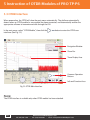
When powered on, the OTDR will show the main menu automatically. The platform automatically
detects when an OTDR module (or any module) has been connected, and automatically enables the
appropriate software to become accessible through the GUI.
In the main menu, select ”OTDR Module”, then click the
interface. (See Fig. 5.1)
button to enter the OTDR user
Navigation Window
Zoom Bar
Trace Display Area
Common Operation
Buttons
Info and Function Area
Fig 5.1 OTDR Main Interface
Note:
The OTDR interface is available only when OTDR module has been attached.
32
Tel: (888) 545-1254
•
www.PrecisionRatedOptics.com
Fax: (415) 358-4602 • Email: [email protected]
5 Instruction of OTDR Modules of PRO TP-P6
5.4 Icons in the OTDR Interface
Icon
Description
Zoom-out trace horizontally
Start testing
Zoom-in trace vertically
Stop testing
Zoom-out trace vertically
OTDR settings
Full-trace view
A/B Marker switch
Save trace file
Move Marker or marking
point left/right
Open trace file
Toggle between marking points
Close trace
Print trace file
Zoom-in trace horizontally
Return to previous menu
Return to previous menu
Note:
Not all icons are displayed at one time. The icons become visible depending on which interface
the user happens to be using at that moment.
5.5 Trace Processing
The “OTDR Trace Manager” software included with the TP-P6 is for trace review and analysis on
a Windows-based PC, following trace acquisition. You can transmit the stored trace data be either
connecting the TP-P6 directly to the PC, using the included USB cable, or by transferring the files using a
USB “memory stick.
Trace processing includes:
● Trace editing (single-trace, multiple-trace)
● Printing (single-trace printing, batch printing)
● Trace format conversion
The Bi-directional averaging program (for singlemode fibers only) is available in advanced versions. This
is meant to increase loss testing accuracy by averaging the measured loss values of each event from
both directions. Bi-directional testing is always recommended for the greatest accuracy.
Tel: (888) 545-1254
•
www.PrecisionRatedOptics.com
Fax: (415) 358-4602 • Email: [email protected]
33
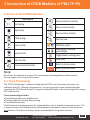
6 Preparing to use the OTDR
6.1 Connectors
The TP-P6 comes standard with FC and PC optical port connectors. It can also accommodate SC and ST
connectors, which are available from Precision Rated Optics.
6.2 Cleaning and Connecting to Optical Fiber
To ensure measurement accuracy, always clean and connect the fiber properly before testing.
Tools are not required to connect fiber to the OTDR.
● Please refer to “Maintenance and Calibration” for optical port and connector cleaning.
● After cleaning the connectors, verify that the correct connectors are being used.
● Connect the fiber to be tested to the OTDR port.
Note:
Improperly connected fiber can cause many problems, including highly innaccurate test results, caused by
light loss and/or scattering.
Warning!!
To ensure your personal safety, please refer to the Safety Instructions of this manual before testing.
Caution
● When testing with the OTDR, unless connected to specific optical port, please make sure there is no
operational laser in the fiber under test. Failure to do so may cause incorrect test results, or even
permanent damage to the equipment.
● Please do not screw connectors too tightly, or damage may occur to the fiber and/or optical ports.
34
Tel: (888) 545-1254
•
www.PrecisionRatedOptics.com
Fax: (415) 358-4602 • Email: [email protected]
7 Testing with the OTDR
7.1 OTDR Quick Test
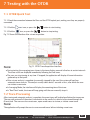
7.1.1 Check the connection between the fiber and the OTDR optical port, making sure they are properly
connected.
7.1.2 Click the
7.1.3 Click the
icon, or press the
icon, or press the
button to start testing.
button to stop testing.
Fig 7.1 Shows the interface after a trace acquisition:
Fig 7.1 OTDR Trace Acquisition Interface
Note:
● During testing, the averaging trace shows in the trace display area and refreshes at certain intervals.
The trace result are displayed immediately following the final trace.
● The user can stop tracing at any time. If stopped, the application will display all trace information
gathered up to that point.
● After a trace analysis is complete (or manually stopped by the user) the system will perform
automatic trace analysis. The analysis usually takes about 5 seconds or less, after which the user
can initiate a new trace.
● In Averaging Mode, the interface will display the remaining time of the trace.
● In “Real-Time” mode, the trace will keep going until the user manually stops it.
7.2 Trace Processing
After tracing and automatic analysis is complete, the event types will be displayed below the trace area.
The user can review all of the events’ information in the events list, which can be viewed through the
{Events} tab. The user can also save traces, open saved traces to review, or initiate a new trace.
Note:
The application will prompt the user to save unsaved traces before initiating a new trace.
Tel: (888) 545-1254
•
www.PrecisionRatedOptics.com
Fax: (415) 358-4602 • Email: [email protected]
35
7 Testing with the OTDR
7.3 Unsaved Traces
Unsaved traces will be titled as “*U_xxxx” (xxxx stands for the current testing wavelength), which is
displayed on the upper-left corner of the trace display area.
Note:
A trace name starting with an asterisk: “*” indicates that it is an unsaved trace or a modified trace.
7.4 Saving a Trace
When a trace is complete, the user can save the trace, along with the parameters information.
Procedure:
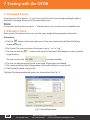
1. Click the
button on the lower-right corner of the main interface and the [Save File] dialog
window will pop up.
2. File Format: The user can choose a file format, such as “.sor” or “.jpg”.
3. The user can click the
button on the top-left of the [Save File] dialog box to select a specific
target directory.
to create new folder.
The user can also click
4. The user can edit the name of the file to be saved. All characters are allowed.
5. File saving: In the [Save File] dialog window, click the [Save] button to save the file.
6. Click [Cancel] to cancel saving the file.
The [Save File] dialog window and options are shown below. (See Fig 7.2)
Fig 7.2 Save dialog window
36
Tel: (888) 545-1254
•
www.PrecisionRatedOptics.com
Fax: (415) 358-4602 • Email: [email protected]
7 Testing with the OTDR
Operation Notes:
● The title bar will always show the current folder path, as shown in Fig 7.2: “\SDMMC_DISK\”.
● Newly created folders will automatically be displayed.
● After a file is saved, the file name will be displayed on the upper-left corner of the trace display
area. Please Note: Only the first 10 characters of the file name will be displayed. The remaining
characters are abbreviated using a tilda “~” mark
7.5 Auto Naming
The system supports automatic naming when saving traces.
Procedure:
1. Enable/disable “Auto Naming” by checking or unchecking {Auto Naming} in the OTDR Setup.
2. The user can edit the auto naming default filename by modifying file name prefix from the {File Name}
field.
Please Note: The prefix is only available when the “Auto Naming” option is checked.
Note:
● The file name in “Auto Naming” mode consists of the Prefix+Wavelength+Number. The number will
increase automatically as the user continues to save traces.
● If the name of the file to be saved already exists, the system will display a Warning!!.
7.6 Opening a Saved Trace File
Click the
button on the lower-right corner of the OTDR interface to open a saved trace.
1. In [Single -Trace Display] mode, when opening a new trace, the currently-displayed trace will be
closed.
2. In [Multiple -Trace Display] mode, the user can simultaneously display up to four traces.
Note:
● The user can enable or disable “Multiple -Trace Display” mode in the OTDR setup by checking or
unchecking the {Multiple-Trace} option in the [Display] dialog.
● The user can open and view a “.jpg” format trace though “File Explorer” on the {Program} tab in the
main interface. The“.jpg” format trace can be also loaded onto a PC for viewing and analysis.
7.7 Trace Viewing and Analysis
The user can zoom-in or out of a trace by utilizing Markers and marking points for the trace
characterization, including loss, attenuation, reflection, etc.
Zoom in or Zoom out of a trace:
● To zoom in: Draw a selection frame from the upper-left corner to the lower-right right corner.
● To zoom out: Draw a selection frame from the lower-right corner to the upper-left corner.
Tel: (888) 545-1254
•
www.PrecisionRatedOptics.com
Fax: (415) 358-4602 • Email: [email protected]
37
7 Testing with the OTDR
Show A/B Marker:
● Click the {Markers} tab in the OTDR main interface and the Markers or Marker tabs will show in the
trace display area.
● Press the adjustment knob once.
To move the Marker quickly:
● Select and hold the Marker, dragging it to the left or right.
or
buttons on {the Markers} tab to move the active Marker left or
● Alternatively, click the
right at an accelerated speed. This is especially useful for extremely long-distance traces.
Moving the Marker precisely:
● Rotate the adjustment knob clockwise to move the Marker right.
● Rotate the adjustment knob counter-clockwise to move the Marker left.
Switching from the “A” Marker to the “B” Marker:
● Click the
or
button to switch the A/B Markers from the {Markers} tab.
● Alternatively, press the adjustment knob once to switch.
● Alternatively, click the desired Marker with the stylus or mouse.
Note:
● When holding and moving the Marker with stylus, please apply adequate force, or the operation
may not be successful. As with anything, using the touchscreen and stylus quickly and
efficiently may take some practice.
● Marker movement and re-analysis are not applicable when viewing a ‘.jpg“ format trace. A .jpg is
essentially a flat “snap shot” of the trace, not an actual live, real-time trace.
7.8 Information and Function Windows
The information and function windows are located at the bottom of OTDR interface.
Information can include: event list, measurement parameters, Markers information (A/B Marker,
marking points, etc.), trace parameters and trace information.
Tab
Meas. Para.
Events
Markers
Trace Para.
Trace Info.
Source
Function
Measurement parameters: Mode, Wavelength, Range, Pulse width,
Averaging Time and etc.
Add event, modify an event, delete an event and analyze an event.
A/B switching, moving Markers, locking, loss and reflection analysis.
Trace test parameters
Cable and fiber information viewing and editing.
OTDR module built-in visible light source.
38
Tel: (888) 545-1254
•
www.PrecisionRatedOptics.com
Fax: (415) 358-4602 • Email: [email protected]
7 Testing with the OTDR
7.8.1 Switch Information and Function Windows
At any time, the user can switch to a different tab or window simply by clicking it with the stylus.
7.8.2 Events Info Reference
Within any interface, while using any module or function, the user can simply click the
or
buttons to scroll through the events, then click on a specific event and the detailed information relating
to that event will be displayed.
7.8.3 Reanalyze
If the trace data does not provide the required information, or unexpected results are obtained, you may
perform a new trace at any time.
To reanalyze a trace:
1. If necessary, review or reset the threshold.
2. In {events}, click [analyze]. The system will reanalyze the trace.
3. When the analysis is complete, the events list will show the new results.
Note:
● Reanalyzing a trace may cause certain previously detected events to be deleted. The ability of the
TP-P6 to detect events depends largely upon the threshold setting at the time the trace is initiated.
Events that occur outside of the given threshold will not be detected.
7.9 Uploading a Trace to a PC
Once transferred to a computer, the trace data can be analyzed, stored and manipulated in many ways.
This is particularly useful when performing fiber characterization.
To copy or move the trace to a computer:
1. The user can copy the saved trace to a computer by connecting it directly using the supplied USB
cable, or by using a “thumb” drive, or similar USB storage device. The trace data can then be analyzed
using network management, such as FiberBase, which is also available through Precision Rated
Optics.
Note: Any USB “thumb” drive can be used for the transfer if data from the TP-P6 to the computer.
7.10 Get Help While Using the OTDR
While using the OTDR module, click “?” or “HELP” to display detailed information. Click “BACK” to exit.
Tel: (888) 545-1254
•
www.PrecisionRatedOptics.com
Fax: (415) 358-4602 • Email: [email protected]
39
8 Testing Optical Fiber in Auto Mode
8.1 “Auto Testing” Mode
When the total length of a fiber span is unknown, the user can simply use the “Auto Testing” function to
acquire the trace and analyze any events found.
While in “Auto” mode, the OTDR will automatically estimate the optical fiber length, set the sampling
parameter, obtain the trace, and display the resulting events in the form of a list.
While in “Auto” Mode, the user can specifically set the desired parameters, such as:
● The wavelength to be used for testing (at least one wavelength)
● Testing time span
Note:
If “Auto” mode is used, the TP-P6 analyzes the connected fiber, then calculates the setting that best fits
the required test(s) to be performed. This automatic calibration generally takes under five (x5) seconds. If
the fiber is removed during that time, or the operation is aborted, no test data will be displayed.
Caution
Except for the fiber under test, do not connect any optical fiber which sends any additional optical signal
to the OTDR port. Any external signal over -30dBm will not only affect the OTDR sampling (providing
innaccurate results), but could also permanently damage the OTDR.
8.2 “Auto” Testing Mode
To test and acquire a trace in “Auto” Mode:
“
1. Connect the optical fiber to the right OTDR light port.
2. Set the parameter “Range” to “ AUTO”.
3. Set the testing time span.
icon, or press the
(Start/Stop)
4. To initiate testing: Using the stylus, click the
button on the front panel.
5. When the trace is complete, you may save the trace, review the trace or re-analyze the trace. If you
need to re-analyze the trace, please follow the steps as outlined above until a satisfactory test has
been performed.
Note:
● When testing automatically, please remember to set the “Range” to “AUTO.”
● When setting the parameters, take into consideration the overall condition, cleanliness and
complexity (number of connections points) of the fiber under test. Failure to do so may result in
highly innacurate test results.
40
Tel: (888) 545-1254
•
www.PrecisionRatedOptics.com
Fax: (415) 358-4602 • Email: [email protected]
9 Test the optical fiber in Manual mode
“Manual” mode can be used to set various test parameters more precisely. if you are quite familiar with
the fiber being tested, setting the parameters precisely can achieve even greater testing accuracy.
Setting the parameters correctly is essential to achieving the most accurate results.
9.1 Common Parameters for OTDR Testing.
- [Options] section of the OTDR [Settings]
You can set the parameters {Meas. Para.} from the
dialog. Please remember that these parameters and settings are only available if there is an
OTDR module connected to the TP-P6.
Parameter
Definition
The overall distance of the fiber span
The width of the laser pulse being trasmitted by
the Light Source port of the OTDR module.
User-selectable testing time.
Laser wavelength, testing laser wavelength
selection
Defines which mode the OTDR is using, i.e.,
“Manual” , “Auto”, etc..
Range
Pulsewidth
Averaging Time
Wavelength
Mode
Table 9.1 OTDR common use parameters table
9.2 OTDR Test Parameters Configuration
Click the [
] icon (from within the OTDR interface) to enter the settings window. From
here, testing parameters can be set by the user, including: General Settings, Analysis
Parameters Settings, etc.
Parameter
Definition
IOR of optical fiber, which affects the transmission speed of a laser. Need to set
separately accord to operational wavelength relatively
IOR
Scatter Coefficient
Also known as “back scatter,” affects the power of the laser on any given fiber span.
Non Reflection Threshold
Also known as “splice loss,” threshold. Non reflection events with insertion loss greater
than the threshold will be displayed on the trace.
Also known as “reflectivity.” Reflection events with insertion loss greater than this
threshold will be displayed on the trace
Reflection Threshold
Also known as optical fiber-end detecting threshold. The first event with insertion loss
greater than this threshold is identified as the end of the fiber, and all following events
will be ignored on trace.
End Threshold
Default
Revert to the values set by the factory. This will erase all user-adjusted settings.
Table 9.2 OTDR test parameters setting table
Tel: (888) 545-1254
•
www.PrecisionRatedOptics.com
Fax: (415) 358-4602 • Email: [email protected]
41
9 Test the optical fiber in Manual mode
9.3 OTDR Display and Other Custom Configurations
The saving method, testing display area and etc. Parameters setting in this part won’t affect the testing
result.
Setting
Content
Auto Name
If this is selected, the trace files will automatically be named. The file name
will be determined by the information obtained by that test, and used as the
prefix for the naming of that file.
Display Grid Line
If this option is selected, the grid lines will be displayed while the trace is
being displayed.
Support Multiple Traces
If this option is selected, multiple traces can be displayed simultaneously.
Navigator Window
If this option is selected, there will be a trace navigator window on the
upper-right of the trace window. This makes it easier to ascertain the
overall state of an entire trace. Through the “Navigator” window, you can
also zoom-in on a trace.
If this feature is selected, a zoom toolbar will appear onscreen and
the overall size of the trace onscreen will be smaller to allow for the
extra window. If this feature is not selected, the toolbar will not appear,
increasing the trace size onscreen.
Display the Zoom Toolbar
Length unit
The user can select either American standard or metric units as the default.
Table 9.3 OTDR display and other options
9.4 “Real-time” and “Average” Testing Modes
Under sampling and accumulating conditions, test mode has real-time and average modes.
s
1. Under “Real-Time” mode, The TP-P6 tests the external optical fiber connection in real-time and
refreshes the display. When the user clicks the
icon, or the
(Start/Stop) icon on the
front panel, the test will either be stopped or restarted, depending on the status at that moment.
2. Under “Average” mode, the TP-P6 accumulates and averages the testing data according to the time
range set by the user. When testing is complete, the results are displayed onscreen.
Under normal circumstances, the “Average” mode will suffice for most testing.
Operating Instructions
● “Real-time” and “Average” modes are controlled by [Real-time/Average] in {Test Setting} <Test
Mode>
● While in <Test Mode> clicking the adjustment knob will switch between the two options.
42
Tel: (888) 545-1254
•
www.PrecisionRatedOptics.com
Fax: (415) 358-4602 • Email: [email protected]
9 Test the optical fiber in Manual mode
9.5 Range Configuration
Setting the range as close as possible to the actual length of the fiber under test will result in far greater
accuracy when testing.
Range Options: Auto, 1.3km, 2.5km, 5km, 10km, 20km, 40km, 80km, 160km, 240km, etc.
Operation:
Select the range desired.
Note:
● If the user selects “Auto” for the test range, the OTDR will attempt to determine the range
automatically. It will also automatically choose a pulse width.
● By default, the OTDR module is set to “Auto.”
9.6 Pulse Width Configuration
Pulse width selection affects the trace dynamics and resolution. Selecting a smaller width to test can
achieve a higher distance resolution and smaller dead zone, but it affects the dynamics. Conversely,
selecting a wider pulse width can achieve higher dynamics, and can be used to test longer distances, but
will affect the resolution and dead zone.
Operation:
Select the pulse width value.
Note:
● Default value: Auto
● When the distance range is “Auto”, the pulse width will also be automatically determined. The pulse
width will adjust itself according to the distance range.
9.7 Averaging Time Configuration
Test times affect the test trace Signal-to-Noise-Ratio (SNR). The longer the test time, the higher the SNR
and the greater the dynamics. Consequently, when testing long-distance optical fiber, select a longer test
time to achieve greater resolution and accuracy.
Operation:
Click the time span duration in the time span area of [Settings].
Note:
● Averaging Time Options: Auto, Quick, 15s, 30s, 45s, 60s, 90s, 120s, 180s, etc.
● The factory default value is 60 seconds.
Tel: (888) 545-1254
•
www.PrecisionRatedOptics.com
Fax: (415) 358-4602 • Email: [email protected]
43
9 Test the optical fiber in Manual mode
9.8 Laser Wavelength Configuration
The user can select the wavelength to be used for testing, or can select multiple wavelengths to be used
simultaneously.
Operation:
Select the desired wavelength in the “Wavelength” parameter in [Setup].
Note:
The available wavelengths will be determined by which module(s) are attached and being used.
9.9 IOR Settings
IOR is a key factor in determining the speed of the laser transmission in optical fiber. The IOR
configuration has a direct impact on the accuracy of the measurement. Generally speaking, the IOR
parameter is a recommended value, provided by the optical fiber manufacturer. The value can be set to
an accuracy of four decimal places, between 1.0000 and 1.9999.
9.10 Scatter Coefficient (Back Scatter)
Scatter coefficient determines the value of backward scatter power. The configuration affects the
calculation of reflection value.
Note:
The configuration zone is: -10 to -70dB.
9.11 Non-Reflection Threshold (Splice Loss Detection Threshold)
Configuration
This configuration has a direct impact on the listing of insertion loss events. Only events greater than
this threshold will be listed. The threshold range is from 0.00 to 5.00dB.
Note:
The default value is 0.20dB.
44
Tel: (888) 545-1254
•
www.PrecisionRatedOptics.com
Fax: (415) 358-4602 • Email: [email protected]
9 Test the optical fiber in Manual mode
9.12 Reflection Threshold (Reflection Detection Threshold)
Configuration
This configuration has direct impact on reflection events listing. Only reflection events greater than this
threshold will be displayed in events list. The threshold range is from -10dB to -65dB
Note:
The default value is -52.00dB
9.13 End Threshold (Optical Fiber End-Face Detection Threshold)
Configuration
This threshold is the end-face threshold of optical fiber. If the end-face threshold equals 3.0dB, then the
first event with insertion loss greater than 3dB will be considered as the end of the optical fiber. The
available values are between 0.0dB to 20.0dB.
Note:
The default value is 3.00dB.
9.14 Load Default
In the OTDR Setup interface, there are three “default” options. Each option corresponds to scatter
coefficient (back scatter) non-reflective events’ thresholds:
1) Splice Loss Detecting Threshold
2) Reflection Threshold (reflection detecting threshold)
3) End Threshold (optical fiber end detecting threshold).
Tel: (888) 545-1254
•
www.PrecisionRatedOptics.com
Fax: (415) 358-4602 • Email: [email protected]
45
10 Using the OTDR to Test FTTx-PON Network
Optical Fiber Spans
FTTx-PON network optical fiber spans are different from normal optical fiber spans. There is a branching
aspect to the span. The user needs to be aware of the following, when testing FTTx-PON:
10.1 Using the PON-Optimized OTDR Module
Some models are optimized specifically for testing FTTx-PON network optical fiber spans, and can
achieve highly accurate trace results.
Due to the higher sensitivity, it is important to correctly set the distance range, end threshold (optical
fiber end detecting threshold) and reflection threshold ( reflection detecting threshold).
10.2 Selecting the Proper Distance Range
Because there is branching in FTTx-PON network optical fiber spans, there will be significant attenuation,
resulting in innacurate automatic calculation of the span’s length. We therefore highly recommend
manually selecting the parameters, such as the distance range, pulse width and other thresholds.
10.3 End Threshold (Optical Fiber end Detection Threshold)
For normal optical fiber spans, the end threshold configuration can remain set at 3.0dB. For PON
network testing, however, the user will need to set the end threshold to a proper value, then the PRO TPP6 can locate the end accurately. Please refer to Table 10.1 (shown below) as a reference.
10.4 Test Parameter - Recommended Values
Splitter Type
Loss Reference Value
1:8
1:16
1:32
1:64
≥9dB
≥12dB
≥15dB
≥18dB
End Threshold Configuration
Reference Value
12dB
15dB
18dB
21dB
Recommended Test
Pulse Width
100ns, 300ns
100ns, 300ns
300ns, 1us
300ns, 1us
Table 10.1 Recommended parameter values for PON network optical fiber spans
46
Tel: (888) 545-1254
•
www.PrecisionRatedOptics.com
Fax: (415) 358-4602 • Email: [email protected]
11 Trace Analysis and Event Operation
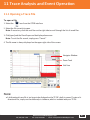
11.1 Opening a Trace File
To open a file:
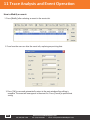
1. Select the
icon from the OTDR interface.
2. Select the file you wish to open.
Note: If necessary, click the scroll bar on the right side to scroll through the list of saved files.
3. Click [open] and the file will open and be displayed onscreen.
Note: To exit the file search, simply press “Cancel.”
4. The file name is always displayed on the upper-right side of the screen.
Navigator Window
Zoom Tools
Grid Line
Note:
● A bi-directional trace file is too large to be displayed on the TP-P6’s built-in screen.To view a bidirectional file, simply use the data analysis software, which is included with your TP-P6.
Tel: (888) 545-1254
•
www.PrecisionRatedOptics.com
Fax: (415) 358-4602 • Email: [email protected]
47
11 Trace Analysis and Event Operation
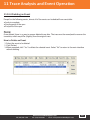
11.2 Simultaneous Display Multiple-Traces
For the purpose of comparing trace files, the PRO TP-P6 supports the opening and displaying of multiple
traces simultaneously. When opening multiple traces, the current trace is shown in red, the icon in front
of the file name is also red. The other icons are grey.
The user can choose whether to display a single trace or multiple traces.
Opening “Multiple Traces”:
In the OTDR
in the test options, select the “Support Multiple Traces“.
Note:
The TP-P6 can simultaneously display (x4) traces on the built-in screen. If the user needs to examine
other traces, please close some of the opened traces, or upload the trace data files to a PC and use the
data analysis software.
11.3 Closing a Trace File
Click the [Close Trace] button on the upper-right corner of the interface to close the trace file.
Note:
While in “Single Trace” mode, selecting “Open New Trace” will automatically close the currently
displayed trace automatically.
11.4 Trace Display
After a trace has been opened, the TP-P6 will display the trace and analysis result in the trace window.
The events on the trace will be marked by small icons. These events will be marked and displayed below
the corresponding trace.
Note: The X axis shows the relative distance from the testing point.
Note: The number on the Y axis shows the reflection power value (relative power) and its range.
Note: After acquiring the trace, the trace display parameters can be revised (such as grid lines and the
“Zoom Window” screen).
Note:
The contents of the trace window change according to the selected options. Some items of a trace can
be seen simultaneously on the built-in screen, but other items are displayed only when they are selected
for display. The TP-P6 will automatically display as much information as possible on the built-in screen,
depending on the user settings and available screen space.
48
Tel: (888) 545-1254
•
www.PrecisionRatedOptics.com
Fax: (415) 358-4602 • Email: [email protected]
11 Trace Analysis and Event Operation
Event Options:
In {event} options, there are various parameters of events listed, including event type, number,
position, insertion loss, reflection loss, attenuation and accumulation.
When switching to {event}, the TP-P6 will display a Marker on the tracing graph.
When a particular event in event list is selected, the Marker will move to that event position.
When opening multiple traces, the event options only displays the current trace.
Markers Options
When altering {Markers} options, the TP-P6 will display two Markers: A and B, or include some reference
points.
The user can move these Markers along the trace, to calculate loss, attenuation, reflection, etc.
The user (from the “Markers” settings interface) can relocate all Markers at once, and also drag them
from within the trace display window. The adjustment knob can be used to move the Markers very
precisely. If the user requires the maximum degree of control over the Markers, it may be necessary to
zoom-in on the area containing the Markers to achieve precise movement.
11.5 Switching and Moving Markers
There are several ways the user can alternate between and move Markers. The user can use a
combination of methods to achieve maximum efficiency when navigating through a trace.
● In the trace display area, use the stylus or mouse to select the A/B Markers, or the tab above the
Markers.
● In the buttons area on the bottom of interface, click
or
to switch between A and B.
● Press down the spinning-hand wheel (on the front panel) to switch between the Markers, or mark a
particular point.
● After selecting Markers, continuously click the
or
buttons to move the Markers.
● The spinning-hand wheel on the front panel can be used to move the Markers more precisely.
● After selecting the marked point, click the
right.
or
buttons to move the Markers to the left or
Note:
● For easier usage, the position of the Markers will be stored in memory - even when the unit is turned
off. When the TP-P6 is turned back on, the user will see the last known Marker positions on the
trace appear automatically.
● A marked pioint appears anywhere on the fiber span where a loss or reflection event has occured.
● The spinning-hand wheel can move the Markers accurately, but it can be very slow if the trace is
particularly long.
Tel: (888) 545-1254
•
www.PrecisionRatedOptics.com
Fax: (415) 358-4602 • Email: [email protected]
49
11 Trace Analysis and Event Operation
11.6 Switch and Move the Marked Point
When analyzing loss or reflection events, there will be marked points displayed for additional testing to
be performed near the selected Markers.
There are various ways to switch or move the marked point(s). The user can use one or all of them to
increase efficiency.
To move Markers, you may:
● Use the stylus or mouse to select a Marker, then click and drag the marked point to a new desired
location along the trace.
● In the buttons area of the interface, click the
icon to switch between the available Markers.
● Press down the spinning-hand wheel on the front panel to create a new marked point.
● After select the point, continuously click the
or
to move the point.
● Use the spinning-hand wheel to move the marked point accurately.
Note:
When moving points associated with each Marker, please keep in mind:
● The marked points on the left side cannot cross the Markers on the right side.
● The marked points on the right side cannot cross the Markers on the left side.
11.7 Quickly Moving the Markers Outside of the Window
When magnifying a trace, the Markers may be positioned outside of the window.
When the Markers are on the left-side (outside the window) there will be an indicator on the left margin
of the window: A <-- or B <--.
When the Markers are on the right-side (outside the window) there will be an icon on the right margin of
the window: --> A or --> B.
Clicking and dragging the indicators shown above can move the Markers into current window.
50
Tel: (888) 545-1254
•
www.PrecisionRatedOptics.com
Fax: (415) 358-4602 • Email: [email protected]
11 Trace Analysis and Event Operation
11.8 Locking the A-B Markers
In the {Markers} interface, select the [A-B] to linked the A and B Markers.
After the A and B Markers are linked, when moving one Marker, the other one will move with it, and the
distance between them will remain the same.
For some special testing operations, this function may be useful.
Note:
When one Marker is moved to the trace boundary, the distance between A and B will not be maintained,
but will revert when it’s not contained within the trace boundaries.
11.9 Zoom-in on a Trace
In order to examine an event in greater detail, from within a trace, zooming-in can be useful.
The TP-P6 provides two ways to zoom-in on a trace:
Method #1: Zoom-in by cross frame, which is the fastest method. This method is fast, but less accurate.
Method #2: Use the “Zoom” toolbar. This method is slower, but allows greater accuracy.
Note:
● After any magnification operation, the Markers may disappear from the current trace window.
● If using method #2 (the “Zoom” toolbar), the “Display Zoom Toolbar” option needs to be turned on
from within [Setup].
Tel: (888) 545-1254
•
www.PrecisionRatedOptics.com
Fax: (415) 358-4602 • Email: [email protected]
51
11 Trace Analysis and Event Operation
11.10 Cross-Frame to Zoom-in on a Trace
In the trace display area, magnify the traces by clicking and dragging to draw a frame, starting from the
upper-left of the display area to the lower-right of the display area.
To zoom-out of the trace, click and drag to draw a frame from the lower-right to the upper-left of the
display area.
Note: The user may need to repeat the above operation to zoom farther into or farther out of a trace.
Note:
● Do not cross to the outside of the trace display area, otherwise the operation will abort.
● The trace can only be magnified to a certain degree.
● The trace cannot be contracted to more than a 1:1 ratio.
● The TP-P6 will maintain the level of zoom initiated by the user, even when initiating new traces, until
the zoom level is changed by the user.
11.11 Using the Zoom Toolbar to Zoom
On the right side of trace window, there is a zoom toolbar vertical ranked. Can use the zoom toolbar to
zoom the trace to check the event detail on the trace.
Note:
● When selecting the magnify button for the first time, the trace window will display the trace in the
middle of the built-in screen.
● After the trace has been magnified, in order to move trace window, click anywhere outside the
magnified area. The trace window will move to the desired location. The user may also use the
arrow keys on the front panel to move the trace.
11.11.1 Revert the entire trace view
Click the
icon to revert (zoom-out) of the entire trace.
11.11.2 Zoom-in on a trace Horizontally
Click the
icon to zoom-in on the trace horizontally.
52
Tel: (888) 545-1254
•
www.PrecisionRatedOptics.com
Fax: (415) 358-4602 • Email: [email protected]
11 Trace Analysis and Event Operation
11.11.3 Zoom-out of a trace Horizontally
Click the
icon to zoom-out of a trace.
11.11.4 Zoom-in on a trace Vertically
Click the
icon to Zoom-in on a trace vertically.
11.11.5 Zoom-out of a trace Vertically
Click the
icon to Zoom-out of a trace vertically.
11.12 Remember the Zoom Status Automatically
When testing or opening a trace, the level of magnification and position will be remembered temporarily.
When testing the same distance again, the magnified status of the window will remain the same until
changed by the user.
Note:
● When the user turns off the PRO TP-P6, the zoom settings will not be saved. When the TP-P6 is
turned on again, the trace window will display the entire trace threshold.
● When the user changes the wavelength, pulse width and/or time, as long as the distance is not
changed, the previously set zoom level will be used.
● When the user changes the distance, the trace window will revert to display the entire trace.
Tel: (888) 545-1254
•
www.PrecisionRatedOptics.com
Fax: (415) 358-4602 • Email: [email protected]
53
11 Trace Analysis and Event Operation
11.13 Moving the Magnified Trace Window
After the trace has been magnified, the trace window will only display part of the trace. There are two
ways to move the trace window:
1. Using the stylus or mouse to operate in the navigation window.
2. Using the four navigational arrow keys on the front panel.
To move a magnified trace window from within the navigation window
In the navigation window, the user can see the position of current window on the entire magnified trace.
Click anywhere outside of the magnified area of the navigation window and the trace window will move to
the new location accordingly.
Note:
In the navigation window, if the user clicks the grayed-out region, the operation will not initiate.
Using the arrow navigational keys to move a trace window
While within a magnified trace, use the arrow directional keys on the front panel. The trace window will
move accordingly.
● Click the
button to move the trace window upward.
● Click the
button to move the trace window downward.
● Click the
button to move the trace window to the left.
● Click the
button to move the trace window to the right.
Note:
When displaying an entire trace within the window, the trace window cannot be moved.
54
Tel: (888) 545-1254
•
www.PrecisionRatedOptics.com
Fax: (415) 358-4602 • Email: [email protected]
11 Trace Analysis and Event Operation
11.14 Setting the Event Options
The event table lists all of the events within a particular trace. Events can be defined as any point where
a change in optical transmission was detected. Events cause loss, which can be caused by a lack of
transmission power or quality, faulty splices, defective or dirty connectors or crack/bends in the fiber. If
an event exists outside of the defined threshold, it will not be detected or displayed.
Fig 11.2 Event Options
The TP-P6 displays many attributes of a trace:
● Type: Different indicators are used for different event types. For detailed information pertaining to
specific types of events, please refer to the appropriate sections of this manual.
● Number: Event number (automatically designated by the OTDR application program).
● Position: Distance between the OTDR and the event.
● Insertion Loss: The loss caused by a loss event, measured in dB (automatically calculated).
● Reflection Value: Calculated value for each reflective event.
● Attenuation: The attenuation (loss) for each optical fiber length (loss/distance).
● Accumulation: The accumulated loss from the span starting point to the end of the span.
Note:
“Accumulation” is the calculation of all loss within the parameters and does not calculate the events
that occur outside of the designated parameters. To determine specific loss occurring within a specific
parameter, please refer to the loss results displayed in {Markers}.
Tel: (888) 545-1254
•
www.PrecisionRatedOptics.com
Fax: (415) 358-4602 • Email: [email protected]
55
11 Trace Analysis and Event Operation
11.14.1 Display the Event on the trace, and locating the event in the Event Table
At any time, while scrolling through the event table, the user can check the relative info about all events
tested on a particular trace. When an event is selected, a Marker will be placed at that event.
Note:
● When the trace is under magnification, certain Markers may not be displayed in the current window.
● It is adviseable to first view the entire trace, locate the events, then zoom into specific events to
analyze specific details.
11.14.2 Add an Event
The user can manually insert events into the event table at any time. For example, when there is a splice
point on some given position, but is hidden due to excessive noise, or the splice loss is lower than the
minimum set value of a non-reflection detection threshold, then adding an event can be useful. Adding an
event manually will add an event numberto the insertion point, but will not otherwise alter the trace.
Note:
When reanalyzing a trace, any manually inserted events will be automatically deleted from the trace.
To add an event:
1. Press [add] while inside the {Events} tab.
Fig 11.3 Adding an Event
56
Tel: (888) 545-1254
•
www.PrecisionRatedOptics.com
Fax: (415) 358-4602 • Email: [email protected]
11 Trace Analysis and Event Operation
2. Fill in the event info in the “Add Event” dialog window.
Fig 11.4 Add Event Dialog Window
3. Press [Ok] to save and return to the main window after editing is complete. The event will appear in
the event list. Select [Cancel] to exit without saving..
Note:
You can add either a reflection event or a non-reflection event.
11.14.3 Modifying an Event
The user can modify an event in the event table manually. For example, if you find a faulty splice, and
repair the affected area of fiber, you can then choose to alter the event corresponding to that splice
point, which will show a more accurate trace record. Alternatively, you could make all of the repairs
necessary and then reanalyze the fiber span.
Note:
● Adding an event manually will not alter the calculated trace data from the original trace.
● When reanalyze the trace, events will be re-marked and modified events (if not repaired or altered)
will revert to their original value
Tel: (888) 545-1254
•
www.PrecisionRatedOptics.com
Fax: (415) 358-4602 • Email: [email protected]
57
11 Trace Analysis and Event Operation
How to Modify an event:
1. Press [Modify] after selecting an event in the events tab.
2. From here the user can alter the event info, replacing any existing data.
3. Press [Ok] to save and automatically return to the main window after editing is
complete. The event will now appear in the event list. Press [Cancel] to quit without
saving.
58
Tel: (888) 545-1254
•
www.PrecisionRatedOptics.com
Fax: (415) 358-4602 • Email: [email protected]
11 Trace Analysis and Event Operation
11.14.4 Deleting an Event
Except for the following events, almost all of the events can be deleted from event table.
● Analysis complete
● Starting point of the span
● End point of the span
Note:
Once deleted, there is no way to recover deleted trace data. The trace must be reanalyzed to recover the
trace data, which may differ (slightly) from the original trace.
How to Delete an Event
1. Select the event to be deleted.
2. Click {Delete}
3. When prompted, click “Yes“ to delete the selected event. Select “No” to return to the main interface
without deleting.
Tel: (888) 545-1254
•
www.PrecisionRatedOptics.com
Fax: (415) 358-4602 • Email: [email protected]
59
11 Trace Analysis and Event Operation
11.15 Analysis Detecting Threshold Configuration
In order to optimize the event detection, the user can set the testing thresholds.
● Change a non reflection threshold (Splice Loss Threshold): It can display or hide small
non-reflection event
● Change a Reflection Threshold: On the low end it can hide the false reflection events caused by
noise, or convert the harmless reflection event into a loss event. On the high side, it can detect
events which may cause damage to network and other optical fiber equipment, due to excessively
high light levels.
● Change the finish threshold (optical fiber End Threshold): It can analyze an important loss event (like
a break point) and halt event analysis following that event.
Note:
User-set thresholds apply to “Auto” mode, as well as “Manual” mode.
11.16 Set Analysis Detecting Threshold
1. Select the
icon in the button area (which is in the lower-right area) to enter setting interface.
2. Set these parameters in the parameters analysis window. In the relative edit frame, enter the new
value, or press [Default] to revert to the default value.
Fig 11.8 Parameters Analysis Edit Frame
3. Press [Ok] to save the new settings and return to the main interface. Press [Cancel] to quit without
saving.
Note:
Threshold settings will be applied to the subsequent traces, and will not alter data acquired from
previous traces..
60
Tel: (888) 545-1254
•
www.PrecisionRatedOptics.com
Fax: (415) 358-4602 • Email: [email protected]
11 Trace Analysis and Event Operation
11.17 Reanalyzing a Trace
The user can reanalyze a trace at any time. Reanalyzing a trace will accomplish the following:
● Create a new event table for a trace.
● Reanalyze a trace utilizing new-introduced features offerred by updated software.
● Update an existing event table -if the data has been modified or repairs have been made.
To reanalyze a trace:
1. In the [Event] options, press [Analysis]. The TP-P6 will then initiate a new trace.
2. After the analysis is complete, the new results will be displayed in the event table.
Note:
● If the thresholds used are too restrictive, meaning that few or no events were detected, please alter
the threshold settings and initiate a new test using wider parameters.
11.18 Analyze the Optical Fiber in a Specific Optical Fiber Span
Because a PON optical fiber span has a splitter (multiple spans), the user needs to set the proper finish
threshold (optical fiber End Detecting Threshold) to analyze the end event, which can be affected by the
splitter.
The thresholds must be set before initiating a test, or the results may be innaccurate or inconsistent.
Tel: (888) 545-1254
•
www.PrecisionRatedOptics.com
Fax: (415) 358-4602 • Email: [email protected]
61
11 Trace and Event Analysis Settings
11.19 Set Trace Display Parameters
The user can modify or alter trace display options before or after a test or trace is opened.
● Grid line: Select or deselect this to display or hide the grid lines. By default, the TP-P6 is set to
display the grid.
● Navigation Window: The user can choose to either show or hide the navigation window which, if
shown, appears in the upper-right of the trace screen.
● Length Unit: Either before or after a trace is performed, the user can change the unit of
measurement used throughout the interface.
● Multiple Trace: If turned on, the TP-P6 will simultaneously display multiple traces onscreen.
● Zoom Toolbar: The factory default is set to display the “Zoom” toolbar. If the user desires to
maximize the screen display area, this toolbar can be turned off.
Note:
When the user first enters the OTDR interface, the help info for simple operations are displayed
onscreen in the trace area, obstructing the navigation window and grid lines. Only after a test, or after a
trace is opened, do the grid lines and navigation window become visible again.
To set the trace display parameter
1. Select
in the button bar, on the lower-right of the OTDR menu.
2. In the options of test display area, select and modify the display options
3. Press [application] and make change become effective, then quit the setting dialog box. or press
[cancel] to quit the setting dialog box without setting save.
Note:
To hide or display the zoom toolbar must turn off all the trace opened. Otherwise the setting
won’t go into effect.
62
Tel: (888) 545-1254
•
www.PrecisionRatedOptics.com
Fax: (415) 358-4602 • Email: [email protected]
11 Trace and Event Analysis Settings
11.20 Set the length unit
In the OTDR parameters setting dialog box, select the length unit in the test display area options. The unit
can be set to display in meters, feet or miles.
Note:
● The default length unit is the meter, displayed as “m”.
● Certain values, such as pulse width, wavelength, etc will not change, regardless of the distance. For
example, Pulse is always measured in seconds, while wavelength is always measured in nm.
● If “m” is used as the length unit, the system will display km in some places.
● When selecting “ft” as the lunit of measurement, the system will display kft in some instances
(k=x1,000).
● When selecting “mi” as the unit of measurement, the system will display kmi in some places
(k=x1,000).
11.21 Display or Switch the Trace
In the OTDR test application program, when opening multiple traces, there are two ways to switch the
displayed trace
1. To display or hide the trace, click the file name tab on the upper-left.
2. To close the trace, click the [close trace] on the interface, in the upper-right of the window.
11.22 Check Current Trace Parameters
To check the current trace information on the {Trace Info} tab, simply click the tab.
Fig 11.10 Check the Trace Parameters
Tel: (888) 545-1254
•
www.PrecisionRatedOptics.com
Fax: (415) 358-4602 • Email: [email protected]
63
11 Trace and Event Analysis Settings
The content that the TP-P6 can display is as follows:
● File Name: The name of current trace.
● Date: Date and time of test.
● Wavelength: The laser wavelength used for testing.
● Pulse Width: The laser pulse width used for sampling.
● Averaging Time: Continuous sampling time.
● Range: Distance used for testing.
● Span Length: The length of optical fiber span, as calculated after test completion.
● Span Loss: The total loss, from the span starting point to the span end point.
● Span Attenuation: Average loss of the total span, indicated as a function of distance.
● Event Quantity: Total number of events detected from the current trace analysis, which is
accordance with the test parameters.
The content displayed on the right of the display window is as follows:
● IOR: Indicate the trace IOR (also called group coefficient). If modifying this parameter, it will adjust
the trace distance automatically
● Back Scatter: Rayleigh Back Scatter of the displayed trace.
● Non-Reflection Threshold: Check the current setting of small Non-Reflection Events during the
trace analysis.
● Reflection Threshold: Check the current setting of small Reflection Events during the trace
analysis.
● End Threshold: Check the current setting of the limit of detected events (will affect the
transmission performance during the trace analysis).
Note:
Trace parameter options only display the active, selected trace, even when multiple traces are opened. If
you wish to view the information pertaining to a particular trace, you will need to click on that trace. The
active, selected trace will always be indicated in red.
64
Tel: (888) 545-1254
•
www.PrecisionRatedOptics.com
Fax: (415) 358-4602 • Email: [email protected]
12 Manual Trace Analysis
A user can use Markers and Zoom tools to measure Splice Loss, Attenuation and Reflection, or use
Markers to locate Event Position and Relative Power Level.
12.1 To Use Markers
Click the {Markers} tab in the OTDR main interface to activate Markers.
12.2 Event Location and Loss Information
The OTDR application automatically calculates the event location and displays the location in the Events
list. The user can manually check the event location and distance between events. Loss information can
also be displayed. The X-axis represents distance and Y-axis represents Relative Power.
Fig 12.1 Event Location and Loss Information
To acquire the event location and loss information:
1. Click the {Markers} tab in OTDR main interface.
2. Place Marker A or B to at the beginning of the event, the Marker tab will display the distance.
3. Fig 12.1 shows the insertion loss of current Marker and A-B loss.
Tel: (888) 545-1254
•
www.PrecisionRatedOptics.com
Fax: (415) 358-4602 • Email: [email protected]
65
12 Manual Trace Analysis
12.3 Measuring Insertion Loss (2-Point and 5-Point method)
Insertion Loss (unit: dB) is calculated by measuring the signal level of Rayleigh Back Scatter (RBS) and
the magnitude of reduction. Insertion loss can be created by reflection and non-reflection events.
The system calculates (in real-time) the loss between Markers A and B, and also calculates the insertion
loss at Marker A or B. Insertion loss is calculated in a 5-Point method.
2-Point Method (A-B Loss):
Insertion loss is calculated as shown in Fig. 12.2.
Fig 12.2 2-Point Loss
The 2-Point method is suitable for measuring splice loss, but not applicable to measuring reflection
events.
Note:
● ”A-B Loss” is for quick loss measurement of a specific segment of the fiber, marked between Marker
A and B.
● “A-B Loss” is not applicable to measuring “Reflection” events.
66
Tel: (888) 545-1254
•
www.PrecisionRatedOptics.com
Fax: (415) 358-4602 • Email: [email protected]
12 Manual Trace Analysis
5-Point Method to Measure Event Loss:
Event loss can also be measured by a 5-Point method. When the [Loss] button in “Markers” Tab is not
pressed, the marking points used by 5-Point method will not be displayed. The system uses the 5-Point
method by default.
When applying the 5-Point Method manually, the Marker and its related 4 marking points divide the trace
around the event into 2 areas: the area left of the active Marker and the area the the right of the Marker.
The 2 marking points on the left, and the 2 on the right, both form a straight line and move the two lines
close to the event center. The calculated power difference between the two lines is the Event Insertion
Loss.
This method also applies to the measurement of point A or B’s Insertion Loss.
When the [Loss] button is pressed, the PRO TP-P6 will show the marking points to measure the event
loss. When Marker A is selected, the screen will display the 4 marking points related to Marker A. When
Marker B is selected, the screen will display the 4 marking points related to Marker B. The Markers and
marking points can be moved separately.
Tel: (888) 545-1254
•
www.PrecisionRatedOptics.com
Fax: (415) 358-4602 • Email: [email protected]
67
12 Manual Trace Analysis
Using the 5-Point Method:
1. In the main interface of the PRO TP-P6 OTDR module, click the “Markers” tab.
2. Press the [Loss] button. Marker A, Marker B and their related marking points will be displayed
on the trace.
3. Zoom into the trace to view the event clearly. Move Marker A to the end of the linear section
of the trace - before the event.
4. Move the first marking point to the beginning of the linear part of the trace before the event.
5. Move the second marking point to the end of the linear part of the trace before the event.
6. Move the third marking point to the beginning of the linear part of the trace after the event.
7. Move the fourth marking point to the end of the linear part of the trace after the event.
Fig. 12.4 Measuring Insertion Loss Using 5-Point Method
Note:
● The marking points on the left of the active Marker cannot be moved the right - and vice versa.
● The loss shown in the Event List is measured by the 5-Point method.
68
Tel: (888) 545-1254
•
www.PrecisionRatedOptics.com
Fax: (415) 358-4602 • Email: [email protected]
12 Manual Trace Analysis
12.4 Measure Attenuation (2-Point and LSA method)
2-Point method measures the attenuation between Marker A and B calculated by all the loss over the
distance between Marker A and B (Unit: dB/Km).
The LSA (Least-Squares Approximation) method uses linear regressions that is applied to the backscatter
before and after an event (Between Marker A and B) to estimate the attenuation in the backscatter
resulting from the event’s loss.
The LSA method only measures the amplitude (decibel) change between the crossing points of the trace
based on Marker A and B.
Compared to the 2-Point method, the LSA method is more accurate because it is less sensitive to trace
noise and more suitable for measuring splice attenuation. However, the LSA method should not be
applied to measuring attenuation when there are reflection events between Markers A and B.
Measuring attenuation:
1. Click {Markers} tab in OTDR main interface to show Marker A and B.
2. Place Markers A and B at different points on the trace.
3. Zoom-in on the trace to adjust the Marker position when necessary.
4. Check 2Pt. Atten. (2-Point Attenuation) and LSA Atten. (LSA Attenuation) values, as shown in Fig. 12.5.
Fig. 12.5 Viewing Attenuation
Note:
There should not be any event between Marker A and B when measuring attenuation
with the 2-Point method.
Tel: (888) 545-1254
•
www.PrecisionRatedOptics.com
Fax: (415) 358-4602 • Email: [email protected]
69
12 Manual Trace Analysis
12.5 Measuring Reflectance
Reflectance is the ratio of reflected power (Pr) to incident power (Pi) of an event (such as a connector).
Reflectance = 10 log (Pr/Pi).
1. Click the {Markers} tab in the OTDR main interface to show Marker A and B.
2. Click the [Refl.] button to show the Marker points.
3. Before measurement, zoom-in on the trace and place Marker A to one end of the linear part of the
trace before the event.
4. Move the first marking point to the beginning of the linear part of the trace before the event and
Marker A.
5. Move the second marking point to the end of the linear part of the trace before the event and
Marker A.
6. Place the marking point behind Marker A to the peak of the reflection event to be measured.
7. View the reflectance.
Note:
The above process is applicable to measuring all reflection events’ reflectance even they are very close
to each other.
70
Tel: (888) 545-1254
•
www.PrecisionRatedOptics.com
Fax: (415) 358-4602 • Email: [email protected]
13 Trace File Management
Note:
1. For non-reflection events, reflectance will show as “-----”.
2. The user can save, open, rename and delete trace file after acquisition.
3. The user can save and open trace file in OTDR main interface.
4. The user can rename, copy, move and delete file in File Explorer.
13.1 To Save a Trace in Different Formats
In OTDR main interface, user can choose trace saving format as Bellcore (.sor) or JPEG (.jpg).
13.2 To Copy, Move, Rename and Delete a Trace
There are two ways to copy, move, rename and delete trace.
Way 1: Though File Explorer:
A. In PRO TP-P6 main interface, click {Program} tab and click [File Explorer] icon as shown in Fig 13.1:
B. Click [ ] button or press button on front panel to enter File Explorer.
C. Click “SDMMC_Disk” icon to enter internal memory space.
D. Copy, move, rename and delete trace.
E. After operation, click [ ] button to return to main interface.
Note:
● In File Explorer, the file and directory operation is similar to Windows 98/XP system.
● User can move, rename and delete files saved in “SDMMC_Disk” but the disk itself cannot be moved,
renamed or deleted.
● For more information, please refer to the Help file on PRO TP-P6.
Way 2: User can connect PRO TP-P6 to PC, PRO TP-P6 will be recognized as a mobile device. User can
copy, move, rename and delete files in PC’s Windows System.
Tel: (888) 545-1254
•
www.PrecisionRatedOptics.com
Fax: (415) 358-4602 • Email: [email protected]
71
13 Trace File Management
13.3 Checking the Available Disk Space
The user can check disk utilization (used space and free space) in the File Explorer:
1. Enter File Explorer from the PRO TP-P6 main interface.
2. Click the “SDMMC_Disk” icon and select [File] <Properties> or click and holdthe “SDMMC_Disk” icon,
select <Properties> from pop-up menu.
3. The “SDMMC_Disk” space utilization status is shown below:
4. Click “OK” to exit the disk properties.
Note:
It is suggested that the user check disk utilization periodically, transferring or backing up files to avoid
running out of disk space when the PRO TP-P6 is in use.
72
Tel: (888) 545-1254
•
www.PrecisionRatedOptics.com
Fax: (415) 358-4602 • Email: [email protected]
14 Print OTDR Report
The User can manage a saved trace file directly on the PRO TP-P6, as well as print a report.
For reference and report printing, it is necessary to manage and update the trace information.
14.1 Trace Information
After trace acquisition, the user can add or update tested fiber information ,which includes: Cable ID,
Fiber ID, Fiber Type, Start Location, End Location and Operator.
14.2 Check and Edit Trace Information
The user can check and edit the trace information from the {Trace Info.} interface.
When a newly-tested trace is saved, the trace is saved with the information listed in the “Trace
Information” section (14.1).
The user can also edit the saved trace information.
● After editing the trace information of a saved trace, the updated trace file name will show a star
sign (“*”) to indicate that the file has been changed. If the user attempts to close the editing window
without saving, the system will prompt the user to save the file.
● Updating of trace information is only effective with the current active trace in “Multiple-Trace”
display mode.
● The editing of trace information does not affect either the measurement parameters or the end
results.
Edit and save trace information:
1. Click the {Trace Info.} tab in OTDR main interface.
Tel: (888) 545-1254
•
www.PrecisionRatedOptics.com
Fax: (415) 358-4602 • Email: [email protected]
73
14 Print OTDR Report
2. Press the [Edit] button and the trace window will pop up.
3. You may alter any of the information displayed:
Fig 14.2 Edit Trace Information
4. After editing, press [Ok] to save and return to main interface, or click [Cancel] to ecit without saving
the changes.
5. Click the [Save] button in the OTDR main interface to save the trace again. The updated information
will be saved with the trace file.
Note:
● An edited and saved trace file can be used as a template for later reference.
● The user can also use the TP-P6 Data Management software to edit and save trace information.
14.3 Print OTDR Report
The PRO TP-P6 supports direct printing, via USB.
The OTDR report includes: Trace Information, Measurement Parameters, Markers information, Event
List, etc.
Specific contents to be printed can be specified in Print Options.
74
Tel: (888) 545-1254
•
www.PrecisionRatedOptics.com
Fax: (415) 358-4602 • Email: [email protected]
14 Print OTDR Report
Print OTDR report:
1. Connect the USB printer to the PRO TP-P6
Note: Before attempting to print for the first time, please configure the printer through the “Printer
Configuration” interface.
2. Click the
icon in the OTDR main interface and printing dialog window will pop up.
Fig 14.3 Printing dialog window
3. Choose the trace (or multiple traces) to be printed:
A. To print the current file, please choose the “Print current file” option and only one trace will be
printed.
B. To print unopened traces saved in PRO TP-P6, please check “Batch print” option, which will allow
batch printing of up to eight (x8) traces.
Tel: (888) 545-1254
•
www.PrecisionRatedOptics.com
Fax: (415) 358-4602 • Email: [email protected]
75
14 Print OTDR Report
4. Print Option:
The user can customized the OTDR report by clicking the [Option] icon, on the printing
dialog window, to specify which contents to be printed.
Fig 14.4 Printing Options
5. Press the [Print] button to start printing.
During printing, the system will display the status: “Printing... Pease wait”, as shown in Fig 14.5.
Fig 14.5 Printing
6. After printing is complete, the TP-P6 will automatically return to the main interface.
76
Tel: (888) 545-1254
•
www.PrecisionRatedOptics.com
Fax: (415) 358-4602 • Email: [email protected]
15 VFL Application
The built-in VFL of the OTDR module can shoot a red laser into the fiber under test. The red laser will be
visible at a marco bend, point of breakage and/or bare fiber end. The maximum detection range for the
PRO TP-P6 VFL is over 5Km, making it a very useful tool for fiber identification and detection, as well as
highlighting breaks, tight bends, splices and/or defective connectors in optical fiber spans.
Note:
The VFL is a perfect complementary tool to be used in conjunction with the OTDR, especially useful for
its ability to make visible the problems occurring in the area close to the OTDR, such as problems that
exist in the “Dead Zone.”
Note:
The VFL is only available with an OTDR module that has been ordered with the VFL option.
Fault locating with the VFL:
1. Clean the connector properly.
2. Connect the fiber to the VFL port.
icon in the OTDR main interface.
3. Click the (Source)
4. Check the “CW” (Constant Wave) option to emit a laser continuously, or check “Flash” to emit a
modulated laser at 1Hz.
5. Press the [VFL On] button to start the VFL. The
icon will then turn orange.
6. While the VFL is operational, press [VFL Off] to turn off the VFL. The
orange back to grey.
icon color will turn from
Fig 15.1 VFL Operation
Tel: (888) 545-1254
•
www.PrecisionRatedOptics.com
Fax: (415) 358-4602 • Email: [email protected]
77
16 Using the MPN Module
16.1 Main Features of the MPN Module
● Simultaneous display of “Triple-Play” PON signals at 1310, 1490 and 1550nm wavelengths.
● Burst mode 1310nm upstream signal detection & measurement.
● Dual-port, pass-through design.
● Stabilized Laser Source at 1310, 1490, 1550 and 1625nm wavelengths.
● Optical Power Meter at 850, 1300, 1310, 1490, 1550 and 1625nm calibrated wavelengths.
Warning!!
Laser Radiation: To avoid serious eye injury, never look directly into the optical outputs of fiber optic
network equipment, test equipment, patch cords, or test jumpers.
● Always avoid looking directly into the optic output port, when the instrument is operational.
● Always replace protective dust caps on the detector port when the instrument is not being used.
● Always avoid looking directly at the unconnected end of optical fiber in testing and make the
unconnected end pointing at a non-reflective object, if possible.
16.2 MPN Module Interface
When the power is on, it will show the main menu automatically. Only the modules that are connected
will be represented onscreen. As you add modules, thumbnail images of that equipment will automatically
be recognized and added to the bottom of the main interface.
In the main menu, select the module you wish to use. Once selected, press the
enter that particular module’s interface, as shown below:
78
Tel: (888) 545-1254
•
www.PrecisionRatedOptics.com
Fax: (415) 358-4602 • Email: [email protected]
button to
16 Using the MPN Module
16.3 PON Power Meter of MPN Module
Click the MPN Module icon to enter the interface, as shown in Fig 16.2
At any time, the user can click the different modules (shown on the top-left of the screen) to shift
between different module interfaces. For example, you can instantly switch between “PPM (PON Power
Meter)”, “SLS (Stabilized Laser Source)”, “OPM (Optical Power Meter)” and “LTS (Loss Test).”
Note:
Switching between different module interfaces is only possible when there are two or more modules.
button or Press the
Click the
the measurement. Click
button or Re-Press
(Start/Stop) button on PRO TP-P6 front panel to start
(Start / Stop) button on the PRO TP-P6
front panel to stop the measurement.
Note:
The selected function (module) will turn red.
MPN function area
Measurement
display area
Operation
button area
Measurement
setting area
Fig 16.2 PON Power Meter Interface of Multiple-func Module
Under “PPM” there are three setting interfaces: “General Setup”, “Threshold Setting,”
and “Measurement Record”.
Tel: (888) 545-1254
•
www.PrecisionRatedOptics.com
Fax: (415) 358-4602 • Email: [email protected]
79
16 Using the MPN Module
The “General Setup” interface is shown in Fig 16.2.
“Buzzer”: Switch on or off to open/close the alarm buzzer function. With this feature turned on, when
the TP-P6 detects a power value beyond the normal range, a buzzer will automatically sound.
“Unit”: Switch to select between “W” or “dBm”.
“Auto Zero”: This function provides an easy method of auto zeroing the Power Meter, which can be
used to rectify the TP-P6 power value under non-luminous states, for day-to-day testing purposes.
Warning!!
Always replace the protective cap on the Optical Power Testing output, and ensure that the tie-in is
completely covering the port, making it impossible for laser light to escape.
“Wavelength”: Select this to display one wavelength individually or three wavelengths together.
Create or delete the Threshold value in the “Threshold” interface, as shown in Fig 16.3.
Click “setup”=> “Current Thre. Set” to select a certain threshold.
The user may also select a default threshold set, as shown on the left-side of the display. When a
threshold is selected, information pertaining to that specific threshold will be displayed on the right-side
of the display.
Fig 16.3 PON Power Meter - Threshold Interface
80
Tel: (888) 545-1254
•
www.PrecisionRatedOptics.com
Fax: (415) 358-4602 • Email: [email protected]
16 Using the MPN Module
Double-click any Threshold Set to modify the settings, as shown in Fig 16.4.
Click “OK” to save the new settings.
Fig16.4 PON Power Meter- Modify Threshold Set
The “Measurement Record” interface is shown as Fig 16.5.
Fig 16.5 PON Power Meter - Measurement Record
The name will be changed according to the user’s input. Click the “Open” icon to find and select
any particular named measurement record file. The user may then input a new file name in the
“Name” field, as shown in Fig 16.6.
Tel: (888) 545-1254
•
www.PrecisionRatedOptics.com
Fax: (415) 358-4602 • Email: [email protected]
81
16 Using the MPN Module
Fig 16.6 PON Power Meter-Open
Click “Save” to save the records.
16.4 Stabilized Laser Source of MPN Module
Under “SLS” there are two setting interfaces: “General Setup” and “Reference Setting.”
The “General Setup” interface is shown in Fig 16.7
82
Tel: (888) 545-1254
•
www.PrecisionRatedOptics.com
Fax: (415) 358-4602 • Email: [email protected]
16 Using the MPN Module
Fig16.7 Stabilized Laser Source - Setup Interface
“Unit”: Shift between dBm and W.
“Wavelength”: Support 1310, 1490, 1550 and 1625nm wavelengths.
“Modulation”: Select the different modes at 270Hz, 1KHz, 2KHz, Auto ID.
button or Press the
After the setup, click Click the
(Start/Stop) button on PRO TP-
P6 front panel to start the measurement. Click the
button or Re-Press the
button on PRO TP-P6 front panel to stop the measurement.
(Start/Stop)
Note:
The function icon turns red while switching on this function module.
The “Reference Setting” interface is shown as Fig 16.8
Fig 16.8 Stabilized Laser Source - Ref. Setting
Tel: (888) 545-1254
•
www.PrecisionRatedOptics.com
Fax: (415) 358-4602 • Email: [email protected]
83
16 Using the MPN Module
“Attenuation”: Select from steps at 1.0dB, 0.5dB, 0.1dB, 0.05dB. The adjustable range of output
power is 6 dB.
“Ref.”: Select “Set SLS output power as Ref” or “Manual input” to set the Ref. Click “Save” to save
the Ref. setting.
16.5 Optical Power Meter of the MPN Module
Click “OPM” icon to enter Optical Power Meter interface, as shown in Fig 16.9.
Fig 16.9 Optical Power Meter
After the setup, click
button, or press the
panel to start the measurement. Click the
(Start/Stop) button on the PRO TP-P6 front
button or re-press the
” (Start/Stop) button on
the PRO TP-P6 front panel to stop the measurement.
Note:
● The function icon turns red while switching on this function module.
● The wavelength of the OPM will be changed to the current wavelength automatically if the
Modulation set of the SLS is set to “Auto ID”.
“Unit”: Shift between dBm and W.
“Auto Zero”: This function provides an easy method of auto zeroing the Power Meter, which can be
used to rectify the instrument’s power value while in a non-luminous state during daily testing.
84
Tel: (888) 545-1254
•
www.PrecisionRatedOptics.com
Fax: (415) 358-4602 • Email: [email protected]
16 Using the MPN Module
Note:
Always replace the protective cap on optical power testing output, and ensure that the tie-in is
completely air-proof.
“Wavelength”: 850, 1300, 1310, 1490, 1550 and 1625nm wavelengths are user selectable.
16.6 Loss Test of MPN Module
Click the “LTS” icon to enter the “Loss Test” interface, as shown in Fig 16.10.
button or Press the
(Start/
click the
Stop) button on the PRO TP-P6 front panel to start the
button, or re-press the
measurement. Click
(Start/Stop) button on the PRO TP-P6 front panel to stop the
measurement.
Note:
The function icon turns red while switching on this function
module.
Fig16.10 Loss Test
“Wavelength”: 1310, 1490, 1550, 1625nm wavelengths are user selectable.
“Ref.”: Select “Set Test Value as Ref” or “Manual Input” to set the Reference Value.
16.7 Optical Connector Inspection
Click the “OCI” icon to enter the Optical Connector Inspector interface, as shown in Fig 16.11.
Click the
button or press the
(Start/
Stop) button on the PRO TP-P6 front panel to start the
measurement, as shown in Fig 16.11
Fig. 16.11
Tel: (888) 545-1254
•
www.PrecisionRatedOptics.com
Fax: (415) 358-4602 • Email: [email protected]
85
16 Using the MPN Module
Click the
button, or re-press the
(Start/
Stop) button on PRO TP-P6 front panel to stop the
measurement.
Note:
While the inspection function is active, the user can
adjust the display brightness by sliding the black-andwhite adjustment bar. To return the brightness to the
factory default, simply click the “Reset” icon on the
right-side of the display.
Fig. 16.12
The user can directly copy, move, rename and/or delete any image file or folder on the PRO TP-P6.
Files can also be exchanged between the PRO TP-P6 and external storage devices, such as a USB flash
drive, external hard drive and/or PC. The storage device simply needs to have USB connection capability.
The PRO TP-P6 is equipped with two types of USB ports:
● USB host (Type “A”, flat).
● USB (Type “B”
, square).
86
Tel: (888) 545-1254
•
www.PrecisionRatedOptics.com
Fax: (415) 358-4602 • Email: [email protected]
17 File Management
17.1 Transferring Files or Folders Between the PRO TP-P6 and USB
Storage Devices
1. Connect a USB storage device to the PRO TP-P6 USB port.
2. Click the “File Explorer” icon on the {Program} tab to enter File Explorer, where all connected, active
drives (including USB drives and folders) are displayed for file management.
3. After a file transfer, the user can directly unplug the USB storage device from the PRO TP-P6.
Note:
If the USB storage device is not shown in the File Explorer, please close the File Explorer and try again.
17.2 Transferring Files or Folders Between the PRO TP-P6 and a PC
Note:
Microsoft ActiveSync software must first be installed on the PC for file transfer between the PRO TP-P6
and a PC.
Some necessary software must be installed on the PC before connecting the PRO TP-P6. For more
information about installation, please refer to the included instructions, which are provided with the
software setup CD.
1. If Microsoft ActiveSync software is not installed on the PC, please install it, then follow the software
installation instruction.
2. Connect the USB cable type “A” (the recatngular “flat” connector) to the PC and the type “B” end
(square shape) to the PRO TP-P6.
3. After the Microsoft ActiveSync software
is
has been installed and indicates “Connected,” click “Explore” to
to
access the files and folders on the PRO TP-P6, or access the files
and folders from My Computer on your PC.
4. After file transfer is complete, simply disconnect the USB cable.
Note:
There is no need to turn off the PC and/or the PRO TP-P6 when
connecting and disconnecting the USB cable.
Fig 16.1 ActiveSync Connected
17.3 Deleting Saved Files
1. Click the “File Explorer” icon on the {Program} tab to enter the File Explorer.
2. Click the “\SDMMC_Disk” icon to enter the internal storage space.
3. Select the files or folders to be deleted.
4. Click “Delete” to finalize the deletion.
Tel: (888) 545-1254
•
www.PrecisionRatedOptics.com
Fax: (415) 358-4602 • Email: [email protected]
87
18 Maintenance and Calibration
18.1 Cleaning of Optical Interfaces
Interfaces must be kept clean. Special alcohol may be used to clean optical outputs. Always replace
protective dust caps when the unit is not being used. Always keep the protective dust caps clean.
Also, the outside of the ports should be periodically cleaned.
18.2 Necessity of Cleaning
The diameter of an optic core is 9um, and the diameter of dust and other particulates ranges from 1/100
to 1/1/10 um. Comparatively speaking, the size of a single speck of dust (and other particulates) can cover
a significant portion of an optical fiber, and therefore degrade the performance of the PRO TP-P6.
Additionally, the power density may actually burn the dust into the optical fiber, creating further damage.
As an example, 0dBm optic power may produce about 16000000W/m*m power density in single mode
fiber. In this were the case, measurement would be inaccurate and the damage would be irreversible.
18.3 Safety Instructions Before Cleaning
a) Make sure the PRO TP-P6 is turned off when cleaning
b) Any operations contradictory to the instructions may result in serious laser injuries.
c) Make sure the Laser Source is turned off when cleaning the connectors.
d) When the PRO TP-P6 is in operation, always avoid looking directly into the optical output. Although
laser radiation is invisible, it can, and will, burn the retina, causing serious injury to the eyes.
e) Be cautious of electric shock, and make sure that the A/C power is disconnected from the PRO TPP6 before cleaning. Always use dry or moist, soft cloth to clean the outside of the PRO TP-P6. Never
attempt to clean the inside of the TP-P6. If you suspect that the inside has been contaminated,
please contact your local PRO service representative for further instructions.
f) Please do not add any unauthorized accessories to the TP-P6, or attempt to adjust the unit in ay
way, other than through the built-in software interface.
g) For maintenance, always send the unit to an authorized PRO repair center.
18.4 Typical Cleaning Tools
a) Optical fiber cleaner (for cleaning of optical connectors)
b) Optical fiber cleaning rod (for cleaning of optical outputs)
c) Optical fiber cleaning tissue (for cleaning optical interfaces)
d) Isopropyl alcohol
e) Cotton ball
f) Lint-free Tissue
g) Cleaning brush
h) Compressed air
88
Tel: (888) 545-1254
•
www.PrecisionRatedOptics.com
Fax: (415) 358-4602 • Email: [email protected]
18 Maintenance and Calibration
18.5 Cleaning Procedure
a) Disconnect the protective cap from the flange.
b) Clean the laser head carefully.
c) Replace the protective cap.
18.6 Battery Charging Instructions
Typically, the PRO TP-P6 Lithium battery supports over 7 hours of continuous operation.
Charging status is indicated in the system main interface, as well as the PRO TP-P6 front panel indicator.
1. In the system main interface, the charging status is displayed in the upper-right corner of the display.
Icon
Description
DC input is on
Battery remaining power
70%
2. The front panel charging indicator also displays charging status (Please refer to 1.4 Front Panel
Indicators Introduction).
18.7 Battery Instructions
Note:
● When you first unpack your new TP-P6, the battery is not fully charged. Please charge the battery
before using for the first time. Charging typically takes approximately four (x4) hours.
● The charging time is subject to the type of functional modules in use, environment, temperature, etc.
● If the TP-P6 sits unused for a long period of time (longer than two months) its capacity may not
match the indicated charging status (for example, the charging indicator indicates ”Full” but the PRO
TP-P6 may power off, due to a low battery). In that case, battery calibration is necessary (Please
refer to section 18.9 of this manual for “Battery Calibration” instructions).
Warning!!
● Please do not store the battery in an environment where the temperature is over 60 ºC (140 ºF).
● Only use the specified charger to charge the battery.
18.8 Charging the Battery
Connect the A/C power adapter to the PRO TP-P6. Plug the other end into any wall outlet. The charging
process will automatically start and finish when the battery is fully charged.
Tel: (888) 545-1254
•
www.PrecisionRatedOptics.com
Fax: (415) 358-4602 • Email: [email protected]
89
18 Maintenance and Calibration
18.9 Battery Calibration
After the battery either sits unused for a long period of time, or has been used frequently, the battery
power level monitor may not be accurate. In some cases, for example, the battery can indicate that it is
at least partially charged, yet the unit shuts down automatically due to a dead battery. If this occurs, the
user will need to recalibrate the battery.
Procedure:
1. Discharge the battery completely, leaving the unit on until the unit shuts down automatically.
2. Charge the battery until fully charged.
18.10 Change Battery
1. Power-off the PRO TP-P6 and unplug the power adapter.
2. Open the battery dock cover.
3. Change the battery.
4. Re-attach the battery dock cover.
Note:
● Please Note: Always turn off the TP-P6 before performing a battery replacement.
● Only authorized service personnel can change the internal clock battery.
18.11 Calibration Requirements
Calibration of the PRO TP-P6 is recommended every two years. Please contact your nearest PRO
representative, or contact our Customer Service Center for instructions on sending in the TP-P6 for
proper calibration.
18.12 Shipment
The PRO TP-P6 should always be shipped in its original packing materials, if possible. Otherwise, the
TP-P6 should be professionally packed for safe shipment. Precision Rated Optics is not liable for damage
that may occur during shipping, due to incorrect or inadequate packing procedures.
Please note the following points when shipping the PRO TP-P6:
● Use original packing materials, if possible.
● Avoid excessive temperature and humidity changes.
● Avoid direct exposure to sunlight.
● Avoid shock and vibration.
90
Tel: (888) 545-1254
•
www.PrecisionRatedOptics.com
Fax: (415) 358-4602 • Email: [email protected]
19 Troubleshooting
19.1 Common Problems and Solutions
Problem
Possible Reason
Solution
Battery power is depleted
● Charge the battery
● Replace the battery
● Connect the PRO TP-P6 to external power supply.
External power supply is not connected
Connect PRO TP-P6 to external power supply.
External power supply is unplugged
Make sure external power supply is well connected on
both ends.
Battery dock cover is not closed
properly
Close the battery dock cover properly
Screen backlight is off, but power
indicator is on.
Press any key to exit “Power Saving” mode.
Battery depleted, the PRO TP-P6 is off
and the power indicator is off.
● Charge the battery
● Replace the battery
● Connect the PRO TP-P6 to external power supply.
External keypad no response
External keypad is not recognized.
● Unplug the keypad and re-plug
● Power off PRO TP-P6, plug keypad and
power on PRO TP-P6 again.
External mouse no response
External mouse is not recognized.
● Unplug the mouse and re-plug
● Power off PRO TP-P6, plug in the mouse and
power on the PRO TP-P6 again.
Screen display blurs
Brightness is not set properly
Adjust brightness
Application no response
Problem error
Restart PRO TP-P6 and run the application again.
Battery run out
Change the battery
Battery is not fully charged
● Charge the battery
● Re-calibrate the battery
Touchscreen is not responding
properly with stylus
Touch screen needs calibration
Connect external USB mouse to calibrate the stylus.
PRO TP-P6 indicates low
battery after battery is fully
charged
Battery is not fully charged.
Re-calibrate the battery
TP-P6 does not power on
Black Screen
Operation time is short
19.2 Trace Measurement Problems and Solutions
Problem
Expected events are not shown
in the trace
Special events appear at the
end of the trace
Possible Reason
Solution
Events are too close to each other.
● Try again with short pulsewidth
● Try testing from the other end of the fiber
SNR is poor
Try again with wide pulsewidth or increase averaging time.
Wrong configuration
Check OTDR parameters, like Reflection Threshold,
Non-Reflection Threshold and End Threshold. Re-analyze
or test again.
Wrong configuration, e.g. wrong end
threshold setting.
Adjust configuration and test again.
The fiber under test is too long to test
accurately.
Select proper range and test again.
Tel: (888) 545-1254
•
www.PrecisionRatedOptics.com
Fax: (415) 358-4602 • Email: [email protected]
91
20 Warranty
20.1 Terms of Warranty
All Precision Rated Optics® products are warranted against defective material and workmanship for
a period of one (1) year from the date of shipment to the original customer. Any product found to be
defective within the warranty period will be repaired or replaced by Precision Rated Optics free of
charge. In no case will Precision Rated Optics, Inc. liabilities exceed the original purchase price of the
product.
20.2 Exclusion
The warranty on your equipment shall not apply to defects resulting from the following:
● Unauthorized repair or modification
● Misuse, negligence, or accident
Precision Rated Optics, Inc. reserves the right to make changes to any of its products, at any time,
without having to replace or change previously purchased units.
20.3 Warranty Registration
A warranty registration card is included with the original shipment of equipment. Please take a few
moments to fill out the card and mail or fax it to the local Customer Service Center of Precision Rated
Optics, Inc. to ensure proper initiation of your warranty term and scope of your warranty.
20.4 Returning Instruments
To return instrument for reasons of yearly calibration or other, please contact the local Customer
Service Center of Precision Rated Optics, Inc. to obtain additional information and a RMA# (Return
Materials Authorization number). You shoulld also describe the reasons for the return of the equipment,
to allow us the popportunity to better service you.
Note:
To return the PRO TP-P6 in the case of repair, calibration or other recommended maintenance, please
note the following:
● Be sure to pack PRO TP-P6 with soft cushion like Polyethylene, so as to protect the shell of
PRO TP-P6.
● Please use the original hard packing box. If use other packing material, please ensure at least 3 cm
soft material around PRO TP-P6.
● Be sure to correctly fill out and return the warranty registration card, which should include the
following information: company name, postal address, contact, phone number, email address and
problem description.
● Be sure to seal the packing box with exclusive tape.
● Be sure to ship to our local representative or directly to us in a reliable way.
92
Tel: (888) 545-1254
•
www.PrecisionRatedOptics.com
Fax: (415) 358-4602 • Email: [email protected]
20 Warranty
20.5 Contacting Customer Service
Please check our web site (www.precisionratedoptics.com) for updates to this manual and
additional application information. If you need technical or sales support, please contact your local
Precision Rated Optics Customer Service Center, shown below:
Precision Rated Optics, Inc.
Product Distribution Center
Manufacturing & Testing
9999 Hamilton Blvd
Breinigsville, PA 18031
THANK YOU FOR CHOOSING
PRECISION RATED OPTICS!!
www.PrecisionRatedOptics.com
DOC. P/N: MAN-PRO TP-P6 EN V1109
Tel: (888) 545-1254
•
www.PrecisionRatedOptics.com
Fax: (415) 358-4602 • Email: [email protected]
93
Precision Rated Optics, Inc.
National Sales Office
2030 Blue Heron Circle
Birmingham, AL 35242
Precision Rated Optics, Inc.
Corporate Office
Billing & Processing
PO Box 877 Trexlertown, PA 18087
Precision Rated Optics, Inc.
Product Distribution Center
Manufacturing & Testing
9999 Hamilton Blvd
Breinigsville, PA 18031