1
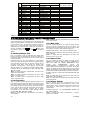
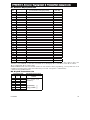
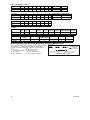
Zone
Zone Type
Zone Name
Chime (melody
No.
Default
Programmed
Default
Programmed Zone Name or Off) (*)
10 Perimeter
Living Room
11 Interior
Living Room
12 Interior
Bedroom
13 Perimeter
Bedroom
14 Perimeter
Guest Room
15 Interior
Master Bedroom
16 Perimeter
Master Bedroom
17 Perimeter
Laundry Room
18 Perimeter
Master Bathroom
19 Perimeter
Basement
20 Fire
Fire
21 Fire
Fire
22 Emergency
Emergency
23 Emergency
Emergency
24 24 h / silent
Basement
25 24 h / silent
Office
26 24 h / audible
Attic
27 24 h / audible
Den
28 non-alarm
Yard
29 non-alarm
Hall
30 non-alarm
Utility room
* Note: All zones are CHIME OFF by default. Enter your own choice in the last column and program accordingly.
4.4 DEFINING CONTROL PANEL PARAMETERS
4.4.1 Preliminary Guidance
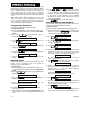
This mode allows you to customize the control panel and
adapt its characteristics and behavior to the requirements
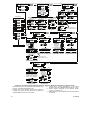
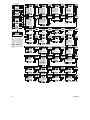
of the particular user. An illustrated process is shown in
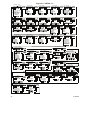
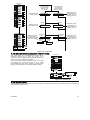
Figure 4.4. In this illustration, each selected option is
displayed with a dark box at the right side. To review the
button, until
or
options, repeatedly click
the desired option is displayed, then click SHOW/OK
button.
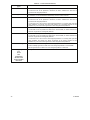
4.4.2 Entry Delays 1&2
(Fig. 4.4, location 01, 02). Two different entry delays allow
the user to enter the protected site (while the system is in
the armed state) via 2 specific doors and routes without
causing an alarm.
Following entry, the user must disarm the control panel
before the entry delay expires. Slow-rate warning beeps
start sounding once the door is opened, until the last 10
seconds of the delay, during which the beeping rate
increases. Locations No. 1 (entry delay 1) and 2 (entry
delay 2) allow you to program the length of these delays.
Available options for each delay are: 00s, 15s, 30s, 45s,
60s, 3m and 4m.
Note: To comply with CP-01 requirements, "00s" and "15s"
options are not available.
Note: To comply with EN requirements, the entry delay
must not exceed 45 sec.
Note: To comply with UL requirements, the entry delay
must not exceed 15 sec.
4.4.3 Exit Delay
(Fig. 4.4 location 03). An exit delay allows the user to arm
the system and leave the protected site via specific routes
and doors without causing an alarm. Slow-rate warning
beeps start sounding once the arming command has been
given, until the last 10 seconds of the delay, during which
the beeping rate increases. Location No. 3 allows
programming of the exit delay length. Available options
are: 30s, 60s, 90s, 120s, 3m, and 4m.
Note: To comply with CP-01 requirements, "30s" option is
not available.
12
Note: To comply with UL requirements, the exit delay must
not exceed 120 sec.
4.4.4 Bell Time
(Fig. 4.4, location 04). Here you select the length of time
the bell (or siren) is allowed to function upon alarm. The
bell time starts upon activation of the siren. Once the bell
time expires, the siren is automatically shut down.
Available options are: 1, 3, 4, 8, 10, 15 and 20 minutes.
Note: Bell Time is defined for the entire alarm system and
not per partition.
Note: To comply with EN requirements, the Bell Time
should be set to 15 min. max.
4.4.5 Abort Time
(Fig. 4.4 location 05). Here you select the length of time
allowed by the system to abort an alarm (not applicable to
alarms from FIRE, 24H SILENT, EMERGENCY, GAS,
FLOOD
and
TEMPERATURE
zones).
The
PowerMaxExpress is programmed to provide an “abort
interval” that starts upon detection of an event. During this
interval, the buzzer sounds a warning but the siren remains
inactive and the alarm is not reported. If the user disarms the
system within the allowed abort interval, the alarm is aborted.
Available options are: 00s, 15s, 30s, 45s, 60s, 2m, 3m
and 4m.
Note: To comply with CP-01 requirements, "60s", "3m" and
"4m" options are not available.
Note: To comply with UL requirements, the abort time must
not exceed 45 sec.
4.4.6 Alarm Cancel
(Fig. 4.4, location 06). Here you determine the ”cancel
alarm” period that starts upon reporting an alarm to the
central station. If the user disarms the system within that
time period, a “cancel alarm” message is sent to the
central station.
Available options are: 1, 5, 15, 60 minutes, 4 hours and
also cancel inactive.
Note: To comply with CP-01 requirements, "1 minute"
option is not available.
D-302980