1
Installation and Setup
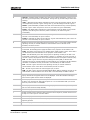
5. Complete these fields:
Field
Description
Device Name
The name of the projector.
IP Address
The IP address of the projector.
Subnet Mask
The subnet mask to which the IP address belongs.
Gateway
The IP address for the network gateway.
Apply
Applies Ethernet settings.
Serial Speed (Baud)
The baud rate of the serial port. The default is 115200.
Enable SNMP
Enables SNMP.
SNMP V2 / SNMP V3
The SNMP protocol type. Contact Christie technical support for the SNMP
V3 user ID and password.
Management IP
The IP address where SNMP information and notifications are sent.
Download MIB to USB
Sends the SNMP Management Information Base (MIB) file to a USB flash
drive.
Apply
Applies SNMP settings.
Serial Access
Grants access to serial connections.
Ethernet Access
Grants access to Ethernet connections.
Add the Lamp Information to the Lamp History
1. If the lamp is on, tap the lamp off (
) icon to turn it off.
2. Tap Menu > Advanced Setup > Lamp Change Wizard.
3. Tap Next.
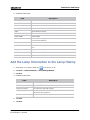
4. Complete these fields:
Field
Description
Type
The lamp type.
Serial Number
The lamp serial number.
Reason for Change
The reason the lamp was changed.
Lamp Expiry (Hours)
The number of hours the lamp can operate before replacement.
This field is auto-populated.
Hours Used
The number of hours the lamp has operated before installation.
5. Tap Save.
6. Tap Next.
CP2215 Quick Start Guide
020-101295-02 Rev. 1 (04-2015)
17