1
Yasca User's Guide
15
3.2.5.8 COBOL Resource Leakage (Code-Quality.Resource-Leak.GETMAIN.php)
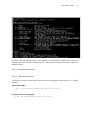
This plugin scans for potential resource leaks in COBOL source code. The resource leak in question comes
from executing a GETMAIN without an associated FREEMAIN. Long running jobs can exhaust available
resources.
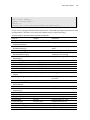
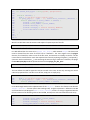
EXEC CICS GETMAIN
SET (ADDRESS OF SOME-VARIABLE)
LENGTH (LENGTH OF SOME-VARIABLE)
NOHANDLE
END-EXEC
00010000
00010010
00010020
00010030
00010040
3.3 Writing Your Own Plugins
It is easy to extend Yasca by writing your own plugin. This can take the form of a PHP script, GREP file, or
PMD ruleset placed in the plugins directory.
3.3.1 Writing a New PHP Plugin
Writing a new PHP Plugin means extending the Plugin class (see the API or Plugin.php source code),
implementing an execute() function that will perform the scan when invoked.
Suppose you want to write a PHP Plugin to search for all social security numbers hardcoded in Java
source code or .properties files. The first thing you need to do is define what type of plugin it is.
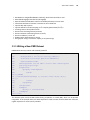
There are two types of plugins: single-target and multi-target. Single targets operate only on the file
passed from the engine, and multi-targets generally operate on all files in the target directory at once.
The Yasca engine is not aware of this distinction, so multi-target plugins will be invoked once for each
target file. It is therefore important to prevent the plugin from executing multiple times, which can be
done like this:
function execute() {
static $alreadyExecuted;
if ($alreadyExecuted == 1) return;
$alreadyExecuted = 1;
Next, you should decide on the specific file types that will be scanned. In this case, the file extensions
.java and .properties should suffice.
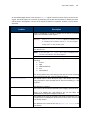
The last step is writing the code. The example below shows the finished product. Embedded comments
have been removed for brevity, but full documentation should be included in any plugins that you
create.
001 <?php