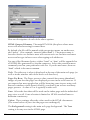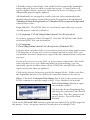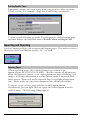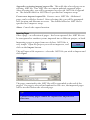
1
Aavelin Digital Signage and Video Messaging System by MagicBox User Manual v3.04 Copyright © 2008 MagicBox, Inc. All Rights Reserved Aavelin User Manual -1- -2- Aavelin User Manual Table of Contents About This Manual ......................................................................................................... - 5 - Customer Support .......................................................................................................... - 5 - Copyright and Use .......................................................................................................... - 6 - Warranty ........................................................................................................................... - 7 - Software License.............................................................................................................. - 7 - Standards and Regulatory Compliance Statements ............................................... - 8 - Important Safety Instructions...................................................................................... - 9 - Overview .................................................................................................................................11 Hardware .............................................................................................................................. 11 Software................................................................................................................................. 11 Installation............................................................................................................................ 14 Hardware ............................................................................................................................. 15 Installation ........................................................................................................................... 15 Software Installation .........................................................................................................20 Setup ..................................................................................................................................... 22 Updating the Unit’s Software ......................................................................................... 27 The Setup Menu ................................................................................................................. 29 Completing Site Setup ...................................................................................................... 32 Managing Multiple Users ................................................................................................ 34 Getting Started and Publishing ...................................................................................... 36 Creating a New Project ..................................................................................................... 36 Working Within a Project ............................................................................................... 38 Adding and Removing Pages ........................................................................................... 39 Project Properties ............................................................................................................... 39 Importing and Exporting ................................................................................................ 44 Saving Your Work..............................................................................................................46 Previewing your Project....................................................................................................46 Publishing to an Aavelin Unit ......................................................................................... 47 Creating and Adding Content .......................................................................................... 49 Standard Pages ....................................................................................................................49 Text Objects ........................................................................................................................ 53 Images ...................................................................................................................................54 Adobe Flash ......................................................................................................................... 55 Credit Roll ........................................................................................................................... 58 Video Frames ....................................................................................................................... 60 Video Pages .......................................................................................................................... 60 Overlay Regions .................................................................................................................. 61 Logo ....................................................................................................................................... 65 Visual Effects ....................................................................................................................... 65 Audio ..................................................................................................................................... 66 Aavelin User Manual -3- Scheduling and Other Page Settings ............................................................................ 68 General ................................................................................................................................. 68 Display Settings .................................................................................................................. 69 Scheduling ........................................................................................................................... 69 External Device Commands ............................................................................................ 73 Appendix A – Infra-Red Control ...................................................................................... 74 Appendix B – Weather ...................................................................................................... 80 Appendix C – TxStream ................................................................................................... 85 Appendix D – Adtec MPEG Players ................................................................................ 88 Frequently Asked Questions ............................................................................................94 -4- Aavelin User Manual About This Manual Throughout the manual, tips and important items will be highlighted in the following manner: Text in this style of box represents a helpful tip or important concept in using the Aavelin system. Text in this style of box describes very important information to prevent loss of data or damage to your system. Optional Feature Text in this style of box indicates a feature or component that is not a part of the standard feature set, but is instead available as an optional component to the Aavelin system. Professional Feature Text in this style of box indicates a feature that is available only in the Professional edition of Aavelin Composer software. Customer Support Should you have any questions about installing or using your MagicBox Aavelin system, visit our website at http://www.magicboxinc.com and click on ‘Support’. Alternatively, you can contact us any of the following ways: Phone: 541-752-5542 Fax: 541-752-5614 E-Mail: [email protected] Aavelin User Manual -5- Copyright and Use This manual and the software described herein are copyrighted with all rights reserved. Under the copyright laws, neither this manual nor the software may be copied, in whole or in part, without the written permission of MagicBox, Inc. MagicBox®, Aavelin™, and Aavelin Composer™ are trademarks of MagicBox, Inc. Other terms, including TrueType, InstallShield, Windows, JPEG, etc., are trademarks of their respective manufacturers. The backgrounds and fonts present on the Aavelin CD-ROM are copyrighted by their original distributors and are present under a special arrangement with MagicBox, Inc. These images and fonts are provided for use in commercial and educational video production, broadcast, cablecast, and closed-circuit applications. The image files may not be redistributed in other media, including print; nor may the original image files be translated into other formats for other platforms. The fonts may be used by a single user by any software application which supports them. These companies are the original copyright holders of the images and fonts included on the Aavelin CD-ROM. Written permission from the copyright holder is required for uses of images and fonts in media or applications other than those mentioned above. Dimension Technologies, Inc. 4612 NE 20th Avenue Ocala, FL 34479 100 Sample Backgrounds The BeOS logo is a trademark of Be, Incorporated. Credits Aavelin Composer Software: Lead Programmer: Karl Ott, Chad Mann Concepts and Original Design: Bob Richardson Director / Producer: Karl Frederick, VP of Technology Aavelin Hardware: Case Design, Video-Out Hardware: Karl Frederick, VP of Technology Aavelin Playback Software: Programming team: Karl Ott, Karl Frederick Concepts and Original Design: Bob Richardson Contributing Programmers: Dianne H., George W., JBQ, John F., Leo S., Manuel, the team at Be, Inc. Director / Producer: Karl Frederick, VP of Technology Aavelin Documentation: Original Director/Producer, Original Manual: Bob Richardson Manual Composition and Revisions: Darin Starr, Chad Mann -6- Aavelin User Manual Executive Producer: Tom Searcy Special Thanks: Garrett Andres, Scott Bowman, Ann Davies, Brad Holland, Ashish Warranty The Aavelin player unit hardware is warranted against defects in parts and labor for a period of one year from the date of purchase when governed by the standard warranty. This warranty does not apply to damage caused by misuse or external forces such as power fluctuations, extreme temperatures, exposure to excessive moisture, or other acts of nature. CD-ROMs, Zip disks, or floppy disks are warranted to be free from media defects for a period of ninety (90) days from the date of purchase. This warranty does not cover shipping and handling charges for any replacement components or merchandise. Bronze, Silver, and Gold warranties are subject to their own terms and conditions outlined on their respective warranty certificates. Software License SOFTWARE PROGRAM LICENSE AGREEMENT PLEASE READ CAREFULLY COPYRIGHT This manual and software described herein are copyrighted with all rights reserved. Under the copyright laws, neither this manual nor the software may be copied, in whole or in part, without the written permission of MagicBox, Inc. DISCLAIMER The software is licensed and delivered on an "as is" basis. Except for the express warranty set forth below, MagicBox, Inc. makes no other warranties, either expressed or implied, by statute or otherwise, regarding the enclosed computer software product, its quality, its performance, its merchantability, or its fitness for any particular purpose. The entire risk as to the results and performance of any program is assumed by you. Should the program prove defective, you (and not MagicBox, Inc. or its dealers) assume the entire cost of all necessary servicing, repair, or correction. Further, MagicBox, Inc. does not warrant, guarantee or make any representations regarding the terms of corrections, accuracy, reliability, currentness, or otherwise; and you rely on the program and results solely at your own risk. LIMITED WARRANTY MagicBox, Inc. warrants that the disks on which this software is recorded are free from defects in material and workmanship, under normal use for 90 (ninety) days after the date of original purchase. If a defect occurs during the 90-day period, you may return the disks to MagicBox, Inc. for a free replacement. The remedy for breach of this warranty shall be limited to replacement and shall not encompass any other damages, including but not limited to loss of profit, and special, incidental, or other similar claims. LIMITATION OF LIABILITY Aavelin User Manual -7- MagicBox Inc.'s liability is limited solely to the repair or replacement of the defective product, in its sole discretion, and shall not in any event include damages for loss of use or loss of anticipated profits or benefits or other incidental or consequential costs, expenses, or damages, including without limitation any data or information which may be lost or rendered inaccurate, even if MagicBox, Inc. has been advised of the possibility of such damages. Some states do not allow a limitation on how long an implied warranty lasts, or limitation of incidental or consequential damages, so the above limitations or exclusions may not apply to you. This warranty gives you specific legal rights, and you may also have other rights which vary from state to state. LICENSE RESTRICTIONS The licensed software and all associated documentation, and all proprietary and intellectual property rights therein, are and shall remain the exclusive property of MagicBox Inc. Licensee agrees not to (a) modify, adapt, alter, translate, or create derivative works from the licensed software or associated documentation, except as expressly permitted; (b) reverse engineer, de-compile, dissemble or un-assemble in any way the licensed software; or (c) distribute or disclose to others the licensed software or associated documentation. MISCELLANEOUS This agreement represents the entire understanding regarding the programs and related documentation and supersedes any prior purchase order, communications, or representations. MagicBox, Inc. products and services are interoperable only with specific 3rd party products and services, the definition of which is reserved solely and without limitation at MagicBox, Inc.’s discretion, and may be changed without notice at any time. Contact MagicBox Inc. for a list of approved 3rd party vendor products, services and/or limitations. This agreement may only be modified by an officer of MagicBox, Inc. If any provision of the agreement shall be deemed unlawful, void, or for any reason unenforceable, it shall be deemed severable from, and shall in no way affect the validity and enforceability of the remaining provisions of the agreement. This license agreement shall be governed by the laws of the state of Oregon. Standards and Regulatory Compliance Statements This device has been subjected to laboratory tests by a certified testing facility, and has been found to conform to the following standards and specifications: UNITED STATES: FCC Part 15 Subpart B Section 15.109 and 15.107 Class A; ANSI C63.4 (1992) method. CANADA: ICES-003 Class B using : FCC Part 15 Subpart B Section 15.109 and 15.107 Class A; ANSI C63.4 (1992) method. Federal Communications Commission (FCC Statement) This equipment has been tested and found to comply with the limits for a Class A digital device, pursuant to Part 15 of the FCC Rules. These limits are designed to provide reasonable protection against harmful interference in a commercial installation. This equipment generates, uses, and can radiate radio frequency energy. If not installed in accordance with the instructions in this manual, harmful interference to radio communication may occur. However, there is no guarantee that interference will not occur in a particular installation. If this equipment does cause interference to radio and television reception, which can be determined by turning the equipment off and on, the user is encouraged to try and correct the interference by one or more of the following measures: Re-orient or relocate the receiving antenna. Increase the space between the equipment and the receiver. Connect the equipment into an outlet on a circuit different from the one to which the receiver is connected. Consult the dealer or an experienced radio/TV technician for help. If necessary, the user should consult the dealer or an experienced radio/television technician for additional suggestions. The user may find the following booklet prepared by the Federal Communications Commission helpful: “How to Identify and Resolve Radio-TV Interference Problems”. This booklet is available from the U.S. Government Printing Office, Washington, DC 20402 by ordering Stock No. 004-00000345-4. -8- Aavelin User Manual WARNING: A grounded-type power cord is required in order to meet the FCC emission limits and also to prevent interference to the nearby radio and television reception. It is essential that only the supplied power cord be used. Use only shielded cables to connect I/O devices to this equipment. Canadian Doc Notice For Class B Computing Devices This digital apparatus does not exceed the Class B limits for radio noise emissions from digital apparatus as set out in the Radio Interference Regulation of the Canadian Department of Communications. Le présent appareil numérique n’èmet pas de bruits radioélectroniques dépassant les limites applicable aux apparils numéeriques de las class B prescrites dan le Règlement sur le brouillage radioélectrique édicté par le ministrère des Communications du Canada. Important Safety Instructions The following instructions describe how to prevent physical injury to yourself or others, as well as how to prevent damage to the unit. Read these instructions thoroughly before attempting to install your unit. 1. Disconnect the device from the main power supply before cleaning. Do not use any liquid or aerosol spray cleaners. 2. To avoid damage to the device, use only accessory parts permitted by the manufacturer. 3. The device must be protected against moisture. 4. To set up the device, it must be put in a stable horizontal position. Tipping it over or dropping it may cause injuries or damage to the equipment. Only use safe setup locations, and follow the setup instructions of the manufacturer. 5. The ventilation openings are used for air circulation which protect the device against overheating. Do not block the ventilation openings. 6. To connect the device, follow the connected load values of the main supply. 7. For electrical safety, the wall socket must be equipped with a nonfused grounded conductor contact. 8. The power cable must be positioned in a way that nobody may trip over it and excessive strain is not placed on it. There should be nothing resting on the cable. 9. All instructions and warning remarks on the device must be followed. Aavelin User Manual -9- 10. If the device will not be used for a long time period, it should be disconnected. 11. Absolutely no objects or liquids should enter the device via its openings. This could cause a fire or an electrical shock. 12. Do not open the device unless instructed to do so by an authorized customer service personnel. 13. If any of the following conditions occur, the device must be disconnected from the main power, and it must be checked by a qualified service center: A. Either the power cable or power plug is damaged. B. Liquid has entered the device. C. The device was exposed to moisture. D. When the device does not operate according to the manual, or you do not achieve any improvement with the aid of the manual. E. The device has been dropped and/or the casing is damaged. F. The device gives off excessive heat or a burning smell. G. When the device shows obvious signs of a defect. 14. For repair, only original spare parts or parts in accordance with the original specifications may be used. Use of unsuitable parts can cause more damage and may void your warranty. 15. Please contact the manufacturer for all questions concerning service and repair. 16. The power outlet must be located in close proximity to the equipment and must be easily accessible. - 10 - Aave Overview The Aavelin Digital Signage and Video Messaging system allows you to create slides and other content on your PC with graphics and text which can then be played back on numerous types of video monitors using the Aavelin unit. A variety of applications can be served by an Aavelin, including advertising, announcements, schedules, point of sale displays, and more. Use the Aavelin wherever you have one or more monitors that need to display messages in the form of still images, video, and crawling text. Hardware The Aavelin unit is a dedicated player in a rugged rack-mount case. It features high quality output, quiet operation, and an easy-to-use interface with a keypad remote control. The back panel has a variety of connections for attaching various monitors and accessories to the unit. These connectors are described later in this manual. Software Each Aavelin unit comes with a copy of MagicBox’s “Aavelin Composer” software. This software can be installed onto a Windows (2000, XP, or Vista) computer allowing you to generate pages with backgrounds, text, and images and other content to be displayed on an Aavelin system. Aavelin User Manual 11 Backgrounds can come from many sources, including other Windows applications, your own scanned photos or digital camera images, the MagicBox background libraries, and more. You can copy and paste text directly into Aavelin Composer from other programs such as Microsoft Word, Corel Word Perfect, Netscape, etc. Publishing The act of transferring your content from the PC it was created on to the Aavelin system for playback is called Publishing. With the Aavelin system, several publishing options are available Ethernet – All Aavelin systems include built-in Ethernet support, allowing you to place the Aavelin on a network of any size for high-speed transfers. Direct serial – All Aavelin systems include a 10ft serial cable that can be connected between the PC and the Aavelin, using an available 9-pin communications port. Serial transfers are slower than Ethernet, but very simple to set up. Modem – Publish to the Aavelin over standard phone lines with the optional modem package. Slower than direct serial, modem transfers are recommended only if other methods are not available. Removable media – You can also publish to ZIP disks or USB Flash drives. After publishing to the removable media, simply remove it from the PC, and insert it the disk or drive into the Aavelin. The project will be transferred and played automatically. All of these publishing methods are described in detail later in this manual. Once published, the Aavelin retains the projects on its built-in hard drive. The hard drive has a capacity for a nearly unlimited number of images (10,000+). However, capacity may vary depending on other types of content sent. Terminology Here are some terms associated with the Aavelin that will be used frequently throughout this document: Publishing: The act of sending finished content to the Aavelin unit for playback Page: Also called a slide, or frame – a single screen of content. Overlay Region: Also referred to as a crawl region – an area of text at the top or bottom of the screen, separate from the page area, that contains scrolling or static text. 12 Aavelin User Manual Time Domain: Another name for page and crawl scheduling. Previous versions of the Aavelin software used this term. Upstream: With regards to video playback, an upstream video source is one that feeds into one of the Aavelin’s video inputs. Downstream: With regards to video playback, a downstream source is one that the Aavelin’s output signal passes through prior to distribution. Aavelin User Manual 13 Installation Box Contents Before you begin setup of your Aavelin unit, make sure that the following components are included in the original packaging: Aavelin Main System Unit Control Keypad Power Cord BNC to RCA Adapter Plug (AV100/200 only) BNC Video Cable (AV100/200 only) S-Video Cable (AV100/200 only) Null Modem Serial Cable Aavelin Composer CD-ROM Aavelin Training DVD 1/8” Audio Cable This User Manual Warranty/Registration Card Be sure to fill out and send in your registration card as soon as possible. We must have your registration card on file to be able to provide support and product updates. You may also register by visiting our web site at www.magicboxinc.com 14 Aavelin User Manual Hardware Installation The Aavelin’s chassis is a 2U rack space enclosure. Ideally, the Aavelin will be installed in a rack mount case or cabinet in a climate-controlled room. If a rack mount installation is not available, the Aavelin unit should be placed on a stable, flat, level surface. Take care to ensure that the unit is not placed where it may be easily knocked over, have its cords tripped over, or have liquids spilled into it. The Aavelin unit warranty does not cover damage caused by accidents or misuse. All of the Aavelin’s connections are found on the rear panel, shown below. Your Aavelin back panel may appear different than the one pictured above. The AV100 does not have the four video inputs found on the right. You must unplug the power cord before adding or changing any connections. Failure to do so may damage your Aavelin unit. About Television Standards (NTSC/PAL) Different parts of the world use different television standards. The standard used in most of North America is called “NTSC”. The standard used in many European countries is called “PAL”. When using Composite or S-Video, the Aavelin can operate in either the NTSC or PAL modes. The mode is set at the factory based on the country to which the unit is shipped. If you need to change this setting, contact MagicBox technical support. Aavelin User Manual 15 Connect a Monitor The Aavelin unit supports several different types of display devices as shown below: The “VGA/RGB” port supports any PC-style RGB monitor or compatible plasma monitor. The “S-Video” port supports professional video monitors with multipin inputs labeled “S-Video”, “S-VHS”, or “Y/C”. The “Composite Video” port outputs standard composite video which may be connected to a video monitor or a television with “A/V” or “Aux” inputs. It is recommended that only one output connector be used at a time. The desired output is set in the Aavelin’s setup menus. When the setup menus are being displayed, they are sent to all output connectors. However, only the selected output connector displays a broadcast-quality signal. Connect the Control Keypad The Aavelin is controlled by a small keypad. Connect this keypad to a USB connector on the front or back of the player. Older Aavelin keypads utilized a PS/2 style connector (round, on the left in the picture above). The bottom (purple) of the two is to be used with that style of keypad. Connect the Ethernet Cable (Optional) Aavelin units include an Ethernet networking adapter. This connector may be located in the PCI Expansion area on some systems. If you intend to use the Aavelin unit on a LAN, connect the network cable here. (Contact your network administrator to help you identify your network’s cable connection if necessary.) 16 Aavelin User Manual Ethernet networking can be a complex subject. If you are not familiar with terms such as “TCP/IP”, “IP Address”, “Subnet Mask”, etc., We recommend that you have your Network Administrator assist you with the initial setup of the Aavelin unit. Connect a Modem (Optional) If you will be using a modem with your unit, (US Robotics Sportster 33.6 or 56K modems are supported), connect it to the COM1 serial port. Aavelin units have 2 communications ports. COM1 is not labeled, COM2 is labeled and is used only for the Aavelin weather station optional component. The modem should have its DIP switches set according to the following photo. Next, connect the phone line from the wall to the modem. Use the plug on the outermost edge of the modem. Finally, connect the included power supply, and turn the modem on. To ensure proper detection, the modem must be powered on before the Aavelin playback system. Connect a Direct Serial Cable (Optional) If you will be publishing via a direct serial connection, connect the cable from the communications port on the publishing PC to the COM1 serial connector on the Aavelin. See the section above for help identifying the COM1 port on the Aavelin. To publish with a serial cable, you must use a Null Modem serial cable, included with your Aavelin. A standard serial cable will not work. Aavelin User Manual 17 Connect Audio Sources (Optional) Current AV100 and AV200 playback systems feature 4 audio connections – 3 inputs (MIC, Line 1, and Line 2) and 1 output (AV400, AV400P, and some previous Aavelin models have only MIC and Line 1 inputs). Line inputs 1 and 2 are located on top, and the MIC input (right) and stereo output (left) are located below. Some systems may appear different from this picture. 1. MIC Input – This input is referred to in the Aavelin Composer software as a ‘Music Bed’ input. Attach a CD player or other background music source here (pink colored input jack on AV400, AV400P, and some previous Aavelin players) 2. Line Input – An additional audio source can be connected here. Common uses would be a VCR, DVD player, or MPEG player (blue colored input jack on AV400, AV400P, and some previous Aavelin players). 3. Speaker Output – Audio output for connection to distribution gear or speakers (green colored output jack on AV400, AV400P, and some previous Aavelin players). Connect the Infra-Red Controller (Optional) The Aavelin’s optional Infra-Red control module connects to the parallel port on the Aavelin (25-pin, magenta colored). Refer to Appendix A for further information. Connect the Weather Station (Optional) The optional Weather Basic and Weather Deluxe kits feed live weather statistics to the Aavelin via the Com 2 serial port. Refer to Appendix B for further information. Connect the Video Inputs (Optional, AV200 & AV400 Only) AV200 (shown below) and AV400 series owners will find 4 video inputs on the back of the Aavelin – 3 RCA, and 1 S-Video. Video input connectors on the AV400 series are located to the right in the area marked ‘PCI Expansion’. Any device that you wish to show through the Aavelin can be connected here (VCR’s and DVD players are most commonly used). Refer to the “Video Pages” section of the “Creating and 18 Aavelin User Manual Adding Content” chapter for further details. Connect the Power Once you are sure everything is properly connected, connect the power cable to the rear of the Aavelin unit and then plug it into a power outlet on a surge protector or battery backup unit. Plugging the Aavelin directly into a wall socket is not recommended. Ensure that the power standard switch (115V / 230V) is set to the correct voltage for your country. Damage could result if the switch is not set properly. Starting the Unit The Aavelin unit has a “soft” power switch. When you plug the unit in, it will return to its last power setting, which may have been “on” or “off”. Normally, the unit should be left on all the time, but if you need to turn off the power (for example to connect expansion devices or to ship the unit), press and hold the power button on the front of the case for 4-6 seconds. The unit will shut down, and then you may unplug the power cable. Turn the unit on by connecting the power and momentarily pressing the power switch on the front of the unit The Aavelin’s boot process can take up to 60 seconds. During this time, the screen may be black (if using Composite or S-Video output) or a series of boot screens will be displayed (VGA only). After the boot process is complete, the Aavelin will begin playing pages. If this is the first time your Aavelin unit has been started, it will play a demonstration project. Otherwise, it will play the default project last published from your PC. Having successfully reached this stage, your unit is ready to configure. Follow the steps below under “Configure the Aavelin Unit”. Aavelin User Manual 19 Software Installation To install the Aavelin Composer software, your computer must meet the following requirements: • • • • Windows 2000, XP, or Vista 50MB Hard Drive Space CD-ROM Drive Super VGA card with True Color (24-bit or 32-bit) modes (800x600 or higher desktop resolution required) • Color Monitor Windows 95, 98, ME, and Windows NT 4.0 are not supported. Starting Setup… Insert the “Aavelin Composer” CD into your CD-ROM drive. On most Windows machines, the CD should automatically launch the installer. If Auto-Run is disabled on your machine, perform the following: Go to “My Computer” or “Windows Explorer.” Click on the letter of your CD-ROM drive (such as D:\ or E:\ ). Then double-click on “Aavelin_Composer_R3.04.30.msi.” This will take you through the setup procedure. Using Setup When the setup program first runs, it will take a few seconds to prepare its files for installation. After this is complete, the Wise Installer will be started and will guide you through the installation process. You will be prompted for your name, organization, who should be allowed to use the application (current user or all users), and a location to install the application to. If you are unsure on a particular item, simply proceed with the default setting and click ‘Next’. After the installation is complete, click on the ‘Finish’ button to exit the Wise Installer application. An icon will be placed on your desktop that can be double-clicked to launch the application. Alternatively, you can launch the application via the Start menu, under ‘Programs’, ‘MagicBox’, and ‘Aavelin Composer’. 20 Aavelin User Manual Serial Key The first time Aavelin Composer is launched, you will be prompted to enter a serial key to unlock the application. This 20-digit key is found on the reverse side of the CD case insert on a sticker. Enter the key in this field exactly as it appears on the sticker, in all caps and with dashes between the sections. When entered correctly, the application will launch, and the main screen will indicate the version of software that was unlocked – AV100, AV200, AV400, or Professional. Serial keys may contain the number 0 and 1, but not the letters O or I. Aavelin User Manual 21 Setup The Aavelin unit’s functions are accessed using the included wired control keypad. Control Keypad Buttons Menu This key will enter and exit the Aavelin unit’s menu system. The menu display will be sent to all the video outputs simultaneously, temporarily enabling any outputs that are turned off. Exit the menu screen by pressing “Menu” again. The Aavelin unit will resume playback on its specified output connector. Arrows and Select / Enter When accessing menus, the arrow keys navigate the menus and change the values of selections. The Select and Enter keys choose a highlighted menu item. Esc Pressing the ESC key will back up to the previous menu level. If you are in a requester that has a “Cancel” button, pressing ESC is the same as hitting “Cancel”. Opt 1, Opt 2, +, These keys are reserved for future expansion. The Setup Menus The setup menus allow you to change some of the settings used by the Aavelin unit. The changes you make are remembered by the unit even after a power failure. To access the menus, press the Menu key on the control keypad. The main menu screen, shown below, should appear. The menus are displayed on all outputs simultaneously. After you exit from the menus, playback resumes on the designated output connector. 22 Aavelin User Manual Use the up and down arrows on the control keypad to highlight a menu item. Once the desired item is highlighted, press the Select key. Each of the setup menus is described on the following pages . Video Settings Menu The Video Settings menu controls how the Aavelin outputs video during the playback of projects. Highlight the output connector you will be displaying to, and press the select key. The Aavelin can output its signal on the VGA connector, or as Composite Video or S-Video. VGA – When selected, only the VGA connector will output a signal - the composite and s-video connections will be disabled completely. Composite/S-Video – When selected, either or both of the connectors can be used. The VGA connector will display a preview-quality image. The Aavelin support both NTSC and PAL display standards. Currently this setting cannot be altered from the Video Settings menu. Systems are sent from MagicBox properly configured for the country they will be used in. Set Date & Time Menu From the Main menu, highlight “Set Date & Time” and press Select. The Set Date and Time menu, below, will appear: Aavelin User Manual 23 When you create pages on your PC, you can set starting and ending dates and times., therefore it is very important that the date and time on the playback system are set accurately to assure proper playback. Press the right arrow key to highlight the first ‘Date’ field. Use the up and down arrow buttons to change the value of a field, and use the left and right arrow buttons to move between fields. The format is YEAR – MONTH – DAY. Once you have adjusted the numbers to reflect the current date, press Select to move down to the first ‘Time’ field. Use the left and right arrow keys to select which number you wish to modify, and use the up and down arrow keys to change the value of that number. The format is HOUR – MINUTES – SECONDS. This menu uses 24-hour notation, meaning that hours range from 00 to 23 instead of the usual 1-12 AM/PM. For example, Midnight is 00:00, 8am is 08:00, Noon is 12:00, 1pm is 13:00 and 11pm is 23:00. Once you have adjusted the numbers to reflect the current date, press Select to move down to the ‘Time’ field. Use the up and down arrow buttons to highlight the desired time zone, and press the Select key to highlight “Set” and press the Select key again to confirm the settings. Press the right arrow key and select to return to the main menu. Network Settings Menu All Aavelin units feature built-in support for Ethernet networking. 24 Aavelin User Manual Ethernet networking can be a complex subject. If you are not familiar with the meaning and implementation of terms like “TCP/IP”, “IP Address”, “Subnet Mask”, etc., then we recommended that you have your network administrator assist you with these menus. MagicBox can assist with the diagnosis of network-related problems, but cannot advise on how to configure the Aavelin system for installation on a specific network. All network settings are adjusted by selecting the “Network Settings” menu from the Main Menu screen: TCP/IP Address - Use the left and right arrow keys to select which number you wish to modify, and use the up and down arrow keys to change the value of that number. When you are finished, press the Select key to move down to the Subnet entry. Subnet Mask - Set the Subnet value to the one used on your network the same way you entered your TCP/IP address. (This value is provided by your network administrator). It is important that the Subnet match the Subnet of your network, or communication with the Aavelin unit may not work. When you are finished, press the Select key to move down to the Gateway entry. Gateway - In some networks, setting just the TCP/IP address may be sufficient. However, in more complex networks, a “Gateway” value is required. Set the Gateway value to the one used on your network the same way you entered the previous two addresses. (This value is provided by your network administrator.) If you are installing the Aavelin unit behind a router, the router address must be entered in the Gateway setting before the Aavelin will talk across the router. When you are finished, press the Select key to move down to the Domain entry. Aavelin User Manual 25 Domain - In some networks, setting just the TCP/IP address may be sufficient. However, in more complex networks, a Domain Name Server (DNS) may be required, and that address can be specified here. Set the Domain value to the one used on your network the same way you entered the previous three addresses. (This value is provided by your network administrator.) If you are installing the Aavelin unit behind a router, the Domain Name Server address must be entered in the Domain setting, or the Aavelin may not be able to find other machines on the network. When you are finished, press the Select key to highlight ‘Set’ and press the Select key again to save your settings. Press the right arrow key followed by the Select key to return to the main menu. Verifying the Network Setup Once the Aavelin networking hardware has been connected and its settings have been configured, your Network Administrator should verify that the network is operating properly. To verify that data can reach the Aavelin unit, use a PC on the same network. Open an MS-DOS prompt on the PC, then type in a “ping” command: ping x.x.x.x Substitute your IP address for the “x.x.x.x” shown above. For example, if the IP address of your Aavelin unit is “10.1.1.4”, then you should type: ping 10.1.1.4 If your network connection is successful, you should see results similar to the following: C:\Windows>ping 10.1.1.4 Pinging 10.1.1.4 with 32 bytes of data: Reply Reply Reply Reply Reply from from from from from 10.1.1.4: 10.1.1.4: 10.1.1.4: 10.1.1.4: 10.1.1.4: bytes=32 bytes=32 bytes=32 bytes=32 bytes=32 time<10ms time<10ms time<10ms time<10ms time<10ms TTL=255 TTL=255 TTL=255 TTL=255 TTL=255 Ping Statistics for 10.1.1.4: Packets: Sent = 4, Received = 4, Lost = 0 (0% loss). 26 Aavelin User Manual If a connection cannot be established between the Aavelin and your networked PC, you should repeat the hardware and software setup steps, verifying your settings. Pay particular attention to the Aavelin’s IP address and Subnet value. If the above test still fails, have your Network Administrator contact MagicBox, Inc. IR Setup Menu (Optional) The IR Setup Menu is used to configure the Aavelin’s optional Infra-Red control module. Refer to the ‘Infra-Red Setup’ addendum for further information. Installation Menu The installation menu provides controls for updating the player unit’s software (see next section) and restoring either of the two preinstalled demonstration projects. System Menu The System menu allows you to turn off or restart the Aavelin player. When possible, always use one of these options rather than holding in the power switch to shut the player off. Updating the Unit’s Software Occasionally, MagicBox will issue upgrades to the Aavelin software. These upgrades are issued on CD-Rom and available from MagicBox upon request. Use the following procedure to update your Aavelin with one of these CD’s. Playback Update Procedure Press the Menu key on the control keypad to display the Aavelin menu. Use the arrow keys to highlight the ‘Installation’ button and press the Select key. At this time, insert the CD-Rom labeled ‘Aavelin Playback Update’ into the CD-Rom drive of the Aavelin. After a few seconds, you will hear the disc spin-up, and the red IDE light and the green activity light on the CD-Rom drive will blink. When this happens, press the Select key while ‘Update from CD’ is highlighted. Aavelin User Manual 27 The CD-Rom activity and red IDE lights will blink rapidly while the update is performed. This procedure will take approximately 60 to 90 seconds – afterwards, the CD-Rom drive will automatically eject the disc, and the application will be restarted. When the Aavelin has completed its restart, press the Menu key to verify that the new version was installed successfully. Store the Playback Update CD-Rom in a safe location. In emergency situations it can also be used as a repair disc. Aavelin Composer Setup This section will describe how to launch the Aavelin Composer software and configure the program’s settings. Launching Aavelin Composer To launch the Aavelin Composer software, use these steps: Click on the Windows “Start” button on the taskbar. Click on “Programs” or “All Programs” Click on “MagicBox”, and finally… Click on “Aavelin Composer” The program will launch, and you should see a main menu screen similar to the one below. (The exact size and appearance of menus and text will vary depending on your Windows desktop resolution.) 28 Aavelin User Manual The main menu has the following choices: New Project, Open Project, Delete Project, Publish, Setup, About, and Exit. The Setup Menu Click on Setup from the main menu to enter the setup menu. You will see a window similar to the one below: General The General tab, shown above, allows you to set the default font style, size, and justification. This saves time if you have a favorite font, as you won’t have to change it every time you create a new page or paragraph. The factory setting is “Arial”, “40”, and “Center”. You can also specify the exact location of project storage, stock images, Flash files and Import/Export files (.MBT files); for example, if you are configuring Aavelin Composer use projects from a server location. Normally, these fields are set automatically by the installation program and don’t need to be changed. Do not specify the root of a drive (i.e., ‘C:\’, ‘H:\’) for the project, stock image, or import/export path. The “Object Tracker” size controls the thickness of the “handles” of objects in the Page Editor. You can increase this size to make the handles easier to grab for users with disabilities. Aavelin User Manual 29 Sites A ‘Site’ in Aavelin Composer is actually a physical Aavelin playback system. If you have one Aavelin unit, you will have one ‘Site’ as well. Multiple Aavelin players will need multiple site entries (Lobby Display, Breakroom, etc) The Sites tab is where Aavelin Composer is configured to publish completed work to your Aavelin unit(s). When you first install Aavelin Composer, the list of sites under the sites tab will be empty: Click on Add to create a site description. You will be presented with the window shown to the right: Enter a name for the site. In the example above, “Lobby Monitor” has been entered. Use whatever short word or phrase that best describes your Aavelin unit’s location. Below the site name you may type in whatever brief comment information you’d like, such as a mailing address or contact name and phone number. The Aavelin can be password protected to prevent unauthorized users from publishing to it. The Password section allows you to have the password sent automatically. Note that the password is actually set elsewhere (discussed at the end of this section), this field is used only to eliminate the need to type in the password every time you publish. Your Aavelin’s password is defined on the Sites tab of the setup dialog. The Project to Publish section allows you to select a project file to always publish to this site. This will save you a step at publish time, but only if you always use the same file. Connection Method Depending on the way each Aavelin unit is connected, there are different ways to set up each site description. Click on the Connection Method tab and then select one of the following four types: 30 Aavelin User Manual Removable Media - The removable media publish method is for Aavelin units that are not connected to your PC via serial cable, modem, or Ethernet networking. At publish time, you will be prompted to insert a removable disk such as a Zip disk (older models only) or USB drive, and the pages for your project will be automatically copied to that disk. Direct Serial Connection - The serial publish method is for Aavelin units connected directly to your PC via a serial cable. Select the “COM” port that corresponds with the cable connection. At publish time, Aavelin Composer will automatically connect with the Aavelin unit and send over the pages of your project. Modem - The modem publish method is for remote Aavelin units that are accessed over the phone using your PC’s modem. Select the “COM” port to which your PC’s modem is connected, and enter the phone # (including any long-distance or outside line access #’s you normally dial) of your Aavelin unit’s modem. When publishing, Aavelin Composer will automatically dial the modem and send your project’s pages to the Aavelin unit. TCP/IP - The “Network” publish method is for Aavelin units that are connected to your corporate LAN or to the Internet. Enter the IP address of the unit. This must be the same address that has been programmed into the Aavelin unit at setup time. If you do not know this address, obtain it from your Network Administrator. Aavelin User Manual 31 When publishing, Aavelin Composer will automatically connect to the Aavelin unit across the network and send your project’s pages. TxStream Data Service This tab is used to configure the optional TxStream subscription service for datafeeds. For more information, view Appendix C – TxStream for more information. External Devices This tab is used to configure an external Adtec MPEG player so that Aavelin Composer can communicate with it, and trigger spots automatically. Refer to Appendix D – Adtec MPEG Players for more information. Completing Site Setup After you have set up your site’s name, preferences, and connection method, click on OK. You will be returned to the setup window with the Sites tab still selected. Now your site name(s) will appear in the list, similar to the picture to the left. The names of the sites will be listed in Alphabetical order, and an icon will appear next to each site name indicating the connection method selected: Removable Media Direct Serial Modem Network Test Connection At this time you can test a connection to ensure your PC can talk to the Aavelin. Select a site, and click on the “Test Connection” button. If successful, you will see a screen containing this information: 32 Aavelin User Manual If your test is not successful, double-check all hardware connections, and refer to the Troubleshooting section later in this manual. Set Date & Time Aavelin Composer can also be used to set the date & time of your Aavelin system remotely. This is useful if your Aavelin is remotely located, or in other situations where it may be difficult to access the system menus through the Aavelin’s keypad. Select a site, and click on the Set Date & Time button. Composer will connect to the Aavelin and display the date and time currently set. Make any adjustments necessary, and click on the Set button. Set Password The Aavelin system can be password protected, allowing only authorized users to publish content. By default, Aavelin systems are shipped with no password. If you wish to set one, simply select your site from the list and click on the Set Password button. Aavelin User Manual 33 Aavelin Composer will then connect to the system and see if a password is already set. Since this system does not have a password set currently, Composer simply prompts you for a New Password. Type in your desired password (4-character minimum), re-type it in the field below, and click on the Set Password button. If there is already a password set, Aavelin Composer will prompt you for it before allowing any changes. To remove password protection from an Aavelin system, simply click on the Clear Password button. Managing Multiple Users If more than one person will be creating and/or editing content for your Aavelin project, additional steps will be needed to ensure that everything runs as smoothly as possible. Aavelin Composer will work in a multi-machine installation if the following criteria are met: File Sharing and Separate Installation All of the computers which will have Aavelin Composer must be on the same LAN. Aavelin Composer opens files using the standard Windows mechanisms. “File Sharing” must be enabled between the machines and the server. Designate a “Server” One machine should be used to store all projects, background files, and user images. Select a machine which will always be turned on and always accessible on the network. This machine will be called the “Server”. It is not necessary to install Aavelin Composer on the server machine… it will just be used to store project files and images. Users on other computers will access files which are stored on this machine, so it is important that it remain powered on and connected to the LAN at all times. Change the paths within Aavelin Composer setup (default project folder, stock image path, etc) to point to locations on this ‘server’ using mapped network drives (talk to your network administrator for details). If the designated ‘server’ also has Aavelin Composer installed on it, it is important that this PC use the same mapped network drive letters (effectively referring to itself in the 3rd person). 34 Aavelin User Manual Do Not Use “Local” Image Files Users who wish to add an image file or background to a project should copy that file to a designated area on the server. If they use a file which is on their local hard drive, it will not be available when other users attempt to open the project, which could cause undesirable results as images disappear from pages. Use Common Fonts Windows stores fonts locally on a machine. Ensure that all of the fonts on one machine are also installed on all of the other machines. (Observe copyright and royalty restrictions when copying fonts.) If an individual user wishes to add a font for use in Aavelin composer, that font will have to be installed on all machines. One User at a Time for a Particular Project While a user has a particular project open, other users should not attempt to open or edit the same project. In such cases, the last person to save “wins”, and any other changes will be lost. Publishing Sites The “Sites” tab in the setup menu will have to be configured for each machine running Aavelin Composer. If you add a new Aavelin unit or change its site parameters (phone # or IP address), you will have to change the Site setup in each copy of Aavelin Composer. Aavelin User Manual 35 Getting Started and Publishing This section will show how to create a new project, open an existing project, manage and work within a project, and change the global project settings as well. These simple steps are necessary before you can begin adding and changing content. Creating a New Project A project is a collection of content that the Aavelin system will play back in sequence. While the Aavelin is capable of storing numerous projects, only one can be played back at a time. Generally, if you own only one Aavelin unit, you will probably stick with just one project for all your work. Owners of multiple Aavelin units usually have one project for each unit, although sometimes the same project will be sent to two or more units. From the Main Menu in Aavelin Composer, select New Project. You will now be given some basic options before you can begin creating pages. Project Title Give the project an appropriate name. This will be for your reference only. Also, select the output format for your project. Composite/S-Video: Creates your project in 4:3 aspect ratio, landscape orientation, and 640x480 resolution. VGA (Custom): Allows you to choose the aspect ration, orientation, and resolution of the project. This setting does not determine what output connector is used on the Aavelin playback system. It is only used to create a project with settings appropriate for that particular connector. Display Type (Aspect Ratio) 4x3: Standard aspect ratio for CRT displays (TV’s, etc) and some LCD screens. 16x9: Widescreen aspect ratio for most plasma and LCD screens. 36 Aavelin User Manual Display Orientation Landscape: Orientation where the display is wider than it is tall. Typically considered to be the standard orientation. Portrait: For tilt-axis displays. Select Portrait (left) or Portrait (right) depending on which way the display will be turned. Resolution The resolutions available will be dependant on the choices made in the previous steps. Select a resolution appropriate for the display you will be using. Refer to the display documentation if necessary. Select a resolution and click on the Finish button - you will now be taken to the empty project editor. As you add pages to the project (see the chapter titled “Creating and Adding Content”), refer to the “Working within a Project” section later in this chapter for specific details on manipulating pages and changing your project view settings. Opening an Existing Project To make changes to an existing project, simply click on the Open Project button from the main Composer screen. The most recently opened project will already be selected. Simply press enter or click on the Open button to resume working on it. You can sort by Filename or Date Modified by clicking on the respective column headers. Double-click on a project to open it for editing. Aavelin User Manual 37 Working Within a Project Once a project has been opened, you will be presented with the project overview screen, similar to one of the two samples shown below: The Aavelin Composer software can display your project to you in Thumbnail (left) or List (right) views. In List Mode, you can see all of your pages presented in a list. In Thumbnail Mode, you view actual images of your pages in a grid. Functionality between both modes is identical, only the formatting of the displayed information is different. List mode is often faster when working with a larger project, as it requires less of the graphics card in your PC and consumes less memory. You can switch between the two views at any time by clicking on the ‘View’ menu and selecting either View List or View Thumbnails. Both views display a list of the pages in your project. This list is in the order that the pages will appear when played. The Project Editor list shows the number and name of each page, the dwell time and transition effect, and other information relating to the scheduled dates and times for a particular page. If there are more pages than will fit in the view, you can use the scroll bars at the right and bottom to navigate through the list or thumbnails. 38 Aavelin User Manual Adding and Removing Pages New pages can be added to the project using either the Append Page or Insert Page buttons. Append Page – adds a new page to the end of the project. Insert Page – available only when a page is selected (highlighted) in the project view. This adds a new page to the project immediately before the selected page. A page can be removed from the project permanently by selecting it and clicking on the Delete Page button. Copy Page will create an exact duplicate of the selected page and add it to the project immediately after it. This can be useful if you have created one page to be used as a template, and wish to make numerous variations of it. Re-ordering Pages After being sent to the Aavelin system, pages will play back in the order they appear in the project view. Changing the order of the pages is very simple with the provided controls – the Move Up and Move Down buttons. Simply select (highlight) a page, and move it up or down in the page order with the appropriate button. Editing Pages To select a page you want to work on, simply double-click on it in either view. Alternatively, you can click on a page once to highlight it and click on the Edit Page button to the left. Editing a page will open the Page Editor window (standard pages) or bring up the Page Properties sheet (video overlay pages). Both are discussed in the following chapter, “Creating and Adding Content”. Project Properties In addition to every page having its own properties, the Project itself has a set of properties. Aavelin User Manual 39 Click on the “Project Properties” button and the Project Properties dialog will appear: The Project Properties dialog allows you to edit supplementary information about your project, set the default dwell, and define content that displays over the top of all pages, such as crawl lines (referred to as “Overlay Regions”). General Tab Author/Company/Notes: These fields allow you to indicate who created this project, and enter any notes you want to keep. These fields are for your reference purposes and will not display on the Aavelin player unit. Creating Software: These fields tell you what program created this project. Page Defaults Tab Page Dwell Time: The default “Page Dwell Time” is the duration all pages in a project will be set to when first created, until they are individually set to a user-defined duration. Try changing this value to 12. When you leave the Project Properties menu, all pages using the default dwell will have changed from 15 (the current setting) to 12. You can tell which pages are set to use the default dwell by looking at the Dwell column in the list. Any page using the default dwell will have its dwell value shown in brackets. 40 Aavelin User Manual Page Size: This is a reference value that indicates the output resolution of all the pages in the current project. This value is set during project creation and cannot be changed. Logo Tab The logo tab allows you to insert a static logo image on screen that will be present throughout the entire project. Allowable image types are .BMP and .JPG. For more details, view the Logo section of the “Creating and Adding Content” chapter. Overlay Region The Overlay Region tab is used to control the Aavelin’s 4 overlay regions, or crawl regions. These crawl lines are used to scroll information from right to left across the top or bottom of the screen, and can also be used to display static (centered) information for a pre-determined period of time. Further information is available in the “Creating and Adding Content” chapter under “Crawl Lines”. HTML Preferences The HTML Preferences tab provides controls to adjust and manage the HTML version of your Aavelin Composer project. Having an HTML version of your project is a handy way to allow more people to see your pages. The same pages that are running individually on TV can be viewed all at once in a web browser, and the person browsing can then select an individual page to magnify and read. Professional Feature HTML Output is a component of the Professional edition of Aavelin Composer (part number AVC2) Each Aavelin project has its own set of preferences for the web page appearance and other related particulars. You may not need to edit or change these from the default values, however by changing them you can create your own customized web page look. Aavelin User Manual 41 Here are descriptions of each of the above options: HTML Output Filename: The main HTML file (the place where most users will start browsing) is named here. By default, the file will be named with your project name, an underscore, and “index”. (For example, “tutorial_index.html”). The project name is forced to lower case because most web servers are case sensitive and most users tend to type in lower case when typing web addresses. For any of the filename choices, either “.html” or “.htm” will be appended to all HTML files generated by Aavelin composer. Select the extension most commonly used on your particular web site. If you do not know, then use “html” which is the most common. Title: The title text is what is displayed at the top of the main web page (as well as in the window title of the user’s web browser.) Pages Per Row: The Pages per row value controls how many thumbnail images of your Aavelin pages are displayed per row in the web browser. If you expect that most people that will be browsing your site are using web browser windows sized about 640x480, you don’t want to have too many pages per row. A value of 3 or 4 typically works well. Font: Select the font that will be used on the index page and the individual page view as well. Font selection is limited to HTML standard fonts to maintain consistency. Colors: These settings affect the colors used in the HTML documents. (The actual colors of your Aavelin pages are unchanged.) The Background setting is the main web page background. The Text setting is for any text in the HTML page. 42 Aavelin User Manual The Link setting controls the color of the borders around the thumbnail images that the user can click to zoom into a page. (Visited links will appear slightly darker, and active links that the user is clicking on will temporarily appear slightly lighter.) All thumbnails are arranged in a table with one color surrounding the thumbnail and another around the textual description of the thumbnail. Thumbnail Main Background and Thumbnail Description Background control these colors. Copy Files To: The HTML files are saved in the same directory as your Aavelin project, which by default is: C:\Program Files\MagicBox\Aavelin\Projects\ If you have a project called “Channel33”, then the HTML files and all the associated JPEG files can be found in: C:\Program Files\MagicBox\Aavelin\Projects\Channel33\ You may then copy these files to your remote web server using your favorite FTP program, or, if your web server is located directly on your LAN, you can instruct Aavelin Composer to copy all the files automatically every time you save. If your web server is on your LAN, or if you want to share these files with users who have access to a different folder on your machine, you can optionally specify a folder where all the HTML files and JPG files will be copied every time they are updated. Click on the browse button to specify the output folder. (Make sure that the Copy files to box is checked if you want this feature to be active). Filter: Check the Constrain Date Range box if you wish to restrict your HTML content to a specific range of days. Once checked, click on the Select Date Range button to open the calendar control. Click on the desired beginning date and drag the selection to the desired ending date. The date range can be up to 6 weeks. Press Ok when finished. Click on the Write HTML button to generate (or update) the HTML pages for the project. Note: the project must be saved prior to writing HTML. Aavelin User Manual 43 Omitting Specific Pages Sometimes you may not want a page from your project to show up in the HTML version. For example, a page that is still being constructed. To omit a particular page, go to the “Page Properties” dialog for that page, and then remove the checkbox next to Include when writing HTML. Importing and Exporting Aavelin Composer allows you to import and export pages. This makes it easy to share pages between different projects, PC’s, or both. Exporting Pages When exporting pages, the content elements are written to an import/export file (XXXXXXXX.MBT). This file contains all information about the exported content – text, object placement, page scheduling, and images. All of this information is retained when a page is imported back into a project. Fonts will not be exported due to copyright infringement laws. Please make sure that both computers have the installed fonts. To export a page, select a page and click on the Export button. Alternatively, you can right-click on a page and select Export from the context menu. The following dialog appears: 44 Aavelin User Manual Append to existing import/export file: This adds the selected page to an existing .MBT file. One .MBT file can contain multiple exported pages. After selecting this, you will be prompted to select an .MBT file to append to. The default folder for .MBT files is specified in Composer setup. Create new import/export file: Creates a new .MBT file. Additional pages can be added as desired. After selecting this, you will be prompted for a location and filename to create. The default folder for .MBT files is specified in Composer setup. Abort: Cancels the export function. Importing Pages Once a page – or collection of pages – has been exported, the .MBT file can be transported to another system, imported into a different project, or both. Importing a page or pages from one of these .MBT files is very simple. Open the project you wish to import to, and click on the Import button. This will open a file requester – select the .MBT file you wish to Import and click Open The pages contained in the .MBT file will be appended to the end of the project. If a page is selected in thumbnail or list view, the imported pages will be inserted before the selected page. Video Overlay pages cannot be exported or imported at this time. Aavelin User Manual 45 Saving Your Work As you create and edit pages, it is important to save your work as you go along so that if the power fails or your computer has problems, you don’t lose all the changes you have made. To save your changes to the project, you can either exit from the project editor (you will be asked if you want to save the changes), or you can click on the Save option under the “File” menu. Previewing your Project Aavelin Composer’s Project Preview feature let’s you watch your project on your PC before publishing it to the playback system. This is a great way to check page timing, layout, and view the overlay regions and other project elements. Professional Feature Project Preview is a component of the Professional edition of Aavelin Composer (part number AVC2) To launch the preview window, simply click on the Project menu at the top of the screen, and select Preview. This will begin the preview from the first page in the project. Alternatively, you can right-click on a page and select Preview from the context menu. This will begin the preview from the selected page. 46 Aavelin User Manual The preview window provides controls to pause and resume playback (Pause, Play), advance immediately to the next page (Next), and exit the preview window. Without intervention, the preview window will automatically advance pages and overlay region items according to the dwell times that have been programmed. Scheduling information is disregarded during Project Preview. All pages are treated as ‘Run Always’ during preview, even pages tagged as ‘Events’. Publishing to an Aavelin Unit Now that you have completed the tutorial exercises, you can play back the results on the Aavelin unit. The process of transferring a project to the Aavelin unit is called “Publishing”. To publish a project file, click on the Publish button from the main menu. The Publish Wizard will now appear. The first step in the Publish Wizard is selecting if you want to publish to removable media, to a single site (Aavelin Composer supports sending projects to multiple Aavelin units. Each unit is referred to as a “site”.), or to multiple sites in one publish session: For the purposes of this tutorial, select the Publish to Single Site method and then click Next. The other publish methods are described in the Reference section of this manual. Aavelin User Manual 47 The Publish Wizard will now ask you to specify a destination site for publishing. (You should have created an entry for your site earlier in the Setup section of this manual). Select your site from the list. Now click on Finish. A file dialog will appear asking you to select a file to publish. As a convenience, the most recently opened project will already be selected. You can also just doubleclick on the file name as a shortcut. The software will now start the publishing process. A progress window will appear: The contents of the progress window will vary depending on the publishing method for your site. You should see that the software is attempting to contact your unit, and the names of the files being sent. If your site uses “Removable Media”, then you will be asked to insert a disk for copying. 48 Aavelin User Manual Creating and Adding Content Content is the artwork and programming that make up the visual and aural components of your project. Content can be a simple graphic, a block of text, background music, a DVD, and more. Aavelin content can be divided into a few simple categories: Standard Pages – made up of elements such as text, graphics, AdobeFlash, and smaller video frames (picture-in-picture) Video Pages – full page video pass-thru, from a source such as a cable TV tuner, VCR, DVD player, camera, etc Overlay Regions – horizontally scrolling areas at the top or bottom of the screen used to display text information Logo – a static logo image on the screen Audio – background music and page voiceovers Standard Pages Append or insert a page into your project and select ‘Aavelin page’ as the page type. Give the page a description, click on the OK button and the new page is shown in the page editor, where all design and arrangement takes place. Elements added to pages such as text, graphics, Flash, etc, are inserted onto the page editor as objects, which can be manipulated easily with the mouse. Each object also has a series of property sheets, which are discussed later with each specific object. Insert a text object into the page editor by clicking on the Insert Text button. You will see an object appear on the page with the word “text” inside the object tracker handles, or bounding box. Aavelin User Manual 49 The object can be moved around on the page by clicking on any section of the white object handles, holding down the mouse button and dragging the object. The object can be resized by clicking and dragging any of the black points on the outline. The page editor consists of several elements that facilitate page creation. Object Selection Toolbar As objects (text, graphics, etc) are added to the page, they are listed in the drop-down list in the object selection toolbar. Using the toolbar to select and manipulate objects is often easier than attempting to select or highlight an item in the page editor, as the editing window can become crowded with overlapping objects in more complex pages. Controls are provided to access the Properties sheet for the selected object and to Delete the object. Bring Forward and Send Back provide layering controls. In the example below, a rectangle is shown in front of a text box, obscuring it completely in the first picture. Select the rectangle, click on the Send Back button, and the second picture shows the result. >>> To the right of the object selection toolbar are two additional tools – a dynamic color display, and information about the currently selected object. As you move your mouse around the page editor, the dynamic color display will change to show the RGB value of what is immediately under the mouse cursor. This makes it very easy to match colors, if you are creating content in 3rd party graphic programs as well. The object Position and Size indicators show details about the currently selected object (position in X, Y coordinates, size in width, height). This can simplify the process of aligning multiple objects, as an example. The Safe Text Area Guides Notice the rectangle inside the page editor near the border of the window. This rectangle represents what is called the “Safe Text Area”, or sometimes the “Safe Title Area.” 50 Aavelin User Manual Computer monitors and television screens are somewhat different in how they display images. A computer monitor shows you the entire image, usually surrounded by a thin black border. On a television screen, however, the image is stretched slightly so that it goes past the plastic bezel of the picture tube, creating the appearance of a picture that goes from edge to edge without any border. This process is known as “Overscan”. The problem with overscan is that no two TVs are adjusted the same, and will “waste” varying amounts of display area. This means that any text you have near the edge of a display, although it may look OK on your TV, might get chopped off on a different one. This problem has led video professionals to define what is known as the “Safe Text Area”. Text placed inside this area will show up for sure on any TV that isn’t severely out of alignment. In Aavelin Composer, this area is represented by the thin rectangle. Backgrounds A page background is an image or color pattern applied to the entire page area. The background is always behind everything else and is not considered an object, so it will not appear in the object selection toolbar. Images set as page backgrounds will by default be stretched or shrunk down to fill the entire page area. Double-click on a blank area on the page The Page Properties dialog will open. Click on the Background tab. one color to another). Select a background type using the pull-down menu. Select from Solid color, Image File, or one of many different ramp options (a fade from Horizon, Vertical/Horizontal splits, and Left Third are ramps with slightly more complex patterns. Depending on the background type selected, some or all of the Color 1 through Color 4 buttons will be enabled (Solid uses Color 1 only, most ramps use 1 and 2, the more complex patterns use all 4). Double-click on one of the enabled color buttons to select a particular color using the color picker tool. Aavelin User Manual 51 Aavelin Composer lets you select from a palette of 64 predefined colors designed to look good on video. You can also design your own custom colors by selecting User Defiend Color and adjusting the red, green, and blue slider bars as desired. The Page Background can also be an image file. The Aavelin Composer software includes 100 backgrounds to get you started, but you can use backgrounds from just about any source in one of the supported file formats (.BMP, .JPG, .JFIF, .GIF, .PCD, .PCX, .PNG, .TNG, TIF, .WMF, and .WPG). Select Image File and the controls in the Image File area (such as “Browse”) become enabled: Click on the Browse Stock Images or Browse My Images button to select a background file (the ‘Stock’ images path is defined under Aavelin Composer setup, ‘My Images’ will open whatever folder you last accessed an image from). Click on an image once to select it and a preview of it will appear below. Confirm your selection by clicking on the Open button. You will be returned to the Page Background dialog, and note that your selection is now shown in the file name space. 52 Aavelin User Manual Stretch/Shrink to fit: This option is enabled by default. Unchecking it will allow the image to be displayed at its native size, if it is something other than the dimensions of the page. Keep Aspect Ratio: Disabled by default. Used in conjunction with the Stretch/Shrink to Fit option, checking this box will potentially increase or decrease the size of the image as much as possible without distorting the aspect ratio of the original image. Click on “OK” to return to the Page Editor and see your selected background. Text Objects Text within Aavelin Composer is handled as an object on a page, or potentially a series of objects. For each block of text that is to have its own unique font, size, or color, a separate text object will be needed on the page. This image demonstrates in an extreme fashion the differences that can be achieved between multiple text objects. Add an initial text object to a page by clicking on the Insert Text button in the page editor. To edit the text, simply click inside the box and you will see a familiar blinking cursor. You can type in text manually, or paste from an existing document (text formatting will be stripped during the copy/paste process). Text objects can be moved and resized like other objects by clicking on and dragging the object outline. Every text object has a collection of Properties that affect the appearance of the text, such as font style, size, color, outline, and shadow. To access the Font Properties dialog, simply double-click on a selected text object, or “right click” using the right mouse button and then select “Properties > Font”. Aavelin User Manual 53 Feel free to experiment with the text properties, including changing the font and color, and then click “OK” or “Apply” to see how they appear on the page and are affected by the tracker control. Aavelin Composer relies on the Windows font list to determine what fonts are available. Additional True Type fonts can be installed via the Fonts applet in Control Panel. The Background tab of the text properties dialog controls the background of the text object only. Adjust these values to give a backdrop to the text in the object, which can help it stand out from the rest of the page. See “Visual Effects” later in this chapter on how to use these settings on the background tab. The Spell Check tab of the text properties dialog will display the text contained in the object and a Check Spelling button. Click on the Check Spelling button and any misspelled words will be identified, and a prompt for action will be displayed. This can also be used to paste text copied from another source. Images Image objects differ from background images in that they can be resized and positioned freely in the page editor like other objects. To add an image to your page, simply click in the Insert Picture button in the page editor. 54 Aavelin User Manual The image object will be added on to the page and the properties dialog for it will be displayed automatically. An image must be selected before the OK button is enabled. Clicking on the Cancel button will close the dialog and remove the object from the page. Click on the Browse Stock Images or Browse My Images button to select a background file (the ‘Stock’ images path is defined under Aavelin Composer setup, ‘My Images’ will open whatever folder you last accessed an image from). Click on an image once to select it and a preview of it will appear below. Confirm your selection by clicking on the Open button. Auto-Stretch: Checking this box will enlarge the image so that it occupies the entire screen. Controls are also provided to adjust the Gamma, Brightness, and RGB Contrast of the image. Adobe Flash Adobe Flash is an industry standard file format for creating and displaying dynamic content. A Flash file can consist of text, graphics, audio, and more. Using a Flash authoring program, you can combine all of these elements to create anything from animated text & graphic banners, to full multimedia presentations. Only Flash Player 7 and earlier are supported. Please do not author Flash in any other format. Aavelin User Manual 55 Flash files are created using 3rd party software. Aavelin Composer allows you take Flash files that have been created in such a program and integrate it into an Aavelin project. For more information, visit these link: http://www.adobe.com http://www.swishzone.com To add a Flash file onto a page as an object, click on the Insert Flash button in the page editor. Click on the ‘Browse’ button to select a Flash file. All files with the extension of .SWF will be displayed. You can insert up to 2 Flash objects onto a single page. In some cases, you may have pages with multiple Flash items that contain audio – use the Mute this Flash object’s audio control on this tab to selectively mute an individual Flash object during playback. Flash files can be created with the intention of being fully interactive – requiring mouse or keyboard input – as often seen on websites. Due to the Aavelin’s nature as a display-only device, creating a Flash file that relies on keyboard or mouse input is strongly discouraged. The volume for any Flash objects that are not muted can be controlled from the Audio tab of Page Properties – refer to the “Audio” section of this chapter. Two playback options are available as well: Load and Pause: Use this for most Flash objects. This ensures that the content is loaded ahead of time and paused on the first frame so it is ready to go at the appropriate time. Load and Play: This loads the Flash object early and begins playing it before it is shown on-screen. This is useful for Flash content that may need a few seconds to establish a connection with a datasource or internet location to pull data. 56 Aavelin User Manual You also have the option of using the transparency feature to key out a certain color. This is very useful when the background of a flash file is a single color and you want that to become transparent. Simply click the transparent box and click on “color” to choose from one of our preset colors or type in the amount of red, green, and blue. Once you have selected the desired Flash file, click on the ‘OK’ button to return to the page editor. To see a preview of the Flash file in the page editor, you will need the Flash player for Windows installed through Internet Explorer (other browsers will not allow Composer to use it). It can be downloaded free of charge from this location: http://www.adobe.com and click on “Get Adobe Flash Player” Use the Object Tracker Handle to position and size the Object on the page as desired. At this point, the Flash object behaves similar to a text or graphic object. If the Flash object becomes deselected, you can re-select it using the object toolbar located at the top of the Aavelin Composer window. Highlight an object from here and it will be automatically selected in the page editor, allowing you to quickly resize or move the object. Due to the interactive capabilities of Flash in general, clicking on a Flash object on the page will have no effect. Use the object selection toolbar as mentioned above to manipulate the objects. Aavelin User Manual 57 All Flash files used in the project will be transferred to the Aavelin system during publishing and played directly from there. Flash files can be very resource intensive and it is possible to overload the Aavelin’s processor and/or memory leading to poor system performance. For optimal performance, we recommend keeping the object size small on the page and removing resource intensive visual effects from the Flash file (such as blur transitions, etc). Credit Roll A Credit Roll object is a section of a page that houses vertically scrolling text, similar to credits at the end of a movie. It is ideal for long messages, menus, or lists of information that will not fit on a typical as standard text. Credit Roll also allows you to use larger text than you might normally, due to the removal of some space restraints. A Credit Roll object must be linked to a .TXT file that contains the text to be displayed. Professional Feature Credit Roll is a component of the Professional edition of Aavelin Composer (part number AVC2). From the page editor, click on the Credit Roll button. The credit roll object will be added on to the page and the properties dialog for it will be displayed automatically. A text file must be selected before the OK button is enabled. Clicking on the Cancel button will close the dialog and remove the object from the page. Click on the Browse button and select a .TXT file containing the text you wish to scroll up the screen. Horizontal Indent: Effectively a margin setting. The number represents how many pixels of a cushion the text will be given on both sides of the object. Speed: The speed at which the text will scroll from bottom to top. 58 Aavelin User Manual Visible Lines: Controls how many lines of text will be shown at once as the text scrolls. Increasing this number will make the text smaller. This control is provided in place of a control for the font size. The lower half of the “Credit Roll” tab features controls to adjust the Background, Border, and Outline of the entire credit roll object. The font and associated properties for the credit roll object is controlled from the Font tab. Select the font, color, and outline/shadow properties as desired. The Size field is disabled as it controlled instead by the Visible Lines field on the Credit Roll tab. .TXT files used by the credit roll object will ignore tab stops and other special characters in the file. To arrange data in the .TXT file for display in an aligned table format, use a fixedwidth (monospace) font such as Courier, or Lucida Console. Instead of using the tab stops to align data cells, use multiple spaces instead and make the data align with the monospace font. After clicking on ‘OK’, Composer will show a preview of your text in the credit roll object. Scheduling a page with Credit Roll – When scheduling your page, the dwell time will be ignored because the page will play as long as it takes to show all your text in the credit roll. Aavelin User Manual 59 Video Frames Live or pre-recorded video can be passed through the Aavelin and shown full screen (see the next section of this chapter), or in a smaller video frame, or video window – creating a picture-in-picture display with your own messaging around the video. From the page editor, click on the Insert Video Frame button. The frame object will be added on to the page and the properties dialog for it will be displayed automatically. A frame graphic must be selected before the OK button is enabled. Clicking on the Cancel button will close the dialog and remove the object from the page. Click on the Select Frame button to browse for a frame graphic. If you do not want a graphical border around the video, select NoBorder_VidFrame4x3 aspect.png or NoBorder_VidFrame16x9 aspect.png for the frame graphic, depending on the aspect ratio of the video that will be passing through. Select the frame graphic you wish and click on the Open button. Source Select: The 4 video input connectors on the back of the Aavelin are listed here. Select the one that has the source attached that you wish to display. Optional Feature Video pass-thru is available only with the AV200, AV400, and AV400P models. If you will be triggering a device to play back through this window, refer to the “Infra Red Control” or “Adtec MPEG” appendix. Video Pages Video sources can be passed through the Aavelin full-screen as well and be displayed with other elements such as a overlay regions and logo graphics fully integrated. Optional Feature Video pass-thru is available only with the AV200, AV400, and AV400P models. To add a video page, simply click on the ‘Append Page’ button and select ‘RT Video Overlay’ as the page type. Provide a description, and click on ‘OK’. The page properties window for the new page will be brought up automatically. 60 Aavelin User Manual There is no page editor for Video Overlay pages. No text or graphics can be inserted on the page aside from overlay regions or a project-wide logo. Go to the Audio/Video tab and select the Video Input that corresponds to the physical connector on the rear of the Aavelin that the video source is connected to. If you will be triggering a device, refer to the appropriate appendix for Intra-Red control or Adtec MPEG playback. You may wish to adjust audio settings as well, if the video passing through has an accompanying audio track. See the section on Audio later in this chapter. Overlay Regions The Aavelin system has the capability to display continuous messages that are superimposed over all (or most) pages in a project. These are referred to as “Overlay Regions”. Overlay messages can crawl from right to left, or be centered on the screen for a fixed amount of time. They can be text, date and time, or weather variables. To access the overlay regions, click on ‘Project Properties’ and select the ‘Overlay Regions’ tab. Aavelin User Manual 61 The Aavelin allows for up to 4 independent crawl regions to be displayed at once; a maximum of two at the top of the display (T1 and T2), and two and the bottom (B1 and B2). With all 4 regions enabled, they are positioned as shown below: If, for example, only region T2 is enabled, it will be shown where T1 is displayed above, flush with the very top edge of the screen. Enabling T1 will then push T2 down to the position is it shown in above. Vertical Offset: If your crawl region appears slightly outside of the viewing area on a television (tops or bottoms of letters getting cut off), you can use the Vertical Offset tool to bring them into view. Top – This value determines the number of pixels the top regions (T1 and T2) will be moved down from the top edge of the display. The value effects both T1 and T2. Bottom – This value determines the number of pixels the bottom regions (B1 and B2) will be moved up from the bottom edge of the display. The value effects both B1 and B2. Enabling and Defining a Region Using the pull-down menu, select a region and click on the “Enabled” checkbox. This turns on the selected region. Once a region has been enabled, the speed, height, and appearance can be modified, and content can be placed in it. Crawl Speed: The speed the crawling region items will crawl at. This value is the same for all region items in a specific region. Height: The height, in pixels, of the region. The default value is 40. It is important to note that this is not the point-size of the font, but the size of the entire region. The font-size adjusts automatically to fill the region size, as defined here. Font/Appearance: Each region’s appearance can be set independent from the others. 62 Aavelin User Manual This Font dialog works in much the same way as with Text Objects in the Page Editor. Font type, style, outline, and shadow can all be customized. The Background tab of this dialog defined the region’s backdrop. Available choices are Solid (one color), Ramp (two colors), Pattern (two colors), Transparent (no background), and Alpha-Blending (see “Visual Effects” later in this chapter). Adding Region Content Enabling a region and defining its appearance is the first step. The second and final step is creating the text and variables to display in that region. In this example, our region has 2 items – it will display the date and time, and then a message that simply says “Thanks for watching!”. These two items will repeat in a simple loop. Adding more content items will simply create a larger loop – after the last item in the list is displayed, it will go back to the first. Content is added to this list by clicking on the ‘Add’ button under an enabled region, and the Crawl Properties dialog is displayed: Aavelin User Manual 63 Static: The region item will be centered on the screen for the specified dwell time, and will not move. After the specified dwell time, the next region items will be displayed. If there is only the one region item, it will remain on screen without interruption. Crawling: The region item will crawl across the screen from right to left, at the speed defined on the Overlay Region tab. When the message disappears off the left edge of the screen, the next region item will be displayed. If there is only the one region item, it will be repeated. Select the type of message you want to display. Text: Type in the desired text message. This message can be as long or short as desired. Text can be copied from another program (word processor, etc) and pasted into this field as well. System Variable: Display one of the pre-defined system variables. Available options are as follows: Date & Time (12 or 24 hour) Date & Time with Seconds (12 or 24 hours). This option is not available if mode is set to crawling. Weather – these items are described in detail in the section titled ‘Aavelin Weather System Reference’. TxStream: Select a TxStream item – as defined in Site Setup (see ‘TxStream Data Service’ within the ‘Aavelin Composer Configuration’ section). Select the TxStream item that matches what you defined previously in Site Setup (Weather TxStream 1, 2, etc). Selecting a TxStream item will change the mode to crawling. Press ‘Ok’ and the region item will be added to the list. 64 Aavelin User Manual Scheduling The scheduling tab of the crawl object properties sheet allows you to set one or more scheduling conditions for each item in a crawl region. Scheduling controls are the same as those for pages. Refer to the “Scheduling” section of the “Scheduling and Other Page Properties” chapter. Please note that the dwell time only affects static overlay regions. A crawl region will crawl for as much time as needed to get all the text across the screen. Logo The logo tab allows you to insert a static logo image on screen that will be present throughout the entire project. Allowable image types are .BMP and .JPG. Check the “Enable Logo for all pages” box, and click on the “Browse” button to select your logo image. Location: This is the starting on-screen location for the logo image. Placement can be fine tuned using the Horizontal and Vertical Offset values. Horizontal/Vertical Offset: Allows for more precise placement of a logo image. Horizontal offset will move the image up by the specified number of pixels, and Vertical offset will move the image to the right by the specified number. Only positive numbers are allowed. The default value for both fields is 0. Scale: Controls the size of the logo image, with the value being expressed as a percentage (i.e., 100 is the images original size, 200 is double the original size). The default for this value is 100. Visual Effects Text Boxes, Logos, and Overlay Regions have an additional format section called “Visual Effects”. Here you can change the visual appearance of the object by setting its transparency/opaqueness or alpha blending. Aavelin User Manual 65 Transparency: Set this to make your object transparent. Set the “Key Color” to match the color of the background of your object. This color will be “keyed” out, thus making the object appear transparent. Alpha-Blending Using Source: The image formats .PNG and 32-bit .BMP support a pixel by pixel alpha blending. Currently, this is really only used for logos. If this was used in your image, then click this setting so that any transparency settings in the image file will used. Alpha-Blending Using Constant: This setting will cause the entire object’s transparency to change. Use the slider bar to set how transparent or solid you want to object to look. The higher the number the more solid it will appear, and the lower the number the more transparent it will appear. (Alpha Blending can only be done on an AV400 or higher). Audio In addition to the visual elements that make up a page, the Aavelin supports 2 types of audio as well – external pass-thru, and Flash. External Pass-Thru: This can simply be an audio stream that accompanies a DVD/VHS video playback, or an audio-only source for background music, such as a CD player. Flash: AdobeFlash objects can contain audio to accompany the video and graphics they also contain, or they can be audio-only to provide a voiceover or narration to a page. The Audio tab of Page Properties contains a series of volume faders for all available sources. Line 1, Line 2: These volume faders control the devices that are plugged into the Line 1 and Line 2 input jacks on the back of the Aavelin. 66 Aavelin User Manual Music Bed: This fader controls the volume level of the device plugged into the Music Bed or MIC input jack on the back of the Aavelin. This is the default audio source for new pages, making it ideal for connecting a device that provides background music (CD player, radio, etc). Flash: Adjust the volume of AdobeFlash content on the page using this fader. As discussed in the Flash section earlier, each page can contain up to 2 Flash objects. For this reason, a ‘mute’ function is provided for each individual Flash object on its own properties sheet. The volume fader on the audio tab will not override that setting. Aavelin User Manual 67 Scheduling and Other Page Settings Every page in a project has what are called “Properties.” These are settings other than those that control the actual contents of the page. For example, the duration a page appears and the transition effect used are page properties. Click on a page in the project view to highlight it, and click on the “Page Properties” button to view the property sheets for that page. The Page Properties dialog is divided into multiple tabs. On Video Overlay pages, the ‘Background’ tab will not be present. General The “General” tab allows you to name the page and see some statistics about that page. Description: This is a short description of the contents of your page. This description shows up in the Project Editor next to the page number. This description is for your own reference only. Video overlay pages that trigger Adtec MPEG clips will display the clip name in place of the description in the thumbnail view. Page Size and Output JPG Filename: All pages will indicate a Page Size. This is the resolution of the JPEG file that is output by Aavelin Composer and displayed on the playback system. This resolution is determined when the project is created, and cannot be changed afterwards. The actual name of the file is shown as well, allowing you to locate that file on your hard drive. Include When Writing HTML: Aavelin Composer Professional writes pages as HTML files as well. Uncheck this box if you don’t want the page written as HTML. 68 Aavelin User Manual Log to File: Check this box to Include this page in playback records written to the Aavelin unit. These logs are reserved for future use. Background: For standard pages (Aavelin pages), the page background is set here. Refer to the ‘Background’ section of the chapter, “Creating and Adding Content”. Display Settings The “Display Settings” tab contains settings for the transition effect that is used to bring the page on-screen, and the speed of that transition. From here you can also disable regions (crawl lines) for the particular page. Transitions: As each new page is displayed by the player, it can appear to “wipe” onto the screen using several different methods. The Transition Type pull-down menu allows you to select from these different methods. The “Fast Cut” transition means to have an instantaneous switch from one page to the next. If ‘Random’ is selected, a random transition and transition speed will be selected for the page. The Transition Speed determines how fast a page appears to wipe onto the screen when played. If you are using the “Fast Cut” transition, the speed is ignored. Disable Regions: Check this box to turn off the display of crawl regions for the selected page. Scheduling The Scheduling tab allows you to place various conditions and restrictions on pages that determine when they will appear on screen. Aavelin User Manual 69 By default, a page is set to “Run Always” upon being created, meaning that the page shows up each time the playback system repeats through the project. With page scheduling, you can direct pages to follow a schedule – playing only during allowed times, or playing at specific times. Each row in this table can be thought of as an additional filter. Composer will look at the first row and determine if the entry is valid. If it is, the page is allowed to play. If not, Composer continues searching for a valid entry. If all entries are invalid, the page is skipped. Aavelin Composer Standard allows for 3 entries, while Professional supports an unlimited number. Disable Page: Check this box to disable the page completely. All other options will be greyed-out when this is checked. Key: The top-right corner of the page shows the color-coded key used to display the status of a particular time domain range. If a range is set to expire on Saturday at 8:00am, then at 8:01am that range will display in Composer as red. Current ranges will display in green, those specifying future dates will show in blue, and pages tagged as Events will display as yellow. Use: The “Use” checkbox will enable or disable a specific range. This scheduler can be useful to dramatically change a page’s scheduling with just a few clicks of the mouse. Multiple fields can be used to establish very different schedules, and they can be toggled between easily by checking the Use box. Regular Scheduling Regular scheduling is used to make a page expire on a specific date, or be valid only during certain times or on certain days of the week. 70 Aavelin User Manual Click on the first field to highlight it, and click again on the Run Always text in the Start Date field. To establish a schedule, uncheck the Run Always box and click on the drop-down box to reveal the calendar control. Use the left and right arrows at the top of the calendar to find the appropriate month, and then click once on the desired date to select it. For this example, October 9, 2003 has been selected as the beginning date for this page. Click anywhere off of the date select control, and you will see the effect these changes have made. The selected start date is shown, and the Expiration Date is set to “Never Expires”. Click on the line again to highlight it, and click once on “Never Expires” to bring up the expiration date control. Uncheck “Never Expires”, and use the calendar tool to select the expiration date for the page. Aavelin Composer also allows you to restrict pages with regard to time. Select the range you wish to modify, and click once on the Start Time field. The hour, minute, and second (if enabled) fields can be selected independently. The up and down arrows to the right can be used to change the highlighted value (alternatively, the up and down arrow keys on the keyboard can be used, and numbers can be typed in specifically as well). Finally, Aavelin Composer allows you to schedule pages with regard to Day of Week. Click once on your range to select it, and click on the “Run on Days” field to bring up the day selector. Select the days you want the page to display by putting a check in the box to their left. The “All Days”, “Week-Days”, and “Weekend” checkboxes will select the associated days automatically. Aavelin User Manual 71 The far right column of the time domain table shows the Dwell Time, or page duration – and allows you to change it. Click once on the desired range to highlight it, then click on the Dwell Time field to bring up the dwell time selector. When first created, a page will be set to “Use Project Default” (discussed in the Project Properties section). Uncheck that and then modify the dwell time as desired. Regular Scheduling Examples Here are some examples of regular scheduling along with a description of what is being done. This page will play for 30 seconds at a time between the hours of 6am and 4pm on every Monday, Wednesday, and Friday that falls between the date range of 5/10/07 and 5/24/07. To make the page play at all times of day during that same date range, simply change both the starting and ending times to midnight. This makes the page valid 24 hours a day. Building on the first example, the second range shown here adds a second condition – play for 15 seconds at a time from 4pm to midnight. Event Scheduling Event scheduling specifies an exact date and time when a page will play. This is often used in conjunction with triggering a playback device such as a DVD or VHS player, to play back a recording at a specific time. Event pages will not play as part of the normal page rotation. To make a range an event, simply check the Event box. 72 Aavelin User Manual The start date, start time, and dwell time fields can easily be adjusted as shown above. In this example, the page will play for 9 seconds at midnight on April 18, 2006. To make the page play more than once, select Repeat and more options will become available. In this example, the page will play between 6am and 6pm on weekdays between 4/18 and 4/21 2006. It will be on-screen for 9 seconds every hour on the hour between those times. The interval at which the page repeats can be changed by clicking on the text that says Repeat every 1 hours. Select an interval first (seconds, minutes, hours, days), and then a number. A page scheduled as an event will override any page currently playing. Be careful when scheduling repeating events and make sure you don’t have two events that will repeat at the same time. Only one of them will play and there is no way to know which page will play. External Device Commands From this tab, commands can be assigned to trigger external devices supported by the Aavelin. VTR/DVD Control: The Aavelin, when used with the optional DVD/VTR control module, support scheduling and control of multiple DVD/VTR units. Refer to Appendix A, Infra-Red Control, for more information. Adtec MPEG Player: The Aavelin can also issue commands to Adtec MPEG players, allowing for the incorporation of encoded MPEG content into a project. Refer to the “Aavelin RT Video Pass-Through” section for further information. Aavelin User Manual 73 Appendix A – Infra-Red Control This section will explain how to use the Aavelin system with the VTR/DVD Control Option. Throughout this section, we will use the term VTR to describe a Video Tape Recorder. This term is interchangeable with the term VCR, which stands for Video Cassette Recorder. The VTR term is a bit broader, in the sense it includes all devices that use video tape. DVD is an acronym for Digital Versatile Disk; commonly referred to as Digital Video Disk. Optional Feature The Infra-Red Control module is an optional component to the Aavelin system. It is available with either 2, 4, or 7 infrared emitters to control that number of playback devices (part numbers AVVTR-2, AVVTR-4, and AVVTR-7) Contents: - Aavelin Infra-Red VTR/DVD Switchbox - Parallel Male/Male Extension Cable for device interconnection - 2-Sided Adhesive Tape Installing and Configuring Begin by powering off the Aavelin player unit and removing the power cable. Attach the 6-foot Parallel extension between the Infra-Red Switchbox Input/Output connector and the rear of the Aavelin’s Parallel Port. Parallel Port Next make sure the switchbox is selected to the setting marked ‘Infra-Red’ (the ‘Alternate’ setting is not used at this time). The Infra-Red emitters are labeled 1, 2, etc. Depending on the hardware installed, the Aavelin Playback system can support up to 7 Infra-Red emitters. 74 Aavelin User Manual Route Emitter 1 to your VTR/DVD player. Look closely at the front panel of the VTR/DVD you want to control. The Emitter should face directly to the VTR/DVD’s Infra-Red Receiver. Adhesive panels have been attached to provide for a permanent fit. Route the other Emitters, labeled 2, etc. to the corresponding VTR/DVD unit. Audio and Video Signals – Upstream (AV200, AV400, AV400P) VTR/DVD players will be connected to the AV200, 400, and 400P models via an upstream connection – this simply means that the output from that player will be connected to an input on the Aavelin unit. Any available audio and video input can be used. We recommend keeping audio and video signals with matching inputs to keep things simple (Deck 1 goes to Vid-1 for video and Line-1 for audio, Deck 2 goes to Vid-2 for video and Line-2 for audio, etc). Audio and Video Signals – Downstream (AV100) Players used with the AV100 model will be hooked up using a downstream connection – meaning that the audio and video outputs from the Aavelin will be fed to an input on the player and be passed through at all times, being interrupted only when the player begins playing a tape or DVD. Using a downstream connection, the Aavelin’s overlay regions and logo cannot be shown over the video source. Standalone DVD players cannot be used with the AV100 via a downstream connection because they typically do not have video inputs. A VHS/DVD combo player can be used, with some additional software configuration. The player must be kept in “VHS mode” to pass video through, and switched to “DVD mode” to play a disc. The Aavelin can be instructed to perform this switch via infra-red commands. Turn on the VTR/DVD unit(s). When looping through, be sure the VTR(s) are set to Line Input, not TV Input. Some VTR / DVD combo players have several outputs; see the Manufacturer’s manual for information on which video inputs and outputs are best used for your application. Power up the Aavelin unit. The Aavelin will resume normal playback operation in 30-60 seconds. Aavelin User Manual 75 After power-up, if there continues to be no display, check cable routing; especially if the cables are routing through the VTR/DVD. This can be a common source of trouble. This problem is resolved by referring to the VTR/DVD Manufacturer’s instructions for setting the Video Input. Aavelin Playback VTR Playback Setup With the Aavelin system Powered Up and running, press the Menu key on the keypad. This will bring up a Main Menu. Proceed by selecting the IR Setup option. The IR setup menu, similar to the picture below, will appear. Use the Up, Down, Left and Right arrows to navigate this menu. There are three panels to configure. 1) Select the Port. The port is defined by the output Infra-Red emitter that is affixed to the face of the VTR/DVD unit. Use the Right arrow to move to the Command Set panel. 2) Select the Command Set for your VTR/DVD unit. The list is organized by Manufacturer. There are dozens of types of VTR/DVD code sets. We have included categories for most VTR code sets. Locate the VTR/ DVD that most closely matches your type. In the case of Sony, as most listings, there are several code sets. Test similar code set names to find the one that best matches the VTR/DVD unit in use. Try several of the available listings to find a match. For example, Sony_1, Sony_2, Sony_3, etc. Use the Right arrow to move to the Test panel. Select the command to issue as a test. Press the Select ( ) key on the keypad to issue the highlighted command to the VTR/DVD unit. 76 Aavelin User Manual When issuing commands, look to the VCR or DVD players’ display screen for an acknowledgment, such as “Play” or “Stop” – the Aavelin’s attached output may or may not show the video at this stage, depending on how it is configured and what project it has been told to play, and should not be watched to judge the success of a test command. While in the Test panel, try out the functions of the selected Command Set. When the correct code set is issued, expect to see corresponding action on the VTR/DVD player; similar as if the devices Infra-Red Remote was used. If the deck responds to commands sometimes, but not consistently, the IR emitter cube positioning needs to be adjusted. Repeat the test steps as often as is needed, adjusting the placement of the emitter cube until the deck responds consistently to every single test command issued. Failure to do this will likely result in scheduled programming not being played back. Continue with the three steps, setting up each emitter and VTR/DVD with the corresponding code set. When the “Set” button is selected, the Port and Command Set selections are saved to the Aavelin unit’s internal Hard Drive. This completes the hardware setup and configuration. Programming and scheduling playback is done in your project, managed by the Aavelin Composer software. Programming Infra-Red Commands In your Aavelin Composer project, begin by adding a page to your project (Append or Insert page). Select an Aavelin page for downstream connections, or an RT Video Overlay page for upstream connections (see above section for details). To enter the required Infra-Red commands, click on ‘Page Properties’ for this new page and click on the ‘External Device Commands’ tab. Commands will be added here in sequence. Programming an Infra-Red command series begins with a list of necessary commands, using the remote control for the player if necessary to see what is required. To play a VHS tape, you will likely only need a play command at the beginning, and stop and rewind commands at the end (the rewind command ensures the tape is ready for playback the next time). Click on the ‘Add’ button to add the first command in the sequence. Select ‘VTR/DVD Infra Red Control” from the drop down selection box and click ‘Ok’. Aavelin User Manual 77 Select the first command from the ‘Command’ list, and the emitter number of the cube attached to the deck you wish to trigger. Click on the ‘Event Trigger’ tab to establish when this command is to be issued. Commands will only be issued at 3 possible times – a specified number of seconds before the page, as the page starts, or as it ends. Pre-Roll commands (before the page) are useful to VHS tapes that have a few seconds of static or blank tape before the actual content. Watch the tape and determine how much ‘lead in’ time should be provided, and assign a preroll value of that length to the play command. Below is a typical VTR event sequence. Pre-Roll 5 Sec On Page End On Page End VTR Control VTR Control VTR Control <Play> Emitter 1 <Stop> Emitter 1 <Rewind> Emitter 1 A <PLAY> command is issued on emitter port #1. This command is set to PreRoll 5 seconds before the page is shown on the playback system. Below is a typical DVD event sequence. Pre-Roll 5 Sec On Page End VTR Control VTR Control <Play> Emitter 1 <Stop> Emitter 1 First the Play command is issued on emitter port #1. This occurs immediately as the page begins showing. Pre-Roll is not necessary for most DVD players, as less time is needed to begin playing from a DVD disk. Below is a typical sequence for playing a DVD using a VHS/DVD combo player connected downstream: Pre-Roll 15 Sec On Page Begin On Page End On Page End VTR VTR VTR VTR Control Control Control Control <DVD> Emitter 1 <Play> Emitter 1 <Stop> Emitter 1 <VCR> Emitter 1 The ‘DVD’ and ‘VCR’ commands are used to switch the player out of passthrough mode (before the playback) and back into it (after playback). The other commands are the same as with a standard DVD player. Not all VHS/DVD combo decks are supported. Check with MagicBox for recommendations prior to selecting a player. 78 Aavelin User Manual Playback Duration The steps above leave one important bit of information missing – how long is the tape or disc that will be played back? Whatever the duration of the video that will be played back, it needs to be inserted into the ‘Dwell Time’ column on the ‘Scheduling’ tab of page properties. Scheduling Most Infra-Red controlled content will likely be scheduled to play at a specific time, rather than as part of the normal playback loop. Refer to the chapter titled “Scheduling and Other Page Settings” for specifics on event scheduling that would be appropriate for scheduled playback. Aavelin User Manual 79 Appendix B – Weather This section will explain how to use the optional Weather Station with the Aavelin system. Optional Feature The Weather Station is an optional component to the Aavelin system. It is available in basic or deluxe versions (part numbers AVW1 and AVW2, respectively) The Weather Station is a collection of sensors that attach to a centrally located junction box. Also attached to this junction box is an Ultimeter, which provides local display of the weather data. This Ultimeter also connects to a communications port on the Aavelin, allowing weather data to be displayed within a project. This section provides a quick reference of the steps needed to properly install the Aavelin Weather System. For complete documentation of the Weather Station’s features, refer to the manual enclosed in the Ultimeter box. Included in the Aavelin Weather Station: - Ultimeter 800 (Basic) or Ultimeter 2100 (Deluxe)w/stand - Junction Box w/Power Adapter and Mounting Bracket - Temperature Sensor - Anemometer (Wind Vane) w/3 Cups - Junction Box Cable - Rain Gauge - Aavelin Data Logger Cable - Humidity Sensor (Deluxe only) Before You Start Take a few moments before installation to do the following: Set the Ultimeter’s date & time – This is outlined on page 24 of the weather station’s manual. 80 Aavelin User Manual Set the Ultimeter’s leap year – This is outlined on page 24 of the weather station’s manual. Set the Barometric Pressure – This is outlined on page 25 of the weather station’s manual. Plan the installation – Suggested cable lengths and some additional tips can be found on page 15 of the weather manual. Installing the Aavelin Weather Station Installing the Aavelin Weather Station is done in just a few steps. The indoor hardware (Junction Box and Ultimeter) must be installed in sensible locations, and many of the Sensors have specific requirements to ensure accurate collection of weather data. Installing the Junction Box The Junction Box is the central piece that all other devices in the Weather System attach to. It must be installed indoors, and near a power outlet. Once attached to the wall with the mounting bracket, plug in the AC power adapter. Connecting to the Ultimeter Connect the Junction Box and Ultimeter using the cable provided. This cable uses a connector that is slightly wider than the connectors used for the weather sensors, and will only plug in to 1 port on the Junction Box. Attach the other end to the port on the underside of the Ultimeter. As you attach sensors to the Junction Box, verify that the Ultimeter is able to display the appropriate data. Page 3 of the Weather System manual describes the function of each key on the Ultimeter. Installing the Temperature or Humidity Sensor The Temperature or Humidity Sensor connects to the port on the Junction Box indicated by this icon: The Deluxe Kit includes a Humidity Sensor. With it attached to the Junction Box, the Temp. Sensor is not used. Attaching the Temp. Sensor to another port on the Junction Box will result in incorrect weather data. Refer to page 17 of the Weather Station manual for specific mounting and sensor placement tips. Aavelin User Manual 81 Installing the Anemometer (Wind Vane) The Anemometer connects to the port on the Junction Box indicated by this icon: Refer to pages 12 and 19 of the Weather Station manual for additional information on the Anemometer. Installing the Rain Gauge The Rain Gauge connects to the port on the Junction Box indicated by this icon: Ensure that the Rain Gauge is installed in a location where rainfall will be completely unobstructed. Connecting to the Aavelin Weather Data is delivered to the Aavelin using the included Aavelin Data Logger Cable. Connect one end of the cable to the port on the side of the Ultimeter, and plug the other end into the port labeled COM2 on the back of the Aavelin. Once the connection is made, press and hold these keys together for 3 seconds: The display should blink approximately 3 times, and return to normal. The Ultimeter is now set to output Serial Data in a way that the Aavelin can understand. Using the Weather Station with Aavelin Composer With the Weather Station hardware installed, the final step is to configure the project to display the desired weather data. Weather information on the Aavelin is displayed in Overlay Regions, or Crawl Lines. For more information on Overlay Regions, view the “Project Properties” section earlier in this manual. Open the project that the weather data will be shown in, and click on the “Project Properties” button. Select the “Overlay Region” tab. Enable the region that the weather data will be placed in by checking the “Enabled” box. 82 Aavelin User Manual Now select the “Overlay Content” tab. Select the enabled region from the drop-down box at the top, and click on the “Add” button. Select “System Variable”, and the list of available weather fields can be viewed. Weather (All): Displays the current temp with Hi/Low, Wind Speed/Direction, high wind speed, humidity*, heat index*, and barometric pressure* (* = deluxe weather station only). Barometric Pressure: Weather Deluxe only. Displays the current barometer value with direction indicator. This value requires that an initial barometric pressure reading be programmed into the Ultimeter (see above). Current Temperature: Displays the current temperature. Current Temperature w/ High/Low: Display the current temperature along with High/Low values for the current day. Current Wind-Speed w/ Direction: Displays the current wind-speed along with the wind direction. Daily Rain-Fall: Displays the daily rainfall in inches. Dew-Point: Weather Deluxe only. Displays the current dew point value. This value requires that an initial barometric pressure reading be programmed into the Ultimeter (see above). Aavelin User Manual 83 High Temperature: Displays the high temperature value for the day. High Wind-Speed: Displays the high wind-speed reading for the day Humidity: Weather Deluxe only. Displays the current humidity reading. Low Temperature: Displays the low temperature reading for the day. Monthly Rain-Fall: Displays the cumulative rain-fall for the current month. Wind Chill: Displays the calculated wind chill value. This value is only valid if the current temperature is below 45 degrees, and the current windspeed is above 5mph. If these requirements are not meant, the wind chill value will be skipped during playback. 84 Aavelin User Manual Appendix C – TxStream TxStream is a subscription Data Feed Service from MagicBox. Using TxStream, customizable weather forecasts for a specific geographic region or News data can be displayed as crawling text on screen. Optional Feature TxStream is an optional subscriptions service for the Aavelin system (part number AVTX1 for Weather and AVTX2 for News). Access to the TxStream server is controlled by MagicBox, and unauthorized access will be blocked. TxStream requires that the Aavelin has a network connection that can communicate with the TxStream Data Server at MagicBox. View the ‘Network Settings’ section earlier in this document for details. TxStream allows you to define up to 5 different feeds that can contain weather forcasts or News/Data Feeds. To set up your TxStream data, click on any of the 5 available slots and click Modify. From here you can choose to set up for NOAA weather, News, Financial Data, Sports News, or Stock Data. The News feed has 4 news options and any or all can be used (National, World, Business, and Entertainment). Aavelin User Manual 85 NOAA Weather TxStream After specifying the NOAA Weather feed, the following screen will appear: Filter State/Region/Sub-Region: Begin by selecting the state whose data you wish to receive. The ‘Region’ list will be populated with available regions for that state. In some cases, regions from bordering states may be shown if there is a densely populated area nearby. Select the appropriate SubRegion next, if more than one is available. Local Vicinity: This field lists the actual cities/towns for which the weather data is valid. Find your city by browsing through the Vicinity list. Not all cities may be listed – if yours is not, select the closest available city. NOAA Weather Zone Filter: This field is a product of the selections made earlier and cannot be modified. This is displayed for informational purposes only. NOAA U.S. Vicinity Code: This shows the code derived from the Local Vicinity selection made earlier. These values may be changed periodically by NOAA – if it does, you can replace this code with the name of a city in the ‘Local Vicinity’ field (simply cut & paste from one field to the other). Changing this field is recommended if the Fallback Message (see below) is displayed for an extended period of time. Zone Filter and Vicinity Codes are subject to change by NOAA. If you do not see any weather data on your Aavelin, call MagicBox to see if it is a problem with your Zone Filter. 86 Aavelin User Manual Misc Settings Forecast = Today + X Days: Change this value to define the length of the forecast. Allowable values are 0 (today only) to 7 (8 days total forecast). Include Issued Forecast Time Info: If this option is checked, the date/time information of the forecast will be displayed between the Prefix label (see below) and the actual forecast data. Prefix Label: This is the text label that will be displayed at the beginning of the forecast. Fallback Message: This is the text string that will be displayed if no forecast data is available. This can happen if updated satellite data has not been received by the TxStream Data Server, or if service has been denied (invalid activation code, etc). Once a TxStream item has been completely defined, you can choose to display it in an Overlay Region within a project (see the section titled ‘Overlay Region Tab’ for further information on this). You can then publish the project to the site and your forecast data will be displayed. News and Data Feeds As stated earlier, if you select the News Feed, you can put into the data feed any or all of the 4 options for News. They will scroll across your crawl region in the order that they are listed. All other news/data feeds must be set up as individual feeds. After selecting any of the News or data feeds, you will need to enter text for the following: Prefix Label: This is the text label that will be displayed at the beginning of the data feed. The current service will put a prefix that will describe the type of news (i.e. World News, or Financial, etc). Fallback Message: This is the text string that will be displayed if no data is available. This can happen if updated news data has not been received by the TxStream Data Server, or if service has been denied (service has not been purchase or has expired). Aavelin User Manual 87 Appendix D – Adtec MPEG Players Adtec MPEG Players supported by the Aavelin require some specific configuration before they are able to be triggered automatically by the Aavelin player unit. The Adtec player must be placed on the network as all communication between it and the Aavelin takes place via Ethernet. The Aavelin supports two series of Adtec players, the 1013/1015 series and the 4111 series. Both have a different configuration process. Configuring the Adtec 1013/1015 To configure the Adtec player’s network settings, use the RJ-11 to DB-9 serial cable included with the Adtec player. Connect the DB-9 end of the cable to a serial port on your PC, and the RJ-11 end to the ‘RS232 In’ port on the back of the Adtec player. Once the serial cable is connected, press the ‘Reset’ button on the front of the Adtec player. Without resetting the player, the serial connection will not work. The reset process should take approximately 20-30 seconds, With the serial cable in place, use the HyperTerminal program included with Windows to connect to the player and make changes. Click on ‘Start’, ‘Run’, type in ‘hypertrm’ and press ‘Ok’. Enter a name for the new connection and press ‘Ok’ Under the ‘Connect Using’ field, select the COM port the serial cable is connected to on your PC, and press ‘OK’. 88 Aavelin User Manual Set the COM port properties as pictured above. Bits per second: 38400 Data bits: 8 Parity: None Stop bits: 1 Flow control: Xon/Xoff Press the ‘OK’ button to connect. The network addresses can be set using the following commands. Note that each command is preceded with ‘* ‘ (the asterisk character [shift-8] and a space). The characters you type will not be displayed, only the response from the player after pressing ‘Enter’. IP Address: * ipa xxx.xxx.xxx.xxx Verify setting by re-typing the command afterwards, without the address: * ipa Subnet Mask: * ipm xxx.xxx.xxx.xxx Gateway: * gip 0 xxx.xxx.xxx.xxx Note: Multiple gateway addresses are allowed. In the example above, the primary gateway is set. To set additional gateway addresses, change the 0 to 1-3 (4 total address allowed. Additional commands can be issued while connected to change various settings of the player. Some of the more common commands are listed here. Blanking Sets the output of the Adtec player when no spot is being played. Recommended: Black * bl black Repeat Causes MPEG spots to play repeatedly. Default is on, recommended: Off * rpt off Aavelin User Manual 89 Startup When on, the player will begin playing clips immediately upon startup. Recommended: Off * stu off DVD Copying Two commands that ease the loading of MPEG spots via the DVD drive. When enabled, MPEG spots on a DVD will be automatically copied to the player’s hard drive, and the DVD will be ejected from the drive when done. Applies to the Edje DVD only. * dej on * dup 1 XCP Protocol Support XCP is an alternate connection protocol that the Aavelin will use if it is enabled, and improves timing and accuracy. Recommended: On * xcp on Saving Changes When finished, the following command commits the changes to memory. * cfg save Configuring the Adtec 4111 The Adtec unit’s video output must be connected to one of the video input connections on the Aavelin. Both must have IP addresses and be able to talk to each other with a delay of no more than 200ms. If you are able to ping each IP from the computer, then they should be OK. On the Adtec Unit Use front panel menu to set up network configuration. 1. Push “Mode” button – Use left/ right arrows to locate System Menu 2. Push ”Select” - Use “up” arrow to locate “Network Menu” & press ”Select” 3. Use arrows to toggle between network settings 4. To change the settings, press “Select” and then use the up and down arrows to change the numbers. 5. Once finished, push “Enter”. Once network settings are input into the Adtec 4111, install mediaControl software on your PC to complete the configuration process. 90 Aavelin User Manual Media Control Software Setup Install and launch mediaControl software on a PC connected to the local network. Add your Adtec device to the “Connect” list –(See “Connect Section Diagram”) Highlight “Connect: Insert a Description of your Adtec player Input the IP address you assigned to your Adtec player. Check “Advanced” and verify user name and password are set correctly. User Name: adtec Password: none Once connected, Highlight the “Network” section and verify that XCP support is turned ON. The rest of the fields are populated with the correct data. (See “Network Section Diagram”) Aavelin User Manual 91 Next, Highlight the “Decoder” section and verify that Blank mode is set to BLACK, Repeat is set to OFF, and Start up is set to OFF. (See “Decoder Section Diagram”) Aavelin Composer Setup Once the Adtec player has been configured, it needs to be added as a device within Aavelin Composer, similar to how the Aavelin system itself is added as a site. Click on Setup and select the External Devices tab. Click on Add, select Adtec MPEG Player, and click on OK. On the General tab, give the device a name – this is how it will be referred to in the software. On the Connection tab, there are 4 fields: Login: the default login is “adtec” Password: the default password is “none” TCP/IP Address: Enter the IP address assigned to the unit in the previous section. UDP Code: Leave this at “0” Finally, modify the site properties for the Aavelin unit that the Adtec player is connected to. From the Sites tab of setup, double-click on that Aavelin site. At the bottom of the General tab, select the Adtec device in the Attached Adtec MPEG Player field (this will be the name you gave it in the general tab of the setup above). 92 Aavelin User Manual Triggering Video With the setup work completed, it’s time to add video content to a project. MPEG video can be played back full-screen or in a window that can be positioned anywhere on the screen and sized as desired. Full-screen MPEG playback See the “Video Pages” section in the chapter titled “Creating and Adding Content” to add a full-screen video page to your project. Go to Page Properties, to the External Device Commands tab and click Add. Select Type as “Adtec MPEG Player” Verify that the device you have setup shows up in the Device field and click on the Browse button to select a clip. After a clip has been selected, the dwell time for the page will be automatically adjusted to match the length of the clip. Finally, select the Video Input that the Adtec player is plugged into on the back of the Aavelin Windowed MPEG Playback See the “Video Frames” section in the chapter titled “Creating and Adding Content” to add a video frame to a standard page in your project. Once a frame graphic and input have been selected (within the object properties for the frame object), click on the Select Video Clip button in the page editor window (or you can go through the Page Properties). From the External Device Commands tab click on Add. Select Type as “Adtec MPEG Player” and click on OK. Select the appropriate Device and click on Browse as described above for full-screen video. Aavelin User Manual 93 Frequently Asked Questions I cannot publish using a direct serial connection Direct serial publishing requires the use of a Null Modem serial cable. A standard “straight-through” serial cable will not work. An appropriate serial cable ships with every Aavelin system. If you have lost this cable or require a new one, you can contact [email protected] to order one. Can I set the Aavelin to operate in DHCP mode on my network? We recommend using a static IP address when configuring the Aavelin for use on a network. For further assistance, contact technical support. I installed the Aavelin behind a firewall and cannot publish. Ethernet publishing traffic to the Aavelin happens on port 427. This port must be open between the publishing PC and the Aavelin. This port is used by Aavelin Composer as well as the Aavelin E-Blast application. What image types are supported by the Aavelin? Aavelin Composer will recognize images with the following extensions: .JPG, .JFIF, .PCD, .PCX, .PNG, .TGA, .TIF, .WMF, .WPG, .BMP, .JP2, and .GIF. Currently only static .GIF images (non-animated) are supported. Can I preview my project in Composer before publishing it? Aavelin Composer version 2.90 and later includes Project Preview as part of the Professional edition of the software. I am having difficulties getting my logo to display transparently. Logo images use the color green (RGB value 0, 255, 0) as the transparency key color. Any area of the image that you wish to show as transparency will need to be filled with this color. View the following URL for an example of the MagicBox, Inc logo, as used in the Factory Demo project: http://magicboxinc.com/images/rabbit_logo_transparency.bmp What are the power consumption specifics of the Aavelin? USA 120V Service at 60 Hz Peak Amp Draw 0.75 A 90 Watts Normal Amp Draw Below 0.62 A 74.4 Watts 94 Aavelin User Manual Can I use content from Microsoft PowerPoint in a project? PowerPoint allows you to save a presentation as a series of .JPG images – these images can then be used within Composer. Look for this under ‘Save As…’ within PowerPoint. Additionally, Powerpoint presentations can be converted to AdobeFlash and played back on a page – visit the MagicBox website for more information. Dew Point and Barometric Pressure weather values are not displaying The Ultimeter included with the Weather Deluxe option requires that an initial reference barometer reading be programmed in. See the Weather System Reference section for further details. I receive ‘Unknown Error’ message while publishing over TCP/IP This is generally an indication of dropped network packets, frequently caused by very brief network outages. These message can also occur if a network is at peak capacity, during high traffic hours. Contact your network administrator to see if network conditions can be improved. Can a project currently on the Aavelin be retrieved for editing? Content can only be sent to the Aavelin, not retrieved from it. For this reason, MagicBox highly recommends backing up the projects on your PC regularly. How can I tell if my software is current? MagicBox regularly issues software updates for the Aavelin. Details about the currently available software release can be found on our website. Visit http://www.magicboxinc.com and click on the ‘Update’ button. What network ports are used by the Aavelin? • 427 (TCP) - used to publish from Aavelin Composer and E-Blast • 123 (UDP) - Network Time Protocol (NTP) for sync to a time server • 4455 (TCP) - Used for TxStream data service • 23 (TCP) - Telnet (optional, for support use only) • 21 (TCP) - FTP (optional, for support use only) Aavelin User Manual 95