1
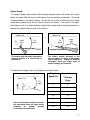
IP subnet masks
don’t match
IP network
addresses don’t
match.
IP network
device addresses
are the same.
Poor connection
quality
Make sure the subnet mask is the same on both PC and sonar. For the
factory default ‘Class C network’ configuration, the subnet mask is
255.255.255.0. The ‘255’ part of the mask defines the ‘network’ part of the
IP address. The ‘0’ part of the mask defines the ‘device’ part of the IP
address.
Make sure the IP *network* part of the IP address is the same on both the
sonar and the computer. In the factory default case, this is the first 3
numbers in the IP address: 192.168.1.
The device part of the IP address must be *different* for every device on
the network. In the factory default case, the sonar is set to ‘45’ and the PC is
set to 3. Don’t use 255, it’s reserved for ‘broadcast’ use.
Use an ohm meter to verify Tx and Rx line connectivity between the
Ethernet connector that plugs into the PC and the 10 pin connector that
plugs into the Sonar Head. Refer to “ProViewerE Sonar to Surface Cable
Drawing” in the Appendix for pin to pin connection information.
To connect with the sonar, its IP address must be compatible with the
network or computer to which it is attached. If you miss-configure the
sonar’s network settings and are unable to connect to it, follow this
procedure to re-establish communications with the sonar:
You suspect
you’ve missconfigured the
sonar IP address
1. Connect the sonar communication cable directly to a Windows
XP computers network interface card.
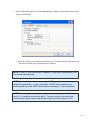
2. As described below in the ‘Running the sonar on a network’
section, open the ‘Internet Protocol (TCP/IP) Properties window
for the network interface card you plugged the sonar into.
3. Under the ‘General’ tab, select ‘Obtain an IP address
automatically’.
4. Under the ‘Alternate Configuration’ tab, select ‘Automatic private
IP address’ and click OK.
5. Close the rest of the windows folders you opened.
6. Cycle the sonar power off (for at least 10 seconds), then turn the
sonar back on.
7. After about 100 seconds, the Widows PC and the sonar should
have negotiated ‘link local’ IP address (in the range of
169.254/16).
8. Using the ProViewer software, ‘connect’ normally and
reconfigure the sonar’s network settings to be compatible with its
intended network.
4