1
EggPlant: Reference Manual
36
script by choosing Run menu > Set Breakpoint.)
You can move a breakpoint by dragging the triangle to another line in the script, or remove it by dragging it out of the
column.
Script frame Pop-up Menu
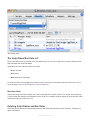
The Script Frame pop-up menu displays the handlers that are being executed, listed in the reverse order in which
they are called.
When script execution is paused, you can select a different frame from this pop-up menu to view it in the Script
Display area and see which line it is currently executing. This also sets the context for commands typed into the
Ad‑hoc Do Box. For example, if you want to output the value of a variable that is present only in the script handler
that started your execution, you must make sure to select the very bottom frame, numbered “1.”
The Log Area
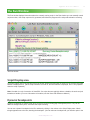
The Log Area is the lower half of the Run window. As the script runs, the Log Area displays the following information:
1 The same information that is recorded in the script’s permanent log. (See the Results pane, in The Suite Editor.)
2 The output of Put commands that have no specific destination.
3 Script tracing information, when Script Tracing is turned on. (See the ScriptTracing, in Global Properties.)
4 Output from commands entered in the Ad‑hoc Do-Box. (See the Ad‑hoc Do-Box, below.)
The Ad‑hoc do box
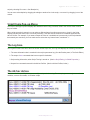
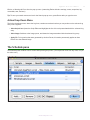
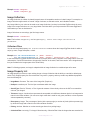
The Ad‑hoc Do Box (AHDB) allows you to modify a script as it is running. For example, you can assign new values to
variables, execute commands, or call other scripts.
The Ad-hoc Do Box
w w w. t e s t p l a n t . c o m