1
The information on the following pages should enable you to start working with the
software immediately. You will learn how to edit an image step by step.
1. The Title Screen
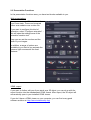
On the title screen you can find the tools for searching and loading images and
loading existing projects.
(1) Image data browser
This tool allows you to search through folders for images. A preview of the
images found will be displayed and you can import them directly by rightclicking on them and using the context menu that pops up.
(2) Load image
Use this button to load images directly. All common image formats, camera
RAW formats and HDR image formats are supported.
(3) Open project
You can load existing projects by clicking on this button.