1
GENERAL OPERATION
Mic 1 & 2 / Wireless 1 & 2 Mic Input
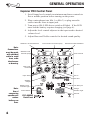
Balanced or unbalanced microphone input. Use XLR mics and
cables when long mic cables are needed. The XLR input has
phantom power for use with condenser microphones.
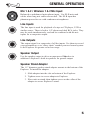
Line Inputs
The line input is used for playback of a tape or CD player, VCR or
similar source. There is both a 1/4"-phone and dual RCA jacks. They
may be used simultaneously, and can be combined with the mic
inputs for a composite output.
Line Outputs
The output signal is a composite of all the inputs. Use them to record
your presentation, or to “daisy chain” another powered sound system
to the Explorer for greater crowd coverage.
Speaker Output
Use the speaker output to drive an unpowered 2Ω speaker in
addition to Explorer’s built-in speakers for greater output.
Speaker Stand Adapter
The 1.5" diameter speaker stand adapter mounts to the bottom of the
Explorer. To install the adapter:
1. Slide adapter into the slot on bottom of the Explorer.
2. Tighten screw to secure adapter to Explorer.
3. Place unit on stand, then tighten screw on the collar of the
adapter to secure Explore to stand.
5