1
USER MANUAL
1
2
44601 Fremont Blvd., Fremont, CA 94538, USA
Tel: +1.510.440.9901
Fax: +1.510.440.1270
www.arcsoft.com
Copyright © 2011 ArcSoft, Inc. All rights reserved. ArcSoft,
the ArcSoft logo, and ArcSoft TotalMedia Theatre 5 are
registered trademarks of ArcSoft, Inc. in the United States.
All other product and companies named herein may be
trademarks of their respective owners.
3
Table of Contents
1. Introduction.......................................... 6
1.1 Installation........................................... 7
1.2 System Requirements .........................
8
1.3 Key Features ....................................... 11
2.
TotalMedia Theatre 5's User Interface ... 12
2.1 Media Manager .................................... 13
2.2 Control Panels ...................................... 14
2.3 Smart and Disc Menu ........................... 17
2.4 Right-Click Menu .................................. 18
2.4 Shortcuts ............................................. 20
3. Playing Media Files ...............................
3.1 Blu-Ray Discs ......................................
3.2 3D Movies ...........................................
3.3 DVDs ..................................................
3.4 Video Files ..........................................
22
23
24
28
29
4. Using SimHD .......................................... 30
5. Configuring with the AV Center ............. 33
5.1 Audio Output Tab ................................. 34
5.2 Audio Effects Tab ................................. 38
5.3 Equalizer Tab ........................................ 40
5.4 Display Tab ......................................... 41
5.5 Video Effects Tab ................................. 42
6. Customizing Your Settings .................... 43
6.1 General Tab ......................................... 44
6.2 Playback Tab ....................................... 45
6.3 BD-Java Tab ........................................ 47
6.4 Region and Language Tab .................... 49
6.5 Parental Control Tab ............................. 51
6.6 File Association Tab .............................. 52
6.7 Power Manager Tab ............................... 53
6.8 Information Tab .................................... 55
4
Reference ................................................. 56
Product Registration ....................................... 57
Customer Support ........................................... 58
Technical Support ............................................ 59
Licensing Agreement ....................................... 60
About ArcSoft .................................................. 64
Index ........................................................ 65
5
Chapter 1: Introduction
1.
Introduction
Installation
System Requirements
Key Features
ArcSoft TotalMedia® Theatre 5 is your all-in-one player for
PCs. Whether playing Blu-ray and DVD discs, AVCHD, or highdefinition files on local machines or videos on a UPnP server
and online, the program has it covered. With an intuitive and
innovative user interface design, excellent playback quality
and performance, and industry-leading playback technology,
TotalMedia Theatre® 5 brings the premium movie experience
to your PC.
Besides exciting new features, TotalMedia Theatre® 5 comes
with upgraded SimHD®, ArcSoft’s in-house movie upscaling
application, which integrates de-noise, dynamic-lighting and
frame rate conversion, making the upscaled video even more
vivid than before.
6
Chapter 1: Introduction
1.1
Installation
1. Insert the CD into your CD-ROM drive.
2. The installer should start automatically.
3. Follow the on-screen instructions to complete the
installation.
4. When prompted, enter the license key located on the
sleeve in which your software CD came in.
Take note as to where the program is installing and where it can
be found in the Start menu.
Note: If the installer does not start automatically, you will need
to run it manually:
1. Insert the CD into your CD-ROM drive.
2. Click Start>Run.
3. In the Run dialog, type “X:/setup.exe”. (“X” is the drive
letter associated with your CD-ROM drive. This letter
will vary from system to system.)
4. Click OK.
5. Follow the on-screen instructions to complete the
installation.
7
Chapter 1: Introduction
1.2 System Requirements
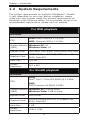
The system requirements for ArcSoft’s TotalMedia™ Theatre
5 vary depending on your use. Before installation, please
make sure your system meets the minimal requirements as
displayed in the following tables. For a complete listing of our
recommended requirements, please visit our website.
For DVD playback
Minimum
CPU
Intel: Intel® Pentium 2 2.4 GHz
AMD: Sempron 2600+ 1.6 GHz
System Memory Windows XP: 1G
(RAM)
Windows Vista: 1G
Optical Driver
DVD-ROM, DVD-R/RW, DVD+R/RW, DVD-RAM
Graphics Card
NVIDIA GeForce 8400 GT, ATI Radeon HD
3200, Intel G35
Hard Disc
300 MB
Screen
Resolution
800 x 600
For SimHD playback
Minimum
CPU
Intel:
Intel® Core™ 2 Duo CPU E6400 @ 2.13GHz
AMD:
AMD Phenmom X4 96500 2.3GHz
System Memory Windows XP: 2 GB or more
(RAM)
Windows Vista: 2 GB or more
Optical Driver
DVD Driver
Graphics Card
NVIDIA GeForce 8000 GT, ATI Radeon HD
4000, Intel G45
Hard Disc
1 GB
Screen
Resolution
1680 x 1080
8
Chapter 1: Introduction
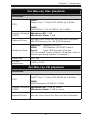
For Blu-ray disc playback
Minimum
CPU
Intel:
Intel® Core™ 2 Duo CPU E4600 @ 2.4GHz
AMD:
AMD Athlon™ 64 X2 4800+ @ 2.4GHz
System Memory Windows XP: 2 GB
(RAM)
Windows Vista: 2 GB
Optical Driver
Blu-ray Disc driver for Blu-ray Disc Playback
HD DVD drivers for HD DVD Playback
Graphics Card
NVIDIA: GeForce 8600 GT
AMD:
ATI Radeon HD 3600 Series
Intel:
Intel G45 Express Chipset
(If you install Intel's chipset, Windows Vista or
above operating system is needed.)
Hard Disc
600 MB
Screen
Resolution
1280 x 1024
For Blu-ray 3D playback
Minimum
CPU
Intel:
Intel® Core™ 2 Duo CPU E6700 @ 2.66GHz
AMD:
AMD Phenmom X3 8400 2.1GHz
System Memory Windows XP: 2 GB or more
(RAM)
Windows Vista: 2 GB or more
Optical Driver
Blu-ray Disc driver for Blu-ray Disc Playback
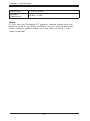
9
Chapter 1: Introduction
Hard Disc
2 GB or more
Screen
Resolution
1680 x 1080
Note:
If you use the Windows XP system, please make sure the
Service Pack 2 has been installed. If you use the Windows
Vista system, please make sure the Service Pack 1 has been installed.
10
Chapter 1: Introduction
1.3
•
•
•
•
•
•
•
•
•
•
•
Key Features
Plays Blu-ray 3D™ movies and watch 2D DVD
movies in 3D in real-time
Includes online video streaming directly from
popular streaming websites
Includes a powerful Media Manager to help you
organize, view, and search for videos easily and
quickly
Newly improved SimHD® supports De-Noise,
Dynamic Lighting and increased frame-rate
conversion
Provides a Smart Menu so you can view detailed
information about the currently playing DVD or
video file without interrupting playback
Redesigned elegant Audio/Video Center and
intuitive user interface
Supports 3D photo format: JPS, MPO
Supports MPEG-4 ASP files
Supports external subtitle files: SRT, SMI, SSA,
IDX, and SUB
Supports video formats: AVS, WTV, MKV, (with
multiple audio tracks and subtitles)
Supports audio formats: ALAC, wmal, APE, FLAC,
LPAC, OFR
11
Chapter 2: TotalMedia Theatre 5's User Interface
2. TotalMedia Theatre 5's User
Interface
TotalMedia Theatre 5's sleek new look features a modern,
black-based transparent UI design, intuitive control for easy
navigation, and Information Center (the i button) to keep you
informed with new patches, upgrades and promotions.
When launching TotalMedia Theatre 5, the source device and
last played media file are displayed. Click the desired media
file or the Media Manager button located at the top left side
of the screen to choose a different media file.
This section also explains about the top and bottom Control
Panels, the Smart Menu, right-click menu, and provides a table
for all of the shortcuts in TotalMedia Theatre 5.
12
Chapter 2: TotalMedia Theatre 5's User Interface
2.1 Media Manager
From the Media Manager, you can play movies, create playlists,
browse, download online videos, and even share your own
movies.
LIBRARY
Allows you to quickly play a movie from your local computer.
The application automatically loads thumbnails and information
about the movie onto your computer. You can preview a movie
by clicking a thumbnail without needing to find it first with
Windows Explorer.
SHARED
Play all the media files shared over a network. All available
UPnP server names are listed with Videos, Music and Photos
sub-folders below them. Click the sub-folder to view the media
thumbnails or preview them.
ONLINE
Play and download videos from the Internet.
PLAYLISTS
Create your own playlists or edit them. Click the “+” button on
the right side of the PLAYLISTS tab to create a new playlist.
Right-click the title of a playlist to edit it. Click the “+” button on
the right side of a playlist to add a new item into this playlist.
13
Chapter 2: TotalMedia Theatre 5's User Interface
2.2 Control Panels
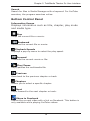
There are two control panels in TotalMedia Theatre 5; use the
top panel for several common and advanced controls and the
bottom panel for basic playback control and menu options.
Top Control Panel
ArcSoft TotalMedia Theatre
Displays information about the software.
i (Information Center)
Highlights and blinks when a message from ArcSoft arrives. Click
this button to read any messages from ArcSoft.
? (Online Help)
Displays the online help file.
Media Manager/Now Playing
Click the Media Manager button to organize your media files.
The Playing Media button displays when a media file is playing.
Click to return to the main screen.
Open
Click the Open button to browse to the desired file.
SimHD (On/Off)
Click to turn on or off SimHD. Click the arrow to display the
SimHD Settings dialog box. For detailed information on this
feature, refer to Using SimHD.
2D/3D
Click this button to toggle between 2D and 3D mode. Click
the arrow to display the 3D Settings dialog box. For detailed
information on this feature, refer to 3D Movies.
AV Center
Click to display five tabs to customize audio and video setup. For
detailed information on this feature, refer to Configuring with the
AV Center.
Magic/List View
From the Media Manager, click either the Magic or List view to
display the media files as a thumbnail or list.
14
Chapter 2: TotalMedia Theatre 5's User Interface
Search
Search for files in Media Manager with a keyword. For YouTube
searches, the program searches online.
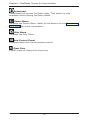
Bottom Control Panel
Information Screen
Displays information such as title, chapter, play mode
and media type.
Stop
Stops the current file or movie.
Backward
Reverses the current file or movie.
Playback Speeds
Displays a pop-up menu to select the play speed.
Forward
Forwards the current movie or file.
Play/Pause
Plays/pauses the multimedia file.
Previous
Goes back to the previous chapter or track.
Chapters
Allows you to select a specific chapter.
Next
Skips forward to the next chapter or track.
Share to Facebook
Shares the current video with a link on Facebook. This button is
only available while playing YouTube videos.
15
Chapter 2: TotalMedia Theatre 5's User Interface
Download
Downloads the current YouTube video. This button is only
available while playing YouTube videos.
Smart Menu
Displays the Smart Menu. Refer to the section on the Smart and
Disc Menu for more information.
Disc Menu
Displays the Disc Menu.
Sub Control Panel
Displays/hides the virtual remote control.
Eject Disc
Ejects a disc or closes the drive tray.
16
Chapter 2: TotalMedia Theatre 5's User Interface
2.3 Smart and Disc Menu
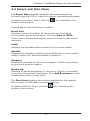
The Smart Menu displays detailed information about the
currently playing DVD or video file without interrupting playback.
To display the Smart Menu, click the
bottom control panel.
icon located on the
Commands on the Smart Menu include:
Movie Info
Displays movie information of the current movie such as
movie name, genre and director. Click the View in TMDb
button (www.themoviedb.org) to search for movie information
manually.
Audio
Displays the available audio tracks for the current media.
Subtitle
Displays the available subtitles and subtitle files for the current
media. Select your desired subtitle to enable it.
Chapters
Displays thumbnails of the movie chapters. Select a thumbnail
to jump to a specific chapter.
Bookmark
Displays all saved bookmarks in the movie. Select a thumbnail
to jump to the selected bookmark. Click Add Bookmark to add
a bookmark at the current point.
The Disc Menu displays the options available for the specific
Blu-ray disc or DVD that is currently playing.
To display the Disc Menu, click the
bottom control panel.
17
icon located on the
Chapter 2: TotalMedia Theatre 5's User Interface
2.4 Right-Click Menu
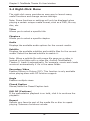
The right-click menu provides an easy way to launch many
useful functions and change various settings.
Note: Some functions or settings will only be displayed when
playing a certain unique media format, such as a DVD, Blu-ray
disc, etc.
Titles
Allows you to select a specific title.
Chapters
Allows you to select a specific chapter.
Audio
Displays the available audio options for the current media.
Subtitle
Displays the available subtitles and subtitle files for the current
media. Select the desired subtitle to enable it.
Note: When a subtitle file with same file name as a video is
located in the folder with a video file, ArcSoft TotalMedia®
Theatre 5 loads it automatically. For example, movie.wmv loads
movie.srt automatically if it's in the same folder.
Secondary Video
Enables Picture-in-Picture (PiP). This function is only available
when playing discs with PiP function support.
Angle
Enables multiple views.
Closed Caption
Shows/hides the Closed Caption text.
Still Off (Continue)
If the presentation playback is on hold, click it to continue the
playback.
Repeat
Selects your favorite part of the media file or disc to repeat
playing. Submenu functions include:
18
Chapter 2: TotalMedia Theatre 5's User Interface
Off - No repeat.
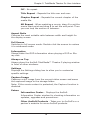
Title Repeat - Repeats the title over and over.
Chapter Repeat - Repeats the current chapter of the media file.
AB Repeat - When watching a movie, drag A to set the movie start point and drag B to set the end point. Then you can loop the section in between.
Aspect Ratio
Chooses the most suitable ratio between width and height for
the display screen.
Full Screen
Switches to full screen mode. Double-click the screen to restore
it to windowed mode.
Information
Shows/hides the OSD information when playing a DVD or Bluray disc.
Always on Top
Always place the ArcSoft TotalMedia™ Theatre 5 playing window
in front of other windows.
Settings
Displays the Settings dialog box to allow you to customize
specific settings.
Capture Image
Captures a still image from the current video screen and saves
the captured image to the storage folder.
Note: If the movie content is protected, the Capture function is
disabled.
Extras
Information Center - Displays the ArcSoft Information Center window for checking information on updates, upgrades and promotions.
Other ArcSoft Products - Takes you to ArcSoft’s or a partner’s website for more ArcSoft products.
19
Chapter 2: TotalMedia Theatre 5's User Interface
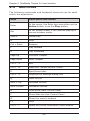
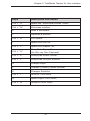
2.5 Shortcuts
The following commands and keyboard shortcuts can be used
within the application.
Keys
Description and Action
Enter
In the menu, the Enter key acts either as the
Active button or as the Play button.
Esc
In full screen mode, it will resume playing in
normal window mode.
SPACE
Pause/Play
O
Stop
Ctrl + Enter
Resume
F
Play forward
R
Play backward
Page Up
Previous Chapter
Page Down
Next Chapter
Ctrl + “X”
Exit
Ctrl + “O”
Open the “Select Source” menu
E
Eject/Insert disc
Ctrl + "S"
Displays the Settings dialog box
Q
Mute On/Off
Shift + Up
Increase volume
Shift + Down
Decrease volume
H
Hide/Show Main Control Panel
F
Show/Hide the Sub Control Panel
G
Show the menu's buttons
F1
Help
Ctrl + “I”
Opens the ArcSoft Information Center window
20
Chapter 2: TotalMedia Theatre 5's User Interface
Keys
Description and Action
Ctrl + “A”
Opens the "Effect and Utilities" menu
Ctrl + “N”
Minimizes window
K
Adds a bookmark
P
Captures a picture
Ctrl + “R”
A-B repeat
T
Opens the title list
Ctrl + "C”
Opens the chapter list
Ctrl + “U”
Show/Hide Popup Menu
(for Blu-ray Disc Playback)
Ctrl + “E”
Show/Hide Effect Center
Ctrl + “J”
Show/Hide Utilities window
G
Change Angle
L
Change (Primary) Audio Stream
S
Changes Subtitles
Ctrl + “T”
Jump to Title Menu
M
Opens Right-Click menu
Ctrl + “M”
Jumps to Root Menu
21
Chapter 3: Playing Media Files
3. Playing Media Files
As a universal player, TotalMedia Theatre 5 not only plays
movies from your local machine, it also plays online videos
from an UPnP media server. YouTube videos can be played
directly inside TotalMedia Theatre's UI, with near highdefinition quality via SimHD.
Playback options include:
•
•
•
•
Blu-ray Discs
3D Movies
DVDs
Video Files
22
Chapter 3: Playing Media Files
3.1 Blu-Ray Discs
ArcSoft TotalMedia® Theatre 5 has received Blu-ray 3D™
(Profile 5.0) Certification from the Blu-ray Disc Association. It
supports BDAV, BDMV, BD-Java, AVCHD and AVCREC discs.
The following functions are available when playing Blu-ray
discs:
PiP (Picture-in-Picture)
Open PiP by selecting the Secondary Video option in the
right-click menu. This function is only available when playing
discs with PiP function support.
BD-Java
Executes the BD-Java application and provides related
settings. Please refer to Settings - BD-Java for detailed
information.
23
Chapter 3: Playing Media Files
3.2 3D Movies
ArcSoft TotalMedia® Theatre 5 provides excellent 3D playback
performance with a variety of hardware environments.
To set up the application to watch 3D movies on your specific
system:
1. Click the 3D button, located on the top control panel.The
General Settings dialog box displays.
2. Check the Always play Blu-ray 3D movies in 3D
mode option. If this option is unchecked, the application
plays Blu-ray 3D movies in 2D mode.
3. Check the Always play movies and video files in 3D
mode option. If this option is unchecked, the application
playback will be in 2D mode and cannot be switched to
3D mode.
4. Check the Auto Detect Source File Layout checkbox
to automatically play movies in 3D mode. In case of
mis-detection, please manually set the source layout.
Options include:
2D
Select this option when your source file is a 2D video/movie. ArcSoft TotalMedia® Theatre 5 uses Sim3D™ to convert the file to 3D in real-time.
Left/Right
Select this option when your source file already contains 3D images constructed by left and right images.
Top/Down
Select this option when your source file already contains 3D images constructed by top and bottom images.
24
Chapter 3: Playing Media Files
Anaglyph
Select this option when your source file already contains 3D images constructed by red and cyan overlapped images.
Line Interleave
Select this option when your source file already contains 3D images alternating between left-
eye and right-eye lines.
Checkerboard
Select this option when your source file already contains 3D images alternating in adjacent pixel.
Depth Perception
Drag the Depth Perception slider to adjust the amount of
depth in the video image.
General Settings Tab - 3D Settings
25
Chapter 3: Playing Media Files
Viewing Environment
From the Viewing Equipment tab, select one of the following
options:
Select Your Display Configuration
Select your 3D playback equipment so ArcSoft TotalMedia®
Theatre 5 can play the movie properly.
NVIDIA 3D Vision Ready Display
Select NVIDIA® 3D Vision™ Ready display if your display is
either a HDMI 1.4 3D TV, 120Hz LCD display, 3D projector, or
100Hz and higher analog CRT.
AMD Blu-Ray Stereoscopic 3D Solution
Select this if your display is a HDMI 1.4 3D TV or 120Hz LCD
display.
Micro-polarized 3D LCD
Select this if your display is a Micro-polarized LCD TV that
supports Line Interleave 3D output.
3D Ready DLP HDTVs
Select this if your display is a 3D-ready DLP TV that supports
Checkerboard output.
Other Display
Select this if your display is not a 3D-ready display.
Swap Left/Right image when you experience eyestrain
in 3D mode
Some displays may have swapped images between the left
eye and right eye which can cause eyestrain when it reverses.
Check this option if you experience eyestrain.
26
Chapter 3: Playing Media Files
Viewing Environment Tab - 3D Settings
27
Chapter 3: Playing Media Files
3.3 DVDs
The application supports DVD-Video and DVD-VR.
The following functions are available when playing a DVD:
Capture Image
Press P or select Capture from the right-click menu to
capture from the current video screen. The captured image
is saved in the storage folder. See the General Tab on the
Settings dialog box to set the folder location for saved images
and bookmarks.
Note: The Capture function is only available for DVDs without
CSS protection.
Bookmark
Click this option in the Smart Menu to view all bookmark
thumbnails of the movie. Click the thumbnail to jump to the
selected bookmark.
SimHD
Use SimHD to upscale standard-definition DVDs to highdefinition. Please refer to Using SimHD for more information.
28
Chapter 3: Playing Media Files
3.4 Video Files
A variety of video formats are supported with ArcSoft
TotalMedia® Theatre 5 and listed on the File Association
tab.
To select a specific video file format:
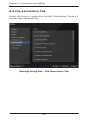
1. From the Settings dialog box, select the File
Association tab.
2. Select the desired video file format or check the All
checkbox.
3. Click Apply and then OK.
The following functions are available when playing video files:
Capture Image
Press P or select Capture from the right-click menu to
capture from the current video screen. The captured image
is saved in the storage folder. See the General Tab on the
Settings dialog box to set the folder location for saved images
and bookmarks.
Note: The Capture function is only available for video files
without CSS protection.
Bookmark
Click this option in the Smart Menu to view all bookmark
thumbnails of the movie. Click the thumbnail to jump to the
selected bookmark.
Subtitle
Load external subtitles through the right-click menu by clicking
Subtitles and the Add Subtitle submenu.
SimHD
Use SimHD to upscale standard-definition video files to highdefinition. Please refer to Using SimHD for more information.
29
Chapter 4: Using SimHD
4. Using SimHD
SimHD™ is ArcSoft's upscaling technology, converting
standard-definition multimedia files and DVDs to highdefinition, offering you a sharper and more vivid picture in
real-time.
Notes: To use SimHD, please make sure your computer
system matches the requirements first.
To use SimHD:
1. Turn SimHD ON by clicking the SimHD button
,
located on the top control panel. This button toggles on/
off.
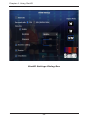
2. To customize SimHD settings, click the arrow icon on this
button to display the SimHD Settings dialog box.
Options on the SimHD Settings dialog box include:
Automatic
When this option is selected, the program automatically
chooses the appropriate parameters according to your
computer's system. Uncheck this option to customize your
settings.
Processed with
Choose CPU or GPU to support SimHD with upscaling.
Note: To enable GPU support, you need a compatible graphics
card and have the latest driver with NVIDIA CUDA™ or AMD
Stream™ installed. Visit www.arcsoft.com and go to the
SimHD related page to get more information about supported
graphics card.
Resolution
Choose a desired resolution from the drop-down list for your
original video.
Sharpness
Drag the slider to adjust the sharpness.
30
Chapter 4: Using SimHD
Dynamic Lighting
Drag the slider to adjust the brightness.
De-Noise
Drag the slider to reduce noise from original video.
This function only works on Windows 7 and Windows Vista.
Smoothness
Drag the slider to adjust the smoothness. This function only
works on Windows 7 and Windows Vista.
Display Mode
Three display modes are provided:
Normal
Apply SimHD upscaling effect to the whole playback screen.
Comparison
Divide the screen into left and right to display the same scene on each for comparison. The SimHD upscaling effect is only applied to the right side of the video.
Splitting
Divide the screen into left and right. The SimHD upscaling effect is only applied to the right half of the screen.
Note: All settings are applied to the current profile and applied to the video in real-time.
31
Chapter 4: Using SimHD
SimHD Settings Dialog Box
32
Chapter 5: Configuring with the AV Center
5. Configuring with the AV Center
Use the following five function tabs to configure the audio and
video output as well as apply virtual effects to your audio or
video playback.
Tabs include:
•
•
•
•
•
Audio Output
Audio Effects
Equalizer
Display
Video Effects
33
Chapter 5: Configuring with the AV Center
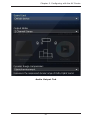
5.1 Audio Output Tab
The Audio Output feature allows you to select your audio
output mode according to your PC configuration.
Options on the Audio Output tab include:
Sound Card
The application detects your default sound card setup. Choose
the sound card in the drop-down list if you have more than
one card.
Output Mode
From this drop-down list, you can choose one of the following
audio output modes available from your selected sound card:
Headphones
Choose this option if you're using headphones.
2 Channel Stereo
Choose this option if you have a typical 2-speaker/channel setup.
5.1 Channel
Choose this option if you have a 5.1-channel setup.
7.1 Channel
Choose this option if you have a 7.1-channel setup.
S/PDIF
S/PDIF is an advanced digital interface for audio signal processing. Choose this option if you want to enjoy true 6-channel audio quality and have an external Dolby Digital/DTS decoder that complies with your S/PDIF sound card.
HDMI
Choose this option if you have an audio connection with an HDMI (High-Definition Multimedia Interface) connector.
34
Chapter 5: Configuring with the AV Center
Mixing Mode
When HDMI or S/PDIF output is selected, Dynamic Range
Compression will be changed to Mixing Mode. From this dropdown list, you can choose one of the following audio mixing
modes:
Original Primary Audio Only
Secondary audio is ignored and the source format for primary audio is the same as the output audio format.
Mix to PCM uncompressed Audio
Audio streams are encoded to PCM before transferring to SPDIF/HDMI output. The maximum number of channels is 7.1.
Mix to Dolby Digital® format
Audio streams are encoded to Dolby Digital before transferring to SPDIF/HDMI output. The maximum number of channels is 5.1.
Mix to DTS® format
Audio streams are encoded to DTS before transferring to SPDIF/HDMI output. The maximum number of channels is 5.1.
Auto mix based on source audio
Supports two modes in audio mixing. The secondary audio is mixed in this case. The primary audio formats are only Dolby Digital and DTS.
Note: When the Mix to DTS® format is selected, it will mix Dolby Digital source audio to PCM.
Dynamic Range Compression
Dynamic Range Compression is only used for Dolby Digital and Dolby Digital Plus audio when using an analog output mode. (Headphones, 2 Channel Stereo, 5.1 Channels or 7.1 Channels)
35
Chapter 5: Configuring with the AV Center
Quiet environment
When you are in a quiet place, select this option to experience the full dynamic range of Dolby digital sound.
Normal environment
When you are in a public place, select this option to experience the compressed dynamic range of Dolby digital sound.
Noisy environment
When you are in a noisy place, select this option to experience boosted sound.
Note: To get more information about Dolby technology, visit:
http://www.dolby.com/index.html.
36
Chapter 5: Configuring with the AV Center
Audio Output Tab
37
Chapter 5: Configuring with the AV Center
5.2 Audio Effects Tab
Audio effects are available when using analog output modes
(Headphones, 2 Channels, 5.1 Channels, and 7.1 Channels)
and unavailable for S/PDIF or HDMI output modes.
Options on the Audio Effects tab include:
Volume Boost
Drag the slider to increase the volume when the system
volume and program volume are already both set to
maximum.
Mode
Choose one audio effect mode from the drop-drown list. The
number of options available depends upon your audio output
mode. Please refer to AV Center - Audio Output for more
details about Audio Mode.
ArcSoft Virtual Headphones
Gives you the following two options (Only available for Headphones and 2 Channel Stereo):
Virtual Surround
This option combines multi-channel surround audio into 2 channels, offering a virtual surround sound experience through your 2-channel speakers (or headphones).
Speech Boost
This option increases the vocal volume, making it easier to hear voice dialogues. The Intensity slider adjusts the intensity of the speech effect.
DTS Surround Sensation Headphone
This option is available for Headphones and 2- Channel Stereo. For more detailed information about the options, refer to www.dts.com.
Neo: 6 (not available for S/PDIF and HDMI)
Two modes you can use, Cinema Mode and Music Mode. Please visit www.dts.com to find more details about Neo: 6.
38
Chapter 5: Configuring with the AV Center
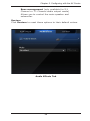
Bass management (only available for 5.1 Channel or 7.1 Channel audio output mode)
Allows you to control the main speaker and subwoofer.
Restore
Click Restore to reset these options to their default values.
Audio Effects Tab
39
Chapter 5: Configuring with the AV Center
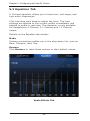
5.3 Equalizer Tab
A 10-band equalizer allows you to boost low, mid-range, and
high audio frequencies.
Click and drag each band to adjust the level. The level
settings are applied to the current profile immediately and
applied to audio in real-time. The equalizer is only available
for Headphones 2 Channel, 5.1 Channel and 7.1 Channel
output.
Options on the Equalizer tab include:
Mode
Sixteen pre-setting profiles are in the drop-down list, such as
Bass, Classical, Jazz, Pop.
Restore
Click Restore to reset these options to their default values.
Audio Effects Tab
40
Chapter 5: Configuring with the AV Center
5.4 Display Tab
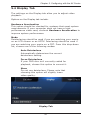
The settings on the Display tab allow you to adjust video
playback.
Options on the Display tab include:
Hardware Acceleration
This option should be checked for systems that meet system
requirements. If your computer does not have a highperformance video card, uncheck Hardware Acceleration to
improve system performance.
Mode
Deinterlacing should be used if you are watching your movie
on an LCD screen or an HDTV. Interlacing should be used if
you are watching your movie on a CRT. From this drop-down
list, choose one of the following modes:
Auto Deinterlace
Automatically determines the correct deinterlace setting.
Force Deinterlace
If your DVD disc isn't correctly coded for playback, choose this option to correct it.
None
Do not use deinterlace. Please note that choosing this option will slightly lower video quality.
Display Tab
41
Chapter 5: Configuring with the AV Center
5.5 Video Effects Tab
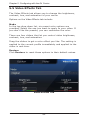
The Video Effects tab allows you to change the brightness,
contrast, hue, and saturation of your movie.
Options on the Video Effects tab include:
Mode
In the top drop-down list, six preset color options are
provided. Select the one you want to apply to your video. If
you don’t like the presets, you can customize the color.
There are four sliders that let you control video brightness,
contrast, hue, and saturation.
Drag the sliders to get a color effect you like. The setting is
applied to the current profile immediately and applied to the
video in real-time.
Restore
Click Restore to reset these options to their default values.
Video Effects Tab
42
Chapter 6: Customizing Your Settings
6. Customizing Your Settings
This section discusses the various setting controls used with
TotalMedia Theatre 5 and explains how you can customize
your software.
To display the Settings dialog box, click the Settings
located in the Top Control Panel.
The Settings dialog box contains the following tabs:
•
•
•
•
•
•
•
•
General
Playback
BD-Java
Region and Language
Parental Control
File Association
Power Manager
Information
43
icon,
Chapter 6: Customizing Your Settings
6.1 General Tab
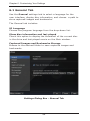
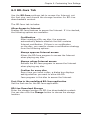
Use the General settings tab to select a language for the
user interface, display disc information, and choose a path to
store captured images and bookmarks.
The General tab includes:
UI Language
Choose the program language from the drop-down list.
Show disc information and last played
Check this option to display the thumbnail of the current disc
in the drive and last played movie on the Main window.
Captured Images and Bookmarks Storage
Browse to the desired folder to save captured images and
bookmarks.
Settings Dialog Box - General Tab
44
Chapter 6: Customizing Your Settings
6.2 Playback Tab
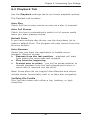
Use the Playback settings tab to set movie playback options.
The Playback tab includes:
Auto Play
Check this box to play movies as soon as a disc is inserted.
Auto Full Screen
Check this box to automatically switch to full screen mode
when you start playing movies.
Default Drive
If you have multiple disc drives, use the drop-down list to
select a default drive. The program will play movies from this
drive by default.
Auto-Resume
Select how you want the application to handle movie
playback. Options include:
• Resume from the last position - playback will start
from where the movie was last stopped.
• Play from the beginning
• Prompt user to select - you will be asked whether to
resume playback from the last stopped point when a
movie disc is inserted into the drive.
Note: Some discs do not support Auto-Resume and others
include similar functionality built in to their disc navigation.
YouTube File Profile
Play YouTube videos with either a low, medium, or high
resolution.
45
Chapter 6: Customizing Your Settings
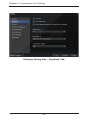
Settings Dialog Box - Playback Tab
46
Chapter 6: Customizing Your Settings
6.3 BD-Java Tab
Use the BD-Java settings tab to access the Internet, set
the font size, and choose the storage location for BD-Live
downloadable content.
The BD-Java tab includes:
Allow Access to Internet
Enables BD-Java features to access the Internet. If it is checked,
the following options are available:
Certification
After inserting a Blu-ray disc, the program automatically detects whether the disc contains Internet certification. If there is no certification on the disc, you need to choose a certification strategy from the following options:
Always approve Internet access
Allows the BD-Java program to access the Internet when playing any disc.
Always refuse Internet access
Refuses the BD-Java program to access the Internet when playing any disc.
Confirm for every disc
Every time you insert a disc, a dialog box displays asking whether you want to allow the BD-
Java program in this disc to access the Internet.
Font Size in the undefined BD-Java application
Set the font size for the BD-Java application.
BD-Live Download Storage
Enter the storage location for BD-Live downloadable content.
You can also click the Change button to choose the storage
location.
47
Chapter 6: Customizing Your Settings
Settings Dialog Box - BD-Java Tab
48
Chapter 6: Customizing Your Settings
6.4 Region and Language Tab
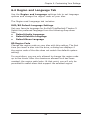
Use the Region and Language settings tab to set language
options and change the region code on your disc.
The Region and Language tab includes:
DVD/BD Default Language Settings
Set your favorite language for ArcSoft TotalMedia® Theatre 5.
Select the preferred language from the following drop-down
lists:
• Default Audio Language
• Default Subtitle Language
• Default Menu Language
BD Region Code
Change the region code on your disc with this setting. The first
time you insert a disc into the drive, a dialog box displays if
the region code of the disc does not match the default system
setting.
For most discs, you are only allowed to change the region code
up to five times. After the maximum allowed limit has been
reached, the region code locks. At that point, you will only be
permitted to watch discs that support the selected region.
49
Chapter 6: Customizing Your Settings
Settings Dialog Box - Region and Language Tab
50
Chapter 6: Customizing Your Settings
6.5 Parental Control Tab
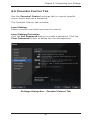
Use the Parental Control settings tab to restrict specific
movie levels and set a password.
The Parental Control tab includes:
Level Setting
Select a movie level which you want to restrict.
Level Setting Protection
Click the Set Password button to create a password. Click the
Clear Password button to delete the current password.
Settings Dialog Box - Parental Control Tab
51
Chapter 6: Customizing Your Settings
6.6 File Association Tab
Select the types of media files ArcSoft TotalMedia® Theatre 5
should open automatically.
Settings Dialog Box - File Association Tab
52
Chapter 6: Customizing Your Settings
6.7 Power Manager Tab
Use the Power Manager settings tab to display the current
power supply.
The Power Manager tab includes:
Power Status
The Power Status displays the power supply (AC Line or Battery)
that your computer is currently using.
Power Strategy
Allows you to stop playback when the power falls below a certain
percentage (3%-30%).
Warn me if battery life is less than XX%
Select this box to enable the battery power alert. When your
battery power falls down to the specified percentage, a warning
message displays.
Power
Manage Mode
Max Performance
Achieves the best performance and video quality during playback. This option consumes the most battery power.
Balance
Optimizes battery usage to leverage performance and power efficiency. This option may or may not have a significant effect on video quality.
Max Battery
Maximizes your battery life. This option may compromise video quality.
53
Chapter 6: Customizing Your Settings
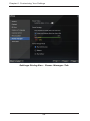
Settings Dialog Box - Power Manager Tab
54
Chapter 6: Customizing Your Settings
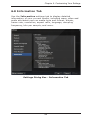
6.8 Information Tab
Use the Information settings tab to display detailed
information of your current media, including many video and
audio attributes such as media type and format, bitrate,
frame rate, resolution, aspect ratio, language, sampling
frequency, bits per sample, and more.
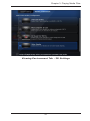
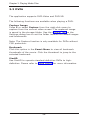
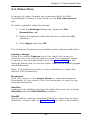
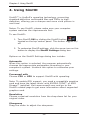
Settings Dialog Box - Information Tab
55
Reference
Reference
Product Registration
Customer Support
Technical Support
Licensing Agreement
About ArcSoft
56
Reference
Product Registration
To register TotalMedia Theatre 5:
1. Select the Information Center
icon located in the
top control panel. The Information Center dialog box
displays.
2. Click the large Registration button in the lower left
panel.
3. Enter the required information.
4. Click Submit.
Another option to register TotalMedia Theatre 5:
1. Copy the Serial Number from the Splash/About screen.
2. Log into your ArcSoft account and select Software
Registration.
3. Enter the required information.
4. Click Submit.
To contact customer service with any registration questions,
click the I need help registering my ArcSoft software
option.
57
Reference
Customer Support
Service and support are always our top priorities, and we live up
to this ideal by making answers readily accessible to you at all
times. Our website includes a product-specific knowledge base
that contains information on how-to’s, troubleshooting tips, and
product info.
Visit http://www.arcsoft.com for product details and frequently
asked questions.
58
Reference
Technical Support
ArcSoft provides six months of free telephone support to
registered users who purchased full or upgrade retail versions
of our software. To register today, visit http://www.arcsoft.com/
support/custservice.asp.
United States/Canada
Tel: +1-510-979-5599
Web: www.arcsoft.com/support
Hours: M-F, 9:00am – 5:00pm Pacific Time
Europe
Te: +353 (0) 61-7020870
Email: [email protected]
Hours: M-Th, 8:30am – 5:30pm GMT,
F 8:30am – 4:30pm GMT
(adjusted for daylight savings time when applicable)
Languages: English, French, Italian, German, Spanish, Dutch,
Portuguese
China
Web: www.arcsoft.com.cn/support
Email: [email protected]
Japan
Tel: 5070-060655 (within Japan)
Web: www.arcsoft.jp/support
Email: [email protected]
Hours: M-F, 10:00am 12:00pm, 1:00pm-6:00pm (Japan time
zone)
Language: Japanese
Taiwan
Web: www.arcsoft.com.tw/support
Email: [email protected]
59
Reference
Licensing Agreement
PLEASE READ THE FOLLOWING TERMS ("Agreement")
CAREFULLY. USE OF THE SOFTWARE (defined below) PROVIDED
BY ARCSOFT IS PERMITTED ONLY UNDER AND IN ACCORDANCE
WITH THIS AGREEMENT. IF YOU DO NOT AGREE TO BE BOUND
BY THIS AGREEMENT, PLEASE DO NOT USE THIS SOFTWARE.
IF YOU OBTAIN THIS SOFTWARE IN FORM OF CD WITHOUT
PRINT COPY OF THIS AGREEMENT, AND YOU DO NOT HAVE
OPPORTUNITY TO READ THIS AGREEMENT, YOU MAY RECEIVE
A FULL REFUND OF THE ORIGINAL PURCHASE PRICE IF YOU
(i) DO NOT USE THIS SOFTWARE, AND (ii) RETURN IT WITH
PROOF OF PAYMENT TO THE PLACE WHERE IT WAS PURCHASED
WITHIN 30 DAYS OF THE PURCHASE DATE.
1. Grant of License. This Agreement permits you to use one
copy of the Software or the Software included in this package or
device on any single computer ("Software"). For each software
licensee, the program can be "in use" on only one computer
or hardware device at any given time. The Software is "in
use" when it is either downloaded, copied, loaded into RAM or
installed into the hard disk or other permanent memory of a
computer or other hardware device.
2. License Restrictions. YOU MAY NOT RENT, LEASE,
SUBLICENSE, SELL, ASSIGN, LOAN OR OTHERWISE TRANSFER
THE SOFTWARE OR ANY OF YOUR RIGHTS AND OBLIGATIONS
UNDER THIS AGREEMENT. You may not modify, translate,
reverse assemble, decompile, disassemble or otherwise attempt
(i) to defeat, avoid, bypass, remove, deactivate or otherwise
circumvent any software protection mechanisms in the Software,
including without limitation any such mechanism used to restrict
or control the functionality of the Software, or (ii) to derive the
source code or the underlying ideas, algorithms, structure or
organization from the Software (except to the extent that such
activities may not be prohibited under applicable law). However,
you may transfer all your right to use the Software to another
person or organization, provided that (a) the followings are also
transferred with the Software, (i) this Agreement; (ii) other
software if contained in the original package, and/or hardware
that the Software is bundled; (iii) any original or updated
version of the Software; (b) no copies including back-up and
installed in your computer or other device are at your possession
after the transfer, and (c) the recipient accepts all the terms
60
Reference
of this Agreement. In no event shall you transfer the Software
obtained as a trial, test version, or otherwise specified as not for
resale. A special license permit from ArcSoft is required if the
program is going to be installed on a network server for the sole
purpose of distribution to other computers.
3. Copyright. The Software or the Software contained in this
package or device is protected by United States copyright laws,
international treaty provisions, and all other applicable national
laws. The Software must be treated like all other copyrighted
materials (e.g. books and musical recordings). This license does
not allow the Software to be rented or leased, and the written
materials accompanying the Software (if any) may not be
copied.
4. Ownership. Title, ownership rights, and all intellectual
property rights in and to the Software and any accompanying
documentation, and any copy of the foregoing, shall remain
the sole and exclusive property of ArcSoft and/or its third party
licensers. You agree to abide by the copyright law and all other
applicable laws. You acknowledge that the Software contains
valuable confidential information and trade secrets of ArcSoft
and/or its third party licensers.
5. Warranty Disclaimer. THE SOFTWARE IS MADE AVAILABLE
TO YOU ON "AS IS" BASIS. NO WARRANTIES, EITHER EXPRESS
OR IMPLIED, ARE MADE WITH RESPECT TO THIS SOFTWARE,
INCLUDING BUT NOT LIMITED TO THE IMPLIED WARRANTIES OF
MERCHANTABILITY AND FITNESS FOR A PARTICULAR PURPOSE
AND WARRANTIES FOR NON-INFRINGEMENT OF INTELLECTUAL
PROPERTY, AND ARCSOFT EXPRESSLY DISCLAIMS ALL
WARRANTIES NOT STATED HEREIN. YOU ASSUME THE ENTIRE
RISK AS TO THE QUALITY AND PERFORMANCE OF THE
SOFTWARE. SHOULD THE SOFTWARE PROVE DEFECTIVE, YOU,
AND NOT ARCSOFT OR AN AUTHORIZED RESELLER, ASSUME
THE ENTIRE COST OF NECESSARY SERVICING, REPAIR, OR
CORRECTION. SOME STATES DO NOT ALLOW THE EXCLUSION
OF IMPLIED WARRANTIES, SO THE ABOVE EXCLUSION MAY NOT
APPLY TO YOU. THIS WARRANTY GIVES YOU SPECIFIC LEGAL
RIGHTS, AND YOU MAY ALSO HAVE OTHER RIGHTS THAT VARY
FROM STATE TO STATE. YOUR SOLE REMEDY AND THE ENTIRE
LIABILITY OF ARCSOFT ARE SET FORTH ABOVE.
6. No Liability for Consequential Damages. YOU AGREE THAT
IN NO EVENT SHALL ARCSOFT OR ITS AGENTS BE LIABLE
FOR ANY LOSS OF ANTICIPATED PROFITS, LOSS OF DATA,
LOSS OF USE, BUSINESS INTERRUPTION, COST OF COVER OR
ANY OTHER INDIRECT, INCIDENTAL, SPECIAL, PUNITIVE OR
CONSEQUENTIAL DAMAGES WHATSOEVER ARISING OUT OF
61
Reference
THE USE OF OR INABILITY TO USE THE SOFTWARE, HOWEVER
CAUSED AND ON ANY THEORY OF LIABILITY (WHETHER FOR
BREACH OF CONTRACT, TORT (INCLUDING NEGLIGENCE)
OR OTHERWISE), EVEN IF ARCSOFT HAS BEEN ADVISED OF
THE POSSIBILITY OF SUCH DAMAGES. IN NO EVENT WILL
ARCSOFT BE LIABLE TO YOU FOR DAMAGES IN AN AMOUNT
GREATER THAN THE FEES PAID FOR THE USE THE FOREGOING
LIMITATIONS APPLY TO THE EXTENT PERMITTED BY APPLICABLE
LAWS IN YOUR JURISDICTION.
7. Export. You will not export or re-export the product
incorporating the Software without the appropriate United States
or foreign government licenses.
8. U.S. Government Restricted Rights. If you are a unit or
agency of the United States government, the Software and
related documentation are deemed to be "commercial computer
software" and "commercial computer software documentation,"
respectively, pursuant to DFAR Section 227.7202 and FAR
Section 12.212(b), as applicable. Any use, modification,
reproduction, release, performing, displaying or disclosing
of the Software and/or the related documentation by the
United States government shall be governed solely by the
terms of this Agreement and shall be prohibited except to the
extent expressly permitted by the terms of this Agreement.
Any technical data provided that is not covered by the above
provisions is deemed to be "technical data?commercial items"
pursuant to DFAR Section 227.7015(a). Any use, modification,
reproduction, release, performing, displaying or disclosing of
such technical data shall be governed by the terms of DFAR
Section 227.7015(b).
9. Termination. THIS AGREEMENT SHALL BE EFFECTIVE UPON
INSTALLATION OF THE SOFTWARE AND SHALL TERMINATE
UPON THE EARLIER OF: (i) YOUR FAILURE TO COMPLY
WITH ANY TERM OF THIS AGREEMENT; OR (ii) RETURN,
DESTRUCTION OR DELETION OF ALL COPIES OF THE SOFTWARE
IN YOUR POSSESSION. ArcSoft's rights and your obligations
shall survive the termination of this Agreement.
10. High Risk Activities. The Software is not fault-tolerant and
is not designed or intended for use in hazardous environments
requiring fail-safe performance, or any other application in which
the failure of the Software could lead directly to death, personal
injury, or severe physical or property damage (collectively,
"High Risk Activities"). ARCSOFT EXPRESSLY DISCLAIMS ANY
EXPRESS OR IMPLIED WARRANTY OF FITNESS FOR HIGH RISK
ACTIVITIES.
11. Governing Law and Jurisdiction. This Agreement will be
governed by and construed under the laws of the State of
62
Reference
California and the United States as applied to agreements
entered into and to be performed entirely within California,
without regard to conflicts of laws provisions thereof and the
parties expressly exclude the application of the United Nations
Convention on Contracts for the International Sales of Goods.
Suits or enforcement actions must be brought within, and each
party irrevocably commits to the exclusive jurisdiction of the
state and federal courts located in Santa Clara County.
63
Reference
About ArcSoft
ArcSoft, Inc. is an industry leading software developer of
multimedia technologies and applications across desktop
and embedded platforms. Working closely with major OEM
manufacturers, ArcSoft offers a full line of imaging and video
solutions that enhance the features, performance, and user
experience of mobile phones, digital cameras, optical drives,
personal computers, and consumer electronics devices.
Established in 1994, ArcSoft is headquartered in Fremont,
California, with regional commercial and development facilities
in Europe and Asia. For further details, please visit us at our
corporate web site: www.arcsoft.com.
64
INDEX
Index
Symbols
C
3D movies 24
watching 24
capturing images 19 29 44
chapters 15 17 18
checkerboard 25
Closed Caption 18
contrast 42
control panels 14
customer support 58
customizing software 43
A
A-B repeat 21
adjusting
brightness 42
contrast 42
hue 42
saturation 42
video playback 41
AMD 26
anaglyph 25
ArcSoft 64
aspect ratio 55
audio effects 38
audio output
mixing modes 35
output modes 34
setting 34
AV Center
audio effects 38
audio output 34
display 41
equalizer 40
video effects 42
D
de-noise 31
Disc Menu 17
display modes 31
DVDs
bookmarks 28
capturing images 28
SimHD 28
system requirements 8
using 28
dynamic lighting 30
E
equalizer
adjusting 40
F
B
features 11
file formats
setting 52
frame rate 55
full screen 20 45
BD-Java 23 47
Blu-ray 23
BD-Java 23
PiP 23
system requirements 9
Blu-ray 3D
system requirements 9
bookmarks 28 29
adding 17
brightness 42
H
hue 42
65
INDEX
I
R
Information
Center 12 14 19 20 57
installation 7
Internet
settings 47
region code
changing 49
registering software 57
resolution 30
right-click menu 18
audio 18
settings 19
subtitles 18
L
languages
choosing 44 49
Library 13
licensing agreement 60
line interleave 25
S
saturation 42
Secondary Video 18 23
settings
customizing 43
sharpness 30
shortcuts 20
SimHD 28 29
system requirements 8
using 30
Smart Menu 17 28
smoothness 31
storage location
setting 47
subtitles 29
system requirements 8
M
media files
3D movies 24
Blu-ray discs 23
DVDs 28
information on 55
videos 29
Media Manager 13
menus 17 19
movies
playback options 45
N
T
NVIDIA 26
technical support 59
Titles 18
P
V
parental control
setting 51
PiP 23
playback controls 14
playlists
creating 13
power status 53
product registration 57
video files
adjusting playback 41
bookmarks 29
capturing images 29
formats 29
SimHD 29
subtitles 29
W
Windows Vista 8
Windows XP 8
66