1
For computers with a 9-pin serial port, use an IBM AT type
(9-pin to 25-pin) RS-232 serial cable. For Macintosh Plus
or newer computers, use only a high speed RS-232 serial
cable that supports hardware flow control signals.
Note: Exercise caution when working with any ACpowered device. Always turn the power off when
connecting or disconnecting cables to or from the
device.
1. Turn your computer off.
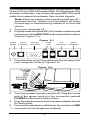
2. Plug the male end of the RS-232 modem cable into the
connector marked RS-232C on the back of the modem
(refer to Figure 2-1).
Figure 2-1
Power
Switch
Power
RS-232C
Connector Connection
Audio
Jack
SPK
Line
Phone
Connection Connection
MIC
3. Plug the other end of the cable into the serial port on
your computer (refer to Figure 2-2).
Figure 2-2
PHONE
LINE
MIC
SPK
RS-232C
POWER
4. Turn the modem's power switch off. Plug the round
end of the power cord into the connector marked
POWER on the back of the modem.
5. Plug the transformer end of the power adapter into an
AC wall outlet.
6. Connect the telephone cable from the modem's LINE
“ c connector to the telephone wall jack.
2