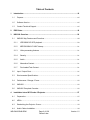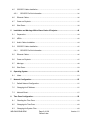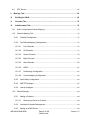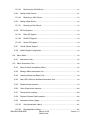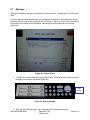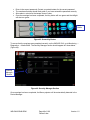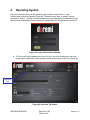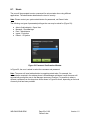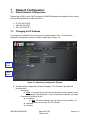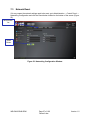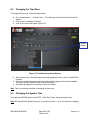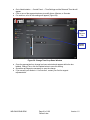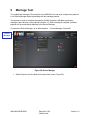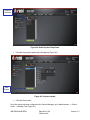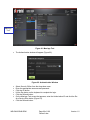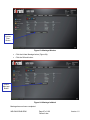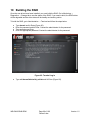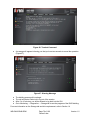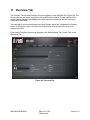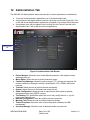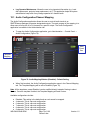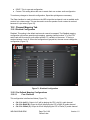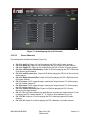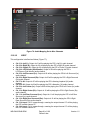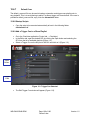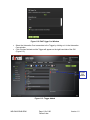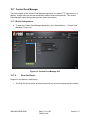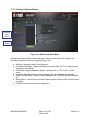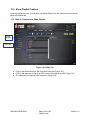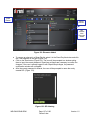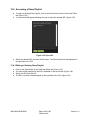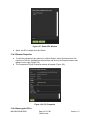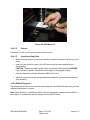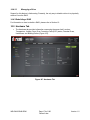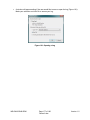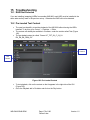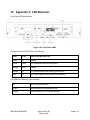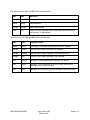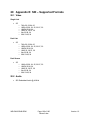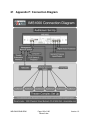
1
IMS1000 Installation and User Manual Version 1.2 The English version of this document is the only legally binding version. Translated versions are not legally binding and are for convenience only. IMS.OM.002949.DRM Page 1 of 196 Doremi Labs Version 1.2 Table of Contents 1 Introduction ......................................................................................................................16 1.1 Purpose...................................................................................................................................... 16 1.2 Software Version ...................................................................................................................... 16 1.3 Contact Technical Support...................................................................................................... 16 2 ESD Rules.........................................................................................................................18 3 IMS1000 Overview ............................................................................................................20 3.1 4 IMS1000 Key Features and Functions.................................................................................. 20 3.1.1 JPEG2000 DCI DCP playback ....................................................................................... 20 3.1.2 MPEG2/H264/VC1 MXF Interop: ................................................................................... 21 3.1.3 Video processing features: ............................................................................................. 21 3.1.4 Security .............................................................................................................................. 21 3.1.5 Audio .................................................................................................................................. 21 3.1.6 Alternative Content........................................................................................................... 21 3.1.7 Pre-Loaded Test Content ................................................................................................ 21 3.2 Input / Output Ports .................................................................................................................. 21 3.3 Environmental Specifications ................................................................................................. 21 3.4 Performance / Storage / Power .............................................................................................. 22 3.5 IMS1000..................................................................................................................................... 22 3.6 IMS1000 Faceplate Overview ................................................................................................ 22 Installation Into a NEC Series-2 Projector ......................................................................27 4.1 Preparation ................................................................................................................................ 27 4.2 HDDs .......................................................................................................................................... 31 4.3 Reattaching the Projector Covers .......................................................................................... 33 4.4 Audio Cables Installation......................................................................................................... 34 IMS.OM.002949.DRM Page 2 of 196 Version 1.2 Doremi Labs 4.5 GPI/GPO Cables Installation .................................................................................................. 35 4.5.1 5 4.6 Ethernet Cables ........................................................................................................................ 36 4.7 Power on Projector................................................................................................................... 37 4.8 Shut Down ................................................................................................................................. 38 Installation and Marriage With a Barco Series-2 Projector ...........................................40 5.1 Preparation ................................................................................................................................ 40 5.2 HDDs .......................................................................................................................................... 42 5.3 Audio Cables Installation......................................................................................................... 44 5.4 GPI/GPO Cables Installation .................................................................................................. 45 5.4.1 6 8 GPI/GPO Pin-Out Information ........................................................................................ 45 5.5 Ethernet Cables ........................................................................................................................ 46 5.6 Power on Projector................................................................................................................... 47 5.7 Marriage ..................................................................................................................................... 48 5.8 Shut Down ................................................................................................................................. 50 Operating System ............................................................................................................52 6.1 7 GPI/GPO Pin-Out Information ........................................................................................ 36 Users .......................................................................................................................................... 53 Network Configuration ....................................................................................................55 7.1 Default Network Configuration ............................................................................................... 55 7.2 Changing the IP Address ........................................................................................................ 55 7.3 Network Reset .......................................................................................................................... 57 Time Zone Configuration .................................................................................................59 8.1 Checking the Time Zone ......................................................................................................... 59 8.2 Changing the Time Zone......................................................................................................... 60 8.3 Changing the System Time .................................................................................................... 60 IMS.OM.002949.DRM Page 3 of 196 Doremi Labs Version 1.2 8.4 9 NTP Servers.............................................................................................................................. 62 Marriage Tool ...................................................................................................................64 10 Building the RAID .........................................................................................................69 11 Overview Tab ................................................................................................................72 12 Administration Tab .......................................................................................................74 12.1 Audio Configuration/Channel Mapping ................................................................................. 75 12.2 Channel Mapping Tab ............................................................................................................. 76 12.2.1 Disabled Configuration .................................................................................................... 76 12.2.2 Pre-Defined Mapping Configurations ............................................................................ 76 12.2.2.1 Four Channels .......................................................................................................... 76 12.2.2.2 Six Channels ............................................................................................................. 77 12.2.2.3 Seven Channels ....................................................................................................... 78 12.2.2.4 Eight Channels.......................................................................................................... 79 12.2.2.5 Nine Channels .......................................................................................................... 80 12.2.2.6 ISDCF......................................................................................................................... 81 12.2.2.7 Passthrough Configuration ..................................................................................... 82 12.2.2.8 Custom Mapping Configuration.............................................................................. 83 12.2.3 Audio Delay Configuration .............................................................................................. 84 12.2.4 SMPTE Packages ............................................................................................................ 85 12.2.5 Interop Packages.............................................................................................................. 86 12.3 Device Manager ....................................................................................................................... 88 12.3.1 Adding a Projector ............................................................................................................ 88 12.3.1.1 Removing a Device or Projector ............................................................................ 90 12.3.2 Automation Libraries Management................................................................................ 90 12.3.3 Adding an eCNA Device.................................................................................................. 90 IMS.OM.002949.DRM Page 4 of 196 Doremi Labs Version 1.2 12.3.3.1 12.3.4 Adding a JNior Device ..................................................................................................... 91 12.3.4.1 12.3.5 Removing a JNior Device........................................................................................ 92 Adding a Raw Device ...................................................................................................... 92 12.3.5.1 12.3.6 Removing an eCNA Device .................................................................................... 91 Removing a Raw Device ......................................................................................... 93 3D Configuration............................................................................................................... 93 12.3.6.1 Dolby 3D Support ..................................................................................................... 93 12.3.6.2 RealD 3D Support .................................................................................................... 94 12.3.6.3 Sensio 3D Support ................................................................................................... 94 12.3.7 Closed Caption Support .................................................................................................. 94 12.3.8 Subtitle Engine Configuration ......................................................................................... 94 12.4 Macro Editor .............................................................................................................................. 96 12.4.1 12.5 Automation Cues .............................................................................................................. 96 Macro Automation Cues .......................................................................................................... 96 12.5.1 Macro Creation Using Macro Editor .............................................................................. 96 12.5.2 Editing a Macro Automation Cue ................................................................................... 97 12.5.3 Inserting Actions into Macro Cues ................................................................................. 98 12.5.4 Add a GPO Action to the Macro Automation Cue ....................................................... 99 12.5.5 Playback Action Insertion ................................................................................................ 99 12.5.6 Video Output Action Insertion ....................................................................................... 100 12.5.7 Dowser Action Insertion ................................................................................................ 100 12.5.8 Projector Channel Switch Insertion ............................................................................. 100 12.5.9 Automation Library Usage ............................................................................................ 101 12.5.9.1 Using Automation Library ...................................................................................... 101 12.5.9.2 Resulting Macro Setting ........................................................................................ 102 IMS.OM.002949.DRM Page 5 of 196 Version 1.2 Doremi Labs Action List Management ............................................................................................ 103 12.5.10 12.5.10.1 Action Re-Ordering ................................................................................................ 103 12.5.10.2 Action Edition .......................................................................................................... 103 12.5.10.3 Action Removal ....................................................................................................... 103 Macro Saving .............................................................................................................. 103 12.5.11 12.6 Trigger Cue Tab ..................................................................................................................... 103 12.6.1 Trigger Cue Tab Overview ............................................................................................ 104 12.6.2 Trigger Cue Creation ..................................................................................................... 104 12.6.3 Connection to a General Purpose Input Event .......................................................... 105 12.6.4 Connection to a Signal Event ....................................................................................... 107 12.6.5 Trigger Cue Saving ........................................................................................................ 108 12.6.6 Pre-Defined Macro Usage ............................................................................................ 108 12.6.7 Default Cues ................................................................................................................... 109 12.6.8 Startup Scripts ................................................................................................................ 109 12.6.9 Add a Trigger Cue to a Show Playlist ......................................................................... 109 12.7 Content Feed Manager ......................................................................................................... 111 12.7.1 Quick Configuration........................................................................................................ 111 12.7.2 Scan for Server ............................................................................................................... 111 12.7.3 Advanced Options Button ............................................................................................. 112 12.7.4 Adding a Server Manually ............................................................................................. 113 12.7.4.1 Networking the Server(s) ...................................................................................... 113 12.7.4.2 Advanced Options .................................................................................................. 113 12.7.5 Deleting a Server ............................................................................................................ 114 12.7.6 Ingesting from a Server That Was Added .................................................................. 114 12.8 Log Manager ........................................................................................................................... 115 IMS.OM.002949.DRM Page 6 of 196 Version 1.2 Doremi Labs Log Operator Maintenance ................................................................................................... 115 12.9 Account Manager GUI ....................................................................................................... 116 12.10 12.10.1 Add a New User Account .......................................................................................... 116 12.10.2 Edit an Existing User Account .................................................................................. 118 12.10.3 Delete An Existing User Account ............................................................................. 118 Theater Properties.............................................................................................................. 119 12.11 12.11.1 Facility Tab .................................................................................................................. 119 12.11.2 Contacts Tab ............................................................................................................... 120 12.12 Terminal ............................................................................................................................... 121 12.13 System ................................................................................................................................. 122 13 Control Tab .................................................................................................................124 13.1 Show Management Using CineLister .................................................................................. 124 13.2 CineLister Editor Tab ............................................................................................................. 124 13.2.1 Show Playlists ................................................................................................................. 125 13.2.2 Audio-Visual Content ..................................................................................................... 125 13.3 Show Playlist Creation........................................................................................................... 126 13.3.1 How to Create a New Show Playlist ............................................................................ 126 13.3.2 Element Re-Ordering ..................................................................................................... 128 13.4 13.3.2.1 Refresh Button ........................................................................................................ 128 13.3.2.2 Save Button ............................................................................................................. 128 Accessing a Show Playlist .................................................................................................... 129 13.4.1 Editing an Existing Show Playlist ................................................................................. 129 13.4.2 Deleting a Show Playlist ................................................................................................ 130 13.4.3 Element Properties......................................................................................................... 131 13.4.4 Unencrypted CPLs ......................................................................................................... 131 IMS.OM.002949.DRM Page 7 of 196 Version 1.2 Doremi Labs 13.4.5 Encrypted CPL with KDM Valid (more than 48 Hours)............................................. 132 13.4.6 Encrypted CPL with KDM Valid (less than 48 Hours)............................................... 133 13.5 Play 2D Content in 3D Mode ................................................................................................ 133 13.5.1 3D Mode Configuration.................................................................................................. 133 13.5.2 How to Set the Show Playlist Mode to 3D .................................................................. 133 13.6 CineLister Playback Tab ....................................................................................................... 134 13.6.1 Playback an Existing SPL ............................................................................................. 134 13.6.2 Playback Progress ......................................................................................................... 136 13.6.3 Pause Mode .................................................................................................................... 137 13.6.4 Adjusting the Default Values ........................................................................................ 137 13.6.5 Playback Lock Mode ...................................................................................................... 137 13.6.6 Playback Alert Messages .............................................................................................. 138 13.7 CineLister Schedule Tab ....................................................................................................... 139 13.7.1 How to Schedule Playback ........................................................................................... 139 13.7.2 Schedule Playback Messages ..................................................................................... 140 13.7.3 Schedule Conflict............................................................................................................ 140 13.7.4 Scheduled Show Did Not Start Error ........................................................................... 140 13.7.5 Show Playlist Removal .................................................................................................. 141 13.7.6 Playback Recovery Due to Power Failure .................................................................. 141 13.8 13.7.6.1 How to Recover Playback ..................................................................................... 141 13.7.6.2 Shutting Down During Playback........................................................................... 141 Ingest Manager ....................................................................................................................... 142 13.8.1 Ingest Scan ..................................................................................................................... 142 13.8.1.1 Content Types......................................................................................................... 142 13.8.1.2 Ingesting Content From A USB Drive ................................................................. 143 IMS.OM.002949.DRM Page 8 of 196 Version 1.2 Doremi Labs 13.8.1.3 Ingesting Content from a Remote Doremi Server/LMS .................................... 143 13.8.1.4 Ingesting Content From a Doremi Remote Server/LMS .................................. 143 13.8.1.5 Pngest ...................................................................................................................... 144 13.8.2 13.9 Ingest Monitor ................................................................................................................. 145 Content Manager .................................................................................................................... 145 13.9.1 Overview .......................................................................................................................... 146 13.9.2 Composition Playlists Page .......................................................................................... 147 13.9.2.1 Actions Button ......................................................................................................... 147 13.9.2.2 Delete a CPL ........................................................................................................... 147 13.9.2.3 Information............................................................................................................... 148 13.9.2.3.1 Properties Tab .................................................................................................... 148 13.9.2.3.2 Assets Tab .......................................................................................................... 148 13.9.2.3.3 SPL(s) Tab .......................................................................................................... 149 13.9.2.3.4 KDM(s) Tab ......................................................................................................... 150 13.9.2.4 13.9.3 Decryption Keys Page ................................................................................................... 153 13.9.3.1 13.9.4 Filter Tool ................................................................................................................. 153 Performing a KDM Sanity Check ......................................................................... 154 Show Playlists Page ...................................................................................................... 154 13.9.4.1 Delete a SPL ........................................................................................................... 155 13.9.4.2 Information............................................................................................................... 155 13.9.5 Licenses Page ................................................................................................................ 156 13.9.5.1 Delete a License ..................................................................................................... 157 13.9.6 Adding a License ............................................................................................................ 157 13.9.7 Licenses Available - Managed Through Doremi License Control (DLM) .............. 158 13.10 Device Controller ................................................................................................................ 159 IMS.OM.002949.DRM Page 9 of 196 Version 1.2 Doremi Labs 13.10.1 How to Configure the Device Controller GUI ......................................................... 159 13.10.2 Registered Tab ........................................................................................................... 160 13.10.2.1 General Tab ............................................................................................................ 160 13.10.2.2 System Tab ............................................................................................................. 161 13.10.2.3 Colors Tab ............................................................................................................... 162 13.10.2.3.1 HDMI Color Space Settings............................................................................ 163 13.10.2.3.2 HDSDI Color Space Settings ......................................................................... 163 13.10.2.4 Info Tab .................................................................................................................... 164 Manual Tab ................................................................................................................. 164 13.10.3 Macro Execution ................................................................................................................. 166 13.11 14 Monitoring Tab ...........................................................................................................168 14.1 Diagnostics .............................................................................................................................. 168 14.2 System Tab ............................................................................................................................. 169 14.2.1 14.3 Storage Tab............................................................................................................................. 170 14.3.1 14.4 Detailed Report Overview ............................................................................................. 169 RAID Sub-View ............................................................................................................... 171 14.3.1.1 Analyze .................................................................................................................... 172 14.3.1.2 Disk Cleanup ........................................................................................................... 172 14.3.1.3 Repair ....................................................................................................................... 172 14.3.1.4 Reinitialize a RAID ................................................................................................. 172 Drive Replacement................................................................................................................. 172 14.4.1 Degraded Drive............................................................................................................... 172 14.4.1.1 Removing the Old Drive ........................................................................................ 172 14.4.1.2 Reboot ...................................................................................................................... 173 14.4.1.3 Inserting a New Drive ............................................................................................ 173 IMS.OM.002949.DRM Page 10 of 196 Version 1.2 Doremi Labs 14.4.2 Rebuild Progress ............................................................................................................ 173 14.4.2.1 14.4.3 Managing a Drive ................................................................................................... 174 Rebuilding a RAID .......................................................................................................... 174 14.5 Hardware Tab ......................................................................................................................... 174 14.6 Media Block Tab ..................................................................................................................... 175 14.7 Log Download ......................................................................................................................... 176 15 Troubleshooting .........................................................................................................179 15.1 RAID Not Detected................................................................................................................. 179 15.2 Pre-Loaded Test Content ...................................................................................................... 179 16 Appendix A: General Purpose Output Connection Diagram ...................................181 17 Appendix B: General Purpose Input Connection Diagram ......................................183 18 Appendix C: LED Behavior ........................................................................................185 19 Appendix D: HDMI Inputs – Supported Formats ......................................................188 20 Appendix E: SDI – Supported Formats .....................................................................190 20.1 Video ........................................................................................................................................ 190 20.2 Audio ........................................................................................................................................ 190 21 Appendix F: Connection Diagram .............................................................................192 22 Acronyms ....................................................................................................................194 23 Document Revision History .......................................................................................196 IMS.OM.002949.DRM Page 11 of 196 Doremi Labs Version 1.2 Software License Agreement The software license agreement can be found at the following location: http://www.doremilabs.com/support/cinema-support/cinema-warranties/ Hardware Warranty The hardware warranty can be found at the following location: http://www.doremilabs.com/support/cinema-support/cinema-warranties/ HDMI The terms HDMI and HDMI High-Definition Multimedia Interface, and the HDMI Logo are trademarks or registered trademarks of HDMI Licensing LLC in the United States and other countries. IMS.OM.002949.DRM Page 12 of 196 Doremi Labs Version 1.2 WARNING THIS DEVICE MUST BE GROUNDED. IMPORTANT Power requirements for electrical equipment vary from area to area. Please ensure that the IMS1000 meets the power requirements in the surrounding area. If in doubt, consult a qualified electrician or a Doremi Labs dealer. IMS1000 Power Ratings The IMS1000 Maximum Power Consumption is up to 53W in Playback 400Mbps with 3 external USB devices attached that could draw 5V/0.5A from the IMS1000 USB ports. WARNING: Multiple sources of supply; disconnect all sources before servicing. IMS1000 Rack Mount and Thermal Information Maximum operating ambient temperature is 40°C. Never restrict the air flow through the devices’ fan or vents. When installing equipment into a rack, distribute the units evenly. Otherwise hazardous conditions may be created by an uneven weight distribution. Connect the unit only to a properly rated supply circuit. Reliable earthing (grounding) of rack-mounted equipment should be maintained. Protecting Yourself and the IMS1000 Never touch the AC plug with wet hands. Always disconnect the projector from the power supply by pulling on the plug not the cord. Allow only a Doremi Labs, Inc. dealer or qualified professional engineer to repair or reassemble the IMS1000. Apart from voiding the warranty, unauthorized engineers might touch live internal parts and receive a serious electric shock. Do not put, or allow anyone to put any object, especially metal objects, into the IMS1000. Use only an AC power supply. Never use a DC power supply. If water or any other liquid is spilled into or onto the IMS1000, disconnect the power and call a Doremi dealer. The unit must be well ventilated and away from direct sunlight. To avoid damage to internal circuitry, as well as the external finish, keep the IMS1000 away from direct sources of heat (heater vents, stoves, radiators). Avoid using flammable aerosols near the IMS1000. They can damage the surface area and may ignite. Do not use denatured alcohol, paint thinner, or similar chemicals to clean the IMS1000. This can damage the unit. Modification of this equipment is dangerous and can result in the functions of the IMS1000 being impaired. Never attempt to modify the equipment in any way. In order to ensure optimum performance of the IMS1000, select the setup location carefully and make sure the equipment is used properly. Avoid setting up the IMS1000 in the following locations: IMS.OM.002949.DRM Page 13 of 196 Doremi Labs Version 1.2 In a humid or dusty environment. In a room with poor ventilation. On a surface which is not level. Inside a moving vehicle where it will be subject to vibration. In an extremely hot or cold environment. Removable Drives Warning Removal of the hot swappable hard drives allows access to pins and traces supplying power to the hard drive backplane. This is considered an energy hazard. Removal of the hard drives must be performed by a trained service specialist or by trained personnel. The equipment may only be used in a restricted access area which is not accessible to the general public. Caution The non-removable battery is located on the IMS1000 fusion board. Danger of explosion if battery is removed. IMS.OM.002949.DRM Page 14 of 196 Doremi Labs Version 1.2 WARNING!! To prevent fire or shock hazard, do not expose this appliance to rain or moisture ! CAUTION RISK OF ELECTRIC SHOCK DO NOT OPEN CAUTION: TO REDUCE THE RISK OF ELECTRIC SHOCK, DO NOT REMOVE COVER (OR BACK). NO USER-SERVICEABLE PARTS INSIDE. REFER SERVICING TO QUALIFIED SERVICE PERSONNEL. The lightning flash with the arrowhead symbol superimposed across a graphical representation of a person, within an equilateral triangle, is intended to alert the user to the presence of uninsulated “dangerous voltage” within the product’s enclosure; that may be of sufficient magnitude to constitute a risk of electric shock. ! The exclamation point within an equilateral triangle is intended to alert the user to the presence of important operating and maintenance (servicing) instructions in the literature accompanying the appliance. IMS.OM.002949.DRM Page 15 of 196 Doremi Labs Version 1.2 1 Introduction 1.1 Purpose This manual is intended to demonstrate to the user how to install, operate, and use the software on the IMS1000 Integrated Media Server. 1.2 1.3 Software Version This manual is intended for use with software version 2.4.x and higher. The SM Versions are: o 6.0.X and higher for Series-2 Projectors. Contact Technical Support If in need of help or assistance, please contact Doremi Labs Technical Services: USA 24/7 Technical Services line: + 1-866-484-4004 Technical Services Email: [email protected] Europe 24/7 Technical Services line: + 33 (0) 492-952-847 Technical Services Link: http://support.doremitechno.org/ticketing Japan Technical Services line: + 044-966-4855 Technical Services Email: [email protected] Australia ~ China ~ India ~ Indonesia ~ Korea ~ Malaysia ~ New Zealand ~ Philippines ~ Singapore ~ Taiwan ~ Thailand Technical Services Email: [email protected] IMS.OM.002949.DRM Page 16 of 196 Doremi Labs Version 1.2 This page has been intentionally left blank. IMS.OM.002949.DRM Page 17 of 196 Doremi Labs Version 1.2 2 ESD Rules ESD (Electrostatic Discharge) Safety Rules ESD (Electrostatic Discharge) safety rules are to be respected while installing, repairing, or upgrading hardware on Doremi Cinema Servers. The basic rules and elements of ESD control are the following: Grounded personnel: o All technicians must wear ESD safe smocks, wrist straps, and heel straps properly attached. o Never touch a sensitive component or assembly unless properly grounded. Always assume that all electronic (solid-state) components and assemblies are sensitive to ESD damage. Always do the work on static safe work surfaces/work stations/desks. Make sure your desk and wrist strap ground outlets are connected to the building ground. Be aware of the static generating materials that you work with. Always use grounded cards during loading/unloading of ESD devices. Never transport, store, or handle sensitive components or assemblies except in a staticsafe environment (ESD static bags). Always store ESD devices using safe tote boxes. Personnel Training: o Training courses should be required for all employees who handle or otherwise come into contact with ESD items. o The training program and the level of ESD protection should be tailored to the needs and sensitivity of the product or production area. o Recurrent training for personnel should be an integral part of the program. IMS.OM.002949.DRM Page 18 of 196 Doremi Labs Version 1.2 This page has been intentionally left blank. IMS.OM.002949.DRM Page 19 of 196 Doremi Labs Version 1.2 3 IMS1000 Overview The IMS1000 is a state-of-the-art DCI compliant Integrated Media Server capable of playing movies and trailer packages in MXF format at up to 500 Mbits/sec when installed into a DLP Series-2 Projector. The IMS1000 supports the highest JPEG2000 decoding formats including 4K, 12-bit 4:4:4, or 10-bit 4:2:2 for 2D and 3D HFR applications. The IMS1000 incorporates High-Definition Multimedia Interface technology. The IMS1000 accepts alternative content through HDMI® inputs and live stream. Movies and clips are stored on an On-Board RAID5 storage. The IMS1000 is controlled via Ethernet interface using a web based version of CineLister, TMS2000, or third party theater management system supporting Doremi servers. Ingest is done via USB, eSATA, or Ethernet. 3.1 ● ● ● ● ● ● ● ● ● ● ● ● ● ● ● IMS1000 Key Features and Functions Doremi designed and manufactured Single board solution (SMS and IMB on a single board) High quality storage Support for local storage 4K Alternative input — support is forthcoming, Q3 2013 3D Live (Sensio® Live & RealD® Live) RealD ghost busting® Auro 3D audio® Web based interface Support for access products (Fidelio & CaptiView) Ingest through eSATA, USB, or Ethernet Live Support (Ethernet stream, Mpeg2, H264, VC1 up to 50Mbits/s Scaler and Deinterlacer included GPIOs (4in & 6out) SDI inputs support the following 3D mappings: ○ Dual Stream ○ Side by Side ○ Top Bottom ○ Sensio HiFi 3D — support is forthcoming, Q3 2013 ○ RealD 3D — support is forthcoming, Q3 2013 3.1.1 JPEG2000 DCI DCP playback Support 2K playback up to 120fps Support 4K playback up to 60fps Bitrates up to 500Mbits/s DCI compliant 12Bits 4:4:4 XYZ’ for all formats IMS.OM.002949.DRM Page 20 of 196 Doremi Labs Version 1.2 3.1.2 MPEG2/H264/VC1 MXF Interop: 720p 60 fps, 1080i, 1080p up to 30 fps Bitrates up 50MBits/s 4:2:0, 8bits 3.1.3 Video processing features: Color conversion support - YCbCr601, YCbCr709, RGB rec709, XYZ’ and YCxCz De-Interlacing Scaler (upscale up to 4K) - To be released, Q3 2013 3.1.4 Security Doremi Forensic Watermarking for audio and video FIPS 140-2 Level 3 Security certified 3.1.5 Audio 16 channels, AES-EBU, 24bits up to 96KHz 3.1.6 Alternative Content HDMI input (See Annex D for the list of supported formats) HDSDI (1.5 Gbit) Support Dual 3GSDI— support is forthcoming, Q3 2013 Live content (network input) Alternative audio routing (using HDMI audio, SDI embedded audio, and live input). 3.1.7 Pre-Loaded Test Content 3.2 3.3 Used for testing playback when hard drives are not installed. See Section 15.2 for more information. Input / Output Ports 2x Gigabit Ethernet (RJ45) (Eth0 is full speed, Eth1 is max 500mbit/s) 1x eSATA 3GBit/s 3x USB 2.0 1x HDMI input 2x 3GSDI bidirectional (input and output) — support is forthcoming, Q3 2013 8x AES pair (using 2x RJ45) 4x GPI ports (1x RJ45) 6x GPO ports (1x RJ45) Environmental Specifications Temperature Range (Ambient): Operating: 10C to 40C or 50F to 104F IMS.OM.002949.DRM Page 21 of 196 Doremi Labs Version 1.2 3.4 3.5 ● Non-operating: -20C to 60C or -4F to 140F Performance / Storage / Power The IMS1000 uses 3 x 1TB HDDs (2.5”), providing 2TB of media storage Raid 5 storage is hardware based The IMS1000 supports up to 4K 60fps and 2K HFR up to 120 fps The IMS1000 supports 500 Mbits/s playback Battery: IMS1000 battery is a Panasonic Vanadium rechargeable lithium battery VL3032. Power < 70W (Power input [email protected] from projector main LVDS connector) IMS1000 An IMS1000 is shown below (Figure 1): Figure 1: IMS1000 3.6 IMS1000 Faceplate Overview Figure 2: IMS1000 with NEC Faceplate IMS.OM.002949.DRM Page 22 of 196 Doremi Labs Version 1.2 Figure 3: IMS1000 with Barco Faceplate Ethernet ● The IMS1000 has two built-in Gigabit Ethernet connectors. The left one is identified as ETH1 and the right one is identified as ETH0. eSATA ● Used for ingesting content at four times the maximum transfer rate of USB 2.0. USB ● There are three USB 2.0 ports on the front panel that can accommodate an external USB device, such as the CaptiView transmitter or USB external drive for content ingestion. HDMI ● ● To be used for inputting of alternative content, i.e., Blu-ray Disc player, Gaming, Digital Cameras or Laptop presentations. HDCP (High-bandwidth Digital Content Protection) supported SDI-A/SDI-B ● ● ● ● GPI ● ● 3G-SDI — support is forthcoming, Q3 2013 Used for Dual Projector setups Chase Mode Alternative Content Inputs General Purpose Input for Automation Interface RJ-45 Connector IMS.OM.002949.DRM Page 23 of 196 Doremi Labs Version 1.2 GPO ● ● General Purpose Output for Automation Interface RJ-45 Connector AES-OUT 1-8 ● ● Digital Audio Channels 1 - 8 Output RJ-45 Connector AES-OUT 9-16 ● ● Digital Audio Channels 9-16 Output RJ-45 Connector IMS.OM.002949.DRM Page 24 of 196 Doremi Labs Version 1.2 LEDs See Figure 4 for LED placement. Figure 4: LED Diagram For more information, please refer to Section 18. IMS.OM.002949.DRM Page 25 of 196 Doremi Labs Version 1.2 This page has been intentionally left blank. IMS.OM.002949.DRM Page 26 of 196 Doremi Labs Version 1.2 4 Installation Into a NEC Series-2 Projector 4.1 Before you begin to install your IMS1000 into your projector, be sure that: o The projector is powered down and in the off position. o Disconnect the AC power cord from the wall. o Remember to always follow ESD procedures. Preparation Figure 5: NEC Projector Gently pull on the filter cover to remove it (Figure 6). Figure 6: Remove Filter Cover IMS.OM.002949.DRM Page 27 of 196 Doremi Labs Version 1.2 Remove the four screws holding the projector cover in place (Figure 7). Screw Screw Key Hole Screw Screw Figure 7: Screw Locations Using the key for the projector screen, turn the key in the lock to the right so that it is unlocked (Figure 8). Figure 8: Projector Unlock Gently pull the cover off to remove it from the projector (Figure 9). IMS.OM.002949.DRM Page 28 of 196 Doremi Labs Version 1.2 Figure 9: Projector Cover Removed Remove the blank cover of the media block slot by unscrewing the two handles at the side (Figure 10). Two Handles Blank Cover Figure 10: Unscrewing the Slot Cover The media block slot should now be empty (Figure 11). IMS.OM.002949.DRM Page 29 of 196 Doremi Labs Version 1.2 Guiderails Figure 11: Empty Slot Carefully remove IMS1000 from its carton and antistatic bag. Gently place the IMS1000 board into the projectors media block slot guiderails (Figure 12) on the inside of the slot (Figure 11). Figure 12: Missing HDDs Screw in the handles on the side of the IMS1000 board to secure it in the projector (Figure 13). IMS.OM.002949.DRM Page 30 of 196 Doremi Labs Version 1.2 Two Handles Figure 13: Securing the Board 4.2 HDDs HDDs are to be shipped out of their chassis. Upon initial installation, insert them into the IMS1000 HDDs Chassis Carrier prior to powering up the projector. Do not insert or remove HDDs if the unit is powered on. HDDs are to be of the same make and model and have the same capacity. Doremi prohibits mixing SATA I drives with SATA II drives within the same RAID. Each one of the three HDDs that come with the IMS1000 will be labeled with either a “1,” “2,” or “3.” The HDD labeled “1” is to be inserted into the left hand HDD slot, labeled HDD-1, on the IMS1000. The HDD labeled “2” is to be inserted into the middle HDD slot, labeled HDD-2, on the IMS1000. The HDD labeled “3” is to be inserted into the right hand HDD slot, labeled HDD-3, on the IMS1000. Each HDD has a silver latch mechanism that allows for unlatching of the drive from the hard drive cage (Figure 14). Silver Release Lever Figure 14: Silver Latch on HDD IMS.OM.002949.DRM Page 31 of 196 Doremi Labs Version 1.2 For each HDD, press on the silver release lever on the front side in order to release the spring loaded HDD carrier handle. With the carrier handle open, insert the drive all the way into the chassis cage (Figure 15). Spring Loaded HDD Carrier Handle Figure 15: HDD Insertion Close the silver HDD carrier handle until you hear an audible click and the release tab has locked the HDD into place. Repeat for the other two HDDs. The HHDs properly installed will look like the image presented below (Figure 16). Figure 16: HDDs Inserted IMS.OM.002949.DRM Page 32 of 196 Doremi Labs Version 1.2 4.3 Reattaching the Projector Covers Reattach the projector cover and screw in the four screws holding it in place (Figure 17). Figure 17: Reattaching the Projector Cover Turn the key to lock the projector in place (Figure 18). Figure 18: Turning the Lock Reattach the filter cover by gently pushing it into place (Figure 19). IMS.OM.002949.DRM Page 33 of 196 Doremi Labs Version 1.2 Figure 19: Reattaching the Filter Cover 4.4 Audio Cables Installation AES-OUT 1-8 AES-OUT 9-16 Figure 20: Audio Connectors ● ● ● ● Plug one shielded CAT5 or CAT6 cable end into the connector labeled AES-OUT 1-8 on the IMS1000 board (Figure 20). Plug the other end of the shielded CAT5 or CAT6 cable into the audio processor. Take another shielded CAT5 or CAT6 cable and plug the end into the connector labeled AES-OUT 9-16 (Figure 20). Plug the other end of the shielded CAT5 or CAT6 cable into the audio processor. Note: If the audio processor does not have RJ-45 connectors but has a single DB25 connector, then you will need to use the RJ-45 to DB25 converter that is provided with the IMS1000 (Figure 21). IMS.OM.002949.DRM Page 34 of 196 Doremi Labs Version 1.2 Figure 21: RJ-45 to DB25 Converter 4.5 GPI/GPO Cables Installation GPO GPI Figure 22: GPI/GPO Connectors ● ● ● ● Plug one shielded CAT5 or CAT6 cable end into the connector labeled GPI on the IMS1000 board (Figure 22). Plug the other end of the shielded CAT5 or CAT6 cable into whichever automation controller is available or required. Take another shielded CAT5 or CAT6 cable and plug the end into the IMS1000 connector labeled GPO (Figure 22). Plug the other end of the shielded CAT5 or CAT6 cable into whichever automation controller is available or required. IMS.OM.002949.DRM Page 35 of 196 Doremi Labs Version 1.2 4.5.1 GPI/GPO Pin-Out Information Figure 23: RJ45 Socket Pin-Out 4.6 Ethernet Cables Connect an Ethernet cable to the Ethernet connector on the IMS1000 and the other end of the cable to either a laptop or network switch (Figure 24). Figure 24: Ethernet Connector Note: Ethernet port (Eth0) is set to DHCP by default. All IMS1000 boards are shipped from the factory with the following default IP address for Eth1: o IP: 192.168.100.50 o SM: 255.255.255.0 o GW: 192.168.100.1 For more information, refer to Section 21. IMS.OM.002949.DRM Page 36 of 196 Doremi Labs Version 1.2 4.7 ● Power on Projector Connect AC power to the projector (Figure 25). Figure 25: AC Power ● Turn the projector on. The expected boot up time is about 2:30 minutes (Figure 26). Please refer to the projector manufacturer manual for proper power up sequence. Figure 26: Power Switch ● To access the IMS1000 GUI (Graphical User Interface), launch your browser on the computer that is connected and enter the IP address into the browsers window. You will be presented with the Doremi IMS1000 Login screen. ● ● ● Enter Username: doremi Enter Password: doremi Click the Login button. To complete the marriage, refer to Section 9. IMS.OM.002949.DRM Page 37 of 196 Doremi Labs Version 1.2 4.8 Shut Down In order to properly shutdown the IMS1000 board and the NEC projector, the user must follow the steps below. To shut down the board, go to Administration → System (Figure 27). Shutdown Button Figure 27: Shut Down Click on the Shutdown button and wait two minutes. The LED lights on the IMS1000 will stop flashing and the HDD lights will have a steady light once it has finished shutting down. After two minutes, refer to the projector manufacturer manual for proper power down sequence to shut down the projector. The IMS1000 board and the projector have now been properly shut down. Warning: The IMS1000 must be shut down according to the designated method. Failure to follow the above method may result in file corruption. IMS.OM.002949.DRM Page 38 of 196 Doremi Labs Version 1.2 This page has been intentionally left blank. IMS.OM.002949.DRM Page 39 of 196 Doremi Labs Version 1.2 5 Installation and Marriage With a Barco Series-2 Projector 5.1 Before you begin to install your IMS1000 into your projector, be sure that: o The projector is powered down and in the off position. o Disconnect the AC power cord from the wall. o Remember to always follow ESD procedures. Preparation Figure 28: Barco Projector Remove the blank cover of the media block slot by unscrewing the two screws on the sides (Figure 29). IMS.OM.002949.DRM Page 40 of 196 Doremi Labs Version 1.2 Blank Cover Two Screws Figure 29: Unscrewing the Blank Cover The media block slot should now be empty (Figure 30). Guiderails Figure 30: Empty Media Block Slot Carefully remove the IMS1000 from its carton and antistatic bag. Gently place the IMS1000 board into the projectors media block slot guiderails on the inside of the slot (Figure 30). Tighten the two screws in place (Figure 31). IMS.OM.002949.DRM Page 41 of 196 Doremi Labs Version 1.2 Two Screws Figure 31: Tightening the Screws 5.2 HDDs HDDs are to be shipped out of their chassis. Upon initial installation, insert them into the IMS1000 HDDs Chassis Carrier prior to powering up the projector. Do not insert or remove HDDs if the unit is powered on. HDDs are to be of the same make and model and have the same capacity. Doremi prohibits mixing SATA I drives with SATA II drives within the same RAID. Each one of the three HDDs that come with the IMS1000 will be labeled with either a “1,” “2,” or “3.” The HDD labeled “1” is to be inserted into the left hand HDD slot, labeled HDD-1, on the IMS1000. The HDD labeled “2” is to be inserted into the middle HDD slot, labeled HDD-2, on the IMS1000. The HDD labeled “3” is to be inserted into the right hand HDD slot, labeled HDD-3, on the IMS1000. Each HDD has a silver latch mechanism that allows for unlatching of the drive from the hard drive cage (Figure 32). Silver Release Lever Figure 32: Silver Latch on HDD IMS.OM.002949.DRM Page 42 of 196 Doremi Labs Version 1.2 For each HDD, press on the silver release lever on the front side in order to release the spring loaded HDD carrier handle. With the carrier handle open, insert the drive all the way into the chassis cage (Figure 33). Spring Loaded HDD Carrier Handle Figure 33: HDD Insertion Close the silver HDD carrier handle until you hear an audible click and the release tab has locked the HDD into place. Repeat for the other two HDDs. The HHDs properly installed will look like the image presented below (Figure 34). Figure 34: HDDs Inserted IMS.OM.002949.DRM Page 43 of 196 Doremi Labs Version 1.2 5.3 Audio Cables Installation AES-OUT 1-8 AES-OUT 9-16 Figure 35: Audio Connectors ● ● ● ● Plug one shielded CAT5 or CAT6 cable end into the connector labeled AES-OUT 1-8 on the IMS1000 board (Figure 35). Plug the other end of the shielded CAT5 or CAT6 cable into the audio processor. Take another shielded CAT5 or CAT6 cable and plug the end into the connector labeled AES-OUT 9-16 (Figure 35). Plug the other end of the shielded CAT5 or CAT6 cable into the audio processor. Note: If the audio processor does not have RJ-45 connectors but has a single DB25 connector, then you will need to use the RJ-45 to DB25 converter that is provided with the IMS1000 (Figure 36). Figure 36: RJ-45 to DB25 Converter IMS.OM.002949.DRM Page 44 of 196 Doremi Labs Version 1.2 5.4 GPI/GPO Cables Installation GPO GPI Figure 37: GPI/GPO Connectors ● ● ● ● Plug one shielded CAT5 or CAT6 cable end into the connector labeled GPI on the IMS1000 board (Figure 37). Plug the other end of the shielded CAT5 or CAT6 cable into whichever automation controller is available or required. Take another shielded CAT5 or CAT6 cable and plug the end into the IMS1000 connector labeled GPO (Figure 37). Plug the other end of the shielded CAT5 or CAT6 cable into whichever automation controller is available or required. 5.4.1 GPI/GPO Pin-Out Information Figure 38: RJ45 Socket Pin-Out IMS.OM.002949.DRM Page 45 of 196 Doremi Labs Version 1.2 5.5 Ethernet Cables Connect an Ethernet cable from the LAN connector on the Barco projector’s cinema controller slot and the other end of the cable to either a laptop or network switch (Figure 39). LAN Connector Cinema Controller Slot Figure 39: Ethernet Connections Note: Ethernet port (Eth0) is set to DHCP by default. All IMS1000 boards are shipped from the factory with the following default IP address for Eth1: o IP: 192.168.100.50 o SM: 255.255.255.0 o GW: 192.168.100.1 Connect an Ethernet cable from the Ethernet connector on the IMS and the other end of the cable to LAN connector on the Barco projector’s cinema controller slot (Figure 40). Ethernet Connector LAN Connector Figure 40: Ethernet Connections IMS.OM.002949.DRM Page 46 of 196 Doremi Labs Version 1.2 5.6 ● For more information, refer to Section 21. Power on Projector Connect AC power to the projector (Figure 41). Figure 41: AC Power ● Turn the projector on. The expected boot up time is about a 2:30 minutes (Figure 42). Please refer to the projector manufacturer manual for proper power up sequence. Figure 42: Power Switch ● To access the IMS1000 GUI (Graphical User Interface), launch your browser on the computer that is connected and enter the IP address into the browsers window. You will be presented with the Doremi IMS1000 Login screen. ● ● ● Enter Username: doremi Enter Password: doremi Click the Login button. IMS.OM.002949.DRM Page 47 of 196 Doremi Labs Version 1.2 5.7 Marriage Marriage on the Barco projector is done directly on the projector. The Marriage Tool GUI is not used. Once the projector has finished booting up, the taillights at the back of the projector will be red, indicating that the board and the projector are not married. If there is a touch screen attached to the projector, two tamper errors will appear, indicating that the marriage has not occurred (Figure 43). Figure 43: Tamper Errors To begin the marriage process, push the Key button. It should be red to indicate that the marriage has not been completed (Figure 44). Key Button Figure 44: Red Key Button After you push the Key button, the numbered buttons should flash orange. IMS.OM.002949.DRM Page 48 of 196 Doremi Labs Version 1.2 Enter in the correct password. Contact your administrator for the correct password. The numbered buttons should flash green if you have entered the password correctly. Allow about a minute for the tamper errors to clear. Once the marriage has been completed, the Key button will turn green and the taillight will also turn green. Key Button Figure 45: Green Key Button To ensure that the marriage was completed correctly, on the IMS1000 GUI, go to Monitoring → Diagnostics → Media Block. The Security Manager section should appear as it does below (Figure 46): Security Manager Section Figure 46: Security Manager Section Once marriage has been completed, the Barco projector will be automatically detected in the Device Manager. IMS.OM.002949.DRM Page 49 of 196 Doremi Labs Version 1.2 5.8 Shut Down In order to properly shutdown the IMS1000 board and the Barco projector, the user must follow the steps below. To shut down the board, go to Administration → System (Figure 47). Shutdown Button Figure 47: Shut Down Click on the Shutdown button and wait two minutes. The LED lights on the IMS1000 will stop flashing and the HDD lights will have a steady light once it has finished shutting down. After two minutes, refer to the projector manufacturer manual for proper power down sequence to shut down the projector. The IMS1000 board and the projector have now been properly shut down. Warning: The IMS1000 must be shut down according to the designated method. Failure to follow the above method may result in file corruption. IMS.OM.002949.DRM Page 50 of 196 Doremi Labs Version 1.2 This page has been intentionally left blank. IMS.OM.002949.DRM Page 51 of 196 Doremi Labs Version 1.2 6 Operating System Every time the user logs out of the operating system and then logs back in, a Login Authentication window will appear (Figure 48). The default login name is “doremi” and the password is “doremi.” However, the administrator may have changed and/or added other login usernames and passwords. Please contact your administrator for the appropriate information. Figure 48: Login Authentication Window ● The Overview Tab will appear every time the unit is turned on or rebooted. Users can access various applications from the tabs located across the top of the GUI (Figure 49). Overview Tab Figure 49: Overview Tab Screen IMS.OM.002949.DRM Page 52 of 196 Doremi Labs Version 1.2 6.1 Users The user will be prompted to enter a password for various tasks when using different applications. The administrator determines the level of security. Note: Please contact your system administrator for passwords, not Doremi Labs. The following are types of passwords/privileges the user may be asked for (Figure 50): ● ● ● ● ● Admin (Administrator) - Super User Manager - ShowManager Root - Administrator Ingest - Projection Doremi – Projection Figure 50: Password Confirmation Window In Figure 50, the user is asked to select the username and password. Note: The server will need authentication to complete certain tasks. For example, the authentication required in the window above is ShowManager privileges; hence the server will automatically prompt the user to the Manager username. However, it is possible to select a different username from the drop-down list as shown in Figure 50 above, depending on the level of security that has been provided. IMS.OM.002949.DRM Page 53 of 196 Doremi Labs Version 1.2 This page has been intentionally left blank. IMS.OM.002949.DRM Page 54 of 196 Doremi Labs Version 1.2 7 Network Configuration 7.1 Default Network Configuration Ethernet port (Eth0) is set to DHCP by default. All IMS1000 boards are shipped from the factory with the following default IP address for Eth1: 7.2 IP: 192.168.100.50 SM: 255.255.255.0 GW: 192.168.100.1 Changing the IP Address To change the IP address of the server, go to the Administration Tab → Control Panel → Networking Configuration and then follow the steps below (Figure 51): Save Button Reset Button Figure 51: Networking Configuration Window ● The Networking Configuration window will appear. You will need to populate the following fields: ○ Hostname ■ Note: It is a good idea to input the circuit location/screen number in here. For example, “DoremiScreen-1,” as it will be easier to identify in the logs. ○ Properties of both eth0 & eth1: ■ IP Address ● Note: Do not put leading zeros (0) in front of any numbers. For example, do not input 192.168.100.050. ■ Netmask ■ Gateway IMS.OM.002949.DRM Page 55 of 196 Doremi Labs Version 1.2 Note: You can use the tick box for either of these to obtain an IP address automatically with DHCP. ● Select the Save button to keep these settings. ● You will be prompted to key in a password to keep these settings. See your system administrator for this password. SuperUser privileges are necessary to be able to confirm the changes. If the user is already logged in with SuperUser privileges, a password window will not appear. ● To verify the setup, go to Monitoring Tab → Diagnostics → System and verify the IP Address listed in the area labeled Networking (Figure 52). Monitoring Tab IP Address Confirmed Time and Date Information Figure 52: System Monitoring Tab Window IMS.OM.002949.DRM Page 56 of 196 Doremi Labs Version 1.2 7.3 Network Reset If for any reason the network settings need to be reset, go to Administration → Control Panel → Networking Configuration and click the Reset button located on the bottom of the screen (Figure 53). Administration Tab Reset Button Figure 53: Networking Configuration Window IMS.OM.002949.DRM Page 57 of 196 Doremi Labs Version 1.2 This page has been intentionally left blank. IMS.OM.002949.DRM Page 58 of 196 Doremi Labs Version 1.2 8 Time Zone Configuration Units are by default set to Pacific Time Zone (PST or PDT). This section provides information on how to check and/or change the time zone. 8.1 ● ● ● Checking the Time Zone To confirm that the time zone of the unit is set correctly, go to Monitoring → Diagnostics → System. The System screen will provide information on what Time Zone is configured (Figure 52). Alternatively, to check the time and time zone, go to Administration → Control Panel → Time Settings and the Date and Time tab will appear (Figure 54). Figure 54: Current Date and Time Window IMS.OM.002949.DRM Page 59 of 196 Doremi Labs Version 1.2 8.2 Changing the Time Zone To change the time zone, follow the steps bellow: ● ● ● Go to Administration → Control Panel → Time Settings and the Date and Time tab will appear. Click on the box labeled, Timezone. A list of time zones will appear (Figure 55). Update Button Figure 55: TimeZone Drop-Down Window ● ● ● Select the time zone that best represents the geographical area in which the IMS1000 is installed. Once the appropriate timezone has been selected and appears within the box labeled Timezone, click the Update button to save this setting. SuperUser privileges are necessary to save the change. Note: This is the preferred method of changing the time zone. 8.3 Changing the System Time To modify the IMS1000 system clock (RTC - Real Time Clock), follow the steps below: Note: DCI specification allows the user to only modify the time +/- up to 6 minutes per calendar year. IMS.OM.002949.DRM Page 60 of 196 Doremi Labs Version 1.2 ● ● ● Go to Administration → Control Panel → Time Settings and the Date and Time tab will appear. Click on one of the appropriate boxes to modify Hours, Minutes, or Seconds. For each box, a list of time settings will appear (Figure 56). NTP Servers Tab Update Button Figure 56: Change Time Drop-Down Window ● ● ● Once the appropriate time change has been selected and appears within the box labeled, Change Time, click the Update button to save this setting. SuperUser privileges are necessary to save the change. If you exceed your allotted +/- 6 minute limit, contact your first tier support representative. IMS.OM.002949.DRM Page 61 of 196 Doremi Labs Version 1.2 8.4 NTP Servers NTP (Network Time Protocol) Servers are specific servers that sync the time and date on your unit to the UTC time. To access the NTP Servers tab, click on the green arrow button on the right side of the Date and Time tab, found by going to Administration → Control Panel → Time Settings (Figure 56). Click the Add button to add your NTP server (Figure 57). Add Button Figure 57: NTP Servers IMS.OM.002949.DRM Page 62 of 196 Doremi Labs Version 1.2 This page has been intentionally left blank. IMS.OM.002949.DRM Page 63 of 196 Doremi Labs Version 1.2 9 Marriage Tool To complete the marriage of the projector to the IMS1000, the user must configure the projector in the Device Manager before proceeding with the marriage process. This process is used to complete marriage for the NEC projector. With Barco projectors, marriage is done directly on the projector (Section 5.7). After marriage is complete, the Barco projector will be automatically detected in the Device Manager. To access the Device Manager, go to Administration → Device Manager (Figure 58). Device Manager Figure 58: Device Manager Select Projector from the New Device drop down menu (Figure 59). IMS.OM.002949.DRM Page 64 of 196 Doremi Labs Version 1.2 Projector Selected Figure 59: Add Projector Drop-Down Populate the projector parameters that appear (Figure 60). Save Button Figure 60: Projector Added Click the Save button. Once the device has been configured in the Device Manager, go to Administration → Control Panel → Marriage Tool (Figure 61). IMS.OM.002949.DRM Page 65 of 196 Doremi Labs Version 1.2 Marriage Tool Figure 61: Marriage Tool The Authentication window will appear (Figure 62). Figure 62: Authentication Window Select Security Officer from the drop-down menu. Enter the appropriate username and password. Click the Ok button. Hit the Esc button on the keyboard to complete the login. Click the Refresh button. On the Marriage Tool screen that appears, enter the Authorization ID and click the ReArm Service Door button (Figure 63). Click the Refresh button. IMS.OM.002949.DRM Page 66 of 196 Doremi Labs Version 1.2 Re-arm Service Door Button Figure 63: Marriage Window Click the Initiate Marriage button (Figure 64). Click the Refresh button. Initiate Marriage Button Figure 64: Marriage Initiated Marriage has now been completed. IMS.OM.002949.DRM Page 67 of 196 Doremi Labs Version 1.2 This page has been intentionally left blank. IMS.OM.002949.DRM Page 68 of 196 Doremi Labs Version 1.2 10 Building the RAID Once the new drives have been installed, you must build the RAID. Go to Monitoring → Diagnostics → Storage tab to see the status of the RAID. If you need to build, the RAID status will be degraded and the drive status will be healthy and working online. To build the RAID, go to Administration → Terminal and follow the steps below. ● ● ● ● Type doremi and hit Enter (Figure 65). Enter the password and hit Enter. Contact the administrator for the password. Type su and press Enter. Enter the appropriate password. Contact the administrator for the password. Figure 65: Terminal Log In ● Type: sh /doremi/sbin/reinit_raid.sh and hit Enter (Figure 66). IMS.OM.002949.DRM Page 69 of 196 Doremi Labs Version 1.2 Figure 66: Terminal Command ● A message will appear informing you that you have ten seconds to cancel the operation (Figure 67). Figure 67: Warning Message ● ● ● ● The building process will now begin. The unit will restart. Select ok to log out of the session. After 5 to 10 minutes, you will be allowed to log back into the GUI. Go to Monitoring → Diagnostics → Storage tab to see the progress of the RAID building. For more information on the Storage tab and drive replacement, refer to Section 14. IMS.OM.002949.DRM Page 70 of 196 Doremi Labs Version 1.2 This page has been intentionally left blank. IMS.OM.002949.DRM Page 71 of 196 Doremi Labs Version 1.2 11 Overview Tab The Overview Tab will always display first upon logging in to the IMS1000 GUI (Figure 68). This tab provides the user with a snap shot of the systems current status. The top section of the screen, labeled Playback, will display the current playback status along with any upcoming ShowPlaylist schedules. The lower part of this screen displays the current System status and is separated by Storage, Server, and Projector status. Hot links on this tab provide quick access to the user for its respective function. From the top Tabs Bar, the user can navigate to the Administration Tab, Control Tab, or the Monitoring Tab. Figure 68: Overview Tab IMS.OM.002949.DRM Page 72 of 196 Doremi Labs Version 1.2 This page has been intentionally left blank. IMS.OM.002949.DRM Page 73 of 196 Doremi Labs Version 1.2 12 Administration Tab The IMS1000 GUI Administration tab provides access to various applications as listed below. ● ● ● To access the Administration applications, go to the Administration tab. A drop-down list will appear when the mouse is hovering over the tab (Figure 69). Click on this tab and all Administration applications will appear in the window’s left hand pane. A drop-down menu will also appear when hovering over the Control Panel tab in the Administration tab. It will reveal several more applications. Administration Tab Figure 69: Administration Tab Window ● ● ● ● ● ● ● ● ● ● ● Device Manager: Allows the user to add different projectors, close caption devices, subtitle devices, etc. Macro Editor: Allows the user to quickly execute a macro. Content Feed Manager: Allows the user to browse, FTP, manage and export all the content available on the player including: ShowPlaylists, CPLs, KDMs, and Doremi Licenses. Terminal: Allows the user to perform terminal commands. System: Allows the user to shut down and restart the unit. Audio Configuration: Allows the user to map/route all audio tracks to operatordesignated outputs (only SMPTE content). Time Setting: DCI specification allows the user to only modify the time +/- up to 6 minutes per calendar year. Network Configuration: Setup and modify network connections. Marriage Tool: Allows the user to perform projector marriage. Theatre Properties: Allows the user to input information necessary for KDM management. Accounts Manager: Allows the user to add/remove/edit user accounts. IMS.OM.002949.DRM Page 74 of 196 Doremi Labs Version 1.2 ● Log Operator Maintenance: Allows the user to log important information (e.g., hard disk replacement, projector lamp replacement, etc.). This application helps the system administrator keep track of any change operated in a theater booth. 12.1 Audio Configuration/Channel Mapping The Audio Configuration application allows the user to route all audio tracks in an SMPTE/Interop package to operator-designated outputs. The main purpose of the mapping is to allow users to move the HI or VI channels to a specific output. The Audio Configuration application is available in the Administration tab. ● To open the Audio Configuration application, go to Administration → Control Panel → Audio Configuration (Figure 70). Data Check Box Template Mapping Figure 70: Audio Mapping Window (Disabled) - Default Setting ● When first launched, the Audio Configuration application opens in the Channel Mapping tab. The Template Mapping will be set to Disabled (Figure 70). Note: All the templates, except Disabled, can be modified directly instead of having to select Custom. Once the template is edited, the Template Mapping will read Custom. Available configurations include: ● Disabled: This setting is the default and as such cannot be mapped. ● 4 channels: This is a pre-set configuration. ● 6 channels: This is a pre-set configuration. ● 7 channels: This is a pre-set configuration. ● 8 channels: This is a pre-set configuration. ● 9 channels: This is a pre-set configuration. IMS.OM.002949.DRM Page 75 of 196 Doremi Labs Version 1.2 ● ● ISDCF: This is a pre-set configuration. Custom: This setting allows the user to create their own custom audio configuration. To make any changes to the audio configuration, SuperUser privileges are necessary. The Data checkbox is used to indicate on the AES output that a channel is not an audible audio content, but a data content. This can be used to mute the speaker if such content is received because it is just noise (Figure 70). 12.2 Channel Mapping Tab 12.2.1 Disabled Configuration Disabled: This setting is the default and as such cannot be mapped. The Disabled mapping configuration will perform pass-through mapping, meaning channel number "X" of the CPL audio track will be routed to audio output number "X" (variable) of the server, "X" being a number between 1 and 16. When the configuration is grayed-out, the user cannot change the configuration (Figure 71). Figure 71: Disabled Configuration 12.2.2 Pre-Defined Mapping Configurations 12.2.2.1 Four Channels This configuration is defined as follows (Figure 72): ● ● ● Ch. 01 is Left (L): Output ch.01 will be playing the CPL's Left (L) audio channel. Ch. 02 is Right (R): Output ch.02 will be playing the CPL's Right (R) audio channel. Ch. 03 is Center (C): Output ch.03 will be playing the CPL's Center (C) audio channel. IMS.OM.002949.DRM Page 76 of 196 Doremi Labs Version 1.2 ● ● ● ● ● Ch. 04 is Input: Ch.04 is pass-through, meaning the output channel “X” will be playing the CPL's audio channel “X.” Ch. 05 is Surround (S): Output ch.05 will be playing the CPL's Surround (S) audio channel. Ch. 06 – Ch. 14: These channels are pass-through, meaning the output channel “X” will be playing the CPL's audio channel “X.” “X” will be a value between 6 and 14. Ch. 15 is HI: Output ch.15 will be playing the CPL's Hearing Impaired (HI) audio channel. Ch. 16 is VI: Output ch.16 will be playing the CPL's Narration (VI) audio channel. Figure 72: Audio Mapping Set to Four Channels 12.2.2.2 Six Channels This configuration is defined as follows (Figure 73): ● ● ● ● ● ● ● ● ● Ch. 01 is Left (L): Output ch.01 will be playing the CPL's Left (L) audio channel. Ch. 02 is Right (R): Output ch.02 will be playing the CPL's Right (R) audio channel. Ch. 03 is Center (C): Output ch.03 will be playing the CPL's Center (C) audio channel. Ch. 04 is LFE/Screen (Sub-Woofer): Output ch.04 will be playing the CPL's LFE/Screen (Sub-Woofer) audio channel. Ch. 05 is Left Surround (Ls): Output ch.05 will be playing the CPL's Left Surround (Ls) audio channel. Ch. 06 is Right Surround (Rs): Output ch.06 will be playing the CPL's Right Surround (Rs) audio channel. Ch. 07 – Ch. 14: These channels are pass-through, meaning the output channel “X” will be playing the CPL's audio channel “X.” “X” will be a value between 7 and 14. Ch. 15 is HI: Output ch.15 will be playing the CPL's Hearing Impaired (HI) audio channel. Ch. 16 is VI: Output ch.16 will be playing the CPL's Narration (VI) audio channel. IMS.OM.002949.DRM Page 77 of 196 Doremi Labs Version 1.2 Figure 73: Audio Mapping Set to Six Channels 12.2.2.3 Seven Channels This configuration is defined as follows (Figure 74): ● ● ● ● ● ● ● ● ● ● ● ● Ch. 01 is Left (L): Output ch.01 will be playing the CPL's Left (L) audio channel. Ch. 02 is Right (R): Output ch.02 will be playing the CPL's Right (R) audio channel. Ch. 03 is Center (C): Output ch.03 will be playing the CPL's Center (C) audio channel. Ch. 04 is LFE/Screen (Sub-Woofer): Output ch.04 will be playing the CPL's FE/Screen (Sub-Woofer) audio channel. Ch. 05 is Left Surround (Ls): Output ch.05 will be playing the CPL's Left Surround (Ls) audio channel. Ch. 06 is Right Surround (Rs): Output ch.06 will be playing the CPL's Right Surround (Rs) audio channel. Ch. 07 is Input: Ch.07 is pass-through, meaning the output channel “X” will be playing the CPL's audio channel “X.” Ch. 08 is Input: Ch.08 is pass-through, meaning the output channel “X” will be playing the CPL's audio channel “X.” Ch. 09 is Center Surround (Cs): Output ch.09 will be playing the CPL's Center Surround (Cs) audio channel. Ch. 10 – Ch. 14: These channels are pass-through, meaning the output channel “X” will be playing the CPL's audio channel “X.” “X” will be a value between 10 and 14. Ch. 15 is HI: Output ch.15 will be playing the CPL's Hearing Impaired (HI) audio channel. Ch. 16 is VI: Output ch.16 will be playing the CPL's Narration (VI) audio channel. IMS.OM.002949.DRM Page 78 of 196 Doremi Labs Version 1.2 Figure 74: Audio Mapping Set to Seven Channels 12.2.2.4 Eight Channels This configuration is defined as follows (Figure 75): ● ● ● ● ● ● ● ● ● ● ● Ch. 01 is Left (L): Output ch.01 will be playing the CPL's Left (L) audio channel. Ch. 02 is Right (R): Output ch.02 will be playing the CPL's Right (R) audio channel. Ch. 03 is Center (C): Output ch.03 will be playing the CPL's Center (C) audio channel. Ch. 04 is LFE/Screen (Sub-Woofer): Output ch.04 will be playing the CPL's LFE/Screen (Sub-Woofer) audio channel. Ch. 05 is Left Surround (Ls): Output ch.05 will be playing the CPL's Left Surround (Ls) audio channel. Ch. 06 is Right Surround (Rs): Output ch.06 will be playing the CPL's Right Surround (Rs) audio channel. Ch. 07 is Left Center (Lc): Output ch.07 will be playing the CPL's Left Center (Lc) audio channel. Ch. 08 is Right Center (Rc): Output ch.08 will be playing the CPL's Right Center (Rc) audio channel. Ch. 09 – Ch.14: These channels are pass-through, meaning the output channel “X” will be playing the CPL's audio channel “X.” “X” will be a value between 9 and 14. Ch. 15 is HI: Output ch.15 will be playing the CPL's Hearing Impaired (HI) audio channel. Ch. 16 is VI: Output ch.16 will be playing the CPL's Narration (VI) audio channel. IMS.OM.002949.DRM Page 79 of 196 Doremi Labs Version 1.2 Figure 75: Audio Mapping Set to Eight Channels 12.2.2.5 Nine Channels This configuration is defined as follows (Figure 76): ● ● ● ● ● ● ● ● ● ● ● ● Ch. 01 is Left (L): Output ch.01 will be playing the CPL's Left (L) audio channel. Ch. 02 is Right (R): Output ch.02 will be playing the CPL's Right (R) audio channel. Ch. 03 is Center (C): Output ch.03 will be playing the CPL's Center (C) audio channel. Ch. 04 is LFE/Screen (Sub-Woofer): Output ch.04 will be playing the CPL's LFE/Screen (Sub-Woofer) audio channel. Ch. 05 is Left Surround (Ls): Output ch.05 will be playing the CPL's Left Surround (Ls) audio channel. Ch. 06 is Right Surround (Rs): Output ch.06 will be playing the CPL's Right Surround (Rs) audio channel. Ch. 07 is Left Center (Lc): Output ch.07 will be playing the CPL's Left Center (Lc) audio channel. Ch. 08 is Right Center (Rc): Output ch.08 will be playing the CPL's Right Center (Rc) audio channel. Ch. 09 is Center Surround (Cs): Output ch.09 will be playing the CPL's Center Surround (Cs) audio channel. Ch. 10 – Ch.14: These channels are pass-through, meaning the output channel “X” will be playing the CPL's audio channel “X.” “X” will be a value between 10 and 14. Ch. 15 is HI: Output ch.15 will be playing the CPL's Hearing Impaired (HI) audio channel. Ch. 16 is VI: Output ch.16 will be playing the CPL's Narration (VI) audio channel. IMS.OM.002949.DRM Page 80 of 196 Doremi Labs Version 1.2 Figure 76: Audio Mapping Set to Nine Channels 12.2.2.6 ISDCF This configuration is defined as follows (Figure 77): ● ● ● ● ● ● ● ● ● ● ● ● ● ● Ch. 01 is Left (L): Output ch.01 will be playing the CPL's Left (L) audio channel. Ch. 02 is Right (R): Output ch.02 will be playing the CPL's Right (R) audio channel. Ch. 03 is Center (C): Output ch.03 will be playing the CPL's Center (C) audio channel. Ch. 04 is LFE/Screen (Sub-Woofer): Output ch.04 will be playing the CPL's LFE/Screen (Sub-Woofer) audio channel. Ch. 05 is Left Surround (Ls): Output ch.05 will be playing the CPL's Left Surround (Ls) audio channel. Ch. 06 is Right Surround (Rs): Output ch.06 will be playing the CPL's Right Surround (Rs) audio channel. Ch. 07 is HI: Output ch.07 will be playing the CPL's Hearing Impaired (HI) audio channel. Ch. 08 is VI: Output ch.08 will be playing the CPL's Narration (VI) audio channel. Ch. 09 is Left Center (Lc): Output ch.09 will be playing the CPL's Left Center (Lc) audio channel. Ch. 10 is Right Center (Rc): Output ch.10 will be playing the CPL's Right Center (Rc) audio channel. Ch. 11 is Left Rear Surround (Lrs): Output ch.11 will be playing the CPL's Left Rear Surround (Lrs) audio channel. Ch. 12 is Right Rear Surround (Rrs): Output ch.12 will be playing the CPL's Right Rear Surround (Rrs) audio channel. Ch. 13 is Input: Ch.13 is pass-through, meaning the output channel “X” will be playing the CPL's audio channel “X.” Ch. 14 is Input: Ch.14 is pass-through, meaning the output channel “X” will be playing the CPL's audio channel “X.” IMS.OM.002949.DRM Page 81 of 196 Doremi Labs Version 1.2 ● ● Ch. 15 is Input: Ch.15 is pass-through, meaning the output channel “X” will be playing the CPL's audio channel “X.” Ch. 16 is Input: Ch.16 is pass-through, meaning the output channel “X” will be playing the CPL's audio channel “X.” Figure 77: Audio Mapping Set to ISDCF 12.2.2.7 Passthrough Configuration This configuration allows the CPL’s audio channel to passthrough to the processor (Figure 78). Figure 78: Audio Mapping Set to Passthrough IMS.OM.002949.DRM Page 82 of 196 Doremi Labs Version 1.2 12.2.2.8 Custom Mapping Configuration Click on the drop-down menu and select Custom. ● The following window will appear (Figure 79): Advanced Tab Figure 79: Custom Mapping ● Click on the drop-down arrow to view the available mapping parameter selection for each output channel (ch.01-ch.16) to select the CPL's audio channel, using its label that is to be routed to the processor (Figure 80). IMS.OM.002949.DRM Page 83 of 196 Doremi Labs Version 1.2 Figure 80: Custom Mapping Parameters 12.2.3 Audio Delay Configuration From the Administration → Control Panel → Audio Configuration → Advanced tab, the user can modify the delay between the audio and video by dragging the cursor to the desired delay on the graphical cursor that allows values between -200 milliseconds and +200 milliseconds (Figure 81). To access the Advanced tab, click on the green arrow button the right side of the GUI (Figure 79). All audio tracks will be modified for the same delay selected. After the delay has been configured, click on the green Save button to save your audio delay settings (Figure 81). The selected audio delay will be displayed as numeric MS (milliseconds) value. Note: The user cannot add separate delays for each track. IMS.OM.002949.DRM Page 84 of 196 Doremi Labs Version 1.2 Save Button Figure 81: Audio Delay Via Advanced Tab ● ● Positive Value: The audio will be heard behind the video action. Negative Value: Indicates that the audio is ahead of the video action. The recommended value that matches almost all setups is 80 milliseconds. 12.2.4 SMPTE Packages Note: The audio selection should reflect the audio package in number of audio channels. Change the Template Mapping setting by clicking on the list-menu and selecting the desired setting (Figure 82). IMS.OM.002949.DRM Page 85 of 196 Doremi Labs Version 1.2 Figure 82: Template Mapping Drop-Down Window ● ● Make sure to click the Save button to ensure the configuration is saved. SuperUser privileges are necessary to save changes. The list of possible labels that can be routed (if present in the audio MXF file) are defined by SMPTE as follows: ○ L/Left ○ R/Right ○ C/Center ○ LFE Screen ○ Ls/Left surround ○ Rs/Right surround ○ Lc/Left center ○ Rc/Right center ○ Cs/Center surround ○ Rrs/Right rear surround ○ Lrs/Left rear surround ○ HI/Hearing Impaired ○ VI-N/Visual Impaired-Narration 12.2.5 Interop Packages ● Interop audio MXF files do not contain any channel label information. Therefore, if a configuration is selected, the routing will be executed as if the audio MXF file was created according to the ISDCF audio mapping recommendations, which currently consists of (Figure 83): IMS.OM.002949.DRM Page 86 of 196 Doremi Labs Version 1.2 Figure 83: ISDCF – Interop Recommendations IMS.OM.002949.DRM Page 87 of 196 Doremi Labs Version 1.2 12.3 Device Manager The Device Manager is an application used to configure the connection between a unit and cinema projector(s). It also provides for the use of Ethernet commands for the control of theater automation devices. ● ● To run the Device Manager, go to Administration → Device Manager. The following window will appear (Figure 84): New Button Figure 84: Device Manager 12.3.1 Adding a Projector To connect a projector to the unit (server), click the New button (Figure 84). ● The New Device drop-down menu window will appear (Figure 85): Figure 85: Add Device Drop-Down Window ● Select Projector. The following window will appear (Figure 86): IMS.OM.002949.DRM Page 88 of 196 Doremi Labs Version 1.2 Figure 86: Device Selection Window – Projector Item Selected The main configuration window will be updated to reflect the addition of the Projector device. The user will be able to enter the projector parameters as illustrated below (Figure 87): Delete Device Button Save Button Figure 87: Device Manager GUI – Projector Fields Configuration To perform the projector configuration, follow the steps below: ● Specify a projector identifier (e.g., projector name, screen #) in the first field. IMS.OM.002949.DRM Page 89 of 196 Doremi Labs Version 1.2 ○ ● ● ● Note: For projector types, please select Primary. Also, this could apply if the user were to use dual projector for 3D (left projector would be Primary and right projector would be Secondary). Click No for secondary configuration. Choose the correct Series-2 projector model to connect to the unit using the Projector model field(s). Select the model series 2 for the projector from the drop-down menu on the right. Choose to either enable or disable the subtitles. ○ Note: If the user enables subtitles without the unit being connected to a projector, then the server will not operate properly. Check the Enabled check box at the top right corner of the GUI. Click the Save button to record the settings (Figure 87). A password confirmation page will appear. Enter the password to save and record the settings. SuperUser privileges are necessary to confirm the changes. If the user is already logged in with SuperUser privileges, the password confirmation window will not appear. 12.3.1.1 ● ● Removing a Device or Projector To remove a device or projector, click on it in the left part of the Device Manager GUI. Click the Delete Device button (Figure 87). 12.3.2 Automation Libraries Management Support for theater automation control is also provided. The list of currently supported devices is the following: o eCNA o JNior o A pre-built library of supported automation commands is available for each of these two devices. These automation commands can then be added to Macro Cues. 12.3.3 Adding an eCNA Device To add the eCNA device, click the New Device button in the Device Manager window (Figure 84). The New Device drop-down window will appear. Select eCNA. The Device Manager GUI will be updated to reflect the addition of the eCNA device. Input the eCNA Server IP address in the appropriate field (Figure 88). If not already done, check the Enabled check-box in the top-right corner of the GUI. Click the Save button to record the settings. A window asking for the password will appear. Enter the password to save the settings and proceed. IMS.OM.002949.DRM Page 90 of 196 Doremi Labs Version 1.2 Figure 88: eCNA Added 12.3.3.1 Removing an eCNA Device To remove the eCNA device, select it in the Device Manager GUI and click the Delete Device button (Figure 87). 12.3.4 Adding a JNior Device To add the JNior device, click the New button in the Device Manager window (Figure 84). The New Device drop-down window will appear. Select JNior. The Device Manager GUI will be updated to reflect the addition of the JNior device. Input the JNior Server IP address in the appropriate field (Figure 89). The port number field will already contain the appropriate value (factory default value). Note: The JNior device documentation will provide the correct username and password (factory default values). Click the Save button to record the settings. A window will appear asking for a password. Enter the password to proceed. IMS.OM.002949.DRM Page 91 of 196 Doremi Labs Version 1.2 Figure 89: JNior Added 12.3.4.1 Removing a JNior Device To remove the JNior device, click on it in the Device Manager GUI. Click the Delete button (Figure 87). 12.3.5 Adding a Raw Device A Raw device allows for communication with an external device across an Ethernet connection using Raw data formatted as text or binary strings. ● ● ● ● To add a Raw device, click the New button. The New Device drop-down menu will appear. Select Raw. The Device Manager GUI will be updated to reflect the addition of the Raw device (Figure 90). Input the name of the Raw device in the Identifier field. IMS.OM.002949.DRM Page 92 of 196 Doremi Labs Version 1.2 New Button Delete Button Figure 90: Device Manager GUI – Raw Device Configuration ● ● ● ● ● Specify a vendor name in the Vendor field. Specify a product name in the Product Name field. Enter the IP address of the Raw device in the Device IP field. Choose the protocol to be used (TCP or UDP) and the proper Port number. Click the Save button to record the settings (Figure 90). A window will appear asking for a password. Enter the password to proceed. SuperUser privileges are necessary to confirm the changes. If the user is already logged in with SuperUser privileges, the password confirmation window will not appear. 12.3.5.1 ● Removing a Raw Device To remove the Raw device, click on it in the Device Manager GUI and press the Delete button (Figure 90). 12.3.6 3D Configuration When using an IMS1000 configuration for 3D presentation, the projector needs to be set to the proper color space. Contact the projector vendor to configure the projector properly. 12.3.6.1 Dolby 3D Support To enable the Dolby 3D support, please contact Doremi Labs Technical Support to receive the appropriate license (Section 1.3). IMS.OM.002949.DRM Page 93 of 196 Doremi Labs Version 1.2 12.3.6.2 RealD 3D Support To enable the RealD 3D support, please contact RealD at [email protected] to receive the appropriate license. Once the license has been received, follow the steps below: Open the Device Manager GUI by clicking on Administration → Device Manager. Click the New Device button. Select the RealD 3D EQ. The device will be visible on the main Device Manager GUI. To complete the configuration, click the Save button (Figure 87). Enter the appropriate password and click Ok. 12.3.6.3 Sensio 3D Support To enable the Sensio 3D support, please contact Doremi Labs Technical Support to receive the appropriate license (Section 1.3). 12.3.7 Closed Caption Support To enable the Rear Window devices Closed Caption support, install the appropriate license. For information about the Closed Caption Support, contact Doremi Labs Technical Support (Section 1.3). 12.3.8 Subtitle Engine Configuration This section provides instructions on how to set up the Device Manager for Subtitle Engine support. It will allow the user to generate subtitles into the picture before being exported to the projector. Once the license has been received, follow the steps bellow: Open the Device Manager GUI by going to Administration → Device Manager. Click the New Device button. The New Device drop-down window will appear. Note: If the user already has a projector configured through Device Manager to display subtitles, meaning that the Enable subtitle file was set to Yes, adding the Subtitle Engine device will cause a warning window to appear asking the user to disable all projector subtitle display. The Subtitle Engine will generate the subtitle inside the picture before exporting the resulting pictures to the projector. If the user plans to use the Subtitle Engine, click the Yes button in the warning window to disable all projector subtitles. Select the Subtitle Engine device. The device will be visible on the main Device Manager GUI (Figure 91). IMS.OM.002949.DRM Page 94 of 196 Doremi Labs Version 1.2 Figure 91: Subtitle Engine To complete the configuration, click the Save button (Figure 87).The user will be asked for a password. Enter the appropriate password and press Ok. IMS.OM.002949.DRM Page 95 of 196 Doremi Labs Version 1.2 12.4 Macro Editor 12.4.1 Automation Cues An Automation Cue is an action/demand that is sent from the IMS1000 to any external device connected to the IMS1000 for the purpose of being inserted into a Show Playlist. Upon installation of the IMS1000, Automation Cues can be predefined by the operator, transferred from an XML file, or added manually. Automation Cues can be added to CPLs and SPLs using CineLister. 12.5 Macro Automation Cues A Macro Automation Cue consists of two parts, an Automation Cue and a Trigger Cue. Trigger Cues are explained fully in the Section 12.6, Trigger Cues. A Trigger Cue is an action that is sent to the IMS1000, whereas an Automation Cue is sent from the IMS1000. Also, Macro Cues are a sequence of actions, whereas an Automation Cue is only one action. 12.5.1 Macro Creation Using Macro Editor ● ● Go to the Administration tab and select Macro Editor. The Macro Editor GUI will appear (Figure 92). New Macro Button Figure 92: Macro Editor GUI ● ● Click on the New Macro button to begin the creation process (Figure 92). The user will be prompted to enter a name for the Macro Automation Cue (Figure 93). IMS.OM.002949.DRM Page 96 of 196 Doremi Labs Version 1.2 Figure 93: New Macro Settings Click the Ok button when done and the Macro Editor GUI will re-appear. The new macro will appear in the Macro Editor Window (Figure 94). Delete Button Settings Button Macro Added Up and Down Arrows Save Button Figure 94: New Macro Added Click on Save when done creating the Macro Automation Cue (Figure 94). SuperUser privileges are necessary to save the changes. If the user is already logged in as a SuperUser, the confirmation window will not appear. 12.5.2 Editing a Macro Automation Cue ● ● ● ● To remove (delete) a Macro Automation Cue, select it in the Macro Editor window and click the Delete Macro button (Figure 94). To edit the name of an existing Macro Automation Cue, highlight the macro and click the Settings button or double-click on the Macro itself (Figure 94). Use the up and down arrows to re-arrange the Automation Cues (Figure 94). Click the Save button when finished (Figure 94). IMS.OM.002949.DRM Page 97 of 196 Doremi Labs Version 1.2 ● Selecting the Revert button will close a document without saving the changes. Use this with caution. 12.5.3 Inserting Actions into Macro Cues ● ● ● Go to the Administration tab, and then select Macro Editor. Highlight the Macro to be affected. Click the Select an Action to Insert drop-down menu (Figure 95). Insert Button Figure 95: Add a New Action Window ● ● ● ● ● To add an action to the Macro Automation Cue, click on its corresponding action and click the Insert button (Figure 95). The actions available include the following: Projector: ○ Projector Dowser: open or close the selected projector dowser. ○ Lamp: power on or off the selected projector lamp. ○ Projector Channel Switch: switch the selected projector channel. ○ Macro: execute the macro defined in the selected projector. Input/Output: ○ General Purpose Output: configure a GPO line. ○ Send Message: send a message to the connected device. Playback: ○ Audio Volume: control the audio volume output. ○ Playback Actions: change the playback state. ○ Video Output Actions: change the default video output format. ○ Sensio3D: enable or disable the Sensio3D output format. ○ RealD SBS: enable or disable the RealD SBS output format. IMS.OM.002949.DRM Page 98 of 196 Doremi Labs Version 1.2 ● ● ● Macro Control: ○ Delay: insert a delay between actions. ○ Purge Pending Macro: purge the current macro execution stack. Library: ○ Library System: ○ System Shutdown: allows the user to shut down the player. Click Cancel to stop adding an action. 12.5.4 Add a GPO Action to the Macro Automation Cue ● ● ● ● To add a GPO action, highlight the desired Macro Cue. Select the General Purpose Output option which is located in the Input/Output section in the Select an Action to Insert drop-down menu (Figure 95). Click the Insert button. The following window will appear (Figure 96): Figure 96: GPO Setup Window ● Set the line number and value according to the usage and click the Ok button. 12.5.5 Playback Action Insertion ● ● ● ● To add a Playback Action, highlight the desired Macro Cue. Select the Playback Actions option which is located in the Playback section in the Select an Action to Insert drop-down menu (Figure 95). Click the Insert button. The following window will appear (Figure 97): Figure 97: Playback Actions Setup Window IMS.OM.002949.DRM Page 99 of 196 Doremi Labs Version 1.2 ● Select the proper playback action between Play, Pause, Toggle Play/Pause, or Re-cue Show and click the Ok button. 12.5.6 Video Output Action Insertion ● ● ● ● To add a Video Output Actions, highlight the desired Macro Cue. Select the Video Output Actions option which is located in the Playback section in the Select an Action to Insert drop-down menu (Figure 95). Click the Insert button. The following window will appear (Figure 98): Figure 98: Video Output Set Up Window 12.5.7 Dowser Action Insertion ● ● ● ● To add a Dowser Action, highlight the desired Macro Cue. Select the Dowser Action option which is located in the Projector section in the Select an Action to Insert drop-down menu (Figure 95). Click the Insert button. The following window will appear (Figure 99): Figure 99: Add a New Action Window - Dowser 12.5.8 Projector Channel Switch Insertion ● ● ● ● To add a Projector Channel Switch Action, highlight the desired Macro Cue. Select the Projector Channel Switch Action option which is located in the Projector section in the Select an Action to Insert drop-down menu (Figure 95). Click the Insert button. The following window will appear (Figure 100): IMS.OM.002949.DRM Page 100 of 196 Doremi Labs Version 1.2 Figure 100: Add a New Action Window - Channel Switch ● ● ● Choose the name of the projector from the drop-down menu window that appears (Figure 100). Use the plus/minus buttons to select the channel to send the command to. Click the Ok button. 12.5.9 Automation Library Usage 12.5.9.1 Using Automation Library Support for theater automation control is provided. The list of currently supported devices is: eCNA JNior Expansion Module JNior When one of the supported devices (e.g., eCNA and JNior) is added, the Macro Editor will allow the user to use the corresponding commands for each device. To use a library command, click on Library in the Add an Action window and click Insert. The following pop-up window will appear (Figure 101): IMS.OM.002949.DRM Page 101 of 196 Doremi Labs Version 1.2 Figure 101: Library Window Select the desired driver and action. Click the Ok button, or Cancel to cancel this command. 12.5.9.2 Resulting Macro Setting The right part of the Automation Cue tab will display the added actions as illustrated below (Figure 102): Trigger Cue Tab Up and Down Arrows Delete Button Save Button IMS.OM.002949.DRM Figure 102: Action Added Page 102 of 196 Doremi Labs Version 1.2 Click the Save button to save the settings. Enter the password to save settings and proceed. 12.5.10 12.5.10.1 Action List Management Action Re-Ordering The two arrows allow the user to change the order of the actions in the Macro Automation Cue (Figure 102). Using the arrows, each action can be moved to the top or to the bottom of the Macro Actions window. In order to move an action toward the top of the list, select it and click on the arrow pointing to the top. If an action needs to be moved toward the bottom of the list, select it and click on the arrow pointing to the bottom. Repeat the two steps above until the required actions order is obtained. 12.5.10.2 Action Edition The user can edit an action of any given Macro Automation Cue by selecting it. The user will be able to edit the properties and set the action when added to the Macro Automation Cue. 12.5.10.3 To remove an action from the list of actions associated to a Macro Automation Cue, select the action in the Macro Actions window and click the Delete button (Figure 102). 12.5.11 Action Removal Macro Saving Repeat the Macro creation operations for all the Macro Automation Cues and click the Save button (Figure 102). The user will be asked for a password to be able to perform the operation. Enter the appropriate password and click the Ok button. SuperUser privileges are necessary in order to be able to save changes. If you are already logged in as a SuperUser, the Password window will not appear. The Macro Automation Cues will be available in CineLister in order to create a ShowPlaylist. Note: The saving operation will not only save the Macro Automation Cues, but also the Trigger Cues that were created. 12.6 Trigger Cue Tab A Trigger Cue allows for the execution of a Macro Automation Cue upon the occurrence of an event from an external device using a Signal or General Purpose Input. When the user selects an event to occur from the external device, the occurrence of that event “triggers” a Macro Automation Cue. The Macro Automation Cue will then be executed. Both the event and the Marco Automation Cue are defined during the Trigger Cue creation. Note: The Signal comes from an external device connected over the Ethernet. The external device options are: eCNA, JNior, and Raw. IMS.OM.002949.DRM Page 103 of 196 Doremi Labs Version 1.2 Example: If a Trigger cue is based on the event, “Wait for GPI #1 ON,” it is possible to link a specific Macro Automation Cue as presented above in order to be executed when GPI #1 is ON. The user has the choice to program Trigger Cues to be available during the whole Show Playlist or only during a specific Show Playlist element. 12.6.1 Trigger Cue Tab Overview New Trigger Button Figure 103: Macro Editor - Trigger Cue Tab 12.6.2 Trigger Cue Creation The Trigger Cue tab is located under Administration → Macro Editor → Trigger Cue (Figure 103). Alternatively, the user may also click on the green arrow button on the right side of the Automation Cue tab to access the Trigger Cue tab (Figure 102). ● ● To create a new Trigger Cue, click the New Trigger button (Figure 103). The same type of window for the Automation Cue tab allowing the user to enter the Trigger Cue name will appear (Figure 104). Figure 104: Trigger Cue Setting Window IMS.OM.002949.DRM Page 104 of 196 Doremi Labs Version 1.2 ● ● Enter the appropriate name. It will be the name used by the CineLister application to insert the Trigger Cue in a Show Playlist. The newly created Trigger Cue will appear in the Trigger window and it will be ready to connect to a GPI event (Figure 105). Delete Button Settings Button Figure 105: Trigger Cue Defined ● ● ● To edit an existing Trigger Cue, select it in the Trigger window and click on the Settings button or double click on it (Figure 105). The user will be able to edit the name of the Trigger Cue using the same window. To remove a Trigger Cue, select it in the Trigger window and click the Delete Trigger button (Figure 105). 12.6.3 Connection to a General Purpose Input Event ● To connect a Trigger Cue to an event, select it in the Trigger window and click the Connect to An Event drop-down menu (Figure 106): IMS.OM.002949.DRM Page 105 of 196 Doremi Labs Version 1.2 Add Button Figure 106: Events Window ● ● To connect the selected Trigger Cue to a GPI event, click the General Purpose Input option and click the Add button (Figure 106). The following window will appear (Figure 107): Figure 107: General Purpose Input Setup Window ● ● Define the GPI line number and value to connect to the Trigger Cue and click the Ok button. The connected GPI event will then appear in the right part of the GUI (Figure 108). IMS.OM.002949.DRM Page 106 of 196 Doremi Labs Version 1.2 Event Added Figure 108: GPI Event Added 12.6.4 Connection to a Signal Event ● ● ● Click on the Trigger Cue that you want to assign the Signal event to. Click the Connect to an Event button from Macro Editor's Trigger Cue tab. The Connect to an Event drop-down window will appear (Figure 106). Click the Signal button and Click Add. The Signal Setup window will appear (Figure 109). Figure 109: Signal Event Setup Window IMS.OM.002949.DRM Page 107 of 196 Doremi Labs Version 1.2 ● ● ● ● Choose the device from the drop-down menu. Choose the driver from the drop-down menu. Choose the signal from the drop-down menu and the signal name will auto-populate. Click Ok when finished and the connected Signal event will appear in the right part of the Editor tab (Figure 110). Signal Added Save Button Figure 110: Signal Added 12.6.5 Trigger Cue Saving ● ● ● ● Repeat the Trigger Cue creation operation for all Trigger Cues that are created and click the Save button (Figure 110). The user will be asked for a password to be able to perform the operation. SuperUser privileges are necessary to confirm the changes. If the user is already logged in with SuperUser privileges, the password confirmation window will not appear. Enter the appropriate password and click the Ok button. The Trigger Cues will now be available within CineLister, so that the user can include them in a Show Playlist. Note: The saving operation will not only save the Trigger Cues, but also the Macro Automation Cues. 12.6.6 Pre-Defined Macro Usage If the user has a pre-defined macros.xml file containing automation and trigger cue definitions, then copy it into the /doremi/etc/ folder and the corresponding macros will be visible in the Macro Editor GUI. The user will then be able to update the cues, if needed, from the Macro Editor GUI. IMS.OM.002949.DRM Page 108 of 196 Doremi Labs Version 1.2 12.6.7 Default Cues The default_cues.xml file can be used to load an automation and trigger cues playlist prior to any playback. This is to avoid having to add a Fire Alarm trigger cue to each show. If the user is provided a default_cues.xml file, copy it into the /doremi/etc/ folder. 12.6.8 Startup Scripts Copy the script to be executed automatically at boot in the following folder: /doremi/etc/rc.d/ 12.6.9 Add a Trigger Cue to a Show Playlist Go to the CineLister application (Control tab → CineLister). In the Editor tab, open the desired SPL by clicking the Open button and selecting the SPL from the list of available playlists (Figure 111). Select a Trigger Cue on the left part of the GUI and click on it (Figure 111). Open Button Trigger Cues Figure 111: Trigger Cue Selected The Edit Trigger Cue window will appear (Figure 112). IMS.OM.002949.DRM Page 109 of 196 Doremi Labs Version 1.2 Figure 112: Edit Trigger Cue Window Select the Automation Cue to associate to the Trigger by clicking on it in the Automation Cues window. Click Ok when finished and the Trigger will appear on the right hand side of the GUI (Figure 113). Trigger Cue Added Figure 113: Trigger Added IMS.OM.002949.DRM Page 110 of 196 Doremi Labs Version 1.2 12.7 Content Feed Manager The main purpose of the Content Feed Manager application is to add an FTP ingest source. In addition, multiple units can be interconnected to share content simultaneously. The Content Feed Manager makes the ingestion process quicker and simpler. 12.7.1 Quick Configuration ● To open the Content Feed Manager application, go to Administration → Content Feed Manager (Figure 114). Figure 114: Content Feed Manager GUI 12.7.2 Scan for Server Support for this feature is forthcoming. The Scan for Server button will check and see if any servers are present on the network. IMS.OM.002949.DRM Page 111 of 196 Doremi Labs Version 1.2 12.7.3 Advanced Options Button Advanced Option Button Save Button Figure 115: Advanced Options Menu Clicking the Advanced Options button will open a menu where the user can configure the following file types to be used for ingesting (Figure 115): ● ● ● ● ● ● ● Authorize "play while ingest" from this server. Key Delivery Message – allows the KDM to be ingested from the FTP or another server registered in the netmap. Composition Playlist (enabled by default) – allows import or FTP of a CPL into the server. Installation Package software, security manager, firmware packages for upgrades. Doremi License (DLM) – Doremi License Messages, e.g., Dolby3D, RealD, 4K Enabled, etc. Show Playlist – click this box to be able to export and then import a SPL from one server to another. Click the Save button to save the configuration. IMS.OM.002949.DRM Page 112 of 196 Doremi Labs Version 1.2 12.7.4 Adding a Server Manually 12.7.4.1 Networking the Server(s) ● The Content Feed Manager GUI can be manually set up by clicking the New Repository button. This will allow the user to add a new server for which the fields will have to be manually entered. ● Click the New button to add a new server. The following fields will appear (Figure 116): Save Button Delete Button Figure 116: Add New Server ● ● ● ● Enter the Identifier name in the Identifier field. It is recommended that a unique identifier be used (e.g., screen 1, screen 2, etc). Enter the IP address for the server. Optional: Click the Test button to test the IP connection. A pop-up window will appear that will test the connection. Click the Close button to exit this window. Enter the Remote Path for the destination of the server. The user will have to manually enter the Remote Path. 12.7.4.2 Advanced Options Clicking the Advanced Options button will open a drop-down menu where the user can configure the following file types to be used for ingesting: Authorize "play while ingest" from this server (enabled by default) Key Delivery Message – allows the KDM to be ingested from the FTP or another server registered in the netmap. Composition Playlist (enabled by default) – allows import or FTP of a CPL into the server. Installation Package software, security manager, firmware packages for upgrades. IMS.OM.002949.DRM Page 113 of 196 Doremi Labs Version 1.2 Doremi License (DLM) – Doremi License Messages, e.g., Dolby3D, RealD, 4K Enabled, etc. Show Playlist – click this box to be able to export and then import a SPL from one server to another. Click the Save button to save the configuration. The server is now added to the Content Feed Manager network. 12.7.5 Deleting a Server ● Delete a server from the Content Feed Manager list by selecting it and clicking on the Delete Repository button (Figure 116). This will also remove it from the Ingest Manager drop-down list of servers to ingest from. 12.7.6 Ingesting from a Server That Was Added ● In order to ingest material (restrictions are based on the Advanced Options settings) on the destination unit, the user will need to open the Ingest Manager application (Control → Ingest Manager). Select the unit that was just added in the Content Feed Manager application as a source/feed (Figure 117). Figure 117: Ingesting ● ● This will populate the Ingest Manager application scan tab window with all the content available for ingest from the selected source/feed unit. Select the desired material to ingest. IMS.OM.002949.DRM Page 114 of 196 Doremi Labs Version 1.2 12.8 Log Manager Support for this feature is forthcoming. The Log Manager application can be set up to automatically upload SMPTE and System logs to designated FTP sites. The log can be generated at a specific time (on a daily basis) and stored/uploaded locally or into a remote FTP server. The Log Manager application will be available in the Administration tab. 12.9 Log Operator Maintenance Support is forthcoming. ● ● ● The Log Operator Maintenance is an application that lets the operator log important information (e.g., hard disk replacement, projector lamp replacement, etc.). It will help the system administrator keep track of any change operated in a theater booth. The log records created with the Log Operator Maintenance application are stored for one year. The Log Operator Maintenance application will be available in the Administration tab. IMS.OM.002949.DRM Page 115 of 196 Doremi Labs Version 1.2 12.10 Account Manager GUI To access the Account Manager GUI, go to Administration → Control Panel → Account Manager. ● The following window will appear (Figure 118): New Button Delete Button Figure 118: Account Manager GUI ● The Account Manager GUI allows the user to edit, add, and delete user accounts. 12.10.1 ● ● Add a New User Account To add a new user account, click the Add button (Figure 118). The following window will appear (Figure 119): Figure 119: Account Manager GUI – New User Addition IMS.OM.002949.DRM Page 116 of 196 Doremi Labs Version 1.2 ● ● Enter the username (to be used for login) in the upper empty field and the associated full name used to describe the user. Both names will be displayed in the window after the new user addition is completed. Select the proper privileges. They are listed below from the lowest level to the highest level of privileges (Figure 120): ○ ○ ○ ○ ○ Inactive: This user does not have any privileges. Ingest: The user is allowed to ingest content. Projectionist: Projectionist is a standard user allowed to use the Doremi applications present on the unit without changing the configuration. Show Manager: In addition to Projectionist's privileges, a Show Manager user is allowed to ingest and delete content. SuperUser: In addition to Show Manager's right, a SuperUser has the privileges to configure the unit and to create, modify, and delete user accounts. For example, the SuperUser can update the firmware and software. It will also be considered a root user. Save Button Figure 120: Account Manager GUI – Privileges Definition ● Furthermore, two different login types are available for the user: ○ Application: Virtual user account only works with Doremi applications. ○ System: Regular Linux user account that can be used anywhere on the system. For example, on Linux terminal windows. ● Define the password by typing the desired password. Note: The user will be provided information about the strength of the chosen password. Confirm the password in the Confirm field. ● ● Click the Save button to save the new user (Figure 120). The new user account will be visible in the main Account Manager GUI as illustrated below (Figure 121): IMS.OM.002949.DRM Page 117 of 196 Doremi Labs Version 1.2 New User Added Figure 121: Account Manager GUI – New User Added 12.10.2 ● ● Edit an Existing User Account To edit an existing user account, select it within the Account Manager GUI. The following dialog box will appear allowing the user to edit the user properties but not the username or the login type (Figure 122). Figure 122: Account Manager GUI – User Properties Editing ● ● Click the Save button when finished editing the settings. Click the Close button when finished with the configuration. 12.10.3 ● ● Delete An Existing User Account To delete an existing user account, select it within the main Account Manager GUI and click the Delete button (Figure 118). The user will be asked for a confirmation. Clicking OK will delete the user account (Figure 123). IMS.OM.002949.DRM Page 118 of 196 Doremi Labs Version 1.2 Figure 123: User Account Deletion Confirmation 12.11 Theater Properties The Theater Properties tab allows the user to specify theater properties, such as the facility name, address, auditorium specifics, and contact information. The user may add one facility per IMS1000. This information is necessary as it contains information needed for the generation of the FLM file. The information is used by studios in KDM management. 12.11.1 Facility Tab The Theater Properties tab defaults to the Facilities tab (Figure 124). Here the user can input the facility, name, address, and auditorium specifics such as screen aspect ratio and screen color. Contacts Tab Save Button Figure 124: Facilities Tab Click the Save button to save your changes (Figure 124). IMS.OM.002949.DRM Page 119 of 196 Doremi Labs Version 1.2 12.11.2 Contacts Tab To access the Contacts Tab, use the arrow at the right side of the GUI (Figure 124). Here the user can input the information of the appropriate contact for the facility (Figure 125). New Button Figure 125: Contacts Tab Click on the New button. The Add Contact window will appear (Figure 126). Fill out the appropriate information and click Save. The contact will appear in the Contacts tab. Figure 126: Add Contact Window IMS.OM.002949.DRM Page 120 of 196 Doremi Labs Version 1.2 12.12 Terminal To log into the Terminal tab (Administration tab → Terminal), enter the admin user login name and password (Figure 127). Figure 127: Terminal Login If possible, all changes made to settings should be done through the Terminal GUI. IMS.OM.002949.DRM Page 121 of 196 Doremi Labs Version 1.2 12.13 System The System Tab (Adminstration tab → System) allows the user to restart and shutdown the unit. ● ● To restart the IMS1000, press the Restart button. You will be disconnected from the web interface in 5 seconds (Figure 128). The user has the option to cancel the action. To shut down the system, click the Shutdown button (Figure 128). Shutdown Button Restart Button Figure 128: System GUI If content is currently being played, a window will appear asking the user to confirm the restart or shutdown. IMS.OM.002949.DRM Page 122 of 196 Doremi Labs Version 1.2 This page has been intentionally left blank. IMS.OM.002949.DRM Page 123 of 196 Doremi Labs Version 1.2 13 Control Tab 13.1 Show Management Using CineLister CineLister is based on a Graphical User Interface (GUI) that allows the creation, management, editing, and playback of SPLs and other ingested content. CineLister also has the capability to schedule playbacks. 13.2 CineLister Editor Tab ● ● To access the CineLister GUI, go to Control → CineLister. The user will be prompted to CineLister's Playback tab. The Playback tab is the default tab that CineLister displays every time the application is opened (Figure 129). Editor Tab Figure 129: CineLister GUI Playback Tab ● ● To access the Editor tab, click on the Editor on the left side of the window or on the green arrow button on the right side (Figure 129). The Editor tab is composed of two different parts (Figure 130): o The left pane displays all of the content (e.g., features, trailers, advertisements) and Automation and Trigger Cues. o The right pane is used to display the content of a given Show Playlist. IMS.OM.002949.DRM Page 124 of 196 Doremi Labs Version 1.2 Figure 130: Editor Tab 13.2.1 Show Playlists A Show Playlist (SPL) is a succession of Compositions (CPLs), Automation Cues, and Trigger Cues. Show Playlists make up the chain of events that account for the playback of a show. Using CineLister, the user can create and edit SPLs. ● Types of elements that can be used when creating a SPL: ○ Audio-visual content (e.g., features, test content, trailers, live, etc.) ○ Automation cues (Macro automation events) ○ Trigger cues (events upon which a Macro Automation Cue is executed) 13.2.2 Audio-Visual Content ● When the audio-visual content is encrypted, an icon is displayed with the content. ● Lock icon with red button: The required KDM is not available. Thus, the content cannot be played. ● Lock icon with green button: A valid KDM is available for that content and that content can be played. ● Timer icon with orange caution sign: The required KDM is present and will expire in less than 48 hours. The user is warned that they will not be able to play the content anymore after expiration of the KDM. IMS.OM.002949.DRM Page 125 of 196 Doremi Labs Version 1.2 13.3 Show Playlist Creation CineLister allows the user to create their own Show Playlist from the elements listed in the left pane of the Editor tab. 13.3.1 How to Create a New Show Playlist New Button Elements Figure 131: Editor Tab ● ● ● Click on the New button from the CineLister Editor tab (Figure 131). Click on the elements to add to the SPL from the left pane of the GUI (Figure 131). The element(s) will appear in the right pane (Figure 132). IMS.OM.002949.DRM Page 126 of 196 Doremi Labs Version 1.2 Save Button Delete Element SPL Window With Elements Added Figure 132: Elements Added ● ● ● To remove an element in a Show Playlist, select it in the Show Playlist window and click the X that appears on the right (Figure 132). Click on the Save button (Figure 132). The user will be prompted to a window asking them to input the correct password. SuperUser privileges are necessary to confirm the changes. If the user is already logged in with SuperUser privileges, the password confirmation window will not appear. After the correct password is entered, the user will be prompted to name the newly created SPL (Figure 133). Figure 133: SPL Naming IMS.OM.002949.DRM Page 127 of 196 Doremi Labs Version 1.2 13.3.2 Element Re-Ordering Using the up and down arrows, each element can be moved to the top or to the bottom of the Show Playlist: ● ● To move an element to the top of the Show Playlist, select it and click on the arrow pointing to the top (Figure 134). To move an element to the bottom, select it and click on the arrow pointing to the bottom (Figure 134). Open Button Up and Down Arrows Refresh Button Figure 134: Element Re-Ordering Note: When an element is associated with an automation or trigger cue, the cues will also be re-ordered. 13.3.2.1 Refresh Button Anytime new content and a package are ingested into the server, the items will not be displayed automatically in the CineLister GUI if CineLister is already running. Click on the Refresh Contents button from the Editor tab (Figure 134) to see an updated version of all available items that have been ingested. 13.3.2.2 Save Button It is very important to click the Save button when done completing any task to save, especially a SPL (Figure 132). If the user does not click the Save button, the changes will not be reflected. IMS.OM.002949.DRM Page 128 of 196 Doremi Labs Version 1.2 13.4 Accessing a Show Playlist ● ● To open an existing Show Playlist, click on the Open button from the CineLister Editor tab (Figure 134). A new window will appear allowing the user to select the desired SPL (Figure 135). Figure 135: Open SPL ● Select the desired SPL and click the Ok button. The Show Playlist will be displayed on the right side of the GUI. 13.4.1 Editing an Existing Show Playlist ● ● ● ● Click on the Open button in the CineLister Editor tab (Figure 134). The user will be prompted to the SPLs Available on Server window (Figure 135). Select the SPL and click Ok. The SPL’s content will be displayed on the right side of the GUI (Figure 136). IMS.OM.002949.DRM Page 129 of 196 Doremi Labs Version 1.2 Delete Button Properties Button Properties Icon Figure 136: SPL Opened ● ● ● ● Re-order the elements within the SPL by using the up and down arrows (Figure 134). Remove elements by selecting them and then clicking the X button. To edit the settings of an Automation or Trigger cue, click on it (Figure 132). To view the properties of a particular CPL, highlight the CPL and click on the Properties icon that appears on the right (Figure 136). 13.4.2 Deleting a Show Playlist ● ● ● ● Open the desired SPL. Once the SPL is opened, delete it by clicking on the Delete button (Figure 136). A password will be needed to complete this operation. SuperUser privileges are necessary to confirm the changes. If the user is already logged in with SuperUser privileges, the password confirmation window will not appear. The Delete window will appear (Figure 137). IMS.OM.002949.DRM Page 130 of 196 Doremi Labs Version 1.2 Figure 137: Delete SPL Window ● Select the SPL to delete and click Delete. 13.4.3 Element Properties ● ● To view the properties of any element in a Show Playlist, select the element from the right side of the GUI. Highlight the selected item and click on the Properties button that appears on the right (Figure 136). The Composition Playlist Properties window will appear (Figure 138). Figure 138: CPL Properties 13.4.4 Unencrypted CPLs IMS.OM.002949.DRM Page 131 of 196 Doremi Labs Version 1.2 If the element selected is an unencrypted CPL, the following properties window will appear (Figure 139): Figure 139: Unencrypted CPL 13.4.5 Encrypted CPL with KDM Valid (more than 48 Hours) If the element selected is an encrypted CPL, the following Properties window will appear with the KDM information. The window will indicate that the KDM is available and its end date (Figure 140). Figure 140: Encrypted KDM IMS.OM.002949.DRM Page 132 of 196 Doremi Labs Version 1.2 13.4.6 Encrypted CPL with KDM Valid (less than 48 Hours) If the element selected is encrypted and the KDM is available, but will expire in less than 48 hours, the text in the KDM information screen will be orange and the remaining time will be displayed. Note: All KDMs will automatically be removed from the server upon expiration. 13.5 Play 2D Content in 3D Mode 13.5.1 3D Mode Configuration The user can play 2D content within a 3D ShowPlaylist. Changing the mode of the SPL to 3D does not automatically make the content 3D. The content must be in 3D/48fps format to create a 3D SPL. 13.5.2 How to Set the Show Playlist Mode to 3D Click the Show Playlist Properties button (Figure 136). Select the 3D mode from the Display Mode drop-down window (Figure 141). Figure 141: Display Mode Drop-Down Click the Close button. The Show Playlist Properties button will reflect the name of the SPL and what mode it is set to (Figure 142). IMS.OM.002949.DRM Page 133 of 196 Doremi Labs Version 1.2 Open Button Name and Mode Figure 142: SPL Set to 3D Note: In 3D or 48fps mode, the IMS1000 video output is in the YCxCz color space. The projector itself needs to be properly configured to the YCxCz color space in 3D or 48fps mode for proper display. Contact the projector vendor to configure the projector properly or see the Section, “Device Manager.” 13.6 CineLister Playback Tab 13.6.1 Playback an Existing SPL ● ● Click on the Open button from the CineLister Editor tab (Figure 142). The following window will appear (Figure 143). Figure 143: Open SPL Window IMS.OM.002949.DRM Page 134 of 196 Doremi Labs Version 1.2 ● ● Select the SPL to play and click OK. Next, go to the Playback tab from the CineLister GUI (Figure 144). Pause Button Eject Button Play Button Mode Drop Down Figure 144: Playback ● ● Click the Play button to load the Playlist (Figure 144). If no Playlist is selected, a message will appear stating, “The show playlist is empty” (Figure 145). Figure 145: Empty Playlist Note: If a SPL contains an element with an expired KDM, the SPL will not load. IMS.OM.002949.DRM Page 135 of 196 Doremi Labs Version 1.2 13.6.2 Playback Progress The SPL progress list-box displays the order of the playback (Figure 146). Next and Previous Button Playback Icons Fast Forward and Rewind Button Figure 146: Playback Icons ● ● ● ● ● Elements already played are flagged using a yellow mark. Elements currently being played are flagged using a green mark. Elements that were not played due to an error are flagged using a red mark. Elements that were skipped by the user have an orange mark. Elements that have not yet been played do not have any marks next to them. IMS.OM.002949.DRM Page 136 of 196 Doremi Labs Version 1.2 13.6.3 Pause Mode ● Use the Pause button to pause the playback (Figure 144). Note: Clicking the Eject button will eject the SPL (Figure 144). ● ● ● ● Use the Next and Previous buttons to go to the next or previous CPL in the Show Playlist (Figure 146). Use the Fast Forward and Rewind buttons to forward or rewind within a CPL. The default value is set at 3 minutes (Figure 146). See below for instructions on how to adjust the value. Use the Play button to resume from where the CPL was last paused. Select the playback mode from the Mode drop-down list: Play, Loop, Play then rewind, or Play then eject (Figure 144). The user will be prompted to a password window to confirm the mode; the default mode is Play. SuperUser privileges are necessary to confirm the changes. If the user is already logged in with SuperUser privileges, the password confirmation window will not appear. 13.6.4 Adjusting the Default Values Support for this feature is forthcoming. This feature will allow the user to change the fast forward and rewind amount to their desired settings. 13.6.5 Playback Lock Mode The Mode button can be used to determine manual or schedule mode (Figure 147). Mode Button Figure 147: Playback Lock Mode IMS.OM.002949.DRM Page 137 of 196 Doremi Labs Version 1.2 13.6.6 Playback Alert Messages CineLister displays alert messages in the Playback tab. Currently, there are two alerts available: 1. Projector communication failure. ○ This message is displayed when there is no projector configured or if the server is not connected to the primary configured projector. 2. Storage is degraded. ○ This message is displayed if at least one of the available RAID storages is degraded or faulty. For example, RAID-md0 or RAID-md1. IMS.OM.002949.DRM Page 138 of 196 Doremi Labs Version 1.2 13.7 CineLister Schedule Tab The Schedule tab allows the user to schedule the playback of Show Playlist's on a certain day and time. The server will automatically begin the playback of the SPLs once they have been scheduled (Figure 148). New Button Delete Button Figure 148: CineLister - Schedule Tab 13.7.1 How to Schedule Playback ● ● ● ● ● Go to the Schedule tab from the CineLister GUI (Figure 148). The Schedule tab automatically displays the current week. Click the New button. Enter the appropriate password for the authentication window that might appear depending on your user level. The Edit Schedule window will appear (Figure 149). IMS.OM.002949.DRM Page 139 of 196 Doremi Labs Version 1.2 Figure 149: Edit Schedule Window ● ● ● ● ● ● Select the SPL to schedule for playback from the drop-down menu. Use the left and right arrows to adjust the week to schedule the playback. Select the day(s) to schedule the playback by checking the corresponding boxes (Figure 149). Select the start time for the scheduled playback by using the up and down arrows. Click Save when finished. The Schedule tab will be updated to reflect the recently added schedule 13.7.2 Schedule Playback Messages If a show is playing in the Playback tab and there is a time conflict with a scheduled show, the user will get an alert message. The message will state that there is a scheduled SPL that will start in, for example 00:40 seconds, and asks if the user wants to eject the current show and toggle playback in scheduled mode. ● ● To keep playing the current show, click No. To stop playing the current show and allow the scheduled show to begin, click Yes. The server will stop playback and the show will play as it was scheduled. 13.7.3 Schedule Conflict If the user is trying to schedule playback and one already exists for the same time and date, they will receive a Schedule Conflict message. The Schedule Conflict message displays the time and date for which there is a conflict. They will also receive the conflict message if they are trying to schedule playback that interrupts the scheduled time of another playback. 13.7.4 Scheduled Show Did Not Start Error If there is an error message stating, “The scheduled Show below did not start as expected.” This can be due to several reasons. Contact Doremi Labs for assistance (Section 1.3). IMS.OM.002949.DRM Page 140 of 196 Doremi Labs Version 1.2 13.7.5 Show Playlist Removal ● ● ● ● To delete a Show Playlist from the schedule, go to the CineLister Schedule tab. Click on the SPL to remove it in the Schedule window. It will become highlighted, then click on the Delete button (Figure 148). The appropriate password will be needed for the password authentication window that will pop up. SuperUser privileges are necessary to confirm the changes. If the user is already logged in with SuperUser privileges, the password confirmation window will not appear. 13.7.6 Playback Recovery Due to Power Failure ● If a power failure occurs during a scheduled playback, then playback recovery will be possible after having powered the unit back on. 13.7.6.1 ● ● How to Recover Playback When powering the unit back on after an unexpected power failure, the user will need to login again. After logging in, CineLister will resume playback three minutes before the power failure occurred. Note: Cinelister will resume playback at the default amount of 180 seconds prior to power failure. This amount will be different if the settings have been changed by the user. 13.7.6.2 Shutting Down During Playback When there is a playback in progress and the user tries to shut down the server, they will be prompted to a confirmation window. If they select yes, the server will shut down in five seconds and playback will stop. Note: Playback will resume when the unit is turned back on. IMS.OM.002949.DRM Page 141 of 196 Doremi Labs Version 1.2 13.8 Ingest Manager The Ingest Manager GUI (Figure 150) can be accessed by going to Control → Ingest Manager. It will only show items that can be supported by the IMS1000 (text, documents, pictures, powerpoint presentations, etc. will not appear). 13.8.1 Ingest Scan The Ingest Manager Tab automatically opens the Ingest Scan tab. Ingest Button Refresh Button Location Menu Figure 150: Ingest Monitor Note: Compositions (CPLs), Key Delivery Messages (KDMs), Doremi License Files (DLMs), and Show Playlists (SPLs) can all be ingested through the Ingest Manager GUI. 13.8.1.1 Content Types Different types of content can be displayed in the Ingest Manger GUI window. ● Reel icons represent a Composition Package which contains audio-video content (e.g., features, trailers, etc.). ● Speaker and Film icons represent individual compositions within a Composition package. ● Film icons represent Show PlayLists (SPLs), which contain the main feature and trailers. IMS.OM.002949.DRM Page 142 of 196 Doremi Labs Version 1.2 ○ ● Note: When the SPL is ingested, the Ingest Manager GUI will show all of the components that make up the SPL. Lock icons represent Key Delivery Messages (KDMs), which contain the required decryption keys allowing playback of the corresponding CPLs. 13.8.1.2 Ingesting Content From A USB Drive If the content to ingest is on a USB drive, plug the drive into the IMS1000’s USB Port and go to the Ingest Manager. From the drop-down window, select Local Storage and hit the Refresh button. ● ● ● Select an item. Click on the Ingest button (Figure 150). The ingest process will begin. If an item was already ingested, it will appear in gray. Ingested Item Figure 151: USB Ingest Note: It is possible to playback ingested content while ingesting other content. The user will be prompted to the Ingest Monitor tab to view the progress of the ingest. 13.8.1.3 Ingesting Content from a Remote Doremi Server/LMS Use a File Transfer Protocol (FTP) connection to ingest an item from a central server or a cinema server over a network. 13.8.1.4 ● Ingesting Content From a Doremi Remote Server/LMS Click on the drop-down menu from the Location menu (Figure 150). IMS.OM.002949.DRM Page 143 of 196 Doremi Labs Version 1.2 ● Select the device from which to ingest from. Its content will be displayed inside the GUI (Figure 152). Figure 152: Remote Server Ingest ● Select the item to ingest and click the Ingest button (Figure 150). Note: The server must be added through Content Feed Manager. 13.8.1.5 Pngest Support for this feature is forthcoming. The Pngest feature is available when the user is ingesting content over a Doremi remote server or LMS. Note: The Pgnest feature is available only when ingesting content over a Remote Doremi Server or a LMS, not from a USB or eSATA. When the user is ingesting a Composition, it can be played while it is being ingested rather than waiting until the ingest is complete to play it. Give the CPL approximately 5-7 minutes to load. The user cannot rewind or fast forward during playback. To rewind, the user will have to start from the beginning. The user will be able to view the CPL at the rate that it is being ingested (i.e., like a streaming video, hence, there is no need to refresh during playback). IMS.OM.002949.DRM Page 144 of 196 Doremi Labs Version 1.2 13.8.2 Ingest Monitor The IMS1000 allows the user to ingest content while the server is ingesting previously selected content. Click on the Ingest Monitor tab to see the progress of all the ingested items (Figure 153). ● ● USB ingests are Real Time. eSata ingests are two-thirds of Real Time. Figure 153: Ingest Progress 13.9 Content Manager The Content Manager application is a graphical user interface (GUI) that allows the user to browse, manage and export all the content available on the player including: ShowPlaylist, CPL, KDM and Doremi License. The user has an application to access content information that was not available previously. The Content Manager application is available in the Control tab. ● To open the Content Manager application, go to Control → Content Manager ● The following window will appear (Figure 154): IMS.OM.002949.DRM Page 145 of 196 Doremi Labs Version 1.2 13.9.1 Overview Figure 154: Content Manager Main Tab ● ● ● ● ● ● ● ● ● ● ● ● A complete CPL is a CPL that is playable. An incomplete CPL misses elements, therefore is not playable. An unavailable CPL might be listed by a SPL, but it might have been deleted from the unit. Valid KDMs are KDMs that have not expired yet and are for trusted devices. Invalid KDMs are KDMs that are either expired or for the wrong trusted device. Expired KDMs are KDMs with a validity date that has expired. Not yet valid KDMs reference KDMs made in advance, not valid in present, to be used in the future. A valid License is a license that has not expired. An expired License is a license with validity date that has expired. Not yet valid are licenses available on the unit, not valid in present, but valid only for future use. The main sub-tab (Overview) will display how much space is available on the unit. The sub-tabs will show the user all details for the Composition Playlists, Decryption Keys, Show Playlists, Licenses and other related fields that are on the unit. IMS.OM.002949.DRM Page 146 of 196 Doremi Labs Version 1.2 13.9.2 Composition Playlists Page Delete Button Figure 155: Content Manager Composition Playlists Tab 13.9.2.1 Actions Button Support for this feature is forthcoming. 13.9.2.2 Delete a CPL To delete a CPL from the server, click on the CPL and click on the Delete button (Figure 155). A window will appear asking to confirm (Figure 156). Figure 156: Delete CPL Window Click Ok to continue and Cancel to cancel the operation. Once the CPL is deleted, it will be permanently deleted from the server and removed from any associated SPLs. IMS.OM.002949.DRM Page 147 of 196 Doremi Labs Version 1.2 13.9.2.3 Information Clicking on a CPL will provide the following information. Any time the user wants to exit the CPL Information window, click on the Ok button. 13.9.2.3.1 Properties Tab The Properties tab displays the following information about the CPL (Figure 157): Title UUID (Universally Unique Identifier) Creation date Package size Duration Edit rate (frame rate) Kind (e.g., trailer, feature, etc.) Creator Issuer Sound: Channel count, Quantization bits, Encoding Picture: Encoding and Dimension Figure 157: CPL Information Window - Properties Tab 13.9.2.3.2 ● Assets Tab The Assets tab (Figure 158) displays information on all the Reels that compose the CPL and the Assets in each Reel (Reel number, subtitle and sound). IMS.OM.002949.DRM Page 148 of 196 Doremi Labs Version 1.2 Figure 158: CPL Information Window - Assets Tab 13.9.2.3.3 ● ● ● ● SPL(s) Tab The SPL(s) tab displays information related to all of the Show Playlists that contain the selected CPL (Figure 159). The SPL information window will appear. Each SPL in this list contains the CPL that information is sought for. Select the desired SPL from the Name column and click on it. This will open the SPL information window Properties tab that will show all the names of the CPLs inside that SPL (Figure 160). The second tab of the SPL information window displays the related schedules. IMS.OM.002949.DRM Page 149 of 196 Doremi Labs Version 1.2 Figure 159: SPL(s) Tab Figure 160: SPL Information Window 13.9.2.3.4 ● KDM(s) Tab This tab will display the UUID and Validity of each KDM for the concerned CPL (Figure 161). IMS.OM.002949.DRM Page 150 of 196 Doremi Labs Version 1.2 Figure 161: KDM(s) Tab ● ● Select a KDM and click on it. This will take the user to the KDM Information window Properties tab. The Properties tab displays the following information about the selected KDM (Figure 162): ○ ○ ○ ○ Message ID: KDM UUID Message Type: MessageType field of the KDM Annotation Text: AnnotationText field of the KDM Ingestion Date: Date on which the KDM was ingested into the server Figure 162: Properties Tab ● The Content tab contains the following information about the related CPL (Figure 163): ○ CPL Title ○ CPL ID (CPL UUID) IMS.OM.002949.DRM Page 151 of 196 Doremi Labs Version 1.2 Figure 163: Content Tab ● The Validation tab (Figure 164) contains precise information about the date and time of the validity of the KDM, an approximation of the period for which the KDM is valid as well as Signer information (subject and issuer). Figure 164: Validation Tab ● The TDL tab contains the list about the trusted devices (projectors) and their certificate thumbprints (Figure 165). Figure 165: TDL Tab IMS.OM.002949.DRM Page 152 of 196 Doremi Labs Version 1.2 13.9.2.4 Filter Tool The Content Manager allows the user to filter CPLs, in the Composition Playlist tab, using the Filter button located on the top portion of the window (Figure 166). The Filter button allows the user to sort the CPLs based on the following elements: ● All Elements, Incomplete Elements, and Feature. Note: The black-highlighted area (Figure 166) indicates whether the content is 3D or has subtitles (ST). Subtitle Figure 166: Filter Tool 13.9.3 Decryption Keys Page ● The Decryption Keys page displays the list of all encrypted CPLs on the unit and the corresponding KDMs with a description of the following information (Figure 167): ○ Expiration date ○ Description with electronic serial number of the unit ○ UUID of the KDM ○ Associated CPLs IMS.OM.002949.DRM Page 153 of 196 Doremi Labs Version 1.2 Figure 167: Decryption Keys Tab 13.9.3.1 Performing a KDM Sanity Check Support for this feature is forthcoming. 13.9.4 Show Playlists Page ● This page displays all the SPLs available on the unit together with the following information (Figure 168): ○ SPL Duration ○ SPL Name ○ UUID IMS.OM.002949.DRM Page 154 of 196 Doremi Labs Version 1.2 Delete Button Figure 168: Show Playlist Tab 13.9.4.1 ● ● ● Select a SPL from the list and click the Delete button (Figure 168). A manager password and confirmation will be needed to perform the operation. Confirm or deny the deletion with the pop-up confirmation window by pressing Yes or No. 13.9.4.2 ● ● Delete a SPL Information Select a SPL and click on it to get details regarding the SPL. The SPL Information window pops up and displays SPL Properties tab (all CPLs in it) and the Related Schedules tab (Figure 169). IMS.OM.002949.DRM Page 155 of 196 Doremi Labs Version 1.2 Figure 169: Properties Tab 13.9.5 Licenses Page The Licenses page contains the list of all the licenses available on the unit including the expiration date and short description of the usage of the license (Figure 170). To view the details of an available license, click on it and the properties of the license will appear in the lower half of the screen. On this page, the user is allowed to delete licenses. Delete Button Figure 170: Licenses Tab IMS.OM.002949.DRM Page 156 of 196 Doremi Labs Version 1.2 13.9.5.1 Delete a License Select the license from the list and then click on the Delete button (Figure 170). A Manager password will be needed to perform the deletion. If the user is already logged in with SuperManager privileges, the password confirmation window will not appear. Click on Yes to confirm the deletion. 13.9.6 Adding a License To add a license, have the license file on a USB flash drive and plug it into a USB port on the unit. Go to the Control → Ingest Manager and select Local Storage from the drop-down menu. Select the license file(s) to install and click the Ingest button (Figure 171). Figure 171: License Ingest The user will be asked for a password. Enter the appropriate password and press Ok. It is not necessary to reboot the unit. Go back to the License Manager GUI. The ingested license(s) will be visible. After ingesting a license, the associated device (e.g., “Subtitle Engine,” “Dolby DFC 100”) will be visible in the Device Manager GUI. IMS.OM.002949.DRM Page 157 of 196 Doremi Labs Version 1.2 13.9.7 Licenses Available - Managed Through Doremi License Control (DLM) Sensio Sensio HiFi 3D demux Reald RealD Deghosting Reald RealD 3D demux Doremi Doremi 4K License Doremi Doremi StreamIt license Barco Auro3D Doremi Captiview Doremi Doremi Deghost (Not available yet) IMS.OM.002949.DRM Page 158 of 196 Doremi Labs Version 1.2 13.10 Device Controller 13.10.1 ● ● How to Configure the Device Controller GUI To open the Device Controller application, go to Control → Device Controller. The following Device Controller window will appear (Figure 172). Browse Projectors Button Figure 172: Device Controller ● To view existing projectors, click on the Browse Projector button (Figure 172). The following window will appear (Figure 173). Figure 173: Browse Projector Window IMS.OM.002949.DRM Page 159 of 196 Doremi Labs Version 1.2 13.10.2 Registered Tab If the device was previously created/registered in the Device Manager GUI, then it will automatically appear in the "Registered" tab of the Device Controller GUI. An IMB or Sony SRX Projector will be automatically detected by the Device Controller application when added to the network. The following parameters are shown in the Registered tab for the device: o Name o Type o IP o Port The "Port" number is automatically populated. Please do not alter this field. Select the device to control and then click on it. The Device Controller window will display four tabs that will allow the user to configure, control, and manage the device (Figure 174). Figure 174: Registered Tab 13.10.2.1 General Tab The first tab displays and controls the input source and scaling (Figure 175). IMS.OM.002949.DRM Page 160 of 196 Doremi Labs Version 1.2 Figure 175: General Tab Input: The following sources are supported: o Internal: signal source is the IMS1000 hard drives. o HDMI: signal source is an external device (e.g., BD player) that connects via HDMI cable to the IMS1000. o SDI: signal source is an external device that connects via SDI cables to the IMS1000. Scaling: The following masking/scaling is selectable from the drop-down menu. o Side Masking o Top/Bottom Masking o One-to-One 13.10.2.2 System Tab The second tab displays the networking configuration (Figure 176). IMS.OM.002949.DRM Page 161 of 196 Doremi Labs Version 1.2 Figure 176: System Tab The following networking configuration information is displayed: o IP o Mask (sub-network mask) o Gateway The user can modify the network configuration by inputting the desired configuration in the designated fields. Root privileges are required to change the networking parameters. Now it will be possible to change the IP, mask, or Gateway. Click Save to confirm the changes. These changes take immediate effect and they expire when you reboot the unit, being replaced by the default networking configuration. You can save these settings as default by pressing the Save button. These configurations will be effective even after a reboot. To restore the networking configuration to factory default, click on the Restore button. The factory default settings are: o IP: 192.168.254.246 o Mask: 255.255.255.0 o Gateway: 192.168.254.1 Make sure to click the Save button when finished setting the network configuration. 13.10.2.3 Colors Tab The third tab, called Colors, allows the user to modify the color space for HDMI and HDSDI inputs (Figure 177). IMS.OM.002949.DRM Page 162 of 196 Doremi Labs Version 1.2 Figure 177: Colors Tab 13.10.2.3.1 HDMI Input Color Space: Click on the arrow on the drop-down menu and select the desired color space standards from the list. o Auto o YCbCr709 o RGB709 o YCxCz o XYZ HDMI Input Degamma: Click on the arrow on the drop-down menu and select the desired degamma factor from the list. o Rec709 o DCI o Custom: Choose the desired degamma factor value in the numeric field using the arrows. 13.10.2.3.2 HDMI Color Space Settings HDSDI Color Space Settings HDSDI Input Color Space: Click on the arrow on the drop-down menu and select the desired color space standards from the list. o YCbCr709 o RGB709 o YCxCz o XYZ HDSDI Input Degamma: Click on the arrow on the drop-down menu and select the desired degamma factor from the list. o Rec709 o DCI IMS.OM.002949.DRM Page 163 of 196 Version 1.2 Doremi Labs o Custom: Choose the desired degamma factor value in the numeric field using the arrows. HDSDI Input Mode: Click on the arrow on the drop-down menu and select the desired Input Mode from the list. o (2D) 4:4:4 Dual Link o (3D) 4:2:2 13.10.2.4 Info Tab The fourth tab will display the following useful identification information for the controlled device (Figure 178): o o o o o Firmware version Main Board revision Running Mode Serial Number Software Version Figure 178: Info Tab Use the Refresh button to refresh information about the controlled device. Click Quit to exit the application. 13.10.3 Manual Tab If the device is created manually in the Manual tab (Figure 179), then it will be temporary and will be lost once the application is closed, or the unit rebooted. IMS.OM.002949.DRM Page 164 of 196 Doremi Labs Version 1.2 Figure 179: Manual Tab The following information is required to configure the device manually: o Device Name: It is recommended that the user use a relevant name. o Device Type: Click on the arrow for the list of supported devices. o IP Address: IP address of the device to control. Port: This information is automatically populated after choosing the Device Type. o IMB Port Number → 43751 Note: Ethernet port (Eth0) is set to DHCP by default. All IMS1000 boards are shipped from the factory with the following default IP address for Eth1: IP: 192.168.100.50 SM: 255.255.255.0 GW: 192.168.100.1 IMS.OM.002949.DRM Page 165 of 196 Doremi Labs Version 1.2 13.11 Macro Execution This allows the operator to execute a set of macros in one single click (Figure 180). This feature is particularly useful in emergency cases. For instance, in case of a crash recovery, the player will resume the show but the operator will have to quickly execute some macros such as, “projector lamp on.” Figure 180: Macro Execution IMS.OM.002949.DRM Page 166 of 196 Doremi Labs Version 1.2 This page has been intentionally left blank. IMS.OM.002949.DRM Page 167 of 196 Doremi Labs Version 1.2 14 Monitoring Tab This application provides information for each drive, detailed reports, and allows the user to replace and rebuild a failed RAID. 14.1 Diagnostics To access the Diagnostic application, go to Monitoring Tab and click on Diagnostics. The System tab will automatically appear on the screen (Figure 181): Figure 181: System Tab The GUI presented is composed of four different tabs: o System: Provides overall information concerning the system itself o Storage: Provides information concerning the storage and allows the user to repair, reinitialize, and replace a drive o Hardware: Provides information related to the hardware o Media Block: Provides information on issues relating to the media block. IMS.OM.002949.DRM Page 168 of 196 Doremi Labs Version 1.2 14.2 System Tab The System tab provides general information related to the server, such as: Serial Number, Software/Firmware Version numbers, IP addresses, Product Name, Base Board, Watermark, Security Manager Version, System Clock, Secured Clock, Timezone, UTC Offset, and the date of the Next DCT Change. The System tab also displays the status of the playback and the Composition Playlist UUID. The System tab is illustrated below (Figure 182): Detailed Report Button Figure 182: System Tab 14.2.1 Detailed Report Overview To generate a report log, please follow the steps below: Note: If possible, generate the report log when there is no playback. Go to the Monitoring Tab Click on the Detailed Report button (Figure 182). Click the OK button (Figure 183). Figure 183: Generate Report IMS.OM.002949.DRM Page 169 of 196 Doremi Labs Version 1.2 The report will take several minutes to generate. When the generation is complete, a window will appear asking the user if they would like to open or save the report (Figure 184). Make your selection and click Ok. The report is saved on the computer’s default downloads folder. Figure 184: Detailed Report 14.3 Storage Tab The Storage tab consists of two sub-views: RAID Sub-View and Disk Sub-View (Figure 185). First, the RAID Sub-View which is the top half of the screen, lists all the RAID builds configured on the server. Second, the Disk Sub-View which is the bottom half of the screen, lists all the disks configured in the selected RAID. IMS.OM.002949.DRM Page 170 of 196 Doremi Labs Version 1.2 Figure 185: Storage Tab 14.3.1 RAID Sub-View The RAID Sub-View lists all the RAIDs configured in the system and the information pertaining to each, such as: An icon to show RAID status (green= healthy; amber= degraded/rebuild; red= missing) Array device name Mount point Array size Array used disk space RAID status (healthy, degraded, rebuilding %, failed) To analyze or repair a RAID, click on the Analyze or Repair buttons. Analyze - To analyze a RAID performance and to free disk space. Repair - To repair a degraded RAID. It attempts to sync a highlighted RAID that is currently not part of the RAID. Manage – To disable a possible faulty drive. IMS.OM.002949.DRM Page 171 of 196 Doremi Labs Version 1.2 14.3.1.1 Analyze Support for this feature is forthcoming. The Analyze feature will be used to check if the performance of a RAID is enough to support playback without underflowing. 14.3.1.2 Disk Cleanup Support for this feature is forthcoming. The Disk Cleanup feature will allow the user to delete files that are not being used or not needed anymore. The user will access the Disk Cleanup feature from the Storage tab. 14.3.1.3 Repair Support for the Repair feature is forthcoming. 14.3.1.4 Reinitialize a RAID Support is forthcoming for this feature. The purpose of reinitializing a RAID will be to reformat due to corrupted file systems. 14.4 Drive Replacement This section presents the procedure to apply when a drive needs to be replaced. 14.4.1 Degraded Drive The Storage tab will display the failed drive in the Disk sub-view telling the user that the drive needs to be replaced. The RAID sub-view will present you with the RAID status. Note: This process will destroy the content of the drive (not the RAID). It cannot be undone once it has begun. To replace the drive, follow the steps below: 14.4.1.1 Removing the Old Drive Press on the handle to release it and open the handle all the way. Slide the drive out gently from the HDD enclosure (Figure 186). IMS.OM.002949.DRM Page 172 of 196 Doremi Labs Version 1.2 Figure 186: HDD Removal 14.4.1.2 Reboot Reboot the unit with just the two functioning drives in place. 14.4.1.3 Inserting a New Drive Before inserting the drive, press on the handle to release it and open it all the way until it clicks. Insert the new drive all the way in the HDD enclosure at the same position as the previous drive. CAUTION: The drive must be inserted all the way inside the HDD enclosure BEFORE trying to close the handle. Otherwise the drive might not be plugged properly. Close the handle by pushing it toward the HDD until it clicks. When the new drive insertion process has been completed, the drive will automatically start rebuilding. 14.4.2 Rebuild Progress The Storage tab will allow you to view the rebuild progress in the RAID Sub-View after you have replaced and inserted a new disk. Note: When the server is rebuilding a RAID, a red icon will appear to indicate that the RAID is being rebuilt. The status will read as unknown until the RAID is rebuilt. IMS.OM.002949.DRM Page 173 of 196 Doremi Labs Version 1.2 14.4.2.1 Managing a Drive Support for this feature is forthcoming. Presently, the only way to disable a drive is to physically remove it from the RAID. 14.4.3 Rebuilding a RAID For information on how to rebuild a RAID, please refer to Section 10. 14.5 Hardware Tab The Hardware tab provides information concerning the server itself, such as: Temperature, Voltage, Fans, Error Correction Code (ECC) status, Decoder Errors, Underflows, and Booting Device (Figure 187). Figure 187: Hardware Tab IMS.OM.002949.DRM Page 174 of 196 Doremi Labs Version 1.2 14.6 Media Block Tab The Media Block tab is divided into three sections (Figure 188): Projector Model: o Connection Status: Displays the status of the connection with the media block o Dowser: Displays whether or not the dowser is open o Lamp: Displays whether or not the lamp is on Media Decoder: o Video Watermark: Displays the type of watermark present o Audio Watermark: Displays the type of watermark present Security Manager: o Blackout Mode o Service Door Status o Service Door Armed o Physical Marriage: Displays whether or not the physical marriage is operational o Logical Marriage: Displays whether or not the logical marriage is engaged o Active Marriage Figure 188: MediaBlock Tab IMS.OM.002949.DRM Page 175 of 196 Doremi Labs Version 1.2 14.7 Log Download The Log Download tab allows the user to generate System and Security Manager logs for a designated amount of time. Download Icon New Button Figure 189: Log Download To generate a log: Click on the New button (Figure 189). The New Log window will appear (Figure 190). Figure 190: New Log Window Select either the System or Security Manager database to create the log. Select the starting and ending date. Click the Create button. The log will appear. To download the log, highlight the log with the mouse and click on the Download icon that appears (Figure 189). IMS.OM.002949.DRM Page 176 of 196 Doremi Labs Version 1.2 A window will appear asking if the user would like to save or open the log (Figure 191). Make your selection and click Ok to access your log. Figure 191: Opening a Log IMS.OM.002949.DRM Page 177 of 196 Doremi Labs Version 1.2 This page has been intentionally left blank. IMS.OM.002949.DRM Page 178 of 196 Doremi Labs Version 1.2 15 Troubleshooting 15.1 RAID Not Detected If you are installing (swapping) HDDs from another IMS1000, each HDD must be installed in the same order as they were in the previous set up. Otherwise the RAID will not be detected. 15.2 Pre-Loaded Test Content The user has the ability to test the playback of the IMS1000 without having the HDDs installed. To do this, go to Control → Cinelister → Editor. The content will already be available in Cinelister, under the section called Test (Figure 192). The pre-loaded content is called, “Doremi-V7_TST_2K_C_24_81EN_EN_EN_DRM_OV.” Test Content Test Content Figure 192: Pre-Loaded Content To test playback, click on the content so that it appears in the right side of the GUI (Figure 192). Go to the Playback tab in Cinelister and click on the Play button. IMS.OM.002949.DRM Page 179 of 196 Doremi Labs Version 1.2 This page has been intentionally left blank. IMS.OM.002949.DRM Page 180 of 196 Doremi Labs Version 1.2 16 Appendix A: General Purpose Output Connection Diagram IMS.OM.002949.DRM Page 181 of 196 Doremi Labs Version 1.2 This page has been intentionally left blank. IMS.OM.002949.DRM Page 182 of 196 Doremi Labs Version 1.2 17 Appendix B: General Purpose Input Connection Diagram IMS.OM.002949.DRM Page 183 of 196 Doremi Labs Version 1.2 This page has been intentionally left blank. IMS.OM.002949.DRM Page 184 of 196 Doremi Labs Version 1.2 18 Appendix C: LED Behavior Front Panel LED specification: Figure 193: Front Panel LEDs The behavior of the CPU LEDS is the following: CPU1 CPU2 State of the IMS1000 CPU Green Off Booting Green Green CPU operational without warning/error Orange Green Standby Orange Off CPU operational but with warning (non-specific) Red Off CPU cannot play due to ERROR (non-specific) The HDMI LED behavior is the following: Off No HDMI signal detected Green HDMI detected with supported format Orange HDMI detected with un-supported format IMS.OM.002949.DRM Page 185 of 196 Doremi Labs Version 1.2 The behavior of the SM1 and SM2 LEDs is the following: SM1 SM2 SM status Orange Green Booting Green Green SM operational Orange Orange SM in rescue mode Red Any SM in FIPS lock (different color of SM2 can indicate the reason for Fips lock, To Be Defined) The behavior of the SM3 and SM4 LED is the following: SM3 SM4 Playback Status Green Green OK to play, no problem reported since last CPL validate Orange Green Service Door closed, but need to be rearmed Orange Orange Service Door is open, marriage is activated otherwise Orange Red Service Door is open, Marriage is not activated Red Orange Marriage is initialized/armed but marriage not verified Red Green Marriage is not initialized/armed, service door and physical marriage are ok (ready to marry) Red Red Marriage is not activated, physical marriage is currently broken IMS.OM.002949.DRM Page 186 of 196 Doremi Labs Version 1.2 This page has been intentionally left blank. IMS.OM.002949.DRM Page 187 of 196 Doremi Labs Version 1.2 19 Appendix D: HDMI Inputs – Supported Formats Video: VGA 60 480p 60 576p 50 720p 50, 59.94, 60 1080p 23.98, 24, 25, 29.97, 30, 47.95, 48, 50, 59.94, 60 2kp 23.98, 24 1080p 23.98, 24, 25, 29.97, 30 Audio: 32 kHz 44.1 kHz 48 kHz 88.2 kHz 96 kHz Note: HDMI Audio data rate is not converted when processed through the IMS1000. Make sure your audio processor supports the audio format encoded on the disc you are playing back. IMS.OM.002949.DRM Page 188 of 196 Doremi Labs Version 1.2 This page has been intentionally left blank. IMS.OM.002949.DRM Page 189 of 196 Doremi Labs Version 1.2 20 Appendix E: SDI – Supported Formats 20.1 Video Single Link 2D o o o o o o 720p 50, 59.94, 60 1080p 23.98, 24, 25, 29.97, 30 1080sf 23.98, 24 1080i 25, 29.97, 30 2kp 23.98, 24 2ksf 23.98, 24 o o o o o o 720p 50, 59.94, 60 1080p 23.98, 24, 25, 29.97, 30 1080sf 23.98, 24 1080i 25, 29.97, 30 2kp 23.98, 24 2ksf 23.98, 24 Dual Link 2D Dual Stream 3D o o o o o 1080p 23.98, 24, 25, 29.97, 30 1080sf 23.98, 24 1080i 25, 29.97, 30 2kp 23.98, 24 2ksf 23.98, 24 20.2 Audio SDI Embedded Audio @ 48 KHz IMS.OM.002949.DRM Page 190 of 196 Doremi Labs Version 1.2 This page has been intentionally left blank. IMS.OM.002949.DRM Page 191 of 196 Doremi Labs Version 1.2 21 Appendix F: Connection Diagram IMS.OM.002949.DRM Page 192 of 196 Doremi Labs Version 1.2 This page has been intentionally left blank. IMS.OM.002949.DRM Page 193 of 196 Doremi Labs Version 1.2 22 Acronyms Term Definition CPL Composition Play List DCI Digital Cinema Initiatives DLM Doremi License Message FPS Frames Per Second GPI General Purpose Input GPO General Purpose Output HDD Hard Disk Drive IMB Integrated Media Block KDM Key Delivery Message LCD Liquid Crystal Display LED Light Emitting Diode RAID Redundant Array of Independent Disks SDI Serial Digital Interface SPL Show Play List SSH Secured Shell VGA Video Graphics Array XML Extensible Markup Language SMS Screen Management System IMS.OM.002949.DRM Page 194 of 196 Doremi Labs Version 1.2 This page has been intentionally left blank. IMS.OM.002949.DRM Page 195 of 196 Doremi Labs Version 1.2 23 Document Revision History Date Version 04/26/2013 1.0 First version. 04/26/2013 1.1 Minor editorial change made. 05/06/2013 1.2 Revision made to Section 7.2. IMS.OM.002949.DRM Description Page 196 of 196 Doremi Labs Version 1.2