1
Integrated High Definition
LCD Television
HIGH-DEFINITION TELEVISION
46SV670U
55SV670U
For an overview of steps for setting up your new TV, see page 9.
Note: To display a High Definition picture, the TV must be receiving a
High Definition signal (such as an over-the-air High Definition TV
broadcast, a High Definition digital cable program, or a High
Definition digital satellite program). For details, please contact your
TV antenna installer, cable provider, or satellite provider.
© 2009 TOSHIBA CORPORATION
All Rights Reserved
Owner’s Record
The model number and serial number are on the back
and side of your TV. Record these numbers in the
spaces below. Refer to these numbers whenever you
communicate with your Toshiba dealer about this TV.
Model number:
Serial number:
TD/M
VX1A00138500
Dear Customer,
Thank you for purchasing this Toshiba LCD TV. This
manual will help you use the many exciting features of your
new LCD TV. Before operating your LCD TV, please
read this manual completely, and keep it nearby for
future reference.
Safety Precautions
WARNING: TO REDUCE THE RISK OF FIRE OR
ELECTRIC SHOCK, DO NOT EXPOSE THIS
APPLIANCE TO RAIN OR MOISTURE.
WARNING
RISK OF ELECTRIC SHOCK
DO NOT OPEN.
WARNING: TO REDUCE THE RISK OF ELECTRIC
SHOCK, DO NOT REMOVE COVER (OR BACK).
NO USER-SERVICEABLE PARTS INSIDE. REFER
SERVICING TO QUALIFIED SERVICE PERSONNEL.
The lightning flash with arrowhead
symbol, within an equilateral triangle, is
intended to alert the user to the presence
of uninsulated “dangerous voltage” within
the product’s enclosure that may be of
sufficient magnitude to constitute a risk of
electric shock to persons.
The exclamation point within an
equilateral triangle is intended to alert the
user to the presence of important
operating and maintenance (servicing)
instructions in the literature
accompanying the appliance.
WARNING
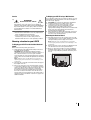
To prevent injury, this apparatus must be securely
attached to the floor/wall in accordance with the
installation instructions. See item 23 on page 3 and
instructions on page 5.
WARNING: If you decide to wall mount this
television, always use a UL Listed wall bracket
appropriate for the size and weight of this television.
The use of any wall bracket other than a UL Listed wall
bracket appropriate for the size and weight of this
television for wall mounting this television could result
in serious bodily injury and/or property damage. See
“Removing the Pedestal Stand” (- page 5).
NOTE TO CATV INSTALLERS
This is a reminder to call the CATV system installer’s
attention to Article 820-40 of the U.S. NEC, which provides
guidelines for proper grounding and, in particular, specifies
that the cable ground shall be connected to the grounding
system of the building, as close to the point of cable entry
as practical. For additional antenna grounding information,
see items 30 and 31 on page 4.
2
CHILD SAFETY:
It Makes A Difference How and Where You Use Your Flat
Panel Display
Congratulations on your purchase! As you enjoy your
new product, please keep these safety tips in mind:
The Issue
• The home theater entertainment experience is a growing trend
and larger flat panel displays are popular purchases. However,
flat panel displays are not always supported on the proper stands
or installed according to the manufacturer’s recommendations.
• Flat panel displays that are inappropriately
situated on dressers, bookcases,
shelves, desks, speakers, chests or
carts may fall over and cause
injury.
TOSHIBA Cares!
• The consumer electronics industry
is committed to making home
entertainment enjoyable and safe.
Tune Into Safety
• One size does NOT fit all. Follow the manufacturer’s recommendations
for the safe installation and use of your flat panel display.
• Carefully read and understand all enclosed instructions for
proper use of this product.
• Don’t allow children to climb on or play with furniture and
television sets.
• Don’t place flat panel displays on furniture
that can easily be used as steps, such
as a chest of drawers.
• Remember that children can
become excited while watching a
program, especially on a “larger
than life” flat panel display. Care
should be taken to place or install
the display where it cannot be
pushed, pulled over, or knocked down.
• Care should be taken to route all cords and
cables connected to the flat panel display so that they cannot be
pulled or grabbed by curious children.
Wall Mounting: If you decide to wall mount your
flat panel display, always:
• Use a mount that has been recommended by the display
manufacturer and/or listed by an independent laboratory (such
as UL, CSA, ETL).
• Follow all instructions supplied by the display and wall mount
manufacturers.
• If you have any doubts about your ability to safely install your
flat panel display, contact your retailer about professional
installation.
• Make sure that the wall where you are mounting the display is
appropriate. Some wall mounts are not designed to be mounted
to walls with steel studs or old cinder block construction. If you
are unsure, contact a professional installer.
• A minimum of two people are
required for installation. Flat panel
displays can be heavy.
Important Safety Instructions
1)
2)
3)
4)
Read these instructions.
Keep these instructions.
Heed all warnings.
Follow all instructions.
5) Do not use this apparatus near water.
6) Clean only with dry cloth.
7) Do not block any ventilation openings. Install in
accordance with the manufacturer’s instructions.
8) Do not install near any heat sources such as
radiators, heat registers, stoves, or other apparatus
(including amplifiers) that produce heat.
9) Do not defeat the safety purpose of Wide blade
the polarized or grounding type
plug. A polarized plug has two blades
with one wider than the other.
A grounding type plug has two blades
and a third grounding prong. The wide blade or the third
prong are provided for your safety. If the provided plug
does not fit into your outlet, consult an electrician for
replacement of the obsolete outlet.
10) Protect the power cord from being
walked on or pinched, particularly at plugs,
convenience receptacles, and the point
where they exit from the apparatus.
11) Only use attachments/accessories specified by the
manufacturer.
12) Use only with the cart, stand, tripod,
bracket, or table specified by the
manufacturer, or sold with the
apparatus. When a cart is used, use
caution when moving the cart/apparatus
combination to avoid injury from tip-over.
13) Unplug this apparatus during lightning storms or
when unused for long periods of time.
14) Refer all servicing to qualified service personnel.
Servicing is required when the apparatus has been
damaged in any way, such as power-supply cord or plug
is damaged, liquid has been spilled or objects have fallen
into the apparatus, the apparatus has been exposed to
rain or moisture, does not operate normally, or has been
dropped.
Additional Safety Precautions
14a) CAUTION: If the TV is dropped and the cabinet or
enclosure surface has been damaged or the TV does
not operate normally, take the following precautions:
• ALWAYS turn off the TV and unplug the power cord
to avoid possible electric shock or fire.
• NEVER allow your body to come in contact with any
broken glass or liquid from the damaged television.
The LCD panel inside the TV contains glass and a
toxic liquid. If the liquid comes in contact with your
mouth or eyes, or your skin is cut by broken glass,
rinse the affected area thoroughly with water and
consult your doctor.
• ALWAYS contact a service technician to inspect the
TV any time it has been damaged or dropped.
15) CAUTION:
• To reduce the risk of electric shock, do not use the
polarized plug with an extension cord, receptacle, or
other outlet unless the blades can be inserted
completely to prevent blade exposure.
• To prevent electric shock, match wide blade of plug
to wide slot; fully insert.
16) WARNING:
To prevent the spread of fire, keep candles or other
open flames away from this product at all times.
Installation, Care, and Service
Installation
Follow these recommendations and precautions and heed
all warnings when installing your TV:
17)
WARNING: NEVER expose batteries to
excessive heat such as sunshine, fire or
the like.
18) ALWAYS plug the product into an outlet that is located in
such a manner that it can be easily unplugged in case the
product requires service.
19) NEVER route the product’s power cord inside a wall or
similar enclosed area.
20) Never modify this equipment. Changes or modifications
may void: a) the warranty, and b) the user’s authority to
operate this equipment under the rules of the Federal
Communications Commission.
21)
DANGER: RISK OF SERIOUS
PERSONAL INJURY,
DEATH, OR EQUIPMENT
DAMAGE!
Never place the TV on an unstable cart,
stand, or table. The TV may fall, causing
serious personal injury, death, or serious damage to the
TV.
22) To avoid damage to this product, never place or store the
TV in direct sunlight; hot, humid areas; or areas subject to
excessive dust or vibration.
23) Always place the TV on the floor or a sturdy, level, stable
surface that can support the weight of the unit. To secure
the TV, use a sturdy strap from the hooks on the rear of
the TV pedestal to a wall stud, pillar, or other immovable
structure. Make sure the strap is tight, secure, and
parallel to the floor.
Sturdy strap (as short as possible)
4"
min.
Securement
Hooks
Clip
Securement
Clip
TV side
TV top
24) The apparatus shall not be exposed to dripping or
splashing, and that no objects filled with liquids, such as
vases, shall be placed on the apparatus.
3
25) Never block or cover the slots or openings in the TV
cabinet back, bottom, and sides. Never place the TV:
• on a bed, sofa, rug, or similar
surface;
• too close to drapes, curtains, or
walls; or
• in a confined space such as a
bookcase, built-in cabinet, or
any other place with poor
ventilation.
The slots and openings are provided to protect the TV
from overheating and to help maintain reliable operation
of the TV. Leave a space of at least 4 (four) inches around
the TV.
Care
For better performance and safer operation of your TOSHIBA
TV, follow these recommendations and precautions:
32) If you use the TV in a room whose temperature is 32 °F
(0 °C) or below, the picture brightness may vary until the
LCD warms up. This is not a sign of malfunction.
27) Never allow anything to rest on or roll over the power
cord, and never place the TV where the power cord is
subject to wear or abuse.
33) Always unplug the TV before
cleaning. When cleaning your
TV, please first remove any dirt or
dust from the surface. Gently
wipe the cabinet and the display
panel surface (the TV screen)
with a dry, soft cloth only (cotton, flannel, etc.). The
enclosed cleaning cloth is for cabinet cleaning. Harsh
rubbing or use of a dirty or stiff cloth will scratch the TV
surface. Avoid contact with alcohol, thinner, benzene,
acidic or alkaline solvent cleaners, abrasive cleaners, or
chemical cloths, which may damage the TV surface.
Never spray volatile compounds such as insecticide on
the TV surface. Such products may damage or discolor
the TV.
28) Never overload wall outlets and extension cords.
34)
26) Always place the back of the television at least four (4)
inches away from any vertical surface (such as a wall) to
allow proper ventilation.
29) Always operate this equipment from a 120 VAC, 60 Hz
power source only.
30) Always make sure the antenna system is properly
grounded to provide adequate protection against voltage
surges and built-up static charges (see Section 810
of the National Electric Code).
Antenna lead-in wire
Ground clamp
Electric service equipment
Ground clamps
Antenna discharge unit
(NEC Section 810-20)
Grounding conductors
(NEC Section 810-21)
Power service grounding
electrode system (NEC Art 250 Part-H)
31)
DANGER: RISK OF SERIOUS
PERSONAL INJURY OR DEATH!
• Use extreme care to make sure you are never in a
position where your body (or any item you are in
contact with, such as a ladder or screwdriver) can
accidentally touch overhead power lines. Never locate
the antenna near overhead power lines or other
electrical circuits.
• Never attempt to install any of the following during
lightning activity: a) an antenna system; or b) cables,
wires, or any home theater component connected to
an antenna or phone system.
4
WARNING:
RISK OF ELECTRIC SHOCK!
Never spill liquids or push objects of any kind into the TV
cabinet slots.
35) While it is thundering, do not touch the connecting cables
or apparatus.
36) For added protection of your TV from lightning and power
surges, always unplug the power cord and disconnect
the antenna from the TV if you leave the TV unattended or
unused for long periods of time.
37) ALWAYS unplug the TV to completely disconnect from
mains power. When the TV is turned off using the on/off
switch, it is not completely disconnected from power and
a minute amount of current is still consumed.
38) During normal use, the TV may make occasional
snapping or popping sounds. This is normal, especially
when the unit is being turned on or off. If these sounds
become frequent or continuous, unplug the power cord
and contact a Toshiba Authorized Service Center.
39)
WARNING: RISK OF
SERIOUS PERSONAL
INJURY OR EQUIPMENT
DAMAGE!
Never strike the screen with a sharp
or heavy object.
40) •The LCD screen of this product can be damaged by
ultraviolet radiation from the sun. When selecting a
location for the television, avoid locations where the
screen may be exposed to direct sunlight, such as in
front of a window.
• Never touch, press, or place anything on the LCD
screen. These actions will damage the LCD screen. If
you need to clean the LCD screen, follow the
instructions in item 33 on this page.
Service
41)
To Display your LCD TV using a Wall Bracket:
WARNING:
RISK OF ELECTRIC SHOCK!
Never attempt to service the TV yourself. Opening and
removing the covers may expose you to dangerous
voltage or other hazards. Failure to follow this WARNING
may result in death or serious injury. Refer all servicing
not specified in this manual to a Toshiba Authorized
Service Center.
42) If you have the TV serviced:
• Ask the service technician to use only replacement
parts specified by the manufacturer.
• Upon completion of service, ask the service
technician to perform routine safety checks to
determine that the TV is in safe operating condition.
Choosing a location for your LCD TV
To Display your LCD TV on the included Pedestal
Stand:
Observe the following safety precautions:
1) Read and Follow the pedestal assembly instructions
included with the pedestal.
CAUTION: Before beginning pedestal assembly,
carefully lay the front of the LCD Panel face down on a
flat, cushioned surface such as a quilt or blanket.
Leave the bottom of the unit protruding over the edge
of the surface and assemble the pedestal as indicated
below.
Note: Extreme care should always be used when
attaching the pedestal stand to avoid damage to the
LCD panel.
2) Place the TV on a sturdy, level surface that can support
the weight of the TV.
3) Be sure to secure the TV to a wall stud, pillar, surface,
or other immovable structure. To secure the TV in this
manner: (1) attach the provided securement clip to an
immovable structure, then (2) pass a sturdy strap
through the securement clip and attach each end to
the hooks located on the back of the TV. Be sure to
leave at least 4 inches between the TV and the wall or
similar structure for ventilation. See item 23, page 3 for
additional details.
If you decide to wall mount your LCD TV, always use a UL
listed wall bracket appropriate for the size and weight of
the LCD TV (- page 2) :
1) CAUTION: Two people are required for installation.
2) Unplug and remove any cables and/or other
component connectors from the rear of the TV.
3) Follow the instructions provided with your wall
bracket. Before proceeding, make sure the
appropriate bracket(s) are attached to the wall and the
back of the TV as described in the instructions
provided with the wall bracket.
4) After attaching the appropriate bracket(s) to the wall
and the back of the TV, remove the pedestal stand
from the TV as described below.
Removing the Pedestal Stand
1) Carefully lay the front of the unit face down on a flat,
cushioned surface such as a quilt or blanket. Leave the
stand protruding over the edge of the surface.
Note: Extreme care should always be used when
removing the pedestal stand to avoid damage to the
LCD panel.
2) Remove the four screws shown in the diagram below.
This will allow removal of the pedestal stand.
3) Once you have removed all four screws holding the
pedestal stand in place, remove the pedestal stand
from the TV by sliding the pedestal stand away from
the TV.
Four screws
5
FCC Declaration of Conformity
Compliance Statement (Part 15):
The Toshiba 46SV670U and 55SV670U Televisions
comply with Part 15 of the FCC rules.
Operation is subject to the following two conditions: (1)
this device may not cause harmful interference, and (2) this
device must accept any interference received, including
interference that may cause undesired operation.
The party responsible for compliance to these rules is:
Toshiba America Consumer Products, L.L.C.
82 Totowa Rd. Wayne, NJ 07470.
Ph: 1-800-631-3811
Note: This equipment has been tested and found to
comply with the limits for a Class B digital device, pursuant
to Part 15 of the FCC rules. These limits are designed to
provide reasonable protection against harmful
interference in a residential installation. This equipment
generates, uses, and can radiate radio frequency energy
and, if not installed and used in accordance with the
instructions, may cause harmful interference to radio
communications. However, there is no guarantee that
interference will not occur in a particular installation. If this
equipment does cause harmful interference to radio or
television reception, which can be determined by
removing and applying power to the equipment, the user
is encouraged to try to correct the interference by one or
more of the following measures:
• Reorient or relocate the receiving antenna.
• Increase the separation between the equipment and the
receiver.
• Connect the equipment into an outlet on a circuit
different from that to which the receiver is connected.
• Consult the dealer or an experienced radio/TV
technician for help.
Caution: Changes or modifications to this equipment not
expressly approved by Toshiba could void the user’s
authority to operate this equipment.
ENERGY STAR® User Information
ENERGY STAR User Information Statement: the factory
default settings of this television meet ENERGY STAR®
requirements. Enabling or changing certain features and
functionality (e.g. Picture Settings, Auto Brightness Sensor,
Power-On Mode) may increase energy consumption,
possibly beyond the limits required for ENERGY STAR
qualification.
To ensure your television is operating at optimal energy
efficiency, select [Home] mode during initial activation. To
return to [Home] mode settings, select [AutoView] picture
mode, set the Auto Brightness Sensor to [On] mode, and set
the Power-On mode to [Power-Saving]. [AutoView] mode
is recommended for normal home use.
For more information, see page 40 and 49.
ENERGY STAR® qualified TV. Products that
earn the ENERGY STAR prevent green house
gas emissions by meeting strict guidelines set
by the U.S. Environmental Protection Agency.
ENERGY STAR and the ENERGY STAR mark
are registered U.S. marks.
6
Important notes about your LCD TV
The following symptoms are technical limitations of
LCD Display technology and are not an indication of
malfunction; therefore, Toshiba is not responsible for
perceived issues resulting from these symptoms.
1) An afterimage (ghost) may appear on the screen if a
fixed, non-moving image is displayed for a long period
of time. The afterimage is not permanent and will
disappear in a short period of time.
2) The LCD panel contained in this TV is manufactured
using an extremely high level of precision technology;
however, there may be an occasional pixel (dot of light)
that does not operate properly (does not light, remains
constantly lit, etc.). This is a structural property of LCD
technology, is not a sign of malfunction, and is not
covered under your warranty. Such pixels are not
visible when the picture is viewed from a normal
viewing distance.
Note: Interactive video games that involve shooting a
“gun” type of joystick at an on-screen target may not work
with this TV.
Trademark Information
• Manufactured under license from Dolby Laboratories.
Dolby and the double-D symbol are trademarks of Dolby
Laboratories.
•
Audyssey EQ is based on the award-winning
Audyssey MultEQ technology. It is the first-ever room
equalization solution that can achieve optimum sound for a
large listening area and it is featured in many high end home
theater products. Audyssey EQ is used in the TV tuning
process to calculate an equalization solution that corrects
time and frequency response problems in TV systems. This
results in clear, rich sound with more intelligible dialog.
• Manufactured under license from Audyssey Laboratories.
U. S. and foreign patents pending. Audyssey EQ is a
registered trademark of Audyssey Laboratories.
• HDMI, the HDMI logo and High-Definition Multimedia
Interface are trademarks or registered trademarks of HDMI
Licensing LLC.
• INSTAPORT™ and INSTAPORT logo are trademarks of
Silicon Image, Inc. in the United States and other countries.
• DivX® is a registered trademark of DivX, Inc., and is used
under license.
•
SDHC Logo is a trademark.
Contents
Important Safety Instructions . . . . . . . . . . . . . . . . . . . . . . 3
Installation, Care, and Service . . . . . . . . . . . . . . . . . . . . . 3
Choosing a location for your LCD TV . . . . . . . . . . . . . . . . . 5
Chapter 1: Introduction. . . . . . . . . . . . . . . . . . . . . . . . . . . 9
Features of your new TV . . . . . . . . . . . . . . . . . . . . . . . . . . 9
Overview of steps for installing, setting up,
and using your new TV . . . . . . . . . . . . . . . . . . . . . . . . . 9
TV front and side panel controls and connections . . . . 10
TV back panel connections. . . . . . . . . . . . . . . . . . . . . . . . 11
Chapter 2: Connecting your TV . . . . . . . . . . . . . . . . . . . . .12
Overview of cable types . . . . . . . . . . . . . . . . . . . . . . . . . . 12
About the connection illustrations . . . . . . . . . . . . . . . . . 12
Connecting a VCR (or a VCR with S-video) and
antenna, Cable TV or Camcorder . . . . . . . . . . . . . . . . 13
Connecting a DVD player with ColorStream®
(component video), a VCR, and
a satellite receiver . . . . . . . . . . . . . . . . . . . . . . . . . . . . . 14
Connecting a device to the IR OUT infrared terminal
using the IR blaster cable for IR pass-through
device control. . . . . . . . . . . . . . . . . . . . . . . . . . . . . . . . . 15
Connecting an HDMI™ or DVI device to
the HDMI input . . . . . . . . . . . . . . . . . . . . . . . . . . . . . . . 16
REGZA-LINK® connection . . . . . . . . . . . . . . . . . . . . . . . 17
Connecting a digital audio system . . . . . . . . . . . . . . . . . 18
Connecting an audio system . . . . . . . . . . . . . . . . . . . . . . 18
Connecting a personal computer (PC) . . . . . . . . . . . . . . 19
Chapter 3: Using the remote control. . . . . . . . . . . . . . . . . .20
Preparing the remote control for use . . . . . . . . . . . . . . . 20
Installing the remote control batteries . . . . . . . . . . . . . . 20
Learning about the remote control . . . . . . . . . . . . . . . . . 21
Remote Control functional key chart . . . . . . . . . . . . . . . 22
Using the remote control to operate
your other devices. . . . . . . . . . . . . . . . . . . . . . . . . . . . . 24
Programming the remote control to operate
your other devices. . . . . . . . . . . . . . . . . . . . . . . . . . . . . 24
Device code setup . . . . . . . . . . . . . . . . . . . . . . . . . . . . . 24
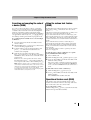
Searching and sampling the code of
a device (8500) . . . . . . . . . . . . . . . . . . . . . . . . . . . 25
Using the volume lock feature (8000). . . . . . . . . . . . . 25
Operational feature reset (8900) . . . . . . . . . . . . . . . . . 25
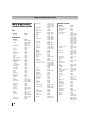
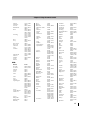
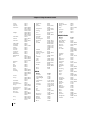
Multi-brand remote control device codes . . . . . . . . . . . 26
Chapter 4: Menu layout and navigation. . . . . . . . . . . . . . . .34
Main menu layout . . . . . . . . . . . . . . . . . . . . . . . . . . . . . . . 34
THINC™ menu . . . . . . . . . . . . . . . . . . . . . . . . . . . . . . . . . 34
Navigating the menu system . . . . . . . . . . . . . . . . . . . . . . 35
Chapter 5: Setting up your TV . . . . . . . . . . . . . . . . . . . . . .36
Initial Setup. . . . . . . . . . . . . . . . . . . . . . . . . . . . . . . . . . . . . 36
Quick Setup from the SETUP menu . . . . . . . . . . . . . . . . 36
Selecting the menu language . . . . . . . . . . . . . . . . . . . . . . 36
Configuring the antenna input source for
the ANT/CABLE terminal. . . . . . . . . . . . . . . . . . . . . . 37
Programming channels into the
TV’s channel memory. . . . . . . . . . . . . . . . . . . . . . . . . . 37
Auto Tuning. . . . . . . . . . . . . . . . . . . . . . . . . . . . . . . . . . 37
Manual Tuning . . . . . . . . . . . . . . . . . . . . . . . . . . . . . . . 37
Setting channel skip. . . . . . . . . . . . . . . . . . . . . . . . . . . . . . 38
Setting video input skip . . . . . . . . . . . . . . . . . . . . . . . . . . 38
Labeling input sources . . . . . . . . . . . . . . . . . . . . . . . . . . . 38
Setting the Auto Input feature . . . . . . . . . . . . . . . . . . . . . 39
Setting the time zone . . . . . . . . . . . . . . . . . . . . . . . . . . . . . 39
Selecting the location. . . . . . . . . . . . . . . . . . . . . . . . . . . . . 39
Selecting the TOSHIBA Illumination mode . . . . . . . . . . 39
Selecting the Power-On Mode . . . . . . . . . . . . . . . . . . . . . 40
Using Blue Screen. . . . . . . . . . . . . . . . . . . . . . . . . . . . . . . . 40
Setting the screen transparency . . . . . . . . . . . . . . . . . . . . 40
Viewing the system status . . . . . . . . . . . . . . . . . . . . . . . . 40
Reset Factory Defaults . . . . . . . . . . . . . . . . . . . . . . . . . . . . 40
Chapter 6: Using the TV’s features . . . . . . . . . . . . . . . . . . .41
Selecting the video input source to view . . . . . . . . . . . . 41
Tuning channels . . . . . . . . . . . . . . . . . . . . . . . . . . . . . . . . . 42
Tuning channels using the Channel Browser™ . . . . 42
Setting the Channel Tuning Mode . . . . . . . . . . . . . . . 44
Tuning to the next programmed channel . . . . . . . . . 44
Tuning to a specific channel
(programmed or unprogrammed) . . . . . . . . . . . 45
Switching between two channels using
Channel Return . . . . . . . . . . . . . . . . . . . . . . . . . . . 45
Switching between two channels
using SurfLock™ . . . . . . . . . . . . . . . . . . . . . . . . . 45
Selecting the picture size. . . . . . . . . . . . . . . . . . . . . . . . . . 46
Scrolling the picture. . . . . . . . . . . . . . . . . . . . . . . . . . . . . . 48
Using the Auto Aspect Ratio feature. . . . . . . . . . . . . . . . 48
Using the 4:3 Stretch . . . . . . . . . . . . . . . . . . . . . . . . . . . . . 48
Using the FREEZE feature . . . . . . . . . . . . . . . . . . . . . . . . 48
Adjusting the picture . . . . . . . . . . . . . . . . . . . . . . . . . . . . . 49
Selecting the picture mode . . . . . . . . . . . . . . . . . . . . . . 49
Adjusting the picture quality. . . . . . . . . . . . . . . . . . . . 49
Using the TheaterLock™ feature . . . . . . . . . . . . . . . . . . . 50
Viewing the Control Visualization window . . . . . . . . . 50
Using the closed caption mode . . . . . . . . . . . . . . . . . . . . 50
Analog CC Mode . . . . . . . . . . . . . . . . . . . . . . . . . . . . . . 50
Digital CC Settings . . . . . . . . . . . . . . . . . . . . . . . . . . . . 51
CC Selector . . . . . . . . . . . . . . . . . . . . . . . . . . . . . . . . . . . 51
Using the Closed Caption button on
the remote control. . . . . . . . . . . . . . . . . . . . . . . . . 51
Adjusting the audio . . . . . . . . . . . . . . . . . . . . . . . . . . . . . . 52
Muting the sound . . . . . . . . . . . . . . . . . . . . . . . . . . . . . 52
Using the digital audio selector. . . . . . . . . . . . . . . . . . 52
Selecting stereo/SAP broadcasts. . . . . . . . . . . . . . . . . 52
Adjusting the audio quality . . . . . . . . . . . . . . . . . . . . . 52
Selecting the optical audio output format . . . . . . . . . 53
Using the Dolby® Digital
Dynamic Range Control feature. . . . . . . . . . . . . 53
Using Dolby® Volume . . . . . . . . . . . . . . . . . . . . . . . . . 53
Setting the PIN code . . . . . . . . . . . . . . . . . . . . . . . . . . . . . 53
Registering a new PIN code . . . . . . . . . . . . . . . . . . . . . 53
Changing or deleting your PIN code . . . . . . . . . . . . . 53
If you cannot remember your PIN code. . . . . . . . . . . 53
Blocking TV programs and movies
by rating (V-Chip) . . . . . . . . . . . . . . . . . . . . . . . . 54
Downloading an additional rating system
for blocking TV programs and movies . . . . . . . 54
Unlocking programs . . . . . . . . . . . . . . . . . . . . . . . . . . . 55
Locking channels . . . . . . . . . . . . . . . . . . . . . . . . . . . . . . . . 56
Using the input lock feature. . . . . . . . . . . . . . . . . . . . . 56
Using the GameTimer® . . . . . . . . . . . . . . . . . . . . . . . . . 56
Using the panel lock feature . . . . . . . . . . . . . . . . . . . . 56
Using the PC settings feature . . . . . . . . . . . . . . . . . . . . . . 57
Setting the PC Audio . . . . . . . . . . . . . . . . . . . . . . . . . . . . . 57
Setting the On Timer . . . . . . . . . . . . . . . . . . . . . . . . . . . . . 58
Setting the Sleep Timer . . . . . . . . . . . . . . . . . . . . . . . . . . . 58
Using REGZA-LINK® . . . . . . . . . . . . . . . . . . . . . . . . . . . . 59
REGZA-LINK® playback device
(DVD player, etc.) control . . . . . . . . . . . . . . . . . . 59
(continued)
7
REGZA-LINK® input source selection. . . . . . . . . . . . 59
Amplifier VOLUME and MUTE controls . . . . . . . . . 60
Other REGZA-LINK® functions . . . . . . . . . . . . . . . . . 60
REGZA-LINK® PC Link. . . . . . . . . . . . . . . . . . . . . . . . 60
Using the HDMI settings feature. . . . . . . . . . . . . . . . . . . 61
Setting the HDMI audio mode. . . . . . . . . . . . . . . . . . . . . 61
Displaying TV status information . . . . . . . . . . . . . . . . . . 62
Understanding the auto power off feature . . . . . . . . . . 62
Understanding the last mode memory feature . . . . . . . 62
Chapter 7: Using the TV’s advanced features. . . . . . . . . . . .63
Using the advanced picture settings features . . . . . . . . 63
Using the Resolution+™ . . . . . . . . . . . . . . . . . . . . . . . 63
Using the DynaLight™. . . . . . . . . . . . . . . . . . . . . . . . . 63
Using Dynamic Contrast . . . . . . . . . . . . . . . . . . . . . . . 63
Using the Static Gamma feature . . . . . . . . . . . . . . . . . 63
Using the Film Stabilization feature . . . . . . . . . . . . . . 63
Using the Expert Mode. . . . . . . . . . . . . . . . . . . . . . . . . 64
Using the ClearScan 240™ feature . . . . . . . . . . . . . . . 64
Using the MPEG NR feature . . . . . . . . . . . . . . . . . . . . 64
Using the DNR feature . . . . . . . . . . . . . . . . . . . . . . . . . 64
Using the Auto Brightness Sensor . . . . . . . . . . . . . . . 65
Using the Backlight Adjustment Pro . . . . . . . . . . . . . 65
Using the ColorMaster™ feature . . . . . . . . . . . . . . . . 65
Using the Base Color Adjustment. . . . . . . . . . . . . . . . 65
Selecting the color temperature . . . . . . . . . . . . . . . . . 66
Using the advanced sound settings features . . . . . . . . . 66
Using the surround sound feature . . . . . . . . . . . . . . . 66
Using the Media Player. . . . . . . . . . . . . . . . . . . . . . . . . . . 67
Media Player Specifications. . . . . . . . . . . . . . . . . . . . . 67
Basic operation. . . . . . . . . . . . . . . . . . . . . . . . . . . . . . . . 67
Playing DivX® files (only for USB devices) . . . . . . . . 68
Playing MP3 files (only for USB devices) . . . . . . . . . 69
Viewing JPEG files . . . . . . . . . . . . . . . . . . . . . . . . . . . . 70
Chapter 8: Troubleshooting. . . . . . . . . . . . . . . . . . . . . . . .71
General troubleshooting . . . . . . . . . . . . . . . . . . . . . . . . . . 71
LED indications . . . . . . . . . . . . . . . . . . . . . . . . . . . . . . . . . 73
Chapter 9: Appendix . . . . . . . . . . . . . . . . . . . . . . . . . . . .74
Specifications . . . . . . . . . . . . . . . . . . . . . . . . . . . . . . . . . . . 74
Acceptable signal formats for
PC IN and HDMI terminals. . . . . . . . . . . . . . . . . . . . . 75
PC IN signal formats. . . . . . . . . . . . . . . . . . . . . . . . . . . 75
HDMI signal formats . . . . . . . . . . . . . . . . . . . . . . . . . . 76
Limited United States Warranty
for LCD Televisions 26” and Larger. . . . . . . . . . . . . . 77
Limited Canadian Warranty
for Toshiba Brand Flat Panel Televisions . . . . . . . . . 78
Index . . . . . . . . . . . . . . . . . . . . . . . . . . . . . . . . . . . . . . .82
8
Chapter 1: Introduction
Features of your new TV
•Media Player allows you to play DivX® and MP3 files
and to view your JPEG pictures (- page 67).
The following are just a few of the many exciting
features of your new Toshiba widescreen, integrated
HD, LCD TV:
•Integrated digital tuning (8VSB ATSC and QAM)
eliminates the need for a separate digital converter
set-top box (in most cases).
•1080p output resolution.
•Four HDMI™ digital, high-definition multimedia
interfaces with 1080p input support (- page 16).
•HDMI capabilities
Deep Color feature allows the HDMI source to
increase the available color bits within the boundaries
defined by the RGB or YCbCr color space.
Lip-Sync feature activates an auto audio/video
display timing adjustment function that allows HDMI
source devices to accurately perform synchronization
automatically.
HDMI INSTAPORT™ technology reduces lag time
when switching HDMI sources.
RGB Range feature adjusts RGB full range signal
automatically.
•REGZA-LINK® allows control of external devices
from the TV remote via HDMI connection
(- page 59).
•Two sets of ColorStream® HD high-resolution
component video inputs (- page 14).
•Digital Audio Out optical audio connection with
Dolby® Digital optical output format (- page 18).
•PC IN (Analog RGB) computer terminal
(- page 19).
•FocaLight™ LED Backlight with Local Dimming
allows the LEDs to be controlled by zone, creating a
significantly higher dynamic contrast ratio, where
blacks are blacker without reducing the peak white
brightness.
•IR OUT for controlling infrared remote-controlled
devices through the TV (- pages 12 and 15).
•ColorMaster™ allows you to adjust the TV’s standard
colors (- page 65).
•Expert Mode allows detailed calibration with red,
green and blue color selections (- page 64).
•ClearScan 240™ provides picture clarity for fast
motion video using new Backlight Scanning
technology (- page 64).
•Resolution+™ upconverts and enhances for a more
detailed picture (- page 63).
•AutoView™ allows you to automatically adjust
picture settings based on ambient light conditions and
input signal content (- page 49).
•Dolby® Volume eliminates inconsistent TV volume
when changing channels or viewing commercials (page 53).
•
ENERGY STAR® qualified
Overview of steps for installing,
setting up, and using your new TV
Follow these steps to set up your TV and begin using its
many exciting features.
1 Observe the following when choosing a location for
2
3
4
5
6
the TV:
• Read “Important notes about your LCD TV” (page 6).
• Place the TV in a proper location (- pages 2–5).
Do not plug in any power cords until AFTER you
have connected all cables and devices to your TV.
BEFORE connecting cables or devices to the TV,
learn the functions of the TV’s connections and
controls (- pages 10–11).
Connect your other electronic device(s) to the TV
(- pages 13–19).
See “Chapter 3: Using the remote control” (page 20) for an overview of the buttons on the
remote control, install the batteries and prepare to
operate your other device(s).
AFTER connecting all cables and devices, plug in
the power cords for your TV and other devices.
Note: After you turn on the TV, the Initial
Setup menu appears automatically by
default.
7 See “Menu layout and navigation” for a quick
overview of navigating the TV’s menu system (page 34).
8 Program channels into the TV’s channel memory
(- page 37).
9 For details on using the TV’s features, see Chapters
6 and 7.
10 For help, refer to the Troubleshooting Guide, see
Chapter 8.
11 For technical specifications and warranty
information, see Chapter 9.
9
Chapter 1: Introduction
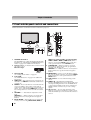
TV front and side panel controls and connections
Model 55SV670U is used in this manual for illustration purposes.
TV front
Right side panel
6
9
7
10
8
11
12
5
13
1
2
3
4
Control panel
1
2
3
4
5
6
7
8
TOSHIBA Illumination
The TOSHIBA logo will be illuminated by the LED
backlight. See “Selecting the TOSHIBA Illumination
mode” on page 39 for additional information.
Remote sensor — Point the remote control toward
this remote sensor.
Effective range:
16.4 ft (5m)
On Timer LED
See “Setting the On Timer” on page 58.
Power LED
See “LED indications” on page 73 for additional
information.
VIDEO 2 IN — The side panel A/V connections are
referred to as “VIDEO 2” and include standard A/V
connections.
POWER — Press to turn the TV on and off. If the TV
stops responding to the controls on the remote
control or TV control panel and you cannot turn off
the TV, press and hold the POWER button on the
TV control panel for 5 or more seconds to reset the
TV.
VOLUME+ – — These buttons adjust the volume
level.
ARROWS I i — When a menu is on-screen, these
buttons function as left/right menu navigation
buttons.
INPUT/ENTER — Repeatedly press to change the
source you are viewing (ANT/CABLE, VIDEO 1,
10
9
10
11
12
13
VIDEO 2, ColorStream HD1, ColorStream HD2,
HDMI 1, HDMI 2, HDMI 3, HDMI 4, PC).When a
menu is on-screen, the INPUT button on the TV's
control panel functions as the ENTER button.
CHANNEL Bb — When no menu is on-screen,
these buttons change the channel (programmed
channels only; - page 37).
ARROWS U u — When a menu is on-screen, these
buttons function as up/down menu navigation
buttons.
MENU/BACK — Press to access the menu system
(- page 35). When a menu is on-screen, the MENU
button on the TV’s control panel functions as the
BACK button.
USB terminal — For use when inserting a USB
device.
HDMI™ IN — High-Definition Multimedia
Interface (HDMI 4) input receives digital audio and
uncompressed digital video from an HDMI device
or uncompressed digital video from a DVI device.
HDMI connection is necessary to receive 1080p
signals.
SD card slot — For use when inserting an SD
Memory Card. Press in SD Memory Card to insert,
and take SD Memory Card out of the SD card slot to
remove.
Chapter 1: Introduction
TV back panel connections
For an explanation of cable types and connections, see pages 12–19.
TV back
1
6
7
Power cord
Cable Strap
8
2
3
4
5
9
1
2
HDMI IN — High-Definition Multimedia Interface
input receives digital audio and uncompressed
digital video from an HDMI™ device or
uncompressed digital video from a DVI device.
Also see item 6. HDMI™ connection is necessary to
receive 1080p signals.
ColorStream HD1 and ColorStream HD2 — Two
sets of ColorStream® high-definition component
video inputs (with standard stereo audio inputs) for
connecting devices with component video output,
such as a Toshiba DVD player with ColorStream®.
Note: Component video cables carry only video
information; separate audio cables are required for a
complete connection.
3
VIDEO 1 IN — Standard (composite) video and
standard audio inputs plus optional S-video inputs
for connecting devices with composite video or Svideo output.
Note: Standard (composite) video and S-video cables
carry only video information; separate audio cables are
required for a complete connection.
4
5
FIXED AUDIO OUT — Analog audio outputs for
connecting an audio amplifier.
IR OUT — For controlling infrared remotecontrolled devices through the TV. You can connect
up to two devices with an optical IR blaster cable
(- page 12), and then control the devices using the
TV’s IR pass-through features.
10
6
PC/HDMI1 (AUDIO) IN — PC audio input terminal
is shared with HDMI1 analog audio input terminal,
and its use can be configured in the AV Connection
menu (- page 57).
7 PC IN — For use when connecting a personal
computer.
8 DIGITAL AUDIO OUT — Optical audio output in
Dolby Digital or PCM (pulse-code modulation)
format for connecting an external Dolby Digital
decoder, amplifier, or home theater system with
optical audio input.
9 Service port — For service use only. Used for
updating the television’s firmware.
10 ANT/CABLE — Input that supports analog (NTSC)
and digital (ATSC) off-air antenna signals and
analog and digital Cable TV (QAM) signals.
HDMI, the HDMI logo and High-Definition Multimedia Interface
are trademarks or registered trademarks of HDMI Licensing
LLC.
Manufactured under license from Dolby Laboratories.
Dolby and the double-D symbol are trademarks of Dolby
Laboratories.
11
Chapter 2: Connecting your TV
Overview of cable types
Cables can be purchased from most stores that sell
audio/video devices. Before purchasing any cables, be
sure of connector types required by your devices and
the length of each cable.
Coaxial (F-type) cable
Coaxial (F-type) cable is used for connecting your
antenna, cable TV service, and/or cable converter box
to the ANT/CABLE input on your TV.
HDMI™ cable (with HDMI Logo “
”)
HDMI (High-Definition Multimedia Interface) cable is
for use with devices with an HDMI output. An HDMI
cable delivers digital audio and video in its native
format. This cable carries both video and audio
information; therefore, separate audio cables are not
required for a complete HDMI device connection (page 16, 17 and 19).
Note: An HDMI cable provides the best audio and picture
performance.
Dual-wand IR blaster cable
Standard A/V cables (red/white/yellow)
Standard A/V cables (composite video) usually come
in sets of three and are for use with video devices with
analog audio and composite video output. These cables
(and the related inputs on your TV) are typically colorcoded according to use: yellow for video, red for stereo
right audio, and white for stereo left (or mono) audio.
S-video cable
S-video cable is for use with video devices with S-video
output. Separate audio cables are required for a
complete connection.
Note: An S-video cable provides better picture
performance than a composite video cable. If you connect
an S-video cable, be sure to disconnect the standard
(composite) video cable or the picture performance will be
unacceptable.
Component video cables (red/green/blue)
Component video cables come in sets of three and are
for use with video devices with component video
output. (ColorStream® is Toshiba’s brand of component
video.) These cables are typically color-coded red,
green, and blue. Separate audio cables are required for
a complete connection.
Note: Component video cables provide better picture
performance than a standard (composite) video or S-video
cable.
12
Dual-wand IR blaster cable is for use with video devices
with IR (infrared) remote control. This cable can be used
with the TV’s IR pass-through feature (- page 15).
To obtain IR blaster cable:
Visit http://ceaccessories.toshiba.com/
Optical audio cable
Optical audio cable is for connecting receivers with
Dolby Digital or PCM (pulse-code modulation) optical
audio input to the TV’s DIGITAL AUDIO OUT terminal
(- page 18).
Analog RGB (15-pin) computer cable
Analog RGB (15-pin) computer cable is for connecting a
PC to the TV’s PC IN terminal (- page 19).
Note: Separate audio cables are required for a complete
connection.
About the connection illustrations
You can connect different types and brands of devices to
your TV in several different configurations. The connection
illustrations in this manual are representative of typical
device connections only. The input/output terminals on
your devices may differ from those illustrated herein. For
details on connecting and using your specific devices, refer
to each device’s owner’s manual.
Chapter 2: Connecting your TV
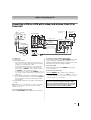
Connecting a VCR (or a VCR with S-video) and antenna, Cable TV or
Camcorder
From Cable TV
or antenna
Camcorder
From Cable TV
Cable box
TV upper back panel
AUDIO
OUT
IN CH 3
CH 4
VIDEO
OUT
L
R
S-video cable
or
Standard
A/V cable
VIDEO 2 inputs
on TV right side panel
Stereo VCR
VIDEO
L
AUDIO
R
IN
CH 3
CH 4
OUT
L
R
IN
from
ANT
OUT
to
TV
Audio cable
TV lower back panel
You will need:
•coaxial cables
•standard A/V cables
– For better picture performance, if your VCR has Svideo, use an S-video cable (plus the audio cables)
instead of the standard video cable.
– For better picture performance, if your camcorder
has S-video, connect an S-video cable (plus the
audio cables) to VIDEO 1 on the TV back instead of
the VIDEO 2 on the TV right side panel.
– If you have a mono VCR, connect L/MONO on the TV
to your VCR’s audio out terminal using the white audio
cable only.
•S-video cable (if your VCR or camcorder has S-video)
– Do not connect both types of video cable to VIDEO 1
at the same time or the picture performance will be
unacceptable.
•standard audio cables (if your VCR or camcorder has
S-video)
Note: When you use a Cable box, you may not be able to
use the remote control to program or access certain
features on the TV.
To view basic and premium Cable channels:
Turn OFF the VCR. Select the ANT/CABLE video input
source on the TV.* Tune the TV to channel 3 or 4
(whichever channel the Cable box output is set to). Use
the Cable box controls to change channels.
To view the VCR:
Turn ON the VCR. Select the VIDEO 1 video input
source on the TV.*
To view the camcorder video:
Select the VIDEO 2 video input source on the TV.*
* To select the video input source, press INPUT on the remote
control (- page 41). To program the TV remote control to
operate other devices, see Chapter 3.
The unauthorized recording, use, distribution, or
revision of television programs, videotapes, DVDs,
and other materials is prohibited under the Copyright
Laws of the United States and other countries, and
may subject you to civil and criminal liability.
To view the antenna or Cable signal:
Select the ANT/CABLE video input source on the TV.*
13
Chapter 2: Connecting your TV
Connecting a DVD player with ColorStream® (component video),
a VCR, and a satellite receiver
Your TV has two sets of ColorStream® (component video) inputs.
TV upper back panel
From antenna
Stereo VCR
AUDIO
OUT
Y
PB
L
PR
COMPONENT VIDEO S-VIDEO VIDEO
OUT
OUT
VIDEO
L
AUDIO
R
IN
R
CH 3
CH 4
OUT
DVD player with component video
L
IN from ANT
OUT to TV
R
From satellite dish
AUDIO
OUT
Y
Satellite
IN
PB
PR
COMPONENT VIDEO S-VIDEO VIDEO
OUT
OUT
Satellite receiver with component video
L
R
TV lower back panel
You will need:
•coaxial cables
•standard A/V cables
– For better picture performance, if your VCR has Svideo, use an S-video cable (plus the audio cables)
instead of the standard video cable. Do not connect
both types of video cable to VIDEO 1 at the same
time or the picture performance will be
unacceptable.
– If you have a mono VCR, connect L/MONO on the TV
to your VCR’s audio out terminal using the white
audio cable only.
•standard audio cables
•component video cables
– You can connect the component video cables (plus
audio cables) from the DVD player or satellite
receiver to either set of ColorStream terminals on the
TV (HD1 or HD2). The ColorStream HD1 and HD2
terminals can be used to display Progressive (480p,
720p, 1080p) and Interlaced (480i, 1080i). Please
check the Owner’s Manual of the DVD player or
satellite in order to determine the best output signal
available (1080p 24Hz/30Hz/50Hz/25Hz are not
supported).
– If your DVD player or satellite receiver does not have
component video, connect a standard A/V cable to
VIDEO 2 on the side panel. If your DVD player has
HDMI video, see page 16.
To view antenna or Cable channels:
Select the ANT/CABLE video input source on the TV.*
14
To view the DVD player:
Turn ON the DVD player. Select the ColorStream HD1
video input source on the TV.*
To view satellite programs using the component video
connections:
Turn on the satellite receiver. Select the ColorStream
HD2 video input source on the TV.*
To view the VCR or view and record antenna channels:
Turn ON the VCR. Tune the VCR to the channel you
want to watch. Select the VIDEO 1 video input source
on the TV.*
To record a TV program while watching a DVD:
Turn ON the VCR. Tune the VCR to the channel to
record. Select the ColorStream HD1 video input
source on the TV* to view the DVD.
* To select the video input source, press INPUT on the remote
control (- page 41). To program the TV remote control to
operate other devices, see Chapter 3.
The unauthorized recording, use, distribution, or
revision of television programs, videotapes, DVDs,
and other materials is prohibited under the Copyright
Laws of the United States and other countries, and
may subject you to civil and criminal liability.
Chapter 2: Connecting your TV
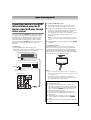
Connecting a device to the IR OUT
infrared terminal using the IR
blaster cable for IR pass-through
device control
You can use the TV’s IR OUT terminal (infrared passthrough) to remotely operate (through the TV) many
infrared remote-controlled devices (such as Toshiba
infrared remote-controlled VCRs or DVD players)
enclosed within an entertainment center or similar
cabinet. Without the IR OUT connection, the device
typically would need to be visible to operate it
remotely.
You will need:
•dual-wand IR blaster cable (- page 12)
•other audio/video cables as required to connect the
device(s) to the TV (- pages 13, 14 and 16)
Front of IR-controlled DVD player (for example)
To connect the IR blaster cable:
1
2
Locate the infrared sensor on the front of your
device. This sensor is marked on some devices.*
Align one of the IR blaster cable’s wands about 1
inch away from the infrared sensor on the front of
the device and attach it using double-sided
mounting tape. If you have a second device, attach
the second wand in a similar manner. (See
illustration.)
Note: If you do not have a second device, coil the
second wand with a rubber band and leave it behind
the TV.
3
Plug the IR blaster cable’s plug into the TV’s IR OUT
terminal.
To control the device(s):
Point either the device’s remote control or the TV
remote control (that you previously programmed to
operate the device; - Chapter 3) toward the front of
the TV and press the button for the desired function.
The signal passes from the remote control through the
TV to the device via the IR blaster cable.
Front of IR-controlled audio device (for example)
Infrared
sensor
IR blaster cable wand
(approx.1 inch from device)
TV upper back panel
Note:
• If you use the device’s remote control to operate the
device, you also will need to use the TV’s remote control
to operate the TV.
• The IR pass-through feature does not support all
IR-controlled devices; satisfactory performance may
not be attainable with certain devices.
*If you cannot locate the device’s infrared sensor:
1 Turn OFF the device.
2 Starting at the lower left corner of the device,
place the end of the device’s remote control (with
the infrared emitter) so it touches the front of the
device and press POWER. (Do not use the TV’s
remote control for this step.)
3 If the device turns on, the point at which the
remote control touched the device is the location
of the sensor.
4 If the device does not turn on, move the remote
control slightly to the right and press POWER
again.
5 Repeat step 4 until you locate the device’s infrared
sensor.
15
Chapter 2: Connecting your TV
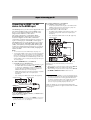
Connecting an HDMI™ or DVI
device to the HDMI input
To connect a DVI device, you will need:
•one HDMI-to-DVI adapter cable
The HDMI input on your TV receives digital audio and
uncompressed digital video from an HDMI source
device, or uncompressed digital video from a DVI
(Digital Visual Interface) source device.
This input is designed to accept HDCP (HighBandwidth Digital-Content Protection) program
material in digital form from EIA/CEA-861-E–
compliant[1] consumer electronic devices (such as a settop box or DVD player with HDMI or DVI output).
The HDMI input can accept and display VGA, SVGA,
XGA, WXGA, SXGA, 480i (60Hz), 480p (60Hz), 720p
(60Hz), 1080i (60Hz), and 1080p (24Hz/60Hz) signal
formats. For detailed signal specifications, see page 76.
Supported Audio format: Linear PCM, sampling rate
32/44.1/48 kHz
•one 3.5mm Stereo to RCA Y-Cable
Note:
• To connect a PC to the HDMI input, see page 19.
• Some legacy HDMI sources may not work properly with
your HDMI TV, due to the adoption of new standards.
Please try setting the following four options (Deep Color,
Lip Sync, INSTAPORT™ and RGB Range) to Off. Your
legacy HDMI source should operate properly with your
TV. See page 61.
To connect an HDMI device, you will need:
•one HDMI cable per HDMI device
– For proper operation, it is recommended that you use
an HDMI cable with the HDMI Logo (
).
– To display an 1080p/60Hz signal format, you will
need a High Speed HDMI™ cable. Conventional
HDMI/DVI cable may not work properly.
– HDMI cable transfers both video and audio. Separate
analog audio cables are not required (see
illustration).
– See “Setting the HDMI audio mode” (- page 61).
TV right side panel
TV upper back panel
HDMI device
VIDEO
AUDIO
L
R
HDMI OUT
IN
OUT
L
R
To view the HDMI device video:
Select the HDMI 1, HDMI 2, HDMI 3, or HDMI 4 video
input source on the TV.*
* To select the video input source, press INPUT on the remote
control (- page 41). To program the TV remote control to
operate other devices, see Chapter 3.
16
– For proper operation, the length of an HDMI-to-DVI
adapter cable should not exceed 9.8 ft (3m). The
recommended length is 6.6 ft (2m).
– An HDMI-to-DVI adapter cable transfers video only.
Separate analog audio cables are required (see
illustration).
– See “Setting the HDMI audio mode” (- page 61).
TV upper back panel
DVI device
VIDEO
L
DVI/HDCP
OUT
AUDIO
R
IN
OUT
L
R
Note: To ensure that the HDMI or DVI device is reset
properly, it is recommended that you follow these
procedures:
• When turning on your electronic components, turn on
the TV first and then the HDMI or DVI device.
• When turning off your electronic components, turn off
the HDMI or DVI device first and then the TV.
[1] EIA/CEA-861-D compliance covers the transmission of
uncompressed digital video with high-bandwidth digital
content protection, which is being standardized for
reception of high-definition video signals. Because this
is an evolving technology, it is possible that some
devices may not operate properly with the TV.
HDMI, the HDMI logo and High-Definition Multimedia
Interface are trademarks or registered trademarks of HDMI
Licensing LLC.
Chapter 2: Connecting your TV
REGZA-LINK® connection
You can control the basic functions of connected audio/video devices using the TV’s remote control if you connect
a REGZA-LINK® compatible audio receiver or playback device. For an explanation of setup and operations, see
pages 59–60.
TV right side panel
TV upper back panel
Audio receiver
VIDEO
AUDIO
L
R
HDMI IN
HDMI OUT
Playback device
(REGZA-LINK DVD player,etc.)
VIDEO
L
AUDIO
R
IN
OUT
L
HDMI OUT
IN
OUT
R
L
R
Playback device
(REGZA-LINK DVD player,etc.)
VIDEO
L
AUDIO
R
HDMI OUT
IN
OUT
L
R
To connect an audio receiver and playback devices, you
will need:
•HDMI cables (- page 12)
Note:
• If several devices are connected, REGZA-LINK® feature
may not operate properly.
• For proper operation, it is recommended that you use
HDMI cables with the HDMI Logo (
).
Before controlling the device(s):
•After completing the above connections, set the
REGZA-LINK Setup menu as you desire (page 60).
•The connected devices must also be set. For details,
see the operation manual for each device.
•The REGZA-LINK® feature uses the CEC technology
as regulated by the HDMI standard.
•This feature is limited to models incorporating
Toshiba’s REGZA-LINK. However, Toshiba is not
liable for those operations. Refer to the individual
instruction manuals for compatibility information.
17
Chapter 2: Connecting your TV
Connecting a digital audio system
The TV’s DIGITAL AUDIO OUT terminal outputs a
or 2-channel down-mixed PCM
Dolby®* Digital
(pulse-code modulation) signal for use with an external
Dolby® Digital decoder or other external audio system
with optical audio input.
You will need:
•optical audio cable (Use an optical audio cable that has
the larger “TosLink” connector and not the smaller
“mini-optical” connector.)
Dolby Digital decoder or
other digital audio system
LINE IN
L
R
Connecting an audio system
This connection allows you to use external speakers
with an external analog audio amplifier to adjust the
sound level.
You will need:
•standard audio cables
To control the audio:
3
Manufactured under license from Dolby Laboratories.
Dolby, and the double-D symbol are trademarks of Dolby
Laboratories.
Optical
Audio IN
TV upper back panel
1
2
Note:
• Some audio systems may not be compatible with Dolby
Digital bitstream signals. Older audio systems that are
not compatible with standard optical out signals may
not work properly, creating a high noise level that may
damage speakers or headphones. THIS DAMAGE IS
NOT COVERED BY YOUR WARRANTY.
• The DIGITAL AUDIO OUT terminal may not output
some digital audio sources because of copy
restrictions.
• The Dolby Digital format is only available when tuned to
a digital RF channel.
Analog audio amplifier
Turn on the TV and the digital audio device.
Press Y on the remote control to open the SETUP
menu.
Press B or b to select AV connection and press T.
LINE IN
L
R
TV upper back panel
SETUP
Menu Language
English
ANT/CABLE In
Antenna
Auto Tuning
Manual Tuning
TV Settings
Manual Setting
AV Connection
PC Settings
4
Press B or b to select Digital Audio Output, and
then press C or c to select either Auto or PCM (“Selecting the optical audio output format” on
page 53).
AV Connection
PC/HDMI 1 Audio
HDMI 1 Audio
PC
Digital
HDMI Settings
Digital Audio Output
18
Auto
To control the audio:
1
2
Turn on the TV and the stereo amplifier.
Minimize the sound volume from the TV’s built-in
speakers and control the volume level using the
amplifier’s remote control.
Chapter 2: Connecting your TV
Connecting a personal computer
(PC)
With either the PC IN or HDMI connection, you can
watch your computer’s display on the TV and hear the
sound from the TV’s speakers.
To connect a PC to the PC IN terminal on the TV:
When connecting a PC to the PC IN terminal on the TV,
use an analog RGB (15-pin) computer cable and a PC
audio cable.
TV upper back panel
•Signal names for mini D-sub 15-pin connector
Pin
No.
Signal
name
Pin
No.
Signal
name
Pin
No.
Signal
name
1
2
3
4
5
R
G
B
NC *
NC
6
7
8
9
10
Ground
Ground
Ground
NC
Ground
11
12
13
14
15
NC
NC
H-sync
V-sync
NC
*NC=Not connected
To connect a PC to the HDMI terminal on the TV:
When connecting a PC to the HDMI terminal on the TV,
use an adapter cable and analog audio cables.
If connecting a PC with an HDMI terminal, use an
HDMI cable. Separate analog cables are not necessary
(- page 12).
TV upper back panel
PC audio
cable
Computer
PC audio
output
PC audio
cable
Computer
Conversion adapter
(if necessary)
•To use a PC, set the monitor output resolution on the
PC before connecting it to the TV. The PC IN terminal
can accept and display VGA, SVGA, XGA, WXGA,
and SXGA signal formats. For detailed signal
specifications, see page 75.
•To display the optimum picture, use the PC settings
feature (- “Using the PC settings feature” on
page 57).
Note:
• The PC audio input terminals on the TV are shared with
the HDMI 1 analog audio input terminals.
• Some PC models cannot be connected to this TV.
• An adapter is not needed for computers with a
compatible mini D-sub15-pin terminal.
• Depending on the DVD’s title and the specifications of
the PC on which you are playing the DVD-Video, some
scenes may be skipped or you may not be able to
pause during multi-angle scenes.
PC audio
output
The HDMI input can accept and display VGA, SVGA,
XGA, WXGA, SXGA, 480i (60Hz), 480p (60Hz), 720p
(60Hz), 1080i (60Hz), and 1080p (24Hz/60Hz) signal
formats. For detailed signal specifications, see page 76.
Note:
• The edges of the images may be hidden.
• If receiving a 480i (HDMI), 480p (HDMI), 720p, 1080i, or
1080p signal program, Native mode scales the video to
display the entire picture within the borders of the
screen (i.e. no overscanning).
19
Chapter 3: Using the remote control
Preparing the remote control for
use
Installing the remote control
batteries
Your TV remote control can operate your TV and many
other devices such as cable converter boxes, satellite
receivers, VCRs, DVD players, and HTIBs (home
theater in a box), even if they are different brands.
1
Slide the battery cover off the back of the remote
control.
2
Install two “AA” size alkaline batteries. Match the +
and – symbols on the batteries to the symbols on the
battery compartment.
3
Slide the battery cover on to the remote control until
the lock snaps.
If you have a Toshiba device:
Your TV remote control is preprogrammed to operate
most Toshiba devices (- page 22).
If you have a non-Toshiba device or a Toshiba device that
the remote control is not preprogrammed to operate:
You can program the TV remote control so it will
operate the other device (- pages 24).
Caution: Batteries must not be exposed to excessive heat
such as sunshine, fire or the like.
Note:
• Be sure to use AA size alkaline batteries.
• Dispose of batteries in a designated disposal area.
• Batteries should always be disposed of with the
environment in mind. Always dispose of batteries in
accordance with applicable laws and regulations.
• If the remote control does not operate correctly, or if the
operating range becomes reduced, replace batteries
with new ones.
• When necessary to replace batteries in the remote
control, always replace both batteries with new ones.
Never mix battery types or use new and used batteries
in combination.
• Always remove batteries from the remote control if they
are dead or if the remote control is not to be used for an
extended period of time. This will prevent battery acid
from leaking into the battery compartment.
20
Chapter 3: Using the remote control
Learning about the remote control
The buttons used for operating the TV only are
described here. For the REGZA-LINK remote control
functions, see the section “Using REGZA-LINK®” (page 59). For a complete list of the remote control’s
functions, see the remote control functional key chart
(- pages 22–23).
3
4
1
3
2
5
6
4
7
8
6
8
9
5
7
10
11
12
13
14
16
17
15
18
19
20
21
22
9
10
11
12
13
14
15
16
17
23
18
19
20
21
Note: The error message “Not Available” may appear if
you press a key for a function that is not available.
22
1
2
23
SLEEP accesses the sleep timer (- page 58).
POWER turns the TV on and off. When the TV is on,
the green LED indicator on the TV front will be
illuminated.
MODE SELECT sets the four remote control device
modes: TV, CABLE/SAT, DVD, and VCR/PVR.
Press TV until the keypad blinks 3 times to control
the TV.
The selected MODE key blinks each time any key is
pressed. When the Auto Input feature is set, these
keys can also be used to change inputs on the TV
(- page 39).
Channel Numbers (0–9, –/100) directly tune
channels. The = button is used to enter two part
channel numbers (- page 45) or to edit the
Favorites List (- page 42).
INPUT selects the video input source
(- page 41).
FAV BROWSER accesses the Favorites List in the
Channel Browser™ (- page 42).
MENU accesses the main TV menu system
(- pages 34 and 35).
ENTER activates highlighted items in the main menu
system.
THINC accesses the THINC™ menu (- page 34).
PAGE + / – are used for paging up and down in
channel lists.
3 C / # c While watching TV, these buttons open
the Channel Browser™ and tune to the previous/
next channel in the channel history (- page 43).
Arrow buttons (BbC c) When a menu is on-screen,
these buttons select or adjust programming menus.
VOL + – adjusts the volume level.
CH Bb cycles through programmed channels when
no menu is on-screen (- page 44).
EXIT closes on-screen menus.
INFO displays TV status information as well as
program details, when available (- page 62).
MUTE reduces or turns off the sound
(- page 52).
CH RTN returns to the last viewed channel or
source (- page 45).
RECALL displays TV status information
(- page 62).
C.CAPTION opens the closed caption/audio
selector screen(- page 50). (The audio selector is
not available for analog channels.)
PIC MODE selects the picture mode
(- page 49).
FREEZE freezes the picture. Press again to restore
the moving picture (- page 48).
PIC SIZE cycles through the picture sizes
(- page 46).
21
Chapter 3: Using the remote control
Remote Control functional key chart
REMOTE
CONTROL
KEY
TV
CABLE/SAT
DVD
Toshiba TV
SLEEP
(TV) Sleep
MODE
SELECT
Remote control device mode selection
VCR/PVR
CABLE
SAT
(satellite)
DVD/VCR
(Orion)
DVD Player/
Recorder
VCR
(Toshiba)
PVR
(TV) Sleep
(TV) Sleep
(TV) Sleep
(TV) Sleep
(TV) Sleep
(TV) Sleep
POWER
Power
Power
Power
Power
Power
Power
Power
1
Digit 1
Digit 1
Digit 1
Digit 1
Digit 1
Digit 1
Digit 1
2
Digit 2
Digit 2
Digit 2
Digit 2
Digit 2
Digit 2
Digit 2
3
Digit 3
Digit 3
Digit 3
Digit 3
Digit 3
Digit 3
Digit 3
4
Digit 4
Digit 4
Digit 4
Digit 4
Digit 4
Digit 4
Digit 4
5
Digit 5
Digit 5
Digit 5
Digit 5
Digit 5
Digit 5
Digit 5
6
Digit 6
Digit 6
Digit 6
Digit 6
Digit 6
Digit 6
Digit 6
7
Digit 7
Digit 7
Digit 7
Digit 7
Digit 7
Digit 7
Digit 7
8
Digit 8
Digit 8
Digit 8
Digit 8
Digit 8
Digit 8
Digit 8
9
Digit 9
Digit 9
Digit 9
Digit 9
Digit 9
Digit 9
Digit 9
0
Digit 0
Digit 0
Digit 0
Digit 0
Digit 0
Digit 0
Digit 0
100/-/+10
- (digital
separator)
-----
- (sub CH)
- (digital
separator)
- (digital
separator)
100
-----
INPUT
(TV) Input
(TV) Input
(TV) Input
(TV) Input
(TV) Input
(TV) Input
(TV) Input
B
Menu select
up
Menu select
up
Menu select
up
Menu select
up
Menu select
up
-----
Menu select
up
b
Menu select
down
Menu select
down
Menu select
down
Menu select
down
Menu select
down
-----
Menu select
down
Menu select
left/right
Menu select
left/right
Menu select
left/right
Menu select
left/right
-----
Menu select
left/right
Menu select
left/right/
C3#c
3 Back
# Next
ENTER
Enter
Enter
Select/Enter
Enter
Enter
-----
Enter
FAV
BROWSE
R/SETUP
FAV
BROWSER
-----
-----
DVD setup
DVD setup
-----
-----
MENU
Menu
Cable menu
Action,
menu
DVD menu
DVD menu
-----
Menu
THINC/
TOP
MENU
THINC
THINC
THINC
Top menu
Top menu
THINC
THINC
GUIDE
Guide
Cable Guide
SAT Guide
DVD TV
Guide
DVD TV
Guide
-----
Guide
PAGE +/-
Page up/
down
Cable page
up/down
Guide page
up/down
Guide page
up/down
Guide page
up/down
----
----
VOLB/b
Volume up/
down*1
Volume up/
down*1
Volume up/
down*1
Volume up/
down*1
Volume up/
down*1
Volume up/
down*1
Volume up/
down*1
CHB/b
Channel
up/down
Channel
up/down
Channel
up/down
DVD
Channel
up/down
DVD
Channel
up/down
Channel
up/down
Channel
up/down
22
Chapter 3: Using the remote control
REMOTE
CONTROL
KEY
TV
CABLE/SAT
DVD
VCR/PVR
Toshiba TV
CABLE
SAT
(satellite)
DVD/VCR
(Orion)
DVD Player/
Recorder
VCR
(Toshiba)
PVR
EXIT/
DVD
CLEAR
Exit
Exit
Exit
DVD clear
DVD clear
----
Exit
MUTE
Mute*1
Mute*1
Mute*1
Mute*1
Mute*1
Mute*1
Mute*1
INFO
Guide Info
Info
Info
Display
Display
-----
Info
RECALL
(TV) Display
(TV) Display
(TV) Display
(TV) Display
(TV) Display
(TV) Display
(TV) Display
CH RTN/
DVD RTN
Last
Channel
Last
Channel
Last
Channel
DVD RTN
DVD RTN
-----
-----
PAUSE/
STEP
Pause*2
Cable Pause
SAT Pause
Pause
Pause
Pause
Pause
PLAY
Play*2
Cable Play
SAT Play
Play
Play
Play
Play
STOP
Stop*2
Cable Stop
SAT Stop
Stop
Stop
Stop
Stop
SKIP -
Skip REW/
Day -*2
-----
-----
Skip REW
Skip REW
-----
-----
SKIP +
Skip FWD/
Day +*2
-----
-----
Skip FWD
Skip FWD
-----
-----
REW
Rewind*2
Cable
Rewind
SAT Rewind
Rewind
Rewind
Rewind
Rewind
FF
FF*2
Cable FF
SAT FF
FWD
FWD
FWD
FWD
C.CAPTION
/TV/VCR
C.Caption
----
TV/SAT
TV/VCR
----
TV/VCR
Reverse
REC
----
Cable
Record
(Double
click)
SAT Record
(Double
click)
Record
(Double
click)
DVD Record
(Double
click)*3
Record
(Double
click)
Record
(Double
click)
SLOW/
DIR +
----
-----
-----
Slow FWD
Slow FWD
Slow FWD
Slow FWD
PIC
MODE
(TV) Picture
mode
(TV) Picture
mode
(TV) Picture
mode
(TV) Picture
mode
(TV) Picture
mode
(TV) Picture
mode
(TV) Picture
mode
FREEZE
(TV) Freeze
(TV) Freeze
(TV) Freeze
(TV) Freeze
(TV) Freeze
(TV) Freeze
(TV) Freeze
PIC SIZE
(TV) Picture
size
(TV) Picture
size
(TV) Picture
size
(TV) Picture
size
(TV) Picture
size
(TV) Picture
size
(TV) Picture
size
DISC/
AM/FM
-----
-----
-----
DVD/VCR
----
-----
Replay
Note:
• “---” = key does not send a signal in that remote control mode.
*1 Volume will affect the TV by default. When the volume is unlocked, all the devices will have their own volume if their ID
has volume data. See “Using the volume lock feature (8000)” (- page 25).
*2 This function is only available for Media Player.
*3 DVD: REC is only for a DVD Recorder, no function is available for a DVD Player.
23
Chapter 3: Using the remote control
Using the remote control to
operate your other devices
Programming the remote control
to operate your other devices
Your TV remote control has one dedicated TV mode
and three programmable multi-brand modes: CABLE/
SAT, DVD, and VCR/PVR. The default device modes
and programmable device modes are listed below.
Device code setup
Note: The TV remote control is preprogrammed to operate
most Toshiba devices. To operate a non-Toshiba device or
a Toshiba device that the remote control is not
preprogrammed to operate, you will need to program the
remote control. See “Programming the remote control to
operate your other devices” (at right).
MODE SELECT
Default device mode control (before
programming)
TV
Toshiba TV
CABLE/SAT
Toshiba Satellite receiver
DVD
Orion DVD
VCR/PVR
Toshiba VCR
MODE SELECT
Device mode control after programming
TV
Toshiba TV
1
2
3
4
CABLE/SAT
DVD
Multi-brand video/audio devices
Note: After programming the remote control, make
sure all necessary keys on the TV remote control (in
addition to p) operate your device. If some keys are
not operational, repeat the device code setup using
another code (if other codes are listed for your device).
If, after trying all listed codes, the necessary keys do
not operate your device, use the device’s original
remote control.
VCR/PVR
Note: Although your new TV’s remote control includes
codes for many devices, it may not include codes for some
or all of the features on certain devices you wish to control.
If you are unable to program the TV’s remote control to
operate your device or some of the features on that device,
use the device’s remote control or the controls on the
device.
Find the code for your device brand in the remote
control device code table on pages 26–33. If more
than one code is listed, try each one separately until
you find one that works.
Press the applicable mode select button (CABLE/
SAT, DVD, or VCR/PVR), until the mode select
button blinks 3 times.
While holding down E, press the five-digit device
code for your device.
• If a valid code is entered, the mode select button
will blink twice.
• If an invalid code is entered, the mode select button
will blink one long blink.
Point the remote control at the device and press p
to test the code.
• If the device responds to the remote control, you
have entered the correct code.
• If the device does not respond to the remote
control, repeat steps 3 and 4 using another code.
5
To control the TV, press TV.
Note:
• Every time you change the batteries you will need to
reprogram the remote control.
• Some newer VCRs respond to either of two codes.
These VCRs have a switch labeled “VCR1/VCR2.” If
your VCR has this kind of switch and does not respond
to the codes for your VCR brand, set the switch to the
other position (“VCR1” or “VCR2”) and reprogram the
remote control.
24
Chapter 3: Using the remote control
Searching and sampling the code of
a device (8500)
Using the volume lock feature
(8000)
If you do not know the device code for a particular
device, you can cycle the remote control through the
available codes for that device mode and sample the
functions to find the code that operates the target
device. The keys available to be sampled, provided they
are applicable to that mode, are p, 1, z, <, and S.
Invalid keys will be ignored while in program mode.
By default (factory setting), the remote control’s volume
keys (z, Z and W) are locked to the “TV” device
mode.
The remote control will operate the TV’s volume, even
when “TV” is not the current device mode.
If you unlock the remote control’s volume keys, each
device mode will have its own volume (if the device ID
has volume data). The remote control will operate the
volume of the device associated with the current device
mode.
If you lock the remote control’s volume keys to a
specific device mode, the remote control will operate
the volume of the device associated with the locked
mode, even when the locked mode is not the current
device mode.
See “Using the remote control to operate your other
devices” on page 24.
To cycle through each available device code and sample
its functions:
1
2
3
4
Press the appropriate mode select button on the
remote control.
While holding down E, press 8, 5, 0, 0. The remote
control will enter program mode.
Point the remote control at the target device and
press p (or other function buttons that are
available to be sampled).
If the device responds to the remote control:
Press E to store the device code. The mode select button
will blink two times, and the remote control will exit the
program mode.
If the device does not respond to the remote control:
Press B, and then press p. Repeat this step until the
device responds to the remote control, and then press E.
Note: When a search cycle is completed, the mode
select button will blink three times. The remote control
will begin to cycle through the available codes again.
If no key is pressed within 10 seconds during
programming, the remote control will exit the program
mode and return to the previous code.
To lock the remote control’s volume keys to a specific
mode (CABLE/SAT in this example):
1
2
3
Press CABLE/SAT.
While holding down the E button, press 8, 0, 0, 0.
Press z. The CABLE/SAT mode select button will
blink two times (locked).
The remote control’s volume keys will now operate the
volume of the device associated with the CABLE/SAT
mode, even when CABLE/SAT is not the current device
mode.
To unlock the remote control’s volume keys:
1
2
While holding down E, press 8, 0, 0, 0.
Press Z. The CABLE/SAT mode select button will
blink four times.
The CABLE/SAT mode will be unlocked.
Operational feature reset (8900)
This feature clears all programmed remote control
features not related to “Device code setup” and resets
the volume lock to the “TV” device mode.
To reset the remote control:
While holding down E, press 8, 9, 0, 0. The mode select
button will respond with four blinks.
25
Chapter 3: Using the remote control
Multi-brand remote
control device codes
TVs
Brand
Code
Toshiba
01524
Cable boxes
Brand
Code
A-Mark
ABC
10008, 10144
10237, 10003,
10008, 10014,
10017
10003, 10014,
10017
10237
10237
10237
10899
11822
10237
10276
10014
10899
10003
10008
10017
10883
10883
10883
10883
11187
10637
10476
10637
10014
10276
10144
10476, 10810,
10276, 10003,
10012, 10014
10003
10883
10144
10009, 10273
10003, 10008,
10009
10476, 10810
10014
10476, 10810,
10276, 10003,
10012, 10014
10000
10003
Accuphase
Acorn
Action
Active
Americast
Amino
Archer
BCC
Bell & Howell
Bell South
British Telecom
Century
Citation
Clearmaster
ClearMax
Cool Box
Coolmax
Digeo
Digi
Director
Dumont
Emerson
Fosgate
GE
General
Instrument
Gibralter
GMI
GoldStar
Hamlin
Hitachi
Insight
Jebsee
Jerrold
Memorex
Mitsubishi
26
Motorola
Multitech
Myrio
Nova Vision
Novaplex
NSC
Oak
Pace
Panasonic
Panther
Paragon
Penney
Philips
Pioneer
Prism
Pulsar
Quasar
RadioShack
RCA
Regal
Runco
Samsung
Scientific Atlanta
Sony
Sprucer
Starcom
Stargate
Storm
Supercable
Supermax
Thomson
Tocom
Torx
Toshiba
Tristar
United Cable
US Electronics
V2
Videoway
Viewmaster
Vision
Vortex View
Zenith
11376, 10476,
10810, 10276,
11187, 11254,
10014, 11106
10883
11822
10008
10008, 10017
10012, 10637
10017
11877, 10877,
10237, 10008
10000, 10008,
10144, 10107
10637
10000, 10008,
10525
10000, 10637
11305, 10317
11877, 10877,
10144, 10533
10012
10000
10000
10883
11256
10276, 10279,
10273
10000
10003, 10144
11877, 10877,
10477, 10237,
10003, 10000,
10008, 10012,
10017
11006
10144
10003, 10014
10014
10637
10276
10883
11256
10012
10003
10000
10883
10276, 10003,
10014
10276, 10003,
10008, 10017
10883
10000
10883
10883
10883
10000, 10525,
10899, 10017
Satellite receivers
Brand
Code
AlphaStar
Bell ExpressVu
Chaparral
Coolsat
Crossdigital
DirecTV
10772
10775
10216
11806
11109
11377, 10392,
10566, 10639,
11639, 11142,
10247, 10749,
11749, 10724,
10819, 11856,
11076, 11108,
10099, 11109,
11414, 11442,
11609, 11392,
11640
11505, 11005,
10775, 11170,
11775
11505, 11005,
10775, 11775
11505, 11005,
10775, 11170,
11775
10775, 11775
11821
11377
10392, 10566
10869
Dish Network
System
Dishpro
Echostar
Expressvu
Fortec Star
Funai
GE
General
Instrument
GOI
Hitachi
Houston
HTS
Hughes Network
Systems
Humax
Innova
Jerrold
JVC
LG
Magnavox
McIntosh
Memorex
Mitsubishi
Motorola
Netsat
Next Level
Optimus
Panasonic
Pansat
Paysat
Philips
10775, 11775
10749, 10819
10775
10775, 11775
11142, 10749,
11749, 11442
11790
10099
10869
10775, 11170,
11775
11226, 11414
10724, 10722
10869
10724
10749
10869
10099
10869
10724
10247, 10701
11807
10724
11142, 10749,
11749, 10775,
10724, 10819,
11076, 10722,
10099, 11442
Chapter 3: Using the remote control
Pioneer
Primestar
Proscan
RadioShack
RCA
Samsung
SKY
Sony
Star Choice
Star Trak
Thomson
Tivo
Toshiba
UltimateTV
Ultrasat
Uniden
Voom
Zenith
11142, 11442
10869
10392, 10566
10566, 10775,
10869
10392, 10566,
11142, 10775,
10855, 10143,
11392, 11442
11377, 11142,
11276, 11108,
11109, 11442,
11609
10099
10639, 11639,
11640
10869
10772, 10869
10392, 10566
11142, 11442
10749, 11749,
10790, 10819,
11285, 11286,
11287, 11289,
11857, 11858
11392, 11640
11806
10724, 10722
10869
11856
DVDs
Brand
Code
3D LAB
Accurian
Advent
Afreey
Aiwa
Akai
20503, 20539
21072, 21416
21016
20698
20641
20695, 20705,
20770, 20899,
21089
20672, 20717
20790
20869
20533, 20672,
20717, 20755,
20794, 20796,
20797, 20830,
21004, 21020,
21056, 21061,
21100
21023
21168, 21407
20717, 20790,
21041, 21071,
21072, 21121,
21122
21071, 21072
20717
20571
20695
Alba
Alco
Allegro
Apex Digital
Arrgo
Aspire Digital
Audiovox
Axion
Blaupunkt
Blue Parade
Blue Sky
Bose
Brandt
Broksonic
California Audio
Labs
Celestial
Centrex
Cinea
CineVision
Citizen
Clairtone
Coby
Craig
Creative
Curtis Mathes
CyberHome
Cytron
Daewoo
Dansai
Decca
Denon
Denver
Desay
Digitrex
Disney
DiViDo
Dual
Durabrand
DVD2000
Electrohome
Emerson
Enterprise
Entivo
Enzer
ESA
Firstline
Fisher
Funai
Gateway
GE
Go Video
Go Vision
21895
20651
20695, 20868
20490
21020
20672, 21004
20831
20876, 20833,
20869
21003, 21277
20571
20778, 21086,
21107, 21177
20831
20503, 20539
21087
20816, 20874,
21023, 21024,
21117, 21129,
21502
20705
20784, 20705,
20770, 20833,
20869, 21169,
21172, 21234,
21242
20770
20770
20490, 20634
20778
21407
20672
20675, 21270
20705
20675, 21068
21127
20521
21003
20591, 20675,
20821, 21268
20591
20503, 20539
20770
20821, 21268
20651
20670
20675, 21268,
21334
21073, 21158
20522, 20815,
20717
20573, 20744,
20717, 20715,
20741, 20783,
20833, 20869,
21044, 21075,
21099, 21158,
21304, 21730
21071, 21072
GoldStar
Goodmans
Gradiente
Greenhill
Grundig
Harman/Kardon
Hitachi
Hiteker
Humax
iLo
Initial
Insignia
Integra
IRT
JBL
Jensen
JMB
JVC
Kawasaki
Kenwood
KLH
Kloss
Koss
Lasonic
Lecson
Lenoxx
LG
LiteOn
Loewe
Logix
Magnasonic
Magnavox
Marantz
McIntosh
Medion
Memorex
Microsoft
Minato
Mintek
Mitsubishi
NAD
Naiko
NEC
Nesa
NexxTech
Norcent
Onkyo
Optimus
20741, 20801,
20869
20790
20490, 20651
20717
20539, 20705
20582, 20702
20573, 20664,
21247
20672
21588
21348
20717
21268
20571, 20627
20783
20702
21016
20695
20558, 20623,
20867, 21164
20790
20490, 20534
20717, 20790,
21020, 21149
20533
20651, 21061
20627, 20798
21533
21127
20591, 20741,
20801, 20869
21058, 21158,
21416, 21440
20511, 20741
20783
20651, 20675
20503, 20539,
20646, 20675,
20821, 21268
20503, 20539,
20675
21533
20651
20695, 20831,
21270
20522, 21708
20752
20839, 20717
21521, 20521
20591, 20741
20770
20785, 20869
20717
21402
21003, 21107,
21265
20503, 20627,
20792, 21769
20571
27
Chapter 3: Using the remote control
Orion
Oritron
Palsonic
Panasonic
Philips
PianoDisc
Pioneer
Polaroid
PolkAudio
Portland
Presidian
Prima
Proceed
Proscan
ProVision
Qwestar
Radionette
RadioShack
RCA
Realistic
Reoc
Rio
Rotel
Rowa
Saba
Sampo
Samsung
Sansui
Sanyo
Schneider
Schwaiger
Sensory Science
Sharp
Sharper Image
Sherwood
Shinsonic
Slim Art
Sonic Blue
Sony
Sova
28
21854
20651
20672
20503, 20490,
20571, 20703,
21362, 21462,
21490, 21762
20503, 20539,
20646, 20675,
20854, 21260,
21267, 21354
21024
20525, 20571,
20631
21020, 21061,
21086
20539
20770
20675, 21072
21016
20672
20522
20778
20651
20741
20571
20522, 20571,
20717, 20790,
20822, 21022,
21132, 21769
20571
20752
20869
20623
21004
20651
20698, 20752
20490, 20573,
20744, 20820,
20899, 21044,
21075
20695
20670, 20675,
20695, 20873,
21334
20783
20752
21158
20630, 20675,
20752, 21256
21117
20770, 21043
20533, 20839
20784
20573, 20715,
20783, 20869,
21099
20533, 21533,
20864, 21033,
21070, 21431
21122
Superscan
SVA
Sylvania
Symphonic
Tatung
Teac
Technics
Technika
Tevion
Theta Digital
Thomson
Tivo
Toshiba
Unimax
Universum
Urban Concepts
US Logic
V
Venturer
Visio
Vizio
Xbox
Yamaha
Zenith
Zeus
Zoece
20821
20717
20675, 20821,
21268
20675, 20821,
21268, 21334
20770
20571, 20717,
20790
20490, 20703
20770
20651
20571
20522, 20511
21503, 21588
20503, 20573,
20539, 20695,
21045, 21154,
21503, 21515,
21588, 21769,
21854
20770
20591
20503, 20539
20839
21064, 21226
20790
21064, 21226
21064, 21226
20522, 21708
20490, 20539,
20545
20503, 20591,
20741, 20869
20784
21265
DVD-R
Brand
Code
Accurian
Apex Digital
Aspire Digital
Coby
CyberHome
Funai
Gateway
Go Video
21416
21056
21168
21086
21129, 21502
20675, 21334
21073, 21158
20741, 21158,
21304, 21730
21348
21164
20741
21158, 21416,
21440
20646, 20675
20490
20646
20631
21086
20522
iLo
JVC
LG
LiteOn
Magnavox
Panasonic
Philips
Pioneer
Polaroid
RCA
Samsung
Sensory Science
Sharp
Sony
Sylvania
Toshiba
Zenith
20490
21158
20675
21033, 21070,
21431
20675
21510
20741
DVD/VCR Combo
Brand
Code
Allegro
Apex Digital
Broksonic
CineVision
Daewoo
Emerson
Funai
Go Video
20869
21061
20695
20833, 20869
20833, 20869
20675
20675
20744, 20715,
20741, 20833,
20869, 21044,
21075
20741
20664
20867, 21164
20741
20675
20695
21762
20675, 21267
21061
20675
20522, 20822
20820, 21044,
21075
20695
20670, 20873
20630
20864, 21033,
21070, 21431
20675
20675
20503, 21854
20741, 20869
31593
31593
30000
31593
31593
30060
30104
30848
30000, 30593,
31593
30000, 31593
41788
GoldStar
Hitachi
JVC
LG
Magnavox
Memorex
Panasonic
Philips
Polaroid
Presidian
RCA
Samsung
Sansui
Sanyo
Sharp
Sony
Sylvania
Symphonic
Toshiba
Zenith
Emerson
Funai
Hitachi
Magnavox
Presidian
RCA
Sanyo
Sharp
Sylvania
Symphonic
Toshiba
Chapter 3: Using the remote control
VCRs
Crosley
Brand
Code
A-Mark
30037, 30240,
30000, 30278,
30046
31972
30060, 30048,
30039, 30047,
30104, 30209,
30020, 30062,
30479
30037, 30240,
30000
30072
30278
30037, 30000,
30124, 30307
30041, 30061,
30106, 30175
30209, 30072,
30278
31972
30039
30278
30035, 30081
30000
30240
30035, 30240
30037, 30278,
30038
30000, 30072
30240
30035, 30048,
30039, 30000,
30104, 30046,
30479
30184, 30121,
30209, 30002,
30208, 30479,
31479
30037
30037, 30038
30035
30002, 30020,
30062
30240
30035, 30081
30072, 30278
30278
30035, 30037,
30240, 30000,
30209, 30278,
30479, 31278
30037
30060, 30035,
30045, 30278
30000, 30072
30037, 30047,
30240, 30072,
30271
30000, 30072
ABS
Admiral
Adventura
Adyson
Aiko
Aiwa
Akai
Alba
Alienware
Allegro
America Action
American High
Amstrad
Asha
Astra
Audiovox
Avis
Beaumark
Bell & Howell
Broksonic
Calix
Candle
Canon
Capehart
Carrera
Carver
CCE
Cineral
Citizen
Classic
Colortyme
Colt
Craig
Criterion
Crown
Curtis Mathes
Cybernex
CyberPower
Daewoo
Daytron
Dell
Denon
Derwent
DirecTV
Dual
Durabrand
Dynatech
Electrohome
Electrophonic
Emerald
Emerex
Emerson
Fisher
Fuji
Fujitsu
Funai
Garrard
Gateway
GE
Gemini
Genexxa
Go Video
30035, 30081,
30000, 30149
30072, 30278
30060, 30035,
30162, 30240,
30000, 30041,
30278, 30432,
30760, 31035
30240
31972
30037, 30045,
30278, 30020,
30046, 30561,
31278
30037, 30278,
30020
31972
30081, 30042
30041
30739
30000
30039, 30038
30240, 30000
30060, 30037,
30240, 30000,
30043, 30209,
30061
30037
30184, 30121
30032
30037, 30184,
30240, 30000,
30121, 30043,
30209, 30002,
30278, 30202,
30208, 30061,
30479, 30561,
30593, 31278,
31479, 31593
30039, 30047,
30000, 30104,
30046
30035, 30033
30000
30037, 30000,
30072, 30278,
30593, 31593
30000
31972
30060, 30035,
30048, 30240,
30000, 30149,
30202, 30760,
30807, 31035,
31060
30060
30037, 30000,
30278
30240, 30432,
30526, 30614
GoldStar
Goodmans
Gradiente
Granada
Grundig
Harley Davidson
Harman/Kardon
Harvard
Harwood
Headquarter
Hewlett Packard
HI-Q
Hitachi
Howard
Computers
HP
Hughes Network
Systems
Humax
Hush
Hytek
iBUYPOWER
ITT Nokia
Janeil
Jensen
JVC
KEC
Kenwood
KLH
Kodak
KTV
LG
Linksys
Lloyd’s
Loewe
Logik
Lumatron
Luxor
LXI
M Electronic
30035, 30037,
30039, 30000,
30278, 30038,
31237
30037, 30081,
30000, 30072,
30278, 30020,
30062
30000, 30008
30081, 30042
30081
30000
30081, 30038
30072
30072
30046
31972
30035, 30047,
30000
30035, 30037,
30045, 30000,
30042, 30041,
30089, 30105
31972
31972
30042, 30739
30739
31972
30047, 30000,
30072
31972
30240, 30041
30240
30067, 30041
30067, 30041,
30008, 30061,
31162
30037, 30278
30067, 30041,
30038, 30046
30072
30035, 30037
30000
30037, 30240,
30038, 31037
31972
30240, 30000,
30072, 30038,
30208
30081
30240, 30000,
30072
30278
30046, 30106
30037, 30000,
30042, 30067
30240
29
Chapter 3: Using the remote control
Magnasonic
Magnavox
Magnin
Marantz
Marta
Matsui
Matsushita
Media Center PC
MEI
Memorex
Metz
MGA
MGN Technology
Microsoft
Midland
Mind
Minolta
Mitsubishi
Motorola
Movie Walker
MTC
MTX
Multitech
NAD
NEC
New Tech
Nikko
Nikkodo
Nishi
Niveus Media
Noblex
Northgate
Olympus
30
30037, 30240,
30000, 30072,
30278, 30020,
30593, 31278
30035, 30037,
30048, 30039,
30081, 30240,
30000, 30149,
30563, 30593,
30618, 31593,
31781
30240
30035, 30081,
30038, 30062
30037
30037, 30209
30035, 30162,
30081, 31162
31972
30035
30035, 30162,
30037, 30048,
30039, 30047,
30240, 30000,
30104, 30209,
30072, 30278,
30062, 30046,
30307, 30479,
31037, 31162,
31237, 31262
30037
30060, 30240,
30043, 30061
30240
31972
30240
31972
30042, 30105
30060, 30048,
30047, 30000,
30042, 30067,
30043, 30041,
30061, 30807
30035, 30048
30072
30240, 30000,
30072
30000
30039, 30000,
30072
30240, 30104
30104, 30067,
30041, 30038
30072
30037, 30278
30037, 30278
30240
31972
30240
31972
30035, 30162,
30104
Onkyo
Optimus
Optonica
Orion
Panama
Panasonic
Penney
Pentax
Philco
Philips
Pilot
Pioneer
Polk Audio
Portland
Presidian
Profitronic
Proscan
Protec
Protech
Pulsar
Pulser
Quarter
Quartz
Quasar
30222
31062, 30035,
30162, 30037,
30048, 30047,
30240, 30000,
30104, 30062,
30432, 30593,
31048, 31162,
31262
30062
30184, 30240,
30000, 30104,
30121, 30209,
30002, 30278,
30208, 30479,
31479
30035
31062, 30035,
30162, 30000,
30020, 30225,
30614, 30616,
31035, 31162,
31262
30035, 30162,
30037, 30047,
30081, 30240,
30000, 30042,
30067, 30038,
31035, 31237
30042, 30105
30035, 30081,
30000, 30209,
30479
30035, 30162,
30048, 30081,
30045, 30000,
30209, 30062,
30616, 30618,
30739, 31081,
31181
30037
30162, 30081,
30042, 30067
30081
30278, 30020
31593
30240
30060, 30202,
30760, 31060
30000, 30072
30072
30039, 30240,
30278
30240
30046
30035, 30047,
30046
30035, 30162,
30002, 31035,
31162
RadioShack
Radix
Randex
RCA
Realistic
ReplayTV
Ricavision
Runco
Samsung
Samtron
Sanky
Sansui
Sanyo
Scientific Atlanta
Scott
Sears
Sharp
Shintom
Shogun
Siemens
30035, 30162,
30037, 30048,
30047, 30240,
30000, 30104,
30046, 30062,
31037, 31162
30037
30037
30060, 30035,
30048, 30240,
30045, 30000,
30042, 30149,
30105, 30106,
30202, 30760,
30807, 30880,
31035, 31060
30035, 30162,
30037, 30048,
30047, 30240,
30000, 30104,
30121, 30278,
30046, 30062,
31162
30614, 30616
31972
30039
30060, 30240,
30045, 30000,
30038, 30432,
30739, 31014
30240
30048, 30039
30240, 30000,
30067, 30209,
30041, 30072,
30002, 30271,
30479, 31479
30047, 30240,
30000, 30104,
30046, 30159,
30479
30008
30184, 30045,
30121, 30043,
30208, 30210
30060, 30035,
30162, 30037,
30048, 30039,
30047, 30033,
30045, 30000,
30042, 30104,
30067, 30043,
30209, 30041,
30072, 30046,
30105, 31237
30048, 30047,
30032, 30000,
30062, 30807,
30848
30039, 30240,
30000, 30072,
30208
30240
30037, 30104
Chapter 3: Using the remote control
Signature
Singer
Sonic Blue
Sonographe
Sony
Soundmaster
Stack 9
STS
SV2000
SVA
Sylvania
Symphonic
Systemax
Tagar Systems
Tandy
Tatung
Teac
Technics
Teknika
Telecorder
Telefunken
Tevion
Thomas
Thomson
Tisonic
Tivo
TMK
TNIX
Tocom
Toshiba
Tosonic
Totevision
Touch
Trix
30060, 30035,
30037, 30048,
30000, 30149,
30046, 30479
30037, 30240,
30072
30614, 30616
30046
30035, 30047,
30032, 30033,
30000, 30067,
30046, 30636,
31032, 31232,
31972
30000
31972
30042, 30105
30000, 30072
30000
30035, 30081,
30000, 30043,
30593, 31593,
31781
30240, 30000,
30002, 30593,
31593
31972
31972
30000, 30104
30048, 30081,
30000, 30067,
30041, 30008
30000, 30067,
30041
30035, 30162,
30037, 30000
30035, 30037,
30000
30240
30041, 30208
30479
30000, 30002
30060, 30041,
30202
30278
30618, 30636,
30739, 31996
30240, 30000,
30208
30037
30240
30240, 30045,
30000, 30043,
30209, 30041,
30062, 30210,
30845, 31008,
31145, 31972,
31996
30278
30037, 30240
31972
30037
Ultra
Unitech
Vector
Vector Research
Vextra
Victor
Video Concepts
Videomagic
Videosonic
Viewsonic
Villain
Voodoo
Wards
Wharfedale
White
Westinghouse
World
XR-1000
Yamaha
Zenith
ZT Group
30045, 30278,
30020
30240
30045
30184, 30038
30072
30067, 30041,
30008
30045, 30061,
30210
30037
30240, 30000,
30072
31972
30000
31972
30060, 30035,
30037, 30048,
30047, 30081,
30033, 30240,
30045, 30000,
30042, 30043,
30041, 30072,
30038, 30149,
30046, 30062,
30479, 30760
30593
30000, 30209,
30072, 30278,
30479
30209, 30002,
30479
30035, 30240,
30000, 30072,
30208
30041, 30038
30037, 30039,
30033, 30000,
30209, 30041,
30278, 30479,
31139, 31479
31972
PVRs
Brand
Code
ABS
Alienware
CyberPower
Dell
DirecTV
Gateway
Hewlett Packard
Howard
Computers
HP
Hughes Network
Systems
Humax
Hush
iBUYPOWER
Linksys
31972
31972
31972
31972
30739
31972
31972
31972
Media Center PC
Microsoft
Mind
Niveus Media
Northgate
Panasonic
Philips
RCA
ReplayTV
Samsung
Sonic Blue
Sony
Stack 9
Systemax
Tagar Systems
Tivo
Toshiba
Touch
Viewsonic
Voodoo
ZT Group
Cable/PVR Combo
Brand
Code
Americast
Amino
Digeo
General
Instrument
Jerrold
Motorola
10899
11822
11187
10810
Myrio
Pace
Pioneer
RCA
Scientific Atlanta
Sony
Supercable
Thomson
Zenith
10810
11376,
10810,
11187, 11106
11822
11877, 10237
11877, 10877
11256
11877, 10877
11006
10276
11256
10899
DBS/PVR Combo
Brand
Code
DirecTV
11377, 10392,
10639, 11142,
11076, 10099,
11392, 11442,
11640
11505, 10775
31972
30739
30739
31972
31972
31972
31972
31972
31972
31972
31972
30616
30618, 30739
30880
30614, 30616
30739
30614, 30616
30636, 31972
31972
31972
31972
30618,
30636, 30739
31008,
31972, 31996
31972
31972
31972
31972
Dish Network
System
Dishpro
Echostar
Expressvu
11505, 10775
11505, 10775,
11170
10775
31
Chapter 3: Using the remote control
Hughes Network
Systems
JVC
Motorola
Philips
Proscan
RCA
Samsung
Sony
Star Choice
Hughes Network
Systems
Philips
Samsung
11142, 11442
11170
10869
11142, 11442
10392
11392
11442
10639, 11640
10869
30739
30739
30739
Audio Amp
Brand
Code
Adcom
Bose
Carver
Curtis Mathes
GE
Harman/Kardon
JVC
Left Coast
Marantz
NEC
Optimus
40577
40674
40892
40300
40078
40892
40331
40892
40892
40264
40013, 40300,
40823
40892
40013, 40300,
40823
40892
40013, 40300,
40823
40013
40264
40689, 40815
40078
40331
40078, 40013
40354, 40133
Philips
Pioneer
Polk Audio
RCA
Realistic
Shure
Sony
Soundesign
Victor
Wards
Yamaha
CD players
Hitachi
Inkel
Integra
Jerrold
JVC
Kenwood
KLH
Krell
Linn
LXI
Magnavox
Marantz
Matsui
McIntosh
MCS
Memorex
Micromega
Miro
Mission
Modulaire
MTC
NSM
Onkyo
Optimus
Panasonic
Brand
Code
Acoustic Research
Aiwa
Arcam
Audio Research
Burmester
Cairn
California Audio
Labs
Cambridge
Soundworks
Carver
Curtis Mathes
50420
50157
50157
50157
50420
50157
50029, 50303
32
Denon
DKK
DMX Electronics
Fisher
Garrard
Genexxa
Grundig
Hafler
Harman/Kardon
50157
50157, 50179
50032
Parasound
Penney
Philips
Pioneer
PolkAudio
Proceed
Proton
QED
Quad
Quasar
50003, 50034
50000
50157
50000, 50179
50420
50032
50157
50173
50100, 50157,
50173
50032
50157, 50180
50101
50003
50032, 50072
50626, 50000,
50029, 50028,
50037, 50190
51711
50157
50157
50179
50157, 50274
50626, 50029,
50157, 50180
50157
50256
50029
50000, 50032,
50179, 50420,
50468
50157
50000
50157
50000, 50032,
50087, 50179,
50180, 50420,
50468
50420
50157
51327, 50101
50000, 50032,
50037, 50087,
50179, 50420,
50468
50029, 50303,
50388, 50752
50420
50029
50626, 50157,
50274
51062, 50032,
51087, 50468
50157
50420
50157
50157
50157
50029
RadioShack
RCA
Realistic
Revox
Rotel
SAE
Sansui
Sanyo
Sears
Sharp
Sherwood
Sonic Frontiers
Sony
Sugden
Sylvania
Symphonic
TAG McLaren
Tandy
Tascam
Teac
Technics
Techwood
Thule Audio
Victor
Wards
Yamaha
Yorx
50000, 50032,
50179, 50180,
50420, 50468
51062, 50032,
50053, 50179,
50420, 50468
50000, 50032,
50087, 50179,
50180, 50420,
50468
50157
50157, 50420
50157
50000, 50157
50000, 50087,
50179
50179
50037, 50180
50180
50157
50490, 50000,
50100, 51364,
50185
50157
50157
50180
50157
50032
50420
50490, 50180,
50420
50029, 50303
50303
50157
50072
50032, 50157,
50053, 50087,
50179
50490, 50036,
51292
50000
Audio Amp/Tuners
Brand
Code
ADC
Aiwa
40531
41405, 40189,
40121, 41388,
41641
41390
41077
41609, 41074
41774
41189
41189
41390
40701, 40820
41229, 40639,
41253, 41933
40189
40531
Alco
AMC
Anam
Apex Digital
Arcam
Audiotronic
Audiovox
B&K
Bose
Cairn
Capetronic
Chapter 3: Using the remote control
Carver
Curtis Mathes
Denon
Emerson
Fisher
Grundig
Harman/Kardon
Hitachi
Integra
JBL
JVC
Kawasaki
Kenwood
KLH
Koss
LG
Linn
Liquid Video
Magnavox
Marantz
McIntosh
Micromega
Mitsubishi
Myryad
Nakamichi
Onkyo
Optimus
Oritron
Panasonic
Philips
Pioneer
Polaroid
Polk Audio
Proscan
RadioShack
41189, 40189,
40121, 41289
40014
41360, 40121,
40771, 41142,
41306
40531
41801
40189
40110, 40189,
40891, 41289,
41304, 41306
41273, 41801
40135, 40842,
41298, 41320
40110, 41306
41058, 40074,
41374, 41495,
41811
41390
41313, 41570,
41569, 40186
41390, 41428
41366, 41497
41293
40189
41497
41189, 41269,
40189, 40531,
41266, 41514
41189, 41269,
40189, 40891,
41289
41289
41189, 40189
41393
41189
41313
40135, 40842,
41298, 41320,
41531
41023, 40074,
40014, 40121,
40186, 40531,
41074
41366, 41497
41308, 41518,
40309, 41288,
41316, 41548,
41633, 41763,
41764
41189, 41269,
40189, 40891,
41266
41023, 40014,
40150, 40531,
40630, 41384
41508
40189, 41289
41254
41609
RCA
Realistic
Revox
Samsung
Sansui
Sanyo
Sharp
Sherwood
Sirius
Sony
Stereophonics
Sunfire
Teac
Technics
Thorens
Toshiba
Venturer
Victor
Wards
Yamaha
Zenith
41023, 41609,
41254, 40531,
41074, 41390,
41511
41609, 40121,
40186
40189
41295, 41304,
41500
41189, 40189
41251, 41469,
41801
40186
41077
41811
41058, 41441,
41258, 41622,
41658, 41758,
41858
41023
41313
41074, 41390
41308, 41518,
40309, 41633
41189
40135, 40842,
41788
41390
40074
40189, 40014
41023, 40176,
40186, 41176,
41276, 41331,
41375
41293
33
Chapter 4: Menu layout and navigation
Main menu layout
Icon
To open the main menus (illustrated below), press Y
on the remote control or TV control panel.
Icon
PICTURE
SOUND
APPLICATIONS
PREFERENCES
34
Item
Page
Picture Mode
49
Reset
49
Backlight
49
Contrast
49
Brightness
49
Color
49
Tint
49
Sharpness
49
Advanced Picture Settings
63
Control Visualization
50
TheaterLock
50
MTS
52
Bass
52
Treble
52
Balance
52
Advanced Sound Settings
66
Dolby Volume
53
Dynamic Range Control
53
SETUP
Item
36
ANT/CABLE In
37
Auto Tuning
37
Manual Tuning
37
TV Settings
38
Manual Setting
38
AV Connection
61
PC Settings
57
Picture Position
48
Quick Setup
36
Power-On Mode
40
Location
39
System Information
40
Reset TV
40
THINC™ menu
The THINC™ menu provides access to the Media
Player, Channel Browser, Favorites Browser, and
REGZA-LINK Player Control features.
The THINC™ menu is not part of the main menu
system. You can only view the THINC menu by
pressing C on the remote control.
Media Player
67
Channel Browser
42
Favorites Browser
42
Media Player
REGZA-LINK Player Control
59
Channel Browser
On Timer
58
Favorites Browser
Sleep Timer
58
REGZA-LINK Setup
60
Channel Browser Setup
43
CC and Digital Audio
Selectors
51
PIN Setting
53
Parental Control and Locks
54
Auto Aspect
48
4:3 Stretch
48
Auto Input
39
Blue Screen
40
Transparency
40
TOSHIBA Illumination
39
Page
Menu Language
THINC Applications
REGZA-LINK Player Control
Chapter 4: Menu layout and navigation
Navigating the menu system
You can use the buttons on the remote control or TV
control panel to access and navigate your TV’s onscreen menu system.
•Press Y to open the main menus.
PICTURE
Picture Mode
AutoView
Reset
Backlight
0
Auto
Contrast
Brightness
0
Color
0
Tint
0
Sharpness
0
•Press C or c on the remote control or TV control panel
to select the top menu, its respective items will appear
below.
•To use the items, press B or b on the remote control or
TV control panel to move up and down through them.
•Press C or c to adjust settings.
•All menus close automatically if you do not make a
selection within 60 seconds.
•To close a menu instantly, press Y or O.
35
Chapter 5: Setting up your TV
Initial Setup
Quick Setup from the SETUP menu
When you first turn on or reset the TV, the Initial Setup
window will appear.
You can conveniently change various basic TV settings
from the Quick Setup item located under the SETUP
menu.
1
2
3
4
In the Menu Language field, press C or c to select
your preferred language.
Press B or b to select Time Zone and set your
desired time zone with C or c and press T.
Next, the Location setting window will appear.
For normal home use, press C or c to select Home
and press T.
If Store is selected in step 3, the Auto Demo setting
window will appear.
For normal TV usage, select Off.
To enable the on-screen demonstration, select On.
Note: The on-screen demonstration will automatically
restart after 120 seconds of inactivity.
5
Next, ANT/CABLE In setup window will appear.
Press C or c to select the input source (Cable or
Antenna) for the ANT/CABLE input on the TV.
6 If you select Antenna, the Channel Tuning Mode
setup window will appear. To tune only digital
channels, select Digital. To tune digital channels
preferentially over analog when entering channel
number directly, select Auto. For normal tuning,
select Standard. Press T to continue to Auto
Tuning.
7 Press T to select Start Scan and continue with the
Auto Tuning.
You can stop the Initial Setup with O. However if you
do not finish the entire Initial Setup process, the Initial
Setup window will appear every time you turn on the
TV.
36
1
2
3
4
Press Y to open the SETUP menu.
Press B or b to select Quick Setup and press T.
A confirmation message will appear on the screen,
press C or c to select Yes and press T.
Other procedures are the same as Initial Setup
(- left-hand column).
Selecting the menu language
You can choose from three different languages (English,
Français and Español) for the on-screen display of
menus and messages.
1
2
From the SETUP menu, highlight Menu
Language.
Press C or c to select your preferred menu
language.
Chapter 5: Setting up your TV
Configuring the antenna input
source for the ANT/CABLE terminal
1
2
From the SETUP menu, highlight ANT/CABLE In.
Press C or c to select the input source (Antenna or
Cable) for the ANT/CABLE input on the TV and
press O.
1
2
3
4
Configure the ANT/CABLE input, if you have not
already done so (- left-hand column).
From the SETUP menu, highlight Auto Tuning.
A screen will appear warning that previous
programs and settings will be deleted.
Press T to start Auto Tuning.
The TV will automatically cycle through all the
channels, and store all active channels in the
channel memory. When Auto Tuning is finished,
press < or , to view the programmed channels.
Programming channels into the
TV’s channel memory
Manual Tuning
When you press < or , on the remote control or TV
control panel, your TV will stop only on the channels
you programmed into the TV’s channel memory.
Follow the steps below to program channels into the
TV’s channel memory.
1
Auto Tuning
Your TV can automatically detect all active channels in
your area and store them in its memory. After the
channels are programmed automatically, you can
manually add or erase individual channels in the
channel memory.
After automatically programming channels into the
channel memory, you can manually enter channels if
the physical channel is known.
From the SETUP menu, highlight Manual Tuning
and press T.
2 Use the Channel Numbers on the remote control to
enter the channel number (up to three-digit
number) and press T.
If channels are found, they will be listed at the bottom
of the screen. Analog channels will be noted by an
“ATV” symbol and digital channels by a “DTV”
symbol.
Note:
• You must configure the ANT/CABLE input source before
programming channels.
• If the ANT/CABLE input is configured for Cable, the
automatic channel programming process erases
channels that were previously programmed into the TV’s
memory.
• If the ANT/CABLE input is configured for Antenna, the
automatic channel programming process adds newly
found channels to the existing set of programmed
channels (and does NOT erase channels that were
previously programmed into the TV’s memory.) To
remove an Antenna source channel from the memory,
you must set it to Skip.
• To tune the TV to a channel not programmed in the
channel memory, you must use the Channel Number
buttons on the remote control.
• Programming channels when the ANT/CABLE input is
configured for Cable will take substantially longer than
when the antenna input is configured for Antenna. This
is normal; however, once channel programming is
finished, you should not have to repeat the
programming process again unless your Cable TV
service lineup changes significantly.
37
Chapter 5: Setting up your TV
Setting channel skip
Setting video input skip
To prevent certain channels from being viewed,
channel positions can be skipped.
If you set a video input source to be skipped, it will be
skipped over when selecting the input by repeatedly
pressing +.
1
2
From the SETUP menu, highlight TV Settings and
press T.
Press B or b to select Channel Options and press
T. The list of channels will appear.
Channel Options
Ch.
3
Type
5-1
DTV
6
ATV
6-1
DTV
8
ATV
9
ATV
10
ATV
11
ATV
12
ATV
To turn on the skip:
1
2
3
Tune to the video input source to be skipped.
From the SETUP menu, highlight Manual Setting
and press T. The setting window will appear.
Press B or b to select 8 (skip on) and press O.
Manual Setting
Skip: On
Video 2
V C R
To turn off the skip:
Press B or b to select a channel position to be
skipped and press T. A tick will appear in the box.
To remove the tick, press T again.
Note: Skipped channels cannot be selected with < or ,;
however, they can still be accessed using the number keys
on the remote control.
1
2
3
Select the video input that is set to skip by direct
number entry or by using B or b and then press T
(- “Selecting the video input source to veiw” on
page 41).
From the SETUP menu, highlight Manual Setting
and press T. The setting window will appear.
Press B or b to select ( (skip off) and press O.
Labeling video input sources
You can label video input sources.
1
2
3
Tune to the input you want to label.
From the SETUP menu, highlight Manual Setting
and press T. The setting window will appear.
Press c to move from the skip selection in order to
select a label, and pressB or b to put in the desired
characters and press T.
Manual Setting
Label: VCR
Video 2
4
5
V C R
Repeat steps 1 through 3 for other inputs.
To save your settings, press T.
Note: Available characters are 0-9, A-Z, (, ), *, +, –, and /.
38
Chapter 5: Setting up your TV
Setting the Auto Input feature
Setting the time zone
This feature allows you to change TV inputs using the
MODE SELECT buttons—TV, CABLE/SAT, DVD,
VCR/PVR—on the remote control. Once an input has
been set for a specific MODE SELECT button, the TV
will automatically switch to the input when you press
and hold the MODE SELECT button for 4 seconds and
then release it.
Auto Input settings options for each MODE SELECT
button are shown below.
•TV: ANT/CABLE
•CABLE/SAT: ANT/CABLE, Video 1, Video 2,
ColorStream HD1, ColorStream HD2, HDMI 1, HDMI
2, HDMI 3, HDMI 4, PC
•DVD: Video 1, Video 2, ColorStream HD1,
ColorStream HD2, HDMI 1, HDMI 2, HDMI 3, HDMI
4, PC
•VCR/PVR: ANT/CABLE, Video 1, Video 2,
ColorStream HD1, ColorStream HD2, HDMI 1, HDMI
2, HDMI 3, HDMI 4, PC
The Time Zone setup will allow you to specify the
correct time zone for your region. This feature will
allow the TV status information to show the correct
time zone information for your viewing area.
Note: The TV mode select button will be restricted to the
ANT/CABLE input.
To set Auto Input:
1
2
From the PREFERENCES menu, highlight Auto
Input and press T.
Set Enable Auto Input to On.
Auto Input
Use this menu to enable your TV's automatic input switching feature when
changing modes on your remote control.
Enable Auto Input
TV
MODE SELECT
DVD
TV
VCR/PVR
--
CABLE/SAT
ColorStream HD1
DVD
HDMI 1
VCR/PVR
Video 1
Reset
3
4
5
2
3
4
5
From the SETUP menu, highlight TV Settings and
press T.
Press B or b to select Local Time Setting and press
T.
Highlight Time Zone and press C or c to set your
desired time zone.
If you want to activate the daylight saving time,
highlight Daylight Saving Time.
Press C or c to select On and press O.
Selecting the location
You can select Home or Store for the TV location. For
normal home use, select Home.
1
2
From the SETUP menu, highlight Location.
Press C or c to select Home and press O.
Selecting the TOSHIBA
Illumination mode
POWER
SLEEP
CABLE/SAT
On
1
Press B or b to select the mode field you want to set.
Press C or c to select the desired input source for
that mode.
Repeat steps 3 and 4 for other modes and press O.
You can set the illumination mode of the TOSHIBA logo
located on the front panel to On or Off.
1
2
From the PREFERENCES menu, highlight
TOSHIBA Illumination.
Press C or c to select either On or Off, then press
O.
To turn off Auto Input:
Select Off in step 2.
Note: Setting the feature to Off will not cancel any settings;
however, all items will be grayed out.
To reset Auto Input:
Highlight Reset and press T.
39
Chapter 5: Setting up your TV
Selecting the Power-On Mode
Viewing the system status
You can select either Power-Saving or Fast mode.
•Power-Saving mode keeps power consumption in
standby mode to below 1W. As a result, it takes a bit
longer for the TV to turn on.
•Fast mode increases power consumption in standby
mode. As a result, the TV will turn on more quickly.
1
1
2
2
System Information
Software Version
From the SETUP menu, highlight Power-On
Mode.
Press C or c to select either Power-Saving or Fast,
then press O.
Select Power-Saving for optimal energy efficiency.
Using Blue Screen
From the SETUP menu, highlight System
Information.
Press T to display the system information.
SV670U
1.1.32.0
Feb 25 2009 - 01:06:35
FW: 17
Reset Factory Defaults
With the Blue Screen feature, the screen will turn blue
and the sound will be muted on analog channels and
external input modes when no signal is received.
You can reset all settings and channels to their factory
default values.
1
1
2
From the PREFERENCES menu, highlight Blue
Screen.
Press C or c to select On, and press O.
Setting the screen transparency
You can set the transparency of the on-screen display
system.
1
2
From the PREFERENCES menu, highlight
Transparency.
Press C or c to select Low, Middle, High or Off, and
press O.
40
2
3
From the SETUP menu, highlight Reset TV and
press T.
Enter your PIN code (if PIN code has been set).
Press C or c to select Yes and press T. The TV will
turn off automatically.
To cancel the reset:
Press C or c to select No and press T.
Chapter 6: Using the TV’s features
Selecting the video input source
to view
To select a REGZA-LINK® device:
1
2
To select the video input source to view:
1
2
Press + on the remote control or TV control panel.
And then either:
a) Press 0–9; or
b) Repeatedly press B or b on the remote control
and then press T to change the input; or
c) Repeatedly press + on the remote control or
TV control panel to change the input.
3
4
Press B or b to highlight an appropriate HDMI
input.
Press c to display the list of REGZA-LINK® devices
for that input.
If there are multiple REGZA-LINK® devices on the
input, use B or b to highlight a particular device.
Press T to select the device and change inputs.
Inputs
0 ANT/CABLE
1 Video 1
2 Video 2
3 ColorStream HD1
4 ColorStream HD2
5 HDMI 1
REGZA-LINK
6 HDMI 2
7 HDMI 3
8 HDMI 4
9 PC
Note:
• You can label the video input sources according to the
specific devices you have connected to the TV
(- “Labeling input sources” on page 38).
• Sources can also be skipped (- “Setting video input
skip” on page 38).
• Inputs that are set to skip will be grayed out and will be
skipped over only when selecting inputs by repeatedly
pressing +.
• If one or more REGZA-LINK® devices are connected to
an HDMI input, the REGZA-LINK® icon will appear in the
input selector. In this case, the label (- page 38) will
not appear in the input selector.
• When the Auto Input feature is set, you can also select
a video input source by pressing and holding the
corresponding MODE SELECT button for 4 seconds
(- page 39).
41
Chapter 6: Using the TV’s features
Tuning channels
Tuning channels using the
Channel Browser™
The Channel Browser™ provides an easy navigation
interface for all your channels and inputs. This feature
allows you to:
•Navigate the contents of all of your inputs.
•Keep a list of your favorite channels (see “Favorites
Browser,” below).
•Keep a history of the last 32 channels or inputs
viewed.
•Quickly surf and tune your recently viewed channels/
inputs from the Channel Browser™ History List
(illustrated on the next page).
•Surf via Browse mode (to immediately tune channels
as you highlight them in the Channel Browser™) or
Select mode (to surf over channels in the
Channel Browser™ before you select one to tune).
•Quickly change inputs from the Inputs List.
•Quickly select REGZA-LINK® devices from the
REGZA-LINK List.
42
Favorites Browser
The Favorites Browser allows you to quickly set up a
favorite channels/inputs list that is integrated into the
Channel Browser™.
To add a favorite channel/input:
1
2
Tune to the channel or input.
Press and hold n on the remote control for 3
seconds.
Note: Additions are added to the beginning of the
Favorites list on the left side of the Channel Browser™.
To delete a favorite channel/input:
1
2
3
Press n to open the Favorites browser list.
Highlight the channel or input to delete by pressing
3 C or # c.
Press and hold = for 3 seconds. The channel/
input will be removed from the Favorites list.
Chapter 6: Using the TV’s features
To set up the Channel Browser™:
1
2
3
From the PREFERENCES menu, highlight
Channel Browser Setup and press T.
Press b or B to highlight Navigation, and then
press C or c to select either Select Mode or
Browser Mode.
Press b or B to highlight History List, and then
press C or c to select the setting you prefer: either
On or Off.
Note: History List will be cleared every time the TV is
powered off.
4
5
6
7
Press b or B to highlight ANT/CABLE List, and
then press C or c to select On or Off.
Press b or B to highlight Inputs List, and then press
C or c to select On or Off.
Press b or B to highlight Favorites List, and then
press C or c to select On or Off.
Press b or B to highlight REGZA-LINK List, and
then press C or c to select On or Off.
Note: REGZA-LINK List will be automatically grayed
out and set to Off when Enable REGZA-LINK is
switched to Off. (- page 60)
8
To return to factory defaults, highlight Reset and
press T.
To open the Channel Browser™:
•Press 3 C or # c on the remote control.
•Press 3 C or # c to surf backward or forward through
the tuned 32 channels in the History list, the channels
in the ANT/CABLE channel list, the inputs in the
Inputs list, the REGZA-LINK® devices in the REGZALINK list, or the favorite channels/inputs in the
Favorites list.
Elements of the Channel Browser™
1
2
3
4
History
88
Video 1
VCR
2
3
4
5
6
11
3
8
DVD
6
1
Video 2
5
Current list (History, ANT/CABLE, Inputs,
Favorites, or REGZA-LINK)
Input type
Channel or input currently being viewed
Channel or input that is currently highlighted in the
browser
Channels stored in the History List
Input labels
To toggle among the available lists:
After opening the Channel Browser™, press B or b to
toggle among History, ANT/CABLE, Inputs, Favorites,
and REGZA-LINK.
Note:
• The Channel Browser™ opens in History List by default.
Once another list has been selected, the
Channel Browser™ will open in the last selected list.
• If all lists are turned off, pressing 3 C, # c, or n will
not display the Channel Browser™. If Favorites List is
turned off, n will have no effect.
• Pressing n will bring up the Channel Browser™
Favorites list regardless of the last selected list in the
Channel Browser™.
To tune to a channel or input in Browse mode:
1
2
While watching TV, press 3 C or # c to open the
Channel Browser™ and surf back to a previous item
or surf forward to the next item in the list.
In Browse mode, when you stop on an item in the
Channel Browser™, it will be highlighted and the
TV will automatically tune to the channel or input.
Press O to close the Channel Browser™.
To tune to a channel or input in Select mode:
1
2
3
While watching TV, press 3 C or # c to open the
Channel Browser™ and surf back to a previous item
or forward to the next item in the list.
In Select mode, when you stop on an item in the
Channel Browser™, it will be highlighted but you
must press T to tune the TV to the highlighted
item.
Press T to tune the TV to the highlighted item.
Press O to close the Channel Browser™.
43
Chapter 6: Using the TV’s features
Adding and clearing channels and inputs in the
History List
Adding channels and inputs to the History List:
As a channel or input is tuned, the Channel Browser™
adds it to the History List and displays it on the “right
side” of the Channel Browser™. Previously tuned
channels/inputs are “shifted” to the left, eventually
moving off the left side. Press
3 C to surf backward through the previously tuned
channels/inputs. Any channel or input that is tuned
repeatedly will not be repeated in the History List but
instead will be moved to the end of the list on the right
side of the Channel Browser™.
The Channel Browser™ will store the following
channels:
•All channels that are tuned using the numeric buttons
on the remote control.
•All channels that are tuned for at least 5 seconds using
< or , on the remote control.
Setting the Channel Tuning Mode
This feature allows you to choose how tuning will be
handled for analog and digital channels when the TV is
in Antenna mode.
Note: To use this feature, ANT/CABLE In must be set to
Antenna (- page 37).
The channel tuning mode has three options.
Mode
Description
Standard
Both analog and digital channels can be
tuned normally
Auto
(default)
Digital channels will have priority
when manually entering a channel
number using the Channel Numbers (09) on the remote control, analog
channels can still be tuned by < / , if
available
Digital
Only digital channels can be tuned
Note:Whenever an item is selected that cannot be tuned
(for various reasons), the TV will automatically tune to the
previously viewed channel or input.
To set the Channel Tuning Mode:
Clearing channels from the History List:
•Reconfiguring the ANT/CABLE input will clear the
History List.
2
3
Note: See page 37 for details on configuring the antenna
input.
•Once 32 channels or inputs are stored in the History
List, the oldest item will be removed from the list
when a new channel or input is tuned.
•Turning off the TV will clear the History List.
1
From the SETUP menu, highlight TV Settings and
press T.
Press B or b to highlight Channel Tuning Mode.
Press C or c to select your desired mode and then
press O.
Note:The Channel Options window as well as the Channel
Browser ANT/CABLE List will be updated automatically
when you change the mode. Also, the History List will be
cleared, but the Favorites List will be saved.
Tuning to the next programmed
channel
To tune to the next programmed channel:
Press < or , on the remote control or TV control panel.
Note:This feature will not work unless you program
channels into the TV’s channel memory (- page 37).
44
Chapter 6: Using the TV’s features
Tuning to a specific channel
(programmed or unprogrammed)
Tuning analog channels:
Press the Channel Number (0–9) on the remote control.
For example, to select channel 125, press 1, 2, 5, then T.
Tuning digital channels:
Enter the major Channel Number (0–9) on the remote
control, followed by the dash (=) button and then the
sub-channel number. For example, to select digital
channel 125-1, press 1, 2, 5, –, 1, then T.
Switching between two channels
using Channel Return
The Channel Return feature allows you to switch
between two channels without entering an actual
channel number each time.
1
2
3
Select the first channel you want to view.
Select a second channel using the Channel Number
buttons (and the dash (=) button if needed).
Press R on the remote control. The previous
channel will display. Each time you press R, the
TV will switch back and forth between the last two
channels that were tuned.
Note: If you press R from a non-antenna input, the
TV will return to the last-viewed input.
Switching between two channels
using SurfLock™
The SurfLock™ feature temporarily “memorizes” one
channel to the R button, so you can return to that
channel quickly from any other channel by pressing
R. To memorize a channel to the R button:
1
2
3
Tune the TV to the channel you want to program
into the R button.
Press and hold R for about 2 seconds until the
message “Memorized” appears on-screen. The
channel has been programmed to the R button.
You can then change channels repeatedly, and
when you press R, the memorized channel will be
tuned.
The TV will return to the memorized channel one time
only. Once you press R and then change channels
again, the CH RTN memory will be cleared and the
button will function as Channel Return, by switching
back and forth between the last two channels that are
tuned.This feature also works for external inputs.
45
Chapter 6: Using the TV’s features
Selecting the picture size
You can view many program formats in a variety of
picture sizes—Native, 4:3, Full, TheaterWide 1,
TheaterWide 2, TheaterWide 3, Normal and Dot by
Dot.
Note: The “picture size” illustrations are examples only.
The format of the image (in any of the picture sizes) will
vary depending on the format of the signal you are
currently watching. Select the picture size that displays the
current program the way that looks best to you.
You can save separate picture size preferences for each
input on your TV.
To select the picture size using the remote control:
1
2
Press I on the remote control.
While the Picture Size screen is open, you can do
one of the following to select the desired picture
size:
• Repeatedly press I.
• Press the corresponding Number button while the
Picture Size screen is open.
• Press B or b and T while the Picture Size screen
is open.
Note: Some of the picture sizes may not be available
depending on the receiving signal format.
Using these functions to change the picture size (i.e.,
changing the height/ width ratio) for any purpose other
than your private viewing may be prohibited under the
Copyright Laws of the United States and other
countries, and may subject you to civil and criminal
liability.
Note: If you select one of the TheaterWide® picture sizes,
the top and bottom edges of the picture (including
subtitles or captions) may be hidden. To view the hidden
edges, either adjust the Picture Position or try viewing the
program in 4:3 or Full picture size.
46
Chapter 6: Using the TV’s features
Picture Size
Native
(for 480i (HDMI), 480p (HDMI), 720p, 1080i, and 1080p signal
programs)
• If receiving a 1080i, 1080p, 720p, 480i (HDMI), or
480p (HDMI) signal program, Native mode scales
the video to display the entire picture within the
borders of the screen (i.e. no overscanning).
• This is especially useful for external HD sources
such as DVHS movies or PC graphics.
• None of the picture is hidden.
Note:
• This mode is supported only for HDMI (1080i, 1080p,
720p, 480i, and 480p), ColorStream® (1080i and
720p), and ANT/CABLE (digital) inputs (1080i, 1080p,
and 720p).
• Depending on the input signal, the border of the
picture may be hidden, displayed in black, or noisy.
Picture Size
TheaterWide 1
(for 4:3 format programs)
The center of the picture remains close to its original
proportion, but the left and right edges are stretched
wider to fill the screen.
TheaterWide 2
(for letter box programs)
ABCDEFG----------------
The top and bottom edges of the picture may be hidden*.
TheaterWide 3
(for letter box programs with subtitles)
4:3
ABCDEFG----------------
ABCDEFG--------------------------
The top and bottom edges are hidden*.
Normal
(for VGA, SVGA, XGA, WXGA, and SXGA sources only)
Some program formats will display with sidebars and/or
bars at the top and bottom.
Full
(for 16:9 [480i, 480p] source programs only)
“Normal” is a non-stretched display. Some input signal
formats will display with sidebars and/or bars at the top
and bottom.
Dot by Dot
(for VGA, SVGA, XGA, WXGA, and SXGA sources only)
If receiving a squeezed 4:3 format program, the picture is
stretched wider to fill the width of the screen but not
stretched taller.
(for 1080i, 1080p, and 720P program sources)
“Dot by Dot” is a non-scaling display.
Depending on the input signal format, the picture is
displayed with sidebars and/or bars at the top and
bottom. (Example: VGA input source)
To view the hidden areas (such as subtitles or captions), see
“Scrolling the Picture” (- page 48).
The edges surrounding the picture may be hidden.
47
Chapter 6: Using the TV’s features
Scrolling the picture
Using the 4:3 Stretch
If the edges of the picture are cut off, you can adjust the
image position.
When 4:3 Stretch is activated, the size switching system
changes 4:3 programs into full screen picture.
Note: You can adjust the picture position when the picture
size is set to TheaterWide 2 or TheaterWide 3.
1
1
2
2
3
From the SETUP menu, highlight Picture Position
and press T.
Press B or b to select Vertical Position.
Press C or c to make the appropriate adjustments.
The adjustment range is from -5 to +10.
Note: This feature is not available on digital channels.
Using the Auto Aspect Ratio
feature
When the auto aspect ratio feature is set to On, the TV
will automatically select the picture size when one of
the following input sources is received:
•A 480i, 480p, 720p, 1080i digital signal from the ANT/
CABLE input
•A 480i signal from the Video 1 or Video 2 input
•A 480i signal from the ColorStream HD1 or HD2
input
•A 480i, 480p, 720p, 1080i, 1080p, or VGA (60/72/
75Hz) signal from the HDMI 1/2/3/4 input
Note: The auto aspect ratio feature is not applicable to the
PC input.
1
2
From the PREFERENCES menu, highlight Auto
Aspect.
Press C or c to select On, and then press O.
48
From the PREFERENCES menu, highlight 4:3
Stretch.
Press C or c to select On, and then press O.
Note: When Auto Aspect is set to Off, this feature will be
grayed out.
Using the FREEZE feature
1
2
When viewing the TV, press B to make the
picture a still picture.
To return to moving picture, press B again.
Note: If the TV is left in FREEZE mode for more than 15
minutes, the FREEZE mode will automatically be released
and the TV will return to moving picture.
Using the FREEZE function for any purpose other than
your private viewing may be prohibited under the
Copyright Laws of the United States and other
countries, and may subject you to civil and criminal
liability.
Chapter 6: Using the TV’s features
Adjusting the picture
Selecting the picture mode
You can select your desired picture settings from the
following modes, as described below.
Adjusting the picture quality
The picture quality you adjusted under a certain picture
mode is saved to the picture mode of same name.
Selection
Pressing C
Pressing c
Backlight*
darker
lighter
Contrast
lower
higher
Mode
Picture Quality
Brightness
darker
lighter
AutoView™
Automatically adjusts picture settings
based on ambient light conditions and
input signal content
Color
paler
deeper
Tint
reddish
greenish
Sports
Bright and dynamic picture
Sharpness
softer
sharper
Standard
Standard picture settings
Movie
Lower contrast for darkened room
Game
Designed for playing a video game
requiring split-second timing between
the on-screen display and input from
the controller
PC
Designed for viewing of PC tables and
documents
Note:
• Because the AutoView mode automatically adjusts
picture settings based on ambient light conditions and
input signal content, some menus will be grayed out
when it is selected.
• PC mode is available for HDMI and PC inputs only (not
displayed for other input sources).
• Game mode cannot be turned on when the ANT/
CABLE input is selected.
1
2
From the PICTURE menu, highlight Picture Mode.
Press C or c to select the picture mode you prefer
and press O.
Note: The picture mode you select affects the current
input only. You can select a different picture mode for
each input.
* Backlight
This feature adjusts the brightness of the entire screen. When
in video mode and no signal is input, this will automatically be
set to 0. (Settings are stored in memory.)
Note: Some menus cannot be adjusted when the picture
mode is set to AutoView.
To adjust the picture quality:
1
2
From the PICTURE menu, highlight the setting you
would like to adjust (Backlight, Contrast,
Brightness, Color, Tint, or Sharpness).
Once you select the desired item, press C or c to
adjust the setting, as described in the table above,
and then press O.
Note: The picture setting that you adjusted affects the
current input only. You can adjust the picture quality
separately for each input .
To revert to the factory defaults:
1
2
3
Select the picture mode you want to reset.
From the PICTURE menu, highlight Reset and
press T.
A confirmation message will appear. Press C or c to
select Yes, and then press T.
49
Chapter 6: Using the TV’s features
Using the TheaterLock™ feature
Using the closed caption mode
The TheaterLock™ feature allows you to “lock” items in
the PICTURE menu that affect the picture display.
These items will be grayed out and unavailable when
the TheaterLock setting is set to “On”.
Analog CC Mode
1
2
From the PICTURE menu, highlight TheaterLock.
Press C or c to select On, and then press T.
Viewing the Control Visualization
window
This feature displays a histogram and control curve
illustrating the brightness of the TV.
1
From the PICTURE menu, highlight Control
Visualization and press T. The histogram window
will appear.
Control Visualization
Distribution
The closed caption mode has two options:
•Captions—An on-screen display of the dialogue,
narration, and sound effects of TV programs and
videos that are closed captioned (usually marked
“CC” in program guides).
•Text—An on-screen display of information not related
to the current program, such as weather or stock data
(when provided by individual stations).
To turn on the closed caption mode:
1
2
3
From the SETUP menu, highlight TV Settings and
press T.
Press b or B to select Closed Captions Settings
and press T.
Press b or B to select Closed Captions and press C
or c to select On.
To view captions or text:
From the Closed Captions Settings menu, highlight
the Analog CC Mode.
•To view captions:
Press C or c to highlight CC1, CC2, CC3, or CC4.
Number
Of
Pixels
Brightness
Control Curve
Giant pandas eat leaves.
Note: If the program or video you selected is not closed
captioned, no captions will display on-screen.
Output
Input
2
Press R to close the window and go back to menu.
If no key is pressed within 10 minutes, it closes
automatically.
•To view text:
Press C or c to highlight T1, T2, T3, or T4.
WORLD WEATHER
LONDON
MOSCOW
PARIS
ROME
TOKYO
Temps
F
C
51
11
57
14
53
12
66
19
65
18
Current
Weather
Clear
Cloudy
Clear
Cloudy
Rain
Note: If text is not available in your area, a black
rectangle may appear on screen. If this happens, set the
Closed Captions setting to Off.
Note: A closed caption signal may not display in the
following situations:
• When a videotape has been dubbed
• When the signal reception is weak
• When the signal reception is non-standard
50
Chapter 6: Using the TV’s features
Digital CC Settings
CC Selector
You can customize the closed caption display
characteristics by changing the background color,
opacity, text size, type, edge, and color.
You can use the CC and Digital Audio Selectors to
temporarily override the default analog caption mode
(set in Analog CC Mode) for a particular channel.
However, once you change to another analog channel,
the closed caption setting will automatically change
back to the current Analog CC Mode setting.
You can also use the CC Selector to select digital closed
caption services (if available). When such services are
not available, the CC Selector presents a default list of
services. If the selected service is not available, the next
best service will be used instead.
Note:
• This feature is available for digital channels only.
• You cannot set the Caption Text and Background as the
same color.
Mode
Description
Caption Size
Auto, Small, Standard, Large
Caption Text
Type
Auto, Default, Mono w. Serif, Prop. w.
Serif, Mono w/o Serif, Prop. w/o Serif,
Casual, Cursive, Small Capitals
Caption Text
Edge
Auto, None, Raised, Depressed,
Uniform, Left Drop Shadow, Right
Drop shadow
Caption Text
Color
Auto, Black, White, Red, Green, Blue,
Yellow, Magenta, Cyan
Text Foreground Auto, Transparent, Translucent,
Opacity
Flashing, Solid
Background
Color
Auto, Black, White, Red, Green, Blue,
Yellow, Magenta, Cyan
Text
Background
Opacity
Auto, Transparent, Translucent,
Flashing, Solid
Caption Text
Edge Color
Auto, Black, White, Red, Green, Blue,
Yellow, Magenta, Cyan
To customize the closed captions:
1
2
3
4
From the SETUP menu, highlight TV Settings and
press T.
Press B or b to select Closed Captions Settings
and press T.
Then highlight Digital CC Settings and press T.
Press B or b to highlight the characteristic you want
to change, and then press C or c to select the format
for that characteristic (see table above).
To select closed captions:
1
2
From the PREFERENCES menu, highlight CC and
Digital Audio Selectors and press T.
Press B or b to highlight Closed Caption, press C
or c to select the desired service, and then press O.
Using the Closed Caption button on
the remote control
If you press ; when an analog channel is tuned:
•The CC selector will be active and will display CC1-4
and T1-4 as the options.
•The audio selector will be disabled.
If you press ; when a digital channel is tuned:
•The CC selector will be active and will display the
possible caption options (available languages) for that
channel or service. For example, in addition to
English, a channel might offer closed captions in
Spanish and/or French.
•The audio selector will be active and will offer
different audio choices for the digital channel (Dolby
or AC3, for example).
51
Chapter 6: Using the TV’s features
Selecting stereo/SAP broadcasts
Adjusting the audio
Muting the sound
Press W on the remote control to partially reduce (1/2
MUTE) or turn off (MUTE) the sound. Each time you
press W, the mute mode will change in the following
order:
1/2 Mute
Mute
Volume
If the closed caption mode is set to Off when you select
“MUTE” mode, the closed caption feature is
automatically activated if the TV program is Closed
Captioned. To mute the audio without automatically
activating the closed caption feature, use Z to set the
volume to 0. See “Using the closed caption mode” (page 50) for more information on closed caption
modes.
Note: If you modify items in the SOUND menu while mute
is active, the mute will automatically be cancelled to allow
for proper adjustment.
Using the digital audio selector
You can use the Digital Audio setting to conveniently
switch between audio tracks on a digital channel (for
those channels that have multiple audio tracks).
To use the digital audio selector:
1
2
3
From the PREFERENCES menu, highlight CC and
Digital Audio Selectors and press T.
Press B or b to select Digital Audio.
Press C or c to select the desired service, then press
O.
The multi-channel TV sound (MTS) feature allows you
to output high-fidelity stereo sound. MTS also can
transmit a second audio program (SAP) containing a
second language, music, or other audio information
(when provided by individual stations).
When the TV receives a stereo or SAP broadcast, the
word “STEREO” or “SAP” appears on-screen when E
is pressed. The MTS feature is only available for analog
signals on the ANT/CABLE input.
To listen a stereo sound:
1
2
From the SOUND menu, highlight MTS.
Press C or c to select Stereo and press O.
Note:
• You can typically leave the TV in Stereo mode because
it will automatically output the type of sound being
broadcast (stereo or monaural).
• If the stereo sound is noisy, select Mono to reduce the
noise.
To listen to a second audio program on an analog station
(if available):
Select SAP in step 2.
Note:
• A Second Audio Program (SAP) can be heard only on
those TV stations that offer it. For example, a station
might broadcast another language as a second audio
program. If you have SAP on, you will see the current
program on the screen but hear the other language
instead of the program’s normal audio.
• If you have SAP on and the station you are watching is
not broadcasting a second audio program, the station’s
normal audio will be output. However, occasionally
there is no sound at all in SAP mode. If this happens, set
the MTS feature to Stereo mode.
Adjusting the audio quality
You can adjust the audio quality by adjusting the bass,
treble, and balance.
1
2
From the SOUND menu, highlight the item you
want to adjust (Bass, Treble, or Balance).
Press C or c to adjust the level of the desired item,
and then press O.
• C makes the bass or treble weaker or increases
the balance in the left channel (depending on the
item selected).
• c makes the bass or treble stronger or increases
the balance in the right channel (depending on the
item selected).
52
Chapter 6: Using the TV’s features
Selecting the optical audio output
format
Setting the PIN code
You can use this feature to select the optical audio
output format when you connect a Dolby Digital
decoder or other digital audio system to the DIGITAL
AUDIO OUT terminal on the TV.
A PIN code is necessary for some menus.
1
2
1
3
4
Tune to a digital source on the ANT/CABLE input.
From the SETUP menu, highlight AV Connection
and press T.
Press B or b to select Digital Audio Output.
Press C or c to select Auto or PCM, and then press
O.
Auto: this mode outputs Dolby Digital or PCM to
the digital audio output socket providing what is
being broadcasted.
PCM: this mode outputs PCM format to the digital
audio output socket.
Note: Even if the mode is set to Auto, only PCM format
audio will be output when playing DivX files.
Using the Dolby® Digital Dynamic
Range Control feature
This dynamic range control feature causes the ATSC
dynamic range to be further compressed, allowing you
to switch from digital to analog broadcasts at the same
dynamic range.
1
2
From the SOUND menu, highlight Dynamic Range
Control.
Press C or c to select On.
Registering a new PIN code
2
From the PREFERENCES menu, highlight PIN
Setting and press T. A new screen will display.
Press the number buttons to enter a four-digit number.
Reenter the PIN code to confirm it.
Changing or deleting your PIN code
1
2
From the PREFERENCES menu, highlight PIN
Setting and press T. PIN code entering screen will
display.
Press the number buttons to enter your four-digit
PIN code.
• Change PIN
Highlight Change PIN and press T.
• Delete PIN
Highlight Delete PIN and press T.
If you delete the PIN code, the settings of Parental
Control and Locks are reset.
If you cannot remember your PIN code
While the PIN code entering screen is displayed, press
E four times within five seconds. The PIN code will be
cleared and you can enter a new PIN code.
Note:
• This feature is only available on digital channels.
• This feature is not available when Dolby Volume is set to
Low or High.
• This feature will also affect the Digital Audio Output
when the optical audio output format is set to PCM.
Using Dolby® Volume
This feature provides a consistent sound volume
regardless of programs, channels or input sources.
1
2
From the SOUND menu, highlight the Dolby
Volume.
Press C or c to select Low, High or Off.
Note:
• If Dynamic Range Control is set to On, this feature will
be grayed out.
• This feature does not affect the audio signal output from
the DIGITAL AUDIO OUT and FIXED AUDIO terminals.
53
Chapter 6: Using the TV’s features
Blocking TV programs and movies by
rating (V-Chip)
Some TV programs and movies include signals that
classify the content of the program (violence, sex,
dialogue, language). The V-Chip feature in this TV
detects the signals and blocks the programs according
to the ratings you select. (For rating descriptions, see the
tables on the next page.)
Note: Rating blocking is a function of the V-Chip feature in
this TV, which supports the U.S. V-Chip system only.
Downloading an additional rating
system for blocking TV programs
and movies
An additional rating system may be available for use in
selectively blocking programs.
Note: The currently tuned station must be receiving a
digital signal before an additional rating system can be
downloaded.
To block and unblock TV programs and movies:
To download the additional rating system
(if available):
1
1
2
3
4
5
6
From the PREFERENCES menu, highlight
Parental Control and Locks and press T.
Enter your four-digit PIN code.
Press B or b to highlight Enable Rating Blocking.
Press C or c to select On.
Press b to highlight Edit Rating Limits and press
T.
The Edit Rating Limits screen appears.
Press B, b, C or c and then press T to select the
level of blocking you prefer. A box with an “5” is a
rating that will be blocked. As you highlight a
rating, a definition for the rating appears at the
bottom of the screen.
2
3
4
5
6
From the PREFERENCES menu, highlight
Parental Control and Locks and press T.
Enter your four-digit PIN code. Parental Control
and Locks window is displayed.
Press B or b to highlight Enable Rating Blocking.
Press C or c to select On.
Press b to highlight Edit Rating Limits and press
T.
The Edit Rating Limits screen appears.
Highlight Alt RS and press T. The Edit Alternate
Ratings screen will appear.
Note:
• The Alt RS button will only be available if an
additional rating system is currently available.
• It may take several minutes for the TV to download
the additional rating system.
• The information displayed in the Alternate
Ratings screen will depend on the configuration of
the additional rating system available at the time of
download.
7
Press B b C or c and then press T to select the level
of blocking you prefer. A box with an “5” is a rating
that will be blocked.
Note:
• The additional rating system can only be downloaded
one time. You will not be able to download any updates
to the rating system should such updates become
available.
• The additional rating system is not designed,
transmitted, or controlled by the TV or Toshiba, nor is
the availability of an additional rating system
determined or controlled by Toshiba. Similarly, the
rating of programs in an additional rating system is not
determined, transmitted, or controlled by the TV or
Toshiba.
• The additional rating system is an evolving technology;
therefore, availability, content, and format may vary.
54
Chapter 6: Using the TV’s features
Independent rating system for broadcasters
Ratings
Description and Content themes
TV-MA
Mature Audience Only (This program is
specifically designed to be viewed by adults and
therefore may be unsuitable for children under
17.)
L) Crude or indecent language S) Explicit sexual
activity V) Graphic violence
TV-14
Parents Strongly Cautioned (This program
contains some material that many parents
would find unsuitable for children under 14
years of age.)
D) Intensely suggestive dialogue L) Strong,
coarse language S) Intense sexual situations V)
Intense violence
TV-PG
Parental Guidance Suggested (This program
contains material parents may find unsuitable
for younger children.)
D) Some suggestive dialogue L) Infrequent
coarse language S) Some sexual situations
V) Moderate violence
TV-G
General Audience (Most parents would find this
program suitable for all ages.)
TV-Y7,
TV-Y7FV
Directed to Older Children (This program is
designed for children age 7 and above. Note:
Programs in which fantasy violence may be
more intense or more combative than other
programs in this category are designated TVY7FV.)
TV-Y
All Children (This program is designed to be
appropriate for all children.)
TV - PG L V
NONE
Unlocking programs
If you try to tune the TV to a program that exceeds the
rating limits you set, the TV will enter program lock
mode and a warning message will appear on-screen.
Follow the instructions to temporarily unlock the
program.
Independent rating system for movies
Ratings
Description and Content themes
X
X-rated (For adults only)
NC-17
Not intended for anyone 17 and under
R
Restricted (Under 17 requires accompanying
parent or adult)
PG-13
Parents Strongly Cautioned (Some material may
be inappropriate for children under 13)
PG
Parental Guidance Suggested (Some material
may not be suitable for children)
G
General Audience (Appropriate for all ages)
Note:
• If you place an “5” in the box next to “None Rated,”
programs rated “None” or “Not Rated” will be blocked;
however, programs that do not provide any rating
information will not be blocked.
• To display the rating of the program you are watching,
press E on the remote control. If it is rated “None,” the
word “NONE” appears in the RECALL screen (as
shown below right). If rating information is not provided,
no rating will appear in the RECALL screen.
55
Chapter 6: Using the TV’s features
Locking channels
With the Lock feature, you can lock specific channels.
The locked channels can only be accessed by entering
the PIN.
1
2
From the SETUP menu, highlight TV Settings and
press T.
Press B or b to select Channel Options and press
T. The list of channels will appear.
Channel Options
Ch.
5-1
3
4
ATV
6-1
DTV
8
ATV
9
ATV
10
ATV
11
ATV
12
ATV
Press c and then B or b to select a channel in the
lock column.
PIN code entry will be required to set a locked
channel.
A tick will appear in the box.
To remove the tick, press T again.
You can use the Input Lock feature to lock the video
inputs (Video 1, Video 2, ColorStream HD1,
ColorStream HD2, HDMI 1, HDMI 2, HDMI 3, HDMI 4
and PC) and channels 3 and 4. You will not be able to
view the input sources or channels until you unlock the
inputs.
2
3
4
From the PREFERENCES menu, highlight
Parental Control and Locks and press T.
Enter your four-digit PIN code.
Press B or b to highlight Input Lock.
Press C or c to select Video, Video+ or Off and
press O.
Mode
Description
Video
Locks Video 1, Video 2, ColorStream HD1/HD2,
HDMI 1, HDMI 2, HDMI 3, HDMI 4, and PC.
Locks Video 1, Video 2, ColorStream HD1/HD2,
HDMI 1, HDMI 2, HDMI 3, HDMI 4, PC and
Video+ channels 3 and 4.
• Select Video+ if you play video tapes via the
ANT/CABLE input.
Off
56
1
2
3
From the PREFERENCES menu, highlight
Parental Control and Locks and press T.
Enter your four-digit PIN code.
Press b or B to select GameTimer, and then press
C or c to select 30, 60, 90, or 120 minutes.
DTV
6
Using the input lock feature
1
You can use the GameTimer® to set a time limit for
playing a video game (30–120 minutes). When the
GameTimer expires, the TV enters Input Lock mode
and locks out the input source for the video game
device.
Type
Note: If the PIN code has not been set yet, a warning
message will appear.
5
Using the GameTimer®
Unlocks all video inputs and channels 3 and 4.
To cancel the GameTimer®:
Select Off in step 3 above.
To deactivate the Input Lock once the GameTimer® has
activated it:
Set the Input Lock to Off (- “Using the input lock
feature” as described above).
Note:
• A message will appear when 10 minutes, 3 minutes, and
1 minute remain on the GameTimer®.
• If the TV loses power with time remaining on the
GameTimer®, when power is restored the TV will enter
Input Lock mode (as if the GameTimer had been
activated), and you will have to deactivate the Input
Lock (as described above).
Using the panel lock feature
You can lock the control panel to prevent your settings
from being changed accidentally (by children, for
example). When Panel Lock is On, none of the controls
on the TV control panel will operate except POWER.
1
2
3
From the PREFERENCES menu, highlight
Parental Control and Locks and press T.
Enter your four-digit PIN code.
Press B or b to select Panel Lock, and then press C
or c to select On.
When Panel Lock is set to On, a reminder will
appear when the buttons on the TV control panel
are pressed. If the POWER button is pressed the TV
will switch off and can only be brought out of
standby by using the remote control.
To unlock the control panel:
Select Off in step 3 above.
Chapter 6: Using the TV’s features
Using the PC settings feature
Setting the PC Audio
You can view an image from a PC on the TV screen.
When a PC is connected to the TV's PC IN terminal, you
can use the PC Settings feature to make adjustments to
the image.
If the edges of the picture are cut off, readjust the
Horizontal Position and Vertical Position. If the
picture is affected by interference, readjust the Clock
Phase and Sampling Clock.
This function allows you to output sound from your PC
when connecting using the PC IN terminal and an
analog RGB cable.
1
2
Select PC input mode (- “Selecting the video input
source to view” on page 41).
From the SETUP menu, highlight PC Settings and
press T.
1
2
3
From the SETUP menu, highlight AV Connection
and press T.
Press B or b to select PC/HDMI 1 Audio.
Press C or c to select PC.
Note: Setting PC/HDMI 1 to PC will force HDMI 1
Audio to Digital mode.
Note: If a PC is not connected or there is no PC input
signal, this feature will be grayed out.
3
4
Press B or b to highlight the item you want to
adjust.
Press C or c to make any appropriate adjustments.
Note: The screen is disrupted momentarily when
adjusting the PC settings. This is not a sign of
malfunction.
Mode
Description
Horizontal
Position
Moves the picture left/right.
The adjustment range is within ±10
from center.*
Vertical
Position
Moves the picture up/down.
The adjustment range is within ±10
from center.*
Clock Phase
Helps to reduce noise and sharpen the
picture.
The adjustment range is within ±32
from center.
Sampling
Clock
Helps to reduce noise and minimize
periodic vertical stripes on the screen.
The adjustment range is within ±5 from
center.
* The default settings and /or adjustment ranges vary
depending on the input signal format.
57
Chapter 6: Using the TV’s features
Setting the On Timer
Setting the Sleep Timer
You can set the on timer to automatically turn on the TV
to a preset channel or input at a preset time.
You can set the sleep timer to turn off the TV after a set
length of time (maximum of 12 hours and 50 minutes).
To activate the On Timer:
To set the sleep timer using the remote control:
Press [ on the remote control to set the length of time
until the TV turns off. Repeatedly press [ to increase
the time in 10-minute increments, or press B or b to
increase or decrease the time in 10-minute increments,
to a maximum of 12 hours and 50 minutes.
1
2
From the APPLICATIONS menu, highlight On
Timer and press T.
Press B or b to select Enable On Timer, and then
press C or c to select On.
Note: If the Enable On Timer is set to Off, other menus
under On Timer cannot be changed.
To set the On Timer:
1
From the APPLICATIONS menu, highlight On
Timer and press T.
Item
Description
Input
To select video input source (ANT/CABLE,
Video 1, Video 2, ColorStream HD1,
ColorStream HD2, HDMI 1, HDMI 2,
HDMI 3, HDMI 4, or PC).
Channel
To select the channel when the TV turns on.
Volume
To set the volume when the TV turns on.
Time until
Power On
To set the time when the TV turns on from
now with C or c or the number buttons
(maximum of 12 hours and 50 minutes).
Note:
• When the On Timer is set to On, the On Timer LED is
turned on (- “LED indications” on page 73).
• If you do not operate the TV for 1 hour after it is powered
on by the On Timer feature, the TV will automatically turn
itself off.
To cancel the On Timer:
1
2
3
From the APPLICATIONS menu, highlight On
Timer and press T.
Press B or b to select Enable On Timer.
Press C or c to select Off.
58
To set the sleep timer using the on-screen menus:
1
2
From the APPLICATIONS menu, highlight Sleep
Timer.
Press the number buttons to enter the length of time
or press C or c to increase or decrease in 10-minute
increments (maximum of 12 hours and 50 minutes).
Note: When a power failure occurs, the sleep timer setting
may be cleared.
To display the remaining sleep time:
Press [.
To cancel the sleep timer:
Repeatedly press [ until it is set to 0 minutes.
Chapter 6: Using the TV’s features
Using REGZA-LINK®
This feature uses CEC technology and allows you to
control Toshiba REGZA-LINK® compatible devices
from the TV remote via HDMI connection (- page 17).
When Enable REGZA-LINK in the REGZA-LINK
Setup menu is set to On, the following REGZA-LINK®
functions will be enabled.
REGZA-LINK Player Control menu functions:
1
2
3
Press C and open the THINC Applications
menu.
Highlight REGZA-LINK Player Control and press
T.
Press B or b to select the item you want to control
and press T.
Item
Description
REGZA-LINK® playback device (DVD
player, etc.) control
Power
Turns the selected device on and off.
Root Menu
Accesses the top menu of the selected
device.
With your TV’s remote control, or using the REGZALINK Player Control menu, you can control the
connected REGZA-LINK playback device you are
watching.
Contents
Menu
Accesses the contents list when you press
T. At this time, the REGZA-LINK Player
Control menu will disappear.
Setup
Menu
Accesses the setup menu of a DVD player.
Top Menu
Accesses the top menu of a DVD during
playback.
Menu
Accesses the menu of a DVD during
playback.
Available remote control key functions:
Before using the following key functions, first set the
MODE SELECT switch on the remote control to TV.
Button
Description
S
Begins playback.
D
Stops playback.
A
Pauses the picture during play or record
mode.
G
Skips forward.
F
Skips backward.
J
Fast-forwards.
H
Rewinds/reverses.
BbCc
Navigates contents menu, etc.
T
Enters contents menu, etc.
R
Returns to the previous menu.
O
Closes the menu.
Note: These functions depend on the devices connected.
Note:
• These functions depend on the devices connected.
• The REGZA-LINK Player Control item will be grayed out
in the following conditions:
- A non-HDMI input is currently selected.
- The Enable REGZA-LINK item is set to Off.
- The connected REGZA-LINK device is not a
playback or recording device.
REGZA-LINK® input source selection
If a REGZA-LINK® device with HDMI switching
capability (e.g. Amplifier) is connected to the HDMI
input, you can select another REGZA-LINK® device
that is connected to the master HDMI device using +
on the remote control or the TV control panel (- page
41).
59
Chapter 6: Using the TV’s features
Amplifier VOLUME and MUTE
controls
To set the REGZA-LINK® Setup:
With your TV’s remote control, you can adjust or mute
the sound volume of your amplifier. First, set the
MODE SELECT switch on the remote control to TV.
•z Z adjust the volume level.
•W turns off the sound.
2
3
Note:
• To use this function:
- Set Speaker Preference to Amplifier in the REGZALINK Setup menu.
- Confirm that a connected REGZA-LINK® device (such
as DVD player, etc) is selected for the Amplifier input
source.
• You can also use this function when the amplifier is
connected to the TV’s DIGITAL AUDIO OUT terminal
(not HDMI connection). In this case, select a digital
audio input mode on the amplifier.
• These functions depend on the device connected.
4
Other REGZA-LINK® functions
Note:This feature depends on the type of equipment
connected.
When Enable REGZA-LINK and each item in the
REGZA-LINK Setup menu are set to On, the following
functions will be enabled.
Item
Description
TV Auto
Power On
If a REGZA-LINK device is turned on, the
TV turns on automatically.
If the TV is turned off, the TV will send a
Auto Standby message to turn off all of the REGZALINK devices connected to the TV.
Amplifier
Control
If Amplifier Control is set to On, you can
adjust the sound volume or turn off the
sound using the remote control.
Speaker
Preference
From this item, you can set your audio
output preference to the TV speakers or
the amplifier. When this item is set to
Amplifier, the remote control can be used
to adjust or mute the volume of the audio.
This item will be grayed out and set to TV
Speakers automatically unless a
REGZA-LINK compatible audio receiver
is connected.
Note: When you turn on the amplifier, change its input
source, or adjust the sound volume, the sound will be
output from the amplifier’s speakers even if TV Speakers
has been selected. Turn the TV off and on again to output
the sound from the TV speakers.
60
1
From the PREFERENCES menu, highlight
REGZA-LINK Setup and press T.
Press B or b to highlight Enable REGZA-LINK.
Press C or c to select On.
Note: If you set Enable REGZA-LINK to Off, the other
items under REGZA-LINK Setup will be grayed out.
Press B or b to highlight the REGZA-LINK setup
item you want to use, and press C or c to select On
or the desired mode.
• TV Auto Power On: On/Off
• Auto Standby: On/Off
• Amplifier Control: On/Off
• Speaker Preference: TV Speakers/Amplifier
REGZA-LINK® PC Link
This feature automatically sets suitable widescreen
formats and picture preferences when the TV is
connected to a REGZA-LINK® PC.
Chapter 6: Using the TV’s features
Using the HDMI™ settings feature
Setting the HDMI™ audio mode
This menu consists of the following items (new HDMI
capabilities) and will be grayed out on non-HDMI
inputs.
Some HDMI legacy sources may not work properly
with your HDMI TV, please try setting the following
options (Deep Color, Lip Sync, INSTAPORT™, and
RGB Range) to Off. Adjusting these settings should
allow your HDMI legacy source to operate properly
with your TV.
To set the HDMI audio mode:
•Deep Color: On
This feature allows the HDMI source to increase
available colors bits within the boundaries defined by
the RGB or YCbCr color space.
•Lip Sync: On
The Lip Sync feature allows an HDMI source such as
an audio receiver to adjust audio delay to match the
video processing delay of the TV.
•INSTAPORT™: On
This feature reduces the lag time when switching
HDMI sources.
•RGB Range: Auto
This feature adjusts RGB full range signal
automatically
When Limit is selected, RGB output signal is output in
the range from 16 to 235. When Full is selected, RGB
output signal is output in the range from 0 to 255.
1
2
3
4
5
From the SETUP menu, highlight AV Connection
and press T.
First press B or b to select PC/HDMI 1 Audio.
Press C or c to select HDMI 1.
Press B or b to select HDMI 1 Audio.
Finally press C or c to select Auto, Digital or
Analog, (Auto is the recommended mode) and
press O.
Mode
Description
Auto
When viewing the HDMI 1 input, if
digital audio from the HDMI input is
available, it will be output. If not, the TV
will automatically detect and output
analog audio from the PC/HDMI 1
Audio input.
Digital
When viewing the HDMI 1 input, digital
audio from the HDMI input will be
output.
Analog
When viewing the HDMI 1 input,
analog audio from the PC/HDMI 1
Audio input will be output.
All of the above HDMI settings need proper HDMI
source devices. If your HDMI source device does not
support these features, the TV may not work properly
when these features are enabled.
Note: If your HDMI connection is capable of 1080p and/or
your TV is capable of refresh rates greater than 60Hz or
supports Deep Color, you will need a High Speed HDMI™
cable. Conventional HDMI/DVI cables may not work
properly with this mode.
1
2
3
4
5
Select the appropriate HDMI input mode (HDMI 1,
HDMI 2, HDMI 3, or HDMI 4).
From the SETUP menu, highlight AV Connection
and press T.
Press B or b to select HDMI Settings.
Press B or b to highlight the item you want to set.
Press C or c to select your desired setting.
61
Chapter 6: Using the TV’s features
Displaying TV status information
To display TV status information using RECALL:
Press E on the remote control.
The following information will display (if applicable):
•Current input (ANT/CABLE, Video 1, etc.)
•If ANT/CABLE is the current input, either “CABLE”
(for cable TV) or “ANT” (for over-the-air broadcasts).
•Channel number (if in ANT/CABLE mode)
•Input label (if set)
•Digital signal strength indicator (bar graph in lower
right corner of box; for ATSC signal only)
•Stereo, Mono or SAP audio status (when HDMI input
mode, Dolby Digital or PCM)
•Video resolution
•Aspect ratio of incoming video signal (4:3 or 16:9)
•V-Chip rating status
•GameTimer (if set)
ANT
5
Stereo
480i
4:3
: 29min
To close the RECALL screen:
Press E again.
To display TV status information using INFO:
(only available for ANT/CABLE input)
Press Q on the remote control.
The following additional information will display for
off air digital channels (if applicable):
•Title
•Duration
•Detailed description
To display Next information, press Q on the remote
control again. Pressing Q a third time will remove the
entire banner.
ANT
2-2
Stereo
480i
Nashville WX Channel
4:3
NONE
8:59am - 4:59pm EST
Nashville WX Channel provides Middle Tenessee and Southern Kentucky
weather.
Note: The location of the banner can be moved to the top
or bottom of the screen by pressing B or b while the
RECALL or INFO display is on-screen. (The last position
will be stored to memory.)
62
Understanding the auto power off
feature
The TV will automatically turn itself off after
approximately 15 minutes if it is tuned to a vacant
channel or a station that completes its broadcast for the
day. This feature functions in ANT/CABLE mode only.
Note: If it is possible that you will be away from the TV for
an extended period of time, you should unplug the power
cord.
Understanding the last mode
memory feature
If the power is cut off while you are viewing the TV,
the Last Mode Memory feature automatically turns on
the TV when the power is resupplied.
Chapter 7: Using the TV’s advanced features
Using the advanced picture
settings features
Note: Some of the Advanced Picture Settings features will
not be available for adjustment when the Picture Mode is
set to AutoView.
Using the
Resolution+™
feature
Using Dynamic Contrast
Dynamic Contrast detects changes in picture quality
that affect the appearance of your contrast settings and
then automatically adjusts the video.
1
2
3
From the PICTURE menu, highlight Advanced
Picture Settings and press T.
Press B or b to select Dynamic Contrast.
Press C or c to adjust the level, and then press T.
The adjustment range is from 0 to 10.
The Resolution+™ feature allows you to adjust the
levels for your desired picture settings and get a sharp
picture.
Note: If the Picture Mode is set to AutoView, the level
range is from -5 to +5.
To set Resolution+:
Using the Static Gamma feature
1
2
3
4
From the PICTURE menu, highlight Advanced
Picture Settings and press T.
Press B or b to highlight Resolution+, and press
T.
Press C or c to select On.
Press B or b to highlight the Level, and then press
C or c to select either 1, 2, 3, 4, or 5 and press T.
Note:
• If the Picture Mode is set to AutoView, the level range
is from -2 to +2.
• If the Picture Mode is set to Game or PC, this feature
will be grayed out.
• This feature may not work properly depending on the
content.
• Noise may appear on the image depending on the
device connected to the TV (e.g. a device with a
specific enhancer function).
The static gamma feature allows you to adjust the levels
of black in the picture.
To adjust the static gamma settings:
1
2
3
From the PICTURE menu, highlight Advanced
Picture Settings and press T.
Press B or b to select Static Gamma.
Press C or c to adjust the level and press T.
The adjustment range is within ±15 from center.
• If the setting is moved in the minus direction, the
detail of black colors will be decreased.
• If the setting is moved in the plus direction, the
detail of black colors will be increased.
Using the Film Stabilization feature
This feature helps to eliminate video shaking.
Using the DynaLight™ feature
1
The DynaLight™ feature automatically strengthens the
black coloring of dark areas in the video according to
the level of darkness.
2
3
1
Note: If the Picture Mode is set to Game, this feature is set
to Off automatically.
2
3
From the PICTURE menu, highlight Advanced
Picture Settings and press T.
Press B or b to select DynaLight.
Press C or c to select On or Off and press O.
From the PICTURE menu, highlight Advanced
Picture Settings and press T.
Press B or b to select Film Stabilization.
Press C or c to select Smooth, Standard or Off and
press O.
63
Chapter 7: Using the TV’s advanced features
Using Expert Mode
Using the MPEG NR feature
This feature individually enables/disables the Red,
Green, and Blue components of the picture to allow for
more accurate adjustment of each color.
The MPEG noise reduction feature allows you to reduce
visible interference caused by MPEG compression.
1
2
3
4
5
From the PICTURE menu, highlight Advanced
Picture Settings and press T.
Press B or b to select Expert Mode, and then press
T.
Press B or b to select either Red, Green or Blue.
Press C or c to select On.
Press b to select Color or Tint, press C or c to
adjust, and then press O.
Note:
• If the Picture Mode is set to AutoView, this feature will
be grayed out.
• When the Expert Mode menu is exited, the On/Off
modes of Red, Green and Blue are no longer valid.
• It is not possible to turn off all three colors at the same
time.
1
2
3
4
Note: If the Picture Mode is set to Game, this feature will
be grayed out.
Using the DNR feature
DNR enables you to “soften” the screen representation
of a weak signal to reduce the noise effect.
1
Using the ClearScan 240™ feature
2
This feature reduces image lag and provides a crisper
image.
3
4
1
2
3
From the PICTURE menu, highlight Advanced
Picture Settings and press T.
Press B or b to select ClearScan 240.
Press C or c to select On, then press O.
64
From the PICTURE menu, highlight Advanced
Picture Setings and press T.
Press B or b to select Noise Reduction and press
T.
Press B or b to highlight the MPEG NR.
Press C or c to select either Off, Low, Middle, or
High and press T.
From the PICTURE menu, highlight Advanced
Picture Settings and press T.
Press B or b to select Noise Reduction and press
T.
Press B or b to select DNR.
Press C or c to select Low, Middle, High, Auto or
Off and press T.
Note:
• If the Picture Mode is set to Game, this feature will be
grayed out.
• The differences may not always be noticeable (for the
best result use lower settings as picture quality can be
lost if the setting is too high)
Chapter 7: Using the TV’s advanced features
Using the Auto Brightness Sensor
Using the ColorMaster™ feature
When the Auto Brightness Sensor feature is set to On,
the TV will automatically optimize the backlighting
levels to suit ambient light conditions.
The ColorMaster™ feature allows you to adjust
standard colors.
1
2
3
4
From the PICTURE menu, highlight Advanced
Picture Settings and press T.
Press B or b to select Auto Brightness Sensor
Settings and press T.
Press B or b to highlight Auto Brightness Sensor.
Press C or c to select On or Off and press T.
Note: If the Picture Mode is set to AutoView, this feature
will be automatically set to On and grayed out.
Using the Backlight Adjustment Pro
This feature adjusts the backlight so that it can change
to match the ambient light conditions.
1
2
3
4
From the PICTURE menu, highlight Advanced
Picture Settings and press T.
Press B or b to select Auto Brightness Sensor
Settings and press T.
Press B or b to highlight Backlight Adjustment
Pro and press T. The Backlight Control Level
window will appear.
Press T to display the adjustment window. Press C
or c to select the point and press B or b to adjust the
level. The adjustment range is from 0 to 100.
1
2
From the PICTURE menu, highlight Advanced
Picture Settings and press T.
Press B or b to select ColorMaster and press C or
c to select On, then press O.
Using the Base Color Adjustment
When ColorMaster™ is set to On, the list of base colors
will be displayed. You can select a base color to adjust.
1
2
3
4
5
6
From the PICTURE menu, highlight Advanced
Picture Settings and press T.
Press B or b to select Base Color Adjustment and
press T. The Base Color Adjustment window
will appear.
Press B or b to highlight the color you want to
adjust, and then press c.
Press C or c to select either Hue, Saturation, or
Brightness.
Press B or b to adjust the setting.
Repeat steps 3 through 5 to adjust any other color.
To revert the adjustments to the factory defaults,
select Reset on the screen and press T.
Backlight Adjustment Pro
Backlight Control Level
37
100
Control
Level
Cancel
Reset
0
Ambient Light
5
Press T to fix the adjustment.
To cancel the adjustment when selecting a point,
select Cancel on the screen.
To revert the adjustments of all points to the factory
defaults, select Reset on the screen and press T.
Note: If the Auto Brightness Sensor is set to Off, this feature
will be grayed out.
65
Chapter 7: Using the TV’s advanced features
Selecting the color temperature
To adjust the color temperature:
1
2
3
4
From the PICTURE menu, highlight Advanced
Picture Settings and press T.
Press B or b to select Color Temperature and press
T.
Press B or b to highlight Color Temperature.
Press C or c to adjust the level. The adjustment
range is 0 (warm) to 10 (cool), then press O.
Note: If the Picture Mode is set to AutoView, the
adjustment range is -5 to +5.
Using the advanced sound
settings features
Using the surround sound feature
Surround, Voice Enhancement, and Dynamic Bass
Boost help to create a thrilling surround sound
experience with deep, rich bass from stereo sound
sources. Your TV’s audio will sound fuller, richer, and
wider.
1
To adjust RGB Offset and RGB Gain:
1
2
3
4
From the PICTURE menu, highlight Advanced
Picture Settings and press T.
Press B or b to select Color Temperature and press
T.
Press B or b to highlight the menu you want to
adjust, and then press C or c to adjust the setting
and press T to return to the previous menu.
To revert the adjustments to the factory defaults,
select Reset on the screen and press T.
2
3
Put the TV in STEREO mode (- “Selecting stereo/
SAP broadcasts” on page 52).
From the SOUND menu, highlight Advanced
Sound Settings and press T.
Press b or B to highlight the feature you want to
adjust, and then press C or c to adjust the item.
Mode
Description
Surround
To select the desired mode (Spatial,
Cinema, or Off).
Spatial: reproduces an expansive and
deep sound
Cinema: delivers realistic sound similar
to what you would experience in a
movie theater.
Voice
Enhancement
To turn the vocal emphasis effect On or
Off.
Dynamic Bass
Boost
To select the desired bass expansion
level (Off, Low, or High).
Note: If Picture Mode is set to AutoView, only the Color
Temperature setting will be available.
66
Chapter 7: Using the TV’s advanced features
Using the Media Player
Basic operation
To set Auto start:
The TV allows you to enjoy photos, movies or music
files stored on a USB device or SD Memory Card (only
for photos).
1
Note:
• SD Memory Card is only available for viewing JPEG
files.
• Do not insert/remove USB device or SD Memory Card
while in use.
• Y is not available during playback.
2
3
Media Player Specifications
2
Device
USB device:
3
Auto start:
1
USB Mass Storage Class devices (MSC)
Note:
•Connectivity is not guaranteed for all devices.
•Connect the USB device to the TV directly.
•Do not use a USB hub.
SD Memory Card:
SD Memory Card: up to 2GB
SD High Capacity Memory Card (SDHC): 4 - 32GB
Note:Do not use any SD Memory Cards other than
those specified.
Supported file system
4
Insert USB device into the USB terminal or SD
Memory Card into the SD card slot on the right
side of the TV.
A prompt will appear. Press C or c to select Yes,
and then press T.
Press B or b to select Photo, Movie, or Music and
press T. The thumbnail view (for Photo) or list of
files (for Movie and Music) will appear.
Press B or b to select USB device or SD Memory
Card if the selection window is displayed.
Note: If Auto Start is set to Off, you can start the Media
Player manually.
Manual Start:
1
2
FAT12, FAT16 and FAT32
You must obtain any required permission from copyright
owners to download or use copyrighted content. Toshiba
cannot and does not grant such permission.
From the APPLICATIONS menu, highlight Media
Player and press T.
Press B or b to highlight Auto Start.
Press C or c to select On.
3
4
Insert USB device into the USB terminal or SD
Memory Card into the SD card slot on the right
side of the TV.
Press C and highlight Media Player, and then
press T.
Press B or b to select Photo, Movie, or Music and
press T. The thumbnail (for Photo) or list of files
(for Movie and Music) will appear.
Press B or b to select USB device or SD Memory
Card if the selection window is displayed.
To select a file in the list of contents:
1
2
Press B b C or c to select a file or folder.
Press T to move to the next layer, press R to
return to the previous layer.
If there are more pages in the list, press x or X
to move to the previous or next page.
To close the Media Player:
Press O. The TV will return to the last-viewed channel
or video input.
67
Chapter 7: Using the TV’s advanced features
Playing DivX® files
(only for USB devices)
Note: Some DivX® files will not play without registration of
your TV. To play those DivX files, register your TV to your
DivX® account (- right-hand column).
Basic Playback:
1
After selecting a file (- “To select a file in the list of
contents” on page 67), press T or S to begin
playback.
Note:
• The Media Player memorizes the location where
playback is stopped. The content resumes playback
from the location where playback was stopped
when you press S next time. To start playback from
the beginning regardless of the location where
playback was stopped, press D twice in Step 2
below.
• Depending on the file size, it may take some time to
start playback.
2
3
Press D to stop playback.
If playback finishes before D is pressed, the next
file will start playing automatically.
To pause playback:
Press A during playback.
To resume normal playback, press S.
To set the repeat mode:
1
2
3
To display the file status information:
1
2
To locate a specific file:
Press F or G repeatedly to access the desired file.
•F: Playback starts from the beginning of the current
file. When you press twice quickly, playback starts
from the beginning of the previous file.
•G: To locate subsequent files.
Note: If the previous or next file is not compatible, it will be
skipped automatically.
To select a language:
1
2
3
Press ; during playback.
Press B or b to select Subtitle or Audio.
Press C or c to select your preferred language.
68
Press E during playback. The following
information will be displayed on the bottom of the
screen.
• File number/Total number (only for files stored in
the same directory)
• Movie title
• Progress time
• Audio format
• Repeat status icon
Press E again to remove the information.
Note: The file status information will disappear after about
6 seconds.
To register your TV to a DivX® account:
1
2
3
To play in fast reverse or fast forward directions:
Press H or J during playback. Each time you press
the H or J, the playback speed will change.
•H: Fast reverse playback
•J: Fast forward playback
Press C.
The current repeat setting will appear. Press C or c
to select Off, All or 1.
Press C or R.
The setting is effective until the TV is turned off.
4
From the APPLICATIONS menu, highlight Media
Player and press T.
Press B or b to highlight DivX® VOD and press T.
A DivX® VOD window appears and you can find
the eight character registration code.
For details on registration, visit the DivX website at
http://vod.divx.com/
Copy the activation file to a USB device and play it
on the TV.
Compatibility files
File format: DivX®
Maximum video resolution: 720 × 480 (30 fps),
Total number of files: Less than 500 per a folder
• ABOUT DIVX VIDEO:
DivX® is a digital video format created by DivX, Inc.
This is an official DivX Certified or DivX Ultra
Certified device that plays DivX video.
• ABOUT DIVX VIDEO-ON-DEMAND:
This DivX® Certified device must be registered in
order to play DivX Video-on-Demand (VOD) content.
First generate the DivX VOD registration code for your
device and submit it during the registration process.
[Important: DivX VOD content is protected by a DivX
DRM (Digital Rights Management) system that
restricts playback to registered DivX Certified devices.
If you try to play DivX VOD content not authorized for
your device, the message “Authorization Error” will
be displayed and your content will not play.]
Learn more at www.divx.com/vod.
Chapter 7: Using the TV’s advanced features
Playing MP3 files
(only for USB devices)
Basic Playback:
1
After selecting a file (- page 67), press T or S to
begin playback.
Compatibility files:
File format: MP3
Sampling frequency:16 kHz, 22.05 kHz, 24 kHz,
32 kHz, 44.1 kHz, 48 kHz
Bit rate: from 8 to 320kbps
Total number of files: Less than 500 per a folder
Note:
• The Media Player memorizes the location where
playback is stopped. The file resumes playback
from the location where playback was stopped
when you press PLAY next time. To start playback
from the beginning regardless of the location where
playback was stopped, press T.
• Depending on the file size, it takes some time to start
playback.
2
Press D to stop playback.
If playback finishes before D is pressed, the next
file will start playing automatically.
To pause playback:
Press A during playback.
To resume normal playback, press S.
To play in fast reverse or fast forward directions:
Press H or J during playback. Each time you press
the H or J, the playback speed will change.
•H: Fast reverse playback
•J: Fast forward playback
To locate a specific file:
Press F or G repeatedly to access the desired file.
•F: Playback starts from the beginning of the current
file.
•When you press twice quickly, playback starts from
the beginning of the previous file.
•G: To locate subsequent files.
Note: If the previous or next file is not compatible, it will be
skipped automatically.
To set the repeat mode:
1
2
3
Press C. The current repeat setting will appear.
Press C or c to select Off, All or 1.
Press C or R.
The setting is effective until the TV is turned off.
69
Chapter 7: Using the TV’s advanced features
Viewing JPEG files
To view in Single View mode:
1
2
3
When the thumbnail appears after starting the
Media Player (- page 67), press C c b or B to
select a file or folder.
If there are multiple pages in the list, press x or
X to move to the previous or next page.
Press T to begin viewing the selected file or to
move to the next layer.
Press R to return to the upper layer.
Press c to view the next file, press C to view the
previous file.
Note: If the previous or next file is not compatible, it will be
skipped automatically.
To view in Slide Show mode:
1
2
To switch to the Slide Show mode, press T during
the Single View mode.
To return to Single View mode, press T again.
Press c to view the next file, press C to view the
previous file.
Note: If the previous or next file is not compatible, it will
be skipped automatically.
3
To set the Slide Show mode settings:
1
2
3
4
Press C during Slide Show mode.
Press B or b to highlight the item (Interval Time or
Repeat).
Press C or c to adjust the setting.
Press C or R to return to Slide Show.
Item
Description
Interval Time
To set a time interval to view photos at
your preferred interval (3sec, 5sec,
10sec, 15sec, 30sec, 60sec, or 90sec).
Repeat
To display photos in the same directory
repeatedly. On/Off
To rotate the image:
While viewing the image in the Single View mode,
press B to rotate the image 90 degrees clockwise, press
b to rotate the image 90 degrees counterclockwise.
To return to the thumbnail:
Press R during Single View mode or Slide Show
mode.
To display file status information:
1
To close the Media Player, press O.
2
Press E. The following information will be
displayed on the bottom of the screen.
• Content number/Total number (only for the
contents stored in the same directory)
• Photo title
• Date and time taken
• File size
• Slide Show icon (if applicable)
• Repeat play icon (if applicable)
• Operation guide
Press E again to remove the information from the
screen.
Note: The file status information will disappear after about
6 seconds.
Compatibility files:
Data compatibility: JPEG Exif ver 2.2
File format: DCF ver 1.1
Maximum viewable resolution: 16384 × 16384 pixels
(Total number of pixels: 10,000,000)
Maximum photo size: 9 MB
Total number of files: Less than 2000 per folder
70
Chapter 8: Troubleshooting
General troubleshooting
Before calling a service technician, please check this
chapter for a possible cause of the problem and some
solutions you can try.
Black box on-screen
• The closed caption feature is set to one of the Text
modes (T1, T2, T3, or T4). Set the closed caption feature
to Off (- page 50).
TV stops responding to controls
• If the TV stops responding to the controls on the remote
control or TV control panel and you cannot turn off the
TV, press and hold the POWER button on the TV control
panel for 5 or more seconds to reset the TV.
Other problems
• If your TV’s problem is not addressed in this
Troubleshooting section or the recommended solution
has not worked, use the Reset Factory Defaults
procedure (- page 40).
TV will not turn on
• Make sure the power cord is plugged in, and then press
p.
• The remote control batteries may be dead. Replace the
batteries or try the control panel buttons.
Picture problems
General picture problems
• Check the antenna/cable connections (- Chapter 2).
• Press + on the remote control or the TV and select a
valid video input source (- page 41). If no device is
connected to a particular input on the TV, no picture will
display when you select that particular input source. For
device connection details, see Chapter 2.
• Antenna reception may be poor. Use a highly directional
outdoor antenna (if applicable).
• The station may have broadcast difficulties. Try another
channel.
• Adjust the picture qualities (- page 49).
• If you are using a VCR, make sure L on the remote
control is set correctly (- page 24).
• Do not connect both a standard video cable and an Svideo cable to the VIDEO 1 input at the same time (page 13).
Video Input Selection problems
Poor color or no color
• The station may have broadcast difficulties. Try another
channel.
• Adjust the Tint and/or Color (- page 49).
Poor composite or S-video picture
• If the TV is connected to an external A/V device (e.g.
DVD player, video game system, set-top box, etc.) try
using a ColorStream® or HDMI video connection
instead.
• If you connect an S-video cable, be sure to disconnect
the standard (composite) video cable. Do not connect
both types of video cable at the same time.
Picture and sound are out of sync
• As with all products that contain a digital display, in rare
instances, when viewing certain content (e.g. television
broadcasts, video games, DVDs), you may notice that
the sound and picture are slightly out of sync. This
phenomenon can be caused by various factors
including, without limitation, video processing within
the TV, video processing in an attached gaming system,
and video processing or different compression rates
used by broadcasters in their programming. You may
want to try one or more of the following suggestions,
which may help to reduce the effect of this
phenomenon:
– If the TV is connected to an A/V receiver that has a
programmable audio delay feature, use this feature
to help synchronize the sound to the picture.
– If you notice this phenomenon only on certain TV
channels, please contact your local broadcast, cable,
or satellite provider to inform them of this issue.
Sound problems
• Check the antenna/cable connections (- Chapter 2).
• The station may have broadcast difficulties. Try another
channel.
• The sound may be muted. Press VOLUME.
• If you hear no sound, try setting the MTS feature to
Stereo mode (- page 52).
• If you are not receiving a second audio program from a
known SAP source, make sure the MTS feature is set to
SAP mode (- page 52).
• If you hear audio that seems “incorrect” for the program
you are watching (such as music or a foreign language),
the SAP mode may be on. Set the MTS feature to Stereo
mode
(- page 52).
• If you connect a PC using either the PC IN terminal or an
HDMI terminal, make sure that the PC Audio setting is
properly set (- page 57).
• If the Input Selection window does not appear when you
press + on the remote control or the TV control panel,
press + a second time, which will change to the next
video input source and display the Input Selection
window.
Cannot view external signals or channel 3 or 4
• If you cannot view signals from external devices
connected to VIDEO 1, VIDEO 2, ColorStream HD1,
ColorStream HD2, HDMI 1, HDMI 2, HDMI 3, HDMI 4,
PC or from channels 3 or 4, make sure the Input Lock is
set to Off (- page 56).
(continued)
71
Chapter 8: Troubleshooting
Remote control problems
• Make sure the remote control is set to the correct device
mode (- page 24).
• Remove all obstructions between the remote control
and the TV.
• The remote control batteries may be dead. Replace the
batteries (- page 20).
• Your TV remote control may not operate certain features
on your external device. Refer to the owner’s manual for
your other device to determine its available features. If
your TV remote control does not operate a specific
feature on another device, use the remote control that
came with the device (- pages 26–33).
• If the TV still does not act as expected, use the Reset
Factory Defaults procedure (- page 40).
Channel tuning problems
• Make sure the remote control is set to the correct device
mode (- page 24).
• The channel may have been erased from the channel
memory by the Auto Tuning feature. Add the channel to
the channel memory (- page 37).
• The channel may be blocked by the Lock feature.
Unblock the channel (- page 56).
• If you are unable to tune digital channels, check the
antenna configuration (- page 37). If you are still
unable to tune digital channels, clear all channels from
the channel list and reprogram channels into the
channel memory (- page 37). If you are still unable to
tune digital channels, use the Reset Factory Defaults
procedure (- page 40). Also see “TV stops responding
to controls” and “Other problems” (- page 71).
Closed caption problems
• If the program or video you selected is not closedcaptioned, no captions will display.
• If text is not available, a black rectangle may appear.
If this happens, turn off the closed caption feature (page 50).
• A closed-caption signal may not display correctly in the
following situations: a) when a videotape has been
dubbed; b) when the signal reception is weak; or c)
when the signal reception is nonstandard (- page 50).
Rating blocking (V-Chip) problems
• If you forget your PIN code: While the PIN code entering
screen is displayed, press E four times within 5
seconds. The PIN code you previously stored will be
cleared (- page 53).
• The V-Chip feature is available for the U.S. V-Chip
system only (- page 54).
No REGZA-LINK operation
• The REGZA-LINK feature is available for Toshiba
REGZA-LINK compatible devices.
• Make sure the HDMI cables with the HDMI Logo
(
) are used.
• When the connected REGZA-LINK device does not work
correctly after you have changed settings of the device,
turn off your TV and unplug the power cord, then plug
and turn on again.
72
• If several devices are connected, REGZA-LINK feature
may not operate properly.
• Read the instruction manual furnished with the
connected REGZA-LINK device.
HDMI problems
For HDMI cables
• Make sure the HDMI cables with the HDMI Logo
(
) are used (- page 12).
For Deep Color
• You should need to use High Speed HDMI cable to work
properly. Normal HDMI cable or DVI cable may not work
with this option (- page 16).
For Legacy HDMI source
• Some of legacy HDMI sources may not work properly
with latest HDMI TV products, due to new standard
adoption. Please try to set Off the HDMI settings (Deep
Color, Lip Sync, RGB Range, INSTAPORT™) (- page
61). Your legacy HDMI source should operate properly
with this TV products.
Media Player problems
• Make sure that devices are connected correctly.
• If you connect a USB device with separate cable or
through USB hub, the TV does not recognize the USB
device.
Chapter 8: Troubleshooting
LED indications
The Power and On Timer LED lights on the TV front
indicate the TV’s status, as described below.
TV front
On Timer
Power
LED Indication
Power LED
•Green is ON (solid)
The TV is operating properly.
•Orange is ON (solid)
Standby with Power-On Mode set to Fast. See
“Selecting the Power-On Mode” (- page 40).
•Green blinks three times
TV is powering up. Wait several seconds until the
green LED stops blinking.
•Green blinks
Abnormal operation of BUS line. Turn OFF the TV and
unplug the power cord. Plug the power cord in again
and turn ON the TV.
•Red blinks
Power protect detection. Turn OFF the TV and unplug
the power cord. Plug the power cord in again and turn
ON the TV.
•Orange blinks
Abnormal operation of back light. Turn OFF the TV
and unplug the power cord. Plug the power cord in
again and turn ON the TV.
On Timer LED
• Green is ON (solid)
On Timer is set.
• Green blinks (if applicable)
Fan Stopped. Turn Off the TV and unplug the power
cord. Plug the power cord in again and turn ON the
TV.
If, after trying the solutions, the problem still exists:
•In the U.S., call TACP Consumer Solutions at 1-800631-3811.
•In Canada, locate the nearest Toshiba authorized
service depot by directing your web browser to
www.toshiba.ca; click “Home Entertainment,” and
then click “Support.”
73
Chapter 9: Appendix
Specifications
Note:
• This model complies with the specifications listed
below.
• Designs and specifications are subject to change
without notice.
• This model may not be compatible with features and/
or specifications that may be added in the future.
Television System
NTSC standard
ATSC standard (8VSB)
Digital Cable (64 QAM, 256 QAM; in-the-clear,
unencrypted)
Channel Coverage
VHF: 2 through 13
UHF: 14 through 69
Cable TV: Mid band (A-8 through A-1, A through I)
Super band (J through W)
Hyper band (AA through ZZ, AAA, BBB)
Ultra band (65 through 94, 100 through 135)
Power Source: 120 V AC, 60 Hz
Power Consumption
46SV670U: 2.4 Arms (maximum current)
0.3 W in standby mode
55SV670U: 3.1 Arms (maximum current)
0.3 W in standby mode
Audio Power: 10 W + 10 W
Speaker Type
Main: Two 2-5/8 × 5-1/8 inches (65 × 130 mm)
Twiter: Two 1-1/4 inches(32 mm)
Video/Audio Terminals
S-VIDEO INPUT:
Y: 1 V(p-p), 75 ohm, negative sync.
C: 0.286 V(p-p) (burst signal), 75 ohm
VIDEO/AUDIO INPUT:
VIDEO: 1 V(p-p), 75 ohm, negative sync.
AUDIO: 150 mV(rms) (30% modulation equivalent, 22 k
ohm or greater)
ColorStream® (component video) HD INPUT:
VIDEO: Y: 1V(p-p), 75 ohm
PR: 0.7 V(p-p), 75 ohm
PB: 0.7 V(p-p), 75 ohm
Suggested formats: 1080p, 1080i, 720p,
480p, 480i
AUDIO: 150 mV(rms), 22 k ohm or greater
74
HDMI™ INPUT:
HDMI compliant
HDCP compliant
Audio Lip Sync supported
Deep Color supported (10 bit 4:4:4, 12 bit 4:4:4)
Suggested formats: See table on the next page.
HDMI Audio:2-channel Linear-PCM; 32/44.1/48
kHz sampling frequency; 16/20/24
bits per sample
FIXED AUDIO OUTPUT:
150 mv (rms) (30% modulation equivalent, 2.2 k
ohm or less)
DIGITAL AUDIO OUTPUT:
Optical type
IR OUT:
3 V(p-p), 3.5 mm mono socket
PC INPUT:
15-Pin D-sub Analog RGB
Dimensions (include foot stand)
46SV670U: Width: 45-5/8 inches (1,158 mm)
Height: 30-7/8 inches (783mm)
Depth: 13-5/8 inches (345 mm)
55SV670U: Width: 53-5/8 inches (1,362 mm)
Height: 35-1/2 inches (901 mm)
Depth: 16-1/4 inches (412 mm)
Mass (weight)
46SV670U: 72.8 lbs (33.0 kg)
55SV670U: 98.1 lbs (44.5 kg)
Operating conditions
Temperature: 32ºF - 95ºF (0ºC - 35ºC)
Humidity: 20 - 80% (no moisture condensation)
Supplied Accessories
•Remote control with two size “AA” alkaline
batteries
•Owner’s manual (this book)
•Securement Clip
Use this clip to attach the TV to a wall stud, pillar, or
other immovable structure. See item 23 on page 3
and instructions on page 5.
•Cleaning cloth (to clean the cabinet and control
panel)
Chapter 9: Appendix
Acceptable signal formats for PC IN and HDMI terminals
PC IN signal formats
Note:
• The PC IN on this TV only accepts the signal formats which are compliant with VESA-DMT as shown in the table below.
Since some PCs input signals which are different from the resolution and frequency described in the table below, the
following phenomenon may occur: incorrect display, false format detection, picture position failure, blur, or judder. In
this case, set the monitor output format on your PC to conform to any signals in the table below.
• The signals whose vertical frequency are 56Hz,70Hz, 72Hz, or 75Hz are converted to 60Hz signal.
• When you connect a PC to this TV, it is recommended to set the refresh rate of your PC to 60Hz.
• The PC IN on this TV does not accept the Sync on Green, Composite Sync and Interlace signals.
Format
Resolution
V. Frequency
H. Frequency
Pixel Clock Frequency
VGA
640 × 480
59.940Hz
31.469kHz
25.175MHz
72.809Hz
37.861kHz
31.500MHz
75.000Hz
37.500kHz
31.500MHz
56.250Hz
35.156kHz
36.000MHz
60.317Hz
37.879kHz
40.000MHz
72.188Hz
48.077kHz
50.000MHz
75.000Hz
46.875kHz
49.500MHz
60.004Hz
48.363kHz
65.000MHz
70.069Hz
56.476kHz
75.000MHz
75.029Hz
60.023kHz
78.750MHz
59.995Hz
47.396kHz
68.250MHz
59.870Hz
47.776kHz
79.500MHz
SVGA
XGA
WXGA
800 × 600
1024 × 768
1280 × 768
1360 × 768
SXGA
1280 × 1024
74.893Hz
60.289kHz
102.250MHz
60.015Hz
47.712kHz
85.500MHz
60.020Hz
63.981kHz
108.000MHz
75.025Hz
79.976kHz
135.000MHz
VESA Standard (DMT)
75
Chapter 9: Appendix
HDMI signal formats
Note:
• The HDMI inputs on this TV only accept VGA, SVGA, XGA, WXGA, and SXGA signal formats which are compliant with
VESA as the table below. Since some PCs and HDMI or DVI devices input signals which are different from the resolution
and frequency described in the table below, the following phenomenon may occur: incorrect display, false format
detection, picture position failure, blur, or judder. In this case, set the monitor output format on your PC, HDMI or DVI
device to conform to any signals in the table below.
• The signals whose vertical frequency are 24Hz, 56Hz, 70Hz, 72Hz, or 75Hz are converted to 60Hz signal.
• When you connect a PC to this TV, it is recommended to set the refresh rate of your PC to 60Hz.
Format
Resolution
V. Frequency
H. Frequency
Pixel Clock Frequency
VGA
640 × 480
59.940Hz
31.469kHz
25.175MHz
72.809Hz
37.861kHz
31.500MHz
75.000Hz
37.500kHz
31.500MHz
56.250Hz
35.156kHz
36.000MHz
60.317Hz
37.879kHz
40.000MHz
72.188Hz
48.077kHz
50.000MHz
75.000Hz
46.875kHz
49.500MHz
60.004Hz
48.363kHz
65.000MHz
70.069Hz
56.476kHz
75.000MHz
75.029Hz
60.023kHz
78.750MHz
59.995Hz
47.396kHz
68.250MHz
59.870Hz
47.776kHz
79.500MHz
SVGA
XGA
WXGA
800 × 600
1024 × 768
1280 × 768
1360 × 768
SXGA
1280 × 1024
74.893Hz
60.289kHz
102.250MHz
60.015Hz
47.712kHz
85.500MHz
60.020Hz
63.981kHz
108.000MHz
75.000Hz
79.976kHz
135.000MHz
27.000/27.027MHz
480i
720 × 480i
59.940/60Hz
15.734/15.750kHz
480p
720 × 480p
59.940/60Hz
31.469/31.500kHz
27.000/27.027MHz
720p
1280 × 720p
59.940/60Hz
44.955/45.000kHz
74.176/74.250MHz
1080i
1920 × 1080i
59.940/60Hz
33.716/33.750kHz
74.176/74.250MHz
1080p
1920 × 1080p
23.976/24Hz
26.973/27.000kHz
74.176/74.250MHz
59.940/60Hz
67.433/67.500kHz
148.352/148.500MHz
76
VESA Standard
Chapter 9: Appendix
Limited United States Warranty
for LCD Televisions 26” and Larger
Toshiba America Consumer Products, L.L.C. (“TACP”) makes
the following limited warranties to original consumers in the
United States.
THESE LIMITED WARRANTIES EXTEND TO THE ORIGINAL
CONSUMER PURCHASER OR ANY PERSON RECEIVING
THIS LCD TELEVISION AS A GIFT FROM THE ORIGINAL
CONSUMER PURCHASER AND TO NO OTHER
PURCHASER OR TRANSFEREE.
LCD TELEVISIONS PURCHASED IN THE U.S.A. AND USED
ANYWHERE OUTSIDE OF THE U.S.A., INCLUDING,
WITHOUT LIMITATION, CANADA AND MEXICO, ARE NOT
COVERED BY THESE WARRANTIES.
LCD TELEVISIONS PURCHASED ANYWHERE OUTSIDE OF
THE U.S.A., INCLUDING, WITHOUT LIMITATION, CANADA
AND MEXICO, AND USED IN THE U.S.A., ARE NOT
COVERED BY THESE WARRANTIES.
Limited One (1) Year Warranty on Parts and Labor
TACP warrants this LCD Television and its parts against
defects in materials or workmanship for a period of one (1)
year after the date of original retail purchase. DURING THIS
PERIOD, TACP WILL, AT TACP’S OPTION, REPAIR OR
REPLACE A DEFECTIVE PART WITH A NEW OR
REFURBISHED PART WITHOUT CHARGE TO YOU FOR
PARTS OR LABOR. During this period, TACP Authorized
Service Station personnel will come to your home when
warranty service is required. Depending on the type of repair
required, the service will either be performed in your home or
the LCD Television will be taken to a TACP Authorized Service
Station for repair and returned to your home at no cost to you.
Rental Units
The warranty for LCD Television rental units begins on the
date of the first rental or thirty (30) days after the date of
shipment to the rental firm, whichever comes first.
Limited Warranty for Commercial Units
TACP warrants LCD Televisions that are sold and used for
commercial purposes as follows: all parts are warranted
against defects in materials or workmanship for a period of
ninety (90) days after the date of original retail purchase.
DURING THIS PERIOD, TACP WILL, AT TACP’S OPTION,
REPAIR OR REPLACE A DEFECTIVE PART WITH A NEW OR
REFURBISHED PART WITHOUT CHARGE TO YOU.
Owner’s Manual and Product Registration Card
Read this owner’s manual thoroughly before operating this
LCD Television.
Complete and mail the enclosed product registration card or
register your LCD Television online at
www.tacp.toshiba.com/service as soon as possible. By
registering your LCD Television you will enable TACP to bring
you new products specifically designed to meet your needs
and help us to contact you in the unlikely event a safety
notification is required under the U.S. Consumer Product
Safety Act. Failure to complete and return the product
registration card does not diminish your warranty
rights.
Your Responsibility
THE ABOVE WARRANTIES ARE SUBJECT TO THE
FOLLOWING CONDITIONS:
(1) You must retain your original bill of sale or provide other
proof of purchase.
(2) All warranty servicing of this LCD Television must be
performed by an Authorized TACP Service Station.
(3) The warranties from TACP are effective only if this LCD
Television is purchased and operated in the Continental
U.S.A. or Puerto Rico.
(4) Labor service charges for set installation, setup,
adjustment of customer controls, and installation or repair
of antenna systems are not covered by this warranty.
Reception problems caused by inadequate antenna
systems, misaligned satellite dishes, cable television
distribution, VCRs, DVD players/recorders, personal
computer level IEEE-1394 devices, and any other
connected signal source device are your responsibility.
(5) Warranties extend only to defects in materials or
workmanship as limited above, and do not extend to any
LCD Television or parts that have been lost or discarded
by you or to damage to the LCD Television or parts
caused by fires, misuse, accident, Acts of God (such as
lightning or fluctuations in electric power), improper
installation, improper maintenance, or use in violation of
instructions furnished by TACP; use or malfunction
through simultaneous use of this LCD Television and
connected equipment; or to units that have been
modified or had the serial number removed, altered,
defaced, or rendered illegible.
How to Obtain Warranty Service
If, after following all of the operating instructions in this manual
and reviewing the section entitled “Troubleshooting,” you find
that service is needed:
(1) To find the nearest TACP Authorized Service Station, visit
TACP’s website at www.tacp.toshiba.com/service
or contact TACP’s Consumer Solution Center toll free at
1-800-631-3811.
(2) You must present your original bill of sale or other proof
of purchase to the TACP Authorized Service Station.
For additional information, visit TACP’s website:
www.tacp.toshiba.com
ALL WARRANTIES IMPLIED BY THE LAW OF ANY STATE OF
THE U.S.A., INCLUDING THE IMPLIED WARRANTIES OF
MERCHANTABILITY AND FITNESS FOR A PARTICULAR
PURPOSE, ARE EXPRESSLY LIMITED TO THE DURATION
OF THE LIMITED WARRANTIES SET FORTH ABOVE. WITH
THE EXCEPTION OF ANY WARRANTIES IMPLIED BY THE
LAW OF ANY STATE OF THE U.S.A. AS HEREBY LIMITED,
THE FOREGOING WARRANTY IS EXCLUSIVE AND IN LIEU
OF ALL OTHER WARRANTIES, GUARANTEES,
77
Chapter 9: Appendix
AGREEMENTS, AND SIMILAR OBLIGATIONS OF TACP
WITH RESPECT TO THE REPAIR OR REPLACEMENT OF
ANY PARTS. IN NO EVENT SHALL TACP BE LIABLE FOR
CONSEQUENTIAL OR INCIDENTAL DAMAGES
(INCLUDING, BUT NOT LIMITED TO, LOST PROFITS,
BUSINESS INTERRUPTION, OR MODIFICATION OR
ERASURE OF RECORDED DATA CAUSED BY USE, MISUSE
OR INABILITY TO USE THIS LCD TELEVISION).
No person, agent, distributor, dealer, or company is
authorized to change, modify, or extend the terms of these
warranties in any manner whatsoever. The time within which
an action must be commenced to enforce any obligation of
TACP arising under the warranty or under any statute or law
of the United States or any state thereof is hereby limited to
ninety (90) days from the date you discover, or should have
discovered, the defect. This limitation does not apply to
implied warranties arising under the law of any state of the
U.S.A.
THIS WARRANTY GIVES YOU SPECIFIC LEGAL RIGHTS
AND YOU MAY ALSO HAVE OTHER RIGHTS WHICH MAY
VARY FROM STATE TO STATE IN THE U.S.A. SOME
STATES OF THE U.S.A. DO NOT ALLOW LIMITATIONS ON
THE DURATION OF AN IMPLIED WARRANTY, WHEN AN
ACTION MAY BE BROUGHT, OR THE EXCLUSION OR
LIMITATION OF INCIDENTAL OR CONSEQUENTIAL
DAMAGES. THEREFORE, THE ABOVE PROVISIONS MAY
NOT APPLY TO YOU UNDER SUCH CIRCUMSTANCES.
Limited Canadian Warranty
for Toshiba Brand Flat Panel Televisions
Toshiba of Canada Limited (“TCL”) makes the following
limited warranties to original consumers in Canada. THESE
LIMITED WARRANTIES EXTEND TO THE ORIGINAL
CONSUMER PURCHASER OR ANY PERSON RECEIVING
THIS TOSHIBA BRAND FLAT PANEL TELEVISION (the
“TELEVISION(S)” or “Television(s)”) AS A GIFT FROM THE
ORIGINAL CONSUMER PURCHASER AND TO NO OTHER
PURCHASER OR TRANSFEREE.
TELEVISIONS PURCHASED IN CANADA, AND USED
ANYWHERE OUTSIDE OF CANADA INCLUDING, WITHOUT
LIMITATION, THE UNITED STATES AND MEXICO, ARE NOT
COVERED BY THESE WARRANTIES.
TELEVISIONS PURCHASED ANYWHERE OUTSIDE OF
CANADA, INCLUDING, WITHOUT LIMITATION, THE UNITED
STATES AND MEXICO, AND USED IN CANADA, ARE NOT
COVERED BY THESE WARRANTIES.
Limited One (1) Year Warranty on Parts and Labour
Subject to the more limited warranty if the Television is used
for any commercial or business purposes as set out below,
TCL warrants the Television and its parts against material
defects in materials or workmanship that result in the
Television failing for a period of one (1) year after the date of
original retail purchase. DURING THIS PERIOD, TCL WILL,
AT TCL’S OPTION, REPAIR OR REPLACE A DEFECTIVE
PART WITH A NEW OR REFURBISHED PART WITHOUT
CHARGE TO YOU FOR PARTS OR LABOUR.
(a) FOR TELEVISIONS 32 INCHES OR LESS: YOU MUST
DELIVER THE ENTIRE TELEVISION TO A TCL
TELEVISION AUTHORIZED SERVICE PROVIDER
(“ASP”). YOU MUST PAY FOR ALL
TRANSPORTATION AND INSURANCE CHARGES
FOR THE TELEVISION TO AND FROM THE ASP.
(b) FOR TELEVISIONS OVER 32 INCHES: During this
period, ASP personnel will come to your home when
warranty service is required. Depending on the type of
repair required, the service will either be performed in
your home or the Television will be taken to an ASP for
repair and returned to your home at no cost to you. INHOME SERVICE ONLY APPLIES WITHIN 100
KILOMETERS OF AN ASP. IF YOU ARE NOT WITHIN
100 KILOMETERS OF AN ASP, YOU MUST DELIVER
THE ENTIRE TELEVISION TO AN ASP. YOU MUST
PAY FOR ALL TRANSPORTATION AND INSURANCE
CHARGES FOR THE TELEVISION TO AND FROM
THE ASP.
Limited Warranty for Commercial Units
TCL warrants Televisions that are used for any commercial or
business purposes as follows: all parts are warranted against
material defects in materials or workmanship that result in the
Television failing for a period of ninety (90) days after the date
of original retail purchase. DURING THIS PERIOD, TCL WILL,
78
Chapter 9: Appendix
AT TCL’S OPTION, REPAIR OR REPLACE THE DEFECTIVE
PART WITH A NEW OR REFURBISHED PART WITHOUT
CHARGE TO YOU.
(c) FOR TELEVISIONS 32 INCHES OR LESS: YOU MUST
DELIVER THE ENTIRE TELEVISION TO AN ASP. YOU
MUST PAY FOR ALL TRANSPORTATION AND
INSURANCE CHARGES FOR THE TELEVISION TO AND
FROM THE ASP.
(d) FOR TELEVISIONS OVER 32 INCHES: During this
period, ASP personnel will come on-site when
warranty service is required. Depending on the type of
repair required, the service will either be performed
on-site or the Television will be taken to an ASP for
repair and returned at no cost to you. ON-SITE
SERVICE ONLY APPLIES WITHIN 100 KILOMETERS
OF AN ASP. IF YOU ARE NOT WITHIN 100
KILOMETERS OF AN ASP, YOU MUST DELIVER THE
ENTIRE TELEVISION TO AN ASP. YOU MUST PAY
FOR ALL TRANSPORTATION AND INSURANCE
CHARGES FOR THE TELEVISION TO AND FROM
THE ASP.
Rental Units
The warranty for Television rental units begins with the date of
first rental or thirty (30) days from the date of shipment to the
rental firm, whichever comes first.
Your Responsibility
THE ABOVE WARRANTIES ARE SUBJECT TO THE
FOLLOWING CONDITIONS:
(1) You must provide your bill of sale or other proof of
purchase.
(2) All warranty servicing of this Television must be
performed by an ASP.
(3) The warranties from TCL are effective only if the
Television is (i) purchased as new and unopened from
TCL or from TCL’s authorized distributors, dealers or
resellers (“ADR’s”) and (ii) located/operated in Canada.
(4) Labour charges for set installation, setup, adjustment of
customer controls, and installation or repair of antenna
systems are not covered by these warranties. Reception
problems caused by inadequate antenna systems are
your responsibility.
(5) Warranties extend only to material defects in materials or
workmanship as limited above, and do not extend to:
a. Service, repairs or replacement made necessary by
accident, misuse, abuse, moisture, liquids, dust, dirt,
neglect, accident, damage, 24/7 applications,
improper installation, improper operation, improper
cleaning, improper maintenance, normal wear and
tear, screen burn or image retention caused by
prolonged display of static images and/or phosphor
aging, or any other external cause or event, act or
omission outside the control of TCL, including fire,
theft, acts of God, alteration, power failures, power
surges or power shortages, lightning, other electrical
faults, or repairs, modifications or replacements by
persons other than those authorized by TCL to service
the Television;
b. Replacement of missing, discarded or lost parts, the
provision of retrofits, or preventive maintenance;
c. Repair of damage that is cosmetic only or does not
affect the Television functionality, such as wear and
tear, scratches and dents;
d. Service on Toshiba-branded accessory items (such
accessory items may be covered by their own
warranty);
e. Service on third party products or service made
necessary by use of incompatible third party products;
f. Service made necessary by the simultaneous use of
this Television and connected equipment;
g. Modifications to the Television not approved in writing
by TCL, and service made necessary by the use or
installation of non-Toshiba modifications to the
Television;
h. Service of a Television on which the TOSHIBA label or
logo, rating label or serial number have been defaced
or removed;
i. On-site service and repair of the Television; and
j. Damage to the Television caused by failure to follow
the specifications, User manuals or guides as to usage
and/or storage.
Disclaimer and Limitation of Remedy
TO THE EXTENT NOT PRECLUDED BY LAW, ALL OTHER
EXPRESS AND IMPLIED WARRANTIES, CONDITIONS AND
REPRESENTATIONS FOR THIS TELEVISION, INCLUDING
THE IMPLIED WARRANTIES, CONDITIONS AND
REPRESENTATIONS OF MERCHANTABILITY AND FITNESS
FOR A PARTICULAR PURPOSE, ARE HEREBY DISCLAIMED
AND EXCLUDED. IF THE APPLICABLE LAW, STATUTORY
OR OTHERWISE, PRECLUDES THE EXCLUSION OF ANY
IMPLIED WARRANTIES, CONDITIONS AND
REPRESENTATIONS THEN SUCH IMPLIED WARRANTIES,
CONDITIONS AND REPRESENTATIONS ARE OTHERWISE
LIMITED IN DURATION TO THE TERM OF THIS EXPRESS
WRITTEN LIMITED WARRANTY. TO THE EXTENT NOT
PRECLUDED BY LAW, STATUTORY OR OTHERWISE, THIS
WRITTEN WARRANTY SUPERCEDES AND SPECIFICALLY
DISCLAIMS ANY OTHER WARRANTY, CONDITION OR
REPRESENTATION NOT STATED IN THIS WARRANTY,
WHETHER MADE BY TCL, TOSHIBA CORPORATION, THEIR
AFFILIATES, ADRs AND ASPs AND WHETHER MADE
ORALLY OR IN WRITING (INCLUDING ANY STATEMENT IN
ANY BROCHURE, PRESS RELEASE, ANNOUNCEMENT,
ADVERTISEMENT, POINT OF SALE DISPLAY, ETC.).
YOU MUST READ AND FOLLOW ALL SET-UP AND USAGE
INSTRUCTIONS IN THE APPLICABLE USER GUIDES AND/
OR MANUALS. IF YOU FAIL TO DO SO, THIS TELEVISION
MAY NOT FUNCTION PROPERLY AND YOU MAY SUFFER
DAMAGE. THIS WARRANTY WILL NOT COVER ANY
SERVICE THAT IS REQUIRED, IN PART OR IN WHOLE, AS A
RESULT OF ANY FAILURE TO FOLLOW THE SET-UP AND
USAGE INSTRUCTIONS. THIS WARRANTY DOES NOT
APPLY AND SHALL BE VOID AND UNENFORCEABLE IF THE
79
Chapter 9: Appendix
TELEVISION IS OPENED, SERVICED, OR REPAIRED BY
PERSONS OTHER THAN THOSE AUTHORIZED BY TCL TO
SERVICE OR REPAIR THE TELEVISION.
IF THE TELEVISION FAILS TO WORK AS WARRANTED
ABOVE, YOUR SOLE AND EXCLUSIVE REMEDY SHALL BE
REPAIR OR REPLACEMENT OF THE DEFECTIVE PART. IN
NO EVENT WILL TCL, TOSHIBA CORPORATION, THEIR
AFFILIATES, ADRs OR ASPs (THE “RELATED PARTIES”) BE
LIABLE TO YOU OR ANY THIRD PARTY FOR ANY
DAMAGES, MONEY, REIMBURSEMENT, COSTS OR
EXPENSES. THIS LIMITATION APPLIES TO DAMAGES,
MONEY, REIMBURSEMENT, COSTS OR EXPENSES OF ANY
KIND WHATSOEVER INCLUDING ANY DIRECT OR
INDIRECT DAMAGES, DAMAGE TO PROPERTY OR
PERSON, LOST PROFITS, LOST SAVINGS,
INCONVENIENCE OR OTHER SPECIAL, INCIDENTAL,
EXEMPLARY OR CONSEQUENTIAL DAMAGES, WHETHER
FOR BREACH OF WARRANTY, BREACH OF CONTRACT,
TORT (INCLUDING NEGLIGENCE), UNDER A STATUTE OR
UNDER ANY OTHER LAW OR FORM OR ACTION, OR
WHETHER ARISING OUT OF THE USE OF OR INABILITY TO
USE THE TELEVISION, EVEN IF ANY OF THE RELATED
PARTIES HAS BEEN ADVISED OF THE POSSIBILITY OF
SUCH DAMAGES OR OF ANY CLAIM BY ANY OTHER
PARTY.
No person, agent, distributor, dealer or company is
authorized to change, modify or extend the terms of these
warranties in any manner whatsoever.
Arbitration and Dispute Resolution
To the extent not precluded by law, any claim, dispute,
controversy or disagreement (whether for breach of warranty,
breach of contract, tort (including negligence and negligent
and/or fraudulent misrepresentation), under a statute or
under any other law or form of action) against any of the
Related Parties arising out of, or otherwise relating to: (i) this
warranty; (ii) the Television; (iii) any oral or written
representations, statements, brochures, press releases,
advertising, announcement, point of sale display, or
promotional material relating to the Television; (iv) the
relationships that result from this warranty, (the foregoing
claims, disputes controversies and disagreements are
collectively referred to as the “Dispute”), shall be referred to
and resolved by final and binding arbitration (to the exclusion
of the courts). To the extent not precluded by law, you agree
to waive any right that you may have to commence or
participate in any representative or class proceeding against
the Related Parties relating to any Dispute. If and where
applicable and to the extent not precluded by law, you further
agree to opt out of any such representative or class
proceedings. Arbitration of any Dispute will be conducted in
the forum and in the manner as agreed to between you and
TCL. Failing such agreement, the arbitration will be
conducted by one arbitrator pursuant to the laws and rules
relating to arbitration generally in force in the jurisdiction in
which you reside at the time that the Dispute arises. To the
extent not precluded by law, no claim, dispute, controversy or
disagreement of any other person may be joined or combined
80
with any Dispute by you, without the prior written consent of
TCL.
Critical Applications
The Television you have purchased is not designed for any
“critical applications.” “Critical applications” means life
support systems, medical applications, connections to
implanted medical devices, commercial transportation,
nuclear facilities or systems or any other applications where
Television failure could lead to injury to persons or loss of life
or catastrophic property damage.
IF THE CUSTOMER USES THE TELEVISION IN ANY
CRITICAL APPLICATION, THE CUSTOMER - AND NOT TCL,
ITS AFFILIATES, ADRs OR ASPs - ASSUME SOLE AND FULL
RESPONSIBILITY FOR SUCH USE. TCL RESERVES THE
RIGHT TO REFUSE TO SERVICE ANY TELEVISION USED IN
A CRITICAL APPLICATION. TCL, ITS AFFILIATES, ADRs
AND ASPs HEREBY DISCLAIM ANY AND ALL LIABILITY,
DAMAGES AND CONSEQUENCES ARISING OUT OF THE
SERVICE OR REFUSAL TO SERVICE SUCH TELEVISION
AND FURTHER DISCLAIM ANY AND ALL LIABILITY,
CONSEQUENCES AND DAMAGES THAT MAY ARISE OR
RESULT FROM THE USE OF THE TELEVISION IN ANY
CRITICAL APPLICATIONS.
General Provisions
If and to the extent that any provision of this limited warranty
should generally be found to be unenforceable, the
unenforceable provision shall be severed from the warranty
and deemed not to form part of the warranty. The remaining
provisions of this warranty shall be and remain valid and
enforceable. If and to the extent that any provision of this
limited warranty as it relates to any of the Related Parties is
found to be invalid or unenforceable in respect of that party
(the “Excluded Party”), the Excluded Party shall be deemed
to be severed or excluded from the provision, and the
provision shall remain valid, enforceable and applicable in
respect of the other or remaining Related Parties.
To the extent permitted by law, this limited warranty shall be
governed and construed in accordance with the laws of
Ontario.
If there is any inconsistency between this limited warranty, on
the one hand, and any statement in the packaging of the
Television or in any other document enclosed with, or used in
the context of the promotion or sale of, the Television, on the
other hand, the provisions of this limited warranty shall
prevail.
How to Obtain Warranty Services
If, after following all of the operating instructions in this manual
and checking the “Troubleshooting” section, you find that
service is needed:
(1) To find the nearest ASP, visit TCL’s web site at
www.toshiba.ca, or call toll free 1-800-268-3404
(2) Present your bill of sale or other proof of purchase to the
ASP.
Chapter 9: Appendix
For additional information, visit TCL’s website at
www.toshiba.ca
A copy of the GPL source code in this product may be
obtained by contacting Toshiba Consumer Solutions at
(800)631-3811. There will be a charge to cover the costs
of providing the source code.
A copy of the LGPL source code in this product may be
obtained by contacting Toshiba Consumer Solutions at
(800)631-3811. There will be a charge to cover the costs
of providing the source code.
Portions of this software are copyright © <2007> The
FreeType Project (www.freetype.org). All rights reserved.
81
Index
A
H
Antenna input configuration ........... 37
Audio quality adjustments .............. 52
Audio system connection ............... 18
Auto Aspect .................................... 48
Auto Brightness Sensor.................. 65
Auto Input ....................................... 39
Auto power off ................................ 62
Auto Tuning .................................... 37
AutoView™ ..................................... 49
HDMI audio mode ........................... 61
HDMI settings ................................. 61
Deep Color............................... 61
Lip Sync................................... 61
INSTAPORT™ .......................... 61
RGB Range .............................. 61
HDMI™ connection......................... 16
B
Backlight......................................... 49
Backlight Adjustment Pro ............... 65
Base Color Adjustment................... 65
Blue Screen .................................... 40
C
CLOSED CAPTION button ............. 51
CH Bb buttons............................... 44
CH RTN button ............................... 45
Channel Browser™......................... 42
Channel lock ................................... 56
Channel Number buttons ............... 45
Channel Tuning Mode .................... 44
ClearScan 240™............................. 64
Closed captions.............................. 50
Color Temperature.......................... 66
ColorMaster™ ................................ 65
ColorStream® ................................. 14
Component video ........................... 14
D
Deep Color...................................... 61
Digital Audio Out............................. 18
Digital audio selector ...................... 52
Digital CC Settings ......................... 51
DivX® .............................................. 68
DNR ................................................ 64
Dolby® Digital ................................. 18
Dolby® Volume ............................... 53
Dynamic Range Control ................. 53
DVD player connection ................... 14
DVI connection ............................... 16
DynaLight™ .................................... 63
Dynamic Bass Boost ...................... 66
Dynamic Contrast ........................... 63
E
Expert Mode ................................... 64
F
Film Stabilization ............................ 63
FREEZE .......................................... 48
G
GameTimer® ................................... 56
I
INFO button .................................... 62
INPUT button .................................. 41
Input Lock ....................................... 56
Input label ....................................... 38
INSTAPORT™................................. 61
Integrated digital tuning .................... 9
IR blaster ......................................... 12
IR OUT connection.......................... 15
J
JPEG ............................................... 70
REGZA-LINK® feature .....................59
Remote control
Battery installation ......................20
Device code table.......................26
Functional key chart ...................22
Programming ..............................24
Reset Factory Defaults ....................40
Resolution+™ ..................................63
RGB Range......................................61
S
SAP sound.......................................52
Satellite receiver connection ...........14
Sleep Timer .....................................58
Static Gamma..................................63
Stereo sound ...................................52
SurfLock™.......................................45
Surround..........................................66
System status..................................40
T
Language selection ......................... 36
Last mode memory feature............. 62
LED indications ............................... 73
Location .......................................... 39
Lip Sync .......................................... 61
TheaterLock™ feature .....................50
TheaterWide® picture size...............46
THINC™ menu ................................34
Time Zone........................................39
TOSHIBA Illumination ......................39
Transparency...................................40
TV status information ......................62
M
V
L
Manual Tuning ................................ 37
Media Player ................................... 67
MODE SELECT ......................... 21, 24
MP3................................................. 69
MPEG NR........................................ 64
MTS................................................. 52
MUTE .............................................. 52
V-Chip blocking...............................54
VCR connection.........................13, 14
Voice Enhancement.........................66
O
On Timer ......................................... 58
Optical audio output format ............ 53
P
Panel Lock ...................................... 56
PC Audio ......................................... 57
PC connection ................................ 19
PC settings...................................... 57
Picture mode................................... 49
Picture quality ................................. 49
Picture scroll ................................... 48
Picture size selection ...................... 46
PIN code ......................................... 53
POWER button.......................... 10, 21
Power-On Mode.............................. 40
R
RECALL button ............................... 62
REGZA-LINK® connection .............. 17
82
Corporate Headquarters: 82 TOTOWA ROAD, WAYNE, NJ 07470, U.S.A.
NATIONAL SERVICE DIVISION: 1420-B TOSHIBA DRIVE, LEBANON, TN 37087, U.S.A.
HEAD OFFICE: 191 McNABB STREET, MARKHAM, ONTARIO, L3R 8H2, CANADA – TEL: (905) 470-5400
SERVICE CENTERS:
TORONTO: 191 McNABB STREET, MARKHAM, ONTARIO L3R 8H2, CANADA – TEL: (905) 470- 5400
MANUFACTURED BY
AutoView, Channel Browser, DynaLight, ColorMaster, SurfLock, TheaterLock, FocaLight, ClearScan 240 and THINC are
trademarks of Toshiba America Consumer Products, L.L.C.
ColorStream, GameTimer, Cinema Series and TheaterWide are registered trademarks of Toshiba America Consumer
Products, L.L.C.
REGZA and REGZA-LINK are registered trademarks of Toshiba Corporation.
Resolution+ is a trademark of Toshiba Corporation.
PRINTED IN MEXICO
(09-05)