1
Nokia N93 User Guide - FCC Draft
2
Nokia N93 User Guide - FCC Draft
0434
DECLARATION OF CONFORMITY
We, NOKIA CORPORATION declare under our sole
responsibility that the product RM-55 is in
conformity with the provisions of the following
Council Directive: 1999/5/EC. A copy of the
Declaration of Conformity can be found at http:/
/www.nokia.com/phones/
declaration_of_conformity/
The crossed-out wheeled bin means that within the European Union the
product must be taken to separate collection at the product end-of-life.
This applies to your device but also to any enhancements marked with
this symbol. Do not dispose of these products as unsorted municipal
waste.
Copyright © 2006 Nokia. All rights reserved.
Reproduction, transfer, distribution or storage of part or all of the contents in this
document in any form without the prior written permission of Nokia is prohibited.
Nokia, Nokia Connecting People, Visual Radio, and Pop-Port are trademarks or
registered trademarks of Nokia Corporation. Other product and company names
mentioned herein may be trademarks or tradenames of their respective owners.
Nokia tune is a sound mark of Nokia Corporation.
This product includes software licensed from Symbian Software Ltd (c) 1998200(6). Symbian and Symbian OS are trademarks of Symbian Ltd.
Java™ and all Java-based marks are trademarks or registered trademarks of Sun
Microsystems, Inc.
Stac ®, LZS ®, ©1996, Stac, Inc., ©1994-1996 Microsoft Corporation. Includes one
or more U.S. Patents: No. 4701745, 5016009, 5126739, 5146221, and 5414425.
Other patents pending.
Hi/fn ®, LZS ®,©1988-98, Hi/fn. Includes one or more U.S. Patents: No. 4701745,
5016009, 5126739, 5146221, and 5414425. Other patents pending.
Part of the software in this product is © Copyright ANT Ltd. 1998. All rights reserved.
US Patent No 5818437 and other pending patents. T9 text input software Copyright
(C) 1997-2006. Tegic Communications, Inc. All rights reserved.
This product is licensed under the MPEG-4 Visual Patent Portfolio License (i) for
personal and noncommercial use in connection with information which has been
encoded in compliance with the MPEG-4 Visual Standard by a consumer engaged
in a personal and noncommercial activity and (ii) for use in connection with
MPEG-4 video provided by a licensed video provider. No license is granted or shall
be implied for any other use. Additional information including that relating to
promotional, internal and commercial uses may be obtained from MPEG LA, LLC.
See <http://www.mpegla.com>.
Nokia operates a policy of ongoing development. Nokia reserves the right to make
changes and improvements to any of the products described in this document
without prior notice.
Under no circumstances shall Nokia be responsible for any loss of data or income
or any special, incidental, consequential or indirect damages howsoever caused.
The contents of this document are provided ‘as is’. Except as required by applicable
law, no warranties of any kind, either express or implied, including, but not limited
to, the implied warranties of merchantability and fitness for a particular purpose,
are made in relation to the accuracy, reliability or contents of this document. Nokia
reserves the right to revise this document or withdraw it at any time without prior
notice.
The availability of particular products may vary by region. Please check with the
Nokia dealer nearest to you.
Export Controls
This device may contain commodities, technology or software subject to export
laws and regulations from the US and other countries. Diversion contrary to law is
prohibited.
FCC / INDUSTRY CANADA NOTICE
Your device may cause TV or radio interference (for example, when using a
telephone in close proximity to receiving equipment). The FCC or Industry Canada
can require you to stop using your telephone if such interference cannot be
eliminated. If you require assistance, contact your local service facility. This device
complies with part 15 of the FCC rules. Operation is subject to the following two
conditions: (1) This device may not cause harmful intereference, and (2) this device
must accept any interference received, including interference that may cause
undesired operation. Any changes or modifications not expressly approved by the
Nokia could void the user's authority to operate this equipment.
ISSUE 1 EN, 9248943
3
Contents
For your safety...........................................6
Gallery.......................................................29
Your Nokia N93 .........................................9
View images and video clips............................................ 30
Edit video clips..................................................................... 30
Edit images ........................................................................... 32
Slide show ............................................................................. 33
TV out mode.......................................................................... 33
Presentations........................................................................ 34
Albums ................................................................................... 34
Online album (network service) ...................................... 34
Online print (network service)......................................... 35
Modes ....................................................................................... 9
Useful shortcuts...................................................................11
Settings ..................................................................................12
Transfer content from another device...........................12
Essential indicators .............................................................13
Keypad lock (keyguard)......................................................14
Volume and loudspeaker control ....................................14
Clock........................................................................................14
Headset...................................................................................15
Wrist and lens cover straps ..............................................15
Wireless LAN.........................................................................15
Home network......................................................................17
Memory card.........................................................................18
File manager .........................................................................20
Help .........................................................................................21
Tutorial ...................................................................................21
Camera..................................................... 22
Record videos........................................................................22
Take pictures.........................................................................24
FCC DRAFT
Media applications ..................................36
Music player ......................................................................... 36
Image print ........................................................................... 37
Back up files ......................................................................... 38
Messaging.................................................39
Write text .............................................................................. 40
Write and send messages ................................................. 41
Inbox—receive messages................................................... 43
Mailbox .................................................................................. 45
View messages on a SIM card ......................................... 47
Messaging settings............................................................. 47
Make calls ................................................52
Voice calls ............................................................................. 52
Video calls ............................................................................. 54
Video sharing (network service)...................................... 55
Answer or reject a call....................................................... 58
Log........................................................................................... 60
Contacts (Phonebook) .............................62
Save names and numbers................................................. 62
Copy contacts ...................................................................... 63
Add ringing tones for contacts ....................................... 64
Create contact groups ....................................................... 64
Web...........................................................65
Web access point ................................................................ 65
Bookmarks view................................................................... 65
Connection security ........................................................... 66
Browse.................................................................................... 66
Download and purchase items........................................ 67
End a connection ................................................................ 67
Web settings......................................................................... 68
Calendar....................................................69
Create calendar entries ..................................................... 69
Meeting requests ................................................................ 69
Calendar views..................................................................... 70
FCC DRAFT
Manage your calendar entries......................................... 70
Calendar settings ................................................................ 70
My own.....................................................71
Visual Radio (network service) ........................................ 71
RealPlayer.............................................................................. 73
Flash Player........................................................................... 75
Movie director...................................................................... 76
Web browser ........................................................................ 77
Games..................................................................................... 78
Connectivity .............................................79
Bluetooth connectivity...................................................... 79
Infrared connection............................................................ 82
Data cbl.................................................................................. 83
PC connections .................................................................... 83
Connection manager.......................................................... 83
Synchronization................................................................... 84
Device manager ................................................................... 85
Home network ..................................................................... 85
Office........................................................89
Calculator.............................................................................. 89
Converter............................................................................... 89
Notes ...................................................................................... 89
Recorder................................................................................. 90
Quickoffice ............................................................................90
Barcode reader...................................................................109
Personalize your device .......................... 92
Troubleshooting .................................... 111
Profiles—set tones ...............................................................92
Change the look of your device.......................................93
Active standby mode ..........................................................94
Q&A.......................................................................................111
Tools ......................................................... 95
Media Key..............................................................................95
Settings ..................................................................................95
Voice commands............................................................... 106
Application manager ....................................................... 107
Activation keys for copyright-protected files .......... 109
FCC DRAFT
Battery information ............................. 115
Charging and discharging...............................................115
Nokia battery authentication guidelines....................115
Care and maintenance ......................... 118
Additional safety information............. 119
Index ...................................................... 122
For your safety
Read these simple guidelines. Not following them may be
dangerous or illegal. Read the complete user guide for
further information.
SWITCH ON SAFELY Do not switch the
device on when wireless phone use is
prohibited or when it may cause interference
or danger.
ROAD SAFETY COMES FIRST Obey all local
laws. Always keep your hands free to operate
the vehicle while driving. Your first
consideration while driving should be road
safety.
INTERFERENCE All wireless devices may be
susceptible to interference, which could affect
performance.
SWITCH OFF IN HOSPITALS Follow any
restrictions. Switch the device off near
medical equipment.
SWITCH OFF IN AIRCRAFT Follow any
restrictions. Wireless devices can cause
interference in aircraft.
6
FCC DRAFT
SWITCH OFF WHEN REFUELING Do not use
the device at a refueling point. Do not use near
fuel or chemicals.
SWITCH OFF NEAR BLASTING Follow any
restrictions. Do not use the device where
blasting is in progress.
USE SENSIBLY Use only in the normal
position as explained in the product
documentation. Do not touch the antenna
unnecessarily.
QUALIFIED SERVICE Only qualified personnel
may install or repair this product.
ENHANCEMENTS AND BATTERIES Use only
approved enhancements and batteries. Do not
connect incompatible products.
WATER-RESISTANCE Your device is not
water-resistant. Keep it dry.
BACK-UP COPIES Remember to make
back-up copies or keep a written record of all
important information.
CONNECTING TO OTHER DEVICES When
connecting to any other device, read its user
guide for detailed safety instructions. Do not
connect incompatible products.
EMERGENCY CALLS Ensure the phone
function of the device is switched on and in
service. The keypad is active only in the Fold
open mode. Press
as many times as
needed to clear the display and return to the
start screen. Enter the emergency number,
then press
. Give your location. Do not end
the call until given permission to do so.
About your device
The wireless device described in this guide is approved for
use on the EGSM 900/1800/1900 and UMTS 2100
networks. Contact your service provider for more
information about networks.
When using the features in this device, obey all laws and
respect privacy and legitimate rights of others.
When taking and using images or video clips, obey all laws
and respect local customs as well as privacy and legitimate
rights of others.
This device supports common features of Microsoft Word,
PowerPoint, and Excel (Microsoft Office 97, 2000, XP, and
2003). Not all file formats can be viewed or modified.
Warning: To use any features in this device, other
than the alarm clock, the device must be switched on.
Do not switch the device on when wireless device use
may cause interference or danger.
Network services
To use the device you must have service from a wireless
service provider. Many of the features in this device
depend on features in the wireless network to function.
These network services may not be available on all
networks or you may have to make specific arrangements
with your service provider before you can utilize network
services. Your service provider may need to give you
additional instructions for their use and explain what
charges will apply. Some networks may have limitations
that affect how you can use network services. For
instance, some networks may not support all
language-dependent characters and services. Network
features are designated in this guide by (network services).
Your service provider may have requested that certain
features be disabled or not activated in your device. If so,
they will not appear on your device menu. Your device may
also have been specially configured. This configuration
7
may include changes in menu names, menu order, and
icons. Contact your service provider for more information.
This device supports WAP 2.0 protocols (HTTP and SSL)
that run on TCP/IP protocols. Some features of this device,
such as MMS, browsing, e-mail, and content downloading
using the browser or over MMS, require network support
for these technologies.
For availability and information on using SIM card
services, contact your SIM card vendor. This may be the
service provider, network operator, or other vendor.
Enhancements, batteries, and
chargers
Always switch the device off and disconnect the charger
before removing the battery.
Check the model number of any charger before use with
this device. This device is intended for use when supplied
with power from a DC-4, AC-3, or AC-4 charger, and from
an AC-1, ACP-7, ACP-8, ACP-9, ACP-12, LCH-8, LCH-9, or
LCH-12 charger when used with the CA-44 charger
adapter.
The battery intended for use with this device is BP-6M.
Warning: Use only batteries, chargers, and
enhancements approved by Nokia for use with this
8
FCC DRAFT
particular model. The use of any other types may
invalidate any approval or warranty, and may be
dangerous.
For availability of approved enhancements, please check
with your dealer. When you disconnect the power cord of
any enhancement, grasp and pull the plug, not the cord.
Model number: Nokia N93-1
Hereinafter referred to as Nokia N93.
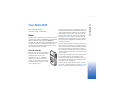
Modes
Your device has four mechanical modes that are optimized
for different use situations: Fold closed for carrying, Fold
open for traditional mobile phone use, Imaging for
recording video and taking pictures, and View for viewing
your images and videos. To switch between the modes,
turn the fold and the swing axis display. There is a short
time-out before a mode is activated.
Fold closed mode
When the fold is closed, the main display
deactivates and the cover display lights
up. Ongoing calls end, unless the
loudspeaker is in use or a compatible
headset is connected. To change the
settings, see ‘Cover display’, p. 96. If you
are using the player to listen to a sound
clip, it continues to play.
In the Fold closed mode, the cover display provides clock
and status information. On the standby mode display, the
signal strength and battery indicators, time information,
status indicators, and the name of the active profile (if
other than General) may be shown. If you are using the
music player to listen to a sound clip, volume bars and
track information are displayed. Use the side scroll keys to
play, pause, play the next/previous sound clip, and turn
the volume up or down.
Your Nokia N93
Your Nokia N93
If you are using Visual Radio in the Fold closed mode, the
visual content is not shown on the cover display. You can
store several preset stations with station name, frequency,
and location information. This information is shown on
the cover display. To turn the audio on and off, change the
channel, and seek new channels, use the scroll key on the
side of the device.
Calendar and clock alarms and notes for missed calls and
new received messages are also displayed. To view
received text messages and the text and image objects of
received multimedia messages, open the fold, and view
the message on the main display.
Incoming calls are indicated by their normal tone and a
note. In the cover display settings, select Answer if fold
opened to answer a call when you open the fold. If a
9
Your Nokia N93
compatible headset is connected to the device, press the
answer key on the headset. To change the settings, see
‘Cover display’, p. 96.
To make calls or use the menu, open the fold.
Imaging mode
To can use the cover display as a torch light, press the
flash key on the side of the device. To operate the torch
light:
• Quickly press the flash key once. The torch light is
activated for 1.5 seconds.
• Quickly press the flash key twice. The torch light is
activated for 3 minutes, or until you press the flash key
again.
• Press and hold the flash key. The torch light is
activated and stays on for as long as you hold the key
or until the 3 minute time-out ends.
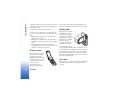
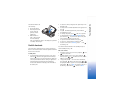
When you open the fold up
to 90 degrees, hold the
device sideways, and turn
the fold down so that the
main display faces you, the
Imaging mode is activated.
The main camera is
activated, and you can see
the view to be captured.
Fold open mode
In the Imaging mode, the keypad is not active. You can use
the capture key, zoom key, side scroll key, camera mode
key, and flash key (all located on the side of the device),
power key, and the landscape selection keys and selection
keys next to the main display.
When you open the fold, the
Fold open mode is activated
automatically: the main
display lights up, the keypad is
available, and you can access
the menu. Scroll in the menu
with the scroll key.
The Fold open mode is
activated even if the fold is
10
not fully opened. The fold opens about 160 degrees, as
shown in the picture. Do not force the fold to open more.
FCC DRAFT
In the Imaging mode, you
can record videos and take pictures. See ‘Camera’, p. 22.
View mode
When the fold is closed and you lift the side of the swing
axis display when the fold is closed, the View mode is
activated.
Useful shortcuts
Use shortcuts to quickly get the most from your device.
Refer to the relevant sections in this user guide for further
details of the functions.
Standby mode
• To switch between applications that are open, press
and hold , and select an application. If memory is
low, the device may close some applications. The device
saves any unsaved data before closing an application.
Leaving applications running in the background
increases the demand on battery power and reduces
the battery life.
• To start the camera, fully press the capture key in the
Imaging mode.
• To call your voice mailbox (network service), press and
hold
.
• To open multimedia applications, press and hold
.
See ‘Media Key’, p. 95.
• To change the profile, press
, and select a profile.
• To switch between the General and Silent profiles,
press and hold
. If you have two phone lines, this
action switches between the two lines.
• To open the last dialed numbers list, press
.
• To use voice commands, press and hold
.
• To start a connection to Services, press and hold
.
See ‘Web’, p. 65.
Your Nokia N93
Use the View mode to do
the following:
• View your images.
• Activate photos and
movies from the
gallery to watch
slideshows.
• Make hands free
video calls and send
live video during a
video call. Adjust the angle of the display for optimum
secondary camera angle.
For other shortcuts available in the standby mode, see
‘Active standby mode’, p. 94.
Edit text and lists
• To mark an item in a list, scroll to it, and press
and
at the same time.
• To mark multiple items in a list, press and hold
while you press
or . To end the selection, release
, then release
.
• To copy and paste text: To select letters and words,
press and hold
. At the same time, press
or
to highlight text. To copy the text to clipboard, while
still holding
, select Copy. To insert the text into a
document, press and hold
, and select Paste.
11
Your Nokia N93
Settings
Your Nokia N93 normally has MMS, GPRS, streaming, and
mobile Internet settings automatically configured in the
device, based upon your service provider or network
operator information. You may have settings from your
service providers already installed in your device, or you
may receive the settings from the service providers as a
special text message.
Transfer content from
another device
You can copy content such as contacts and calendar
entries from a compatible Nokia phone to your Nokia N93
using Bluetooth connectivity or infrared. The type of
content that can be copied depends on the phone model.
Copyright protections may prevent some images, music
(including ringing tones), and other content from being
copied, modified, transferred or forwarded.
You can insert your SIM card in the other device. When
your Nokia N93 is switched on without a SIM card, the
offline profile is automatically activated.
Transfer content
1 Press , and select Transfer on your Nokia N93.
2 In the information view, select Continue.
12
FCC DRAFT
3 Select whether you want to use Bluetooth connectivity
or infrared to transfer the data. Both devices must
support the selected connection type.
4 If you select Bluetooth connectivity, to have your Nokia
N93 search for devices with Bluetooth connectivity,
select Continue. Select your other device from the list.
You are asked to enter a code on your Nokia N93. Enter
a code (1-16 digits), and select OK. Enter the same
code on the other device, and select OK. The devices are
now paired. See ‘Pair devices’, p. 81.
For some phone models, the Transfer application is
sent to the other device as a message. To install
Transfer on the other device, open the message, and
follow the instructions on the display.
If you select infrared, connect the two devices. See
‘Infrared connection’, p. 82.
5 From your Nokia N93, select the content you want to
copy from the other device.
Content is copied from the memory and compatible
memory card (if inserted) of the other device to the
corresponding location in your Nokia N93 and memory
card (if inserted). The copying time depends on the amount
of data to be transferred. You can cancel copying and
continue later.
To view the log information of a previous transfer, in the
main view, select Transfer log.
Essential indicators
The device is being used in a GSM network.
A headset is connected to the device.
The connection to a headset with Bluetooth
connectivity has been lost.
A loopset is connected to the device.
A text phone is connected to the device.
The device is being used in a UMTS network (network
service).
A data call is active.
You have one or more unread messages in the Inbox
folder in Messag..
A GPRS or EDGE packet data connection is active.
You have received new e-mail in the remote mailbox.
There are messages waiting to be sent in the Outbox
folder.
You have missed calls.
Shown if Ringing type is set to Silent and Message
alert tone, IM alert tone, and E-mail alert tone are set
to Off.
The device keypad is locked.
A clock alarm is active.
The second phone line is being used (network service).
All calls to the device are forwarded to another
number. If you have two phone lines (network service), the
indicator for the first line is
and for the second
.
Your Nokia N93
To view the devices you have copied or transferred data
from, in the main view, select Phones.
A GPRS or EDGE packet data connection is available.
A GPRS or EDGE packet data connection is on hold.
A UMTS packet data connection is available.
A UMTS packet data connection is active.
A UMTS packet data connection is on hold.
You have set the device to scan for wireless LANs, and
a wireless LAN is available. See ‘Wireless LAN’, p. 101.
A wireless LAN connection is active in a network
that has encryption.
A wireless LAN connection is active in a network that
does not have encryption.
Bluetooth connectivity is on.
Data is being transmitted using Bluetooth
connectivity.
A USB connection is active.
13
Your Nokia N93
An infrared connection is active. If the indicator is
blinking, the device is trying to connect to the other
device or the connection has been lost.
Keypad lock (keyguard)
Use the keypad lock to prevent the keys from being
accidentally pressed.
To turn on the display light when the keypad lock is on,
press the power key.
• To lock: In the standby mode, press
, then
.
When the keys are locked,
is shown on the
display.
• To unlock in the Fold open mode: Press
, then
.
• To unlock in the Fold closed mode: Press the scroll key.
An unlock dialog appears on the cover display. Select
Yes by moving the scroll key.
When the keypad lock is on, calls may be possible to the
official emergency number programmed into your device.
Volume and loudspeaker control
To increase or decrease the
volume level when you have
an active call or are listening
to a sound, press
or
.
14
FCC DRAFT
The built-in loudspeaker allows you to speak and listen
from a short distance without having to hold the device to
your ear.
Warning: Do not hold the device near your ear when
the loudspeaker is in use, because the volume may be
extremely loud.
To use the loudspeaker during a call, select Options >
Activate loudsp..
To turn off the loudspeaker, select Options > Activate
handset.
Clock
Press , and select Clock. To set a new alarm, select
Options > Set alarm. When an alarm is active,
is
shown.
To turn off the alarm, select Stop, or to stop the alarm for
5 minutes, select Snooze.
If the alarm time is reached while the device is switched
off, the device switches itself on and starts sounding the
alarm tone. If you select Stop, the device asks whether you
want to activate the device for calls. Select No to switch
off the device or Yes to make and receive calls. Do not
To cancel an alarm, select Clock > Options > Remove
alarm.
Clock settings
To change the clock settings, select Clock > Options >
Settings.
To change the time or date, select Time or Date.
To change the clock shown in the standby mode, select
Clock type > Analogue or Digital.
To allow the mobile phone network to update the time,
date, and time zone information to your device (network
service), select Network operator time > Auto-update.
To change the alarm tone, select Clock alarm tone.
World clock
To open the world clock view, open Clock, and press . In
the world clock view, you can view the time in different
cities.
clock main view, and the time in your device is changed
according to the city selected. Check that the time is
correct and matches your time zone.
Headset
Connect a compatible
headset to the Pop-PortTM
connector of your device.
Your Nokia N93
select Yes when wireless phone use may cause
interference or danger.
Warning: When
you use the headset, your
ability to hear outside
sounds may be affected.
Do not use the headset where it can endanger your safety.
Wrist and lens cover straps
Thread the
straps as
shown, and
tighten them.
To add cities to the list, select Options > Add city. You can
add a maximum of 15 cities to the list.
Wireless LAN
To set your current city, scroll to a city, and select
Options > My current city. The city is displayed in the
Your device supports wireless local area network (wireless
LAN). With wireless LAN, you can connect your device to
15
Your Nokia N93
the Internet and compatible devices that have wireless
LAN. For information about using your device in a home
network, see ‘Home network’, p. 17.
3 The device creates an Internet access point with default
Some places, like France, have restrictions on the use of
wireless LAN. Check with your local authorities for more
information.
When an application asks you to select an access point,
select the created access point, or to search for wireless
LANs in range, select Search for WLAN.
Features using wireless LAN, or allowing such features to
run in the background while using other features, increase
the demand on battery power and reduce the battery life.
A wireless LAN connection is established when you create
a data connection using a wireless LAN Internet access
point. The active wireless LAN connection ends when you
end the data connection. To end the connection, see
‘Connection manager’, p. 83.
Your device supports the following wireless LAN features:
• IEEE 802.11b/g standard
• Operation at a frequency of 2.4 GHz
• Wired equivalent privacy (WEP) with keys up to 128
bits, Wi-Fi protected access (WPA), and 802.1x
encryption methods. These functions can be used only
if they are supported by the network.
You can create an Internet access point (IAP) in a wireless
LAN, and use it for applications that need to connect to
the Internet.
Create an Internet access point
1 Press
, and select Connect. > Conn mgr > Availab.
WLAN.
2 The device searches for wireless LANs within range.
Scroll to the network in which you want to create an
Internet access point, and select Options > Define
access point.
16
FCC DRAFT
settings. To view or change these settings, see ‘Access
points’, p. 98.
You can use wireless LAN during a voice call or when
packet data is active. You can only be connected to one
wireless LAN access point device at a time, but several
applications can use the same wireless LAN connection.
When you activate the Offline profile, you can still use
wireless LAN (if available). Remember to comply with any
applicable safety requirements when establishing and
using a wireless LAN connection.
There are two operating modes in wireless LAN:
infrastructure and ad hoc.
The infrastructure operating mode allows two kinds of
communication: wireless devices are connected to each
other through a wireless LAN access point device, or
In the ad hoc operating mode, devices can send and receive
data directly with each other. To create an Internet access
point for the ad hoc network, see ‘Access points’, p. 98.
Tip! To check the unique media access control (MAC)
address that identifies your device, enter *#62209526#
in the standby mode.
Home network
Copyright protections may prevent some images, music
(including ringing tones), and other content from being
copied, transferred, viewed, played, or printed.
To set up home networking in your wireless LAN, first
create and configure your wireless LAN home Internet
access point, then configure the devices. On your Nokia
N93, configure the settings in the Home network
application. To connect a compatible PC to the home
network, on the PC, you must install the Media Server
software from the DVD-ROM supplied with your Nokia
N93.
Your device is compatible with Universal Plug and Play
(UPnP). With a wireless LAN access point device, you can
create a home network and connect compatible UPnP
devices that support wireless LAN to the network, such as
your Nokia N93, a compatible PC, a compatible printer, and
a compatible sound system or a TV, or a sound system or
TV equipped with a compatible wireless multimedia
receiver.
After you have completed the necessary configurations in
all devices connected to the network, you can start using
Home network to share your media files. See ‘View media
files’, p. 87.
After you have configured the home network, you can
copy, view, or play compatible media files and print images
in Gallery on the other connected compatible devices, for
example, view images stored on your Nokia N93 on a
compatible TV. See ‘Home network’, p. 85 and ‘Image print’,
p. 37.
Important: Always enable one of the available
encryption methods to increase the security of your
wireless LAN connection. Using encryption reduces the
risk of unauthorize access to your data.
Your Nokia N93
wireless devices are connected to a wired LAN through a
wireless LAN access point device.
The home network uses the security settings of the
wireless LAN connection. Use the home network feature in
a wireless LAN infrastructure network with a wireless LAN
access point device and encryption enabled.
Your device is connected to the home network only if you
accept a connection request from another device, or in
Gallery, select the option to view, play, print, or copy
17
Your Nokia N93
media files on your Nokia N93 or search for other devices
in the Home network folder.
Important security information
When you configure your wireless LAN home network,
enable an encryption method, first on your access point
device, then on the other devices you intend to connect to
your home network. Refer to the documentation of the
devices. Keep any passcodes secret and in a safe place
separate from the devices.
To view or change the settings of the wireless LAN
Internet access point in your Nokia N93, see ‘Access
points’, p. 98.
If you use the ad hoc operating mode to create a home
network with a compatible device, enable one of the
encryption methods in WLAN security mode when you
configure the Internet access point. This step reduces the
risk of an unwanted party joining the ad hoc network.
Your device notifies you if another device attempts to
connect to it and the home network. Do not accept
connection requests from an unknown device.
If you use wireless LAN in a network that does not have
encryption, switch off sharing Nokia N93 files with other
devices, or do not share any private media files. To change
sharing settings, see ‘Home network settings’, p. 86.
18
FCC DRAFT
Memory card
You can purchase a compatible miniSD
memory card and use it as extra storage
space to save the memory on your
device. You can also back up
information from your device to the memory card.
Use only compatible miniSD memory cards with this
device. Other memory cards, such as Reduced Size
MultiMediaCards, do not fit in the memory card slot and
are not compatible with this device. Using an incompatible
memory card may damage the memory card as well as the
device, and data stored on the incompatible card may be
corrupted.
Keep all memory cards out of the reach of small children.
Insert the memory card
1 To open the door of the
memory card slot,
swing it upwards in a
counterclockwise
direction.
in the slot. Ensure that
the contact area on the
card is facing up.
3 Push the card in. You
hear a click when the card locks
into place.
4 Close the door. You cannot use the
memory card if the door is open.
Eject the memory card
1 Before you eject the card, press
the power key, and select Remove mem. card. All
applications are closed.
2 When Remove memory card and press 'OK' is
displayed, swing open the door of the memory card slot.
3 Press the memory card to release it from the slot.
4 Remove the memory card. If the device is switched on,
select OK when prompted to confirm the removal.
Important: Do not remove the memory card in the
middle of an operation when the card is being accessed.
Removing the card in the middle of an operation may
damage the memory card as well as the device, and data
stored on the card may be corrupted.
Memory card tool
Press , and select Tools > Memory. You can use a
miniSD memory card as extra storage space and for
backing up the information in the device memory.
To back up information from the device memory to a
memory card, select Options > Backup phone mem.
Your Nokia N93
2 Insert the memory card
To restore information from the memory card to the device
memory, select Options > Restore from card.
Format a memory card
When a memory card is reformatted, all data on the card
is permanently lost.
Some memory cards are supplied preformatted and others
require formatting. Consult your retailer to find out if you
must format the memory card before you can use it.
To format a memory card, select Options > Format mem.
card. Select Yes to confirm.
Tip! For best performance, use your Nokia N93 to
format all new miniSD cards.
19
Your Nokia N93
File manager
Many features of the device, such as contacts, messages,
images, videos, ringing tones, calendar notes, documents,
and downloaded applications, use memory to store data.
The free memory available depends on how much data is
already saved in the device memory.
You can use a memory card as extra storage space.
Memory cards are rewritable, so you can delete old
information and save new data on a memory card.
To browse files and folders in the device memory or on a
memory card (if inserted), press , and select Tools > File
mgr.. The device memory view (
) opens. Press
to
open the memory card view (
) (if available).
To move or copy files to a folder, press
and
at the
same time to mark a file, and select Options > Move to
folder or Copy to folder.
To find a file, select Options > Find and the memory from
which to search, and enter a search text that matches the
file name.
View memory consumption
To view what types of data you have in the device and
how much memory the different data types consume,
20
FCC DRAFT
select Options > Memory details. The amount of available
memory is shown in Free memory.
Memory low—free memory
The device notifies you if the device or the memory card
memory is low.
To free device memory, transfer data to a memory card, if
you have one. Mark files to be moved, and select Move to
folder > Memory card and a folder.
You can also transfer media files to a compatible PC, for
example, using the transfer option in Gallery. See ‘Back up
files’, p. 38.
Tip! Use Nokia Phone Browser in Nokia PC Suite to
view the different memories in your device and transfer
data.
To remove data to free memory, use File mgr. or the
respective application. For example, you can remove the
following:
• Messages from the Inbox, Drafts, and Sent folders in
Messag.
• Retrieved e-mail messages from the device memory
• Saved Web pages
• Saved images, videos, or sound files
• Contact information
• Calendar notes
Help
Your device has context-sensitive help. When an
application is open, select Options > Help to access help
for the current view.
Your Nokia N93
• Downloaded applications. See also ‘Application
manager’, p. 107.
• Any other data that you no longer need
When you are reading the instructions, to switch between
help and the application that is open in the background,
press and hold .
To open help from the main menu, select Tools > Help.
Select the desired application to view its help topics.
Tutorial
The tutorial gives you information about some of the
features of your device. To access the tutorial in the menu,
press , and select Extras > Tutorial and the section you
want to view.
21
Camera
Camera
Your Nokia N93 has two cameras, a high resolution
camera on the side of the device (the main camera) and a
lower resolution camera on the top of the main display
(the secondary camera). You can use both cameras to take
still images and record video in the portrait and landscape
views.
The Nokia N93 device supports an image capture
resolution of 2048x1536 pixels using the main camera.
The image resolution in these materials may appear
different.
Press the capture key to start recording. The record icon
is shown. The red recording indicator flashes slowly
and a tone sounds, indicating that video is being recorded.
1 To pause recording at any time, press the capture key.
The pause icon ( ) blinks on the display. Video
recording automatically stops if recording is set to
pause and there are no keypresses within a minute.
2 Press the capture key again to resume recording.
3 Select Stop to stop recording. The video clip is
automatically saved to the Images & video folder of
Gallery. See ‘Gallery’, p. 29.
The images and video clips are automatically saved in the
Images & video folder in Gallery. The cameras produce
.jpeg images. Video clips are recorded in the .mp4 file
format, or in the 3GPP file format with the .3gp file
extension (Sharing modes). See ‘Video settings’, p. 23.
To make lighting and color adjustments before recording a
video in the Imaging mode, use the side scroll key to scroll
through the toolbar. See ‘Setup settings—Adjust color and
lighting’, p. 27 and ‘Shooting modes’, p. 27.
You can send images and video clips in a multimedia
message, as an e-mail attachment, or by using Bluetooth
connectivity.
To zoom in or out of the subject (continuous 3x optical and
up to 20x digital zoom), rotate the zoom key on the side of
the device.
The video viewfinder displays the following:
Record videos
Activate the main camera by rotating the display to the
Imaging mode. If the camera is in the Image mode, use
the camera mode key to select Video mode.
22
FCC DRAFT
After you record a video clip, select the following from the
toolbar:
• To immediately play the video clip you just recorded,
select Play.
• If you do not want to keep the video, select Delete.
• To send the video using multimedia, e-mail, Bluetooth,
or infrared, press the call key, or select Send. For more
information, see ‘Messaging’, p. 39 and ‘Bluetooth
connectivity’, p. 79. This option is not available during
an active call. You cannot send video clips saved in the
.mp4 file format in a multimedia message.
• To record a new video clip, select New video.
Tip! Activate the Offline profile to ensure your video
recording is not interrupted by incoming calls or
messages.
Camera
• Status
Exit
indicators (1)
for audio mute
on, stabilization
on, and the
current capture
mode.
• The toolbar (2),
which you can
Options
scroll through
before
recording to select the shooting mode, white balance,
and color tone (the toolbar is not displayed during
recording).
• The total available video recording time (3). When you
are recording, the current video length indicator also
shows the elapsed time and time remaining.
• The device memory ( ) and memory card ( )
indicators (4) show where videos are saved.
• The video quality indicator (5) indicates whether the
quality of the video is TV (high), TV (normal), Handset
(high), Handset (normal), or Sharing.
• The video clip file type (6).
Tip! Select Options > Turn icons on to display all
viewfinder indicators or Turn icons off to display
only the video status indicators.
Video settings
There are two kinds of settings for the video recorder:
Video setup and main settings. To adjust Video setup, see
‘Setup settings—Adjust color and lighting’, p. 27. The
setup settings return to the default settings after you
close the camera, but the main settings remain the same
until you change them again. To change the main settings,
select Options > Settings and from the following:
Audio recording—Select On if you want to record sound.
23
Camera
Video quality—Set the quality of the video clip to TV
(high) (best quality for long term usage and playback on
a compatible TV or PC and handset), TV (normal),
Handset (high), Handset (normal), or Sharing (limited
video clip size to send using multimedia message (MMS)).
If you want to view the video on a TV or PC, select TV
(high), which has VGA resolution (640x480) and the .mp4
file format. To send the video clip through MMS, select
Sharing (QCIF resolution, .3gp file format). The size of the
video clip recorded with Sharing is limited to 300 KB
(about 20 seconds in duration) so that it can be
conveniently sent as a multimedia message to a
compatible device.
Video stabilisation—Select On to reduce camera shake
when recording the video.
Add to album—Select whether you want to add the
recorded video clip to a certain album in Gallery. Select
Yes to open a list of available albums.
Show captured video—Select whether you want the first
frame of the recorded video clip to be shown on the
display after the recording stops. Select Play from the
toolbar (main camera) or Options > Play (secondary
camera) to view the video clip.
Optical zoom during recording—Select On or Off. Select
Off to eliminate mechanical noise caused by lens
movement during optical zooming when recording.
24
FCC DRAFT
Memory in use—Define the default memory store: device
memory or memory card (if inserted).
Take pictures
Activate the main camera by rotating the display to
Imaging mode. If the camera is in video mode, use the
camera mode key to switch to image mode.
To lock the focus on an object, press the capture key
halfway down (main camera only). The green locked focus
indicator appears on the display. If the focus was not
locked, the red focus indicator appears. Release the
capture key, and press it halfway down again. You can,
however, take the picture without locking the focus.
To take a picture, in the main camera, press the capture
key. Do not move the device before the image is saved.
You can make lighting and color adjustments before taking
a picture in the Imaging mode by using the side scroll key
to scroll through the toolbar. See ‘Setup settings—Adjust
color and lighting’, p. 27.
Saving the captured image may take longer if you change
the zoom, lighting, or color settings.
The camera viewfinder displays the following:
When taking a picture, note the following:
• Use both hands to keep the camera still.
• The quality of a digitally zoomed picture is lower than
that of a nonzoomed picture.
• The camera goes into the battery saving mode if there
are no keypresses for a moment. To continue taking
pictures, press
.
Camera
• Status
Exit
indicators (1)
for sequence
on, self-timer
on; Automatic
(
), On ( ),
or Off ( )
flash mode, and
the current
Options
capture mode.
• The toolbar (2), which you can scroll through before
capturing the image to select the shooting mode, white
balance, exposure value, and color tone (the toolbar is
not displayed during focus and image capture).
• The image resolution indicator (3) indicates whether
the quality of the image is Print 3M - Large
(2048x1536 resolution), Print 2M - Med. (1600x1200
resolution), Print 1.3M - Small (1280x960 resolution),
or MMS 0.3M (640x480 resolution).
• The image counter (4) displays the estimated number of
images you can capture using the current image quality
setting and memory in use (the counter is not displayed
during focus and image capture).
• The device memory ( ) and memory card ( )
indicators (5) show where images are saved.
Tip! Select Options > Turn icons on to display all
viewfinder indicators or Turn icons off to display
only the camera status indicators.
After you take the picture, select the following from the
toolbar:
• If you do not want to keep the image, select Delete.
• To send the video using multimedia, e-mail, Bluetooth,
or infrared, press the call key, or select Send.
• To capture a new image, select New image.
• To print the picture, select Print. See ‘Image print’,
p. 37.
Still image camera settings
There are two kinds of settings for the still image camera:
Image setup and main settings. To adjust Image setup,
see ‘Setup settings—Adjust color and lighting’, p. 27. The
setup settings return to the default settings after you
close the camera, but the main settings remain the same
until you change them again. To change the main settings,
select Options > Settings and from the following:
Image quality—Print 3M - Large (2048x1536
resolution), Print 2M - Med. (1600x1200 resolution),
25
Camera
Print 1.3M - Small (1280x960 resolution), or MMS
0.3M (640x480 resolution). The better the image quality,
the more memory the image consumes. If you want to
print the image, select Print 3M - Large, Print 2M Med., or Print 1.3M - Small. If you want to send it
through e-mail, select Print 1.3M - Small. To send the
image through MMS, select MMS 0.3M.
These resolutions are only available in the main camera.
Add to album—Select whether you want to save the
image to a certain album in the gallery. If you select Yes,
a list of available albums opens.
Show captured image—Select Yes if you want to see the
captured image after it is taken, or No if you want to
continue taking pictures right away.
Extended zoom (main camera only)—Select On
(continuous) to allow the zoom increments to be smooth
and continuous between digital and extended digital
zoom, On (paused) to allow the zoom increments to
pause at the digital and extended digital step point. If you
want to limit the zoom to where the selected image
quality is maintained, select Off.
Flicker cancellation—Select 50Hz or 60Hz.
Shutter tone—Select the tone you want to hear when you
take a picture.
Memory in use—Select where to store your images.
26
FCC DRAFT
Take pictures in a sequence
Sequence mode is available only in the main camera.
To set the camera to take up to six pictures in a sequence
(if enough memory available), select Options > Sequence
mode.
To take the pictures, press the capture key.
After you take the pictures, they are shown in a grid on the
display. To view a picture, press
to open it.
You can also use the sequence mode with the self-timer.
To return to the sequence mode viewfinder, press the
capture key.
You in the picture—self-timer
The self-timer is available only in the main camera.
Use the self-timer to delay the capture so that you can
include yourself in the picture. To set the self-timer delay,
select Options > Self timer > 2 seconds, 10 seconds, or
20 seconds. To activate the self-timer, select Activate. The
self-timer indicator ( ) blinks and the device beeps when
the timer is running. The camera takes the picture after the
selected delay elapses.
You can also use the self-timer in the sequence mode.
Flash
The flash is available only in the main camera.
Keep a safe distance when using the flash. Do not use the
flash on people or animals at close range. Do not cover the
flash while taking a picture.
The camera has an LED flash for low light conditions. The
following flash modes are available: Automatic (
), On
( ), and Off ( ).
To switch between the flash modes, press the flash key.
Setup settings—Adjust color and
lighting
To enable the camera to reproduce colors and lighting
more accurately, or to add effects to your pictures or
videos, use the side scroll key to scroll through the toolbar,
and select from the following options:
Shooting mode—Select a proper shooting mode for the
environment in which you take pictures. Every shooting
mode uses its own lighting settings that have been
adjusted according to a certain kind of environment.
White balance—Select the current lighting condition
from the list. This allows the camera to reproduce colors
more accurately.
Exposure value (images only)—Adjust the exposure time
of the camera.
Camera
Tip! Select Options > Self timer > 2 seconds to keep
your hand steady when taking a picture.
Colour tone—Select a color effect from the list.
The screen display changes to match any settings you
make, so that you see how the change affects the pictures
or videos.
The available settings vary depending on the selected
camera.
The setup settings are camera specific; if you change the
settings in the secondary camera, the settings in the main
camera do not change. The setup settings do, however,
transfer between the image and video modes.
Shooting modes
A shooting mode helps you to find the right color and
lighting settings for the current environment. Select a
proper shooting mode for taking pictures or recording
video clips from the shooting mode list. The settings of
each shooting mode have been set according to a certain
style or environment.
Shooting modes are only available in the main camera.
27
Camera
Use the side scroll key to scroll through the toolbar, and
select from the following options:
Video shooting modes
Normal (
)(default) and Night (
)
Image shooting modes
Automatic ( ) (default), User ( ), Close-up mode
( ), Landscape ( ), Night ( ), and Night portrait
( ).
When you take pictures, the default shooting mode is
Automatic.
To make your own shooting mode suitable for a certain
environment, scroll to User, and select Options > Change.
In the user defined shooting mode you can adjust
different lighting and color settings. To copy the settings
of another shooting mode, select Based on shooting
mode and the desired shooting mode.
28
FCC DRAFT
To store and organize your images, video clips, sound clips,
playlists, and streaming links, or share your files with other
compatible Universal Plug and Play devices through
wireless LAN, press
, and select Gallery. To open the
gallery from the Camera application, select Options > Go
to Gallery. From Camera, only the Images & video folder
is available.
copy > Copy to memory card/Move to memory card or
Copy to phone mem./Move to phone mem..
Files stored on the memory card (if inserted) are indicated
with
. Files stored on the memory card (if inserted) are
indicated with .
,
, or
To reduce the size of images that you already copied to
other locations, such as to a compatible PC, select
Options > Transfer & memory > Shrink. Selecting
Shrink reduces the resolution of an image to 640x480. To
increase free memory space after you have copied items to
other locations or devices, select a file and Options > Free
memory. See ‘Back up files’, p. 38.
Video clips, .ram files, and streaming links are opened and
played in the RealPlayer application. See ‘RealPlayer’,
p. 73. You can also create albums; and mark, and add items
to albums. See ‘Albums’, p. 34.
To download files into Gallery in one of the main folders
using the browser, select Graphic downl., Video downl.,
Track downl., or Sound downl.. The browser opens, and
you can select a bookmark from which the site can
download.
Tip! To switch from Gallery to the camera, in the
Images & video folder, press the capture key or the camera
mode key, or select Options > Go to Camera.
Select Images & video
, Tracks , Sound clips
Streaming links
, Presentations
, All files
Home network
, and press
to open it.
To open a file, press
. Videos open in RealPlyr., and
music and sound clips in Mus. plyr.. See ‘View images and
video clips’, p. 30.
To copy or move files to the memory card (if inserted) or to
device memory, select a file and Options > Move and
Gallery
Gallery
To share media files saved in Gallery with other
compatible UPnP devices through wireless LAN, you must
first create and configure your wireless LAN home Internet
access point, and then configure the Home network
application. See ‘Wireless LAN’, p. 15.
FCC DRAFT
29
Gallery
The options related to Home network are not available in
Gallery before the Home network settings have been
configured.
To create custom video clips, select a video clip or several
clips in the gallery, and select Options > Edit. See ‘Edit
video clips’, p. 30.
View images and video clips
To print your images on a compatible printer, or to store
them on your memory card (if inserted) for printing, select
Options > Print. See ‘Image print’, p. 37.
Pictures taken and video clips recorded with the camera
are stored in the Images & video folder in Gallery. Images
and video clips can also be sent to you in a multimedia
message, as an e-mail attachment, through Bluetooth
connectivity, or by using infrared. To be able to view a
received image or video clip in the gallery or in the media
player, you must save it in the device memory or on a
memory card (if inserted).
Open the Images & video folder in Gallery. The images
and video clip files are in a loop, and ordered by date. The
number of files is displayed. To browse the files one by
one, scroll left or right. To browse files in groups, scroll up
or down.
To edit a video clip or a photo, select Options > Edit. An
image editor or a video editor opens. See ‘Edit video clips’,
p. 30. See ‘Edit images’, p. 32.
To add an image or a video clip to an album in the gallery,
select Options > Albums > Add to album. See ‘Albums’,
p. 34.
30
To send a multimedia message to your service provider's
media file uploading service (network service), press the
call key, and select Via MMS upload (if available). Contact
your service provider for more information.
To view the image, scroll to an image and press
.
When the image is opened, to zoom an image, select
Options > Zoom in or Zoom out. The zooming ratio is at
the top of the display. The zooming ratio is not stored
permanently.
To use the picture as a background image, select the
picture and Options > Assign > Set as wallpaper.
To delete an image or video clip, press
.
Edit video clips
To edit video clips in Gallery and create custom video clips,
scroll to a video clip, and select Options >Edit. See
‘Gallery’, p. 29. To create custom video clips, combine and
trim video clips, and add images, sound clips, transitions,
You can also use Movie director to create custom video
clips. Select the video clips and images you want to create
a muvee with and select Options > Edit > Create muvee.
See ‘Movie director’, p. 76.
In the video editor you can see two timelines: video clip
timeline and sound clip timeline. The images, text, and
transitions added to a video clip are shown on the video
clip timeline. To switch between the timelines, scroll up or
down.
Edit video, sound, image, text, and
transitions
To create custom video clips, mark and select one or more
video clips, and select Options > Edit.
To modify the video, select from the following options:
Edit video clip:
Cut—Trims the video clip in the cut video clip view.
Add color effect—Inserts a color effect on the video clip.
Use slow motion—Slows the speed of the video clip.
Move—Moves the video clip to the selected location.
Remove—Removes the video clip from the video.
Duplicate—Makes a copy of the selected video clip.
Gallery
and effects. Transitions are visual effects that you can add
in the beginning and end of the video or between the video
clips.
Edit text (shown only if you added text)—To move,
remove, or duplicate text; change the color and style of
the text; define how long it stays on the screen; and add
effects to the text.
Edit image (shown only if you added an image)—To move,
remove, or duplicate an image; define how long it stays on
the screen; and set a background or a color effect to the
image.
Edit sound clip (shown only if you have added a sound
clip)—To cut or move the sound clip, to adjust its length,
or to remove or duplicate the clip.
Edit transition—There are three types of transitions: at
the start of a video, at the end of a video, and transitions
between video clips. You can select start transition when
the first transition of the video is active.
Insert—Select Video clip, Image, Text, Sound clip, or New
sound clip.
Movie—Preview the movie in the full screen or as a
thumbnail, save or send the movie, or cut the movie to a
proper size for sending it in a multimedia message.
Mute sound/Unmute sound—Mutes or unmutes the
original video clip sound.
FCC DRAFT
31
Gallery
To take a snapshot of a video clip, in the cut video view,
select Options > Take snapshot. In the thumbnail
preview view, press
, and select Take snapshot.
To save your video, select Options > Movie > Save. To
define the Memory in use, select Options > Settings. The
default is the device memory.
In the Settings view, you can also define Default video
name, Default sc. shot name, Resolution, and Memory
in use.
To send the video, select Send > Via multimedia,
Via e-mail, Via Bluetooth, or Via infrared. Contact your
network operator or service provider for details of the
maximum multimedia message size that you can send. If
your video is too large to send in a multimedia message,
appears.
Tip! If you want to send a video clip that is over the
maximum multimedia message size allowed by your
service provider, you can send the clip using Bluetooth
wireless technology. See ‘Send data using Bluetooth
connectivity’, p. 81. You can also transfer your videos to a
compatible PC using Bluetooth connectivity, or by using a
memory card reader enhancement.
32
Edit images
To edit the pictures after taking them, or the ones already
saved in Gallery, select Options > Edit.
Select Apply effect to crop and rotate the image; adjust
the brightness, color, contrast, and resolution; and add
effects, text, clip art, or a frame to the picture.
To crop an image, select Options > Apply effect > Crop.
To crop the image size manually, select Manual or a
predefined aspect ratio from the list. If you select Manual,
a cross appears in the upper left corner of the image. Move
the scroll key to select the area to crop, and select Set.
Another cross appears in the lower right corner. Again
select the area to be cropped. To adjust the first selected
area, select Back. The selected areas form a rectangle,
which forms the cropped image.
If you selected a predefined aspect ratio, select the upper
left corner of the area to be cropped. To resize the
highlighted area, use the scroll key. To freeze the selected
area, press
. To move the area within the picture, use
the scroll key. To select the area to be cropped, press
.
To reduce redness of the eyes in an image, select Options >
Apply effect > Red eye redu.. Move the cross onto the
eye, and press
. A loop appears on the display. To resize
the loop to fit the size of the eye, move the scroll key. To
reduce the redness, press
.
Slide show
Select Options > Slide show > Start to view images and
video clips in the full screen mode. The slide show starts
from the selected file. Select from the following:
• Play—to open the RealPlayer application, and play a
selected video clip
• Pause—to pause the slide show
• Continue—to resume the slide show, if paused
• End—to close the slide show
To browse the images, press
(previous) or
(next).
• Track—Select a music file from the list.
To decrease or increase the volume during the slide show,
press
or
.
Gallery
Shortcuts in the image editor:
• To view an image in the full screen, press
. To return
to the normal view, press
again.
• To rotate an image clockwise or counterclockwise,
press
or
.
• To zoom in or out, press
or
.
• To move on a zoomed image, scroll up, down, left, or
right.
TV out mode
You can watch videos and images stored in your device on
the screen of a compatible TV. Connect the Nokia
Video-Out Cable (CA-64U) from the TV out Pop-Port
connector on your device to the video input of a
compatible TV. For all applications other than the Images
& video folder in Gallery and RealPlyr., the TV screen
displays what is displayed on the screen of your device.
When you open an image in the thumbnail view while it is
viewed on the TV, the Zoom in option is not available.
When image is not zoomed, the opened image is displayed
on the TV in full screen.
You can view videos and images as a slide show. All items
in an album or marked videos and images are displayed on
the TV in full screen while the selected music plays.
To adjust the tempo of the slide show, before starting the
slide show, select Options> Slide show > Settings >
Delay between slides.
When you open a highlighted video clip, RealPlyr. starts
playing the video clip on the device display and the TV
screen. See ‘RealPlayer’, p. 73.
To add sound to the slide show, select Options > Slide
show > Settings and from the following:
• Music—Select On or Off.
All audio, including the stereo video clip sound, ringing
tone, and key tone, is routed to the TV when the Nokia
FCC DRAFT
33
Gallery
Video-Out Cable is connected to the device. You can use
the device microphone normally.
To remove a file from an album, press
. The file is not
deleted from the Images & video folder in Gallery.
TV out settings must be configured for the applicable TV
system and TV aspect ratio. See ‘TV configuration’, p. 97.
Online album (network service)
Presentations
With presentations, you can view SVG (scalable vector
graphics) files, such as cartoons and maps. SVG images
maintain their appearance when printed or viewed with
different screen sizes and resolutions. To view SVG files,
select the Presentations folder, scroll to an image, and
select Options > Play.
To zoom in, press
. To zoom out, press
.
To switch between full screen and normal screen, press *.
Albums
With albums you can conveniently manage your images
and video clips. To view the albums list, in the Images &
video folder, select Options > Albums > View albums.
To add a picture or a video clip to an album in the gallery,
scroll to a picture or video clip, and select Options >
Albums > Add to album. A list of albums opens. Select
the album to which you want to add the picture or video
clip, and press
.
34
Online album allows you to manage your images and
videos online. You can view, edit, upload, and rename
albums and their contents. You must first set the required
settings to connect to the service. Contact your network
operator/service provider for details. In the Images & video
folder, select Options > Online services > Open service.
When you open the service, the List view displays the
albums/entries and the details in the selection list in
chronological order. If the item is a video clip, then the first
frame of the clip is displayed.
When you open an online entry the Images view is
displayed and the content of the entry is refreshed from
the server. The view shows the entry name and description
(if this information was entered). You can play the video
clip or view the thumbnail image.
To add or edit the name and description text, and upload
the entry content to the server, open the Images & video
folder in Gallery. Scroll to a picture or video clip, and select
Options > Edit .
To add an image or a video clip to the server, scroll to the
image or video clip, select Options > Online services, and
Gallery
after the service is opened, select Options > Upload. You
can also upload albums and their contents by selecting
Options > Send.
Online print (network service)
In the Images & video folder, select the images you want
to order using PrintOnline, and then select Options >
Print > Order prints. You must first set the required
settings to connect to the service. Contact your network
operator or service provider for details.
The images are displayed in a preview, and you can set the
number of copies, the product and product type for the
images, your presonal information, delivery information,
payment method, and view the status of your orders in the
log.
FCC DRAFT
35
Media applications
Media applications
Music player
Press
, and select Mus. plyr.. With the music player,
you can play music files and create and listen to playlists.
Warning: Listen to music at a moderate level.
Continuous exposure to high volume may damage your
hearing. Do not hold the device near your ear when the
loudspeaker is in use, because the volume may be
extremely loud.
Add music
When you open the music player, the previously played
track or playlist is displayed. To view the music library,
select
or Options > Music library and the desired song
list. To start playing the songs in the view, select Options >
Play.
When a song is playing, to change between play and pause,
press
or
.
To stop a song, press
. To fast forward or rewind, press
and hold
or
. To start playing the next or previous
song, press
or
.
When you open the music player for the first time, the
player searches the device memory for music files to
create a music library.
To view the currently played song list, select
or
Options > Open 'Now playing'. To save the song list as a
playlist, select Options > Add to track list, and create a
new playlist, or select a saved playlist.
After you add or remove music files in the device, update
your music library. Select Options > Music library >
Options > Update Music library.
To adjust the volume, press
Tip! You can transfer music files from your device to
a compatible memory card (if inserted) with Nokia
Audio Manager available in Nokia PC Suite.
36
Play music
or
.
To modify the tone of music playback, select Options >
Equaliser.
To select between random play and normal play mode,
select Options > Random play. To select whether playing
Image print
To open your Web bookmarks for downloading music,
select Options > Track downloads.
Use Image print to print your images using a data cable,
wireless LAN (if available), Bluetooth connectivity, or a
compatible memory card (if available).
To return to the standby mode and leave the music playing
in the background, select Options > Play in background.
Music library
To view the music library, select Options > Music library.
All tracks lists all music. To view sorted songs, select
Albums, Artists, Genres, or Composers. The album, artist,
genre, and composer information is collected from the ID3
or M4A tags of the song files, if available.
To add songs, albums, artists, genres, or composers to a
playlist, select the items and Options > Add to track list.
You can create a new playlist or add to an existing one.
To view playlists, select Track lists. To create a new
playlist, select Options > New track list. When viewing a
playlist you have created yourself, to add more songs,
select Options > Add tracks.
To delete a playlist, press
. Deleting a playlist only
deletes the playlist, not the music files.
You can only print images that are in .jpeg format. The
pictures taken with the camera are automatically saved in
.jpeg format.
To print images with Image print, select the image you
want to print, and the print option in the gallery, camera,
image editor, or image viewer.
Media applications
stops at the end of the playlist or restarts from its
beginning, select Options > Loop.
To print to a printer compatible with Image print, connect
the data cable before you select the print option.
Printer selection
When you use Image print for the first time, a list of
available printers is displayed after you select the image.
Select a printer. The printer is set as the default printer.
If you have connected a printer compatible with Image
print using the CA-53 cable, the printer is automatically
displayed.
If the default printer is not available, a list of available
printing devices is displayed.
To change the default printer, select Options > Print
settings > Default printer.
FCC DRAFT
37
Media applications
Print preview
The print preview view opens only when you start printing
an image in the gallery.
The selected images are displayed using predefined
layouts. To change the layout, scroll left and right through
the available layouts for the selected printer. If the images
do not fit on a single page, scroll up or down to display the
additional pages.
Print settings
The available options vary, depending on the capabilities
of the printing device you selected.
To set a default printer, select Options > Default printer.
To select the paper size, select Paper size, the size of
paper from the list, and OK. Select Cancel to return to the
previous view.
Back up files
To transfer and back up media files from your device to a
compatible PC through the wireless LAN, select Options >
Transfer > Start. See ‘Wireless LAN’, p. 15.
Your device starts a device search. Select a device and a
folder to which you want to transfer the media files.
Select OK.
38
To change the Storage device or Store in folder settings,
select Options > Settings.
Press
, and select Messag.. In Messag., you can create,
send, receive, view, edit, and organize text messages,
multimedia messages, e-mail messages, and special text
messages containing data. You can also receive messages
and data using Bluetooth connectivity or infrared, receive
Web service messages, cell broadcast messages, and send
service commands.
To create a new message, select New message.
Note: Only devices that have compatible features
can receive and display multimedia messages. The
appearance of a message may vary depending on the
receiving device.
Messag. contains the following folders:
Inbox—Received messages, except e-mail and cell
broadcast messages, are stored here. E-mail messages are
stored in the Mailbox.
My folders—Organize your messages into folders.
Tip! To avoid rewriting messages that you send often,
use texts in the templates folder.
Mailbox—Connect to your remote mailbox to retrieve
your new e-mail messages or view your previously
retrieved e-mail messages offline. See ‘E-mail’, p. 49.
Messaging
Messaging
Drafts—Draft messages that have not been sent are
stored here.
Sent—The last 20 messages that have been sent,
excluding messages sent using Bluetooth connectivity or
infrared, are stored here. To change the number of
messages to be saved, see ‘Other settings’, p. 51.
Outbox—Messages waiting to be sent are temporarily
stored here.
Example: Messages are placed in the outbox, for
example, when your device is outside network
coverage. You can also schedule e-mail messages to be
sent the next time you connect to your remote
mailbox.
Reports—You can request the network to send you a
delivery report of the text messages and multimedia
messages you have sent (network service). Receiving a
delivery report of a multimedia message that has been
sent to an e-mail address may not be possible.
Tip! When you have opened any of the default
folders, to switch between the folders, press
or
.
To enter and send service requests (also known as USSD
commands), such as activation commands for network
FCC DRAFT
39
Messaging
services, to your service provider, select Options >
Service command in the main view of Messag..
Cell broadcast (network service) allows you to receive
messages on various topics, such as weather or traffic
conditions from your service provider. For available topics
and relevant topic numbers, contact your service provider.
In the main view of Messaging, select Options > Cell
broadcast. In the main view, you can see the status of a
topic, a topic number, name, and whether it has been
flagged ( ) for follow-up.
Cell broadcast messages cannot be received in UMTS
networks. A packet data connection may prevent cell
broadcast reception.
Write text
ABC, abc, and Abc indicate the selected character mode.
123 indicates the number mode.
Traditional text input
is displayed when you are writing text using
traditional text input.
• Press a number key (
—
) repeatedly until the
desired character appears. There are more characters
available for a number key than are printed on the key.
40
• If the next letter is located on the same key as the
present one, wait until the cursor appears (or press
to end the time-out period), and enter the letter.
• To insert a space, press
. To move the cursor to the
next line, press
three times.
Predictive text input
You can enter any letter with a single keypress. Predictive
text input is based on a built-in dictionary to which you
can add new words.
is displayed when you write
text using predictive text input.
1 To activate predictive text input, press
, and select
Predictive text on. This activates predictive text input
for all editors in the device.
2 To write the desired word,
press the keys
—
.
Press each key only once
for one letter. For
example, to write "Nokia"
when the English
dictionary is selected,
press
for N,
for o,
for k,
for i, and
for a.
The word suggestion changes after each keypress.
3 When you finish writing the word correctly, press
to confirm it, or press
to add a space.
Write compound words
Write the first half of a compound word; to confirm it,
press
. Write the last part of the compound word. To
complete the compound word, press
to add a space.
Turn predictive text input off
To turn predictive text input off for all editors in the device,
press
, and select Predictive text > Off.
Tip! To turn predictive text input on or off, quickly
press
twice.
Tips on text input
To insert a number in the letter mode, press and hold the
desired number key.
To switch between the letter and number mode, press and
hold
.
To switch between the different character modes, press
.
To delete a character, press
. To delete more than one
character, press and hold
.
Messaging
If the word is not correct, press
repeatedly to view
the matching words the dictionary has found one by
one, or press
, and select Predictive text >
Matches.
If the ? character is shown after the word, the word is
not in the dictionary. To add a word to the dictionary,
select Spell, enter the word using traditional text input,
and select OK. The word is added to the dictionary.
When the dictionary is full, a new word replaces the
oldest added word.
4 Start writing the next word.
The most common punctuation marks are available under
.
To open a list of special characters, press and hold
.
Tip! To insert several special characters at the same
time, press
when you select each character.
Write and send messages
The appearance of a multimedia message may vary,
depending on the receiving device.
Copyright protections may prevent some images, music
(including ringing tones), and other content from being
copied, modified, transferred or forwarded.
Before you can create a multimedia message or write an
e-mail, you must have the correct connection settings in
place. See ‘Receive MMS and e-mail settings’, p. 43 and
‘E-mail’, p. 49.
FCC DRAFT
41
Messaging
42
The wireless network may limit the size of MMS messages.
If the inserted picture exceeds this limit, the device may
make it smaller so that it can be sent by MMS.
1 Select New message and one of the following:
Text msg.—to send a text message
Multimedia message—to send a multimedia message
(MMS)
E-mail—to send an e-mail
If you have not set up your e-mail account, you are
prompted to do so. To start creating the e-mail
settings with the mailbox guide, select Start.
2 In the To field, press
to select recipients or
groups from contacts, or
enter the recipient’s
phone number or e-mail
address. To add a
semicolon (;) that
separates the recipients,
press
. You can also
copy and paste the
number or address from
the clipboard.
3 In the Subject field, enter the subject of a multimedia
message or e-mail. To change the fields that are
visible, select Options > Address fields.
4 In the message field, write the message. To insert a
template, select Options > Insert or Insert object >
Template.
5 To add a media object to a multimedia message, select
Options > Insert object > Image, Sound clip, or Video
clip. When sound is added,
is shown.
To change the format in which recorded videos are
saved, see ‘Video settings’, p. 23.
6 To take a new picture or record sound or video for a
multimedia message, select Insert new > Image,
Sound clip, or Video clip. To insert a new slide to the
message, select Slide.
To see what the multimedia message looks like, select
Options > Preview.
7 To add an attachment to an e-mail, select Options >
Insert > Image, Sound clip, Video clip, or Note. E-mail
attachments are indicated by .
Tip! To send other file types as attachments, open
the appropriate application, and select Send > Via
e-mail, if available.
8 To send the message, select Options > Send, or press
.
Your device supports the sending of text messages beyond
the character limit for a single message. Longer messages
are sent as a series of two or more messages. Your service
provider may charge accordingly. Characters that use
accents or other marks, and characters from some
E-mail messages are automatically placed in Outbox
before sending. If sending does not succeed, the e-mail is
left in the Outbox with the Failed status.
Tip! You can combine images, video, sound, and text
to a presentation and send it in a multimedia message.
Start to create a multimedia message, and select
Options > Create presentation. The option is shown
only if MMS creation mode is set to Guided or Free.
See ‘Multimedia messages’, p. 48.
Receive MMS and e-mail settings
You may receive the settings in a message from your
network operator or service provider. See ‘Data and
settings’, p. 44.
For availability of and subscription to data services,
contact your network operator or service provider. Follow
the instructions given by your service provider.
Enter the MMS settings manually
, and select Tools > Settings > Connection >
Access points, and define the settings for a
multimedia messaging access point. See ‘Connection’,
p. 98.
2 Press
, and select Messaging > Options >
Settings > Multim. msg. > Access point in use and
the access point you created as the preferred
connection. See also ‘Multimedia messages’, p. 48.
1 Press
Messaging
language options like Chinese, take up more space limiting
the number of characters that can be sent in a single
message. In the navigation bar, you can see the message
length indicator counting backwards. For example, 10 (2)
means that you can still add 10 characters for the text to
be sent as two messages.
Before you can send, receive, retrieve, reply to, and
forward e-mail, you must do the following:
• Configure an Internet access point (IAP) correctly. See
‘Connection’, p. 98.
• Define your e-mail settings correctly. If you select
Mailbox in the Messag. main view and have not set up
your e-mail account, you are prompted to do so. To
start creating the e-mail settings with the mailbox
guide, select Start. See also ‘E-mail’, p. 49.
You must have a separate e-mail account. Follow the
instructions given by your remote mailbox and Internet
service provider (ISP).
Inbox—receive messages
In the Inbox folder,
indicates an unread text
message,
an unread multimedia message,
data
FCC DRAFT
43
Messaging
received through infrared, and
Bluetooth connectivity.
data received through
When you receive a message,
and 1 new message
are shown in the standby mode. to open the message,
select Show. To open a message in Inbox, scroll to it, and
press
.
If the message includes a multimedia presentation,
is
displayed. To play the presentation, select the indicator.
To reply to a received message, select Options > Reply.
Your device can receive many kinds of messages that
contain data (
):
To print a text or a multimedia message on a compatible
Basic Print Profile (BPP) equipped printer with Bluetooth
connectivity (such as HP Deskjet 450 Mobile Printer or HP
Photosmart 8150), select Options > Print.
Multimedia messages
Important: Exercise caution when opening
messages. Multimedia message objects may contain
malicious software or otherwise be harmful to your device
or PC.
You may receive a notification that a multimedia message
is waiting in the multimedia message center. To start a
packet data connection to retrieve the message to your
device, select Options > Retrieve.
When you open a multimedia message ( ), you may see
an image and a message.
is shown if sound is
included, or
if video is included. To play the sound or
the video, select the indicator.
44
To see the media objects that have been included in the
multimedia message, select Options > Objects.
Data and settings
Configuration message—You may receive settings from
your network operator, service provider, or company
information management department in a configuration
message. To save the settings, select Options > Save all.
Business card—To save the information to Contacts, select
Options > Save business card. Certificates or sound files
attached to the business card are not saved.
Ringing tone—To save the ringing tone, select Options >
Save.
Operat. logo—To have the logo shown in the standby
mode instead of the network operator’s own identification,
select Options > Save.
Calen. entry—To save the invitation, select Options >
Save to Calendar.
Web message—To save the bookmark to the bookmarks
list in Web, select Options > Add to bookmarks. If the
E-mail notif.—The note tells you how many new e-mails
you have in your remote mailbox. An extended notification
may list more detailed information.
Web service messages
Web service messages ( ) are notifications (for example,
news headlines) and may contain a text message or a link.
For availability and subscription, contact your service
provider.
Mailbox
If you select Mailbox and have not set up your e-mail
account, you are prompted to do so. To start creating the
e-mail settings with the mailbox guide, select Start. See
also ‘E-mail’, p. 49.
When you create a new mailbox, the name you give to the
mailbox replaces Mailbox in the Messaging main view.
You can have up to six mailboxes.
Open the mailbox
When you open the mailbox, the device asks if you want
to connect to the mailbox (Connect to mailbox?).
To connect to your mailbox and retrieve new e-mail
headings or messages, select Yes. When you view
messages online, you are continuously connected to a
remote mailbox using a data connection. See also
‘Connection’, p. 98.
Messaging
message contains both access point settings and
bookmarks, to save the data, select Options > Save all.
To view previously retrieved e-mail messages offline,
select No. When you view e-mail messages offline, your
device is not connected to the remote mailbox.
Retrieve e-mail messages
If you are offline, select Options > Connect to start a
connection to the remote mailbox.
Important: Exercise caution when opening
messages. E-mail messages may contain malicious
software or otherwise be harmful to your device or PC.
1 When you have an open connection to a remote
mailbox, select Options > Retrieve e-mail and one of
the following:
New—to retrieve all new e-mail messages
Selected—to retrieve only the e-mail messages that
have been marked
All—to retrieve all messages from the mailbox
FCC DRAFT
45
Messaging
To stop retrieving messages, select Cancel.
2 After you retrieve the e-mail messages, you can
continue viewing them online, or select Options >
Disconnect to close the connection and view the
e-mail messages offline.
E-mail status indicators:
The new e-mail (offline or online mode) has not
been retrieved to your device.
The new e-mail has been retrieved to your device.
The e-mail message has been read, and it has not
been retrieved to your device.
The e-mail message has been read.
The e-mail heading has been read and the
message content has been deleted from the device.
3 To open an e-mail message, press . If the e-mail
message has not been retrieved and you are offline,
you are asked if you want to retrieve this message
from the mailbox.
To view e-mail attachments, open a message that has the
attachment indicator , and select Options >
Attachments. If the attachment has a dimmed indicator,
it has not been retrieved to the device; select Options >
Retrieve.
You can also receive meeting requests in the mailbox. See
‘Meeting requests’, p. 69, and ‘Create calendar entries’,
p. 69.
46
To print an e-mail message on a compatible Basic Print
Profile (BPP) equipped printer with Bluetooth connectivity
(such as HP Deskjet 450 Mobile Printer or HP Photosmart
8150), select Options > Print.
Retrieve e-mail messages automatically
To retrieve messages automatically, select Options >
E-mail settings > Automatic retrieval > Header
retrieval > Always enabled or Only in home net., and
define when and how often the messages are retrieved.
Retrieving e-mail messages automatically may increase
your call costs due to the data traffic.
Delete e-mail messages
To delete the contents of an e-mail message from the
device while still retaining it in the remote mailbox, select
Options > Delete. In Delete msg. from:, select Phone
only.
The device mirrors the e-mail headings in the remote
mailbox. Although you delete the message content, the
e-mail heading stays in your device. If you want to remove
the heading as well, you must first delete the e-mail
message from your remote mailbox, and then make a
connection from your device to the remote mailbox again
to update the status.
If you are offline, the e-mail is deleted first from your
device. During the next connection to the remote mailbox,
it is automatically deleted from the remote mailbox. If you
are using the POP3 protocol, messages marked to be
deleted are removed only after you have closed the
connection to the remote mailbox.
To cancel deleting an e-mail from the device and server,
scroll to an e-mail that has been marked to be deleted
during the next connection ( ), and select Options >
Undelete.
Disconnect from the mailbox
When you are online, to end the data connection to the
remote mailbox, select Options > Disconnect.
3 Select Options > Copy. A list of folders opens.
4 To start copying, select a folder and OK. To view the
messages, open the folder.
Messaging settings
Messaging
To delete an e-mail from the device and the remote
mailbox, select Options > Delete. In Delete msg. from:,
select Phone and server.
Fill in all fields marked with Must be defined or with a red
asterisk. Follow the instructions given by your service
provider. You may also obtain settings from your service
provider in a configuration message.
Some or all message centers or access points may be
preset for your device by your service provider or network
operator, and you may not be able to change, create, edit,
or remove them.
Text messages
Press
, and select Messag. > Options > Settings >
Text msg. and from the following:
View messages on a SIM card
Message centres—View a list of all text message centers
that have been defined.
Before you can view SIM messages, you must copy them to
a folder in your device.
1 In the Messag. main view, select Options > SIM
messages.
2 Select Options > Mark/Unmark > Mark or Mark all to
mark messages.
Character encoding— To use character conversion to
another encoding system when available, select Reduced
support.
Msg. centre in use—Select which message center is used
to deliver text messages.
FCC DRAFT
47
Messaging
Receive report—Select whether the network sends
delivery reports on your messages (network service).
Message validity—Select how long the message center
resends your message if the first attempt fails (network
service). If the recipient cannot be reached within the
validity period, the message is deleted from the message
center.
Message sent as—Change this option only if you are sure
that your message center is able to convert text messages
into these other formats. Contact your network operator.
Preferred conn.—Select the connection used for sending
text messages: GSM network or packet data, if supported
by the network. See ‘Connection’, p. 98.
Reply via same ctr.—Select whether you want the reply
message to be sent using the same text message center
number (network service).
Access point in use—Select which access point is used as
the preferred connection for the multimedia message
center.
Multimedia retrieval—Select how you want to receive
multimedia messages. To receive multimedia messages
automatically in your home network, select Aut. in home
network. Outside your home network, you receive a
notification that there is a multimedia message that you
can retrieve in the multimedia message center.
When you are outside your home network, sending and
receiving multimedia messages may cost you more.
Multimedia messages
If you select Multimedia retrieval > Always automatic,
your device automatically makes an active packet data
connection to retrieve the message both in and outside
your home network.
Press
, and select Messag. > Options > Settings >
Multimedia message and from the following:
Allow anon. msgs.—Select whether you want to reject
messages from an anonymous sender.
Image size—Define the size of the image in a multimedia
message: Original (shown only when the MMS creation
mode is set to Guided or Free), Small, or Large.
Receive adverts—Define whether you want to receive
multimedia message advertisements.
MMS creation mode —If you select Guided, the device
informs you if you try to send a message that may not be
48
supported by the recipient. Select Restricted; the device
prevents you from sending messages that may not be
supported.
Receive report—Select whether you want the status of the
sent message to be shown in the log (network service).
User name—Enter your user name, given to you by your
service provider.
Deny report sending—Select whether you want to prevent
your device from sending delivery reports of received
multimedia messages.
Password—Enter your password. If you leave this field
blank, you are prompted for the password when you try to
connect to your remote mailbox.
Message validity—Select how long the message center
resends your message if the first attempt fails (network
service). If the recipient cannot be reached within the
validity period, the message is deleted from the message
center.
Incoming mail serv.—Enter the IP address or host name of
the mail server that receives your e-mail.
Messaging
Receiving a delivery report of a multimedia message that
has been sent to an e-mail address may not be possible.
Access point in use—Select an Internet access point (IAP).
See ‘Connection’, p. 98.
Mailbox name—Enter a name for the mailbox.
E-mail
Press
, and select Messag. > Options > Settings >
E-mail and from the following:
Mailboxes—Select a mailbox to change the following
settings: Connection settings, User settings, Retrieval
settings, and Automatic retrieval.
Mailbox in use— Select which mailbox you want to use for
sending e-mail.
To create a new mailbox, select Options > New mailbox in
the mailbox main view.
Connection settings
To edit the settings for the e-mail you receive, select
Incoming e-mail and from the following:
Mailbox type—Defines the e-mail protocol that your
remote mailbox service provider recommends. The options
are POP3 and IMAP4. This setting can be selected only
once and cannot be changed if you have saved or exited
from the mailbox settings. If you use the POP3 protocol,
e-mail messages are not updated automatically when you
are online. To see the latest e-mail messages, you must
disconnect and make a new connection to your mailbox.
Security (ports)—Select the security option used to
secure the connection to the remote mailbox.
Port—Define a port for the connection.
APOP secure login (for POP3 only)—Use with the POP3
protocol to encrypt the sending of passwords to the
remote e-mail server while connecting to the mailbox.
FCC DRAFT
49
Messaging
To edit the settings for the e-mail you send, select
Outgoing e-mail and from the following:
Include signature—Select whether you want to attach a
signature to your e-mail messages.
My e-mail address—Enter the e-mail address given to
you by your service provider. Replies to your messages are
sent to this address.
New e-mail alerts—Select whether you want to receive
the new e-mail indications, a tone and a note, when new
mail is received to the mailbox.
Outgoing mail serv.—Enter the IP address or host name
of the mail server that sends your e-mail. You may only be
able to use the outgoing server of your network operator.
Contact your service provider for more information.
Default encoding—Select another encoding according to
language.
Access point in use—Select an Internet access point (IAP).
See ‘Connection’, p. 98.
The settings for User name, Password, Security (ports),
and Port are similar to the ones in Incoming e-mail.
User settings
My name—Enter your own name. Your name replaces
your e-mail address in the recipient’s device when the
recipient’s device supports this function.
Send message—Define how e-mail is sent from your
device. Select Immediately for the device to connect to
the mailbox when you select Send message. If you select
During next conn., e-mail is sent when the connection to
the remote mailbox is available.
Send copy to self—Select whether you want to save a
copy of the e-mail to your remote mailbox and to the
address defined in My e-mail address.
50
Retrieval settings
E-mail to retrieve—Define which parts of the e-mail are
retrieved: Headers only, Partially (kB), Messages (for
IMAP4 only), or Msgs. & attachs..
Retrieval amount—Define how many new e-mail
messages are retrieved to the mailbox.
IMAP4 folder path (for IMAP4 only)—Define the folder
path for folders to be subscribed.
Folder subscriptions (for IMAP4 only)—Subscribe to other
folders in the remote mailbox and retrieve content from
those folders.
Automatic retrieval
E-mail notifications—Select whether you want to receive
notifications when new e-mail is received in your remote
mailbox.
E-mail notifications and automatic header retrieval cannot
be active at the same time.
Topic detection—Select whether the device automatically
searches for new topic numbers, and saves the new
numbers without a name to the topic list.
Retrieving e-mail messages automatically may increase
your call costs due to the data traffic.
Other settings
Web service messages
Press
, and select Messaging > Options > Settings >
Other and from the following:
Press
, and select Messaging > Options > Settings >
Service message. Select whether you want to receive
service messages. If you want to set the device to
automatically activate the browser and start a network
connection to retrieve content when you receive a service
message, select Download messages > Automatically.
Cell broadcast
Check the available topics and related topic numbers with
your service provider. Press
, and select Messaging >
Options > Settings > Cell broadcast and from the
following:
Messaging
Header retrieval—Select whether you want the device to
retrieve new e-mail automatically. You can define when,
and how often, the messages are retrieved.
Save sent messages—Select whether you want to save a
copy of the text messages, multimedia messages, or email that you send to the Sent folder.
No. of saved msgs.—Define how many sent messages are
saved to the Sent folder at a time. The default limit is 20
messages. When the limit is reached, the oldest message
is deleted.
Memory in use—If a memory card is inserted in the
device, select the memory where you want to save your
messages: Phone memory or Memory card.
Reception—Select whether you want to receive cell
broadcast messages.
Language—Select the languages in which you want to
receive messages: All, Selected, or Other.
FCC DRAFT
51
Make calls
Make calls
Voice calls
Tip! To increase or decrease the volume during a
call, press
or
. If you have set the volume to
Mute, you cannot adjust the volume with the
or
keys. To adjust the volume, select Unmute, and
press
or
.
You can make voice calls in the Fold open mode and View
mode. See ‘Modes’, p. 9.
1 To start a voice call, in the Fold open mode, enter the
phone number in the standby mode, including the area
code. To remove a number, press
.
For international calls, press
twice for the +
character (replaces the international access code), and
enter the country code, area code (omit the leading
zero if necessary), and phone number.
2 Press
to call the number.
3 Press
to end the call (or to cancel the call
attempt).
Pressing
always ends a call, even if another
application is active.
To make a call from Contacts, press , and select
Contacts. Scroll to the desired name, or enter the first
52
FCC DRAFT
letters of the name to the search field. Matching contacts
are listed. To call, press
. Select the call type Voice call.
You must copy the contacts from your SIM card to
Contacts before you can make a call this way. See ‘Copy
contacts’, p. 63.
To call your voice mailbox (network service), press and hold
in the standby mode. See also ‘Call divert’, p. 104.
Tip! To change the phone number of your voice
mailbox, press , and select Tools > Voic. mail >
Options > Change number. Enter the number
(obtained from your service provider), and select OK.
To call a recently dialed number in the standby mode, press
. Scroll to the number you want, and press
to call
the number.
Make a conference call
1 Make a call to the first participant.
2 To make a call to another participant, select Options >
New call. The first call is automatically put on hold.
3 When the new call is answered, to join the first
participant in the conference call, select Options >
Conference.
Speed dial a phone number
To activate speed dialing, press , and select Tools >
Settings > Call > Speed dialling > On.
To assign a phone number to one of the speed dialing keys
(
—
), press , and select Tools > Spd. dial. Scroll to
the key to which you want to assign the phone number,
and select Options > Assign.
is reserved for the voice
mailbox.
To call in the standby mode, press the speed dial key and
.
Voice dialing
Your device supports enhanced voice commands.
Enhanced voice commands are not dependent on the
speaker’s voice; you do not record voice tags in advance.
Instead, the device creates a voice tag for the entries in
contacts, and compares the spoken voice tag to it. The
voice recognition in the device adapts to the main user’s
voice to recognize the voice commands better.
Make calls
To add a new person to the call, repeat step 2, and
select Options > Conference > Add to conference.
Your device supports conference calls between a
maximum of six participants, including yourself.
To have a private conversation with one of the
participants, select Options > Conference > Private.
Select a participant, and select Private. The conference
call is put on hold on your device. The other
participants can still continue the conference call.
When you finish the private conversation, select
Options > Add to conference to return to the
conference call.
To drop a participant, select Options > Conference >
Drop participant, scroll to the participant, and select
Drop.
4 To end the active conference call, press
.
The voice tag for a contact is the name or nickname that
is saved on the contact card. To listen to the synthesized
voice tag, open a contact card, and select Options > Play
voice tag.
Make a call with a voice tag
Note: Using voice tags may be difficult in a noisy
environment or during an emergency, so you should
not rely solely upon voice dialing in all circumstances.
When you use voice dialing, the loudspeaker is in use. Hold
the device at a short distance away when you say the
voice tag.
1 To start voice dialing, in the standby mode, press and
hold
. If you are using a compatible headset with
53
Make calls
the headset key, press and hold the headset key to
start voice dialing.
2 A short tone is played, and Speak now is displayed. Say
clearly the name or nickname that is saved on the
contact card.
3 The device plays a synthesized voice tag for the
recognized contact in the selected device language,
and displays the name and number. After a timeout of
2.5 seconds, the device dials the number.
If the recognized contact was not correct, select Next
to view a list of other matches, or Quit to cancel voice
dialing.
If several numbers are saved under the name, the device
selects the default number, if it has been set. Otherwise
the device selects the first available number of the
following: Mobile, Mobile (home), Mobile (business),
Telephone, Tel. (home), and Tel. (business).
Video calls
You can make video calls in the Fold open mode and View
mode. See ‘Modes’, p. 9.
For hands-free video calls, use the View mode.
When you make a video call, you can see a real-time,
two-way video between you and the recipient of the call.
54
FCC DRAFT
The live video image, or video image captured by the
camera in your device is shown to the video call recipient.
To be able to make a video call, you must have a USIM card
and be in the coverage of a UMTS network. For availability
of and subscription to video call services, contact your
network operator or service provider. A video call can only
be made between two parties. The video call can be made
to a compatible mobile phone or an ISDN client. Video calls
cannot be made while there is another voice, video, or data
call active.
Icons:
You are not receiving video (the recipient is not
sending video or the network is not transmitting it).
You have denied video sending from your device. To
send a still image instead, see ‘Call settings’, p. 97.
1 To start a video call, in the
Fold open mode, enter the
phone number in the
standby mode, or select
Contacts and a contact.
2 Select Options > Call >
Video call.
If you want to make a
hands-free video call, activate
the View mode after the call
recipient has answered the call.
The video call is active when you see two video images, and
hear the sound through the loudspeaker. The call recipient
may deny video sending (
), in which case you hear the
sound and may see a still image or a grey background
graphic.
Tip! To increase or decrease the volume during a call,
scroll left or right.
To change between showing video or hearing only sound,
select Enable/Disable > Sending video, Sending audio, or
Sending audio & video.
To zoom your own image, select Zoom in or Zoom out. The
zoom indicator is shown on the top of the display.
To switch the places of the sent and received video images
on the display, select Change image order.
Even if you have denied video sending during a video call,
the call will still be charged as a video call. Check the
pricing with your network operator or service provider.
To end the video call, press
.
Video sharing (network service)
Use Video sharing to send live video or a video clip from
your mobile device to another compatible mobile device
during a voice call. Simply invite a recipient to view the
live video, or a video clip you want to share. Sharing
begins automatically when the recipient accepts the
invitation, and you activate the correct mode. See ‘Share
video’, p. 56.
Make calls
Starting a video call may take a while. Waiting for video
image is shown. If the call is not successful (for example,
video calls are not supported by the network, or the
receiving device is not compatible) you are asked if you
want to try a normal call or send a message instead.
Video sharing requirements
Because Video sharing requires a 3G Universal Mobile
Telecommunications System (UMTS) connection, your
ability to use Video sharing depends on 3G network
availability. Contact your service provider for questions
about network availability and fees associated with using
this application. To use Video sharing you must:
• Ensure that Video sharing is installed on your Nokia
N93.
• Ensure that your device is set up for person-to-person
connections. See ‘Settings’, p.56.
• Ensure you have an active UMTS connection and are
within UMTS network coverage. See ‘Settings’, p. 56. If
you start the sharing session while you are within
UMTS network coverage and a handover to GSM
occurs, the sharing session is discontinued, but your
voice call continues.
55
Make calls
• Ensure that both the sender and recipient are
registered to the UTMS network. If you invite someone
to a sharing session and that person’s phone is turned
off, or the person is not within UMTS network
coverage, they do not know that you are sending an
invitation. However, you receive an error message that
the recipient cannot accept the invitation.
Settings
Person-to-person connection settings
A person-to-person connection is also known as a Session
Initiation Protocol (SIP) connection. The SIP profile
settings must be configured in your device before you can
use Video sharing. Setting up a SIP profile allows you to
establish a live person-to-person connection to another
compatible phone. The SIP profile must also be established
to receive a sharing session.
Ask your network operator or service provider for the SIP
profile settings, and save them in your device. Your
network operator or service provider may send you the
settings over the air.
If you know a recipient’s SIP address, you can enter it on
your contact card for that person. Open Contacts from
your device main menu, and open the contact card (or
start a new card for that person). Select Options > Add
detail > Web address. Enter the SIP address in the format
56
FCC DRAFT
sip:username@domainname (you can use an IP address
instead of a domain name).
UTMS connection settings
To set up your UMTS connection, do the following:
• Contact your service provider to establish an
agreement for you to use the UMTS network.
• Ensure that your device UMTS access point connection
settings are configured properly. For help, see
‘Connection’, p. 98.
Share video
To receive a sharing session, the recipient must install
Video sharing and configure the required settings on their
mobile device. You and the recipient must both be
registered to the service before you can start sharing.
To receive share invitations, you must be registered to the
service, have an active UMTS connection, and be within
the UMTS network coverage.
Live video
1 When a voice call is active, select Options > Share
video > Live.
2 The phone sends the invitation to the SIP address you
have added to the contact card of the recipient.
If the recipient has several SIP addresses in the contact
card, select the SIP address to which you want to send
the invitation, and Select to send the invitation.
If the SIP address of the recipient is not available, enter
a SIP address. Select OK to send the invitation.
4 Sharing begins automatically when the recipient
accepts the invitation.
5 Select Pause to pause the sharing session. Select
Options > Continue to resume sharing.
6 To end the sharing session, select Stop. To end the
voice call, press the end key.
Video clip
When someone sends you a share invitation, an invitation
message is displayed showing the sender’s name or SIP
address. If your device is not set to Silent, it rings when
you receive an invitation.
1 When a voice call is active, select Options > Share
video > Clip.
A list of video clips opens.
2 Select a video clip you want to share. A preview view
opens. To preview the clip, select Options > Play.
3 Select Options > Invite.
You may need to convert the video clip into a suitable
format to be able to share it. Clip must be converted
for sharing. Continue? appears. Select OK.
The phone sends the invitation to the SIP address you
have added to the contact card of the recipient.
Make calls
If the recipient has several SIP addresses in the contact
card, select the SIP address to which you want to send
the invitation, and Select to send the invitation.
If the SIP address of the recipient is not available, enter
a SIP address. Select OK to send the invitation.
3 Sharing begins automatically when the recipient
accepts the invitation.
The loudspeaker is active. You can also use a headset to
continue your voice call while you share live video.
4 Select Pause to pause the sharing session. Select
Continue to resume sharing.
5 To end the sharing session, select Stop. To end the voice
call, press the end key.
Accept an invitation
If someone sends you a share invitation and you are not
within UMTS network coverage, you will not know that
you received an invitation.
When you receive an invitation, you can select:
• Accept to begin the sharing session. If the sender
wants to share live video, activate the View mode.
• Reject to decline the invitation. The sender receives a
message that you rejected the invitation. You can also
57
Make calls
press the end key to decline the sharing session and
disconnect the voice call.
To end the sharing session, select Stop. If you share a
video clip, select Exit. Video sharing ended is displayed.
Answer or reject a video call
When a video call arrives,
Answer or reject a call
To answer the call in the Fold open mode, press
. If
Anykey answer is set to On, to answer a call in the Fold
closed mode, open the fold, and the call starts
automatically. Otherwise, open the fold, and press
.
To mute the ringing tone when a call comes in, select
Silence.
Tip! If a compatible headset is connected to the
device, to answer and end a call, press the headset key.
If you do not want to answer a call, in the Fold open mode,
press
to reject it. The caller hears a line busy tone. If
you have activated the Call divert > If busy function to
divert calls, rejecting an incoming call also diverts the call.
See ‘Call divert’, p. 104.
When you reject an incoming call in the Fold open mode,
you can also send a text message to the caller informing
why you cannot answer the call. Select Options > Send
msg.. You can edit the text before sending it. To set up this
option and write a standard text message, see ‘Call
settings’, p. 97.
58
If you answer a voice call during a video call, the video call
is dropped. Call waiting is not available during a video call.
FCC DRAFT
is displayed.
Tip! You can assign a ringing tone for video calls.
Press
and select Tools > Profiles, a profile, and
Options > Personalise > Video call tone.
In the Fold open mode, press
to answer the video call.
To start sending video, activate the View mode, and a live
video image, recorded video clip, or the image being
captured by the camera in your device is shown to the
caller. If you want to send a live video image, turn the
camera unit to the direction from which you want to send
the video image. If you do not activate the View mode,
video sending is not possible, but you can still hear the
other person. A grey screen is shown in place of the video.
To replace the grey screen with a still image, see ‘Call
settings’, Image in video call, p. 97.
Note: Even if you have denied video sending during
a video call, the call is still charged as a video call.
Check the pricing with your network operator or service
provider.
To end the video call, in the View mode or in the Fold open
mode, press
.
You can answer a call while you have another call in
progress if you have activated Call waiting in Tools >
Settings > Call > Call waiting.
To answer the waiting call, press
on hold.
. The first call is put
To switch between the two calls, select Swap. Select
Options > Transfer to connect an incoming call or a call
on hold with an active call and to disconnect yourself from
the calls. To end the active call, press
. To end both
calls, select Options > End all calls.
Options during a voice call
Many of the options that you can use during a voice call
are network services. Select Options during a call for some
of the following options: Mute or Unmute, Answer,
Reject, Swap, Hold or Unhold, Activate handset, Activate
loudsp., or Activate handsfree (if a compatible headset
with Bluetooth connectivity is attached), End active call
or End all calls, New call, Conference, and Transfer.
Select from the following:
of the call. You can edit the message and change the
recipient before sending. Press
to send the file to a
compatible device.
Send DTMF—To send DTMF tone strings, for example, a
password. Enter the DTMF string or search for it in
Contacts. To enter a wait character (w) or a pause
character (p), press
repeatedly. Select OK to send the
tone.
Make calls
Call waiting (network service)
Tip! You can add DTMF tones to the Phone number
or DTMF fields in a contact card.
Options during a video call
Select Options during a video call for the following
options: Enable or Disable (audio in the Fold open mode;
video, audio, or both in the View mode); Activate handset
(if a headset with Bluetooth connectivity is attached);
Activate loudsp.; or Activate handsfree (Fold open mode
only, and if a headset with Bluetooth connectivity is
attached); End active call; Change image order Zoom in/
Zoom out (View mode only); and Help.
Replace—To end an active call and replace it by answering
the waiting call.
Send MMS (in UMTS networks only)—To send an image or
a video in a multimedia message to the other participant
59
Make calls
Log
Recent calls
To monitor the phone numbers of missed, received, and
dialed calls, press , and select Extras > Log > Recent
calls. The device registers missed and received calls only if
the network supports these functions, the device is
switched on, and within the network service area.
Tip! When you see a note in the standby mode about
missed calls, select Show to access the list of missed
calls. To call back, scroll to a name or number, and
press
.
To clear all recent call lists, select Options > Clear recent
calls in the recent calls main view. To clear one of the call
registers, open the register you want to erase, and select
Options > Clear list. To clear an individual event, open a
register, scroll to the event, and press
.
Call duration
To monitor the approximate duration of your incoming
and outgoing calls, press , and select Extras > Log >
Call duration.
60
FCC DRAFT
To set the display of the call duration while a call is active,
select Connect. > Log > Options > Settings > Show call
duration > Yes or No.
Note: The actual time invoiced for calls by your
service provider may vary, depending on network
features, rounding off for billing, and so forth.
To clear call duration timers, select Options > Clear
timers. For this you need the lock code; see ‘Security’,
‘Phone and SIM’, p. 101.
Packet data
To check the amount of data sent and received during
packet data connections, press , and select Extras > Log
> Packet data. For example, you may be charged for your
packet data connections by the amount of data sent and
received.
Monitor all communication events
Icons in Log:
Incoming
Outgoing
Missed communication events
Tip! To see the duration of a voice call on the main
display during an active call, select Options > Settings
> Show call duration > Yes.
Tip! To view a list of sent messages, press
select Messaging > Sent.
, and
Subevents, such as a text message sent in more than one
part and packet data connections, are logged as one
communication event. Connections to your mailbox,
multimedia messaging center, or Web pages are shown as
packet data connections.
Clear log. Select Yes to confirm. To remove a single event
from the log, press
.
To set the Log duration, select Options > Settings > Log
duration. The log events remain in the phone memory for
a set number of days after which they are automatically
erased to free memory. If you select No log, all the log
contents, recent calls register, and messaging delivery
reports are permanently deleted.
Make calls
To monitor all voice and video
calls, text messages, or data
connections registered by the
device, press , select Extras
> Log, and scroll to the right to
open the general log. For each
communication event, you can
see the sender or recipient
name, phone number, name of
the service provider, or access
point. You can filter the general
log to view just one type of event and create new contact
cards based on the log information.
To view the details of a communication event, in the
general log view, scroll to an event, and press the scroll
key.
Tip! In the details view, to copy a phone number to
the clipboard, select Options > Copy Number.
Packet data counter and connection timer: To view how
much data, measured in kilobytes, is transferred and how
long a certain packet data connection lasts, scroll to an
incoming or outgoing event indicated by Pack., and select
Options > View details.
To filter the log, select Options > Filter and a filter.
To erase the contents of the log, recent calls register, and
messaging delivery reports permanently, select Options >
61
Contacts (Phonebook)
Contacts (Phonebook)
Press , and select Contacts. In Contacts you can add a
personal ringing tone or a thumbnail image to a contact
card. You can also create contact groups, which allow you
to send text messages or e-mail to many recipients at the
same time. You can add received contact information
(business cards) to contacts. See ‘Data and settings’, p. 44.
Contact information can only be sent to or received from
compatible devices.
Save names and numbers
1 Select Options > New contact.
2 Fill in the fields that you want, and select Done.
To edit contact cards in Contacts, scroll to the contact
card you want to edit, and select Options > Edit.
Tip! To print contact cards on a compatible Basic
Print Profile (BPP) equipped printer with Bluetooth
connectivity (such as HP Deskjet 450 Mobile Printer or
HP Photosmart 8150), select Options > Print.
To delete a contact card in Contacts, select a card, and
press . To delete several contact cards at the same time,
press
and
to mark the contacts, and press to
delete.
62
FCC DRAFT
Tip! To add and edit contact cards, use Nokia Contacts
Editor available in Nokia PC Suite.
To attach a small thumbnail image to a contact card, open
the contact card, and select Options > Edit > Options >
Add thumbnail. The thumbnail image is shown when the
contact calls.
Tip! Speed dialing is a quick way to call frequently
used numbers. You can assign speed dialing keys to
eight phone numbers. See ‘Speed dial a phone number’,
p. 53.
Tip! To send contact information, select the card you
want to send. Select Options > Send > Via text
message, Via multimedia, Via Bluetooth, or Via
infrared. See ‘Messaging’, p. 39 and ‘Send data using
Bluetooth connectivity’, p. 81.
To add a contact to a group, select Options > Add to
group: (shown only if you have created a group). See
‘Create contact groups’, p. 64.
To view the amount of contacts, groups, and the available
memory in Contacts, select Options > Contacts info.
You can assign default numbers or addresses to a contact
card. In this way if a contact has several numbers or
addresses, you can easily call or send a message to the
contact to a certain number or address. The default
number is also used in voice dialing.
1 In the address book, select a contact, and press .
2 Select Options > Defaults.
3 Select a default to which you want to add a number or
an address, and select Assign.
4 Select a number or an address you want to set as a
default.
The default number or address is underlined in the contact
card.
Copy contacts
To copy names and numbers from a SIM card to your
device, press
, and select Contacts > Options > SIM
contacts > SIM directory. Select the names you want to
copy and Options > Copy to Contacts.
To copy contacts to your SIM card, press
, and select
Contacts. Select the names you want to copy and
Options > Copy to SIM direct., or Options > Copy > To
SIM directory. Only the contact card fields supported by
your SIM card are copied.
Tip! You can synchronize your contacts to a
compatible PC with Nokia PC Suite.
SIM directory and other SIM services
For availability and information on using SIM card
services, contact your SIM card vendor. This may be the
service provider, network operator, or other vendor.
Press
, and select Contacts > Options > SIM
contacts > SIM directory to see the names and numbers
stored on the SIM card. In the SIM directory you can add,
edit, or copy numbers to contacts, and you can make calls.
Contacts (Phonebook)
Default numbers and addresses
To view the list of fixed dialing numbers, select Options >
SIM contacts > Fixed dialling contacts. This setting is
only shown if supported by your SIM card.
To restrict calls from your device to selected phone
numbers, select Options > Activ. fixed dialling. To add
new numbers to the fixed dialing list, select Options >
New SIM contact. You need the PIN2 code for these
functions.
When you use Fixed dialling, packet data connections are
not possible, except when sending text messages over a
packet data connection. In this case, the message center
number and the recipient’s phone number must be
included on the fixed dialing list.
63
Contacts (Phonebook)
When fixed dialing is activated, calls may be possible to
the official emergency number programmed into your
device.
Add ringing tones for contacts
When a contact or group member calls you, the device
plays the chosen ringing tone (if the caller’s telephone
number is sent with the call and your device recognizes
it).
1 Press
to open a contact card or go to the groups
list, and select a contact group.
2 Select Options > Ringing tone. A list of ringing tones
opens.
3 Select the ringing tone you want to use for the
individual contact or the selected group.
You can also use a video clip as a ringing tone.
To remove the ringing tone, select Default tone from the
list of ringing tones.
Create contact groups
1 In Contacts, press
to open the groups list.
2 Select Options > New group.
3 Write a name for the group or use the default name
Group %N, and select OK.
64
FCC DRAFT
4 Open the group, and select Options > Add members.
5 Scroll to a contact, and press
to mark it. To add
multiple members at a time, repeat this action on all
the contacts you want to add.
6 Select OK to add the contacts to the group.
To rename a group, select Options > Rename, enter the
new name, and select OK.
Remove members from a group
1 In the groups list, open the group you want to modify.
2 Scroll to the contact, and select Options > Remove
from group.
3 Select Yes to remove the contact from the group.
Tip! To check to which groups a contact belongs,
scroll to the contact, and select Options > Belongs to
groups.
Various service providers maintain pages specifically
designed for mobile devices. These pages use the wireless
markup language (WML), extensible hypertext markup
language (XHTML), or hypertext markup language (HTML).
Check the availability of services, pricing, and fees with
your network operator or service provider. Service
providers will also give you instructions on how to use their
services.
Press
, and select Services.
Shortcut: To start a connection, press and hold
in the standby mode.
Web access point
To access pages, you need Web service settings for the
page that you want to use. You may receive the settings in
a special text message from the network operator or
service provider that offers the Web page. See ‘Data and
settings’, p. 44. For more information, contact your
network operator or service provider.
Tip! Settings may be available on the Web site of a
network operator or service provider.
Web
Web
Enter settings manually
, select Tools > Settings > Connection >
Access points, and define the settings for an access
point. Follow the instructions given to you by your
service provider. See ‘Connection’, p. 98.
2 Press
, and select Services > Options > Bookmark
manager > Add bookmark. Write a name for the
bookmark and the address of the page defined for the
current access point.
3 To set the created access point as the default access
point, select Options > Settings > Access point.
1 Press
Bookmarks view
The bookmarks view opens when you open Services.
Your device may have some bookmarks loaded for sites not
affiliated with Nokia. Nokia does not warrant or endorse
these sites. If you choose to access them, you should take
the same precautions, for security or content, as you
would with any Internet site.
indicates the starting page defined for the default
access point.
FCC DRAFT
65
Web
Connection security
If the security indicator
is displayed during a
connection, the data transmission between the device and
the Internet gateway or server is encrypted.
The security icon does not indicate that the data
transmission between the gateway and the content server
(or place where the requested resource is stored) is secure.
The service provider secures the data transmission
between the gateway and the content server.
Select Options > Details > Security to view details about
the connection, encryption status, and information about
server and user authentication.
Security certificates may be required for some services,
such as banking services. For more information, contact
your service provider. See also ‘Certif. management’,
p. 103.
Browse
Important: Use only services that you trust and that
offer adequate security and protection against harmful
software.
To download a page, select a bookmark, or enter the
address in the field ( ).
66
On a browser page, new links appear underlined in blue
and previously visited links in purple. Images that act as
links have a blue border around them.
To open links and make selections, press
.
Shortcut: Use
to jump to the end of a page and
to the beginning of a page.
To go to the previous page while browsing, select Back. If
Back is not available, select Options > Navigation
options > History to view a chronological list of the pages
you visited during a browsing session.
To retrieve the latest content from the server, select
Options > Navigation options > Reload.
To save a bookmark, select Options > Save as bookmark.
Tip! To access the bookmarks view while browsing,
press and hold . To return to the browser view, select
Options > Back to page.
To save a page while browsing, select Options > Advanced
options > Save page. You can save pages to the device
memory or memory card (if inserted), and browse them
when offline. To access the pages later, press
in the
bookmarks view to open the Saved pages view.
To enter a new URL address, select Options > Navigation
options > Go to web address.
device, for example, a downloaded photo can be saved in
Gallery.
You can download files that cannot be shown on the
browser page, such as ringing tones, images, operator
logos, themes, and video clips. To download an item, scroll
to the link, and press
.
Important: Only install and use applications and
other software from sources that offer adequate security
and protection against harmful software.
When you start a download, a list of ongoing, paused, and
completed downloads from the current browsing session is
displayed. You can also view the list by selecting Options >
Tools > Downloads. In the list, scroll to an item, and select
Options to pause, resume, or cancel ongoing downloads, or
open, save, or delete completed downloads.
Copyright protections may prevent some images, music
(including ringing tones), and other content from being
copied, modified, transferred or forwarded.
Important: Only install and use applications and
other software from sources that offer adequate security
and protection against harmful software.
Download and purchase items
You can download items such as ringing tones, images,
operator logos, themes, and video clips. These items can be
provided free, or you can purchase them. Downloaded
items are handled by the respective applications in your
Web
To open a sublist of commands or actions for the currently
open page, select Options > Service options.
1 To download the item, scroll to the link, and press .
2 Select the appropriate option to purchase the item, for
example, “Buy”.
3 Carefully read all the information provided.
To continue the download, select Accept. To cancel the
download, select Cancel.
End a connection
To end the connection and view the browser page offline,
select Options > Advanced options > Disconnect, or to
end the connection and close the browser, select
Options > Exit.
Empty the cache
The information or services you have accessed are stored
in the cache memory of the device.
A cache is a memory location that is used to store data
temporarily. If you have tried to access or have accessed
confidential information requiring passwords, empty the
cache after each use. The information or services you have
FCC DRAFT
67
Web
accessed are stored in the cache. To empty the cache,
select Options > Advanced options > Clear cache.
Search page—Define a Web page that is downloaded
when you select Navigation options > Open search page
in the bookmarks view, or when browsing.
Web settings
Volume—If you want the browser to play sounds
embedded on Web pages, select a volume level.
Select Options > Settings and from the following:
Access point—Change the default access point. See
‘Connection’, p. 98. Some or all access points may be
preset for your device by your service provider or network
operator, and you may not be able to change, create, edit,
or remove them.
Load imgs. & sounds—Select whether you want to load
images while browsing. If you select No, to load images
later during browsing, select Options > Show images.
Font size—Select the text size.
Default encoding—If text characters are not shown
correctly, you can select another encoding according to
language.
Auto. bookmarks—Enable or disable automatic bookmark
collecting. If you want to continue collecting automatic
bookmarks but hide the folder from the bookmarks view,
select Hide folder.
Screen size—Select what is shown when you are
browsing: Select. keys only or Full screen.
Homepage—Define the home page.
68
Rendering—If you want the page layout shown as
accurately as possible when in the Small screen mode,
select By quality. If you do not want external cascading
style sheets to be downloaded, select By speed.
Cookies—Enable or disable the receiving and sending of
cookies.
Java/ECMA script—Enable or disable the use of scripts.
Security warnings—Hide or show security notifications.
Conf. DTMF sending—Select whether you want to confirm
before the device sends DTMF tones during a voice call. See
also ‘Options during a voice call’, p. 59.
Use Calendar to remind you of meetings, anniversaries,
and to keep track of your tasks and other notes.
Create calendar entries
Shortcut: In the day, week, or month calendar view,
press any key (
—
). An appointment entry opens,
and the characters you enter are added to the Subject
field. In the to-do view, a to-do note entry opens.
1 Press
, and select
Calendar > Options >
New entry and one of the
following:
Meeting—to remind you
of an appointment that
has a specific date and
time
Meeting request—to
send a meeting request by
e-mail (a mailbox must be
defined in the device)
Memo—to write a general
entry for a day
Anniversary—to remind you of birthdays or special
dates (entries are repeated every year)
To-do—to remind you of a task that needs doing by a
specific date
2 Fill in the fields. To set an alarm, select Alarm > On,
and enter the Alarm time and Alarm date.
To add a description for an appointment or a meeting,
select Options > Add description.
3 To save the entry, select Done.
Calendar
Calendar
When the calendar alarms for a note, select Silence to
turn off the calendar alarm tone. The reminder text stays
on the screen. To end the calendar alarm, select Stop. To
set the alarm to snooze, select Snooze.
Tip! You can synchronize your calendar with a
compatible PC using Nokia PC Suite. When creating a
calendar entry, set the desired Synchronisation
option.
Meeting requests
If you receive a meeting request to the mailbox in your
device, the request is saved to the calendar when you open
the e-mail.
FCC DRAFT
69
Calendar
You can view received meeting requests in the mailbox or
in the calendar. To respond to a meeting request using
e-mail, select Options > Respond.
Manage your calendar entries
Calendar views
To delete more than one event at a time, go to the month
view, and select Options > Delete entry > Before date or
All entries.
Tip! Select Options > Settings to change the
starting day of the week or the view that is shown
when you open the calendar.
In the month view, dates that have calendar entries are
marked with a small triangle in the bottom right corner.
In the week view, memos and anniversaries are placed
before 8 a.m. To switch between the month view, week
view, day view, and to-do view, press
.
To go to a certain date, select Options > Go to date. To
jump to today, press
.
To send a calendar note to a compatible device, select
Options > Send.
To print calendar entries on a compatible Basic Print
Profile (BPP) equipped printer with Bluetooth connectivity
(such as HP Deskjet 450 Mobile Printer or HP Photosmart
8150), select Options > Print.
70
Deleting past entries in Calendar saves space in your
device memory.
To mark a task as completed, scroll to it in the to-do view,
and select Options > Mark as done.
Calendar settings
To modify the Calendar alarm tone, Default view, Week
starts on, Week view title, and select Options > Settings.
Visual Radio (network
service)
You can use the Visual Radio application as a traditional
FM radio with automatic tuning and saved stations. If you
tune to stations that offer Visual Radio service, you can
view visual information on the display related to the radio
program. The Visual Radio service uses packet data
(network service). You can listen to the FM radio while
using other applications.
To use the Visual Radio service, the following conditions
are required:
• The device must be switched on.
• The device must have a valid SIM card inserted.
• The station you listen to and the network operator you
use must support this service.
• An Internet access point must be defined to access the
operator’s visual radio server. See ‘Access points’, p. 98.
• The station must have the correct Visual Radio service
ID defined and Visual Radio service enabled. See ‘Saved
stations’, p. 73.
If you do not have access to the Visual Radio service, the
operators and radio stations in your area may not support
Visual Radio. The Visual Radio service may not be available
in all areas and countries.
My own
My own
The FM radio depends on an antenna other than the
wireless device antenna. A compatible headset or
enhancement needs to be attached to the device for the
FM radio to function properly.
You can listen to the radio with the built-in loudspeaker
or a compatible headset. When using the loudspeaker,
keep the headset plugged in the device. The lead of the
headset functions as the antenna of the radio, so let it
hang freely.
Warning: Listen to music at a moderate level.
Continuous exposure to high volume may damage your
hearing. Do not hold the device near your ear when the
loudspeaker is in use, because the volume may be
extremely loud.
You can make a call or answer an incoming call while
listening to the radio. The radio is turned off when there is
an active call. When the call is finished, the radio is turned
back on.
The radio selects the used frequency band based on the
country information received from the network.
71
My own
Visual Radio can be used for listening when the device
cover is closed. Channel information may be displayed on
the cover display. To mute or unmute the radio, press the
cover key.
Listen to the radio
Note that the quality of the radio broadcast depends on
the coverage of the radio station in that particular area.
Connect a compatible headset to the device. The lead of
the headset functions as the radio antenna, so let it hang
freely. Press
, and select My own > Radio.
To start a station search, select
or
. Searching
stops when a station is found. To change the frequency
manually, select Options > Manual tuning.
If you have previously saved radio stations, select
or
to go to the next or previous saved station. To select
the memory location of a station, press the corresponding
number key.
To adjust the volume, press
or
. To listen to the
radio using the loudspeaker, select Options > Activate
loudspeaker.
To view available stations based on location, select
Options > Station directory (network service).
72
FCC DRAFT
To save the current tuned
station to your station list,
select Options > Save
station. To open the list of
your saved stations, select
Options > Stations. See
‘Saved stations’, p. 73.
To return to the standby
mode and leave the FM radio
playing in the background,
select Options > Play in
background, or press
.
View visual content
To check availability and costs, and to subscribe to the
service, contact your network operator or service provider.
To view available visual content for a tuned station, select
, or in the stations view, select Options > Station >
Start visual service. If the visual service ID has not been
saved for the station, enter it, or select Retrieve to search
for it in the station directory (network service).
When the connection to the visual service is established,
the display shows the current visual content designed by
the content provider.
Saved stations
You can save up to 20 radio stations in Visual Radio. To
open your station list, select Options > Stations.
To listen to a saved station, select Options > Station >
Listen. To view available visual content for a station with
Visual Radio service, select Options > Station > Start
visual service.
To change station details, select Options > Station > Edit.
Settings
Select Options > Settings and from the following:
Start-up tone—To select a tone to play when the
application is started.
Auto-start service—To have the Visual Radio service start
automatically when you select a saved station that offers
visual service, select Yes.
Access point—To select the access point used for the data
connection. You do not need an access point to use the
application as an ordinary FM radio.
RealPlayer
Press
, and select My own > RealPlyr.. With RealPlyr.,
you can play video clips or stream media files over the air.
You can activate a streaming link when you browse Web
pages, or store it in the device memory or a compatible
memory card (if inserted).
My own
To adjust display settings for the visual content view,
select Options > Display settings > Lighting or Power
saver time-out.
Tip! You can also view video clips or streaming links
in your device with other compatible UPnP devices,
such as a TV or a PC, through wireless LAN. See ‘View
media files’, p. 87.
RealPlyr. supports files with extensions such as .3gp,
.mp4, or .rm. However, RealPlyr. does not necessarily
support all file formats or all the variations of file formats.
For example, RealPlyr. attempts to open all .mp4 files, but
some .mp4 files may include content that is not compliant
with 3GPP standards and, therefore, is not supported by
this device.
Play video clips
1 To play a media file stored in device memory or on the
memory card (if inserted), select Options > Open and
from the following:
Most recent clips—to play one of the last six files
played in RealPlyr.
73
My own
Saved clip—to play a file saved in Gallery
See ‘Gallery’, p. 29.
2 Scroll to a file, and press
to play the file.
starts loading the content. The content is not saved in your
device.
Tip! To view a video clip in full screen mode, press
. Press again to change back to normal screen mode.
Shortcuts during play:
• To fast forward, press and hold
.
• To rewind through the media file, press and hold
• To mute the sound, press and hold
until
is
displayed. To turn on the sound, press and hold
until you see
.
.
Stream content over the air
74
Receive RealPlayer settings
You may receive RealPlyr. settings in a special text
message from the network operator or service provider.
See ‘Data and settings’, p. 44. For more information,
contact your network operator or service provider.
Change the RealPlayer settings
Select Options > Settings and from the following:
Video—to have RealPlyr. automatically repeat video clips
after they finish playing.
Many service providers require you to use an Internet
access point (IAP) for your default access point. Other
service providers allow you to use a WAP access point.
Connection—to select whether to use a proxy server,
change the default access point, and set the port range
used when connecting. Contact your service provider for
the correct settings.
The access points may be configured when you first start
your device.
Proxy sett.:
Contact your service provider for more information.
Use proxy—To use a proxy server, select Yes.
In RealPlyr., you can only open an rtsp:// URL address.
However, RealPlyr. recognizes an http link to a .ram file.
Proxy serv. address—Enter the IP address of the proxy
server.
To stream content over the air, select a streaming link
saved in Gallery, on a Web page, or received in a text
message or multimedia message. Before live content
begins streaming, your device connects to the site and
Proxy port number—Enter the port number of the proxy
server.
FCC DRAFT
Glossary: Proxy servers are intermediate servers between
media servers and their users. Some service providers
Netw. sett.:
Default access point—Scroll to the access point you want
to use to connect to the Internet, and press
.
Online time—Set the time for RealPlyr. to disconnect from
the network when you pause a media clip playing through
a network link. Select User defined, and press
. Enter
the time, and select OK.
Lowest UDP port—Enter the lowest port number of the
server’s port range. The minimum value is 1024.
Highest UDP port—Enter the highest port number of the
server’s port range. The maximum value is 65535.
Select Options > Advanced settings to edit the
bandwidth values for different networks.
Organise flash files
Press
, and select My own > Flash Player. Scroll right.
To open a folder or play a flash file, scroll to it, and press
.
My own
use them to provide additional security or speed up
access to browser pages that contain sound or video
clips.
To send a flash file to a compatible device, scroll to it, and
press
.
To copy a flash file to another folder, select Organise >
Copy to folder.
To move a flash file to another folder, select Organise >
Move to folder
To create a folder to organize your flash files, select
Organise > New folder.
The available options may vary.
To delete a flash file, scroll to it, and press
.
Play flash files
Flash Player
With Flash Player, you can view, play, and interact with
flash files made for mobile devices.
Press
, and select My own > Flash Player. Scroll to a
flash file and press
.
Select Options and from the following:
Note: Options may not be available in all flash files.
• Pause to pause the playback.
• Stop to stop the playback.
75
My own
• Volume to adjust the playback volume. To increase or
decrease the volume scroll left or right.
• Quality to select the playback quality.
If the playback appears uneven and slow, change the
Quality setting to Normal or Low.
• Full screen to play the file using the entire display. To
return to the normal screen, select Normal screen.
Even though not visible in full screen, the key
functions may still be available when you press either
key below the display.
• Fit to screen to play the file in its original size after
zooming it.
• Pan mode on to be able to move around the display
with the scroll key when you have zoomed in.
The available options may vary.
Movie director
Press
, and select My own > Movie, or launch it from
the gallery. Muvees are styled video clips that can contain
videos, images, music, and text. The style determines the
rtransitions, visual effects, graphics, music, and text that
are used in the muvee.
76
FCC DRAFT
Create muvees
1 In the Movie director main view, select the videos and
images you want to create a muvee with and select
Options > Create muvee, or open the Images & video
folder in Gallery. Select the video clips and images you
want to create a muvee with and select Options >
Edit > Create muvee.
2 Select a style for the muvee from the style list. Movie
director uses the music and text associated with the
chosen style.
3 Select Create muvee.
The muvee is created automatically and a Preview view is
displayed. You can select Save to save the muvee in the
Gallery, Recreate to shuffle the media files and create a
new muvee, or press Back to select a different style for
your muvee. You can also select Customise to change the
muvee settings and create a custom muvee to which you
can add images, music, and text.
Create a custom muvee
1 .In the Movie director main view, select the videos and
images you want to create a muvee with and select
Options > Create muvee, or select the Images & video
folder in Gallery. Select the videos and images you
want to create a muvee with and select Options >
Edit > Create muvee.
style view, select Options > Customise. Select from
the following:
Music—to select a music clip from the list.
Message—to edit the Opening message and Closing
message.
Videos & Images—select from the following:
• Add/Remove to add or remove video clips and
images, or Add/Remove > Capture to open the
camera application to capture new video clips and
images.
• Move to reorder the position of video clips and
images in the custom muvee.
• Select contents to select video segments to include/
exclude in the muvee.
• Length—to define the duration of the muvee, select
User defined. Select Multimedia message, Same as
music, or Auto-select. If the muvee duration is less
than the music duration, the muvee is repeated to
match the music duration. If the muvee duration is
longer than the music duration, the music is
repeated to match the muvee duration.
Settings—to change the settings for muvee production.
Select from the following:
• Memory in use—select where to store your muvees.
• Resolution—select the resolution of your muvees.
• Default muvee name—set a default name for the
muvees.
3 Select Create muvee.
The muvee is created automatically and a Preview muvee
view is displayed. You can select Save to save the muvee
in the Gallery, Recreate to shuffle the media files and
create a new muvee, or Customise to return to the muvee
settings.
My own
2 Select a style for the muvee from the style list. In the
Web browser
Various service providers maintain pages specifically
designed for mobile devices. These pages use the wireless
markup language (WML), extensible hypertext markup
language (XHTML), or hypertext markup language (HTML).
Check the availability of services, pricing, and fees with
your network operator or service provider. Service
providers will also give you instructions on how to use
their services.
Press
, and select My own > Services.
With this additional browser, you are able to view normal
Web pages, to zoom in and out on a page (Mini Map), to
view Web pages that contain only text in narrow form so
that text wraps, and to read feeds and blogs.
To turn the Mini Map on or off for the current page, press
. When the Mini Map is on, an overview of the
77
My own
complete page is shown when you press and hold the
scroll key right, left, up, or down to move on the page.
See also ‘Web access point’, p. 65.
Games
Press
, and select My own and a game. For instructions
on how to play the game, select Options > Help.
78
FCC DRAFT
Bluetooth connectivity
You can connect wirelessly to other compatible devices
with wireless Bluetooth technology. Compatible devices
may include mobile phones, computers, and enhancements
such as headsets and car kits. You can use Bluetooth
connectivity to send images, video clips, music and sound
clips, and notes; connect wirelessly to your compatible PC
(for example, to transfer files); and connect to a
compatible printer to print images with Image print. See
‘Image print’, p. 37.
Since devices with Bluetooth technology communicate
using radio waves, your device and the other device do not
need to be in direct line-of-sight. The two devices only
need to be within 10 meters (33 feet) of each other, but the
connection may be subject to interference from
obstructions such as walls or from other electronic devices.
This device is compliant with Bluetooth Specification 2.0
supporting the following profiles: Basic Printing Profile,
Generic Access Profile, Serial Port Profile, Dial-up
Networking Profile, Headset Profile, Handsfree Profile,
Generic Object Exchange Profile, Object Push Profile, File
Transfer Profile, Basic Imaging Profile, SIM Access profile,
and Human Interface Device Profile. To ensure
interoperability between other devices supporting
Bluetooth technology, use Nokia approved enhancements
for this model. Check with the manufacturers of other
devices to determine their compatibility with this device.
Connectivity
Connectivity
Glossary: A profile corresponds to a service or a
function, and defines how different devices connect.
For example, the Handsfree Profile is used between the
handsfree device and the phone. For devices to be
compatible, they must support the same profiles.
There may be restrictions on using Bluetooth technology
in some locations. Check with your local authorities or
service provider.
Features using Bluetooth technology, or allowing such
features to run in the background while using other
features, increase the demand on battery power and
reduce the battery life.
When the device is locked, you cannot use Bluetooth
connectivity. See ‘Security’, p. 101 for more information
on locking the device.
FCC DRAFT
79
Connectivity
Settings
Press
, and select Connect. > Bluetooth. When you
open the application for the first time, you are asked to
define a name for your device. After you set Bluetooth
connectivity on and change My phone's visibility to
Shown to all, your device and this name can be seen by
other users with devices using Bluetooth technology.
Select from the following:
Bluetooth—Select On or Off. To connect wirelessly to
another compatible device, first set Bluetooth
connectivity On, then establish a connection.
My phone's visibility—To allow your device to be found
by other devices with Bluetooth technology, select Shown
to all. To hide it from other devices, select Hidden.
My phone's name—Edit the name of your device.
Remote SIM mode—To enable another device, such as a
compatible car kit enhancement, to use the SIM card in
your device to connect to the network, select On.
Remote SIM mode
To use the remote SIM mode with a compatible car kit
enhancement, set Bluetooth connectivity on, and enable
the use of the remote SIM mode with your device. Before
the mode can be activated, the two devices must be
paired and the pairing initiated from the other device.
80
When pairing, use a 16-digit passcode, and set the other
device as authorized. See ‘Pair devices’, p. 81. Activate the
remote SIM mode from the other device.
When the remote SIM mode is on in your Nokia N93,
Remote SIM is displayed in the standby mode. The
connection to the wireless network is turned off, as
indicated by
in the signal strength indicator area, and
you cannot use SIM card services or features requiring
cellular network coverage. However, a wireless LAN
connection remains active during the remote SIM mode.
Warning: In the remote SIM mode, you cannot
make or receive any calls with your device, except make
calls to certain emergency numbers, or use other
features that require network coverage. To make calls,
you must first exit the remote SIM mode. If the device
has been locked, enter the lock code.
To exit the remote SIM mode, press the power key, and
select Exit rem. SIM mode.
Security tips
When you are not using Bluetooth connectivity, select
Bluetooth > Off or My phone's visibility > Hidden.
Do not pair with an unknown device.
Several Bluetooth connections can be active at a time. For
example, if you are connected to a headset, you can also
transfer files to another compatible device at the same
time.
Bluetooth connectivity indicators
• When
is shown in the standby mode, Bluetooth
connectivity is on.
• When
is blinking, your device is trying to connect
with another device.
• When
is shown continuously, data is being
transmitted using Bluetooth connectivity.
1 Open the application where the item you want to send
is stored. For example, to send an image to another
compatible device, open Gallery.
2 Select the item and Options > Send > Via Bluetooth.
Devices with Bluetooth technology within range start
to appear on the display.
Device icons are:
computer, phone,
audio or
video device, and
other device.
To interrupt the search, select Stop.
3 Select the device with which you want to connect.
4 If the other device requires pairing before data can be
transmitted, a tone sounds, and you are asked to enter
a passcode. See ‘Pair devices’, p. 81.
5 When the connection has been established, Sending
data is shown.
The Sent folder in Messag. does not store messages sent
using Bluetooth connectivity.
Tip! When searching for devices, some devices may
show only the unique address (device address). To find
the unique address of your device, enter the code
*#2820# in the standby mode.
Connectivity
Send data using Bluetooth connectivity
Pair devices
To open the paired devices view (
application main view, press
.
), in the Bluetooth
Before pairing, create your own passcode (1—16 digits),
and agree with the owner of the other device to use the
same code. Devices that do not have a user interface have
a factory-set passcode. The passcode is used only once.
To pair with a device, select Options > New paired
device. Devices with wireless Bluetooth technology within
range start to appear on the display. Select the device, and
enter the passcode. The same passcode must be entered
on the other device as well. After pairing, the device is
saved to the paired devices view.
Paired devices are indicated by
in the device search.
To set a device as authorized or unauthorized, scroll to a
device, and select from the following options:
Set as authorised—Connections between your device and
this device can be made without your knowledge. No
FCC DRAFT
81
Connectivity
separate acceptance or authorization is needed. Use this
status for your own devices, such as your compatible
headset or PC, or devices that belong to someone you
trust.
indicates authorized devices in the paired
devices view.
Set as unauthorised—Connection requests from this
device must be accepted separately every time.
To cancel a pairing, scroll to the device, and select
Options > Delete. If you want to cancel all pairings, select
Options > Delete all.
Tip! If you are currently connected to a device and
delete the pairing with that device, pairing is removed
immediately, and the connection is switched off.
Receive data using Bluetooth
connectivity
When you receive data through Bluetooth connectivity, a
tone sounds, and you are asked if you want to accept the
message. If you accept,
is shown, and the item is
placed in the Inbox folder in Messag.. Messages received
through Bluetooth connectivity are indicated by . See
‘Inbox—receive messages’, p. 43.
82
Switch off Bluetooth connectivity
To switch off Bluetooth connectivity, select Bluetooth >
Off.
Infrared connection
With infrared, you can transfer data such as business
cards, calendar notes, and media files with a compatible
device.
Do not point the infrared (IR) beam at anyone's eye or
allow it to interfere with other IR devices. This device is a
Class 1 laser product.
Send and receive data using infrared
1 Ensure that the infrared ports of the sending and
receiving devices are pointing at each other, and that
there are no obstructions between the devices. The
preferable distance between the two devices is up to 1
meter (3 feet).
2 The user of the receiving device activates the infrared
port.
To activate the infrared port of your device to receive
data through infrared, press
, and select Connect. >
Infrared.
3 The user of the sending device selects the desired
infrared function to start the data transfer.
If data transfer is not started within 1 minute after the
activation of the infrared port, the connection is cancelled
and must be started again.
All items received through infrared are placed in the Inbox
folder in Messaging. New infrared messages are indicated
by
.
When
blinks, your device is trying to connect to the
other device or a connection has been lost.
When
is shown continuously, the infrared
connection is active, and your device is ready to send and
receive data using its infrared port.
Data cbl.
Press
, and select Connect. > Data cbl.. In Data cable
mode, select what the USB data cable connection is used
for: PC Suite, Data transfer, or Image print. To have the
device ask the purpose of the connection each time the
cable is connected, select Ask on connection.
PC connections
You can use your device with a variety of PC connectivity
and data communications applications. With Nokia PC
Suite you can, for example, transfer images between your
device and a compatible PC.
Connectivity
To send data through infrared, locate the desired file in
an application or the file manager, and select
Options > Send > Via infrared.
Always create the connection from the PC to synchronize
with your device.
Your device as a modem
You can use your device as a modem to send and receive
e-mail, or to connect to the Internet with a compatible PC
by using Bluetooth connectivity, infrared, or a USB data
cable. Detailed installation instructions can be found in
the User Guide for Nokia PC Suite.
Tip! When using Nokia PC Suite for the first time, to
connect your device to a compatible PC and to use
Nokia PC Suite, use the Get Connected wizard available
in Nokia PC Suite.
Connection manager
Press
, and select Connect. > Conn mgr. To view the
status of data connections or end connections in GSM and
UMTS network and wireless LAN, select Act. data conn..
FCC DRAFT
83
Connectivity
To search for wireless LANs available within range, select
Availab. WLAN.
Data connections
In the active connections view, you can see the open data
connections: data calls ( ), packet data connections (
or ), and wireless LAN connections ( ).
Note: The actual time invoiced for calls by your
service provider may vary, depending on network
features, rounding off for billing, and so forth.
To end a connection, select Options > Disconnect. To
close all open connections, select Options > Disconnect
all.
To view the details of a connection, select Options >
Details. The details shown depend on the connection type.
Wireless LAN
The available wireless LAN view shows a list of wireless
LANs within range, their network mode (Infrastructure or
Ad-hoc), and signal strength indicator.
is shown for
networks with encryption, and
if your device has an
active connection in the network.
To view the details of a network, select Options > Details.
To create an Internet access point in a network, select
Options > Define access point.
84
Synchronization
Press
, and select Connect. > Sync. Sync enables you
to synchronize your notes, calendar, contacts, or e-mail
with various compatible calendar and address book
applications on a compatible computer or on the Internet.
You can also create or edit synchronization settings.
The synchronization application uses SyncML technology
for synchronization. For information on SyncML
compatibility, contact the supplier of the application with
which you want to synchronize your device data.
You may receive synchronization settings in a special text
message. See ‘Data and settings’, p. 44.
Synchronize data
In the Sync main view, you can see the different
synchronization profiles.
1 Select a synchronization profile and Options >
Synchronise. The status of the synchronization is
shown on the display.
To cancel synchronization before it finishes, select
Cancel.
2 You are notified when the synchronization is complete.
Select Yes to view the log file showing the
synchronization status and how many entries have
Device manager
Server password—Enter a password to identify your
device to the server.
Access point—Select an access point to be used when
connecting to the server.
Host address—Enter the URL address of the server.
Press
, and select Connect. > Dev. mgr.. You may
receive server profiles and different configuration settings
from your network operator, service provider, or company
information management department. These configuration
settings may include access point settings for data
connections and other settings used by different
applications in your device.
To connect to a server and receive configuration settings
for your device, scroll to a profile, and select Options >
Start configuration.
To allow or deny receiving of configuration settings from
service providers, select Options > Enable config. or
Disable config..
Server profile settings
Contact your service provider for the correct settings.
Server name—Enter a name for the configuration server.
Server ID—Enter the unique ID to identify the
configuration server.
Connectivity
been added, updated, deleted, or discarded (not
synchronized) in your device or on the server.
Port—Enter the port number of the server.
User name and Password—Enter your user name and
password.
Allow configuration—To receive configuration settings
from the server, select Yes.
Auto-accept all reqs.—If you want your device to ask for
confirmation before accepting a configuration from the
server, select No.
Home network
Your device is compatible with Universal Plug and Play
architecture (UPnP). Using a wireless LAN access point
device or a wireless LAN router, you can create a home
network and connect compatible UPnP devices that
support wireless LAN to the network, such as your Nokia
N93, a compatible PC, a compatible printer, and a
compatible sound system or a TV, or a sound system or TV
equipped with a compatible wireless multimedia receiver.
FCC DRAFT
85
Connectivity
Using the wireless LAN function of the Nokia N93 in a
home network requires a working wireless LAN home
connection setup and the other target home devices to be
UPnP enabled and to be connected to the same home
network.
You can share media files saved in Gallery with other
compatible UPnP devices using the home network. To
manage your Home network settings, press
, and
select Connect. > Home network. You can also use the
home network to view, play, copy, or print compatible
media files from Gallery. See ‘View media files’, p. 87.
Home network settings
To share media files saved in Gallery with other
compatible UPnP devices through wireless LAN, you must
first create and configure your wireless LAN home
Internet access point, and then configure the Home
network application. See ‘Wireless LAN’, p. 15.
The options related to Home network are not available in
Gallery before the Home network settings have been
configured.
Configure settings
To configure the Home network application, select
Connect. > Home network > Settings, and from the
following:
86
Home access point—Select Always ask if you want the
device to ask for the home access point every time you
connect to the home network, User defined to select your
home Internet access point that is used automatically
when you use Home network, or None. If your home
network does not have wireless LAN security settings
enabled, you get a security warning. You can continue, and
switch the wireless LAN security on later; or cancel
defining the access point, and first switch on the wireless
LAN security. See Wireless LAN in ‘Access points’, p. 98.
My device name— Enter a name for your device that is
shown to the other compatible devices in the home
network.
Set sharing on and define content
Select Connect. > Home network > Share content.
Content sharing—Allow or deny sharing media files with
compatible devices. Do not set Content sharing on before
you have configured all the other settings. If you set
Content sharing on, the other UPnP compatible devices in
the home network can view and copy your files you have
selected for sharing in the Images & video and Music
folders.
To select media files for sharing with other devices from
the Images & video and Music folders, or to view the
sharing status of Images & video or Music, select Share
content.
Show media files stored in the other device
To connect a compatible PC to the home network, you
must install the related software from the DVD-ROM
supplied with your Nokia N93.
To select media files that are stored on another home
network device, and show them in your device (or in a
compatible TV, for example), do the following:
1 In Gallery, select Home network. Your device starts
the search of other compatible devices. Device names
start to appear on the display.
2 Select a device from the list.
3 Select the type of media you want to view from the
other device. The available file types depend on the
features of the other device.
4 Select the image, video clip, or music clip you want to
view, and select Options > Show via home net.
(images and video) or Play via home network (music).
5 Select the device in which the file is shown.
If Content sharing is on in your device, the other UPnP
compatible devices in the home network can view and
copy the media files you have selected to share in Share
content. If you do not want the other devices to access
your files, set Content sharing off. Even if Content
sharing is off in your device, you can still view and copy
the media files stored in another home network device if it
is allowed by the other device.
Show media files stored in your device
To select images, videos, and sound clips stored in your
device, and show them in another home network device,
such as a compatible TV, do the following:
1 In Gallery, select an image, a video clip, or a sound clip.
2 Select Options > Show via home net.
3 Select a compatible device in which the media file is
shown. The images are shown both in the other home
network device and your device, and the video clips and
sound clips are played only in the other device.
Connectivity
View media files
To stop sharing the media file, select Options > Stop
showing.
To print images saved in Gallery through Home network
with a UPnP compatible printer, select the print option in
Gallery. See ‘Image print’, p. 37. Content sharing does not
have to be switched on.
To search files with different criteria, select Options >
Find. To sort the found files, select Options > Sort by.
FCC DRAFT
87
Connectivity
Copy media files
To copy or transfer media files from your device to another
compatible device, such as a UPnP compatible PC, select
a file in Gallery, and Options > Organise > Copy to home
network or Move to home network. Content sharing
does not have to be switched on.
To copy or transfer files from the other device to your
device, select a file in the other device, and Options >
Copy to phone mem. or Copy to memory card (the name
of the memory card if the memory card is available).
Content sharing does not have to be switched on.
88
Office
Office
Calculator
Set base currency and exchange rates
Select Type > Currency > Options > Currency rates.
Before you can make currency conversions, you must
select a base currency and add exchange rates. The rate of
the base currency is always 1.
To add, subtract, multiply, divide, and calculate square
roots and percentages, press
, and select Office >
Calculator.
Note: When you change base currency, you must
enter the new rates because all previously set
exchange rates are cleared.
Note: This calculator has limited accuracy and is
designed for simple calculations.
Converter
To convert measures from one unit to another, press
and select Office > Converter.
Notes
,
Converter has limited accuracy, and rounding errors may
occur.
1 In the Type field, select the measure you want to use.
2 In first Unit field, select the unit from which you want
to convert. In the next Unit field, select the unit to
which you want to convert.
3 In the first Amount field, enter the value you want to
convert. The other Amount field changes automatically
to show the converted value.
To write notes, press
, and select Office > Notes. You
can send notes to compatible devices, and save plain text
files (.txt format) that you receive to Notes.
To print a note on a compatible Basic Print Profile (BPP)
equipped printer with Bluetooth connectivity (such as HP
Deskjet 450 Mobile Printer or HP Photosmart 8150), select
Options > Print.
FCC DRAFT
89
Office
Recorder
variations or features of the mentioned file formats are
supported.
See also ‘More information’, p. 91.
To record voice memos, press
, and select Office >
Recorder. To record a telephone conversation, open
Recorder during a voice call. Both parties hear a tone
every 5 seconds during recording.
To search the document for text, select Options > Find.
Go to—to move to the start, end, or selected position
within the document
To use the Quickoffice applications, press
, and select
Office > Quickoffice. A list of files in the .doc, .xls, .ppt,
and .txt file formats saved in your device opens.
Zoom—to zoom in or out
Autoscroll—to start automatic scrolling through the
document. To stop scrolling, press
.
. To
Quicksheet
To open Quickword, Quicksheet, or Quickpoint, press
to reach the desired view.
With Quicksheet, you can read Microsoft Excel files on the
display of your device.
Quickword
Quicksheet supports the viewing of spreadsheet files
saved in .xls format in Microsoft Excel 97, 2000, 2003, and
XP. Not all variations or features of the mentioned file
formats are supported.
With Quickword, you can view native Microsoft Word
documents on the display of your device. Quickword
supports colors, bold, italics, and underline.
Quickword supports the viewing of documents saved in
.doc format in Microsoft Word 97, 2000, and XP. Not all
90
To move in the document, use the scroll key.
You can also select Options and from the following:
Quickoffice
To open a file in its respective application, press
sort files, select Options > Sort files.
View Word documents
See also ‘More information’, p. 91.
See also ‘More information’, p. 91.
To move around in the spreadsheet, use the scroll key.
View presentations
To switch between worksheets, select Options >
Worksheet.
To move between the slide, outline, and the notes view,
press
or
.
To search the speadsheet for a text within a value or
formula, select Options > Find.
To move to the next or previous slide in the presentation,
press
or
.
To change how the spreadsheet is displayed, select
Options and from the following:
To view the presentation in full screen, select Options >
Full screen.
Pan—to navigate within the current worksheet by blocks.
A block contains columns and rows displayed by a screen.
To display the columns and rows, use the scroll key to
select a block and OK.
To expand items in the presentation outline in the outline
view, select Options > Expand entry.
Zoom—to zoom in or out
If you experience problems with Quickword, Quicksheet,
or Quickpoint, visit www.quickoffice.com for more
information. Support is also available by sending an
e-mail to [email protected].
Freeze—to keep the highlighted row, column, or both
visible while you move in the spreadsheet
Resize—to adjust the size of columns or rows
Office
View spreadsheets
More information
Quickpoint
With Quickpoint, you can view Microsoft PowerPoint
presentations on the display of your device.
Quickpoint supports the viewing of presentations created
in .ppt format in Microsoft PowerPoint 97, 2000, and XP.
Not all variations or features of the mentioned file formats
are supported.
FCC DRAFT
91
Personalize your device
92
Personalize your device
Your service provider may have requested that certain
features be disabled or not activated in your device. If so,
they will not appear on your device menu. Your device
may also have been specially configured for your network
provider. This configuration may include changes in menu
names, menu order, and icons. Contact your service
provider for more information.
• To use the standby display for fast access to your most
frequently used applications, see ‘Active standby
mode’, p. 94.
• To change the standby
mode background image
or what is shown in the
screen saver, see ‘Change
the look of your device’,
p. 93.
• To customize the ringing
tones, see ‘Profiles—set
tones’, p. 92 and ‘Add
ringing tones for
contacts’, p. 64.
• To change the shortcuts
assigned for the different
presses of the scroll key and left and right selection
keys in the standby mode, see ‘Standby mode’, p. 96.
FCC DRAFT
• To change the clock shown in the standby mode, press
, and select Clock > Options > Settings > Clock
type > Analogue or Digital.
• To change the welcome note to an image or animation,
press , and select Tools > Settings > Phone >
General > Welcome note / logo.
• To change the main menu view, in the main menu,
select Options > Change view > Grid or List.
• To rearrange the main menu, in the main menu, select
Options > Move, Move to folder, or New folder. You
can move less used applications into folders, and place
applications that you use more often into the main
menu.
Profiles—set tones
To set and customize the ringing tones, message alert
tones, and other tones for different events, environments,
or caller groups, press , and select Tools > Profiles.
To change the profile, press
in the standby mode.
Scroll to the profile you want to activate, and select OK.
To modify a profile, press , and select Tools > Profiles.
Scroll to the profile, and select Options > Personalise.
When you choose a tone, Tone downloads opens a list of
bookmarks. You can select a bookmark and start
connection to a Web page to download tones.
If you want the caller’s name to be said when your device
rings, select Options > Personalise, and set Say caller’s
name to On. The caller’s name must be saved in Contacts.
To create a new profile, select Options > Create new.
Offline profile
The Offline profile lets you use the device without
connecting to the wireless network. When you activate the
Offline profile, the connection to the wireless network is
turned off, as indicated by
in the signal strength
indicator area. All wireless phone signals to and from the
device are prevented. If you try to send messages, they are
placed in the outbox to be sent later.
Warning: In the offline profile you cannot make (or
receive) any calls, except make calls to certain
emergency numbers, or use other features that require
network coverage. To make calls, you must first activate
the phone function by changing profiles. If the device
has been locked, enter the lock code.
Warning: Your device must be switched on to use
Offline profile. Do not switch the device on when
wireless device use is prohibited or when it may cause
interference or danger.
When you have activated the Offline profile, you can still
use the wireless LAN (if available), for example, to read
your e-mail or browse on the Internet. Remember to
comply with any applicable safety requirements when
establishing and using a wireless LAN connection. See
‘Wireless LAN’, p. 15.
Personalize your device
Scroll to the setting you want to change, and press
to
open the choices. Tones stored on the memory card are
indicated with
. You can scroll through the tone list
and listen to each one before you make your selection. To
stop the sound, press any key.
To exit the Offline profile, press the power key, and select
another profile. The device reenables wireless
transmissions (providing there is sufficient signal
strength). If a Bluetooth connection is activated before
using the Offline profile, it is deactivated. A Bluetooth
connection is automatically reactivated after you exit the
Offline profile. See ‘Settings’, p. 80.
Change the look of your
device
To change the look of the display, such as the wallpaper
and icons, press , and select Tools > Themes. The active
theme is indicated by
. In Themes you can group
93
Personalize your device
together elements from other themes or select images
from the Gallery to personalize themes further. The
themes on the memory card (if inserted) are indicated by
. The themes on the memory card are not available if
the memory card is not inserted in the device. If you want
to use the themes saved in the memory card without the
memory card, save the themes in the device memory first.
To open a browser connection and download more
themes, select Theme downloads.
To activate a theme, scroll to it, and select Options >
Apply. To preview a theme before activating it, select
Options > Preview.
To edit themes, scroll to a theme, and select Options >
Edit to change the Wallpaper and Power saver settings.
To restore the selected theme to its original settings,
select Options > Restore orig. theme when you edit a
theme.
Active standby mode
Use your standby display for fast access to your most
frequently used applications. By default, the active
standby mode is on.
Press , select Tools > Settings > Phone > Standby
mode > Active standby, and press
to switch the
active standby on or off.
94
FCC DRAFT
The active standby display is
shown with default
applications across the top of
the screen, and calendar,
to-do, and player events
listed below.
Scroll to an application or
event, and press
.
The standard scroll key
shortcuts available in the
standby mode cannot be used
when the active standby
mode is on.
To change the default applications shortcuts, press ,
select Tools > Settings > Phone > Standby mode >
Active standby apps., and press
.
Some shortcuts may be fixed, and you are not able to
change them.
Media Key
To open the shortcut assigned to the multimedia key, press
and hold
. To open a list of multimedia applications,
press
. To open the desired application, use the scroll
key. To exit the list without selecting an application, press
and hold
.
To change the shortcuts, press
, and scroll down. To
change the default shortcut, select Multimedia key. To
change the applications that are shown when you press
, select Top, Left, Middle, and Right and the
application.
Some shortcuts may be fixed, and you are not able to
change them.
Settings
To change settings, press
, and select Tools > Settings.
To open a settings group, press
. Scroll to a setting you
want to change, and press
.
Tools
Tools
Some settings may be preset for the device by your
network operator or service provider, and you may not be
able to change them.
Phone settings
General
Phone language—Changing the language of the display
texts in your device also affects the format used for date
and time and the separators used, for example, in
calculations. Automatic selects the language according to
the information on your SIM card. After you change the
display text language, the device restarts.
Changing the settings for Phone language or Writing
language affects every application in your device, and the
change remains effective until you change these settings
again.
Writing language—Changing the language affects the
characters and special characters available when writing
text and the predictive text dictionary used.
FCC DRAFT
95
Tools
Predictive text—Set the predictive text input On or Off
for all editors in the device. The predictive text dictionary
is not available for all languages.
Opening sound—Select a short tune to play when you
open the cover and the device is in the standby mode.
Welcome note / logo—The welcome note or logo is
displayed briefly each time you switch on the device.
Select Default to use the default image, Text to write a
welcome note, or Image to select an image from Gallery.
Answer if fold opened—Select No or Yes.
If fold closed—Select End call or Activate loudspeaker.
Standby mode
Orig. phone settings—You can reset some of the settings
to their original values. To do this, you need the lock code.
See ‘Security’, ‘Phone and SIM’, p. 102. After resetting, the
device may take a longer time to power on. Documents
and files are unaffected.
Active standby—Use shortcuts to applications in the
standby mode. See ‘Active standby mode’, p. 94.
Cover display
Right selection key—Assign a shortcut to the right
selection key (
) in the standby mode.
Personalization:
Wallpaper—Select the background image displayed on
the cover display in the standby mode. If you select User
defined in the wallpaper settings, the cropping tool frame
is shown on top of the image you selected. The cropping
tool frame is the size of the cover display, and you can
zoom, rotate, and crop the area of the image you want to
be displayed on the cover display.
Closing animation—Select a short animation to play
when you close the cover.
Closing tone—Select a short tune to play when you close
the cover.
96
Calls:
Left selection key—Assign a shortcut to the left selection
key (
) in the standby mode.
Active standby apps.—Select the application shortcuts
you want to appear in the active standby. This setting is
only available if Active standby is on.
You can also assign keypad shortcuts for the different
presses of the scroll key. The scroll key shortcuts are not
available if the active standby is on.
Operator logo—This setting is only available if you have
received and saved an operator logo. Select Off if you do
not want the logo to be shown.
Brightness—Adjust the basic brightness level of the display
to lighter or darker. However, in extreme light conditions,
the brightness of the display is automatically adjusted.
Power saver time-out—Select the time-out period after
which the screen saver is activated.
Light time-out—Select a time-out after which the
backlight of the display is switched off.
Power saver—Select whether the display is switched off to
save battery power 20 minutes after the screen saver is
activated. When the display is switched off, a LED blinks to
indicate that the device is powered on.
TV configuration
TV system—Select PAL for PAL and SECAM TV system
format or NTSC for NTSC TV system format.
Ratio—Select 4:3 or 16:9.
Call settings
Send my caller ID—You can set your phone number to be
displayed to (Yes) or hidden from (No) the person to whom
you are calling, or the value may be set by your network
operator or service provider when you make a subscription
(Set by network) (network service).
Call waiting—If you have activated call waiting (network
service), the network notifies you of a new incoming call
while you have a call in progress. Set the function on
(Activate) or off (Cancel), or check whether the function
is activated (Check status).
Tools
Display
Reject call with SMS—Select Yes to send a text message
to a caller informing why you could not answer the call.
See ‘Answer or reject a call’, p. 58.
Message text—Write a text to be sent in a text message
when you reject a call.
Automatic redial—Select On, and your device makes a
maximum of 10 attempts to connect the call after an
unsuccessful call attempt. To stop automatic redialing,
press
.
Summary after call—Activate this setting if you want the
device to briefly display the approximate duration of the
last call.
Speed dialling—Select On, and the numbers assigned to
the speed dialing keys (
) can be dialed by
pressing and holding the key. See also ‘Speed dial a phone
number’, p. 53.
FCC DRAFT
97
Tools
Anykey answer—Select On, and you can answer an
incoming call by briefly pressing any keypad key, except
,
,
, and
.
You can also use a wireless LAN data connection. See
‘Wireless LAN’, p. 15. Only one connection in one wireless
LAN can be active at a time.
Line in use—This setting (network service) is shown only
if the SIM card supports two subscriber numbers, that is,
two phone lines. Select which phone line you want to use
for making calls and sending text messages. Calls on both
lines can be answered irrespective of the selected line. If
you select Line 2 and have not subscribed to this network
service, you will not be able to make calls. When line 2 is
selected,
is shown in the standby mode.
To establish a data connection, an access point is required.
You can define different kinds of access points, such as:
• MMS access point to send and receive multimedia
messages
• Access point for the Web application to view WML or
XHTML pages
• Internet access point (IAP) to send and receive e-mail
and connect to the Internet
Tip! To switch between the phone lines, press and
hold
in the standby mode.
Check the type of access point you need with your service
provider for the service you want to access. For availability
and subscription to packet data connection services,
contact your network operator or service provider.
Line change—To prevent line selection (network service),
select Disable if supported by your SIM card. To change
this setting, you need the PIN2 code.
Connection
Data connections and access points
Your device supports packet data connections, such as
GPRS in the GSM network. When you use your device in
GSM and UMTS networks, multiple data connections can
be active at the same time, and access points can share a
data connection.
98
Access points
You may receive access point settings in a message from a
service provider. See ‘Data and settings’, p. 44. Some or all
access points may be preset for your device by your service
provider or network operator, and you may not be able to
change, create, edit, or remove them.
indicates a
protected access point.
indicates a packet data access point, and
wireless LAN access point.
a
Prompt password—If you must enter the password every
time you log in to a server, or if you do not want to save
your password in the device, select Yes.
To create a new access point, select Options > New access
point. To edit the settings of an access point, select
Options > Edit. Follow the instructions from your service
provider.
Password—A password may be needed to make a data
connection, and is usually provided by the service
provider.
Connection name—Enter a descriptive name for the
connection.
Homepage—Depending on the access point you are
setting up, enter the Web address or the address of the
multimedia messaging center.
Data bearer—Select the data connection type.
Authentication—Select Normal or Secure.
Depending on the data connection you select, only certain
setting fields are available. Fill in all fields marked with
Must be defined or with a red asterisk. Other fields can be
left empty, unless you have been instructed otherwise by
your service provider.
Select Options > Advanced settings to change the
following settings:
To be able to use a data connection, the network service
provider must support this feature, and if necessary,
activate it for your SIM card.
Phone IP address (for IPv4 only)—Enter the IP address of
your device.
Network type—Select the Internet protocol type to use:
IPv4 settings or IPv6 settings. The other settings depend
on the selected network type.
Access point name—You obtain the access point name
from your network operator or service provider.
DNS address—In Primary name serv.:, enter the IP
address of the primary DNS server. In Second. name
server:, enter the IP address of the secondary DNS server.
Contact your Internet service provider to obtain these
addresses.
User name—The user name may be needed to make a data
connection, and is usually provided by the service provider.
Proxy serv. address—Define the address for the proxy
server.
Packet data
Follow the instructions from your service provider.
Tools
Tip! To create an Internet access point in a wireless
LAN, press
, and select Connect. > Conn mgr >
Availab. WLAN > Options > Define access point.
FCC DRAFT
99
Tools
Proxy port number—Enter the proxy port number.
Wireless LAN
Follow the instructions from your service provider.
WLAN netw. name—Select Enter manually or Search
for netw.. If you select an existing network, WLAN netw.
mode and WLAN security mode are determined by the
settings of its access point device.
WLAN netw. mode—Select Ad-hoc to create an ad hoc
network and to allow devices to send and receive data
directly; a wireless LAN access point device is not needed.
Security settings for 802.1x and WPA/WPA2:
WPA mode—Select the means of authentication: EAP to
use an extensible authentication protocol (EAP) plug-in, or
Pre-shared key to use a password. Complete the
appropriate settings:
EAP plug-in settings (only for EAP)—Enter the settings as
your service provider instructs.
WLAN security mode—Select the encryption used: WEP,
802.1x (not for ad hoc networks), or WPA/WPA2. If you
select Open network, no encryption is used. The WEP,
802.1x, and WPA functions can be used only if the
network supports them.
Pre-shared key (only for Pre-shared key)—Enter a
password. The same password must be entered on the
wireless LAN access point device.
WLAN security sett.—Enter the settings for the selected
security mode:
Homepage—Define a home page.
Security settings for WEP:
Wep key in use—Select the WEP key number. You can
create up to four WEP keys. The same settings must be
entered on the wireless LAN access point device.
Authentication type—Select Open or Shared for the
authentication type between your device and the wireless
LAN access point device.
100
WEP key settings—Enter WEP encryption (length of the
key), WEP key format (ASCII or Hexadecimal), and WEP
key (the WEP key data in the selected format).
TKIP encryption—Select whether Temporal Key Integrity
Protocol (TKIP) is used.
Select Options > Advanced settings and from the
following:
IPv4 settings: Phone IP address (the IP address of your
device), Subnet mask (the subnet IP address), Default
gateway (the gateway), and DNS address—Enter the IP
addresses of the primary and secondary DNS server.
Contact your Internet service provider for these addresses.
Ad-hoc channel (only for Ad-hoc)—To enter a channel
number (1-11) manually, select User defined.
Scan for networks—If you set Show availability to Yes,
select how often the device searches for available wireless
LANs and updates the indicator.
Proxy serv. address—Enter the address for the proxy
server.
To view advanced settings, select Options > Advanced
settings. Changing wireless LAN advanced settings is not
recommended.
Proxy port number—Enter the proxy port number.
Configs.
Packet data
You may receive trusted server settings from your network
operator or service provider in a configuration message, or
the settings may be stored on your (U)SIM card. You can
save these settings to your device, view, or delete them in
Configs..
The packet data settings affect all access points using a
packet data connection.
Packet data conn.—If you select When available and you
are in a network that supports packet data, the device
registers to the packet data network. Starting an active
packet data connection (for example, to send and receive
e-mail) is quicker. If there is no packet data coverage, the
device periodically tries to establish a packet data
connection. If you select When needed, the device uses a
packet data connection only if you start an application or
action that needs it.
Access point—The access point name is needed to use your
device as a packet data modem to your computer.
Wireless LAN
Show availability—Select whether
a wireless LAN is available.
is displayed when
Tools
IPv6 settings > DNS address—Select Automatic,
Well-known, or User defined.
Date and time
See ‘Clock settings’, p. 15 and language settings in
‘General’, p. 95.
Security
Phone and SIM
PIN code request—When active, the code is requested
each time the device is switched on. Deactivating the
personal identification number (PIN) code request may not
FCC DRAFT
101
Tools
be allowed by some SIM cards. See ‘Glossary of PIN and
lock codes’, p. 102.
Closed user group—You can specify a group of people to
whom you can call and who can call you (network service).
PIN code, PIN2 code, and Lock code—You can change the
lock code, PIN code, and PIN2 code. These codes can only
include the numbers from 0 to 9. If you forget any of
these codes, contact your service provider. See ‘Glossary
of PIN and lock codes’, p. 102.
When calls are limited to closed user groups, calls may be
possible to the official emergency number programmed
into your device.
Avoid using access codes similar to the emergency
numbers to prevent accidental dialing of the emergency
number.
Autolock period—You can set an autolock period, a
time-out after which the device automatically locks. To
turn off the autolock period, select None.
To unlock the device, enter the lock code.
When the device is locked, calls still may be possible to
the official emergency number programmed into your
device.
Tip! To lock the device manually, press
commands opens. Select Lock phone.
. A list of
Lock if SIM changed—You can set the device to ask for
the lock code when an unknown SIM card is inserted into
your device. The device maintains a list of SIM cards that
are recognized as the owner’s cards.
102
Confirm SIM services—You can set the device to display
confirmation messages when you are using a SIM card
service (network service).
Glossary of PIN and lock codes
If you forget any of these codes, contact your service
provider.
Personal identification number (PIN) code—This code
protects your SIM card against unauthorized use. The PIN
code (4 to 8 digits) is usually supplied with the SIM card.
After three consecutive incorrect PIN code entries, the
code is blocked, and you need the PUK code to unblock it.
UPIN code—This code may be supplied with the USIM card.
The USIM card is an enhanced version of the SIM card and
is supported by UMTS mobile phones.
PIN2 code—This code (4 to 8 digits) is supplied with some
SIM cards, and is required to access some functions in your
device.
Lock code (also known as security code)—This code (5
digits) can be used to lock the device to avoid unauthorized
use. The factory setting for the lock code is 12345. To
Personal unblocking key (PUK) code and PUK2 code—These
codes (8 digits) are required to change a blocked PIN code
or PIN2 code, respectively. If the codes are not supplied
with the SIM card, contact the operator whose SIM card is
in your device.
UPUK code—This code (8 digits) is required to change a
blocked UPIN code. If the code is not supplied with the
USIM card, contact the operator whose USIM card is in
your device.
Certif. management
Digital certificates do not guarantee safety; they are used
to verify the origin of software.
In the certificate management main view, you can see a
list of authority certificates that are stored in your device.
Press
to see a list of personal certificates, if available.
Digital certificates should be used if you want to connect
to an online bank or another site or remote server for
actions that involve transferring confidential information.
They should also be used if you want to reduce the risk of
viruses or other malicious software and be sure of the
authenticity of software when downloading and installing
software.
Important: Even if the use of certificates makes the
risks involved in remote connections and software
installation considerably smaller, they must be used
correctly in order to benefit from increased security. The
existence of a certificate does not offer any protection by
itself; the certificate manager must contain correct,
authentic, or trusted certificates for increased security to
be available. Certificates have a restricted lifetime. If
Expired certificate or Certificate not valid yet is shown
even if the certificate should be valid, check that the
current date and time in your device are correct.
Tools
avoid unauthorized use of your device, change the lock
code. Keep the new code secret and in a safe place
separate from your device. If you forget the code, contact
your service provider.
View certificate details—check authenticity
You can only be sure of the correct identity of a server
when the signature and the period of validity of a server
certificate have been checked.
You are notified if the identity of the server is not
authentic or if you do not have the correct security
certificate in your device.
To check certificate details, scroll to a certificate, and
select Options > Certificate details. When you open
certificate details, the validity of the certificate is checked,
and one of the following notes may be displayed:
FCC DRAFT
103
Tools
• Certificate not trusted—You have not set any
application to use the certificate. See ‘Change the
trust settings’, p. 104.
• Expired certificate—The period of validity has ended
for the selected certificate.
• Certificate not valid yet—The period of validity has
not yet begun for the selected certificate.
• Certificate corrupted—The certificate cannot be used.
Contact the certificate issuer.
Change the trust settings
Before changing any certificate settings, you must make
sure that you really trust the owner of the certificate and
that the certificate really belongs to the listed owner.
Scroll to an authority certificate, and select Options >
Trust settings. Depending on the certificate, a list of the
applications that can use the selected certificate is
shown. For example:
• Symbian installation: Yes—The certificate is able to
certify the origin of a new Symbian operating system
application.
• Internet: Yes—The certificate is able to certify servers.
• App. installation: Yes—The certificate is able to
certify the origin of a new JavaTM application.
Select Options > Edit trust setting to change the value.
104
Track protect. object
Some copyright-protected music files may include a
transaction identifier. Select whether you allow the
identifier to be sent with the music file if you send or
forward the file. The provider of the music file can use the
identifier to track the distribution of the files.
EAP plug-ins
You can view the EAP plug-ins currently installed in your
device (network service). Some Internet access points that
use wireless LAN as a data bearer and WPA security mode
use the plug-ins for authentication.
Call divert
Call divert allows you to divert your incoming calls to your
voice mailbox or another phone number. For details,
contact your service provider.
Select which calls you want to divert and the desired
diverting option. To divert voice calls when your number is
busy or when you reject incoming calls, select If busy. Set
the option on (Activate) or off (Cancel), or check whether
the option is activated (Check status).
Several diverting options can be active at the same time.
When all calls are diverted,
is shown in the
standby mode.
Call barring
Call barring (network service) allows you to restrict the
calls that you make or receive with the device. To change
the settings, you need the restriction password from your
service provider.
Select the desired barring option, and set it on (Activate)
or off (Cancel), or check whether the option is active
(Check status). Call barring affects all calls, including
data calls.
Call barring and call diverting cannot be active at the same
time.
When calls are barred, calls may be possible to the official
emergency number programmed into your device.
Network
Network mode (shown only if supported by the
operator)—Select which network to use. If you select Dual
mode, the device uses the GSM or UMTS network
automatically, according to the network parameters and
the roaming agreements between the network operators.
Contact your network operator for more details.
Tools
Call barring and call diverting cannot be active at the same
time.
Operator selection—Select Automatic to set the device
to search for and select one of the available networks, or
Manual to manually select the network from a list of
networks. If the connection to the manually selected
network is lost, the device sounds an error tone and asks
you to reselect a network. The selected network must have
a roaming agreement with your home network, that is, the
operator whose SIM card is in your device.
Glossary: A roaming agreement is an agreement
between two or more network service providers to
enable the users of one service provider to use the
services of other service providers.
Cell info display—Select On to set the device to indicate
when it is used in a cellular network based on
microcellular network (MCN) technology and to activate
cell info reception.
Your device can automatically switch between the GSM
and UMTS networks. The GSM network is indicated with
in the standby mode. The UMTS network is indicated
with
.
FCC DRAFT
105
Tools
Enhanc. sett.
In the standby mode,
indicates a compatible headset
is connected, and
that the headset is unavailable, or
a Bluetooth connection to a headset is lost.
indicates
a compatible loopset is connected and
that a Text
phone is connected.
Select Headset, Loopset, Text phone, Bluetooth
handsfree, or Music stand and from the following:
Default profile—Set the profile that you want activated
each time you connect a certain enhancement to your
device. See ‘Profiles—set tones’, p. 92.
Automatic answer—Set if you want the device to answer
an incoming call automatically after 5 seconds. If the
ringing type is set to Beep once or Silent, automatic
answer is disabled. Automatic answer is not available for
Text phone.
Lights (for music stand only)—Set whether lights remain
on, or are switched off after the time-out.
If you are using a Text phone, you must activate it on your
device. Press
, and select Tools > Settings >
Enhancement > Text phone > Use Text phone > Yes.
106
Voice commands
You can use voice commands to control your device. For
more information about the enhanced voice commands
supported by your device, see ‘Voice dialing’, p. 53.
To activate enhanced voice commands for starting
applications and profiles, you must open the Voice cm.
application and its Profiles folder. Press
, and select
Tools > Voice cm. > Profiles; the device creates voice tags
for the applications and profiles. To use enhanced voice
commands, press and hold
in the standby mode, and
say a voice command. The voice command is the name of
the application or profile displayed in the list.
To add more applications to the list, select Options > New
application. To add a second voice command that can be
used to start the application, select Options > Change
command, and enter the new voice command as text.
Avoid very short names, abbreviations, and acronyms.
To listen to the synthesized voice tag, select Options >
Playback.
To change voice command settings, select Options >
Settings. To switch off the synthesizer that plays
recognized voice tags and commands in the selected
device language, select Synthesiser > Off. To reset voice
Application manager
Press
, and select Tools > App. mgr.. You can install
two types of applications and software to your device:
• J2ME™ applications based on Java technology with the
extension .jad or .jar ( ).
• Other applications and software suitable for the
Symbian operating system ( ). The installation files
have the .sis extension. Only install software
specifically designed for your Nokia N93. Software
providers will often refer to the official model number
of this product: the Nokia N93-1.
Installation files may be transferred to your device from a
compatible computer, downloaded during browsing, or
sent to you in a multimedia message, as an e-mail
attachment, or using Bluetooth connectivity or infrared.
You can use Nokia Application Installer in Nokia PC Suite
to install an application to your device. If you use
Microsoft Windows Explorer to transfer a file, save the file
to a memory card (local disk).
Install applications and software
indicates a .sis application,
a Java application,
that the application is not fully installed, and
that the application is installed on the memory card.
Tools
recognition learning, for example, when the main user of
the device has changed, select Reset voice adapts..
Important: Only install and use applications and
other software from sources that offer adequate security
and protection against harmful software.
Before installation, note the following:
• To view the application type, version number, and the
supplier or manufacturer of the application, select
Options > View details.
• To display the security certificate details of the
application, select Options > View certificate. See
‘Certif. management’, p. 103.
• If you install a file that contains an update or repair to
an existing application, you can only restore the
original application if you have the original installation
file or a full back-up copy of the removed software
package. To restore the original application, remove
the application, and install the application again from
the original installation file or the back-up copy.
• The .jar file is required for installing Java applications.
If it is missing, the device may ask you to download it.
If there is no access point defined for the application,
you are asked to select one. When you are
downloading the .jar file, you may need to enter a user
FCC DRAFT
107
Tools
name and password to access the server. You obtain
these from the supplier or manufacturer of the
application.
1 To locate an installation file, press
, and select
Tools > App. mgr.. Alternatively, search the device
memory or a memory card (if inserted) in File mgr., or
open a message in Messag. > Inbox that contains an
installation file.
2 In App. mgr., select Options > Install. In other
applications, scroll to the installation file, and press
to start the installation.
During installation, the device shows information
about the progress of the installation. If you are
installing an application without a digital signature or
certification, the device displays a warning. Continue
installation only if you are sure of the origin and
contents of the application.
To start an installed application, locate it in the menu, and
press
.
To start a network connection and to view extra
information about the application, select Options > Go to
web address, if available.
To see what software packages are installed or removed
and when, select Options > View log.
To send your installation log to a help desk so that they
can see what is installed or removed, select Options >
108
Send log > Via text message or Via e-mail (available only
if the correct e-mail settings are in place).
Important: Your device can only support one
antivirus application. Having more than one application
with antivirus functionality could affect performance and
operation or cause the device to stop functioning.
Remove applications and software
Scroll to a software package, and select Options >
Remove. Select Yes to confirm.
If you remove software, you can only reinstall it if you have
the original software package or a full backup of the
removed software package. If you remove a software
package, you may no longer be able to open documents
created with that software.
Note: If another software package depends on the
software package that you removed, the other software
package may stop working. Refer to the documentation
of the installed software package for details.
Settings
Select Options > Settings and from the following:
Online certif. check—Select to check the online
certificates before installing an application.
Not in use—View keys that have no media files connected
to them in the device.
Some Java applications may require a phone call, a
message to be sent, or a network connection to a specific
access point for downloading extra data or components. In
the App. mgr. main view, scroll to an application, and
select Options > Suite settings to change settings related
to that specific application.
To buy more usage time or extend the usage period for a
media file, select an invalid activation key and Options >
Activate content. Activation keys cannot be updated if
Web service message reception is disabled. See ‘Web
service messages’, p. 45.
Activation keys for
copyright-protected files
Copyright protections may prevent some images, music
(including ringing tones), and other content from being
copied, modified, transferred or forwarded.
To view the digital rights activation keys stored in your
device, press
, and select Tools > Actv. keys and from
the following:
Valid keys—View keys that are connected to one or more
media files and keys whose validity period has not started
yet.
Invalid keys—View keys that are not valid; the time period
for using the media file is exceeded or there is a protected
media file in the device but no connected activation key.
Tools
Default web address—Set the default address used when
checking online certificates.
To view detailed information, such as the validity status
and ability to send the file, scroll to an activation key, and
press
.
Barcode reader
Use the Barcode reader application to decode different
types of codes (for example, barcodes and codes in
magazines). The codes may contain information such as
URL links, e-mail addresses, and phone numbers.
To scan and decode barcodes, press
, and select
Barcode reader (use autofocus when scanning the code).
To scan a code, select Scan code. Set the code between
the red lines on the display. The Barcode reader scans and
decodes the code, and the decoded information appears
on the display.
To save the code, select Options > Save. The codes are
saved in .bcr format.
FCC DRAFT
109
Tools
To view saved decoded information, in the main view,
select Saved. To open a code, press
.
When viewing the decoded information, the different
links, URL links, phone numbers, and e-mail addresses, are
indicated by icons on the top of the display in the
direction they appear in the decoded information.
In the Saved view, select Options and from the following:
Scan new—To scan a new code
Open link—To open a URL link
Add to bookmarks—To save a URL link to the bookmarks
in Web
Create message—To send a text message or an e-mail to
a phone number or an e-mail address
Add to Contacts—To add a phone number, e-mail
address, or URL address to Contacts
Call—To call a phone number.
The available options may vary depending on the
highlighted link.
The device goes into stanby mode to save battery power if
Barcode reader cannot be activated or if no keys are
pressed for 1 minute. To continue scanning or viewing
saved information, press
.
110
Q&A
Check that the other device is not in the hidden mode.
Check that both devices are compatible.
Access codes
Q: Why can’t I end a Bluetooth connection?
Q: What is my password for the lock, PIN, or PUK codes?
A: If another device is connected to your device, you can
either end the connection using the other device or by
deactivating Bluetooth connectivity. Select Connect. >
Bluetooth > Off.
A: The default lock code is 12345. If you forget or lose the lock
code, contact your device dealer.
If you forget or lose a PIN or PUK code, or if you have not
received such a code, contact your network service
provider.
For information about passwords, contact your access
point provider, for example, a commercial Internet service
provider (ISP), service provider, or network operator.
Application not responding
Q: How do I close an application that is not responding?
A: To open the application switching window, press and hold
. Scroll to the application, and press
to close the
application.
Bluetooth connectivity
Q: Why can’t I find my friend’s device?
A: Check that both devices have activated Bluetooth
connectivity.
Check that the distance between the two devices is not
over 10 meters (33 feet) and that there are no walls or
other obstructions between the devices.
Troubleshooting
Troubleshooting
Browser services
Q: What do I do if the following message is displayed: No
valid access point defined. Define one in Services
settings.?
A: Insert the correct browser settings. Contact your service
provider for instructions.
Camera
Q: Why do images look smudgy?
A: Remove the protective plastic film covering the display and
camera. Ensure that the camera lens protection window is
clean.
Q: Why is there audible noise from the camera when
autofocus or optical zoom is used?
A: Zoom and AF lens movement causes mechanical noise.
Select Options > Settings > Optical zoom during
111
Troubleshooting
recording > Off to eliminate mechanical noise caused
Log
by lens movement when recording.
Q: Why does the log appear empty?
Q: Why do images or videos captured using night mode tend
to be noisier under dark lighting conditions compared to
normal mode?
A: The output of the image sensor under the dark lighting
conditions is more amplified with night mode than with
normal mode to provide better brightness. In return, the
noise level on the image or video increases.
Memory low
Q: Why do VGA video frames appear jagged when video
stabilization is activated?
A: You can delete the following items regularly to avoid
memory getting low:
A: Each video frame is enlarged from a smaller size within
VGA to the VGA size when video stabilization is activated.
Due to this, the quality within each frame is degraded
compared to video without stabilization mode.
•
•
•
•
Display
Q: Why do missing, discolored, or bright dots appear on the
screen every time I turn on my device?
A: This is a characteristic of this type of display. Some displays
may contain pixels or dots that remain on or off. This is
normal, not a fault.
Home network (UPnP)
Q: Why can’t I share files with other devices?
A: Ensure that you have configured the home network
settings. Select Connect. > Home network > Share
content > Content sharing, and the other device is UPnP
compatible.
112
A: You may have activated a filter, and no communication
events fitting that filter have been logged. To see all events,
select Extras > Log > Options > Filter > All
communication.
FCC DRAFT
Q: What can I do if my device memory is low?
Messages from Inbox, Drafts, and Sent folders in Messag.
Retrieved e-mail messages from the device memory
Saved browser pages
Images and photos in Gallery
To delete contact information, calendar notes, call timers, call
cost timers, game scores, or any other data, go to the
respective application to remove the data. If you are deleting
multiple items and one of the following notes are shown: Not
enough memory to perform operation. Delete some data
first. or Memory low. Delete some data., try deleting items
one by one (starting from the smallest item).
Q: How can I save my data before deleting it?
A: Save your data using one of the following methods:
• Use Nokia PC Suite to make a back-up copy of all data to
a compatible computer.
Messaging
Q: Why can’t I select a contact?
A: The contact card does not have a phone number or an
e-mail address. Add the missing information to the contact
card in Contacts.
Multimedia messaging
Q: What should I do when the device cannot receive a
multimedia message because memory is full?
A: The amount of memory needed is indicated in the error
message: Not enough memory to retrieve message.
Delete some data first. To view what kind of data you
have and how much memory the different data groups
consume, select File manager > Options > Memory
details.
Q: The note Retrieving message is shown briefly. What is
happening?
A: The device is trying to retrieve a multimedia message from
the multimedia messaging center.
Check that the settings for multimedia messaging are
defined correctly and that there are no mistakes in phone
numbers or addresses. Select Messaging > Options >
Settings > Multim. msg..
Q: How can I end the data connection when the device starts
a data connection again and again?
A: To stop the device from making a data connection, select
Messaging and one of the following:
On receiving msg. > Defer retrieval—to have the
multimedia messaging centre save the message to be
retrieved later, for example, after you have checked the
settings. After this change, the device still needs to send
information notes to the network. To retrieve the message
now, select Retr. immediately.
On receiving msg. > Reject message—to reject all
incoming multimedia messages. After this change, the
device needs to send information notes to the network,
and the multimedia messaging center deletes multimedia
messages that are waiting to be sent to you.
Multimedia recept. > Off—to ignore all incoming
multimedia messages. After this change, the device does
not make any network connections related to multimedia
messaging.
Troubleshooting
• Send images to your e-mail address, then save the images
to your computer.
• Send data using Bluetooth connectivity to a compatible
device.
• Store data on a compatible memory card.
PC connectivity
Q: Why do I have problems connecting the device to my PC?
A: Ensure that Nokia PC Suite is installed and running on your
PC. See the User Guide for Nokia PC Suite on the
DVD-ROM. For further information on how to use Nokia PC
Suite, see the help function on Nokia PC Suite or visit the
support pages at www.nokia.com.
113
Troubleshooting
Wireless LAN
Q: Why can't I see a wireless LAN (WLAN) access point even
though I know I'm within its range?
A: The WLAN access point may use a hidden service set
identifier (SSID). You can only access networks that use a
hidden SSID if you know the correct SSID and have created
a WLAN Internet access point for the network on your
Nokia device.
Q: How do I switch wireless LAN (WLAN) off on my Nokia
device?
A: You cannot switch off WLAN on your Nokia device. To
reduce battery consumption, you can specify that your
Nokia device does not scan for available networks.
To turn off the background scan:
1 Press
, and select Tools > Settings > Connection >
Wireless LAN.
2 Select Scan for networks > Never.
3 To save your changes, select Done.
When Scan for networks is set to Never, your Nokia device
still listens to available networks, and you can use available
WLAN networks as usual.
114
FCC DRAFT
Charging and discharging
Your device is powered by a rechargeable battery. The full
performance of a new battery is achieved only after two or
three complete charge and discharge cycles. The battery can
be charged and discharged hundreds of times but it will
eventually wear out. When the talk and standby times are
noticeably shorter than normal, replace the battery. Use only
Nokia approved batteries, and recharge your battery only with
Nokia approved chargers designated for this device.
If a replacement battery is being used for the first time or if
the battery has not been used for a prolonged period, it may
be necessary to connect the charger then disconnect and
reconnect it to begin charging the battery.
Do not short-circuit the battery. Accidental short-circuiting
can occur when a metallic object such as a coin, clip, or pen
causes direct connection of the positive (+) and negative (-)
terminals of the battery. (These look like metal strips on the
battery.) This might happen, for example, when you carry a
spare battery in your pocket or purse. Short-circuiting the
terminals may damage the battery or the connecting object.
Battery information
Battery information
Leaving the battery in hot or cold places, such as in a closed
car in summer or winter conditions, will reduce the capacity
and lifetime of the battery. Always try to keep the battery
between 15°C and 25°C (59°F and 77°F). A device with a hot
or cold battery may not work temporarily, even when the
battery is fully charged. Battery performance is particularly
limited in temperatures well below freezing.
Unplug the charger from the electrical plug and the device
when not in use. Do not leave a fully charged battery
connected to a charger, since overcharging may shorten its
lifetime. If left unused, a fully charged battery will lose its
charge over time.
Do not dispose of batteries in a fire as they may explode.
Batteries may also explode if damaged. Dispose of batteries
according to local regulations. Please recycle when possible.
Do not dispose as household waste.
If the battery is completely discharged, it may take a few
minutes before the charging indicator appears on the display
or before any calls can be made.
Nokia battery authentication
guidelines
Use the battery only for its intended purpose. Never use any
charger or battery that is damaged.
Always use original Nokia batteries for your safety. To check
that you are getting an original Nokia battery, purchase it
from an authorized Nokia dealer, look for the Nokia Original
FCC DRAFT
115
Battery information
Enhancements logo on the packaging, and inspect the
hologram label using the following steps:
Successful completion of the four steps is not a total
assurance of the authenticity of the battery. If you have any
reason to believe that your battery is not an authentic original
Nokia battery, you should refrain from using it and take it to
the nearest authorized Nokia service point or dealer for
assistance. Your authorized Nokia service point or dealer will
inspect the battery for authenticity. If authenticity cannot be
verified, return the battery to the place of purchase.
Authenticate hologram
1 When looking at the hologram on
the label, you should see the
Nokia connecting hands symbol
from one angle and the Nokia
Original Enhancements logo
when looking from another angle.
2 When you angle the hologram
left, right, down, and up, you
should see 1, 2, 3, and 4 dots on
each side respectively.
3 Scratch the side of the label to
reveal a 20-digit code, for
example,
12345678919876543210. Turn
the battery so that the numbers
are facing upwards. The 20-digit
code reads starting from the
number at the top row followed by
the bottom row.
4 Confirm that the 20-digit code is
valid by following the instructions
at www.nokia.com/batterycheck.
What if your battery is not
authentic?
If you cannot confirm that your Nokia battery with the
hologram on the label is an authentic Nokia battery, please do
not use the battery. Take it to the nearest authorized Nokia
service point or dealer for assistance. The use of a battery that
is not approved by the manufacturer may be dangerous and
may result in poor performance and damage to your device
and its enhancements. It may also invalidate any approval or
warranty applying to the device.
To find out more about original Nokia batteries, visit
www.nokia.com/battery.
116
Your device is a product of superior design and craftsmanship
and should be treated with care. The suggestions below will
help you protect your warranty coverage.
• Keep the device dry. Precipitation, humidity, and all types
of liquids or moisture can contain minerals that will
corrode electronic circuits. If your device does get wet,
remove the battery, and allow the device to dry completely
before replacing it.
• Do not use or store the device in dusty, dirty areas. Its
moving parts and electronic components can be damaged.
• Do not store the device in hot areas. High temperatures
can shorten the life of electronic devices, damage
batteries, and warp or melt certain plastics.
• Do not store the device in cold areas. When the device
returns to its normal temperature, moisture can form
inside the device and damage electronic circuit boards.
• Do not attempt to open the device other than as instructed
in this guide.
• Do not drop, knock, or shake the device. Rough handling
can break internal circuit boards and fine mechanics.
• Do not use harsh chemicals, cleaning solvents, or strong
detergents to clean the device.
• Do not paint the device. Paint can clog the moving parts
and prevent proper operation.
• Use a soft, clean, dry cloth to clean any lenses (such as
camera, proximity sensor, and light sensor lenses).
• Use only the supplied or an approved replacement
antenna. Unauthorized antennas, modifications, or
attachments could damage the device and may violate
regulations governing radio devices.
• Use chargers indoors.
• Always create a backup of data you want to keep (such as
contacts and calendar notes) before sending your device
to a service facility.
• To allow the device to reset, power the device off, and
remove the battery from time to time for optimum
performance. Make back-up copies of all important data.
Care and maintenance
Care and maintenance
All of the above suggestions apply equally to your device,
battery, charger, or any enhancement. If any device is not
working properly, take it to the nearest authorized service
facility for service.
FCC DRAFT
117
Additional safety information
Additional safety information
Your device and its enhancements may contain small parts.
Keep them out of the reach of small children.
Operating environment
Remember to follow any special regulations in force in any
area, and always switch off your device when its use is
prohibited or when it may cause interference or danger. Use
the device only in its normal operating positions. This device
meets RF exposure guidelines when used either in the normal
use position against the ear or when positioned at least 2.2
centimeters (7/8 inches) away from the body. When a carry
case, belt clip, or holder is used for body-worn operation, it
should not contain metal and should position the device the
above-stated distance from your body.
In order to transmit data files or messages, this device
requires a good quality connection to the network. In some
cases, transmission of data files or messages may be delayed
until such a connection is available. Ensure the above
separation distance instructions are followed until the
transmission is completed.
Parts of the device are magnetic. Metallic materials may be
attracted to the device. Do not place credit cards or other
magnetic storage media near the device, because information
stored on them may be erased.
Medical devices
Operation of any radio transmitting equipment, including
wireless phones, may interfere with the functionality of
inadequately protected medical devices. Consult a physician or
the manufacturer of the medical device to determine if they
are adequately shielded from external RF energy or if you have
any questions. Switch off your device in health care facilities
when any regulations posted in these areas instruct you to do
so. Hospitals or health care facilities may be using equipment
that could be sensitive to external RF energy.
Pacemakers
Pacemaker manufacturers recommend that a minimum
separation of 15.3 centimeters (6 inches) be maintained
between a wireless phone and a pacemaker to avoid potential
interference with the pacemaker. These recommendations are
consistent with the independent research by and
recommendations of Wireless Technology Research. Persons
with pacemakers should:
• Always keep the device more than 15.3 centimeters (6
inches) from their pacemaker
• Not carry the device in a breast pocket
• Hold the device to the ear opposite the pacemaker to
minimise the potential for interference.
If you suspect interference, switch off your device, and move
the device away.
118
Some digital wireless devices may interfere with some hearing
aids. If interference occurs, consult your service provider.
Vehicles
RF signals may affect improperly installed or inadequately
shielded electronic systems in motor vehicles such as
electronic fuel injection systems, electronic antiskid (antilock)
braking systems, electronic speed control systems, and air bag
systems. For more information, check with the manufacturer
or its representative of your vehicle or any equipment that has
been added.
Only qualified personnel should service the device, or install
the device in a vehicle. Faulty installation or service may be
dangerous and may invalidate any warranty that may apply to
the device. Check regularly that all wireless device equipment
in your vehicle is mounted and operating properly. Do not store
or carry flammable liquids, gases, or explosive materials in the
same compartment as the device, its parts, or enhancements.
For vehicles equipped with an air bag, remember that air bags
inflate with great force. Do not place objects, including
installed or portable wireless equipment in the area over the
air bag or in the air bag deployment area. If in-vehicle wireless
equipment is improperly installed and the air bag inflates,
serious injury could result.
Using your device while flying in aircraft is prohibited. Switch
off your device before boarding an aircraft. The use of wireless
teledevices in an aircraft may be dangerous to the operation
of the aircraft, disrupt the wireless telephone network, and
may be illegal.
Potentially explosive environments
Switch off your device when in any area with a potentially
explosive atmosphere, and obey all signs and instructions.
Potentially explosive atmospheres include areas where you
would normally be advised to turn off your vehicle engine.
Sparks in such areas could cause an explosion or fire resulting
in bodily injury or even death. Switch off the device at
refueling points such as near gas pumps at service stations.
Observe restrictions on the use of radio equipment in fuel
depots, storage, and distribution areas, chemical plants or
where blasting operations are in progress. Areas with a
potentially explosive atmosphere are often but not always
clearly marked. They include below deck on boats, chemical
transfer or storage facilities, vehicles using liquefied
petroleum gas (such as propane or butane), and areas where
the air contains chemicals or particles such as grain, dust, or
metal powders.
Additional safety information
Hearing aids
Emergency calls
Important: Wireless phones, including this device,
operate using radio signals, wireless networks, landline
networks, and user-programmed functions. Because of this,
connections in all conditions cannot be guaranteed. You
should never rely solely on any wireless device for essential
communications like medical emergencies.
FCC DRAFT
119
Additional safety information
To make an emergency call:
1 If the device is not on, switch it on. Check for adequate
signal strength.
Some networks may require that a valid SIM card is
properly inserted in the device.
2 Press
as many times as needed to clear the display
and ready the device for calls.
3 Enter the official emergency number for your present
location. Emergency numbers vary by location.
4 Press the
key.
If certain features are in use, you may first need to turn those
features off before you can make an emergency call. Consult
this guide or your service provider for more information.
When making an emergency call, give all the necessary
information as accurately as possible. Your wireless device
may be the only means of communication at the scene of an
accident. Do not end the call until given permission to do so.
Certification information (SAR)
THIS MOBILE DEVICE MEETS GUIDELINES FOR EXPOSURE TO
RADIO WAVES.
Your mobile device is a radio transmitter and receiver. It is
designed not to exceed the limits for exposure to radio waves
recommended by international guidelines. These guidelines
were developed by the independent scientific organization
ICNIRP and include safety margins designed to assure the
protection of all persons, regardless of age and health.
120
The exposure guidelines for mobile devices employ a unit of
measurement known as the Specific Absorption Rate or SAR.
The SAR limit stated in the ICNIRP guidelines is 2.0 watts/
kilogram (W/kg) averaged over 10 grams of tissue. Tests for
SAR are conducted using standard operating positions with
the device transmitting at its highest certified power level in
all tested frequency bands. The actual SAR level of an
operating device can be below the maximum value because
the device is designed to use only the power required to reach
the network. That amount changes depending on a number of
factors such as how close you are to a network base station.
The highest SAR value under the ICNIRP guidelines for use of
the device at the ear is 0.54 W/kg.
Use of device accessories and enhancements may result in
different SAR values. SAR values may vary depending on
national reporting and testing requirements and the network
band. Additional SAR information may be provided under
product information at www.nokia.com.
Your mobile device is also designed to meet the requirements
for exposure to radio waves established by the Federal
Communications Commission (USA) and Industry Canada.
These requirements set a SAR limit of 1.6 W/kg averaged over
1 gram of tissue. The highest SAR value reported under this
standard during product certification for use at the ear is 0.69
W/kg and when properly worn on the body is 1.23 W/kg.
Information about this device model can be found at http://
www.fcc.gov/oet/fccid by searching the equipment
authorization system using FCC ID: QVVRM-55.
FCC DRAFT
121
Additional safety information
Index
A
access points 98
settings 98
activation keys 109
alarms
alarm clock 14
applications
installing 107
Java 107
B
backing up 19
Bluetooth 79
connecting two devices, pairing 81
device address 81
headset 106
pairing 81
security 80
switching off 82
bookmarks 65
C
cache, clearing 67
calendar
create entries 69
synchronizing PC Suite 69
call register
See log
calls
dialled numbers 60
duration 60
international 52
received 60
settings 97
settings for call diverting 104
transferring 59
camera
adjusting lighting and color 27
editing videos 30
flash 27
image setup settings 27
imaging mode 10
saving video clips 22
scenes 27
self-timer 26
sequence mode 26
still image camera settings 25
video recorder settings 23
certificates 103
clear screen
See standby mode
clock 14
alarm 14
settings 15
codes 101
lock code
PIN code 102
PIN2 code 102
security code 102
computer connections 83
conference call 52
connection settings 98
contact cards 62
inserting pictures 62
sending 62
storing DTMF tones 59
copying
contacts between the SIM card and
device memory 63
copyright protection
see activation keys
D
data connections
details 84
ending 84
122
indicators 13
date 14
device manager 85
digital rights management, DRM
see activation keys
E
editing videos
adding effects 31
adding sound clips 30
adding transitions 30
custom video clips 30
e-mail 42
automatic retrieving 46
opening 46
remote mailbox 45
retrieving from mailbox 45
settings 49
viewing attachments 46
F
file formats
.jad 107
.jar 107
.sis 107
RealPlayer 73
file manager 20
fixed dialing 63
FM radio 71
123
G
gallery 29
backup files 38
ordering files in albums 34
presentations 34
TV out mode 33
H
handsfree
see loudspeaker
headset settings 106
help application 21
Home network 17
I
indicators 13
Internet
See Web
Internet access points (IAP)
See access points
J
Java
See applications
L
lock code 102
log
erasing contents 61
filtering 61
log duration 61
loopset settings 106
loudspeaker 14
M
mailbox 45
automatic retrieving 46
media files
fast forward 74
file formats 73
mute sound 74
rewind 74
memory
clearing memory 20, 60
viewing memory consumption 20
memory card 19
menu, rearranging 92
messaging
e-mail 42
multimedia messages 42
text messages 42
modes
fold closed 9
fold open 10
imaging 10
view mode 10
movies, muvees
quick muvees 76
multimedia messages 42
music player 36
mute sound 74
S
O
scenes
image scenes 28
video scenes 28
security code
See lock code
sending
contact cards, business cards 62
video clips 32
service commands 40
settings
access codes 101
access points 98
Bluetooth connectivity 80
calendar 70
call barring 105
call diverting 104
certificates 103
data connections 98
date and time 101
display 97
language 95
lock code 102
original settings 96
personalizing the phone 92
PIN code 102
screen saver 97
UPIN code 102
office applications 90
P
packet data connections
settings 101
PC connections 83
PC Suite
calendar data 69
synchronization 83
transferring music files to your
memory card 36
viewing device memory data 20
personalization 93
phonebook
See contact cards
PIN code 102
profiles 92
Q
Quickoffice 90
R
radio 71
remote mailbox 45
remote SIM mode 80
ringing tones
personal ringing tone 64
receiving in a text message 44
UPUK code 103
shortcuts 11
SIM card
copying names and numbers to
phone 63
messages 47
names and numbers 63
sis file 107
snooze 14
software
transferring a file to your device
107
sound clips 29
sounds
muting a ringing tone 58
recording sounds 90
speed dialling 53
standby mode 92
svg files 34
synchronization 84
T
text messages 42
themes 93
time 14
transferring content from another
device 12
124
U
W
Universal Plug and Play 17
security 18
UPIN code 102
UPUK code 103
USSD commands 40
Web
V
video call 54
answering 58
rejecting 58
video clips 29
video player
See RealPlayer
Visual Radio 71
viewing content 72
visual service ID 72
voice commands 106
voice dialling 53
voice mailbox 52
changing the phone number 52
diverting calls to voice mailbox
104
voice messages 52
voice tags 106
making calls 53
volume control 14
during a call 52
loudspeaker 14
125
access points, see access points
browser 65
wireless LAN 15
access point settings 100
create IAP 16
security 18
see also Universal Plug and Play