1
ComputorEdge
6/10/11
ComputorEdge™ Online — 06/10/11
This issue:
You-Probably-Missed-It
Computing Stories
Happenings in the world of computers and
the Internet which didn't make the evening
news, plus a preview of Windows 8.
Table of Contents:
Digital Dave by Digital Dave
Digital Dave answers your tech questions.
Motherboard Testing; Wireless Router Only Works Wirelessly with Laptop; Yearning for
Windows XP.
You-Probably-Missed-It Computing Stories by Marilyn K. Martin
The Benefits and Innovative Uses of Computers in Our Lives
Marilyn highlights new or unusual aspects of our interaction with computers and the Internet.
This ranges from a device called "Tactile Brush" to virtual colleges and medical diagnoses.
(Click Banner)
Windows 8 Preview by Wally Wang
The Future of Windows
Microsoft is revealing Windows 8 and their new tablet strategy. It seems more geared toward
tablets than PCs and is packaged with some confusion. What does this mean for Microsoft?
(Click Banner)
1 of 44
ComputorEdge
6/10/11
Wally Wang's Apple Farm by Wally Wang
Apple's Worldwide Developer's Conference
Apple's annual Worldwide Developer's Conference; more schools dump textbooks for the
iPad; deceptive advertising; creating e-books with Jutoh; Apple worth more than Wintel; free
books; automatically wake up your Macintosh.
Linux Lessons: Tips and Tricks from Users by Tony J. Podrasky
Display Fortunes in Linux
Tony highlights the "Fortune" command, explaining how it works and how to include our own
"fortunes."
(Click Banner)
Worldwide News & Product Reviews by Charles Carr
The latest in tech news and hot product reviews.
Study: Leakage of Private Information from Popular Web Sites is Common; Run Windows
Apps on Macs Without Windows (The Sequel); On the "Brink" of Brilliance.
DEPARTMENTS:
(Click Banner)
Editor's Letters: Tips and Thoughts from Readers by ComputorEdge
Staff
Computer and Internet tips, plus comments on the articles
and columns.
"Software to Forecast Human Behavior," "You-Send-It," "May 13 Digital Dave Column on
Increasing Speed," "Downloading Flash Videos on Macs"
(Click Banner)
(Click Banner)
2 of 44
ComputorEdge
6/10/11
(Click Banner)
Send mail to [email protected] with questions about editorial content.
Send mail to [email protected] with questions or comments about this Web site.
Copyright © 1997-2011 The Byte Buyer, Inc.
ComputorEdge Magazine, P.O. Box 83086, San Diego, CA 92138. (858) 573-0315
3 of 44
ComputorEdge
6/10/11
Return to Table of Contents
Digital Dave
“Digital Dave answers your tech questions.” by Digital Dave
Motherboard Testing; Wireless Router Only Works Wirelessly with Laptop; Yearning for Windows XP.
Dear Digital Dave,
Is there a way to test or evaluate the condition or health or your motherboard? I know they can't last
forever, and I don't know if they just suddenly quit or what. Are there obvious indications or symptoms
that appear? I'm not sure what an average life span is for a motherboard. Do you prefer any specifics,
Intel, AMD, socket x, socket y, etc.?
Thanks,
Rob Macfie
San Diego
Dear Rob,
In my experience, it has been rare for a motherboard to go bad—at least before hard drives, power supplies and video
boards. I've usually upgraded to newer systems before the motherboard has become the source of the problem.
Motherboards do fail, but that is not usually a primary cause of computer problems.
Having no moving parts, motherboards are not as susceptible to mechanical failure. Overheating can cause components on
the main boards to malfunction, but most systems have sufficient cooling to protect from this. If a board is going to fail, it is
generally early in its life. This is why they are put through a burn-in period where the boards are left running for a long period
of time. The burn-in is done to force bad components to fail early. If a chip doesn't fail during this test period, then it will most
likely perform for many years.
Having said that, there are a number of programs available for monitoring and testing your motherboard and CPU.
Motherboard Monitor (download.cnet.com/Motherboard-Monitor/3000-2086_4-10518386.html?
tag=mncol;1) senses a variety of readings from the main board. The free-to-try Hot CPU Tester Pro (download.cnet.
com/Hot-CPU-Tester-Pro/3000-2086_4-10079576.html?tag=mncol;2) gets better reviews and may be worth
the $19.95 to get the full program. There are a number of commercial programs available. I would like to hear comments from
anyone who has used these or other motherboard testing programs.
When a motherboard fails, it can either start with random errors introduced by a failing component or complete shutdown
when the chip dies. Often the source of a motherboard failure is another device malfunction such as a power supply or video
card. For that reason, a motherboard should never be replaced until you're sure that all other components are good.
As for how long a motherboard may last, it is not uncommon for computer to be still running with the same main board after
ten or more years. Manufacturers calculate a MTBF (Mean Time Between Failure) for their board, but it would be unrealistic
to expect any one device to see that number. While a few boards may fail within a year or two, most are retired well before
4 of 44
ComputorEdge
6/10/11
they live their possible life.
Digital Dave
Dear Digital Dave,
My brother-in-law bought a laptop and I set it up to work at his dad's house on an existing wireless
router. My brother-in-law bought a wireless router for his house and set it up with his laptop and it
worked fine, but his desktop machine will not connect to the Internet, yet it shows a connection to the
network. It was originally connected directly to the DSL modem and was working. Sounds like to me
the router is set up wrong. Any other possibilities? I am the family IT department and his wife wants the
desktop back on the Internet.
Marcus
Alabama
Dear Marcus,
I've found that when a computer doesn't connect to the Internet, it is generally a problem with the IP address. Since most
computers are setup to automatically obtain a new IP for the network device when booting up, when having a problem I will
usually reboot a couple of times. It's surprising how many times this has worked when I've been hooking up in a hotel.
However, when changing configurations and adding new routers, strange things seem to happen.
First, I would make sure that the network setup for the computer is to automatically obtain a new IP when loading. Plus, the
router should be set to automatically assign IPs. If the desktop has a fixed IP assigned, then it could be coming into conflict
with another computer or device on the network. Since the laptop is working with the router, I doubt that there is a problem
with the router setup, although that cannot be ruled out.
It is possible that the older DSL modem, which was directly connected to the desktop, assigned an IP directly to the
computer. Often, old IPs will not be relinquished, even when automatic renewal is assigned. In this situation, you should use
the Microsoft Ipconfig program (www.microsoft.com/resources/documentation/windows/xp/all/proddocs/enus/ipconfig.mspx?mfr=true) to renew the IP. You would run the program in the Command Prompt, first with the "/
release" parameter, then with the "/renew" parameter, although the "/renew" should do both.
If none of the above works, then you will start to suspect the network card in the desktop. I would also try directly connecting
to the router to see if there is only a wireless problem.
You can also temporarily disable the firewall in order to rule it out as the source of the problem.
Digital Dave
Dear Digital Dave,
I've used a Windows XP computer for years and recently bought a new Windows 7 computer. The
experience has made me want to go back to XP. I used to be able to use Windows Explorer to
navigate through the tree of folders and files. Now, whenever I click to open a folder, a new window of
Windows Explorer opens on top of the current folder. This is annoying. Why does Windows 7 do this?
Also, I used to be able to see the file extensions, but now I can't.
Jim
Escondido
Dear Jim,
5 of 44
ComputorEdge
6/10/11
Based upon how often I get this type of question, this is a very common problem. Fortunately, you can adjust the settings for
Windows Explorer to make it operate the same way as you were accustomed in Windows XP.
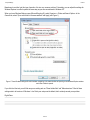
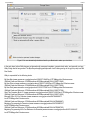
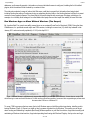
When you have Windows Explorer open (Microsoft flag key+E), select Organize => Folder and Search Options. In the
General tab, select "Open each folder in the same window" and Apply (see Figure 1).
Figure 1. These Windows settings will switch between navigating in the same window and opening a new Windows Explorer window
each time a folder is opened.
If you click the View tab, you will find many more setting such as "Show hidden files" and "Hide extensions." Most of these
settings exist in all versions of Windows. I don't think your setup was the default, but it certainly caused you a problem.
Digital Dave
6 of 44
ComputorEdge
6/10/11
Return to Table of Contents
You-Probably-Missed-It Computing Stories
“The Benefits and Innovative Uses of Computers in Our Lives” by Marilyn K. Martin
Marilyn highlights new or unusual aspects of our interaction with computers and the Internet. This ranges from a device called "Tactile
Brush" to virtual colleges and medical diagnoses.
We are now about fifty years in from the development of personal computers and the Internet. Nearly everyone on the planet
has or wants a computer. They are in our homes, our schools and at our jobs. And "smartphones" with Internet access give us
mobile computing in our pocket.
That Great Informational Highway—the Internet—is practically a member of our family, based solely on daily interactions and
familiarity. And tracking the latest smartphone apps has become almost a national hobby.
I decided to go looking for the non-obvious ways
computers have benefited—or detracted—from our
lives. I wanted to find the little side stories or soon-to-be
applications that highlight a new or unusual aspect of
our interaction with computers and the Internet.
Turning Business Models Upside
Down
According to an article in the Associated Press on
5/30/2011 ("Scholarship's Catch: Don't Go To College,
Pursue Innovation Instead"), San Francisco tech tycoon
Peter Thiel is giving scholarships to hand-picked
geniuses-in-training to not go to college. Instead, these
teens and 20 year olds are getting $100,000 each to
pursue high tech innovation for a couple years. Their
ideas range from mobile banking for the developing
world, to cheaper biofuels and robot helpers.
A New York Times (nytimes.com) article on
05/17/2011 ("For Buyers of Web Start-Ups, Quest to
7 of 44
ComputorEdge
6/10/11
Corral Young Talent"), describes a curious practice on
going in Silicon Valley, especially. High tech companies
are buying—and dumping—start-ups just to snag the
attached talent.
The companies doing the snaring call it "talent
acquisition," but technology blogs call it "acquired"
talent. Facebook has been the most enthusiastic
practitioner of this type of "talent acquisition," to help keep Facebook's start-up hipster culture alive. Facebook has thus bought
a string of smart start-ups—killing most, just to keep the attached human talent.
Medical Computing
Hospitals are already embracing laptops to keep patient records up to date easier, many on rolling tables that can go from
room to room. And the FDA recently cleared a new phone app for physicians (from mimsoftware.com), to allow MRI and
similar scans to be shown on physicians' hospital iPhones or iPads, with restrictions to comply with patient privacy.
One Seattle start-up, "Assay Dynamics" is in R&D to make a low-cost medical diagnostic device for small clinics. Instead of
sending out medical tests to laboratories, then waiting a week for the results, Assay is developing a device that can perform
advanced cardiovascular tests on blood or saliva samples in the doctor's office, with results available in 5-10 minutes.
According to a Seattle Times (seattletimes.nwsource.com) 5/30/2011 article ("Today's Hospital ..."), the newest hospitals
are making liberal use of computerized beds. These "talking" hospital beds are programmed to provide information to the
patient, and ask key questions in 20 languages. (An example would be the bed telling a patient who is just waking up, "You
have a tube in your throat to help you breathe.") These beds can also be programmed to play soothing environmental sounds,
to help with stress reduction.
According to Popsci (popsci.com) IBM's Watson, briefly a TV star competing on "Jeopardy!", has now turned to medical
diagnoses. It was initially programmed to divulge just one answer on "Jeopardy!", with an "80% possibility of accuracy."
Medicine is different, so it has been reprogrammed to divulge all possible answers, even the less likely diagnoses. It has also
been programmed with an entirely new category of information that can be useful in medicine: anecdotal evidence.
High Tech Business Innovations
It was revealed on Newser (newser.com) on 4/5/2011, that one roving beer vendor at Seattle Mariners games, is using
Twitter to bump up his beer sales. Fans in the stadium can tweet vendor Kevin Zelko with their exact seat location, and he'll
pop over with their brew. He sagely figures that people with smartphones hooked into Twitter will have more money anyway to
spend on beer and tips.
Job-skills testing sites for employers have been around for awhile. But now sites are popping up for employees and students
as well. Some you have to pay for, but there are free sites as well. Free-career-test.com, careerpath.com and
jobdiagnosis.com (among others) offer free tests, advice and even some local job openings.
Gizmodo (gizmodo.com) published an article on 5/26/2011, ("The LAPD's Teched Out Cruiser"), describing the Los Angeles
PD's new Chevrolet Caprice PPV cruiser. For starters, it comes equipped with a Forward Looking Infrared (FLIR) camera that
can track the heat signature of a fleeing suspect's footprints.
And the vehicles' Automatic License Plate Recognition (ALPR) system, will automatically alert the patrolmen as stolen cars
drive by. And that clunky on-board laptop in the front seat is gone. It has been replaced by a computer built into the car itself,
and controlled with a touchscreen display mounted in the dash.
Virtual Education
8 of 44
ComputorEdge
6/10/11
Virtual Colleges have been around awhile, for people to earn degrees online at their own pace. Some regular universities are
even experimenting with putting some lectures online, for students to view on their laptops at their leisure. Other universities
are even getting around the high cost of textbooks, by listing all the reading material needed at (free) Internet sources. While
companies like textbooks.com and coursesmart.com are offering textbooks as e-books, to download to Kindle or Nook.
But now Virtual Classrooms have popped up as an alternative to public education, K-12. This offers parents another choice of
how to educate their children, rather than just the regular classroom or home-schooling. These virtual schoolroom lectures or
lessons are "attended" by the child in front of a computer at home. Also called "cyber schools," these are especially helpful for
the sickly or expelled child.
Another hybrid of the Virtual Classroom are sites like the free Global Virtual Classroom (virtualclassroom.com) which
"aims to complement the efforts of governments and educators around the world to integrate technology into their classrooms
and curricula." These specialized Virtual Classrooms can help fill in the gaps in public education, especially schools deficient in
science and technology. This type of specialized cyber-school can be used in the classroom, or offered to students through
their home computers.
According to a 5/17/2011 article on Yahoo News ("Could The Internet Spell The End of Snow Days?") some schools are even
experimenting with setting up temporary Virtual Classrooms when kids can't get to school after snowstorms. Too many days
lost to snow can leave kids out of the mental-groove of learning, and/or heading into Spring with a learning deficit, just when
many states administer their standardized tests.
Beyond Gaming
Stanford communication professor Byron Reeves and J. Leighton Read, a Silicon Valley venture capitalist, founded a company
called "Seriosity (seriosity.com)", to explore online games that can offer a new management approach to motivating
employees.
They have even written a book: "Total Engagement: Using Games and Virtual Worlds to Change the Way People Work and
Businesses Compete." They think that video games offer powerful design elements that can be harnessed by business.
Especially since complicated games "require extraordinary teamwork, elaborate data analysis and strategy, and the
recruitment, evaluation, and retention of top players in multi-person guilds."
Science Daily (sciencedaily.com) on 7/12/2010 offered an article ("Taking Computer Games Into The Future") that a major
research project among three colleges in England could soon revolutionize computer gaming. They have collaborated to make
Artificial Intelligence smarter and more adaptable for game programmers. This will translate to (virtual) non-player characters
(NPDs) that are smarter and more human-like, leading (they hope) to a better and more robust gaming experience.
Chills, Thrills and 3D
Gizmodo (gizmodo.com) republished a PopSci article on 5/27/2011, ("Disney Tactile Device Lets Games and Movies
Literally Send Chills Down Your Spine"), explaining how Disney researchers have found a way to make your video game and
movie experiences more realistic. They have devised something called "Tactile Brush" that creates the sensory illusion of
objects moving against a person's skin, through a series of vibrating coils embedded in the back of a chair. It can mimic
everything from crawling insects, to the forces exerted by a car taking a hard corner, to the sensation of rain running down the
subject's back.
On 5/12/2011, iPopSc (popsci.com) published an article ("Video: New Zero Touch Interface is a Touchscreen Without the
Screen"), about a brand new kind on no-screen monitor. A team from Texas A&M University has recently unveiled a brand
new kind of monitor screen, called the ZeroTouch.
It is more like an empty picture frame lined with LEDs, and filled with crisscrossing beams of infrared light. The screen can be
laid flat as a drawing or drafting board using a stylus. It can fit over a conventional screen to turn it into a touchscreen. Or it can
9 of 44
ComputorEdge
6/10/11
be suspended for a user to reach through, offering a 3D capability and experience.
Messin' With Mother Nature
A Newsobserver.com article in May 2011 ("Bird-Call Apps Add To Stress On Birds"), decries all the new phone apps with
bird calls. These over-used apps flush out bird species for better viewing and photography.
But some birders claim that these bird song apps are seriously stressing out male birds during breeding season, especially.
These territorial male birds are compelled to respond to hearing another male bird nearby, and rush to check out the call,
exposing themselves to hawks, and leaving mates and nests unguarded. (Recorded bird calls are banned in some parks and
refuges, including national parks.)
Body-wired: Wristwatch Computing and Human Antennas
Tech News Daily (technewsdaily.com) reports in a 5/12/2011 article ("Metawatch: A Watch For Your Phone"), that a
simple wristwatch can now be in sync with your smartphone. Watchmaker Fossil (fossil.com) has developed a Metawatch
that can display your smartphone notifications and messages. Slightly thick and clunky, the Metawatch will appeal most to
people who have to pull their smartphone out of their pocket dozens of times every hour.
In May 2011, PopSci announced that Scott Wilson's TikTok and LunaTik watchbands (at kickstarter.com) can turn an iPod
Nano into a wristwatch. Signs of success? Apple—who invented the iPod—asked to sell the watchbands in its stores.
According to a Tech News Daily (technewsdaily.com) article from 5/17/2011 ("Microsoft Sees Human Body As An
Antenna"), Microsoft researchers have discovered a home automation system that "could eliminate costly rewiring and
outsmart even the smartest appliances"—the human body.
A wired person could pick up electromagnetic signals that emanate from all electrical systems and appliances in the home.
"These ambient signals can then be used to create an affordable home automation system, that controls household electronics
with a pat on the wall, or even a simple hand gesture."
Exposure Therapy and Other Virtual Therapies
A Science Daily (sciencedaily.com) article from 2/17/2011 ("Innovative Virtual Reality Exposure Therapy Shows Promise
for Returning Troops") discusses the effectiveness of exposure-therapy on returning military suffering from PTSD (post
traumatic stress disorder). The study showed that using virtual reality treatment for an average of seven sessions, resulted in
significant reductions in PTSD symptoms.
Another Science Daily article on 5/16/2011 ("Using War Games To Treat Post-Traumatic Stress Disorder"), offers returning
soldiers "psychotherapy by computer." This Virtual Reality Exposure Therapy (VRET) presents realistic combat scenarios to
soldiers by "immersing them in simulations of trauma-relevant environments," to desensitize the traumatized soldiers.
One report stated that 80% of the soldiers who completed treatment showed clinically meaningful reductions in PTSD, or other
anxiety or depressive symptoms. Researchers are looking at future applications of this kind of exposure therapy, such as
teaching "stress resilience" or "coping strategies" before deployment. As well as identifying at-risk soldiers who need further
treatment, or more time between deployments.
Another article in Science Daily on 5/16/2011, ("Video Games Effective Treatment for Stroke Victims"), discusses how the
virtual environment can even help stroke patients. An interactive video of game-based therapy, can help stroke patients
improve their arm and hand functions, as they reach and touch virtual objects, and move the objects around on the screen.
Playing computer games can also help speed up and improve a stroke victim's recovery.
Upcoming—What to Watch For
10 of 44
ComputorEdge
6/10/11
MIT's magazine, Technology Review (technologyreview.com), offers a yearly list of "Ten Technologies That Are Going to
Transform Our World." Their April 2011 list includes a "smart (electrical) transformer". This type of transformer can accept
smaller-scale sources of clean/green energy to contribute to the power grid (from solar or wind power), as well as also help
balance electrical supply and demand.
Washington University's Genome Institute has a machine that can read DNA at a faster rate, and is being used to sequence
cancer tissues and look for DNA mutations, to better predict a patient's prognosis and identify the best cancer-killing drugs.
Other revolutionary new technologies on MIT's list are "cloud streaming," "cloud encryption," and "crash-proof codes." Also
what the below listed companies are doing.
Sakti3 Company (sakti3.com) is developing solid state car batteries that can withstand higher temperatures, and thus
incorporate materials that can double or triple the amount of energy stored.
Fluidigm Company (fluidigm.com) is developing revolutionary technology to separate chromosomes and then analyze the
pieces. Research such as this will both impact fundamental genomic research, and help move toward more personalized
medicine.
According to an article in PopSci on 5/17/2011, ("Science Fiction Writer Envisions How Smart Algorithms Could Streamline the
U.S. Tax Code"), sci-fi writer David Brin proposes replacing the U.S. Tax Code with a mathematical model that can find the
simplest "no losers" tax code. The idea is to create software that can cycle through increasingly more precise 'simplifications,'
until you arrive at a simple and fair Tax Code for everyone.
In Conclusion
David Levy (Stanford PhD, 1980) considers himself a Philosopher of Technology, and is a professor at the Information School
of the University of Washington. He often speaks about the "onslaught of digital demands." He contends that when we
overload on technology, "We lose the life-giving dimension of being in the moment."
Bottom line? Stop and smell the roses occasionally. And turn the smartphone off when you do it.
Marilyn is a freelance writer and humorist with many interests. She has sold teen anti-drug articles, as well as had numerous
esoteric articles published. She has almost seventy mini-articles on Helium.com (www.helium.com/users/573405/
show_articles), and is writing a humorous Young Adult Science Fiction series, Chronicles of Mathias. Volumes One
and Two have received a "Gold Star for Excellence" from TeensReadToo.com (www.teensreadtoo.com/
ReptilianRebirth.html), and are available from most on-line bookstores.
11 of 44
ComputorEdge
6/10/11
Return to Table of Contents
Windows 8 Preview
“The Future of Windows” by Wally Wang
Microsoft is revealing Windows 8 and their new tablet strategy. It seems more geared toward tablets than PCs and is packaged with
some confusion. What does this mean for Microsoft?
While Android and iOS gobble up the smart phone market and iOS dominates the tablet market (with Android struggling to get
started), Microsoft has been noticeably absent until now. To demonstrate their tablet strategy, Microsoft recently revealed
Windows 8 (www.youtube.com/watch?v=p92QfWOw88I), which won't be available until 2012.
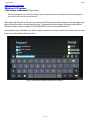
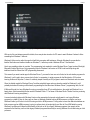
One interesting feature of Windows 8 is its ability to display a keyboard on the screen or split into the corners, which can make
it easy to type while holding a tablet by the sides.
Figure 1. Windows 8 can display a traditional virtual keyboard.
12 of 44
ComputorEdge
6/10/11
Figure 2. For typing on the go, Windows 8 can split the keyboard by the corners.
With most of its new features geared for tablets, there may be less incentive for PC users to want Windows 8 unless it offers
something that Windows 7 does not.
Windows 8 offers such a radical change that it will likely encounter stiff resistance. Although Windows 8 can provide the
familiar Start button and taskbar interface as Windows 7, it will also provide a Windows Phone 7 tiled interface.
Here's one possible problem to consider. The programming tools needed to create Windows Phone 7 apps involves Silverlight,
Microsoft's Adobe Flash clone. Yet programming tools for Windows 8 will center on HTML5 and JavaScript along with
traditional tools like C# and the .NET programming framework.
This means if you want to write apps for Windows Phone 7, you need to learn one set of tools, but to write similar programs for
Windows 8, you'll need to learn a second set of tools. In comparison, to write programs for the Macintosh or iOS involves
learning Xcode and Objective-C, where it's relatively simple to modify an iOS program to work on a Macintosh and vice versa.
Given the limited market for Windows Phone 7 and the potentially larger and more lucrative market for Windows 8, you'll
probably be better off focusing on Windows 8 programming first and then learn Windows Phone 7 programming later, if at all.
(If Microsoft's goal is to have Windows 8 running on everything from PCs to mobile devices, they might put Windows 8 on a
smart phone, which essentially kills the need for Windows Phone 7. The future of Windows Phone 7 doesn't look too promising
with Windows 8 running everywhere.)
A second potential problem with Windows 8 rests on the assumption that people actually want to run legacy Windows
programs on a tablet. If they do, they can't run them on Windows 8 tablets running ARM processors, so before you buy a
Windows 8 tablet, you'll have to check if it's using an Intel or ARM processor. Forcing users to know the difference between an
Intel processor and an ARM processor is going to confuse plenty of people right there. After all, if an ARM tablet is running
Windows 8 and Microsoft claims that Windows 8 will let you run all your legacy Windows programs, then people will be
surprised to find that they can't run their legacy Windows programs unless they're running Windows 8 on a tablet using an Intel
processor.
13 of 44
ComputorEdge
6/10/11
Beyond the confusion between Windows 8 on Intel tablets vs. ARM tablets, there's also the ability to run old Windows
programs, designed for a keyboard and mouse, on a tablet for touch interaction. Running legacy Windows programs may be
nice, but if using it proves too frustrating, then the purpose of running legacy Windows programs on a tablet is rather pointless.
A more serious problem is Microsoft's ambitious goal of creating a single operating system that can work equally well on PCs
and tablets. We already know Windows 7 can work decently on PCs, but so far it's proven too cumbersome for tablets.
Running Windows 8 on a tablet means dealing with Windows registry problems, which are the main cause for slowing
Windows to a crawl over time. Can Windows 8 run on a tablet without gobbling up power while remaining responsive at the
same time? If you run Flash on Windows 8 on a tablet, will the combination of Flash and Windows 8 drain your tablet's
battery?
Besides the need to patch Flash security flaws (www.electronista.com/articles/11/06/06/adobe.issues.new.
warning.and.patch.for.flash.103/) periodically, users of Windows 8 tablets will also need to run antivirus and antispyware programs as well, which will affect the performance of Windows 8.
The last time Microsoft promised a radical new operating system, they called it Longhorn and it turned out to be Vista.
Chances are good that Microsoft won't make that same mistake again with Windows 8. Still, if running legacy Windows
programs on a tablet really isn't that compelling and Windows 8 can't provide a pleasant user experience on a tablet or a PC,
then Windows 8 could mark a turning point for the company's slow decline into irrelevance, just like Digital Research, which
lost its CP/M-80 dominance in the operating system market when everyone thought they could never fail.
Assuming that Windows 8 won't convert Macintosh users back into Windows PC users, Windows 8's radical tiled interface
could alienate more users and convince them to stick with Windows XP/7 even longer or switch to a Macintosh or Linux. More
importantly, the tiled interface of Windows Phone 7 didn't appeal to smart phone users, so will this same tiled interface appeal
to PC users?
For Microsoft to succeed, so many things have to go right (people want to run legacy Windows programs on a tablet, people
don't mind the confusion between Intel and ARM tablets, Windows 8 runs seamlessly on both PCs and Intel/ARM tablets,
people want to use the tiled Windows 8 user interface, people will want a Windows 8 tablet rather than an iPad or Macintosh,
people don't care about automatic synchronization between multiple devices using Apple's iCloud, etc.) that at the very least,
the reaction to Microsoft Windows 8 should be interesting to watch, which even analysts can't agree on (www.
computerworld.com/s/article/9217290/How_big_is_Microsoft_gambling_with_Windows_8_?
taxonomyId=89).
In the early days, before Wally became an Internationally renowned comedian, computer book writer, and generally cool guy,
Wally Wang used to hang around The Byte Buyer dangling participles with Jack Dunning and go to the gym to pump iron with
Dan Gookin.
Wally is responsible for the following books:
My New Mac (www.amazon.com/gp/product/1593271646?ie=UTF8&tag=the15minmovme20&linkCode=as2&camp=1789&creative=9325&creativeASIN=1593271646),
My New iPhone (www.amazon.com/gp/product/1593271956?ie=UTF8&tag=the15minmovme20&linkCode=as2&camp=1789&creative=9325&creativeASIN=1593271956),
My New iPad (www.amazon.com/gp/product/1593272758?ie=UTF8&tag=the15minmovme20&linkCode=as2&camp=1789&creative=9325&creativeASIN=1593272758),
Steal This Computer Book 4.0 (www.amazon.com/gp/product/1593271050?ie=UTF8&tag=the15minmovme20&linkCode=as2&camp=1789&creative=9325&creativeASIN=1593271050),
Microsoft Office 2010 for Dummies (www.amazon.com/gp/product/0470489987?
ie=UTF8&tag=the15minmovme20&linkCode=as2&camp=1789&creative=9325&creativeASIN=0470489987),
14 of 44
ComputorEdge
6/10/11
Beginning Programming for Dummies (www.amazon.com/gp/product/0470088702?
ie=UTF8&tag=the15minmovme20&linkCode=as2&camp=1789&creative=9325&creativeASIN=0470088702),
Beginning Programming All-in-One Reference for Dummies (www.amazon.com/gp/product/0470108541?
ie=UTF8&tag=the15minmovme20&linkCode=as2&camp=1789&creative=9325&creativeASIN=0470108541),
Breaking Into Acting for Dummies with Larry Garrison (www.amazon.com/gp/product/0764554468?
ie=UTF8&tag=the15minmovme20&linkCode=as2&camp=1789&creative=9325&creativeASIN=0764554468),
Strategic Entrepreneurism with Jon Fisher and Gerald Fisher (www.amazon.com/gp/product/1590791894?
ie=UTF8&tag=the15minmovme20&linkCode=as2&camp=1789&creative=9325&creativeASIN=1590791894),
How to Live With a Cat (When You Really Don't Want To) (www.smashwords.com/books/view/18896).
Mac Programming For Absolute Beginners (www.amazon.com/gp/product/1430233362?
ie=UTF8&tag=the15minmovme20&linkCode=as2&camp=1789&creative=9325&creativeASIN=1430233362)
The 15-Minute Movie Method
(www.amazon.com/gp/product/B004TMD9K8/ref=as_li_tf_tl?ie=UTF8&tag=the15minmovme20&linkCode=as2&camp=1789&creative=9325&creativeASIN=B004TMD9K8)
In his spare time, Wally likes blogging about movies and writing screenplays at his site "The 15 Minute Movie
Method" (www.15minutemoviemethod.com/) along with blogging about electronic publishing and how authors can take
advantage of technology at his site "The Electronic Author." (www.wallacewang.com) Wally can be reached at
[email protected].
15 of 44
ComputorEdge
6/10/11
Return to Table of Contents
Wally Wang's Apple Farm
“Apple's Worldwide Developer's Conference” by
Wally Wang
Apple's annual Worldwide Developer's Conference; more schools dump
textbooks for the iPad; deceptive advertising; creating e-books with Jutoh;
Apple worth more than Wintel; free books; automatically wake up your
Macintosh.
On June 6, Steve Jobs gave the keynote address for Apple's annual Worldwide Developer's Conference (WWDC). The three
topics Apple covered were Mac OS X 10.7 Lion, iOS5 and iCloud. Mac OS X 10.7 Lion is currently in beta testing and will be
released in July. Two most prominent features of Lion (www.apple.com/macosx/lion/) include LaunchPad and Mission
Control.
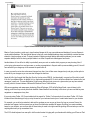
Figure 1. LaunchPad displays all your programs as icons like the iPad home screen.
LaunchPad mimics the appearance of the iPad's home screen where apps are arranged in neat rows that fill the screen. This
makes it easier to find the program you want without digging through the Applications folder.
16 of 44
ComputorEdge
6/10/11
Figure 2. Mission Control shows you all open windows and desktops.
Mission Control provides a quick way to view thumbnail images of all your open windows and desktops, if you use Spaces to
create multiple desktops. The idea behind Spaces is that you create multiple desktops where each desktop contains windows
related to a single program or task. That way instead of cluttering a single desktop with multiple windows, you can create
separate desktops much like having multiple tables in an office to spread out related papers and books.
Another feature of Lion will be its ability to periodically save your work no matter which program you may be using. Now if
you're typing a document in a word processor or creating a presentation in Keynote and the power suddenly goes off, Lion will
have saved all your changes up to the moment the power shut off.
In case you need to review how a document changed over time, Lion will also save changes hourly and give you the option to
review all of your changes so you can see what changed at what time.
Apple will offer Lion through their Mac App Store for the low price of $29.95. Just download it once and you'll be able to install
it on all of your different Macs. In addition to Lion, Apple also previewed iOS 5, which will offer notifications of missed calls, text
messages, e-mails, etc. This new Notification Center screen effectively lets you see at a glance what you may have missed
recently, which is the main feature of Microsoft's Windows Phone 7 tiled interface.
With more magazines and newspapers developing iPhone/iPad apps, iOS5 will offer News Stand, a special store just for
helping you find and buy various periodicals available. News Stand will work similarly to iBooks so you can read and buy new
magazines or newspapers at any time.
If you enjoy using Twitter, iOS 5 now includes built-in support for Twitter. For those who don't care about Twitter, iOS 5 also
includes a new reminder app to help you stay focused on your tasks and remind you of certain tasks based on your location.
For example, you could set a reminder to take out the garbage as soon as you get home. As long as you aren't home, the
reminder won't appear, but the moment you get home, that particular reminder will appear. By letting you create reminders
based on your location, you can focus just on those tasks you need to do right now while ignoring all those tasks you can't do
anything about until you go somewhere else.
The iOS 5 virtual keyboard can now split in half to make it easier for typing with your thumbs while holding your iPhone or iPad
17 of 44
ComputorEdge
6/10/11
in your hands. Instead of setting up your iPhone or iPad by connecting to a computer running iTunes, you'll now be able to turn
on your iPhone/iPad right out of the box with no connection to a computer whatsoever.
Apple also claims that iOS is the most popular gaming platform on the planet with over 50 million users compared to 30 million
users on the Xbox, and the Xbox has been around for eight years compared to the four years iOS has been around with the
2007 introduction of the iPhone. You can expect iOS 5 this fall, which will probably be just in time for a new iPhone 5 model to
come out for both AT&T and Verizon in the United States.
Perhaps the biggest news was iCloud. The idea is that what you store on one Apple device gets sent to iCloud automatically.
Then iCloud sends this data back to all your other Apple devices. Theoretically, you could set an appointment on your iPhone
and then go home to find that same appointment automatically stored on your iMac. By using iCloud, you won't have to
manually synchronize data any more and risk losing track of crucial information between your iPhone, iPad, or Macintosh or
even a PC.
Keeping all of your e-mail messages, appointments and contact information synchronized automatically between your various
devices might be nice, but iCloud also offers the ability to keep your documents synchronized automatically, such as a Pages,
Keynote, or Numbers file. Create a Pages document on your iPad then go home and open that document in Pages on your
Macintosh. By eliminating the messy synchronization problem between devices, iCloud promises to give you access to your
data wherever you go.
Of course, since iCloud only works with iOS devices along with Macs and PCs, how will other smart phone and tablet rivals
deal with this seamless and automatic synchronization feature? If you want the ability to access your data on your computer
and smart phone or tablet, the choice is simple. You get an iPhone, iPod touch, or iPad. What will rivals like Windows Phone 7,
Android and WebOS do to compete against iCloud? Not much, so expect them to sell even fewer units over time.
The synchronization features of iCloud essentially torpedoes competitors struggling to sell their obsolete merchandise to a
shrinking market just like Nokia with their plummeting stock price (www.theglobeandmail.com/globe-investor/nokiawarns-of-weaker-sales-shares-plummet/article2041001/), Research in Motion losing market share (www.reuters.
com/article/2011/05/30/us-column-canada-markets-idUSTRE74S1G520110530) with their Blackberry phones
in the consumer market (/www.reuters.com/article/2011/06/03/us-rim-research-ubsidUSTRE7523PP20110603) and with the U.S. government (www.washingtonpost.com/business/economy/
federal-government-loosens-its-grip-on-the-blackberry/2011/05/27/AG7wW1EH_story.html), and any
company selling tablet devices that can't match the features (bits.blogs.nytimes.com/2011/06/02/non-ipad-tabletsfail-to-gain-customer-traction/) of the iPad despite their ability to run Flash (sort of), offer a USB port, or provide
replaceable batteries.
If you thought the iPhone shook up the smart phone market and the iPad redefined the tablet market, iCloud promises to
wreck havoc among competitors unable to provide an equally simple synchronization solution of documents, music, photos,
appointments, e-mail and contact information between multiple devices.
More Schools Dump Textbooks for the iPad
St. Coleman's College in Ireland plans to replace textbooks with iPads (www.irishtimes.com/newspaper/
ireland/2011/0530/1224298059002.html) next fall. School principal Jimmy Finn said, "It is a bit of a unique idea, but
we have to continue to move with the times."
Media mogul Rupert Murdoch described education as the "last holdout from the digital revolution" and says that schools
should provide personalized learning with lessons delivered by the world's best teachers over the Internet. "Today's classroom
looks almost exactly the same as it did in the Victorian age," Murdoch added.
Perhaps this is one reason why Singapore schools are planning to switch to the iPad (www.google.com/hostednews/
afp/article/ALeqM5ilPmnNUTJ6oLwAvozTJWWY12U__g?docId=CNG.
18 of 44
ComputorEdge
6/10/11
d8595bca5666c62acd2c4571b115f96d.451) by 2013.
Rene Yeo, head of the information technology department at Tampines Secondary School, in Singapore, teaches science with
his iPad. His students learn factorization by manipulating numbers on the screen and read about animal cells and the human
brain structure by clicking on the various parts.
Han, instructional technology fellow at the Macaulay Honors College, City University of New York, said he expects some Asian
countries to leapfrog the West.
"While the Internet was birthed in the US, Singapore and South Korea (for example) boast far greater broadband Internet
access penetration and infrastructure than the US," he said.
Education psychologist Qiu Lin cautioned against the blind use of technological devices, and neglecting the real goals of
education.
"The trend of integrating technology into education will definitely increase," said the assistant professor at Nanyang
Technological University, which is separate from the high school. "But after one month when the novelty of iPads wears down,
a good curriculum and teaching materials that can increase deep thinking and problem solving in students need to be in place."
While countries such as Ireland, Singapore, Japan and South Korea readily adopt the iPad to improve education, a Texas high
school has decided to spend $60 million dollars to build a football stadium (articles.nydailynews.com/2011-05-01/
news/29518481_1_football-stadium-allen-high-school-completion) instead. With priorities like these and
constant budget cuts for American schools and libraries, can anyone guess which countries will provide their citizens with the
education they need to thrive in the future?
Since you can't rely on American schools to provide much of an education nowadays, take matters into your own hands by
studying on your own. One way to learn is to watch the numerous videos provided for free at the Khan Academy (www.
khanacademy.org/). As long as you're a self-starter, you'll always do better than someone who can't do anything without
someone else constantly prodding them into action.
19 of 44
ComputorEdge
6/10/11
Figure 3. The Khan Academy offers a variety of free courses.
Deceptive Advertising
In response to the problem of Flash (news.cnet.com/8301-19882_3-20068318-250/adobe-ceo-dances-aroundflashs-declining-importance/?tag=topTechContentWrap;editorPicks) running on the iPhone or iPad, Adobe's
CEO, Shantanu Narayen, claimed that "It's clear that it's not a technology issue...It's a business model issue. It's all about
control of the applications you can run on the platform."
In other words, Shantanu is trying to blame Apple for not allowing Flash on iOS devices while claiming that it's not a technical
issue after all. Of course, Walt Mossberg of the Wall Street Journal responded by saying, "I have yet to see a tablet where
Flash works really well."
Despite Adobe's inability to get Flash running seamlessly on mobile devices, plenty of smart phone and tablet manufacturers
keep touting "Flash support" as an advantage while not alerting consumers to the erratic nature of Flash on mobile devices. If
you lie to your customers about a feature that doesn't work as expected, how can you possibly keep customers happy?
Perhaps the biggest lies in advertising aren't aimed at deceiving consumers but in deceiving companies who pay ad agencies
huge amounts of cash to produce commercials that return marginal results. Microsoft allocated $500 million to market
Windows Phone 7 and with less market share than their own Windows Mobile 6.5, Windows Phone 7 clearly hasn't returned
$500 million dollars worth of sales. Microsoft also gave Jerry Seinfeld $10 million dollars to appear in two ads with Bill Gates,
and those ads didn't appear to boost Microsoft's sales by $10 million dollars.
Most advertising is simply ineffective, yet ad agencies cheerfully steal money from clients while producing advertisements that
don't pay for themselves. Watch Microsoft's latest ad (www.youtube.com/watch?v=-9hsl6iqv8&feature=player_embedded) where they built a Microsoft Store inside a woman's home, and ask yourself if this ad
gives you a compelling reason to buy a new Windows PC.
20 of 44
ComputorEdge
6/10/11
In contrast to the creative, but ineffective advertising produced by most ad agencies, people involved in the mail-order and
Internet business know they have to create ads that provide a clear benefit and offer a compelling call to action.
To read about the direct response marketing business from the perspective of mail-order, grab a copy of The Lazy Man's
Way to Riches (www.amazon.com/gp/product/1884337228/ref=as_li_tf_tl?ie=UTF8&tag=the15minmovme20&linkCode=as2&camp=217153&creative=399349&creativeASIN=1884337228) by Joe Karbo. Joe Karbo made millions
through mail-order and placing ads in magazines and newspapers. By reading his book, you'll learn the secrets of crafting an
ad that motivates readers to take action and send money right away. Read Joe Karbo's plain text ads (www.
thelazymanswaytoriches.com/joe-karbo-famous-ads-direct-marketing) and compare them to any of Microsoft's
ads or Motorola's Xoom ad that cost millions to air during the Super Bowl, and guess which one is more effective at producing
sales, which is the ultimate goal of any advertising?
Amazingly, the techniques in the direct response (and now Internet) business have been tested for decades, yet companies
still waste time and money on perception advertising designed to look nice and be creative but not generate sales. Read any
ad for different tablets and smart phones and you'll see a parade of technical specifications but few explanations for why you
might want those features. When you see such useless ads, it's a massive clue that the companies selling those products
don't have any idea how to use their advertised features either.
Creating E-Books with Jutoh
Creating an e-book should be easy, but it isn't. Amazon's Kindle uses one format while others use the EPUB standard. While
you can use Pages to create an EPUB document, Pages can't create an Amazon Kindle e-book, nor can it help you design
and create a cover for your e-book. Rather than use separate programs to put together e-books in various file formats, take a
look at an all-in-one EPUB tool called Jutoh (www.jutoh.com/), which runs on Windows, Linux and Mac OS X.
With Jutoh, you have the option of creating your text directly in Jutoh or importing it from other file formats such as HTML, plain
text, or OpenDocument format. Editing and formatting text is simple because Jutoh works like an ordinary word processor.
Once you have text in Jutoh, you can divide that text into chapters. Then you can create a table of contents for your e-book so
a reader can jump to a different chapter.
21 of 44
ComputorEdge
6/10/11
Figure 4. Jutoh can divide text into chapters.
Besides helping you create a table of contents, Jutoh can also include an index as well as letting you add footnotes to your
text. When you're done putting your e-book together, Jutoh provides a cover designer so you can create a visually appealing
cover for your e-book.
22 of 44
ComputorEdge
6/10/11
Figure 5. Jutoh helps you create a book cover.
Although Jutoh is fairly intuitive, you probably won't be able to use the program without reading the online user manual once in
a while. Jutoh's online help closely resembles the help system on Windows programs, so it may look a little ugly as a
Macintosh program, but it gets the job done just the same.
23 of 44
ComputorEdge
6/10/11
Figure 6. Jutoh offers online help.
One of the biggest problems with creating EPUB e-books is that you can't submit them to Apple's iBookstore unless they pass
an EPUB validation check. You can validate your e-books through online sites (threepress.org/document/epubvalidate) or by running the EpubCheck tool (code.google.com/p/epubcheck/) using Java. If you'd rather not mess
around with other tools, you can just use Jutoh's built-in EPUB checker.
Unlike other EPUB creation tools that you have to cobble together, Jutoh provides everything you need to create, edit, format
and validate your EPUB e-books. You can download a free trial version of Jutoh to see how it works and then buy it for $39
when you're ready to start creating your own e-books.
If you want to self-publish EPUB e-books, you'll find Jutoh may be all you ever need. Now you just have to figure out what to
write about and how to market your e-books to reach the largest possible audience on the planet.
Apple Worth More Than Wintel
For years, Microsoft and Intel (known as Wintel) dominated the personal computer market. However, the combined market cap
of both Microsoft and Intel has now fallen below Apple (www.electronista.com/articles/11/06/03/not.reflective.of.
actual.worth.more.potential/). As the second most valuable company in the world, Apple could one day surpass the
current leader, Exxon Mobil.
The fact that Apple is worth more than Microsoft represents a symbolic shift of the personal computer market. Although
Microsoft still dominates the operating system market, the steady erosion of Windows users switching to the Macintosh, as
evidenced by numerous books such as Switching to the Mac: The Missing Manual (www.amazon.com/gp/
product/0596804253/ref=as_li_tf_tl?ie=UTF8&tag=the15minmovme20&linkCode=as2&camp=217153&creative=399349&creativeASIN=0596804253), indicates that Microsoft may never be as
dominant as they once were back in the 90's.
Free Books
24 of 44
ComputorEdge
6/10/11
A truly educated population is one that can keep learning by itself. To help people continue learning new ideas in a variety of
topics, the National Academies Press has announced that they will give away most of their books for free as PDF files.
Figure 7. Grab a free e-book from the National Academies Press.
The books offered by the National Academies Press tend to be more scholarly than light reading with topics that vary from
agriculture and earth sciences to math and transportation. Download a free PDF of a book that interests you or buy the printed
version. With almost the entire book catalog available as a free PDF file, you should have no reason not to have anything to
read for the next few months.
*
*
*
If you can't spare the few seconds every day to boot up your Macintosh, you can schedule your Macintosh to wake itself up
automatically at a specific time. (This works with laptops but only if they're plugged in.)
Just click the Apple menu and choose System Preferences. Then click the Energy Saver icon under the Hardware category.
This opens an Energy Saver dialog. Click on the Schedule button and you'll see options for selecting when to start or shut
down your Macintosh.
25 of 44
ComputorEdge
6/10/11
Figure 8. You can automatically schedule a time for your Macintosh to wake up or shut down.
In the early days, before Wally became an Internationally renowned comedian, computer book writer, and generally cool guy,
Wally Wang used to hang around The Byte Buyer dangling participles with Jack Dunning and go to the gym to pump iron with
Dan Gookin.
Wally is responsible for the following books:
My New Mac (www.amazon.com/gp/product/1593271646?ie=UTF8&tag=the15minmovme20&linkCode=as2&camp=1789&creative=9325&creativeASIN=1593271646),
My New iPhone (www.amazon.com/gp/product/1593271956?ie=UTF8&tag=the15minmovme20&linkCode=as2&camp=1789&creative=9325&creativeASIN=1593271956),
My New iPad (www.amazon.com/gp/product/1593272758?ie=UTF8&tag=the15minmovme20&linkCode=as2&camp=1789&creative=9325&creativeASIN=1593272758),
Steal This Computer Book 4.0 (www.amazon.com/gp/product/1593271050?ie=UTF8&tag=the15minmovme20&linkCode=as2&camp=1789&creative=9325&creativeASIN=1593271050),
Microsoft Office 2010 for Dummies (www.amazon.com/gp/product/0470489987?
ie=UTF8&tag=the15minmovme20&linkCode=as2&camp=1789&creative=9325&creativeASIN=0470489987),
Beginning Programming for Dummies (www.amazon.com/gp/product/0470088702?
ie=UTF8&tag=the15minmovme20&linkCode=as2&camp=1789&creative=9325&creativeASIN=0470088702),
Beginning Programming All-in-One Reference for Dummies (www.amazon.com/gp/product/0470108541?
ie=UTF8&tag=the15minmovme26 of 44
ComputorEdge
6/10/11
20&linkCode=as2&camp=1789&creative=9325&creativeASIN=0470108541),
Breaking Into Acting for Dummies with Larry Garrison (www.amazon.com/gp/product/0764554468?
ie=UTF8&tag=the15minmovme20&linkCode=as2&camp=1789&creative=9325&creativeASIN=0764554468),
Strategic Entrepreneurism with Jon Fisher and Gerald Fisher (www.amazon.com/gp/product/1590791894?
ie=UTF8&tag=the15minmovme20&linkCode=as2&camp=1789&creative=9325&creativeASIN=1590791894),
How to Live With a Cat (When You Really Don't Want To) (www.smashwords.com/books/view/18896).
Mac Programming For Absolute Beginners (www.amazon.com/gp/product/1430233362?
ie=UTF8&tag=the15minmovme20&linkCode=as2&camp=1789&creative=9325&creativeASIN=1430233362)
The 15-Minute Movie Method
(www.amazon.com/gp/product/B004TMD9K8/ref=as_li_tf_tl?ie=UTF8&tag=the15minmovme20&linkCode=as2&camp=1789&creative=9325&creativeASIN=B004TMD9K8)
In his spare time, Wally likes blogging about movies and writing screenplays at his site "The 15 Minute Movie
Method" (www.15minutemoviemethod.com/) along with blogging about electronic publishing and how authors can take
advantage of technology at his site "The Electronic Author." (www.wallacewang.com) Wally can be reached at
[email protected].
27 of 44
ComputorEdge
6/10/11
Return to Table of Contents
Linux Lessons: Tips
and Tricks from Users
“Display Fortunes in
Linux” by Tony J. Podrasky
Tony highlights the "Fortune"
command, explaining how it works
and how to include our own
"fortunes."
Tony shows how to personalize the <fortune> program.
Filename: fortune
Use: To display "fortunes" from the fortune files.
Would you like to have a random ".signature" or a "witty saying" appended to your outgoing e-mail?
We're going to look at the <fortune> command, how it works, and then create our own "fortunes." In the next issue I'll show
you how to use the <cron> mechanism to randomly generate a "fortune" and copy it to your .signature file which then gets
added to the end of your e-mail.
Type the command <fortune> and see what happens:
tonyp% fortune
When one woman was asked how long she had been going to symphony concerts,
she paused to calculate and replied, "Forty-seven years—and I find I mind
it less and less."
— Louise Andrews Kent
tonyp% fortune
208. Members of my Legion of Terror will attend seminars on Sensitivity
Training. It's good public relations for them to be kind and courteous
to the general population when not actively engaged in sowing chaos and
destruction.
[Note: Sometimes you'll receive an error message—which is actually a fortune.]
Now, do a <which fortune> to find out where your fortune program and its files are located.
tonyp% which fortune
/usr/games/fortune
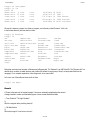
Mine is in the /usr/games directory, so we'll go there.
28 of 44
ComputorEdge
tonyp% cd /usr/games
tonyp% ls -la
total 48
drwxr-xr-x
4 root
drwxr-xr-x 15 root
-rwxr-xr-x
1 root
-rwxr-xr-x
1 root
drwxr-xr-x
2 root
6/10/11
root
root
root
root
root
4096
4096
17476
12244
4096
May
Oct
Apr
Apr
May
26 14:01 .
10 2005 ..
19 2004 banner
19 2004 fortune
29 19:45 fortunes
We see the <banner> program, the <fortune> program, and a directory called "fortunes". Let's <cd>
to the fortunes directory and see what is in there:
tonyp% cd fortunes
tonyp% ls
art
debian.dat
art.dat
definitions
ascii-art
definitions.dat
ascii-art.dat drugs
bible
drugs.dat
bible.dat
education
computers
education.dat
computers.dat ethnic
cookie
ethnic.dat
cookie.dat
food
debian
food.dat
tony%
fortunes
fortunes.dat
goedel
goedel.dat
humorists
humorists.dat
kids
kids.dat
knghtbrd
knghtbrd.dat
law
law.dat
linux
linux.dat
linuxcookie
linuxcookie.dat
literature
literature.dat
love
love.dat
magic
magic.dat
Notice that each entry has two parts: a filename and a filename.dat. The "filename" is an ASCII text file. The "filename.dat" is a
data file which contains a header structure and a table of file offsets for each group of lines (I cut-and-pasted that from the
manpage). For a complete explanation of how things work, do a <man strfile>.
Let's <cat> one of these files and see what's in there:
tonyp% cat magic
Result:
A Thaum is the basic unit of magical strength. It has been universally established as the amount
of magic needed to create one small white pigeon or three normal sized billiard balls.
— Terry Pratchett, "The Light Fantastic"
%
What is a magician but a practicing theorist?
— Obi-Wan Kenobi
%
What use is magic if it can't save a unicorn?
29 of 44
ComputorEdge
6/10/11
— Peter S. Beagle, "The Last Unicorn"
%
When I say the magic word to all these people, they will vanish forever. I will then say the magic words to you, and you, too,
will vanish—never to be seen again.
— Kurt Vonnegut Jr., "Between Time and Timbuktu"
%
————————
Notice that each "witty saying" is followed by the percent sign (%). When the utility <strfile> is run against a file (like the
"magic" file) it creates the ".dat" file (see the explanation above).
Here's 4 short entries from my sig_fortunes file:
————————
Tony J. Podrasky |
|
%
Tony J. Podrasky |
|
%
Tony J. Podrasky |
|
%
Tony J. Podrasky |
|
%
Even Popeye didn't eat his spinach
until he absolutely had to.
Great truths about life that little children have learned:
"Never hold a Dust-Buster and a cat at the same time"
Great truths about life that little children have learned:
"You can't trust dogs to watch your food."
Great truths about life that little children have learned:
"You can't hide a piece of broccoli in a glass of milk."
————————
Now, let's create our own fortunes file.
1. Do a <cd> to where you want to create the file. Probably in your home directory.
2. Cut-and-paste the 4 entries (above) and put them into a file called "sig_fortunes". You might want to copy them into your
mouse and then do a "cat >sig_fortunes", paste the mouse into it, and then do a control-d.
3. Do a <cat sig_fortunes> and see that it came out all right.
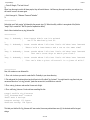
4. Do a <strfile sig_fortunes> You should see something like this:
tonyp% strfile sig_fortunes
"sig_fortunes.dat" created
There were 4 strings
Longest string: 155 bytes
Shortest string: 104 bytes
This tells you: that the file "sig_fortunes.dat" was created, how many entries there were (4), the shortest and the longest
strings.
30 of 44
ComputorEdge
6/10/11
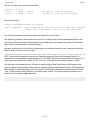
Now do a <ls -la sig*> and you should see the entries:
tonyp% ls -la sig*
-rw-r—r—
1 tonyp
-rw-r—r—
1 tonyp
users
users
565 May 31 17:06 sig_fortunes
44 May 31 17:08 sig_fortunes.dat
Now to test out the file:
tonyp% /usr/games/fortune sig_fortune
Tony J. Podrasky | Great truths about life that little children have learned:
| "Never hold a Dust-Buster and a cat at the same time"
If you keep doing the above command, eventually you should see all four of the entries.
Now, edit the sig_fortunes file and put whatever you like into it. You might go back to the /usr/games/fortunes directory and
look at some of the fortunes that are already there and cut-and-paste them into your personal sig_fortunes file. Remember to
give the author credit by keeping his name with the quote.
Next week, we'll see how to run the <fortune> program using <cron> and store the results in your <.signature> file and have
Mozilla or Firefox put it at the end of your e-mail.
NOTE: I give my shell files uppercase names so that I know they are my shell files and not the system's binaries. For
example, when I save the data (the commands between the "CUT HERE" lines, which is the actual shell file) I might call it "VI",
which is not to be confused with the system's "vi" file—but I call it "VI" because it calls (or uses) the system's "vi editor."
Tony has been in the computer field since 1976 when he started working for Data General Corp as a field engineer. Later
going on to design hardware interfaces, write patches for operating systems, and build networks. It was in 1995 while working
with the military on several projects that he ran into a "spook" who showed him a laptop that ran a then-unknown O/S called
"Linux." "A laptop running a form of UNIX tony = a marriage made in heaven!" Tony can be reached for questions at Linux
Questions for Tony ([email protected]).
31 of 44
ComputorEdge
6/10/11
Return to Table of Contents
Worldwide News & Product
Reviews
“The latest in tech news and hot
product reviews.” by Charles Carr
Study: Leakage of Private Information from Popular Web Sites
is Common; Run Windows Apps on Macs Without Windows
(The Sequel); On the "Brink" of Brilliance.
Study: Leakage of Private Information from Popular Web Sites is Common
Michael Dorsey, Director of Research Communications for the Worcester Polytechnic Institute writes in this week:
A study of more than 100 popular Web sites used by tens of millions of people has found that three quarters directly leak either
private information or users' unique identifiers to third-party tracking sites. The study also demonstrated how the leakage of
private information by many sites, including e-mail addresses, physical addresses, and even the configuration of a user's Web
browser—so-called browser fingerprints—could permit tracking sites to link many disparate pieces of information, including
browsing histories contained in tracking cookies and the contents of searches on health and travel sites, to create detailed
profiles of individuals.
The study (w2spconf.com/2011/papers/privacyVsProtection.pdf) concluded that efforts made to date to curb the
leakage of personal information from Web sites and online social networking sites, including proposals made in a 2010 Federal
Trade Commission (FTC) report on protecting consumer privacy, would be largely ineffective in preventing the identified
leakage and linkage. They asserted that Web sites need to take greater responsibility for privacy protection.
"Despite a number of proposals and reports put forward by researchers, government agencies and privacy advocates, the
problem of privacy has worsened significantly," Wills said. "With the growing disconnect between the existing and proposed
privacy protection measures and the increasing and increasingly worrisome linkage of personal information from all sorts of
Web sites, we believe it is time to move beyond what is clearly a losing battle with third-party aggregators and examine what
roles first-party sites can play in protecting the privacy of their users."
[The study] found that information is leaked through a number of routes to third-party sites that track users' browsing behavior
for advertisers. In some cases, information was passed deliberately to the third-party sites. In others it was included, either
deliberately or inadvertently, as part of routine information exchanges with these sites. Depending on the site, the leakage
occurred as users were creating, viewing, editing, or logging into their accounts, or while navigating the Web sites. They also
observed sensitive search terms (such as pancreatic cancer) being leaked by health sites and travel itineraries being leaked
by travel sites.
The researchers examined the types of information being leaked by the Web sites and rated them according to their sensitivity
and their ability to identify users. A user's name, phone number, or e-mail address rated highest on the identifiability scale, for
example, while health information and travel itineraries rated highest on the sensitivity scale. While the majority of leaked
information rated low on both scales, the authors said this does not necessarily suggest that users need not be concerned
about privacy leaks from Web sites.
They noted that third-party tracking sites receive a wide range of information from popular Web sites that could be used to
connect diverse bits of leaked information and connect them to an individual user's identity. These include the user ID that a
Web sites assigns to a user (leaked by nearly half of the sites studied), unique identifiers like email addresses or home
32 of 44
ComputorEdge
6/10/11
addresses, and browser fingerprints—information on how an individual browser is configured, including the list of installed
plugins, which the authors found is leaked by a number of sites.
The study also evaluated a range of actions that Web users could take to prevent their information from being leaked,
including blocking the setting of cookies and using an advertising blocking utility or the blocking features built into the newest
versions of some popular browsers. They found that all of these techniques miss some types of leakage; ad blockers, for
example, do not reliably block leakage to so-called hidden third-party sites and also impair the usability of some Web sites.
Run Windows Apps on Macs Without Windows (The Sequel)
My, how time flies! Four years have swiftly passed since we we reviewed CrossOver for Macintosh (COM). During that time,
CodeWeavers, Inc. produced several major new COM versions, including the current one (10) which they released in late
January 2011 and most recently updated (to 10.0.3) in late April 2011.
Figure 1. Microsoft Access is a Windows-only program that does not run under Mac OS X. However, Access does run under COM
without having to create and install Windows in a virtual machine or BootCamp partition. Access and other supported apps perform about
the same under COM as on a Windows PC.
To recap, COM is a program that runs many (but not all) Windows apps on Intel Macs without purchasing, installing, and/or
booting Windows (Figure 1). Repeat: you need not buy or possess a product key for Windows. This means you can forget
about creating and maintaining a separate (BootCamp) Windows partition on your Mac's hard drive; forget about creating and
maintaining a Windows virtual machine; forget about spending time fussing with Windows' Registry. And you also can forget
33 of 44
ComputorEdge
6/10/11
about installing and running software products that protect Windows from malware. In other words, COM greatly streamlines
the use of many (but not all) Windows apps on a Mac, thereby enhancing the user's experience and productivity.
How is this possible? COM is a commercial implementation of an open project called Wine (www.winehq.org/). This name
is a recursive acronym—Wine Is Not an Emulator—intended to debunk the myth (wiki.winehq.org/
Debunking_Wine_Myths) that Wine emulates Windows. Instead of emulating Windows' code, Wine is a Windows (en.
wikipedia.org/wiki/Wine_(software)) "compatibility layer" for Unix variants (e.g., Linux, Mac OS X) that includes
alternate implementations of DLLs used by Windows apps. This explains why, as mentioned above, COM runs many but not
all Windows apps—it runs ones that use DLLs included in Wine, but does not properly (if at all) run Windows apps that call
DLLs missing from Wine (e.g., proprietary ones). If COM does not run your preferred app, you can become an advocate
(www.codeweavers.com/compatibility/submit/) for it.
What I like most about COM is that it enhances the user's experience and productivity by running compatible Windows apps
without Windows. Instead of spending time installing, activating, configuring and maintaining Windows (service packs, antimalware programs, etc.), simply drag and drop COM's program file (www.codeweavers.com/store/) from an installer file
(available for purchase and download, or for 30 days free trial download (www.codeweavers.com/products/crossover/
#dl)) to your Mac's Applications folder. No messing with a installer wizard or assistant is required.
After installing COM, you next install the supported Windows app(s) that you want to use. This process also is simple and
stingy with your time. Insert the app's installer DVD (e.g., Microsoft Access) in your Mac's optical drive or download the app's
installer file (e.g., Firefox), click a few buttons in COM's Software Installer window (Figure 2), step through the app's Wizard,
and voilà! COM installs the app in your user account's Applications folder and includes it in the menu bar's Programs menu
(Figure 3). To make launching the app even easier, you can drag and drop its icon on Mac OS X's Dock—after single-clicking
that icon, COM automatically launches and then the app launches under COM (Figure 1). This method saves a step compared
to launching COM (which opens almost instantaneously on my 2009 MacBook Pro) and then selecting the desired app from
COM's Programs menu.
34 of 44
ComputorEdge
6/10/11
35 of 44
ComputorEdge
6/10/11
36 of 44
ComputorEdge
6/10/11
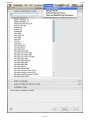
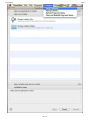
Figure 2. COM's Software Installation window presents three user-friendly methods for installing a supported Windows app—double-click
37 of 44
ComputorEdge
6/10/11
the app's name from the Supported Applications list (top), navigate to and choose an installer file or DVD (middle), or create a "bottle" (i.
e., a Windows environment such as Windows XP or Vista) into which you want the app to be installed (bottom).
Figure 3. Installed Windows apps are included in the Programs menu in COM's menu bar. Select the desired app and it launches under
COM (Figure 1).
Although installing supported Windows apps under COM, as described above, is simple and efficient, one of version 10's new
features is the CrossTie (www.codeweavers.com/compatibility/crosstie) technology that provides another installation
method. CrossTie involves searching for the desired Windows app in CodeWeavers' compatibility library (www.
codeweavers.com/compatibility/search/). If it's there (e.g., Firefox for Windows (www.codeweavers.com/
compatibility/browse/name/?app_id=4595)), the app's Web page in the library will display an orange button labeled
Install Via CrossTie (Figure 4). Click that button and the associated C4P (XML) file downloads to your Mac. This file contains
the necessary instructions for installing the desired app, and configures CrossOver for the app's requirements to ensure proper
installation and performance. Double-click the C4P file and CrossOver initiates the installation process for the desired app.
Figure 4. COM version 10's new features include Web-based CrossTie (a.k.a. CP4) installation technology.
My only quibble with COM is in the Software Installation window—you must step through each "box" (i.e., unit with a disclosure
triangle), otherwise the Proceed button remains unavailable. Thus, for example, if you are attempting to install an unsupported
app, you must click the disclosure triangle for the box labeled "unsupported apps" and choose an item in the pane that
displays, then the Proceed button will be enabled and you can proceed with the installation.
Other noteworthy features (www.codeweavers.com/products/cxmac/change_log/) in COM 10 include elimination of
support for Mac OS X 10.4 (a.k.a. Tiger) because COM now requires GUI features in Leopard and Snow Leopard; new
localizations for German, Czech, Chinese (PRC), and Brazilian Portuguese; improved support for Office 2003, Office 2007,
Internet Explorer 6 and 7, and Quicken 2002, 2009, and 2011; and adoption of Wine 1.3.9.
In conclusion, the money and time that COM saves by eliminating the need to purchase, install and maintain Windows for the
sake of running supported Windows apps far outweighs COM's modest price tag (www.codeweavers.com/products/
cxmac/) ($39.95 for the standard edition, $69.95 for the pro edition). If COM supports the Windows app(s) you need or want
to use, what are you waiting for?
for supported apps
Review contributed by Barry Fass-Holmes
38 of 44
ComputorEdge
6/10/11
On the Brink of Brilliance
If you took Call of Duty's leveling and weapon system, Battlefield Bad Company 2's mission structure, Team Fortress 2's
gameplay, and added in Assassin's Creed's parkour system (the ability to run up walls and other structures) and mashed it all
together into one giant game, you would get something pretty similar to Brink. Brink (www.Brinkthegame.com), the latest
addition to Bethesda Softworks' lineup this year, is a class-based, multiplayer-exclusive shooter that brings a fresh, new twist
to the genre.
The most revolutionary part about Brink is its SMART system. After playing video games for a good portion of my life, I've
come to realize the one thing that makes games unbearable is having to perfectly time jumps to get to certain areas. We've all
been in a situation where we needed to jump a gap to finish a task or level and we end up falling to our deaths. For those of us
who face that problem, the SMART system is our savior. In simple terms the SMART system adds parkour into the world of
first person shooters. If there is a gap or ledge up ahead, all you do is hold down the SMART button (left bumper for the Xbox
360) and you're character will hurdle or scale the object. The whole motion takes place with the movement of your character,
so it feels completely natural and smooth.
39 of 44
ComputorEdge
6/10/11
Brink also offers a refreshing break from traditional multiplayer fare by almost completely eliminating the ability of single
players to win matches by themselves. Remember playing a game where the person on the top of your team always had 30
kills, while you were at the bottom with 2? Well, that doesn't exist in Brink, the playing field is completely level. Each of the four
classes (Soldier, Medic, Engineer and Operative) all have specific tasks that need completing and, in order to win, you have to
complete the primary objective which requires cooperation of all four classes. The soldier class is in charge of defending
teammates as well as replenishing ammo; the engineer builds turrets and does the demolition and construction objectives; the
medic is usually found reviving fallen players; and the operative disguises as the enemy to sneak into their base and steal the
intel.
40 of 44
ComputorEdge
6/10/11
The primary objective can be anything from stealing the intel in order to unlock coordinates or defending a plane so the enemy
can't escape. However, in order to get to the primary objective, a series of smaller ones must first be completed. If you aren't
the appropriate class to complete a specific task, there are also side tasks, things like building a bridge or destroying a
barricade in order to aid your team's advancement to their primary objective. All these objectives and tasks can be switched in
or out at any time during a match by simply opening the mission wheel and selecting a different one. Find yourself in a
situation where you're the wrong class? Correcting it is as simple as interacting with a command post to switch to the
appropriate one.
Aside from parkour and the revolutionary class-based system, Brink incorporates a solid customization and leveling system.
Every weapon has the ability to be customized with attachments ranging from muzzles to scopes and magazines. The biggest
customizable item is your individual character. You can select the clothes you wears, body tattoos, and even body type (heavy
for lots of health and low speed, medium for a balance of speed and health, and light for super speed and lower health). As
you increase with each level new attachments, character gear, and ability coins become available. These coins can be spent
to unlock new abilities for each of your individual classes ranging from reloading while sprinting to shooting grenades in mid air.
All this mixed together makes for an experience that only gets more fun as you level up. So, if you're looking for a fresh spin on
the stale FPS genre, go buy Brink. Brink is available for around $60 on all the major consoles and PC.
Review contributed by Jeremy Halligan
In addition to being an editor and columnist for ComputorEdge and ComputerScene Magazines, where he has written
hundreds of feature articles and cover stories over the past decade, Charles Carr has also penned well over 1,000 non-tech
newspaper and magazine articles and columns for various publications, including two widely-read columns each week for San
Diego's North County Times newspaper.
Carr has covered such diverse topics as pesticide use in area schools, invasive background checks for county volunteers,
asthma awareness, the debate over standards-based grading, potential vulnerabilities in electronic voting machines, and
Southern California's devastating 2003 and 2007 wildfires. He has also written many humorous pieces.
Carr has also edited dozens of stories and articles written by others which have appeared in major publications and web sites
across the country.
He has been a contributor and technical advisor to L.A. and San Diego Parent magazines and receives dozens of
requests a year to appear on Southern California television and radio stations to talk about important events in the tech world.
Carr has judged many writing competitions including San Diego Press Club and Time-Warner Communications contests and
was sole judge for the national NAPPA Tech Toys awards for five years (which his kids really appreciated). He was recently a
judge for the national "Poetry Out Loud" competition.
He has won many writing accolades, including Press Club awards for Best Column Writing, Consumer Writing and Best Arts
and Entertainment, and has repeatedly taken top honors in San Diego Songwriter's Guild competitions for his original musical
compositions.
Carr will soon publish his first book, What a World, a collection of his best writings.
Learn more at www.charlescarr.com.
41 of 44
ComputorEdge
6/10/11
Return to Table of Contents
Editor's Letters: Tips and Thoughts from
Readers
“Computer and Internet tips, plus comments on
the articles and columns.” by ComputorEdge Staff
"Software to Forecast Human Behavior," "You-Send-It," "May 13 Digital Dave
Column on Increasing Speed," "Downloading Flash Videos on Macs"
Software to Forecast Human Behavior
[Regarding Marilyn K. Martin's May 13 article, "Software to Forecast Human Behavior":]
Marilyn K. Martin's articles are excellent, insightful, well written and researched.
Thanks, ComputorEdge.
-Lynn Manning Ross, San Diego
Thank you, Lynn!
-Marilyn K. Martin, Texas
You-Send-It
[Regarding the May 20 Digital Dave column:]
Dave,
I've been using YouSendIt for years. It works great and is reasonably simple. A friend of mine uses the commercial version in
his business for sending large video files to clients and it works like a charm. Just an FYI.
-John H, Encinitas, Ca
Dave,
Free version of subject is limited to 50MB. They charge $10/mo for the 2GB version and, of course, more for bigger loads.
Best,
-Joe, San Diego
ComputorEdge on eReader
[Regarding the May 13 EdgeWord: Take ComputorEdge to the Gym column:]
Congratulations for keeping with the fast tech changes. I have a NOOK Color and this will enable me to more easily keep up
when life gets so busy that I don't have time to click my desktop e-mail link to ComputorEdge. When I have other
computing needs when on the go I also carry a netbook, but the NOOK is so compact, with a good size readable screen that it
has become my reader of choice. Plus the easel type of NOOK cover allows me to read in bed in almost any position.
-Susan McClure, San Diego, CA
42 of 44
ComputorEdge
6/10/11
May 13 Digital Dave Column
[Regarding the May 27 Editors Letters: Tips and Thoughts from Readers column:]
I should have mentioned that I have increased my RAM to the maximum allowed by the MoBo in every computer I have ever
owned with excellent results. In every case it speed things up significantly. That is why, when I install the quad core Phenom
Black chipset I intend to increase the RAM. I am limited to 4GB while running a 32 bit OS with my Gigabyte MoBo, but it will
accept 16GB when running a 64 bit OS. More Ram, up to the system limit, is probably the easiest, cheapest, upgrade you can
do. RAM is usually the bottleneck in a system as it is always slower than CPU speed.
-Paula Barefoot, Borrego Springs
Paula said "his Win7 64-bit is faster than mine running my old XP Pro." I suspect the reason is that yours is an "old"
installation, not that it is XP. A group of us umpc users use a device that is way underpowered by today's standards (1.5GHz &
1GB RAM). Although they can install 7, many choose to install XP since it's a lot more efficient (faster). I use a slightly more
powerful unit with a 1.86GHz Atom and 2GB RAM and choose to use 7 because it works OK and is more modern, not because
it's faster than a fresh install of XP.
-Ron Cerrato, San Diego
Downloading Flash Videos on Macs
[Regarding the May 20 Wally Wangs Apple Farm column:]
In addition to using Snapz Pro, Mac owners have two other ways of downloading a Flash video. One involves using Apple's
Safari Web browser, the other using a free utility program mentioned in my article "Ten Utilities for Snow Leopard" .
Method 1—After accessing a Web page containing a Flash video that you want to download, open Safari's Activity window
(select Window => Activity from Safari's menu bar) and scroll through the window until you find a URL for to the .flv video file
(finding the reference will be light years easier if you have only one open window or tab in Safari than if you have many), then
double-click the reference while pressing your keyboard's option key. The video then will begin downloading.
Method 2—After downloading, installing and launching EasyFind (www.devon-technologies.com/download/index.
html#freeware) and displaying in a Web browser the Web page containing the Flash video of interest, select your Mac's
boot-up volume from EasyFind's pop-up menu and type "FlashTmp0" (without the quote marks) in EasyFind's search term textinput box. Single click "FlashTmp0" that subsequently displays in EasyFind's search window, then click the Reveal In Finder
button in EasyFind's toolbar. A Finder window containing the FlashTmp0 file will display. Drag that file to your Mac's desktop
and rename it as you wish, adding ".flv" (without the quote marks) after the name (e.g., "coolvideo.flv"). In the alert that
displays, click the Add button. Voilà!
-Barry Fass-Holmes, San Diego, CA
ComputorEdge always wants to hear from you, our readers. If you have specific comments about one of our articles,
please click the "Tell us what you think about this article!" link at the top or bottom of the specific article/column at
ComputorEdge.com (webserver.computoredge.com/online.mvc?src=ebook). Your comments will be attached to
the column and may appear at a later time in the "Editor's Letters" section.If you want to submit a short "ComputorQuick
Review", or yell at us, please e-mail us at [email protected].
43 of 44
ComputorEdge
6/10/11
Send mail to [email protected] with questions about editorial content.
Send mail to [email protected] with questions or comments about this Web site.
Copyright © 1997-2011 The Byte Buyer, Inc.
ComputorEdge Magazine, P.O. Box 83086, San Diego, CA 92138. (858) 573-0315
44 of 44