1
LYNXR-IE Installation and Setup Guide
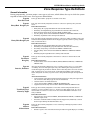
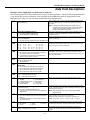
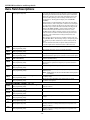
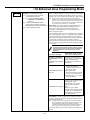
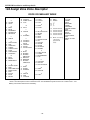
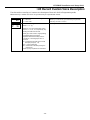
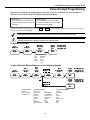
Data Field Descriptions
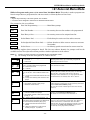
✻35
Entry Delay 01
✻36
Entry Delay 02
✻37
Audible Exit Warning/Quick Exit
✻38
✻39
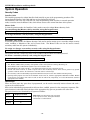
The system will wait the time entered before sounding alarm
upon entering if system is not disarmed.
Note: Entry delay should be less than 45 seconds in order to
comply with EN50131.
00-99 = entry delay time in seconds.
The system will wait the time entered before sounding alarm
upon entering.
Note: Entry delay should be less than 45 seconds in order to
comply with EN50131.
00-99 = entry delay time in seconds.
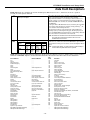
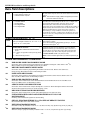
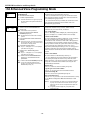
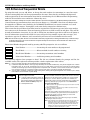
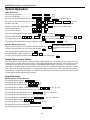
Exit Warning
0 = no exit warning
sound
1 = provide exit
warning sound
when armed AWAY
Exit Warning: Sound consists of slow continuous beeps until last
5 seconds, when it changes to fast beeps. The warning sound will
end at the termination of exit delay.
Quick Exit
0 = no quick
exit
1 = allow quick
exit
Quick Exit: If enabled, user can restart the exit delay time after
arming in STAY mode by entering the user code and pressing
the STAY key. This avoids having the user disarm then re-arm
the system after allowing someone to enter or exit
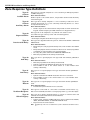
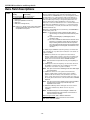
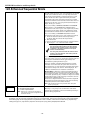
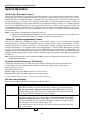
Confirmation of Arming Ding
0 = no ding
1 = confirmation ding after arming system
2 = confirmation ding after arming from RF button or RF
keypad only
Power Up In Previous State
0 = always power up in a disarmed state
1 = assume the system status prior to power-down
Confirmation of arming is provided by a 1/2 second external
sounder “ding” that sounds when closing report is sent, or at the
end of exit delay.
If Option 2 is selected the external sounder “ding” occurs
immediately after the system receives the RF transmission.
When the system powers up armed, an alarm will occur 1
minute after arming if a zone is faulted, and any bypassed zones
will be unbypassed.
Note: If the previous state was armed AWAY or STAY, the system
will not respond to sensor changes for 1 minute, which
allows time for sensors such as PIRs to stabilize.
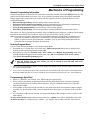
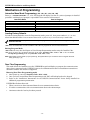
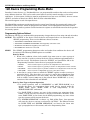
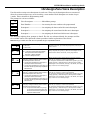
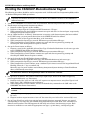
DIALER PROGRAMMING (✻40–✻50)
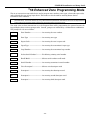
Fields ✻40, ✻41, ✻42: Enter up to the number of digits shown. Enter 0–9, # + 11 for ‘*’; # + 12 for ‘#’; # + 13 for a pause
(2 seconds), # + 14 for “+”. Whenever AAV is used, primary (field ✻41) and secondary (field ✻42) phone numbers should
be preceded with the call waiting disable command. Otherwise, there is the possibility of connection of the third party to
LYNXR-IE during AAV mode.
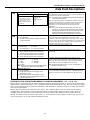
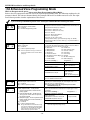
✻40
PABX access Code
✻41
Primary Phone No.
✻42
Secondary Phone No.
If fewer than 6 digits need to be entered, exit by pressing [✻]. To
clear entries from field, press ✻40✻.
Enter up to 6 digits if PABX is needed to access an
outside line.
Enter up to 20 digits.
Note: SMS phone numbers must have a maximum of
15 digits.
Enter up to 24 digits.
Note: SMS phone numbers must have a maximum of
15 digits.
If fewer than 20 digits entered, exit by pressing [✻]. To clear
entries from field, press ✻41✻.
Note: Backup reporting (8 attempts are made to the secondary
phone number if no kissoff is received after 8 attempts to the
primary number) is automatic only if there is a secondary
phone number (field ✻42).
If fewer than 24 digits entered, exit by pressing [✻]. To clear
entries from field, press ✻42✻. See backup reporting note for
field ✻41.
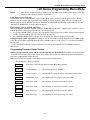
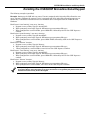
All four digits of the Subscriber account number must be entered in Fields ✻43 and ✻44.
Fields ✻43 and ✻44:
Enter 0 as the first digit of a 4-digit account number for Nos. 0000–0999. Enter [✻] as the fifth digit if a 4-digit account
number is used. Exit field by pressing [✻] if only 3 digits are used. To clear entries from field, press ✻43✻ or ✻44✻. See
blank Programming Form for examples of account number entries. Enter digits 0–9; # +11=B; # +12=C; # +13=D; #
+14=E; or # +15=F.
✻43
✻44
Primary Subs account No.
Enter a four or ten digit account number.
Secondary Subs account No.
Enter a four or ten digit account number.
Enter the primary subscriber account number.
To clear entries from field, press ✻43✻.
Enter the secondary subscriber account number.
To clear entries from field, press ✻44✻.
- 18 -