1
INSTALLING THE XCCN OPTION CARD
1. Remove power from the unit
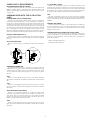
2. Insert a flat-bladed screwdriver into the slot at the top of the expansion port
cover. Gently apply pressure on the screwdriver in an upward direction until
the expansion port cover disengages from the unit as shown in Figure 1.
3. Verify that the option card knobs are in the “unlocked” position as shown in
Figure 2.
4. Carefully insert the option card into the expansion port opening while
aligning the card-edge connector on the option card with the main board's
header, as shown in Figure 3. Once aligned, gently press on the front of the
card until it is flush with the front of the case.
5. Turn the option card knobs to the locked position as shown in Figure 4.
Caution: The expansion and main circuit boards contain static
sensitive components. Before handling the cards, discharge static
charges from your body by touching a grounded bare metal object.
Ideally, handle the cards at a static controlled clean workstation.
Also, handle the cards by the edges only. Dirt, oil, or other
contaminants that may contact the cards can adversely affect circuit
operation.
Warning: Risk of Danger: Be sure to remove all power before
removing the expansion port cover
XCCN
RUN/ERR
Figure 2
Figure 1
GND
CANSHLD
CAN+
V+
XCCN
RUN/ERR
GND
CANSHLD
CAN+
V+
Figure 3
Figure 4
XCCN
RUN/ERR
NLD
N+
2