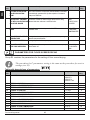
1
ENG
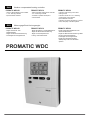
Weather compensated heating controller
PROMATIC WDC10B
- mixing or direct heating circuit controller
- d. h. w. warming controller
- liquid fuel boiler controller
DEU
PROMATIC WDC10
- mixing and direct heating circuit controller
- d. h. w. warming controller
- controller of systems with liquid or
solid fuel boiler
PROMATIC WDC20
- controller of two mixing or two direct
heating circuits
- controller of boiler for d. h. w. warming
or warming by solar collectors
- liquid fuel boiler controller
- controller of systems with liquid or solid fuel
boiler, heat pump or bivalent systems
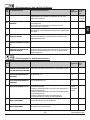
Witterungsgeführte Heizungsregler
PROMATIC WDC10B
- Regler des Mischer- oder
Direktheizkreises
- Regler der Brauchwassererwärmung
- Kesselregler für Flüssigbrennstoff
PROMATIC WDC10
- Regler des Mischer- und Direktheizkreises
- Regler der Brauchwassererwärmung
- Regler von Kesselsystemen für
Flüssig- oder Festbrennstoff
PROMATIC WDC
PROMATIC WDC20
- Regler zweier Mischerheizkreise oder
zweier Direktheizkreise
- Regler der Brauchwassererwärmung mittels
Kessel und Sonnenkollektoren
- Kesselregler für Flüssigbrennstoff
- Regler eines Zweikesselsystems,
Wärmepumpe oder eines bivalentes
Systems
Weather compensated heating controller
WDC10B, WDC10 and WDC20
ENG
Witterungsgeführte Heizungsregler
WDC10B, WDC10 und WDC20
DEU
3
INTRODUCTION
Weather compensated controllers WDC are intended for control of direct and/or mixing heating circuit or two mixing heating circuits and d. h. w. warming with a boiler, solar collectors
and other energy sources.
For initial setup see Initial controller setup, page 9!
5
User manual
ENG
Weather compensated heating controller
WDC10B, WDC10 and WDC20
CONTENTS
ENG
Introduction ................................................................................................................................... 5
USER MANUAL
Controller description .................................................................................................................... 8
Initial controller setup .................................................................................................................... 9
Graphic LCD display ..................................................................................................................... 12
Description of symbols presented on the display ......................................................................... 13
Help screens, messages and warnings........................................................................................ 17
Entering and navigating through the menu .................................................................................. 18
Structure and description of the menu ......................................................................................... 18
Temperature settings .................................................................................................................... 23
User functions ............................................................................................................................... 24
Operating mode selection............................................................................................................. 26
Setting time programs .................................................................................................................. 28
Basic settings................................................................................................................................ 30
Data overview ............................................................................................................................... 32
SERVICE SETTING MANUAL
Controller parameters .................................................................................................................. 33
User parameters ........................................................................................................................... 33
Heating curve ..................................................................................................................... 36
Service parameters ..................................................................................................................... 38
Parameters for floor screed drying ............................................................................................... 48
Factory settings ............................................................................................................................ 49
Basic description of operations..................................................................................................... 50
Mixing heating circuit ........................................................................................................... 50
Direct heating circuit ............................................................................................................ 51
Liquid fuel boiler .................................................................................................................. 52
Heat pump ........................................................................................................................... 52
Pump for additional mixing in boiler (bypass pump) ........................................................... 53
Domestic hot water (d.h.w.) ................................................................................................. 53
Circulation of domestic hot water ........................................................................................ 55
Remote activation of heating ............................................................................................... 55
Operation of heating systems with two heating sources ..................................................... 55
Room unit DD2+ .................................................................................................................. 58
Operation mode for sensor malfunctions ............................................................................ 59
Expanding the system on multiple heating circuits ............................................................. 60
Installation and connection of safety limiter VT ................................................................... 61
Switching valve operation by two heat sources .................................................................. 62
Differential controller............................................................................................................ 63
Setting the minimum rotation rate of R6 pump .................................................................... 64
Simulation of sensors .......................................................................................................... 64
User manual
6
Controller installation .................................................................................................................... 65
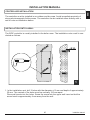
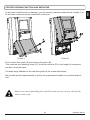
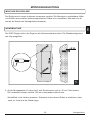
Installation onto a wall .................................................................................................................. 65
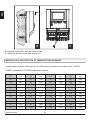
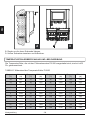
Marking and description of temperature sensors ......................................................................... 66
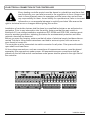
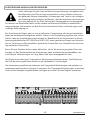
Electrical connection of a controller.............................................................................................. 67
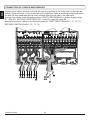
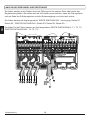
Connecting cables and sensors ................................................................................................... 68
Controller malfunction and servicing ............................................................................................ 69
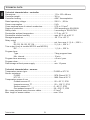
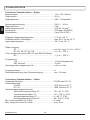
Technical data .............................................................................................................................. 70
Declaration of conformity .............................................................................................................. 71
Disposal of old electrical and electronic equipment ..................................................................... 71
Hydraulic schemes ....................................................................................................................... 141
7
User manual
ENG
INSTALLATION MANUAL
ENG
USER MANUAL
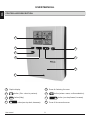
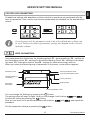
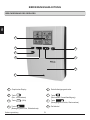
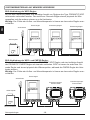
CONTROLLER DESCRIPTION
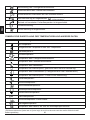
1
2
6
3
4
7
8
5
1
5
Graphic display.
2
button (Esc - return to previous).
6
3
button (Help).
7
4
User manual
8
button(one step back, decrease).
8
Screw for fastening the cover.
button (enters a menu, confirms selection).
button (one step forward, increase).
Cover of the connection area.
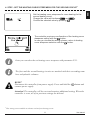
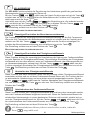
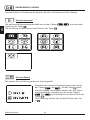
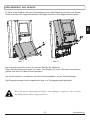
WDC heating controllers are equipped with an innovative solution which enables the setup of
controller in just three or four easy steps.
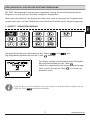
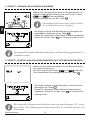
When the controller is connected to the network for the first time, the display first shows the
program version and company logo and then the first step of the procedure for controller
settings is presented.
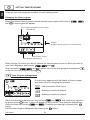
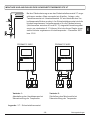
STEP 1 - SET LANGUAGE
Use buttons
and
to select the desired language.
Confirm the selected language by pressing
.
The controller requires a confirmation of language selection with the
button.
In case you chose the wrong language, return to the language selection with the
button.
If you do not find the desired language in the first screen, move to the next screen
with
.
9
User manual
ENG
INITIAL CONTROLLER SETUP
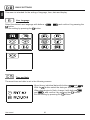
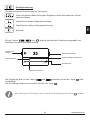
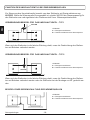
STEP 2 - SET HYDRAULIC SHEME
ENG
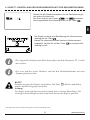
Select a hydraulic scheme for controller operation.
Move between schemes with buttons
and
Confirm the selected scheme by pressing
.
.
All schemes with mixing heating circuit are
available for radiators and floor/wall heating.
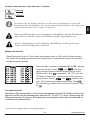
The controller requires a confirmation of language selection with the
button.
In case you choose the wrong scheme, return to scheme
selection with the
button.
Later you can change the selected hydraulic scheme with service parameter S1.1.
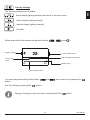
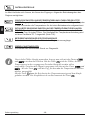
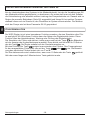
3. STEP- SET THE HEATING CURVE STEEPNESS FOR THE FIRST CIRCUIT
Set the heating curve steepness for room heating for the
first heating circuit.
Change the value with buttons
and
.
Confirm the selected value by pressing
.
The controller requires a confirmation of the set heating
curve steepness with the
button.
In case you choose the wrong heating curve steepness,
return to heating curve steepness selection with the
button.
Later you can change the heating curve steepness with parameter P2.1.
The meaning of heating curve steepness is described in detail on page 34.
User manual
10
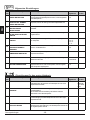
Set the heating curve steepness for room heating for the
second heating circuit.
Change the value with buttons
and
.
Confirm the selected value by pressing
.
The controller requires a confirmation of the heating curve
steepness setting with the
button.
In case you choose the wrong scheme, return to heating
curve steepness selection with the
button.
Later you can alter the set heating curve steepness with parameter P3.1.
The first and the second heating circuits are marked with their according numbers on hydraulic schemes.
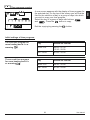
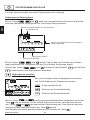
RESET
Disconnect the controller from power supply. Press and hold the
connect power supply.
button and
Attention! The controller will be reset and requires additional setting. When the
controller is reset, all of its previous settings are deleted.
1
This setting is not available in schemes with only one heating circuit.
11
User manual
ENG
4. STEP - SET THE HEATING CURVE STEEPNESS FOR THE SECOND CIRCUIT1
ENG
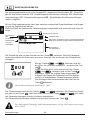
GRAPHIC LCD DISPLAY
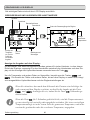
On the LCD display we can look up all the important data for the controller operation.
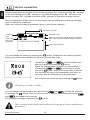
DESCRIPTION AND PRESENTATION OF THE BASIC SCREEN:
Heating circuit.
Operation mode.
User functions.
Room unit.
Status of the controller's control outputs.
Review of
measured
temperatures.
Review of
temperatures, Time and
date.
protection
functions and
other data.
Messages
and
warnings.
Review of data on the screen:
Operation mode and user functions appear separately for each circuit on the upper third of the
screen. To switch between heating circuits and the screen with the hydraulic scheme review
use the
button.
Temperatures, active outputs, protection functions and other data appear in the middle section
of the screen. To review temperatures and other data, use buttons
and
.
The number of sensors and other data displayed on the screen depends on the selected hydraulic scheme and controller settings.
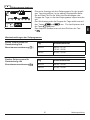
If you wish to retrieve the desired data after using the keyboard, look for the
data with buttons
and
, then confirm it by pressing the
button
for 2 seconds.
If you press the
button for 2 seconds, the temperature review will change
from a single line review into a double line review or vice versa. In the two-line
temperature review, the measured temperature appears in the first line, and the
desired or the calculated temperature appears in the second line.
User manual
12
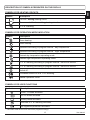
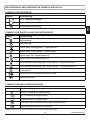
DESCRIPTION OF SYMBOLS PRESENTED ON THE DISPLAY
Symbol
ENG
SYMBOLS FOR HEATING CIRCUITS
Description
The first - mixing heating circuit.
The second - direct or mixing heating circuit.
D. h. w. warming.
SYMBOLS FOR OPERATION MODE INDICATION
Symbol
Description
Room heating.
Room cooling.
Operation according to program interval - day temperature. *
Operation according to program interval - night temperature. *
Desired day temperature operating mode.
Desired night temperature operating mode.
D. h. w. warming according to program interval - switch-on interval. *
D. h. w. warming according to program interval - switch-off interval. *
Switch off.
Permanent switch-on of d. h. w. warming.
Manual operation mode.
SYMBOLS FOR USER FUNCTIONS
Symbol
Description
»PARTY« mode activated.
»ECO« mode activated.
Holiday mode activated.
One-time d. h. w. warming activated.
Anti legionella protection activated.
* The number marks the first or the second time program accordingly.
13
User manual
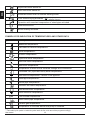
Liquid fuel boiler switch-off.
ENG
Solid fuel boiler switch-on.
Automatic switch over to summer heating mode.
- drying day
- duration of drying
Floor screed drying activated.
Operation with constant temperature of stand-pipe activated.
Remote switch-on.
Boost heating activated.
SYMBOLS FOR INDICATION OF TEMPERATURES AND OTHER DATA
Symbol
Description
Measured temperature.
Calculated or desired temperature.
Room temperature.*
Outdoor temperature.
Liquid fuel boiler temperature.
Solid fuel boiler temperature.
Gas boiler temperature.
Temperature of heat source obtained through BUS connection.
Combined fuel (liquid and solid) boiler temperature.
Heat source temperature - sensor in the pipeline.
Stand-pipe temperature.*
Return-pipe temperature.*
Domestic hot water temperature.
Heat accumulator temperature.
Solar collectors temperature.
Floor screed temperature. *
Boiler return-pipe temperature.
Exhaust gas temperature.
Temperature of the area where heat pump is installed.
* The number by the symbol or inside the symbol marks the first or the second time program accordingly.
User manual
14
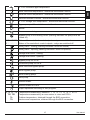
D. h. w. circulation pipe temperature.
ENG
Solar collectors temperature - differential thermostat function.
Solid fuel boiler temperature - differential thermostat function.
Heat accumulator function - differential thermostat function.
D. h. w. storage tank temperature - differential thermostat function.
Bypass pump - differential thermostat function.
Burner.
Burner - second stage.
Bypass pump of the heating circuit (flashing indicates the pump must be
turned off).
R12345678
R12345678
Status of the controller's control outputs - relays are switched on.
Status of the controller's control outputs - relays are switched off.
Mixing valve - closing (flashing indicates it must be closed).
Mixing valve - opening (flashing indicates it must be opened).
Change-over valve - closing.
Change-over valve - opening.
Bypass pump for d.h.w.
Circulation pump for d.h.w.
Solar collectors bypass pump.
Boiler bypass pump.
Boiler leading pump.
Heat pump.
Electric heater.
Electric heater for d.h.w.
Output operation according to time program.
T1, T2, T3, ... T8
TR1, TR2
TA
TQ
Temperature measured by sensors T1, T2, T3, T4, T5, T6, T7 or T8.
Temperature measured by a room sensor or room unit DD2+.
Outdoor temperature, obtained through the BUS connection.
Heat source temperature, obtained through the BUS connection.
15
User manual
ENG
SYMBOLS FOR PROTECTION FUNCTIONS
Symbol
Description
Liquid fuel boiler overheating protection.
Solid fuel boiler overheating protection.
Solar collectors overheating protection.
Accumulator overheating protection.
D. h. w. storage tank overheating protection.
D. h. w. storage tank overheating protection - cooling directed into the boiler.
D. h. w. storage tank overheating protection - cooling directed into the
collectors.
Protection again room freezing.
Frost protection - boliler switch-on to minimum temperature.
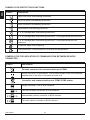
SYMBOLS FOR THE INDICATION OF COMMUNICATION BETWEEN DEVICES
CONNECTED
Symbol
Description
Devices connected to communication port COM1.
Room unit DD2+ is connected. The number beside room unit indicates,
whether this is the first or the second room unit.
Controller and communication port COM1/COM2 status.
Single controller - not in BUS network.
The first (master) controller in BUS network.
Intermediate (slave) controller in BUS network.
The last (slave) controller in BUS network.
User manual
16
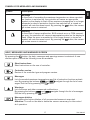
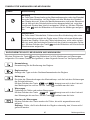
SYMBOLS FOR MESSAGES AND WARNINGS
Description
Message
In the event of exceeding the maximum temperature or when a protection function is switched on, the controller will cause an appropriate
symbol on the display to flash. When maximum temperature is no longer
exceeded or when a protection function has switched off, a turned on
symbol will note the recent event. By pressing the
button, the message review screen is retreived.
Warning
In the event of sensor malfunction, BUS network error or COM connection error, the controller will cause an appropriate symbol on the display to
flash. When the error is remedied or is no longer present, a turned on
symbol will note the recent event. By pressing the
button, the message review screen is retreived.
HELP, MESSAGES AND WARNINGS SCREEN
By pressing the
button, the help, messages and warnings screen is retreived. A new
window opens in which the following icons are available
Short instructions
Short instructions on the use of controller.
Controller version
Review of the controller type and program version.
Messages
List of exceeded maximum temperatures and list of protection functions activations. By pressing the buttons
and
navigate through the list of messages. Exit the list by pressing the
button.
Warnings
List of sensors and other compounds malfunctions.
By pressing the buttons
and
navigate through the list of messages.
Exit the list by pressing the
button.
Messages deletion
By pressing the button deletion of all unconnected sensors is executed.
Attention: You will not be able to delete the sensors necessary for the controller's operation.
17
User manual
ENG
Symbol
ENG
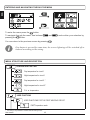
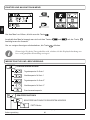
ENTERING AND NAVIGATING THROUG THE MENU
To enter the menu press the
button.
To navigate through the menu, use buttons
pressing the
button.
and
You can return to the previous screen by pressing
, and confirm your selection by
.
If no button is pressed for some time, the screen lightning will be switched off or
reduced according to the setting.
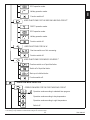
MENU STRUCTURE AND DESCRIPTION
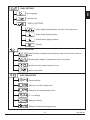
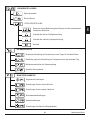
TEMPERATURES SETTING
Day temperature for circuit 1
Night temperature for circuit 1
Day temperature for circuit 2 *
Night temperature for circuit 2 *
D. h. w. temperature
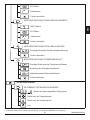
USER FUNCTIONS
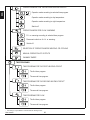
USER FUNCTIONS FOR THE FIRST HEATING CIRCUIT
PARTY operation mode.
* The setting is only available in schemes with two heating circuits.
User manual
18
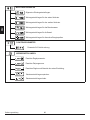
ECO operation mode.
ENG
Holiday operation mode.
Function switch-off.
USER FUNCTIONS FOR THE SECOND HEATING CIRCUIT *
PARTY operation mode.
ECO operation mode.
Holiday operation mode.
Function switch-off.
USER FUNCTIONS FOR D.H.W.
One-time switch-on of d.h.w.warming.
Function switch-off.
USER FUNCTIONS FOR ENERGY SOURCES **
One-time switch-on of liquid fuel boiler.
Switch-off of liquid fuel boiler.
Start-up of solid fuel boiler.
Function switch-off.
OPERATION MODE SELECTION
OPERATION MODE FOR THE FIRST HEATING CIRCUIT
Operation mode according to selected time program.
Operation mode according to day temperature.
Operation mode according to night temperature.
Switch-off.
* The setting is only available in schemes with two heating circuits.
** The setting is only available in schemes with change-over of heat sources.
19
User manual
OPERATION MODE FOR THE SECOND HEATING CIRCUIT*
ENG
Operation mode according to selected time program.
Operation mode according to day temperature.
Operation mode according to night temperature.
Switch-off.
OPERATION MODE FOR D.H.W. WARMING
D. h. w. warming according to selected time program.
Permanent switch-on of d. h. w. warming.
Switch-off.
SELECTION OF OPERATION MODE HEATING OR COOLING
MANUAL OPERATION OF OUTPUTS
CHIMNEY SWEEP
TIME PROGRAMS
TIME PROGRAM FOR THE FIRST HEATING CIRCUIT
The first time program.
The second time program.
TIME PROGRAM FOR THE SECOND HEATING CIRCUIT*
The first time program.
The second time program.
TIME PROGRAM FOR D.H.W.
The first time program.
The second time program.
* The setting is only available in schemes with two heating circuits.
User manual
20
ENG
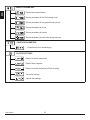
BASIC SETTINGS
User language.
Time and date.
DISPLAY SETTINGS
Active display lighting duration and return to the main menu.
Active display lighting intensity.
Inactive display lighting intensity.
Contrast.
DATA OVERVIEW
Graphic display of temperatures according to days for the period of previous
week.
Detailed graphic display of temperatures for the current day.
Counters of control outputs operation hours.
Special service data.
USER PARAMETERS
General settings.
Settings for the first heating circuit.
Settings for the second heating circuit.
D. h. w. settings.
Settings for boilers.
Settings for alternative energy sources.
21
User manual
SERVICE PARAMETERS
ENG
General service parameters.
Service parameters for the first heating circuit.
Service parameters for the second heating circuit.
Service parameters for d.h.w.
Service parameters for boilers.
Service parameters for alternative energy sources.
FUNCTION PARAMETERS
Parameters for floor screed drying.
FACTORY SETTINGS
Reset of controller parameters.
Reset of time programs.
Reset of controller and restart of the first setting.
Save user settings.
Upload user settings.
User manual
22
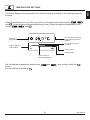
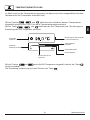
The menu displays the temperatures for which setting is available in the selected hydraulic
scheme.
Select the heating circuit for which you wish to set temperatures with buttons
,
and
. A new screen with temperatures will open. Select the desired temperature with
buttons
,
and
:
Current value of desired
temperature (numerical
display).
Selected
temperature.
Last confirmed value
of setting.
Graphic display
of the setting.
Factory value.
Setting range.
Current value of
desired temperature.
Set the desired temperature with buttons
button.
Exit the setting by pressing
.
and
23
, and confirm it with the
User manual
ENG
TEMPERATURE SETTINGS
ENG
USER FUNCTIONS
User functions enable additional comfort and benefits of using the controller. You will find the
following functions available in the menu:
First heating circuit
Second heating circuit*
Domestic hot water
Energy sources **
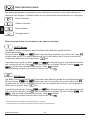
USER FUNCTIONS FOR THE FIRST AND SECOND HEATING CIRCUIT:
PARTY operation mode
PARTY function enables activation of operation according to the desired comfort temperature.
Select Party functions with buttons
and
, and activate it with the
button.
To set the time of function and desired temperature deactivation, select the
icon again.
Now use the
and
buttons to select the setting you wish to change and press
the
button. The value will begin to flash. Change the value with buttons
and
, and confirm it by pressing the
button.
Exit the setting by pressing the
button.
ECO operation mode
ECO function enables activation of operation according to the desired saving temperature.
Select Eco functions with buttons
and
, and activate it with the
button. To set
the time of function and temperature deactivation, select the
icon again.
Now use the
and
buttons to select the setting you wish to change and press
the
button. The value will begin to flash. Change the value with buttons
and
, and confirm it by pressing the
button.
Exit the setting by pressing the
button.
* Functions are only available in schemes with two heating circuits.
** Functions are only available in schemes with liquid fuel boiler and solid fuel boiler.
User manual
24
HOLIDAY function activates the regulation of heating circuit according to the desired saving
temperature up to the date set.
Select Holiday function with buttons
and
, and activate it with the
button. To
set the time of function and temperature deactivation, select the
icon again.
Now use the
and
buttons to select the setting you wish to change and press
the
button. The value will begin to flash. Change the value with buttons
and
,
and confirm it by pressing the
button.
Exit the setting by pressing the
button.
USER FUNCTIONS FOR THE FIRST AND SECOND HEATING CIRCUIT:
One-time activation of d. h. w. warming
This function activates immediate warming of d. h. w. to the desired temperature. When the
desired d. h. w. temperature is achieved, the function deactivates automatically.
Use buttons
and
to select the one-time activation of d.h.w. warming and activate it by pressing the
button. Exit the setting by pressing the
button.
USER FUNCTIONS FOR D.H.W.:
One-time activation of liquid fuel boiler
This function activates immediate switch-over of heating from solid fuel boiler or heat accumulator to liquid fuel boiler. One-time activation of liquid fuel boiler can only be activated in
the case, when the required temperature of heating water is not provided by the solid fuel
boiler or accumulator
Use buttons
and
to select the one-time activation of liquid fuel boiler and activate it by pressing the
button. Exit the setting by pressing the
button.
Deactivation of liquid fuel boiler
Use this function, when you wish to deactivate the heating by liquid fuel boiler and heat only
with solid fuel boiler. This function does not have an automatic deactivation and must be
turned off manually.
Use buttons
and
to select the deactivation of liquid fuel boiler and activate or
deactivate it by pressing the
button. Exit the setting by pressing the
button.
Start-up of solid fuel boiler
This function turns off the liquid fuel boiler and is used whenever we wish to start-up the solid
fuel boiler. If the solid fuel boiler does not reach the temperature required for heating in the
provided period of time, the liquid fuel boiler activates again. Use buttons
and
to
select the start-up of solid fuel boiler and activate it by pressing the
button. Exit the setting by pressing the
button.
You can abort all user functions any time by selecting the
25
icon.
User manual
ENG
Holiday operation mode
ENG
OPERATING MODE SELECTION
In the menu, select the desired operation mode of the controller separate for each heating
circuit and for d. h. w. warming. You can select operation modes from the menu for the
following:
The first heating circuit
The second heating circuit *
Domestic hot water
Switch-over between heating and cooling
Manual operation of outputs
Chimney sweep
OPERATION MODE FOR THE FIRST AND THE SECOND HEATING CIRCUIT:
Operation according to selected time program
Operation proceeds according to the selected time program. If room unit
is switched on, the icon
appears (The number indicates which room
unit influences the circuit). If the controller functions without room unit,
only the
icon will appear.
Operation mode according to day temperature
The controller operates according to the desired day temperature.
Operation mode according to night temperature
The controller operates according to the desired night temperature.
Switch-off
The controller is switched off, while frost protection remains active, if operation
mode heating is selected, or protection against overheating (30 °C), if operation
mode cooling is selected.
OPERATION MODES FOR D.H.W.:
D. h. w. warming according to selected time program
D. h. w. is warmed according to the selected time program.
Permanent activation of d. h. w. warming
D. h. w. warming functions continuously.
Switch-off
D. h. w. is not being warmed.
* The menu is only available in schemes with two heating circuits.
User manual
26
HEATING AND COOLING MODE SELECTION:
ENG
Heating
Cooling
Cooling regulation is thermostatically controlled according to the desired room
temperature and functions with a constant stand-pipe temperature. The temperature is determined with parameters S2.12 and S3.12.
For cooling function a room sensor or a room unit DD2+ must be connected and
the system for supplying cooling water must be switched on.
When switching between heating and cooling, you should change the desired
day and night temperature.
MANUAL OPERATION MODE:
This operation mode is used when testing the heating system or in the event of a malfunction. Each control output can be manually switched on, off or set to operate automatically.
Move between individual outputs R1 to R8 * with buttons
and
. Select the output, of which status you wish to change by pressing the
button, and
ON, OFF or AUTO value will begin to flash. Now you
can change the output status with buttons
and
.
Confirm the setting by pressing the
button.
Exit the setting by pressing the
button.
CHIMNEY SWEEP
Operation mode »Chimney sweep« is intended for emission measurement. Controller activates burner and maintains boiler temperature between 60 °C and 70 °C by adequate activation of loads (heating circuits, domestic hot water) and in such way provides boiler operation
without burner switch-offs.
* The number of outputs depends on the controller type.
27
User manual
ENG
SETTING TIME PROGRAMS
There are two time programs available for each heating circuit.
Changing the time program
Select the desired heating circuit and the desired time program with buttons
and
. A new screen will appear:
,
Time program and heating circuit number.
Selected day.
Timeline
(display of time program for the selected day).
Time program copying.
Time program management.
Select the day, for which you wish to choose the time program course or which you wish to
copy onto other days with buttons
,
and
.
Now use buttons
,
and
or the icon for time program copying
to select the icon for time program management
.
Time program management
A new screen appears with the display of time program
and three icons for changing the program:
- free movement of the cursor
- drawing of switch-off interval
- drawing of switch-on interval
Select the desired command icon with buttons
and
, and confirm the selection
by pressing the
button. Cursor will appear on the timeline. Now draw the desired time
interval course with buttons
and
. Conclude the drawing by pressing the
button.
Exit the time program managment by pressing the
button.
User manual
28
A new screen appears with the display of time program for
the selected day. On the top of the screen you will find the
field for the selection of day or a group of days into which
you wish to copy your time program.
Select the day or a group of days with buttons
and
. Press the
button to copy.
Exit the copying by pressing the
button.
Initial settings of time programs
The first time program for
room heating and d. h. w.
warming
The second time program
for room heating and d. h.
w. warming
Day
Switch-on interval.
MON.-FRI.
05:00 - 07:30
13:30 - 22:00
SAT.-SUN.
07:00 - 22:00
Day
Switch-on interval.
MON.-FRI.
06:00 - 22:00
SAT.-SUN.
07:00 - 23:00
29
User manual
ENG
Time program copying
ENG
BASIC SETTINGS
This menu is intended for the setting of language, time, date and display.
User language
Select the desired user language with buttons
button.
Exit the setting by pressing the
button.
,
and confirm it by pressing the
Time and date
The exact time and date is set in the following manner:
Move throug individual data with buttons
and
With the
button select the data you wish to change.
When data begins to flash, change it with buttons
and
, and confirm it by pressing the
button.
Exit the setting by pressing the
button.
User manual
30
.
Display settings
ENG
The following settings are available:
Active display lighting duration and return to the main menu.
Active display lighting intensity.
Inactive display lighting intensity.
Contrast.
Select and confirm the desired setting with buttons
Graphic symbol.
,
and
:
Current setting value.
Last confirmed setting value.
Factory set
value.
20
80
Setting range.
Current setting value.
You can change the setting with buttons
button.
Exit the setting by pressing the
and
and confirm it by pressing the
button .
Change of setting is only valid when confirmed with the
31
button.
User manual
ENG
DATA OVERVIEW
The following icons for accessing data on the controller operations are available in the menu:
TEMPERATURES DISPLAY FOR THE PERIOD OF ONE WEEK
Graphic display of temperature course according to days for each sensor. Temperatures are recorded for the past week of operation.
DETAILED DISPLAY OF TEMPERATURES FOR CURRENT DAY
Detailed graphic display of temperature course in the current day for each sensor. The frequency of temperature recording can be set with parameter P1.7.
COUNTERS OF CONTROL OUTPUTS OPERATION HOURS
Counters of operation hours of the controller's control outputs.
SPECIAL SERVICE DATA
These serve to provide diagnostics to technical support.
You can review graphs of the sensors by moving between sensors with buttons
and
. Select the sensor, for which you wish to review the temperatures of a previous period with the
button. Now move between days with
buttons
and
. You can change the range of temperature display on
the graph with the
button.
Exit data overview option by pressing the
button.
User manual
32
CONTROLLER PARAMETERS
All additional settings and adaptations of the controller's operations are performed with the
help of parameters. User, service and function parameters are available on the second menu
screen.
In each group, only the parameters used in the selected hydraulic scheme can
be seen. Factory set values of parameter settings also depend on the selected
hydraulic scheme.
USER PARAMETERS
User parameters are divided into the following groups: P1 - general settings, P2 - settings for
the first heating circuit, P3 - settings for the second heating circuit, P4 - settings for domestic
hot water, P5 - settings for boilers, and P6 - settings for alternative energy sources.
When you select the desired group of parameters in the menu, a new screen appears:
Parameter mark.
Current parameter value.
Last confirmed setting value.
Graphic display of
the setting.
Factory set value.
Setting range.
Parameter
description.
Current parameter value.
You can change the Settings by pressing the
button .
The setting value will begin to flash. Now you can change it with buttons
Confirm the setting by pressing the
button.
Now you can move on to another parameter with buttons
and
procedure.
Exit the parameter settings by pressing the
and
.
, and repeat the
button.
33
Service setting manual
ENG
SERVICE SETTING MANUAL
ENG
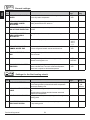
General settings:
Para- Parameter name
meter
Parameter description
Setting
range
Default
setting
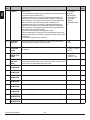
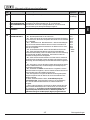
P1.1 AUT. SWITCHOVER SUMMER /
Automatic switch-off and switch-on of heating in respect to avera- 0- NO
ge one-day outdoor temperature.
1- YES
1
P1.2 AVERAGE OUTDOOR TEMP.
Setting of average one-day outdoor temperature at which the
heating should switch-off or switch-on.
10 ÷ 30 °C
18
-30 ÷ 10 °C
-10
WINTER
FOR SUMMER / WINTER
SWITCHOVER
P1.3 OUTDOOR TEMP. FOR ACTIVA- Setting of outdoor temperature by which the frost protection will
TION OF FROST PROTECTION
activate.
P1.4 REQUESTED ROOM TEMP.
Setting of requested room temperature when heating is switched 2 ÷ 12 °C
off.
6
P1.5 TEMPERATURE ROUND UP
Precision of displayed temperatures.
0- 0.1 °C
1- 0.2 °C
2- 0.5 °C
3- 1 °C
With the help of a calendar, the controller carries out the automa- 0- NO
tic clock changeover between summer and winter time.
1- YES
2
P1.7 PERIOD OF TEMPERAT. LOG-
By setting this field you define how often the measured tempera- 1 ÷ 30 min
tures are saved.
5
P1.8 TONES
By setting this field you define whether key pressing is accompa- 0- OFF
nied with sound signals or not.
1- KEYPAD
1
P1.9 ADVANCED DISPLAY OF TEM-
Advanced display of temperatures displays temperatures on main 0- NO
screen in double rows. First row is measured temperature;
1- YES
second row is required or calculated temperature.
1
WHEN CONTROLER IS
SWITCHED OFF
P1.6 AUT. SHIFT OF CLOCK TO
SUMMER / WINTER TIME
GING
PERATURES
1
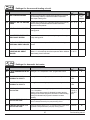
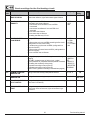
Settings for the first heating circuit:
Para- Parameter name
meter
Parameter description
Setting
range
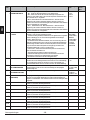
P2.1 HEAT CURVE STEEPNESS
Heating curve steepness indicates what temperature is required
for the heating bodies by a determined outdoor temperature.
See chapter Heating curve.
0,2 ÷ 2,2
P2.2 PARALLEL SHIFT OF HEATING Parallel shift of heating curve (calculated stand-pipe temperatu-
Default
setting
0,7 - floor
1,0 radiators
-15 ÷ 15 °C
re).
Use this setting to eliminate deviation between actual and
required room temperature.
P2.3 DURATION OF BOOST HEATING Setting of boosted temperature by changeover from night to day 0 ÷ 200 min
heating period.
0
P2.4 ROOM TEMPERATURE INCREA- Duration of boosted room temperature by changeover from night 0 ÷ 8 °C
4
CURVE
SE BY BOOST HEATING
Service setting manual
to day heating period.
34
0
Parameter description
Setting
range
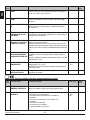
P3.1 HEAT CURVE STEEPNESS
Heating curve steepness indicates what temperature is required
for the heating bodies by a determined outdoor temperature.
See chapter Heating curve.
0,2 ÷ 2,2
P3.2 PARALLEL SHIFT OF HEATING
Parallel shift of heating curve (calculated stand-pipe temperature). -15 ÷ 15 °C
Use this setting to eliminate deviation between actual and
required room temperature.
CURVE
P3.3 DURATION OF BOOST HEATING Setting of boosted temperature by changeover from night to day
heating period.
0 ÷ 200 min
P3.4 ROOM TEMPERATURE INCREA- Duration of boosted room temperature by changeover from night 0 ÷ 8 °C
SE BY BOOST HEATING
ADDITIONAL DIRECT CIRCUITS circuits.
CURVE FOR ADD. DIRECT
CIRCUITS
0,7- floor
1,0radiators
0
0
4
to day heating period.
P3.5 HEAT CURVE STEEPNESS FOR Setting of heat curve steepness for additional direct heating
P3.6 PARALLEL SHIFT OF HEATING
Default
setting
0,2 ÷ 2,2
Parallel shift of heating curve for additional heating circuits.
2 ÷ 12 °C
Values 13 ÷ 90 set directly the boiler temperature when additional 13 ÷ 90 °C
direct heating circuit is activated.
1,2
6
Settings for domestic hot water:
Para- Parameter name
meter
Parameter description
Setting
range
P4.1 D. H. W. TEMPERATURE IN OFF Setting of d. h. w. temperature in OFF program timer interval.
PERIOD
4 ÷ 70 °C
Default
setting
4
P4.2 PRIORITY OF D. H. W.
Setting if d. h. w. warming has priority to room heating in circuit 1. 0- NO
1- YES
0
P4.3 PRIORITY OF D. H. W.
Setting if d. h. w. warming has priority to room heating in circuit 2. 0- NO
1- YES
1
P4.7 TIME PROGRAM FOR D. H. W.
Selection of d. h. w. warming time program which will be used for
d. h. w. circulation.
Setting 1 is first time program for domestic hot water warming.
Setting 2 is second time program for domestic hot eater warming.
Setting 3 is selected time program for domestic hot water
warming.
Setting of running time for d. h. w. circulation pump. Pump running
period is always followed by the pump stand-by period.
1- PROG. 1
2- PROG. 2
3- SELECT.
PROG.
3
0 ÷ 600 sec
300
WARMING TO CIRCUIT 1
WARMING TO CIRCUIT 2
CIRCULATION
P4.8 RUNNING TIME FOR D. H. W.
CIRCULATION PUMP
P4.9 STAND-BY TIME FOR D. H. W.
CIRCULATION PUMP
Setting of stand-by time for d. h. w. circulation pump. Pump stand- 1 ÷ 60 min
by period is always followed by the pump running period.
35
10
Service setting manual
ENG
Settings for the second heating circuit:
Para- Parameter name
meter
ENG
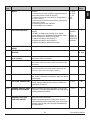
Settings for boilers:
Para- Parameter name
meter
Parameter description
Setting
range
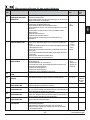
P5.1 MIN. LIQUID FUEL BOILER
Setting of min. liquid fuel boiler temperature.
10 ÷ 90 °C
35
Setting of min. solid fuel boiler temperature.
10 ÷ 90 °C
65
Setting of min. temperature for heat transfer from storage tank.
20 ÷ 70 °C
30
TEMP.
P5.2 MIN. SOLID FUEL BOILER
TEMP.
P5.3 MIN. HEAT ACCUMULATOR
TEMP.
Default
setting
Settings for alternative energy sources:
Para- Parameter name
meter
Parameter description
Setting
range
P6.1 SWITCH-ON DIFFERENCE FOR Setting of difference between solar collectors or solid fuel boiler
COLLECTORS OR SOLID FUEL
BOILER
P6.2 SWITCH-OFF DIFFERENCE FOR
COLLECTORS OR SOILD FUEL
BOILER
P6.3 MIN. TEMPERATURE OF COLLECTORS OR SOLID FUEL
BOILER
5 ÷ 30 °C
temperature and storage tank or heat accumulator temperature by
which the circulation pump shall switch-on.
Setting of difference between solar collectors or solid fuel boiler
1 ÷ 25 °C
temperature and storage tank or heat accumulator temperature by
which the circulation pump shall switch-off.
Setting of min. solar collector or solid fuel boiler temperature to
10 ÷ 60 °C
activate the circulation pump.
Default
setting
12
4
35
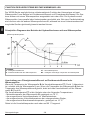
HEATING CURVE
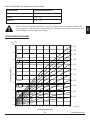
Heating curve steepness indicates, what temperature is required for the heating bodies by a
determined outdoor temperature. The steepness value depends mainly on the heating system type (floor, wall, radiator, convector heating) and insulation of the building.
Determining the heating curve steepness
If you have enough data, you can determine the heating curve steepness with a calculation,
otherwise from experience, based on the evaluation of heating system dimensioning
and building insulation.
The heating curve steepness is set correct, if the room temperature remains stable, even by
large outdoor temperature changes.
When the outdoor temperature remains above + 5 °C, you can adjust the room temperature
by changing the setting for day or night temperature or with the parallel shift of the heating
curve (parameters P2.2 and P3.2). If it gets colder in the building, while the outdoor temperature is dropping, then the heat curve steepness is set to low - you should increase the
setting. If the object by low outdoor temperatures gets warmer, the heat curve steepness
needs to be decreased.
The maximum steepness increase/decrease should not be greater than 0.1 to 0.2 units per
one observation. At least 24 hours must pass between two observations.
Service setting manual
36
Preferred settings of the heating curve steepness:
Setting range:
floor
0,2 - 0,8
wall
0,4 - 1,0
radiator
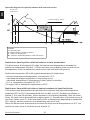
0,8 - 1,4
ENG
Heating system:
With adjusting the heat curve steepness, the controller is tuned with the
building. For optimal controller operation, the right setting of the heat curve
steepness is very important.
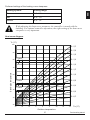
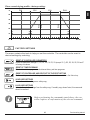
Heat curve diagram
Tv (°C)
100
S=2,2
S=2,0
90
S=1,8
Tvmax
S=1,6
80
S=1,4
Stand-pipe temperature
70
S=1,2
S=1,0
60
S=0,8
Tkmin
50
S=0,6
Tvmin
40
S=0,4
S=0,2
30
20
20
15
10
5
0
-5
-10
-15
-20
Ta (°C)
Outdoor temperature
37
Service setting manual
ENG
SERVICE PARAMETERS
Service parameters are divided into the following groups: S1 - general settings, S2 - settings
for the first heating circuit, S3 - settings for the second heating circuit, S4 - settings for domestic hot water, S5 - settings for boilers in S6 - settings for alternative energy sources.
Service parameters enable you to choose among various additional functions and adaptations of controller's operations.
When you select the desired parameter group, a new screen appears:
- Parameter is locked.
Parameter value.
Parameter
mark.
Factory set
value of the
parameter.
MIN is the minimum possible setting of parameter.
MAX is the maximum possible setting of parameter.
H YD R A U L I C S C H E M E
Parameter description.
You can change the setting by pressing the
button. Parameters are locked by factory
setting, so a new screen appears for the entry of unlocking code:
Use buttons
and
to find the number you
wish to change and press the
button.
When the number begins to flash, you can change it
with buttons
and
and confirm it by pressing the
button. When the correct code is entered,
the controller will unlock the parameters and return to
the menu with the selected group of parameters.
Exit the unlocking code entry by pressing the
button.
The factory set code is »0001«.
You can change the parameter value with buttons
and
. Confirm the selection
by pressing the
button. Now you can move on to another parameter with buttons
and
, and repeat the procedure.
Exit parameter settings by pressing the
button.
Only a trained professional shall perform the changing of service and function
parameters.
Service setting manual
38
Para- Parameter name
meter
Parameter description
Setting range Default
setting
S1.1
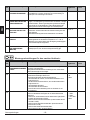
HYDRAULIC SCHE- Selection of hydraulic scheme.
ME
S1.2
CODE FOR UNLOC- This setting enables the change of code which is necessary to unlock the
0000 - 9999
KING THE SERVICE service settings (S and F parameters).
WARNING! Keep new code on a safe place. Without this code is impossible to
SETTINGS
change service settings.
S1.3
TEMPERATURE
SENSOR TYPE
S1.4 T1 SENSOR
FUNCTION
depends on
type of controller
/
0001
Selection of temperature sensors Pt1000 or KTY10.
0- PT1000
1- KTY10
0
Selection of function for sensor connected to input T1.
1- RF, room sensor in circuit 1
2- EF1, sensor for limitation of max. floor temperature in circuit 1. Max. floor
temperature is set with parameter S2.11.
3- RLF1, return pipe sensor in circuit 1. Activates limitation of difference
between stand and return pipe and by that the limitation of max. heating circuit
power. Max. difference is set with parameter S2.14.
4- KTF, sensor in solar collectors. Activates the solar differential thermostat.
(Cold sensor for differential thermostat is T8, pump is controlled with output
R6, operation mode is set with parameters P6 and S6).
5- KF2, sensor in solid fuel boiler. Activates the solid fuel boiler differential
thermostat. (Cold sensor for differential thermostat is T8, pump is controlled
with output R6, operation mode is set with parameters P6 and S6).
6- BF3, d. h. w circulation with temperature sensor. Sensor is placed onto (hot)
exit pipe from storage tank. D. h. w. circulation pump is activated if temperature increase is detected.
7- SF3, d. h. w. circulation with flow switch. D. h. w. circulation pump is activated if contact are closed.
8- BF2, auxiliary d. h. w temperature sensor. Sensor is placed in upper third of
storage tank and enables activation d. h. w. warming according to BF2 sensor.
9- AGF, flue gas temperature sensor for boiler. Warning is displayed on the
screen, if flue gas temperature rises above value of parameter S5.18.
10- RFHP, room sensor in ambient where d. h. w. heat pump is installed. D. h.
w. warming with other heat sources is disabled if room temperature is higher
as set with parameter S4.11.
11- RLKF, boiler return-pipe sensor. Controller maintains min. level of boiler
return-pipe temperature set with parameter S5.14. For this setting it is
necessary to have a hydraulic system with primary boiler circulation pump or
hydraulic system with boiler bypass pump (parameter S4.9=4).
1- RF1
2- EF1
3- RLF1
4- KTF
5- KF2
6- BF3
7- SF3
8- BF2
9- AGF
10- RFHP
11- RLKF
1
1- RF2
2- EF2
3- RLF2
4- RLF1
1
S1.5 T8 SENSOR FUNCTI- Selection of function for sensor connected to input T8.
1- RF2, room sensor in circuit 2
ON
2- EF2, sensor for limitation of max. floor temperature in circuit 2. Max. floor
temperature is set with parameter S3.11.
3- RLF2, return pipe sensor in circuit 2. Activates limitation of difference
between stand and return pipe and by that the limitation of max. heating circuit
power. Max. difference is set with parameter S3.14.
4- RLF1, return pipe sensor in circuit 1. Activates limitation of difference
between stand and return pipe and by that the limitation of max. heating circuit
power. Max. difference is set with parameter S2.14
39
Service setting manual
ENG
General service settings:
ENG
Para- Parameter name
meter
S1.6 DIGITAL INPUT
T1 AND T6
Parameter description
Setting range
S1.7 ANTI-BLOCK
FUNCTION
All outputs that haven’t been activated in the last week are activated on
Friday between 20:00 and 20:15. for 60 seconds.
0- NO
1- YES
S1.8 REMOTE
ACTIVATION
VIA BUS
Selection if remote activation can be activated only local or also from mas- 1- LOCALY
2- LOCALY & FROM
ter controller.
MASTER
S1.9 CIRCUITS FOR
REMOTE ACTIVATION
Selection of circuits affected by remote activation.
S1.10 BUILDING TYPE
(TIME CONSTANT)
Selection of building type (time constant). For heavy (thick walls ) and good 0 ÷ 12 h
isolated buildings select higher value. For light (thin walls, no heat accumulation) and poor isolated objects select lower value.
6
S1.13 SENSOR T1
CALIBRATION
Correction of displayed measured temperature for sensor T1.
-5 ÷ 5 K
0
S1.14 SENSOR T2
CALIBRATION
Correction of displayed measured temperature for sensor T2.
-5 ÷ 5 K
0
S1.15 SENSOR T3
CALIBRATION
Correction of displayed measured temperature for sensor T3.
-5 ÷ 5 K
0
S1.16 SENSOR T4
CALIBRATION
Correction of displayed measured temperature for sensor T4.
-5 ÷ 5 K
0
S1.17 SENSOR T5
CALIBRATION
Correction of displayed measured temperature for sensor T5.
-5 ÷ 5 K
0
S1.18 SENSOR T6
CALIBRATION
Correction of displayed measured temperature for sensor T6.
-5 ÷ 5 K
0
S1.19 SENSOR T7
Correction of displayed measured temperature for sensor T7.
-5 ÷ 5 K
0
Correction of displayed measured temperature for sensor T8.
-5 ÷ 5 K
0
CALIBRATION
S1.20 SENSOR T8
CALIBRATION
Service setting manual
Default
setting
This setting defines controller operation mode if short circuit is detected on 1- REMOTE ACTIV.
1
input T1 or T6.
2- DIR. CIRC.,
1- Day temperature operation mode, regardless to currently selected opera- DELAYED
tion mode. See also parameter S1.9.
SWITCHOVER
2- Additional direct circuit is connected. Temperature requirements of
3- DIR. CIRCUIT
additional direct circuit are also considered for calculation of requested
4- COOLING
boiler temperature. By schemes with two heat sources the switchower to 5- BOOST
other heat source is done with delay, set with parameter S5.15.
6- BOILER LOCKO3- Additional direct circuit is connected. Temperature requirements of
UT
additional direct circuit are also considered for calculation of requested
boiler temperature. By schemes with two heat sources the switchower to
other heat source is done without delay.
4- Switchover from heating to cooling operation mode.
5- Boost heating function is activated. This setting disables regular boost
heating function which is activated by changeover from night to day temperature period.
6- Heating with liquid fuel boiler is blocked.
40
1- CIRCUIT 1
2- CIRCUIT 2
3- CIRCUIT 1 & 2
0
2
3
Para- Parameter name
meter
S2.1 INFLUENCE OF ROOM
TEMP. DEVIATION
Parameter description
Setting range
Set the influence of room temperature deviation. Lower value
means lower influence, higher value means higher influence.
0,0 ÷ 3,0
Default
setting
1
S2.2
INFLUENCE OF ROOM
SENSOR T1
Setting of room sensor T1 influence on the controller operation.
1- automatic room sensor influence
- room sensor has no influence if room unit DD2+
is connected
- room sensor has influence if room unit DD2+ isn't
connected
2- room sensor has influence
3- room sensor has no influence
This setting has affect only if S1.4=1.
1- AUTO
2- YES
3- NO
1
S2.3
INFLUENCE OF DD2+
ROOM SENSOR
Setting of DD2+ room sensor influence on the controller operation.
1- influence has only room unit DD2+ controlling the first circuit
(coding switch on room unit S.2=OFF)
2- influence has only first room unit DD2+ (coding switch on
room unit S.4=OFF)
3- influence has only second room unit DD2+ (coding switch on
room unit S.4=ON)
5- room unit DD2+ has no influence
1- AUTO
2- 1. DD2+
3- 2. DD2+
4- 1. & 2. DD2+
5- NO
1
S2.4
PUMP OPERATION MODE Setting of pump operation mode. Settings have the following
meaning:
1- STAND. (circulation pump of mixing circuit - regular)
2- pump switches off, if requested room temperature is reached
(this setting has no affect by mixing circuit)
3- operation according to time program P1
4- operation according to time program P2
5- SEL. PROG. (operation according to selected time program)
1- STANDARD
2- SWITCHOFF
3- PROG. P1
4- PROG. P2
5- SELECTED
PROGRAM
1
S2.5
MINIMUM STAND-PIPE
TEMPERATURE
Setting of minimum stand-pipe temperature limitation.
10 ÷ 90 °C
20
S2.6
MAXIMUM STAND-PIPE
TEMPERATURE
Setting of maximum stand-pipe temperature limitation.
20 ÷ 150 °C
45- floor
85- radiat.
S2.7
STILL STAND OF MIXING
VALVE CONTROL
Setting of stand-pipe temperature deviation by which the mixing 1,0 ÷ 3,0 °C
valve control is in stand-by.
1
S2.8
MIXING VALVE P - CONSTANT
Setting of mixing valve position correction intensity. Smaller
value means shorter movements, higher value means longer
movements.
1
41
0,5 ÷ 2,0
Service setting manual
ENG
Service settings for the first heating circuit:
ENG
Para- Parameter name
meter
S2.9 MIXING VALVE I - CONSTANT
Parameter description
Setting range Default
setting
Setting of mixing valve control frequency - how often mixing valve 0,4 ÷ 2,5
1
position is being controlled. Smaller value means low frequency,
higher value means higher frequency.
S2.10 MIXING VALVE D - CONSTANT
Sensitivity of mixing valve for stand-pipe temperature changes.
Smaller value means low sensitivity, higher value means high
sensitivity.
0,0 ÷ 2,5
1
S2.11 MAX. FLOOR TEMPERATU- Setting of maximum floor temperature limitation by floor heating.
Setting is active only if floor sensor is installed and parameter
RE
S1.4 is set to 2.
10 ÷ 50 °C
25
S2.12 MINIMUM STAND-PIPE
TEMPERATURE IN COOLING MODE
10 ÷ 20 °C
15
S2.13 SHIFT OF TEMPERATURE, Shift of calculated min. stand-pipe temperature by which the
-10 ÷ 10 °C
REQUIRED TO ACTIVATE mixing valve control will activate.
Smaller value means activation of mixing valve control by lower
STAND-PIPE CONTROL
calculated stan-pipe temperatures, higher value menas activation
of mixing valve control by higher calculated stand-pipe temperatures.
0
S2.14 LIMITATION OF TEMP.
Setting of maximal difference between stand-pipe and return-pipe 3 ÷ 30 °C
DIFFERENCE BETWEEN
temperature. This way the highest power of heating system is
STAND AND RETURN PIPE limited.
Limitation of difference between stand and return pipe is activated
with parameter S1.4=3.
10
S2.15 CONSTANT STAND-PIPE
TEMPERATURE
Selection of operation with constant stand-pipe temperature.
Setting range is 10 ÷ 140 °C.
CAUTION: This function deactivates weather compensated control of mixing valve.
0- NO
1- YES
0
S2.16 CIRCULATION PUMP
SWITCH-OFF DELAY
Setting of circulation pump switch-off delay when there is no
requirement for heating.
0 ÷ 10 min
5
Setting of minimum stand-pipe temperature in cooling mode.
CAUTION! Too low stand-pipe temperature can cause dewing of
heating bodies and pipelines.
Service settings for the second heating circuit:
Para- Parameter name
meter
Parameter description
Setting range Default
setting
S3.1
INFLUENCE OF ROOM
TEMPERAT. DEVIATION
Set the influence of room temperature deviation. Lower value
means lower influence, higher value means higher influence.
0,0 ÷ 3,0
1
S3.2
INFLUENCE OF ROOM
SENSOR T8
Setting of room sensor T8 influence on the controller operation.
1- automatic room sensor influence
- room sensor has no influence if room unit DD2+ is
connected
- room sensor has influence if room unit DD2+ isn't
connected
2- room sensor has influence
3- room sensor has no influence
This setting has affect only if S1.4=1.
1- AUTO
2- YES
3- NO
1
Service setting manual
42
Parameter name
Parameter description
INFLUENCE OF DD2+ ROOM
SENSOR
Setting of DD2+ room sensor influence on the controller
operation.
1- influence has only room unit DD2+ controlling the second
circuit (coding switch on room unit S.3=OFF)
2- influence has only first room unit DD2+ (coding switch on
room unit S.4=OFF)
3- influence has only second room unit DD2+ (coding switch
on room unit S.4=ON)
4- influence have both room units DD2+
5- room unit DD2+ has no influence
S3.4
PUMP OPERATION MODE
Setting of pump operation mode. Settings have the following
meaning:
1- STAND. (circulation pump of mixing circuit - regular)
2- pump switches off, if requested room temperature is reached (this setting has no affect by mixing circuit)
3- operation according to time program P1
4- operation according to time program P2
5- operation according to selected time program
S3.5
Setting range Default
setting
1- AUTO
1
2- 1. DD2+
3- 2. DD2+
4- 1. & 2.
DD2+
5- NO
1- STANDARD
2- SWITCHOFF
3- PROG. P1
4- PROG. P2
5- SELECTED
PROGRAM
1
MINIMUM STAND-PIPE TEMPE- Setting of minimum stand-pipe temperature limitation.
RATURE
10 ÷ 90 °C
20
S3.6
MAXIMUM STAND-PIPE TEMPERATURE
Setting of maximum stand-pipe temperature limitation.
20 ÷ 150 °C
45- floor
85- radiat.
S3.7
STILL STAND OF MIXING
VALVE CONTROL
Setting of stand-pipe temperature deviation by which the
mixing valve control is in stand-by.
1,0 ÷ 3,0 °C
1
S3.8
MIXING VALVE P - CONSTANT Setting of mixing valve position correction intensity. Smaller
value means shorter movements, higher value means longer
movements.
0,5 ÷ 2,0
1
S3.9
MIXING VALVE I - CONSTANT
0,4 ÷ 2,5
1
S3.10
MIXING VALVE D - CONSTANT Sensitivity of mixing valve for stand-pipe temperature chan0,0 ÷ 2,5
ges. Smaller value means low sensitivity, higher value means
high sensitivity.
1
S3.11
MAX. FLOOR TEMPERATURE
10 ÷ 50 °C
25
S3.12
MINIMUM STAND-PIPE TEMPE- Setting of minimum stand-pipe temperature in cooling mode. 10 ÷ 20 °C
CAUTION! Too low stand-pipe temperature can cause dewing
RATURE IN COOLING MODE
of heating bodies and pipelines.
15
S3.13
SHIFT OF TEMPERATURE,
REQUIRED TO ACTIVATE
STAND-PIPE CONTROL
0
Setting of mixing valve control frequency - how often mixing
valve position is being controlled. Smaller value means low
frequency, higher value means higher frequency.
Setting of maximum floor temperature limitation by floor
heating. Setting is active only if floor sensor is installed and
parameter S1.5 is set to 2.
Shift of calculated min. stand-pipe temperature by which the
mixing valve control will activate.
Smaller value means activation of mixing valve control by
lower calculated stan-pipe temperatures, higher value menas
activation of mixing valve control by higher calculated standpipe temperatures.
43
-10 ÷ 10 °C
Service setting manual
ENG
Parameter
S3.3
Setting range Default
setting
LIMITATION OF TEMP. DIFFE- Setting of maximal difference between stand-pipe and return- 3 ÷ 30 °C
10
RENCE BETWEEN STAND AND pipe temperature. This way the highest power of heating
system is limited.
RETURN PIPE
Limitation of difference between stand and return pipe is
activated with parameter S1.5=3.
S3.15
CONSTANT STAND-PIPE TEM- Selection of operation with constant stand-pipe temperature.
Setting range is 10 ÷ 140 °C.
PERATURE
CAUTION: This function deactivates weather compensated
control of mixing valve.
0- NO
1- YES
0
S3.16
CIRCULATION PUMP SWITCH- Setting of circulation pump switch-off delay when there is no
OFF DELAY
requirement for heating.
0 ÷ 10 min
5
ENG
Parameter
S3.14
Parameter name
Parameter description
Service settings for domestic hot water:
Para- Parameter name
meter
S4.1 OUTPUT R5
FUNCTION
S4.2 HYSTERESIS FOR D. H.
W. WARMING
Parameter description
Setting range
Setting of output R5 alternative operation mode.
1- operation according to selected hydraulic scheme
2- d. h. w. warming with electric storage tank
3- operation according to selected program timer for d. h. w.
warming.
4- d. h. w. storage tank is built into the boiler. D. h. w. temperature
sensor is not required.
5- output is used for d. h. w. circulation.
6- d. h. w. warming without temp. difference (by warming with heat
pump).
1- SCHEME
2- EL. HEATER
3- PROG. TIMER
4- D.H.W. TANK
IN BOILER
5- CIRCULATION
6- WITHOUT
DIFF.
Setting of difference between switch-on and switch-off point for
domestic hot water warming.
2 ÷ 20 °C
Default
setting
1
6
S4.3 MAX. D. H. W. TEMPERA- Setting of max. allowed d. h. w. temperature. If this temperature is 50 ÷ 90 °C
TURE
exceeded the warming will stop unconditionally.
80
S4.4 D. H. W. OVERHEATING
PROTECTION
0- OFF
1- COLLECTORS
2- BOILER
3- BOTH
0
S4.5 LEGIONELLA - ACTIVATI- Activation of legionella function.
ON
0- NO
1- YES
0
S4.6 LEGIONELLA - ACTIVATI- Setting of day when the legionella protection should activate.
ON DAY
1- MON
2- TUE
3- WEN
4- THU
5- FRI
6- SAT
7- SUN
5
Service setting manual
Setting of overheating protection for d. h. w. storage tank. If
requested d. h. w. temperature by warming with solar collectros or
solid fuel boiler is exceeded (S4.10), controller activates (by
existing difference) cooling:
1- into collectors
2- into boiler
3- into collectors and boiler
44
Parameter description
Setting of hour when the legionella protection should activate.
Setting range Default
setting
5
0 ÷ 23 h
1- 45 °C
2- 50 °C
3- 55 °C
4- 60 °C
5- 65 °C
6- OFF,
DELAY
7- OFF,
WITHOT
DELAY
1- D. H. W.
S4.9 FUNCTION OF CIRCULATI- Setting of alternative operation mode for d. h. w. circulation output.
1- output is used for d. h. w. circulation
CIRC.
ON OUTPUT
2- output is used d. h. w. warming with electric heater
2- EL. HEA3- output is used to control second stage of 2-stage burner
TER
4- output is used to control boiler return temperature (bypass pump), 3- BURNER 2
set also parameter S1.4=2
-STAGE
CAUTION! Circulation output is R6 or R7 depends on selected
4- BYPASS
hydraulic scheme.
PUMP
3
S4.10 REQ. D. H. W. TEMP. BY
WARMING WITH COLLECTORS OR SOLID FUEL
BOILER
S4.11 MIN. AMBIENT TEMP. FOR
D. H. W. HEAT PUMP
50 ÷ 90 °C
70
D. h. w. is warmed only with heat pump if ambient temperature is
5 ÷ 30 °C
above the set point temperature . D. h. w. warming from central
heating system will activate when the ambient temperature drops
bellow set-point temperature. Set parameter S1.4=10 to activate this
function.
Setting of circulation pump switch-off delay when there is no
0 ÷ 10 min
requirement for heating.
16
S4.12 CIRCULATION PUMP
SWITCH-OFF DELAY
Controled heat source (oil boiler, heat pump, electric heater) will not
activate if d. h. w. can be warmed to min. temperature with solid fuel
boiler or heat accumulator. Setting 6 and 7 defines that d. h. w.
should always be warmed to requested temperature:
6- with delayed switchover to controlled heat source
7- without delayed switchover to controlled heat source
With this setting is set requested d. h. w. temperature if it is being
warmed with solid fuel boiler or solar collectors.
1
5
Service settings for boilers:
Para- Parameter name
meter
S5.1 MAXIMUM BOILER
TEMPERATURE
Parameter description
Setting range
Setting of maximal liquid fuel boiler temperature.
60 ÷ 160 °C
90
1- INVERTED,
WITHOUT
SENSOR
2- WITHOUT
SENSOR
3- 20 °CHYSTERESIS
8
S5.2 BURNER HYSTERESIS AND Setting of burner operation mode and hysteresis.
1- inverted operation mode. Relay is energized if there is no
OPERATION MODE
demand for heating. This way we block operation of heat sources
with independent controller. Such control is required for Rotex
boilers.
2- relay is energized when there is need for heating. This way we
activate operation of independent heat sources, such as (wall hung
gas boiler or heat pump).
3 ÷ 20- burner control hysteresis.
45
Default
setting
Service setting manual
ENG
Para- Parameter name
meter
S4.7 LEGIONELLA - ACTIVATION TIME
S4.8 MIN. D. H. W. TEMP. BY
WARMING WITH SOLID
FUEL BOILER OR HEAT
ACCUMULATOR
ENG
Para- Parameter name
meter
S5.3 BOILER TEMPERATURE
INCREASE FOR CIRCUIT 1
Parameter description
Setting range
Setting of boiler temperature increase in comparison with calcula- 0 ÷ 25 °C
ted stand-pipe temperature for circuit 1.
S5.4 BOILER TEMPERATURE
INCREASE FOR CIRCUIT 2
Setting of boiler temperature increase in comparison with calcula- 0 ÷ 25 °C
ted stand-pipe temperature for circuit 2.
5
S5.5 BOILER TEMP. INCREASE
FOR D. H. W. WARMING
Setting of boiler temperature increase in comparison with
requested d. h. w. temperature.
0 ÷ 25 °C
12
0- ON
1- DAY TEMP.
PERIOD
2- OFF
2
S5.6 BOILER STAND-BY AT MIN. Setting of boiler stand-by at min. boiler temperature.
TEMPERATURE
This setting has affect only if heating operation mode is active.
Default
setting
5
S5.7 BURNER SWITCH-OFF BY Setting of solid fuel boiler temperature increase that causes liquid 0- NO
SOLID FUEL BOILER TEMP. fuel boiler to switch off. Monitoring period is 2 min and is activated 1 ÷ 5 °C
INCREASE
when temperature of solid fuel boiler rises above 30 °C.
4
S5.12 SOLID FUEL BOILER PROTECTION TEMP.
Setting of solid fuel boiler protection temperature. If this tempera- 70 ÷ 90 °C
ture is exceeded, controller gradually starts to increase calculated
stand-pipe temperature in circuit 1 and 2.
77
S5.13 MAX. SOLID FUEL BOILER
OR HEAT ACCUMULATOR
TEMP.
Setting of max. solid fuel boiler temperature or heat accumulator 60 ÷ 160 °C
temperature. If this temperature is exceeded controller transfers
surplus heat to d. h. w. storage tank and heating circuits. Limitation of max. stand-pipe temperature in heating circuits remains
active.
90
S5.14 MIN. BOILER RETURN-PIPE Setting of min. allowed boiler return-pipe temperature.
10 ÷ 90 °C
This setting is valid only by schemes with boiler return pipe limitaTEMP.
tion. Also set parameter S1.4=11.
50
S5.15 SWITCHOVER DELAY TO
By systems with two heat sources, controller switches to heating 0,1 ÷ 3,0
CONTROLLED HEAT SOUR- with oil boiler when the deficit of heat occurs. Switchover is done
with delay. Smaller value means higher heating comfort due to
CE
shorter delay by switchover, higher value means lower heating
comfort due to longer delay by switchover.
1
S5.16 INVERTED OUTPUT FOR
SWITCHOVER BETWEEN
HEAT SOURCES
By schemes with two heat sources it can be set if output for
switchover between two heat sources is inverted.
0
S5.17 FLUE GASES TEMP. FOR
SWITCHOVER TO SOLID
FUEL BOILER
In schemes with double fireplace boiler (scheme #417 and # 418) 70 ÷ 350 °C
the flue gases sensor can be used to measure solid fuel flue
gases temperature (parameter S1.4=9). In such cases the
switchover from oil boiler to solid fuel boiler is activated also if flue
gases temperature exceeds set-point temperature.
130
S5.18 MAX. FLUE GASES TEMPE- Setting of max. flue gases temperature. If flue gases temperature 70 ÷ 350 °C
exceeds setted value, controller indicates it. Set also parameter
RATURE
S1.4=9.
200
Service setting manual
46
0- NORMAL
1- INVERTED
Para- Parameter name
Parameter description
meter
S6.1 PROTECTION OF MAX.
With this setting is activated protection of max. solar collector or
COLLECTORS OR SOLID
solid fuel boiler temperature.
FUEL BOILER TEMPERATURE
Setting range
0- NO
1- YES
Default
setting
1
S6.2
MAX. TEMPERATURE OF
COLLECTORS OR SOLID
FUEL BOILER
If solar collector or solid fuel boiler temprature is exceeded, circu- 90 ÷ 290 °C
lation pump in solar system will activate although d. h. w. temperature is already reached.
120
S6.3
EMERGENCY SHUTDOWN
TEMP. FOR COLLECTORS
OR SOLID FUEL BOILER
If solar collector or solid fuel boiler emergency shutdown tempera- 120 ÷ 350 °C
ture is exceeded, circulation pump will stop unconditionally.
160
S6.4 COLLECTOR’S FROST
PROTECTION
If the temperature drops bellow the set point value (S6.5), the
solar pump switches -on to prevent freezing in the collectors and
pipelines.
NOTE: This setting is suitable only for climates areas where the
temperature only occasionally drops bellow the freezing point.
S6.5 COLLECTOR’S FROST
Setting of temperature by which the collector's frost protection
PROTECTION TEMPERATU- should activate.
RE
S6.6 OIL BOILER OPERATION
VERSUS COLLECTORS OR
SOLID FUEL BOILER
0
-30 ÷ 10 °C
4
Setting if d. h. w. warming with oil boiler and solar collectors or
-1- PARALELL
solid fuel boiler can operate at the same time or oil boiler shall
0 ÷ 600 MINactivate with delay after warming with solar collectors or solid fuel DELAYED OIL
BOILER ACTIboiler has been stopped.
VATION
S6.7 CIRCUITS WITH DELAYED Selection of circuits where oil boiler shall activate with delay
ACTIVATION OF OIL BOILER (parameter S6.6) after warming with solar collectors or solid fuel
boiler has been stopped.
1- domestic hot water
2- heating circuits
3- domestic hot water and heating circuits
S6.8 PUMP KICK FUNCTION
0- NO
1- YES
1- D. H. W.
2- CIRCUITS
3- BOTH
Special algorithm activates the solar pump to switch -on for short 0- NO
intervals. This way realistic temperature of collectors is obtained. 1- YES
This function is used especially with vacuum (tube) collectors or
with classic collectors if the sensor is fitted outside of the collector
body.
120
1
0
S6.9 RESPECT MIN. TEMPERA- We define whether and how the minimum collector or solid fuel
TURE OF COLLECTORS OR boiler temperature is respected.
SOLID FUEL BOILER
0- NO
1- YES
2- YES, SWITCH
-ON
2
S6.10 OPERATION MODE OF
COLLECTORS OR SOLID
FUEL BOILER CIRCULATION PUMP
Setting of circulation pump ON/OFF or RPM operation mode.
RPM modulation of the pump is done with 5 stages (40 %, 55 %,
70 %, 85 %, 100 % RPM).
0- ON/OFF
1- RPM
1
S6.11 MIN. STAGE FOR RPM
MODULATION
Minimum RPM stage for modulation of circulation pump.
1- 40 % RPM
2- 55 % RPM
3- 70 % RPM
1- 40 %
2- 55 %
3- 70 %
1
47
Service setting manual
ENG
Service settings for alternative energy sources:
ENG
Para- Parameter name
meter
S6.12 MAX. RPM TIME OF COLLECTORS OR SOLID FUEL
BOILER CIRCULATION
PUMP
Parameter description
Setting range
When the differential condition is fulfilled, the circulation pump
runs at max. RPM for a setted time. RPM modulation is activated
(if enabled with parameter S6.10) after expiration of circulation
pump max. RPM time.
5 ÷ 300 s
Default
setting
20
S6.13 LOCATION OF COLD SEN- Cold sensor (T8) place of mount, if it is being used for differential
SOR FOR DIFF. THERMOS- thermostat. In exact we define storage device which is being
TAT WITH COLLECTORS OR warmed with solar collectors or solid fuel boiler.
SOLID FUEL BOILER
1- D. H. W.
TANK
2- HEAT ACCUMULATOR
1
S6.14 HEAT PUMP OPERATION
MODE
Setting if heat pump should operate in ON/OFF or weather compenstaed mode.
1- ON/OFF
2- WEATHER
COMPENSATED
2
S6.15 MAX. HEAT PUMP OUTPUT
TEMPERATURE
Setting of max. heat pump output temperature when operating in
weather compenstaed mode.
40 ÷ 70 °C
50
S6.16 HEAT PUMP HYSTERESIS
Setting of hysteresis for heat pump operation.
2 ÷ 10 °C
4
S6.17 MIN. OUTDOOR TEMP. FOR Setting of min. outdoor temperature below which the heat pump
HEAT PUMP OPERATION
should switch off.
-30 ÷ 10 °C
11- NO LIMITATION
-10
PARAMETERS FOR FLOOR SCREED DRYING
Group F1 contains the parameters for the setting of floor screed drying.
The procedure for F parameters setting is the same as the procedure for service
settings (see 38).
Table with descriptions of parametres:
Para- Parameter name
meter
F1.1 FLOOR DRYING
Setting range
0- NO
1- CIRCUIT 1
2- CIRCUIT 2
3- CIRCUIT 1 & 2
Default
setting
0
F1.2
INTERVAL 1: DURATION
1 ÷ 15 days
10
F1.3
INTERVAL 1: START TEMPERATURE
10 ÷ 60 °C
20
F1.4
INTERVAL 1: END TEMPERATURE
10 ÷ 60 °C
20
F1.5
INTERVAL 2: DURATION
1 ÷ 15 days
F1.6
INTERVAL 2: START TEMPERATURE
10 ÷ 60 °C
5
20
F1.7
INTERVAL 2: END TEMPERATURE
10 ÷ 60 °C
50
F1.8
INTERVAL 3: DURATION
1 ÷ 15 days
10
F1.9
INTERVAL 3: START TEMPERATURE
10 ÷ 60 °C
50
F1.10 INTERVAL 3: END TEMPERATURE
F1.11 INTERVAL 4: DURATION
10 ÷ 60 °C
1 ÷ 15 days
50
5
F1.12 INTERVAL 4: START TEMPERATURE
10 ÷ 60 °C
50
F1.13 INTERVAL 4: END TEMPERATURE
10 ÷ 60 °C
20
Service setting manual
48
Floor screed drying profile - factory setting:
F1.2
F1.5
F1.8
F1.11
ENG
°C
50
40
F1.7
F1.9
F1.10
F1.12
30
0
F1.13
F1.4
F1.6
10
F1.3
20
5
10
15
20
25
30
Št. dni
FACTORY SETTINGS
The menu contains the tools to help you set the controller. The controller can be reset to
desired settings by selecting:
RESET OF CONTROLLER PARAMETERS
Resets all parameter settings P1, P2, P3, P4, P5, P6, S1 (except S1.1), S2, S3, S4, S5, S6 and F
to factory set values.
RESET OF TIME PROGRAMS
Deletes the set time programs and retrieves factory set time programs.
RESET OF CONTROLLER AND RE-START OF THE FIRST SETTING
Retrieves all parameters to factory set values and restarts the controller in the first set up.
SAVE USER SETTINGS
Saves all controller settings as a safety copy.
LOAD USER SETTINGS
Uploads all controller settings from the safety copy. If a safety copy doesn't exist, this command
cannot be realised.
Before performing the commands stated above, the controller requires a confirmation of the selected command.
49
Service setting manual
ENG
BASIC DESCRIPTIONS OF OPERATIONS
MIXING HEATING CIRCUIT
Stand-pipe temperature calculation
The upper limit of stand-pipe temperature calculation is set with maximum stand-pipe
temperature - parameters S2.6 and S3.6, lower limit is set with minimum stand-pipe temperature - parameters S2.5 and S3.5. Parameters S2.1 and S3.1 are used to set the influence
of room temperature deviation for the calculation of the stand-pipe temperature, and with the
parameters P2.2 and P3.2 you can adjust the parallel shifting of the heating curve.
Heating switch off
If the calculated temperature of the stand-pipe isn‘t at least a few °C higher than the room
temperature, the heating is automatically switched off. If the room temperature is not
measured and when the outdoor temperature approaches the required temperature, then
the heating is automatically switched off. The temperature difference at which the boiler will
switch off can be increased or decreased with parameters S1.13 and S3.13.
At automatic switch off of the heating, a temperature of 4 °C is set for the temperature of
the stand-pipe and the circulation pump is turned off with delay - parameters S2.16 and
S3.16. With parameters S2.4 and S3.4 other possibilities for pump operation can be selected.
Intensive - BOOST heating
With parameters P2.3, P2.4, and P3.3 and P3.4 you can define time and intensity of intensive (BOOST) heating, which is activated at transition of time program from night to day
heating interval.
Liquid fuel boiler protection
If the liquid boiler temperature drops below the minimum boiler temperature- parameter P5.1,
the mixing valve will gradually begin to close.
In the case, where liquid boiler temperature exceeds the maximum boiler temperature - parameter S5.1, boiler protection is activated. At this point, the maximum boiler temperature
- parameters S2.6 and S3.6 is set for the calculated stand-pipe temperature. The protection
is deactivated, when the boiler temperature drops below the maximum boiler temperature.
Solid fuel boiler protection
If the solid boiler temperature drops below the minimum temperature- parameter P5.2, the
mixing valve will gradually begin to close.
In the case, where solid boiler temperature exceeds the optimal operation temperature, the
controller proportionally increases the calculated stand-pipe temperature.
In this way, boiler overheating is prevented and the surplus heat is discharged into the building.
If the solid boiler temperature exceeds the maximum boiler temperature - parameter S5.13,
the mixing valve gradually opens up to the maximum stand-pipe temperature - parameters
S2.6 and S3.6. The protection is deactivated, when the boiler temperature drops below the
maximum boiler temperature.
Heat accumulator protection
If the temperature of the heat accumulator drops below the set minimum heat accumulator
Temperature.
Service setting manual
50
Limitation of ∆T or heating circuit power
If you wish to limit the maximum power of the heating circuit, use the T1 sensor, which
measures the return-pipe temperature. Set the parameter S1.4=2, then set the maximum
permissible difference between stand-pipe and return-pipe temperatures with parameter
S2.14 .
Limitation of return temperature into the boiler
Install T1 sensor into the return-pipe into the boiler and set parameter S1.4=3. If return-pipe
temperature drops below the minimum temperature - parameter S5.14, the mixing valve will
gradually close. This measure relieves the boiler and prevents condensation in boiler fireplace. In order to enable proper functioning, the hydraulic connection must provide primary
circulation of boiler water.
DIRECT HEATING CIRCUIT
By controlling the boiler, the required temperature supply for the direct heating circuit is provided.
Stand-pipe temperature calculation
The upper limit of stand-pipe temperature calculation is set with maximum stand-pipe
temperature - parameter S3.6. Parameter S3.1 used to set the influence of room temperature deviation for the calculation of the stand-pipe temperature, and with the parameter P3.2
you can adjust the parallel shifting of the heating curve.
Heating switch off
If the calculated temperature of the stand-pipe isn‘t at least a few °C higher than the room
temperature, the heating is automatically switched off. If the room temperature is not
measured and when the outdoor temperature approaches the required temperature, then
the heating is automatically switched off. The temperature difference at which the boiler will
switch off can be increased or decreased with parameter S3.13.
At automatic switch off of the heating, a temperature of 4 °C is set for the temperature of
the stand-pipe and the circulation pump is turned off with delay - parameter S3.16. With parameter S3.4, pump operation mode can be selected.
Intensive - BOOST heating
With parameters P3.3 and P3.4 you can define time and intensity of intensive (BOOST)
heating, which is activated at transition of time program from night to day heating interval.
.
51
Service setting manual
ENG
temperature - parameters S2.6 and S3.6, the mixing valve will gradually begin to close. If the
heat accumulator temperature exceeds the maximum heat accumulator temperature - parameter S5.13, the heat accumulator overheating protection is activated, which opens the
mixing valve up to the maximum stand-pipe temperature - parameters S2.6 and S3.6. The
protection is deactivated, when the heat accumulator temperature drops below the maximum
temperature.
ENG
LIQUID FUEL BOILER
For the required liquid boiler temperature, the highest temperature from the list below is
taken:
- calculated first stand-pipe temperature, increased for the value of parameter S5.3,
- calculated second stand-pipe temperature, increased for the value of parameter S5.4,
- desired d. h. w. temperature, increased for the value of parameter S5.5,
- calculated boiler temperature from slave controllers in BUS connection,
- calculated boiler temperature of an additional direct heating circuit.
The lower limit of the liquid boiler temperature is the minimum boiler temperature - parameter
P5.1, and the upper limit is the maximum boiler temperature - parameter S5.1.
Burner control hysteresis is set with parameter S5.2. Burner switches off when the boiler
temperature exceeds the calculated boiler temperature for more than 60 % of the hysteresis,
and switches back on when the boiler temperature drops below more than 40 % of
the hysteresis.
With parameter S5.2 you can select an alternative burner operation mode:
S5.2=-1, inverted boiler output operation, without the use of the boiler temperature sensor,
S5.2=0, controlling the boiler without boiler temperature sensor, it is used to start boilers
with their own boiler controllers.
When there is no need for boiler operation, the calculated boiler temperature is 4 °C.
Due to the frost protection function, the need for heating (boiler start) can emerge in the
following cases:
- if the outdoor temperature drops below the set frost protection temperature - parameter
P1.3
- If the boiler temperature, stand-pipe or the room temperature drops below 4 °C.
Control of a two-stage burner
If you wish to control the two-stage burner, you have to set the parameter S4.9=3.
The first stage of the burner is controlled by relay R1, and the second stage is controlled by
relay R6 or R7, depending on the selected scheme.
The second stage is switched on, when boiler temperature drops 4°C below the switch-on
temperature for the first stage, or if boiler temperature remains below the switch-on temperature for the first stage for more than 15 minutes.
The second stage is switched off when the temperature in the boiler is less than 4°C below
the switch-off temperature for the first stage.
HEAT PUMP
Control of heat pump in schemes 422, 422b, 422c and 422d
The heat pump (HP) has 2 operation modes, depending on parameter S6.10 setting:
•
S6.14=1 - HP is activated whenever there is a demand for heating and remains
switched on at all times. If outdoor temperature drops below the limit outdoor temperature, set with parameter S6.17, HP is switched off.
Service setting manual
52
S6.14=2 - HP heat pump is controlled in accordance with the outdoor temperature
and maintains the calculated heat accumulator temperature. Max. permissible operational temperature of HP is limited with parameter S6.15. If outdoor temperature
drops below limit outdoor temperature set with parameter S6.11, HP is switched off.
PUMP FOR ADDITIONAL MIXING IN THE BOILER (bypass pump)
Circulation pump output (R6 or R7) can be used to control the bypass pump to increase
boiler return temperature. You can set this operation mode by setting the parameter S1.4=3.
Install the T1 sensor in the return-pipe into the boiler upstream of the additional mixing point.
If return-pipe temperature drops below the temperature set by parameter S5.14, the pump is
switched on.
DOMESTIC HOT WATER
D. h. w. warming with liquid fuel boiler
With the parameter P4.1 you can set the required d. h. w. temperature for the inactive time
program interval.
If the boiler temperature exceeds the maximum allowed boiler temperature - parameter
S5.1 d.h.w will be warmed up to the maximum temperature set with parameter S4.3.
When d. h. w. is warmed, bypass pump is switched off with delay. The delay time is set with
parameter S4.12.
D. h. w. warming with solid fuel boiler
When a solid fuel boiler is in operation, the d. h. w. is warmed to the required d. h. w. temperature independent of the time program.
If the solid fuel boiler temperature exceeds 82 °C, the d. h. w. is warmed to 72 °C.
In case the solid fuel boiler temperature exceeds the maximum boiler temperature - parameter S5.13, then for the required d. h. w. temperature, the maximum allowed d. h. w.
temperature is set with parameter S4.3.
D. h. w. warming with a heater with integrated heat pump
In this case, a special operation mode of d. h. w. control is activated by setting the parameter. S1.4=8. Install a room sensor in the room, where the heat pump is located, and connect
it to the T1 fastener (1, GND). The controller will block the d. h. w. warming function from the
central heating boiler for the time, when the heat pump room remains warmer than is set by
parameter S4.11. This function is switched on by setting the parameter S1.4=8.
D. h. w. warming with solar collectors
The basic operation of the solar collectors system is determined by switch-on differences,
switch-off differences and minimum temperatures of solar collectors - parameters P6.1, P6.2
and P6.3.
D. h. w. is heated up to the desired temperature set with parameter S4.10.
When d.h.w is warmed and the temperature of solar collectors exceeds the protective temperature of solar collectors - parameter S6.1, d. h. w. warming is allowed up to the maximum
temperature of d.h.w - parameter S4.3.
D. h. w. warming is switched off unconditionally, if the d. h. w. temperature exceeds the
maximum temperature - parameter S4.5, or if solar collectors temperature exceeds the maximum temperature - parameter S6.2.
53
Service setting manual
ENG
•
ENG
When d. h. w. is warmed with solar collectors, you can set the liquid fuel operation mode with
parameter S6.3, namely:
S6.3= -1, which enables simultaneous operation of both heat sources.
S6.3= 0 ÷ 600, the boiler will be switches on with set delay upon deactivation of the solar
system. The set value represents delay time in minutes.
D. h. w. warming with an electric heating body instead of boiler
You can program the output for the pump for d. h. w. warming from the boiler (R5) to control
the electric heater for d. h. w. warming by setting the parameter S4.1=2.
D. h. w. will be warmed up to the set desired temperature according to the time program for
d. h. w. warming.
D. h. w. warming with an electric heating body and boiler
You can program the output for the circulation pump (R6 or R7) to control the electric heater
for d. h. w. warming by setting the parameter S4.9=2 .
D. h. w. will be warmed up to the set desired temperature according to the time program for
d. h. w. warming.
To control the electric heating body, a power relay and a thermal fuse must be
connected.
A built-in d. h. w. warming body integrated into the storage tank
If d. h. w. is integrated in the boiler, select the integrated d. h. w. storage tank operation
mode - parameter S4.1=4.
D. h. w. will be warmed up to the set desired temperature according to the time program for
d. h. w. warming. D. h. w. control function is adapted to set the boiler temperature as the
default d. h. w. temperature.
Priority of d. h. w. warming over room heating
With parameters P4.2 and P4.3 you can set the priority of d. h. w. warming over room heating.
Return cooling of domestic hot water (Recooling)
With parameter S6.4 you can activate return cooling of domestic hot water, if d. h. w. temperature approaches it maximum temperature. Parameter S4.4 enables you to select in what
way d. h. w. will be cooled.
Solar collector pump - impulsive mode
Impulsive mode of sun collector pump is set with parameter S6.4. If collector temperature is
higher as minimum collector temperature, the pump is activated each 15 minutes for 10 seconds. This way a realistic collector temperature is acquired. This setting is used in case if
collector sensor isn't mounted directly into the collector body.
Service setting manual
54
The d. h. w. circulation pump is operating according to the time program for the d. h. w.
circulation - parameter P4.7. The pump is operating in intervals. The operation and pause
time ratios are set with parameters P4.8 and P4.9.
D. h. w. circulation on output R5
With parameter setting S4.1=5 the R5 output can be programmed for the activation of d. h.
w. circulation with temperature sensor. This option is available only for those hydraulic
schemes, which do not have a d. h. w. circulation implemented in the base version.
D. h. w. circulation with the use of sensor
When the T1 sensor is free, it can be used to activate the d. h. w. circulation with a temperature switch (set with parameter S1.4=5).
The sensor needs to be installed on the exit pipe from the d. h. w. storage tank (heated conduit). Whenever an immediate temperature rise for at least 5 K is detected, the d. h. w. circulation pump is switched on.
D. h. w. circulation with flow switch
When the T1 sensor is free, it can be used to activate the d. h. w. circulation with a flow
switch (set with parameter S1.4=6).
The switch needs to be installed on the exit pipe from the d. h. w. storage tank (heated conduit). Whenever the flow switch is connected, d. h. w. circulation pump is switched on for 5
minutes.
REMOTE HEATING ACTIVATION
Setting the parameter S1.5=1 enables a remote activation of room heating and d. h. w.
warming with telephone controlled switch Telewarm G1-D or Telewarm G44 or any other
device with a potentially free control switch. When the controller detects a short
circuit on inputs T1 or T6, it activates room heating according to the desired day time temperature and d. h. w. warming.
In a BUS connection of more controllers, you can define with the parameter S1.7, whether a
request for remote activation from the master controller is accepted as well.
OPERATION OF HEATING SYSTEMS WITH TWO HEAT SOURCES
WDC20 controller enables full automatic operation of heating systems with two
heat sources, for example with solid and liquid fuel boiler. Systems can operate with or
without a heat accumulator. The hydraulic connection of the two heat sources can be parallel
or successive. The successive connection uses only one heat source at the time,
while the parallel connection uses both heat sources simultaneously.
55
Service setting manual
ENG
DOMESTIC HOT WATER CIRCULATION
ENG
OperaƟon diagram for hydraulic schemes with two heat sources
heat source
temperature
A
possible range for 3' Ɵme
B
PT
MT
LEGEND:
A - liquid fuel boiler
B - solid fuel boiler or heat accumulator
PT - switchover temperature
MT - minimum needed temperature of the heat source
Switch-over from liquid to solid fuel boiler or to heat accumulator
The heat source A is switched off, when the heat source B temperature exceeds the
switchover temperature PT (point 1). When the heat source B gets closer to heat source
A temperature, then the switchover valve turns to the heat source B (point 2).
Switchover temperature PT is the highest temperature of listed below:
- minimum heat source B temperature, increased for 10°C
- calculated stand-pipe temperature in the mixing circuit,
- calculated temperature of stand-pipes of other (slave) controllers ,
- d. h. w. temperature increased for 10°C.
The upper limit of switchover temperature is 60°C.
Switch-over from solid fuel boiler or heat accumulator to liquid fuel boiler
If the heat source B temperature drops below the minimum heat source B temperature parameter S5.2 or S5.3 (represented with the line MT - point 3), the delay countdown is
started (1.6 to max 60 minutes), which depends on the heating demands. After the countdown, the heat source A is switched on again (point 4). The activation of the heat source A
can occur faster (point 3’), if the heat source B for a defined time (depending on parameter
S5.1 setting), cannot provide for the demanding amount of heat.
When the heat source A temperature exceeds the heat source B temperature for 6°C, the
switchover valve turns to the heat source A (point 5).
Service setting manual
56
Immersion sensor
Immersion sensor is intended to be installed into a sheath within a boiler, heat accumulator,
d. h. w. storage tank, solar collectors or elsewhere. Make sure that the sensor rests against
the sheath walls. Secure the sensor with a fastener or a screw.
Surface sensor
Install the surface sensor onto the stand-pipe above the bypass pump or after the mixing
valve. Clean the selected spot on the pipe first. Place the sensor onto the cleaned spot and
secure it with the enclosed clip spring.
Outdoor temperature sensor
Install the outdoor temperature sensor onto the facade facing north or north-west, approximately 2m above ground. Installation above the windows or vents on the facade facing south
is not allowed.
First remove the protective cover and unscrew two screws from the cover. Use the enclosed
wall screw to attach the sensor to the envisaged spot. Introduce the cable into the sensor
through a feedthrough from the bottom side and connect the sensor.
Room temperature sensor
Install the room temperature sensor onto an indoor wall of a living area, which is not sunlit
and distant from heat and draft sources. Remove the cover and screw the base onto the
selected spot approximately 1.5 metres above ground. You can also install it onto an electrical case or directly onto a wall. A 2-wire signal cable is required for electrical connection. If
there are thermostatic valves installed onto radiators in the room, where room unit is located, the thermostatic valves have to be fully opened. If room sensor is connected to T1 fastener, the required parameter setting is S1.4=1. If room sensor is connected to T8 fastener,
the required parameter setting is S1.5=1.
If temperature sensor that is not required in the selected scheme is connected to
T1 or T8 fastener, you must define its operation mode with parameter S1.4 for
T1 sensor and with parameter S1.5 for T8 sensor.
57
Service setting manual
ENG
TEMPERATURE SENSORS SWITCH-ON
ENG
ROOM UNIT DD2+
The PROMATIC WDC controller enables the connection of DD2+ room unit which measures
room temperature and enables the setting of desired day and night temperature, as well as
operation mode selection. Up to two room units can be connected to a single WDC controller.
SETTING OF CODING SWITCHES ON DD2+ ROOM UNIT:
Required setting.
Room unit is controlling circuit 1.
Room unit is not controlling circuit 1.
Room unit is controlling circuit 2.
Room unit is not controlling circuit 2.
The first room unit.
The second room unit.
SCHEME FOR CONNECTING DD2+ ROOM UNITS:
The first room
unit
Service setting manual
The second
room unit option
58
Outdoor sensor is not connected or has a failure
In this case, the controller operates as a P-controller according to room temperature deviation. If room temperature sensor also has a failure or is not connected, the controller will
maintain stand-pipe temperature at the constant value, which is:
- in radiator heating, higher for 25 °C than the set day or night temperature
- in floor heating, higher for 10 °C than the set day or night temperature
Stand-pipe sensor is not connected or has a failure
The controller assumes a 120 °C stand-pipe temperature and stops room heating. Heating
can be reactivated only by manual operation mode.
Liquid fuel boiler sensor is not connected or has a failure.
The controller assumes a 85 °C boiler temperature and activates the burner, if heating is
requires. The boiler temperature can be set manually on a boiler thermostat.
Solid fuel boiler sensor is not connected or has a failure.
The controller assumes a 85 °C solid fuel boiler temperature. Switchover valve turns to
the solid fuel boiler.
Room sensor is not connected or has a failure.
Room heating operates uninterrupted, according to outdoor temperature.
Return-pipe sensor is not connected or has a failure.
Room heating operates uninterrupted, without influence of return-pipe temperature.
The sensors of d. h. w. storage tank are not connected or have a failure.
If one sensor has a failure, the controller uses only the other sensor. If both sensors have a
failure, the controller switches off the pump for d. h. w. warming. If the solar collector temperature is higher than the desired d. h. w. temperature, the solar system bypass pump will be
switched on.
Solar collector sensor is not connected or has a failure.
The bypass pump for d. h. w. warming with solar collectors is deactivated.
59
Service setting manual
ENG
OPERATION MODES FOR SENSOR MALFUNCTIONS
ENG
EXPANDING THE SYSTEM ON MULTIPLE HEATING CIRCUITS
BUS connection to WDC controllers:
With BUS connection, we can connect any number of PROMATIC WDC controllers. The first
or the master controller physically controls heat sources, while the other (slave) controllers
control only the heating circuits.
Important: Outdoor and boiler temperature sensors must always be connected to master
controller.
Outdoor
sensor
Slave controller
Master controller
Slave controller
Heat
source
BUS connection of controllers WDC and CMP25:
With BUS connection, we can connect the PROMATIC WDC controller and any number of
PROMATIC CMP25 controllers. The first or master controller is always the WDC controller,
which physically controls heat sources, while the CMP25 controllers control the heating circuits.
Important: Outdoor and boiler temperature sensors must always be connected to master
controller.
Outdoor
sensor
Master controller
Slave controller
[scheme 360b]
Heat
source
Service setting manual
60
Slave controller
[scheme 360b]
In the case of floor heating, a safety limiter VT should be installed.
You can use a (capillary) tube-wall, surface or an immersion thermostat with a switching contact. Install it above the VF stand-pipe
sensor. Set the maximum allowed stand-pipe temperature for floor
heating (usually between 40°C and 60°C) or the temperature which
is at least 5°C higher as the set maximum allowed stand-pipe
temperature on the controller - parameters 2.6 and S3.6.
PROMATIC WDC
PROMATIC WDC
Example 2:
Exceeding the safety limiter
temperature will close the mixing
valve.
Example 1:
Exceeding the safety limiter
temperature will deactivate the
circulation pump.
Legend: VT - safety limiter
61
Service setting manual
ENG
INSTALLATION AND CONNECTION OF VT SAFETY LIMITER
ENG
SWITCHING VALVE OPERATION BY TWO HEAT SOURCES
To control the switching valve, a 2-point actuator AVC05R is used.
When heat source B is selected, the controller WDC20 switches off control voltage for the
actuator and signals the solid fuel function or heat accumulator function.
EXAMPLE OF THE SWITCHOVER VALVE USE TYPE 1
AVC05R
LEGEND:
A - liquid fuel boiler
B - solid fuel boiler or heat accumulator
If the actuator is running in the wrong direction, change the rotation direction with the
jumpers in the actuator.
EXAMPLE OF THE SWITCHOVER VALVE USE TYPE 2
LEGEND:
A - liquid fuel boiler
B - solid fuel boiler or heat accumulator
AVC05R
If the actuator is running in the wrong direction, change the rotation direction with the
jumpers in the actuator or rotate the valve rotor for 90º.
EXAMPLE OF SERIAL CONNECTION OF TWO HEATSOURCES
LEGEND:
A - liquid fuel boiler
B - solid fuel boiler or heat accumulator
Service setting manual
62
The WDC20 controller has a built-in autonomous differential controller. The latter is activated
with parameter S1.4=4. Differential controller function is possible in hydraulic schemes,
where R6, T1 and T8 are free. R6 output is implemented with triac and enables the control of
bypass pump rotation rate.
EXAMPLE OF DIFFERENTIAL CONTROLLER USE FOR SOLAR COLLECTORS
EXAMPLE OF DIFFERENTIAL CONTROLLER USE FOR SOLID FUEL BOILER
Differential controller can be activated in schemes 408, 408b, 409, 409b, 411, 413,
416, 416b, 416c, 417, 418, 419, 420, 421, 422, 422b, 422c, 422d, 423e, 423f and
423h.
Schemes 404, 404b, 404c, 404d, 404e, 407b, 405, 406 and 404f already include a
differential regulator for the solar system.
63
Service setting manual
ENG
DIFFERENTIAL CONTROLLER
ENG
SETTING THE MINIMUM ROTATION RATE OF R6 PUMP
When starting the system, it is necessary to determine the minimum rotation rate by which
the bypass pump R6 enables minimum flow. First use a switch to set the maximum or at
least medium intensity of pump operation. In the controller, select the manual operation
mode (page 27) in check at which rotation rate the pump can provide system flow. Save the
minimum rotation rate of the pump with parameter S6.10.
SENSOR SIMULATION
The WDC controller has a special function installed, which enables simulations of all sensors. With the help of this function, users can test controller operation. This function is intended for the case of start-up, maintenance or testing of a controller.
Sensor simulation is activated by selecting the screen with hydraulic scheme display with the
button. Press the
button and hold it for 10 seconds. The controller will switch over
to the simulation operation mode
Move between sensors by pressing the
button. With buttons
and
set the
temperature value for each selected sensor. The simulated sensor mark will change from T
to S.
Simulation operation mode is deactivated by pressing the
button for 10 seconds or if no
button is pressed for more than 5 minutes.
Service setting manual
64
INSTALLATION MANUAL
The controller must be installed in an outdoor and dry area. Avoid immediate proximity of
strong electromagnetic field sources. The controller can be installed either directly onto a
wall or onto an installation batten.
INSTALLATION ONTO A WALL
The WDC controller is usually installed in the boiler room. The installation onto a wall is conducted as follows:
1
1. In the installation spot, drill 2 holes with the diameter of 6 mm and depth of approximately
35 mm. The centres of the holes must be vertically 120 mm apart.
Place wall inserts into the holes. Screw the screw into the upper wall insert so that the
screw head is approximately 4 mm away from the wall.
65
Installation manual
ENG
CONTROLLER INSTALLATION
ENG
2
3
2. Hang the controller onto the upper screw.
3. Insert the bottom screw and screw it in.
MARKING AND DESCRIPTION OF TEMPERATURE SENSORS
Temperature sensors, which contain Pt1000 sensor elements, are marked with »XX/Pt«.
TABLE: resistance of Pt1000 temperature sensors
Temperature
[°C]
Resistance
[Ω]
Temperature
[°C]
Resistance
[Ω]
Temperature
[°C]
Resistance
[Ω]
Temperature
[°C]
Resistance
[Ω]
-20
922
35
1136
90
1347
145
1555
-15
941
40
1155
95
1366
150
1573
-10
961
45
1175
100
1385
155
1592
-5
980
50
1194
105
1404
160
1611
0
1000
55
1213
110
1423
165
1629
5
1020
60
1232
115
1442
170
1648
10
1039
65
1252
120
1461
175
1666
15
1058
70
1271
125
1480
180
1685
20
1078
75
1290
130
1498
185
1703
25
1097
80
1309
135
1415
190
1722
30
1117
85
1328
140
1536
195
1740
Installation manual
66
Every heating controller project must be based on calculations and plans that
are exclusively your own and pursuant to the regulations in force. Images and
texts in these manuals serve as examples and the issuer does not assume
any responsibility for them. Issuer liability for unprofessional, false or incorrect
information or consequential damage is explicitly excluded. We reserve the
right to technical errors or changes without giving prior notice.
Installation of controller devices shall be done by a qualified technician or an authorised organisation. Prior to any intervention into the wiring, make sure that the main switch is
switched off. Low voltage installation regulations IEC 60364 and VDE 0100, statutory provisions for accident prevention, statutory provisions for environmental protection and other
national rules shall be observed.
Before you open the housing, make sure that all poles of electrical supply had been disconnected. Failure to follow these instructions can lead to serious injuries, such as burns or
even threat to human life.
The controller must be connected via switch connector for all poles. Pole space with switch
open shall be at least 3mm.
All low voltage connections, such as connections of temperature sensors, must be placed
separately from connections under power. All temperature sensor connections shall be
placed into the left field and all connections under power shall be placed in the right field of
the controller.
67
Installation manual
ENG
ELLECTRICAL CONNECTION OF THE CONTROLLER
ENG
CONNECTION OF CABLES AND SENSORS
Introduce the cables into the controller through the opening in the lower side or through the
bottom of the controller. First connect all zero conductors, then all earthing conductors and in
the end the inlet conductor and all relay outputs from the left side to the right side.
Arrange the cables in the following manner: FIRST FEEDTHROUGH - power supply, relay
R1, relay R2; SECOND FEEDTHROUGH - relay R3, relay R4, relay R5; «
Arrange the sensor cables in the following manner: FIRST FEEDTHROUGH - T1, T2, T3;
SECOND FEEDTHROUGH - T4, T5, T6; ...
Installation manual
68
In the event of malfunction or damage, you can remove controller module from its base. You
do not have to disconnect the connected conductors.
Picture 1
Picture 2
First unscrew the screw (A) and remove the cover (B).
Then unscrew the fastening screw (C). Hold the controller (D) in the height of connectors
and pull it from the base.
The base stays attached to the wall along with all the connected cables.
We provide module replacements or deliver the replacement module to an authorised service.
Before you start uninstalling the controller from its base, always check if the
main switch is off.
69
Installation manual
ENG
CONTROLLER MALFUNCTION AND SERVICING
ENG
TECHNICAL DATA
Technical characteristics - controller
Dimensions: ··························································· 113 x 163 x 48 mm
Controller weight ····················································· 391 g
Controller housing ··················································· ASA - thermoplastics
Rated operating voltage ··········································· 230 V ~ , 50 Hz
Power consumption ················································· 5 VA
Cross-sectional area of network conductors·················· 0.75 to 1.5 mm2
Degree of protection ················································ IP20 according to EN 60529
Safety class ··························································· I according to EN 60730-1
Permissible ambient temperature ······························· 5 °C do +40 °C
Permissible relative humidity ···································· max. 85 % rH at 25 °C
Storage temperature ················································ -20 °C to +65 °C
Relay output
R1 ·························································· pot. free, max. 4 (1) A ~, 230 V ~
R2, R3, R4, R5, R7, R8······························· 4 (1) A ~, 230 V ~
Triac output (only in models WDC10 and WDC20)
R6 ························································· 1 (1) A ~, 230 V~
Program timer
Type ······················································· 7-day program timer
Min. interval ·············································· 15 min
Program timer accuracy ··········································· ± 5 min / year
Program class ························································ A
Data storage without power supply ····························· min. 10 years
Technical characteristics - sensors
Temperature sensor type ········································· Pt1000 or KTY10
Sensor resistance
Pt1000 ··················································· 1078 Ohm at 20 °C
KTY10 ···················································· 1900 Ohm at 20 °C
Temperature scope of use
Outdoor sensor AF ···································· -25 ÷ 65 °C, IP32
Immersion sensor TF································· -25 ÷ 150 °C, IP32
Surface sensor VF ···································· 0 ÷ 85 °C, IP32
Gas exhaust sensor CF ····························· 20 ÷ 350 °C, IP32
Min. cross-sectional area of sensor cables ·················· 0.3 mm2
Max. length of sensor cables ···································· max. 30 m
Technical data
70
DECLARATIONS AND STATEMENTS
ENG
DECLARATION OF CONFORMITY
Weather compensated controllers PROMATIC WDC meet the requirements and rules of the
following directives:
- EMC: Directive for Electromagnetic compatibility 2004/108/EC,
- LVD: Low voltage directive 2006/95/EC,
- RoHS: Directive for hazardous substances in electric and electronic appliances¸
2002/95/EC.
Product description:
Weather compensated controllers PROMATIC WDC10B, WDC10, WDC20
Applied standards:
EN60730-1, EN60730-2-9, EN60730-2-11,
EN12098-1, EN61000-6-1, EN55014-1.
DISPOSAL OF OLD ELECTRICAL & ELECTRONIC EQUIPMENT
Discarding old electrical and electronic equipment (valid for EU member states and other
European countries with organized separate waste collection).
This symbol on the product or packaging means the product cannot be
treated as a household waste and it has to be disposed of separately via
designated collection facilities for old electrical and electronic equipment
(OEEO). The correct disposal and separate collection of your old appliance
will help prevent potential negative consequences for the environment and
human health. It is a precondition for reuse and recycling of used electrical
and electronic equipment. For more detailed information about disposal of
your old appliance, please contact you city office, waste disposal service or
the shop where you purchased the product.
71
Statements
NOTES
Notes / Notizen
72
DEU
Witterungsgeführte Heizungsregler
PROMATIC WDC10B, WDC10 und WDC20
EINLEITUNG
Witterungsgeführte WDC-Regler dienen der Regulierung des Direkt- und/oder Mischerheizkreises oder zweier Mischerheizkreise und der Brauchwassererwärmung mittels Kessel, Sonnenkollektoren und anderer Energiequellen.
Für die erste Inbetriebnahme des Reglers, siehe REGLEREINSTELLUNG
BEI ERSTEINSCHALTUNG DES REGLERS (Seite 77)!
73
Bedienungsanleitung
INHALTSVERZEICHNIS
Einleitung ...................................................................................................................................... 73
DEU
BEDIENUNGSANLEITUNG
Beschreibung des Reglers ........................................................................................................... 76
Reglereinstellung bei der Erstinbetriebnahme ............................................................................. 77
Graphisches LCD-Display ........................................................................................................... 80
Beschreibung der angezeigten Symbole am Display................................................................... 81
Bildschirme für Hilfe, Meldungen und Warnungen ....................................................................... 85
Öffnen des Menüs und Navigation ............................................................................................... 86
Menüstruktur und -beschreibung ................................................................................................. 86
Temperatureinstellung .................................................................................................................. 91
Benutzerfunktionen ...................................................................................................................... 92
Betriebsartenwahl ......................................................................................................................... 94
Zeitprogramme einstellen ............................................................................................................. 96
Grundeinstellungen ...................................................................................................................... 99
Datenkontrolle............................................................................................................................... 100
WARTUNGSANLEITUNG
Reglerparameter .......................................................................................................................... 101
Benutzerparameter ....................................................................................................................... 102
Heizkurve ............................................................................................................................ 104
Wartungsparameter ..................................................................................................................... 106
Parameter für Estrichtrocknung .................................................................................................... 116
Werkseinstellungen ...................................................................................................................... 117
Grundfunktionsbeschreibungen ................................................................................................... 118
Mischerheizkreis .................................................................................................................. 118
Direktheizkreis ..................................................................................................................... 119
Flüssigbrennstoffkessel ....................................................................................................... 120
Wärmepumpe ...................................................................................................................... 120
Kesselbeimischpumpe (Bypass-Pumpe)............................................................................. 121
Brauchwasser ...................................................................................................................... 121
Brauchwasserzirkulation...................................................................................................... 123
Ferneinschaltung der Heizung ............................................................................................ 123
Funktion der Heizsysteme bei zwei Wärmequellen ............................................................ 124
Anschluss der Temperaturfühler ......................................................................................... 125
Raumeinheit DD2+ .............................................................................................................. 126
Betriebsart bei Fühlerdefekt ................................................................................................ 125
Systemerweiterung auf mehrere Heizkreise ....................................................................... 128
Montage und Anschluss des Sicherheitsthermostats VT .................................................... 129
Funktion des Umschaltventils bei zwei Wärmequellen ....................................................... 130
Differenzregler ..................................................................................................................... 131
Einstellung Der Mindestdrehzahl der Pumpe R6 ................................................................ 132
Fühlersimulation .................................................................................................................. 132
Bedienungsanleitung
74
Montage des Reglers ................................................................................................................... 133
Wandmontage .............................................................................................................................. 133
Temperaturfühlerbezeichnung und -beschreibung ...................................................................... 134
Elektrischer Anschluss des Reglers ............................................................................................. 135
Anschluss der Kabel und Fühler .................................................................................................. 136
Reglerdefekt und -Service ............................................................................................................ 137
Technische Daten ......................................................................................................................... 138
Konformitätsbescheinigung des Herstellers ................................................................................. 139
Entsorgung von gebrauchten elektrischen und elektronischen Geräten ..................................... 139
Hydraulikschemas ........................................................................................................................ 140
75
Bedienungsanleitung
DEU
MONTAGEANLEITUNG
BEDIENUNGSANLEITUNG
DEU
BESCHREIBUNG DES REGLERS
1
2
6
3
4
7
8
5
1
Graphisches Display
5
Deckelbefestigungsschraube
2
Taste
(Esc - zurücksetzen)
6
Taste
(Menüanwahl, Anwahlbestätigung)
3
Taste
7
Taste
(Bewegung nach rechts, Wertzunahme)
4
Taste
(Bewegung nach links, Wertabnahme).
8
Gerätdeckel
Bedienungsanleitung
(Hilfe)
76
REGLEREINSTELLUNG BEI DER ERSTINBETRIEBNAHME
Die WDC-Heizungsregler sind mit einer innovativen Lösung, die eine Ersteinstellung des
Reglers in nur drei oder vier Schritten ermöglicht, ausgestattet.
Beim ersten Anschließen des Reglers ans Netz wird, nach der Anzeige der Programmversion und des Logos, auf dem Display der erste Schritt zur Einstellung des Reglers angezeigt.
DEU
1. SCHRITT - SPRACHENAUSWAHL
Die gewünschte Sprache wählt man mit den Tasten
und
Die ausgewählte Sprache wird mit der Taste
bestätigt.
aus.
Der Regler verlangt eine Bestätigung der Richtigkeit
der Sprachenauswahl mit der Taste
.
Haben Sie versehentlich die falsche Sprache ausgewählt, kehren Sie mit der Taste
zur Sprachenauswahl zurück.
Falls Sie die gewünschte Sprache am ersten Display nicht finden können, blättern Sie mit
Hilfe der Taste
zum nächsten Display.
77
Bedienungsanleitung
2. SCHRITT - AUSWAHL DES HYDRAULIKSCHEMAS
Wählen Sie das Hydraulikschema des Reglerbetriebs aus.
Zwischen den Schemas bewegt man sich mit den Tasten
und
.Das ausgewählte
Schema bestätigt man mit der Taste
.
DEU
Alle Schemas mit Mischerheizkreis stehen für Radiator- und Flächenheizung zur Verfügung.
Der Regler verlangt eine Bestätigung der Richtigkeit des
ausgewählten Schemas mit der Taste
.
Haben Sie versehentlich das falsche Schema ausgewählt,
kehren Sie mit der Taste
zur Schema-Auswahl zurück.
Das ausgewählte Hydraulikschema kann später mit dem Wartungsparameter S1.1
verändert werden.
3. SCHRITT - EINSTELLUNG DER HEIZKURVENSTEILHEIT FÜR DEN ERSTEN KREIS
Stellen Sie die Heizkurvensteilheit für die Raumheizung für
den ersten Heizkreis ein.
Der Wert wird mit den Tasten
und
verändert.
Den eingestellten Wert bestätigt man mit der Taste
.
Der Regler verlangt eine Bestätigung der Heizkurveneinstellung mit der Taste
.
Haben Sie versehentlich den falschen Heizkurvenwert
eingestellt, kehren Sie mit der Taste
zur erneuten Einstellung zurück.
Die eingestellte Heizkurvensteilheit kann später mit dem Parameter P2.1 verändert werden. Die Bedeutung der Heizkurvensteilheit ist im Detail auf Seite 105
beschrieben.
Bedienungsanleitung
78
4. SCHRITT - EINSTELLUNG DER HEIZKURVENSTEILHEIT FÜR DEN ZWEITEN KREIS1
DEU
Stellen Sie die Heizkurvensteilheit für die Raumheizung für
den ersten Heizkreis ein.
Der Wert wird mit den Tasten
und
verändert.
Den eingestellten Wert bestätigt man mit der Taste
.
Der Regler verlangt eine Bestätigung der Heizkurveneinstellung mit der Taste
.
Haben Sie versehentlich den falschen Heizkurvenwert
eingestellt, kehren Sie mit der Taste
zur erneuten Einstellung zurück.
Die eingestellte Heizkurvensteilheit kann später mit dem Parameter P3.1 verändert werden.
Der erste und der zweite Heizkreis sind auf den Hydraulikschemas mit einer
Nummer gekennzeichnet.
RESET
Stromversorgung des Reglers ausschalten. Die Taste
drücken und halten
und die Stromversorgung einschalten.
Achtung!
Der Regler wird zurückgesetzt und es bedarf einer erneuten Einstellung. Alle
vorherigen Einstellungen werden beim Zurücksetzen des Reglers gelöscht.
1
Bei Schemas mit einem Heizkreis gibt es diese Einstellung nicht.
79
Bedienungsanleitung
GRAPHISCHES LCD-DISPLAY
Alle wichtigen Daten sind auf dem LCD Display ersichtlich.
BESCHREIBUNG UND AUSSEHEN DER HAUPTANZEIGE
Heizkreis
Betriebsart
Benutzerfunktionen
Raumeinheit
DEU
Status der Steuerausgänge des Reglers
Anzeige
gemessener
Temperaturen
Anzeige der
Temperaturen, Schutzfunktionen
und anderer
Angaben
Zeit und
Datum
Meldungen und
Warnungen
Anzeige der Angaben auf dem Display:
Die Betriebsart und Benutzerfunktionen werden getrennt für jeden Heizkreis, in dem oberen
Drittel des Displays, angezeigt Für das Umschalten zwischen den Heizkreisen und dem Display mit der Anzeige des Hydraulikschemas verwendet man die Taste
.
Um die Temperatur und andere Daten zu überprüfen, benutzt man die Tasten
und
. Die Anzahl der Fühler und anderer Daten, die auf dem Display zu sehen sind, hängt
vom ausgewählten Hydraulikschema und den Reglereinstellungen ab.
Wenn Sie wünschen, dass nach dem Gebrauch der Tastatur eine beliebige Angabe erneut auf dem Display erscheint, suchen Sie die Angabe mit der Taste
und
bestätigen Sie sie, indem Sie die Taste
2 Sekunden gedrückt halten.
Wenn die Taste
für 2 Sekunden gedrückt bleibt, wird die Temperaturanzeige von einzeilig auf zweizeilig oder umgekehrt verändert. Bei einer zweizeiligen
Temperaturanzeige ist in der ersten Zeile die gemessene Temperatur, und in der
zweiten die gewünschte oder die errechnete Temperatur, angegeben.
Bedienungsanleitung
80
BESCHREIBUNG DER ANGEZEIGTEN SYMBOLE AM DISPLAY
SYMBOLE DER HEIZKREISE
Symbol
Beschreibung
Erster - Mischerheizkreis.
Zweiter - Direkt- oder Mischerheizkreis.
DEU
Brauchwassererwärmung.
SYMBOLE ZUR DARSTELLUNG DER BETRIEBSART
Symbol
Beschreibung
Raumheizung.
Raumkühlung.
Betrieb nach Zeitprogramm - Tagesintervall. *
Betrieb nach Zeitprogramm - Nachtintervall. *
Betrieb nach Soll-Tagestemperatur.
Betrieb nach Soll-Nachttemperatur.
Brauchwassererwärmung nach Zeitprogramm - Einschaltintervall. *
Brauchwassererwärmung nach Zeitprogramm - Ausschaltintervall. *
Abschaltung.
Dauerbetrieb der Brauchwassererwärmung.
Manueller Betrieb
SYMBOLE DER BENUTZERFUNKTIONEN
Symbol
Beschreibung
»PARTY«-Modus ist eingeschaltet.
»ECO«-Modus ist eingeschaltet.
Urlaubsmodus ist eingeschaltet.
Einmalige Brauchwassererwärmung ist eingeschaltet.
Legionellenschutzfunktion ist aktiviert.
*Nummer zeigt an, ob es sich um das erste oder das zweite Zeitprogramm handelt.
81
Bedienungsanleitung
Abschaltung des Flüssigbrennstoffkessels.
Inbetriebnahme des Festbrennstoffkessels.
Automatisches Umschalten auf den Sommer-Modus.
Estrichtrocknung ist eingeschaltet.
- Tag der Trocknung
- Trocknungsdauer
Betrieb mit konstanter Vorlauftemperatur ist eingeschaltet.
DEU
Ferneinschaltung.
Boost-Heizung ist eingeschaltet.
SYMBOLE ZUR DARSTELLUNG DER TEMPERATUREN UND ANDERER DATEN
Symbol
Beschreibung
Ist-Temperatur.
Ausgerechnete Temperatur oder Soll-Temperatur.
Raumtemperatur.*
Außentemperatur.
Temperatur des Flüssigbrennstoffkessels.
Temperatur des Festbrennstoffkessels.
Temperatur des Gaskessels.
Temperatur der Wärmequelle, gewonnen über die Bus-Verbindung.
Temperatur des Kombikessels (Flüssigbrennstoff und Festbrennstoff).
Temperatur der Wärmequelle - Fühler in der Rohrleitung.
Vorlauftemperatur.*
Rücklauftemperatur.*
Brauchwassertemperatur.
Wärmespeichertemperatur.
Solarkollektortemperatur.
Estrichtemperatur. *
Rücklauftemperatur in den Kessel.
Rauchgastemperatur.
Temperatur des Raums, wo sich die Wärmepumpe befindet.
*Die Nummer neben dem Symbol oder im Symbol zeigt, ob es sich um den ersten oder den zweiten Heizkreis handelt.
Bedienungsanleitung
82
Brauchwassertemperatur in der Zirkulationsleitung.
Temperatur der Kollektoren - Differenzthermostatfunktion.
Temperatur des Festbrennstoffkessels - Differenzthermostatfunktion.
Temperatur des Speichers - Differenzthermostatfunktion.
Temperatur des Brauchwassererwärmers - Differenzthermostatfunktion.
Temperatur der Umwälzpumpe - Differenzthermostatfunktion.
DEU
Brenner.
Brenner - zweite Stufe.
Umwälzpumpe des Heizkreises (das Blinken signalisiert, dass die Pumpe
abgeschaltet werden muss).
R12345678
R12345678
Status der Steuerausgänge des Reglers - Relais sind eingeschaltet.
Status der Steuerausgänge des Reglers - Relais sind ausgeschaltet.
Schließen des Mischventils (das Blinken signalisiert, dass das Ventil
geschlossen werden muss).
Öffnen des Mischventils (das Blinken signalisiert, dass das Ventil
geöffnet werden muss).
Schließen des Umschaltventils.
Öffnen des Umschaltventils.
Die Umwälzpumpe für die Brauchwassererwärmung.
Brauchwasser-Zirkulationspumpe.
Sonnenkollektoren-Umwälzpumpe.
Bypass-Kesselpumpe.
Führende Kesselpumpe.
Wärmepumpe.
Elektroheizkörper.
Elektroheizkörper für die Brauchwassererwärmung.
Betrieb des Ausgangs nach dem Zeitprogramm.
T1, T2, T3, ... T8
TR1, TR2
TA
TQ
Temperatur, gemessen mit den Fühlern T1, T2, T3, T4, T5, T6, T7 oder T8.
Temperatur, gemessen mit dem Raumfühler oder der Raumeinheit DD2+.
Außentemperatur, gewonnen über die Bus-Verbindung.
Temperatur der Wärmequelle, gewonnen über die Bus-Verbindung.
83
Bedienungsanleitung
SYMBOLE DER SCHUTZFUNKTIONEN
Symbol
Beschreibung
Schutz des Flüssigbrennstoffkessels vor Überhitzung.
Schutz des Festbrennstoffkessels vor Überhitzung.
Schutz der Sonnenkollektoren vor Überhitzung.
DEU
Schutz des Speichers vor Überhitzung.
Schutz des Brauchwassererwärmers vor Überhitzung.
Schutz des Brauchwassererwärmers vor Überhitzung Kühlung in den Kessel.
Schutz des Brauchwassererwärmers vor Überhitzung Kühlung in die Kollektoren.
Raumfrostschutz.
Frostschutz - Einschalten des Kessels auf Miminaltemp.
SYMBOLE FÜR DIE DARSTELLUNG DER KOMMUNIKATION ZWISCHEN DEN
ANGESCHLOSSENEN GERÄTEN
Symbol
Beschreibung
Geräte, die an die Kommunikationslinie COM1 angeschlossen sind.
Raumeinheit DD2+ ist angeschlossen. Die Nummer neben der Raumeinheit sagt, ob es sich um die erste oder die zweite Raumeinheit handelt.
Reglerstatus in der Bus-Verbindung COM1/COM2.
Selbständiger Regler - nicht in der Bus-Verbindung.
Erster Regler in der Bus-Verbindung.
Zwischenregler in der Bus-Verbindung.
Letzter Regler in der Bus-Verbindung.
Bedienungsanleitung
84
SYMBOLE FÜR WARNUNGEN UND MELDUNGEN
Beschreibung
Meldung
Im Falle einer Überschreitung der Maximaltemperatur oder des Einschaltens der Schutzfunktion, teilt der Regler mit dem Blinken des Symbols
am Display dies mit. Wenn die Maximaltemperatur nicht mehr überschritten ist oder sich die Schutzfunktion schon ausgeschaltet hat, zeigt das
leuchtende Symbol den kürzlich ereigneten Vorfall an. Mit dem Drücken
der Taste
wird der Bildschirm zur Kontrolle der Meldungen aufgerufen.
Warnhinweis
Im Falle eines Fühlerdefekts, Fehlers einer Bus-Verbindung oder einer
Com-Verbindung meldet der Regler einen Fehler mit einem blinkenden
Symbol am Display. Wenn der Fehler behoben bzw. nicht mehr vorhanden ist, weist das leuchtende Symbol auf den kürzlich ereigneten Fehler
hin. Mit dem Drücken der Taste
wird der Bildschirm zur Kontrolle der
Warnhinweise aufgerufen.
BILDSCHIRM FÜR HILFE, MELDUNGEN UND WARNUNGEN
Mit dem Drücken der Taste
wird der Bildschirm für Hilfe, Meldungen und Warnungen
aufgerufen. Ein neues Fenster wird geöffnet, in dem folgende Ikonen zur Verfügung stehen.
Kurzanleitung
Kurzanleitung für die Bedienung des Reglers.
Reglerversion
Anzeige des Typs und des Gerätesoftwarestands des Reglers.
Meldungen
Die Liste der Überschreitungen der Maximaltemp. und die Liste der Aktivierungen
der Schutzfunktionen.
Mit dem Drücken der Taste
und
bewegt man sich in der Liste mit
den Meldungen hin und her. Mit der Taste
verlässt man die Liste.
Warnungen
Fehlerliste für Fühler und andere Baugruppen.
Mit dem Drücken der Taste
und
bewegt man sich in der Liste mit
den Warnungen hin und her. Mit der Taste
verlässt man die Liste.
Löschen der Warnungen
Mit dem Drücken der Taste werden die Fühler, die nicht angeschlossen sind,
gelöscht.
Achtung: Fühler, die für den Betrieb des Reglers notwendig sind, können nicht
gelöscht werden.
85
Bedienungsanleitung
DEU
Symbol
DEU
EINSTIEG UND NAVIGATION IM MENÜ
Um das Menü zu öffnen, drückt man die Taste
.
Innerhalb des Menüs bewegt man sich mit den Tasten
bestätigt man die Auswahl.
Um zur vorigen Anzeige zurückzukehren, die Taste
und
, mit der Taste
drücken.
Wenn einige Zeit keine Taste gedrückt wird, schaltet sich die Displaybeleuchtung aus
bzw. wird gemäß der Einstellung verringert.
MENÜSTRUKTUR UND -BESCHREIBUNG
TEMPERATUREINSTELLUNG
Tagestemperatur für Kreis 1
Nachttemperatur für Kreis 1
Tagestemperatur für Kreis 2 *
Nachttemperatur für Kreis 2 *
Brauchwassertemperatur
BENUTZERFUNKTIONEN
BENUTZERFUNKTIONEN FÜR DEN ERSTEN HEIZKREIS
PARTY-Modus.
* Funktionen stehen nur bei Schemas mit zwei Heizkreisen zur Verfügung.
Bedienungsanleitung
86
ECO-Modus.
Urlaubsmodus.
Funktion abschalten.
BENUTZERFUNKTIONEN FÜR DEN ZWEITEN HEIZKREIS *
DEU
PARTY-Modus.
ECO-Modus.
Urlaubsmodus.
Funktion abschalten.
BENUTZERFUNKTIONEN FÜR DAS BRAUCHWASSER
Einmaliges Einschalten der Brauchwassererwärmung.
Funktion abschalten.
BENUTZERFUNKTIONEN FÜR ENERGIEQUELLEN **.
Einmaliges Einschalten des Flüssigbrennstoffkessels.
Abschaltung des Flüssigbrennstoffkessels.
Inbetriebnahme des Festbrennstoffkessels.
Funktion abschalten.
BETRIEBSARTENWAHL
BETRIEBSART FÜR DEN ERSTEN HEIZKREIS
Betrieb nach dem ausgewählten Zeitprogramm.
Betrieb nach der Tagestemperatur.
Betrieb nach der Nachttemperatur.
Aus.
* Funktionen stehen nur bei Schemas mit zwei Heizkreisen zur Verfügung.
** Funktionen stehen nur bei Schemas mit Flüssig- und Festbrennstoffkessel zur Verfügung.
87
Bedienungsanleitung
BETRIEBSART FÜR DEN ZWEITEN HEIZKREIS*
Betrieb nach dem ausgewählten Zeitprogramm.
Betrieb nach der Tagestemperatur.
Betrieb nach der Nachttemperatur.
DEU
Aus.
BETRIEBSART FÜR BRAUCHWASSER
Brauchwassererwärmung nach dem ausgewählten Zeitprogramm.
Dauerbetrieb der Brauchwassererwärmung.
Aus.
AUSWAHL DES HEIZ- ODER KÜHLBETRIEBS
MANUELLER BETRIEB DER AUSGÄNGE
SCHORNSTEINFEGER
ZEITPROGRAMME
ZEITPROGRAMM FÜR DEN ERSTEN HEIZKREIS
Erstes Zeitprogramm.
Zweites Zeitprogramm.
ZEITPROGRAMM FÜR DEN ZWEITEN HEIZKREIS*
Erstes Zeitprogramm.
Zweites Zeitprogramm.
ZEITPROGRAMM FÜR DAS BRAUCHWASSER
Erstes Zeitprogramm.
Zweites Zeitprogramm.
* Einstellung steht nur bei Schemas mit zwei Heizkreisen zur Verfügung.
Bedienungsanleitung
88
GRUNDEINSTELLUNGEN
Sprachenauswahl.
Zeit und Datum.
Dauer der aktiven Beleuchtung des Displays und des automatischen
Verlassens des Menüs.
Intensität der aktiven Displaybeleuchtung.
Intensität der inaktiven Displaybeleuchtung.
Kontrast.
DATENKONTROLLE
Graphische Darstellung der Temperaturen nach Tagen für die letzte Woche.
Detaillierte graphische Darstellung der Temperaturen für den laufenden Tag.
Betriebsstundenzähler der Steuerausgänge.
Spezielle Wartungsdaten.
BENUTZERPARAMETER
Allgemeine Einstellungen.
Einstellungen für den ersten Heizkreis.
Einstellungen für den zweiten Heizkreis.
Brauchwassereinstellungen.
Kesseleinstellungen.
Einstellungen für alternative Energiequellen.
89
Bedienungsanleitung
DEU
DISPLAYEINSTELLUNG
WARTUNGSPARAMETER
Allgemeine Wartungseinstellungen.
Wartungseinstellungen für den ersten Heizkreis.
Wartungseinstellungen für den zweiten Heizkreis.
DEU
Wartungseinstellungen für das Brauchwasser.
Wartungseinstellungen für die Kessel.
Wartungseinstellungen für alternative Energiequellen.
FUNKTIONSPARAMETER
Parameter für Estrichtrocknung.
WERKSEINSTELLUNGEN
Reset der Reglerparameter.
Reset der Zeitprogramme.
Reset des Reglers und Neustart der ersten Einstellung.
Benutzereinstellungen speichern.
Benutzereinstellungen laden.
Bedienungsanleitung
90
TEMPERATUREINSTELLUNG
Mit den Tasten
,
und
wählt man den Heizkreis, dessen Temperaturen
eingestellt werden sollen, aus. Eine neue Temperaturanzeige erscheint.
Mit der Taste
,
und
wählt man die Soll-Temperatur aus. Die Anzeige zur
Einstellung der Soll-Temperatur erscheint:
Aktueller Wert der Soll-Temperatur
- numerische Darstellung
Ausgewählte
Temperatur
Zuletzt bestätigter
Einstellwert
Graphische
Darstellung der Einstellung
Werkseinstellungswert
Einstellungsbereich
Aktueller Wert der SollTemperatur
Mit den Tasten
und
wird die Soll-Temperatur eingestellt und mit der Taste
wird sie bestätigt.
Die Einstellung verlässt man mit dem Drücken der Taste
.
91
Bedienungsanleitung
DEU
Im Menü sind nur die Temperaturen angezeigt, bei denen man beim ausgewähltem Hydraulikschema die Soll-Temperatur einstellen kann.
BENUTZERFUNKTIONEN
Die Benutzerfunktionen ermöglichen einen zusätzlichen Komfort und Funktionalität beim
Gebrauch des Reglers. Im Menü stehen Ihnen folgende Benutzerfunktionen zur Verfügung:
Erster Heizkreis
DEU
Zweiter Heizkreis *
Brauchwasser
Energiequellen **
BENUTZERFUNKTIONEN FÜR DEN ERSTEN UND ZWEITEN HEIZKREIS:
PARTY-Modus
Die PARTY-Funktion ermöglicht das Einschalten des Betriebs gemäß der SollKomforttemperatur.
Mit den Tasten
und
wählt man die Party-Funktion aus und mit der Taste
schaltet man sie ein. Für das Einstellen der Uhr für den Ablauf der Funktion und der SollTemperatur wählt man erneut die Ikone
aus.
Jetzt wählt man mit den Tasten
und
die Einstellung aus, die verändert werden
soll, und drückt auf die Taste
. Der Wert fängt an zu blinken. Mit den Tasten
und
wird der Wert verändert und mit der Taste
bestätigt.
Die Einstellung verlässt man mit dem Drücken der Taste
.
ECO-Modus
Die ECO-Funktion ermöglicht das Einschalten des Betriebs gemäß der Soll-Spartemperatur.
Mit den Tasten
und
wählt man die Eco-Funktion aus und mit der Taste
schaltet man sie ein. Für das Einstellen der Uhr des Ablaufs der Funktion und Temperatur
wählt man erneut die Ikone
aus.
Jetzt wählt man mit den Tasten
und
die Einstellung aus, die verändert werden
soll, und drückt auf die Taste
. Der Wert fängt an zu blinken. Mit den Tasten
und
wird der Wert verändert und mit der Taste
bestätigt.
Die Einstellung verlässt man mit dem Drücken der Taste
.
* Einstellung steht nur bei Schemas mit zwei Heizkreisen zur Verfügung.
** Einstellung steht nur bei Schemas mit Kesselsystemen für Flüssig- oder Festbrennstoff.
Bedienungsanleitung
92
Die URLAUB-Funktion schaltet die Regulierung des Heizkreises gemäß der gewünschten
Spartemperatur bis zum festgelegten Datum ein.
Mit den Tasten
und
wählt man die Urlaub-Funktion aus und mit der Taste
schaltet man sie ein. Für das Einstellen des Ablaufdatums der Funktion und Temperatur
wählt man erneut die Ikone
aus.
Jetzt wählt man mit den Tasten
und
die Einstellung aus, die verändert werden
soll, und drückt auf die Taste
. Der Wert fängt an zu blinken. Mit den Tasten
und
wird der Wert verändert und mit der Taste
bestätigt.
Die Einstellung verlässt man mit dem Drücken der Taste
.
BENUTZERFUNKTIONEN FÜR BRAUCHWASSER:
Einmaliges Einschalten der Brauchwassererwärmung
Die Funktion aktiviert die unverzügliche Brauchwassererwärmung auf die Soll-Temperatur.
Wenn die Soll-Temperatur des Brauchwassers erreicht ist, schaltet sich die Funktion automatisch aus. Mit den Tasten
und
wählt man die Funktion einmaliges Einschalten der Brauchwassererwärmung aus und aktiviert sie mit der Taste
.
Die Einstellung verlässt man mit dem Drücken der Taste
.
BENUTZERFUNKTIONEN FÜR ENERGIEQUELLEN:
Einmaliges Einschalten des Flüssigbrennstoffkessels
Diese Funktion aktiviert die unverzügliche Umschaltung der Heizung von Festbrennstoffkessel oder Speicher auf Flüssigbrennstoffkessel. Das einmalige Einschalten des Flüssigbrennstoffkessels wird nur dann aktiviert, wenn im Festbrennstoffkessel oder Wärmespeicher keine Heizwassertemperatur verlangt wird. Mit den Tasten
und
wählt man die
Funktion einmaliges Einschalten des Flüssigbrennstoffkessels aus und aktiviert sie mit der
Taste
. Die Einstellung verlässt man mit dem Drücken der Taste
.
Abschalten des Flüssigbrennstoffkessels
Diese Funktion wird dann verwendet, wenn man die Heizung mittels Flüssigbrennstoffkessel
ausschalten möchte und nur mit dem Festbrennstoffkessel heizen will. Die Funktion hat keine automatische Unterbrechung und muss daher manuell ausgeschaltet werden. Mit den
Tasten
und
wählt man die Funktion Abschalten des Flüssigbrennstoffkessels
aus und schaltet sie mit der Taste
ein oder aus. Die Einstellung verlässt man mit dem
Drücken der Taste
.
Inbetriebnahme des Festbrennstoffkessels
Diese Funktion schaltet den Flüssigbrennstoffkessel aus und kann dann verwendet werden,
wenn der Festbrennstoffkessel eingeheizt werden soll. Wenn der Festbrennstoffkessel die
erforderliche Heiztemperatur in einem bestimmten Zeitraum nicht erreicht, schaltet sich erneut der Flüssigbrennstoffkessel ein. Mit den Tasten
und
wählt man die Funktion Inbetriebnahme des Festbrennstoffkessels aus und aktiviert sie mit der Taste
.
Die Einstellung verlässt man mit dem Drücken der Taste
.
Alle Benutzerfunktionen können jederzeit unterbrochen werden, indem die
Ikone
ausgewählt wird.
93
Bedienungsanleitung
DEU
URLAUBSMODUS
BETRIEBSARTENWAHL
Im Menü wählt man die gewünschte Reglerbetriebsart separat für jeden Heizkreis und die
Brauchwassererwärmung aus. Im Menü kann die Betriebsart für folgendes ausgewählt werden:
Erster Heizkreis
DEU
Zweiter Heizkreis *
Brauchwasser
Umschaltung zwischen Heizung und Kühlung
Manueller Betrieb der Ausgänge
Schornsteinfeger
BETRIEBSART FÜR DEN ERSTEN UND ZWEITEN HEIZKREIS:
Betrieb nach ausgewähltem Zeitprogramm
Betrieb läuft nach dem ausgewählten Zeitprogramm ab. Wenn die Raumeinheit angeschlossen ist, wird die Ikone
(Die Nummer sagt, welche
Raumeinheit eine Wirkung auf den Kreis hat) angezeigt. Wenn der Regler ohne Raumeinheit arbeitet, wird nur die Ikone
angezeigt.
Betrieb nach Tagestemperatur
Der Regler arbeitet nach Soll-Tagestemperatur.
Betrieb nach Nachttemperatur
Der Regler arbeitet nach Soll-Nachttemperatur.
Aus
Der Regler ist ausgeschaltet, der Frostschutz bleibt aber aktiv, wenn der Heizbetrieb bzw. der Überhitzungsschutz (30 °C) ausgewählt ist, wenn der Kühlbetrieb
ausgewählt ist.
BETRIEBSART FÜR DAS BRAUCHWASSER:
Brauchwassererwärmung nach ausgewähltem Zeitprogramm
Das Brauchwasser wird nach dem ausgewählten Zeitprogramm erwärmt.
Dauerbetrieb der Brauchwassererwärmung
Die Brauchwassererwärmung arbeitet ununterbrochen.
Aus
Das Brauchwasser wird nicht erwärmt.
* Das Menü steht nur bei Schemas mit zwei Heizkreisen zur Verfügung.
Bedienungsanleitung
94
AUSWAHL DER HEIZUNGS- ODER DER KÜHL– BETRIEBS:
Heizung
Die Regulierung der Kühlung läuft über ein Thermostat in Abhängigkeit von der SollRaumtemperatur und funktioniert mit einer konstanten Zufuhrtemperatur. Die Temperatur
wird mit dem Parameter S2.12 und S3.12 eingestellt.
Damit die Kühlung läuft, muss unbedingt der Raumfühler oder die Raumeinheit
angeschlossen und das System zur Kühlwasserzufuhr eingeschaltet sein.
Bei der Umschaltung zwischen Heizung und Kühlung wird die gewünschte
Tages- und Nachttemperatur verändert.
MANUELLER BETRIEB:
Diese Betriebsart wird zur Prüfung des Heizsystems oder im Falle eines Defekts verwendet. Jeder Steuerausgang kann manuell eingeschaltet, ausgeschaltet oder auf Automatikbetrieb eingestellt werden.
Zwischen den einzelnen Ausgängen R1 bis R8 * bewegt
man sich mit den Tasten
und
. Der Ausgang, dessen Status verändert werden soll, wird mit
Drücken der Taste
ausgewählt, ON, OFF oder AUTO fängt zu blinken an. Jetzt kann der Status des Ausgangs mit den Tasten
und
verändert werden. Die Einstellung bestätigt man mit der Taste
.
Die Einstellung verlässt man mit dem Drücken der Taste
.
SCHORNSTEINFEGER
Betriebsart »Schornsteinfeger« ist für Emissionsmessung bestimmt. Der Regler aktiviert den
Brenner und hält eine Kesseltemperatur zwischen 60 °C und 70 °C, durch Ansteuerung der
Wärmeverbraucher (Heizkreise, Brauchwasser) und ermöglicht damit den Kesselbetrieb ohne den Brenner abzuschalten.
* Die Anzahl der Ausgänge hängt von dem Reglermodell ab.
95
Bedienungsanleitung
DEU
Kühlung
ZEITPROGRAMME EINSTELLEN
Für jeden Heizkreis stehen Ihnen zwei Zeitprogramme zur Verfügung.
Änderungen im Zeitprogramm
Mit den Tasten
,
und
wählt man den gewünschten Heizkreis und anschließend das gewünschte Zeitprogramm aus. Eine neue Anzeige erscheint:
DEU
Nummer des Zeitprogramms und des Heizkreises
Der gewählte Tag
Zeitlinie (Das Zeitprogramm für den jeweiligen
Tag wird angezeigt).
Zeitprogramm kopieren
Zeitprogramm einstellen
Mit den Tasten
,
und
wird der Tag, an dem die Veränderung im Zeitprogramm stattfinden soll, ausgewählt oder der Tag in andere Wochentage kopiert.
Jetzt mit den Tasten
,
und
die Ikone für das Einstellen
für das Kopieren des Zeitprogramms auswählen.
oder die Ikone
Zeitprogramm einstellen
Eine neue Anzeige mit dem Zeitprogramm und drei Ikonen für die Änderung des Programms erscheint:
- Kursor bewegt sich frei
- Zeichnen des Ausschaltintervalls
- Zeichnen des Einschaltintervalls
Mit den Tasten
und
wird die gewünschte Befehlsikone ausgewählt und mit der
Taste
wird sie bestätigt. Auf der Zeitlinie erscheint ein Kursor. Jetzt zeichnet man mit
den Tasten
und
den gewünschten Zeitintervallverlauf. Das Zeichnen des Intervalls wird mit dem erneuten Drücken der Taste
beendet.
Das Einstellen des Zeitprogramms verlässt man mit Drücken der Taste
.
Bedienungsanleitung
96
Eine neue Anzeige mit dem Zeitprogramm für den jeweiligen Tag wird geöffnet. In der oberen Displayhälfte befindet sich das Feld für die Wahl des Wochentages oder
Gruppe der Tage, in die das Zeitprogramm kopiert werden
soll.
Den Wochentag oder die Gruppe der Tage wählt man mit
den Tasten
und
aus. Für das Kopieren wird
die Taste
gedrückt.
Das Kopieren verlässt man mit dem Drücken der Taste
.
Werkseinstellungen der Zeitprogramme
Erstes Zeitprogramm für
Raumheizung und
Brauchwassererwärmung
Zweites Zeitprogramm für
Raumheizung und
Brauchwassererwärmung
Tag
Einschaltintervall
MO-FR
05:00 - 07:30
13:30 - 22:00
SA-SO
07:00 - 22:00
Tag
Einschaltintervall
MO-FR
06:00 - 22:00
SA-SO
07:00 - 23:00
97
Bedienungsanleitung
DEU
Zeitprogramm kopieren
GRUNDEINSTELLUNGEN
Das Menü dient zur Einstellung der Sprache, der Zeit, des Datums und des Displays.
DEU
Sprachenauswahl
Die gewünschte Benutzersprache wählt man mit den Tasten
tigt sie mit der Taste
.
Die Einstellung verlässt man mit dem Drücken der Taste
.
,
aus und bestä-
Zeit und Datum
Die genaue Zeit und Datum werden wie folgt eingestellt:
Zwischen den einzelnen Angaben bewegt man sich mit
den Tasten
und
. Mit der Taste
wählt
man die Angabe, die verändert werden soll, aus. Wenn
die Angabe blinkt, verändert man sie mit den Tasten
Und
und bestätigt sie mit dem Drücken der
Taste
.
Die Einstellung verlässt man mit dem Drücken der Taste
.
Bedienungsanleitung
98
Displayeinstellung
Es stehen folgende Einstellungen zur Verfügung:
Dauer der aktiven Beleuchtung des Displays und des automatischen Verlassens des Menüs
Intensität der aktiven Displaybeleuchtung
DEU
Intensität der inaktiven Displaybeleuchtung
Kontrast
Mit den Tasten
,
und
wird die gewünschte Einstellung ausgewählt und
bestätigt. Eine neue Anzeige erscheint:
Graphisches
Symbol
Aktueller Einstellwert
Zuletzt bestätigter Einstellwert
Werkeinstellung
20
80
Einstellbereich
Aktueller Einstellwert
Die Einstellung wird mit den Tasten
und
verändert und mit der Taste
sie bestätigt.
Die Einstellung verlässt man mit dem Drücken der Taste
.
Die Änderung der Einstellung wird erst nach der Bestätigung mit der Taste
99
wird
wirksam.
Bedienungsanleitung
DATEN KONTROLLE
Im Menü befinden sich Ikonen, die Ihnen den Zugang zu folgenden Betriebsangaben des
Reglers ermöglichen:
DEU
GRAPHISCHE DARSTELLUNG DER TEMPERATUREN NACH TAGEN FÜR DIE LETZTE
WOCHE. Die graphische Darstellung des Temperatuverlaufs nach Tagen, für jeden
Fühler. Es werden die Temperaturen für die letzte Betriebswoche aufgezeichnet.
DETAILLIERTE GRAPHISCHE DARSTELLUNG DER TEMPERATUREN FÜR DEN LAUFENDEN TAG. Die detaillierte graphische Darstellung des Temperaturverlaufs für den
laufenden Tag, für jeden Fühler. Die Häufigkeit der Temperaturaufzeichung wird
mit dem Parameter P1.7 eingestellt (Seite 102).
BETRIEBSSTUNDENZÄHLER DER STEUERAUSGÄNGE.
Betriebsstundenzähler für den Betrieb der Reglersteuerausgänge.
SPEZIELLE WARTUNGSDATEN
Sie dienen dem technischen Dienst zur Diagnostik.
Um sich die Fühler-Graphe anzusehen, bewegt man sich mit den Tasten
und
zwischen den Fühlern. Mit der Taste
wird der Fühler, dessen
Temperaturen in den vergangenen Perioden überprüft werden sollen,
ausgewählt. Zwischen den Tagen bewegt man sich jetzt mit der Taste
und
. Mit der Taste
wird der Tag, für den man die Temperaturen ansehen
möchte, ausgewählt.
Mit der Taste
kann die Reichweite der Temperaturanzeige auf dem Graph
geändert werden. Die Graphübersicht verlässt man mit der Taste
.
Bedienungsanleitung
100
HINWEISE ZU WARTUNGSEINSTELLUNGEN
REGLERPARAMETER
DEU
Alle zusätzlichen Einstellungen und Anpassungen des Reglerbetriebs werden mit Hilfe der
Parameter ausgeführt. Benutzer-, Wartungs- und Funktionsparameter befinden sich auf
dem zweiten Menübildschirm.
Alle zusätzlichen Einstellungen und Anpassungen des Reglerbetriebs werden mit Hilfe
der Parameter ausgeführt. Benutzer-, Wartungs- und Funktionsparameter befinden sich
auf dem zweiten Menübildschirm.
BENUTZERPARAMETER
Die Benutzerparameter sind in die Gruppen P1 - allgemeine Einstellungen, P2 - Einstellungen für den ersten Heizkreis, P3 - Einstellungen für den zweiten Heizkreis, P4 - Brauchwassereinstellungen, P5 - Kesseleinstellungen und P6 - Einstellungen für alternative Energiequellen, eingeteilt.
Wenn im Menü die gewünschte Parametergruppe ausgewählt wird, erscheint eine neue Anzeige:
Bezeichnung
des Parameters
Graphische
Darstellung
der Einstellung.
Beschreibung
des Parameters
P1.1 =
1
Aktueller Parameterwert
Zuletzt bestätigter Einstellwert
0
1
AUTOMATISCHE SOMMER/
WINTER UMSCHALTUNG
0- NEIN
1- JA
Werkseinstellungswert
Einstellbereich.
Aktueller Parameterwert.
Die Einstellung wird mit dem Drücken der Taste
verändert.
Der Einstellwert fängt an zu blinken und kann mit den Tasten
und
verändert
werden. Die Einstellung bestätigt man mit der Taste
.
Jetzt kann man sich mit den Tasten
und
zum anderen Parameter bewegen
und das Verfahren wiederholen.
Die Parametereinstellungen verlässt man mit dem Drücken der Taste
.
101
Wartungsanleitungen
Allgemeine Einstellungen:
Para- Parameterbezeichnung
meter
Beschreibung des Parameters
Einstellungsbereich
P1.1 AUTOMATISCHE SOMMER/
Der Regler schaltet Heizung automatisch aus, wenn die
durchschnittliche Eintagestemperatur höher ist, als die eingestellte
Umschalttemperatur.
0- NEIN
1- JA
1
10 ÷ 30 °C
18
P1.3 AUSSEN TEMPERATUR FÜR
Einstellung des Außentemperaturwerts bei der sich der Frostschutz -30 ÷ 10 °C
einschaltet.
-10
P1.4 GEWÜNSCHTE RAUMTEMPERA-
Anwahl der gewünschten Raumtemperatur, wenn die Heizung
ausgeschaltet ist.
2 ÷ 12 °C
6
P1.5 DARSTELL. DER TEMPERATUR-
Bestimmung der Darstellung der Temperaturrundung der gemesse- 0- 0.1 °C
1- 0.2 °C
nen Temperatur.
2- 0.5 °C
3- 1 °C
2
P1.6 AUTOMATISCHER ÜBERGANG
Mit Hilfe des Kalenders, schaltet der Regler automatisch auf die
Sommer- und Winterzeit um.
0- NEIN
1- JA
1
P1.7 AUFZEICHNUNGSPERIODE DER
Mit der Einstellung wird der Speicherzeitintervall der gemessenen
Temperaturen bestimmt.
1 - 30 min
5
P1.8 SIGNALTÖNE
Mit der Einstellung wird festgelegt, ob bei Tastendruck der Signalton 0- NEIN
aktiviert wird oder nicht.
1- TASTATUR
WINTER UMSCHALTUNG
P1.2 DURCHSCHNITTSAUSSENTEMPE- Einstellung bedeutet durchschnittliche Ein-Tages-außen-
DEU
RATUR FÜR AUT. SOMMER-/
WINTER UMSCHALTUNG
EINSCHALTEN DES
FROSTSCHUTZES
TUR BEI AUSSCHALTEN DES
REGLERS
RUNDUNG
DER UHR AUF SOMMER-/
WINTERZEIT
GEMESSENEN TEMPERATUR
Temperatur, bei der die Heizung automatisch abgeschaltet wird.
P1.9 FORTGESCHRITTENE DARSTEL- Fortgeschrittene Darstellung bedeutet, dass beim Durchblättern der 0- NEIN
LUNG DER TEMPERATUREN
Temperaturwerte die Ist- und Soll-Temperatur oder die ausgerechnete Temperatur angezeigt wird.
1- JA
Übernomm
ener Wert
1
1
Einstellungen für den ersten Heizkreis:
Para- Parameterbezeichnung
meter
P2.1 HEIZKURVESTEILHEIT
Beschreibung des Parameters
Die Steilheit der Heizkurve bestimmt, wie hoch an Hand der
Außentemperatur die Temperatur der Heizkörper sein soll. Siehe
Kapitel Heizkurvesteilheit.
Einstellungsbereich
0,2 ÷ 2,2
Übernomm
ener Wert
0,7 Fußboden
1,0 - Radiatoren
P2.2 PARALLELVERSCHIEBUNG DER
Einstellen der Parallelverschiebung der Heizkurve (die errechnete
Vorlauftemperatur).
Das Einstellen dient der Aufhebung der Differenz zwischen
gewünschter und Ist-Raumtemperatur.
-15 ÷ 15 °C
0
P2.3 DAUER DER BOOST-HEIZUNG
Die Zeitdauereinstellung für die höhere gewünschte Raumtempera- 0 ÷ 200 min
tur beim Übergang vom Nachttemperatur-Intervall auf den Tagestemperatur-Intervall.
0
P2.4 RAUMTEMPERATURERHÖHUNG
Das Einstellen der Temperaturhöhe für die höhere gewünschte
0 ÷ 8 °C
Raumtemperatur beim Übergang vom Nachttemperatur-Intervall auf
das Tagestemperatur-Intervall.
4
HEIZKURVE
BEI BOOST-HEIZUNG
Wartungsanleitungen
102
Einstellungen für den zweiten Heizkreis:
Beschreibung des Parameters
P3.1 HEIZKURVESTEILHEIT
Die Steilheit der Heizkurve bestimmt, wie hoch an Hand der
Außentemperatur die Temperatur der Heizkörper sein soll. Siehe
Kapitel Heizkurvesteilheit.
P3.2 PARALLELVERSCHIEBUNG DER
Einstellen der Parallelverschiebung der Heizkurve (die errechnete
Vorlauftemperatur).
Das Einstellen dient der Aufhebung der Differenz zwischen
gewünschter und Ist-Temperatur.
Die Zeitdauereinstellung für die höhere gewünschte Raumtemperatur 0 ÷ 200 min
beim Übergang vom Nachttemperatur-Intervall auf den Tagestemperatur-Intervall.
HEIZKURVE
P3.3 DAUER DER BOOST-HEIZUNG
P3.4 RAUMTEMPERATURERHÖHUNG
BEI BOOST-HEIZUNG
EinstelÜbernom
lungsbereich mener
Wert
0,70,2 ÷ 2,2
Fußboden
1,0- Radiatoren
0
-15 ÷ 15 °C
Das Einstellen der Temperaturhöhe für die höhere gewünschte Raum- 0 ÷ 8 °C
temperatur beim Übergang vom Nachttemperatur-Intervall auf den
Tagestemperatur-Intervall.
P3.5 HEIZKURVESTEILHEIT FÜR
Einstellen der Steilheit der Heizkurve für zusätzliche direkten Heizkre- 0,2 ÷ 2,2
ZUSÄTZLICHE DIREKTE HEIZKRE- is.
ISE
P3.6 PARALLELVERSCHIEBUNG DER
HEIZKURVE FÜR ZUSÄTZLICHE
DIREKTE HEIZKREISE
Die Einstellung bedeutet parallele Verschiebung der Heizkurve für
2 ÷ 12 °C
zusätzlichen direkten Heizkreis. Der Wert zwischen 13 und 90 bedeu- 13 ÷ 90 °C
tet die gewünschte Kesseltemperatur, wenn der zusätzliche direkte
Heizkreis aktiviert ist.
0
4
1,2
6
Einstellungen für das Brauchwasser:
Para- Parameterbezeichnung
meter
Beschreibung des Parameters
EinstelÜbernom
lungsbereich mener
Wert
P4.1 GEWÜNSCHTE TEMPERATUR
Einstellung der gewünschten Brauchwassertemperatur, wenn das
4 ÷ 70 °C
DER BRAUCHWASSER BEI AUSS- Zeitprogramm für die Brauchwasserwärmung ausgeschaltet ist (OFF).
CHALTEN DES ZEITPROGRAMMS
4
P4.2 VORRANG DER
Festlegung ob die Brauchwassererwärmung Vorrang vor der Erhitzung 0- NEIN
des Heizkreises 1 hat.
1- JA
0
P4.3 VORRANG DER
Festlegung ob die Brauchwassererwärmung Vorrang vor der Erhitzung des Heizkreises 2 hat.
0- NEIN
1- JA
1
P4.7 ZEITPROG. ZUR
Festlegung des Zeitprograms zur Steuerung der
Brauchwasserzirkulation.
Einstellung 1 bedeutet die Funktion nach dem ersten Zeitprogram zur
Brauchwassererwärmung.
Einstellung 2 bedeutet die Funktion nach dem zweiten Zeitprogram zur
Brauchwassererwärmung.
Einstellung 3 bedeutet die Funktion nach Zeitprogram zur
Brauchwassererwärmung, welches zur Zeit ausgewählt ist.
Einstellung des Intervalls zur Funktion der Zirkulationspumpe. Dem
Funktionsintervall folgt immer ein Ruheintervall.
1- PROG. 1
2- PROG. 2
3- AUSGEW.
PROG.
3
0 ÷ 600 Sek
300
BRAUCHWASSERERWÄRMUNG
VOR KREIS 1
BRAUCHWASSERERWÄRMUNG
VOR KREIS 2
BRAUCHWASSERZIRKULATION
P4.8 FUNKTIONSZEIT DER
ZIRKULATIONSPUMPE
P4.9 RUHEZEIT DER
ZIRKULATIONSPUMPE
Einstellung des Ruheintervalls der Zirkulationspumpe. Dem Ruheinter- 1 ÷ 60 Min
vall folgt immer ein Funktionsintervall.
103
10
Wartungsanleitungen
DEU
Para- Parameterbezeichnung
meter
Einstellungen für die Kessel:
Para- Parameterbezeichnung
meter
Beschreibung des Parameters
P5.1 MINIMALE TEMPERATUR DES
Einstellung der minimal Temperatur des Flüssigbrennstoffkessels.
EinstelÜbernom
lungsbereich mener
Wert
35
10 ÷ 90 °C
P5.2 MINIMALE TEMPERATUR DES
Einstellung der minimal Temperatur des Flüssigbrennstoffkessels.
10 ÷ 90 °C
65
P5.3 MINIMALE TEMPERATUR DES
Einstellung der Temperatur, bis zu welcher Wärme vom Speicher
entzogen werden kann.
20 ÷ 70 °C
30
FLÜSSIGRENNSTOFFKESSELS
FESTBRENNSTOFFKESSELS
DEU
WÄRMESPEICHERS
Einstellungen für alternative Energiequellen:
Para- Parameterbezeichnung
meter
Beschreibung des Parameters
P6.1 EINSCHALTDIFFERENZ DER
Einstellung der Differenz zwischen der Kollektor bzw. FestbrennstoffKOLLEKTOREN ODER DES FEST- kessel Temperatur und Brauchwassertemperatur bzw. PufferspeicherBRENNSTOFFKESSELS
temperatur bei der sich die Solarpumpe einschaltet.
EinstelÜbernom
lungsbereich mener
Wert
12
5 ÷ 30 °C
P6.2 AUSSCHALTDIFFERENZ DER
Einstellung der Differenz zwischen der Kollektor bzw. Festbrennstoff- 1 ÷ 25 °C
KOLLEKTOREN ODER DES FEST- kessel-Temperatur und Brauchwassertemperatur bzw. PufferspeicherBRENNSTOFFKESSELS
temperatur, bei der sich die Solarpumpe ausschaltet.
P6.3 MINIMALE TEMP. DER KOLLEK-
TOREN ODER DES FESTBRENNSTOFFKESSELS
Einstellung der minimal geforderten Temperatur der Sonnenkollektoren 10 ÷ 60 °C
bzw. Festbrennstoffkessel, bei der sich die Solarpumpe einschalten
kann.
4
35
HEIZKURVE
Die Steilheit der Heizkurve bestimmt, wie hoch an Hand der Außentemperatur die Temperatur der Heizkörper sein soll. Der Steilheitswert hängt vor allem von der Art des Heizsystems
(Fußboden-, Wand-, Radiator- und Konventorheizung) und der Wärmedämmung des Objekts ab.
Bestimmung der Heizkurvensteilheit
Wenn genügend Daten zur Verfügung stehen, kann die Heizkurvensteilheit rechnerisch bestimmt werden, ansonsten auf der Grundlage der Bemessungen des Heizsystems und der
Wärmedämmung des Objekts.
Die Heizkurvensteilheit ist richtig eingestellt, wenn die Zimmertemperatur auch bei starken
Schwankungen der Außentemperatur unverändert bleibt.
Solange die Außentemperatur über +5 °C bleibt, wird die Zimmertemperatur mit der Veränderung der Einstellung der Tages- bzw. Nachttemperatur bzw. mit einer Parallelverschiebung der Heizkurve (Parameter P2.2 und P3.2) geregelt.
Wenn es im Gebäude, bei niedrigeren Außentemperaturen, kälter wird, ist die Steilheit zu
niedrig und muss höher gesetzt werden.
Wenn es im Gebäude, bei niedrigeren Außentemperaturen, wärmer wird, ist die Steilheit zu
hoch und muss niedriger gesetzt werden.
Die Schwankungen (hoch und niedrig) der Steilheit sollten nicht größer als 0,1 bis 0,2 Einheiten bei einer Beobachtung sein. Der Zeitabstand zwischen zwei Beobachtungen sollte
mindestens 24 Stunden oder mehr betragen.
Wartungsanleitungen
104
Heizsystem:
Einstellungsbereich:
Fußboden
0,2 - 0,8
Wand
0,4 - 1,0
Radiator
0,8 - 1,4
Mit der Einstellung der Heizkurve wird der Regler dem zu regulierenden Objekt angepasst. Die Richtige Einstellung der Heizkurvensteilheit ist für den optimalen Reglerbetrieb äußerst wichtig.
HEIZKURVENDIAGRAMM
Tv (°C)
100
S=2,2
S=2,0
90
S=1,8
Tvmax
S=1,6
80
Vorlauftemperatur
S=1,4
70
S=1,2
S=1,0
60
S=0,8
Tkmin
50
S=0,6
Tvmin
40
S=0,4
S=0,2
30
20
20
15
10
5
0
-5
-10
-15
-20
Ta (°C)
Außentemperatur
105
Wartungsanleitungen
DEU
Wert der Steilheit der Heizkurve im Normalfall:
WARTUNGSPARAMETER
DEU
Die Wartungsparameter sind in die Gruppen P1 - allgemeine Einstellungen, P2 - Einstellungen für den ersten Heizkreis, P3 - Einstellungen für den zweiten Heizkreis, P4 - Brauchwassereinstellungen, P5 - Kesseleinstellungen und P6 - Einstellungen für alternative Energiequellen, eingeteilt.
Mit den Wartungsparametern kann man zwischen zahlreichen Zusatzfunktionen und Anpassungen im Reglerbetrieb wählen.
Wenn im Menü die gewünschte Parametergruppe ausgewählt wird, erscheint eine neue Anzeige:
- Parameter ist gesperrt
Bezeichnung
des
Parameters
Parameterwert
MIN ist die niedrigste mögliche Parametereinstellung.
MAX ist die höchste mögliche Parametereinstellung.
Werkseinstellung des
Parameters
Beschreibung
des Parameters
Die Einstellung wird mit dem Drücken auf die Taste
verändert. Weil die Parameter
werkseitig gesperrt sind, erscheint eine neue Anzeige. Hier muss man den Entsperrkode
eintragen
Mit den Tasten
und
stellt man sich auf
die Ziffer, die verändert werden soll, und drückt die Taste
.
Wenn die Ziffer blinkt, kann man sie mit den Tasten
und
verändern und mit der Taste
bestätigen. Wenn der richtige Kode eingetragen ist,
entsperrt der Regler die Parameter und Sie werden
zurück zur ausgewählten Parametergruppe geleitet.
Das Eintragen des Entsperrkodes kann man mit der
Taste
verlassen.
Die Werkseinstellung für den Kode ist „0001“.
Der Parameterwert wird mit den Tasten
und
verändert. Die Einstellung bestätigt man mit der Taste
. Jetzt kann man sich mit den Tasten
und
zum anderen Parameter bewegen und das Verfahren wiederholen.
Die Parametereinstellungen verlässt man mit dem Drücken der Taste
.
Die Änderung der Wartungs- und Funktionsparameter soll nur von Fachpersonal ausgeführt werden.
Wartungsanleitungen
106
Allgemeine Wartungseinstellungen:
S1.2
S1.3
S1.4
Beschreibung des Parameters
Auswahl des gewünschten Hydraulikschemas.
EinstelÜbernomm
lungsbereich ener Wert
Vom Regler/
Typ abhängig
ENTSPERRKODE FÜR
AUFSCHLIESSUNG DER
WARTUNGSEINSTELLUN
GEN
TEMPERATURFÜHLERTYP
Die Einstellung ermöglicht eine Veränderung des Kodes, notwendig für die
Aufschließung der Wartungseinstellungen. (S und F Parameter)
ACHTUNG! Den neuen Kode sorgfältig aufbewahren, da ohne den Kode
keine Veränderung der Wartungseinstellungen möglich ist.
Den Temperaturfühlertyp Pt1000 oder KTY10 anwählen.
0000 - 9999
0001
0- PT1000
1- KTY10
0
AUSWAHL DER
FÜHLERFUNKTION T1
Mit der Funktion wählt man die Betriebsart des Fühlers T1:
1- RF1, Raumtemperaturfühler für den ersten Kreis
2- EF1, Fühler zum Schutz der höchsten zulässigen Temperatur des Estrichs
für den ersten Kreis. Die höchste Temperatur des Estrichs wird mit Parameter
S2.11. eingestellt.
3- RLF1, Rücklauffühler des Mischerheizkreises 1. Aktiviert wird die Begrenzung der höchsten erlaubten Differenz zwischen Vorlauf und Rücklauf und
somit das Höchstleistungslimit des Heizkreises. Die Differenz wird mit Parameter S2.14 eingestellt.
4- KTF, Sonnenkollektorenfühler. Aktiviert den Solardifferenz-Thermostat.
5- KF2, Fühler desFestbrennstoffkessels. Aktiviert den KesseldifferenzThermostat. Bei Einstellung 4 oder 5 als zweiten Fühler T8 und zur Steuerung
der Umlaufpumpe das Relais R6 benutzen. Die Funktion wird über die
Parameter der Gruppe P6 und S6 eingestellt.
6- BF3, Fühler der Brauchwasserzirkulation. Der Fühler wird am Austrittsrohr
der Brauchwasser eingerichtet. Erkennt der Regler einen plötzlichen Temperaturanstieg, wird die Umwälzpumpe zur Brauchwasserzirkulation eingeschaltet.
7- SF3, an Eingang T1 wird der Durchflussschalter der Brauchwasser angeschlossen. Schließt der Schalter, schaltet der Regler die Umwälzpumpe zur
Brauchwassserrzirkulation ein.
8- BF2, Zusatzfühler im Erhitzer der Brauchwasser. Eingebaut im oberem
Drittel des Erhitzers ermöglicht er, dass das Zuheizen der Brauchwasser erst
dann einschaltet, wenn der Fühler BF2 es wahrnimmt.
9- AGF, Rauchgasfühler. Ermöglicht das Messen der Rauchgastemperatur.
Steigt die Temperatur über den Wert S5.18 wird auf dem Bildschirm eine
Meldung angezeigt.
10- RFHP, Zusatz Raumfühler im Raum, wo die Wärmepumpe der
Brauchwasser steht. Solange der Raum wärmer ist, als die Einstellung
S4.11 wird das Heizen der Brauchwasser aus anderen Quellen nicht
ermöglicht.
11- RLKF, Fühler der Rücklauf in den Kessel. Der Regler schränkt den niedrigsten erlaubten Rücklauftemperatur in den Kessel ein, der mit Parameter
S5.14 bestimmt ist. Zur Funktion muss die Hydraulikschaltung mit der
Hauptumwälzpumpe des Kessels oder, bei Einstellung S4.9=4, die
Hydraulikschaltung mit der Mischpumpe (Bypass) eingeschaltet sein.
1- RF1
2- EF1
3- RLF1
4- KTF
5- KF2
6- BF3
7- SF3
8- BF2
9- AGF
10- RFHP
11- RLKF
1
107
Wartungsanleitungen
DEU
Para- Parameterbezeichnung
meter
S1.1 HYDRAULIKSCHEMA
Para- Parameterbezeichnung
meter
Beschreibung des Parameters
S1.5 AUSWAHL DER
Die Einstellung ermöglicht die Funktionsweise des Fühlers T8:
1- RF1, Fühler der Raumtemperatur für den zweiten Kreis.
2- EF2, Fühler zum Schutz der höchsten zulässigen Temperatur des
Estrichs für den zweiten Kreis. Die höchste Temperatur des Estrichs wird
mit Parameter S3.11. eingestellt.
3- RLF2, Rücklauffühler des Mischerheizkreises 2. Aktiviert wird die
Begrenzung der höchsten erlaubten Differenz zwischen Vorlauf und
Rücklauf und somit das Höchstleistungslimit des Heizkreises. Die Differenz
wird mit Parameter S3.14 eingestellt.
4- RLF1, Rücklauffühler des Mischerheizkreises 1. Aktiviert wird die
Begrenzung der höchsten erlaubten Differenz zwischen Vorlauf und
Rücklauf und somit das Höchstleistungslimit des Heizkreises. Die Differenz
wird mit Parameter S2.14 eingestellt
Die Einstellung bestimmt die Funktionsweise des Reglers, wenn es im
S1.6 DIGITALEINGANG
T1 UND T6
Eingang T1 oder T6 zum Kurzschluss kommt.
1 - Ferneinschaltung bedeutet, Betriebsart mit der gewünschten Tagestemperatur unabhängig von der momentan ausgewählten Art der ReglerFunktion. Siehe auch S1.9.
2 - Zusätzlicher Direkt-Heizkreis bedeutet, dass zur Errechnung der erforderlichen Kesseltemperatur die Forderung des zusätzlichen Direktkreises
berücksichtigt wird. Bei Schemen mit zwei Heizquellen wird die Umschaltung auf die Kontrollierte Heizquelle mit Verzögerung hinsichtlich der
Parametereinstellungen von S5.15 vorgenommen.
3 - Gleich wie 2, wobei die Kontrollierte Heizquelle sofort aktiviert wird,
wenn das Erhitzen erforderlich ist.
4 - Regulationsfunktionsweise schaltet auf Kühlung um.
5 - Aktiviert die Heizung Boost-Funktion. Boost-Funktion wird bei der
Umschaltung von Nacht- auf Tagtemperatur nicht aktiviert.
6 - Blockiert wird das Heizen mit dem Flüssigbrennstoff
S1.7 ANTIBLOCKIERFUNKTION Wenn über die Woche keiner der Relaisausgänge eingeschaltet wurde,
schalten die sich am Freitag zwischen 20.00 und 20:15 Uhr selbstständig
ein. Umwälzpumpen laufen für die Dauer von 60 s, Mischventile und
Umschaltventile drehen sich 30 s in eine und 30s in die andere Richtung.
Hier wählt man an, ob bei der Fernschaltung nur die lokale Fernschaltung
S1.8 FERNSCHALTUNG BEI
BUS-VERBINDUNGEN
berücksichtigt wird oder ob auch die Fernschaltung des Hauptreglers
berücksichtigt wird.
S1.9 AUSWAHL DER KREISE Festgelegt wird auf welchen Kreis die Fernschaltung Einfluss hat.
ZUR FERNSCHALTUNG
DEU
FÜHLERFUNKTION T8
S1.10 HEIZOBJEKTTYP (ZEIT
KONSTANTE)
S1.13 FÜHLERABGLEICH T1
S1.14 FÜHLERABGLEICH T2
S1.15 FÜHLERABGLEICH T3
S1.16 FÜHLERABGLEICH T4
S1.17 FÜHLERABGLEICH T5
S1.18 FÜHLERABGLEICH T6
S1.19 FÜHLERABGLEICH T7
S1.20 FÜHLERABGLEICH T8
Wartungsanleitungen
Festgelegt wird der Typ (zeitliche Konstante) des beheizten Objekts. Für
massive und gut isolierte Objekte wird ein höherer Wert eingestellt. Für
Objekte von leichtem Bau und schlechter Isolation wird ein niedrigerer Wert
eingestellt.
Abweichung bei dem angezeigten, gemessenen Temperaturwert des
Fühlers T1, kann hier nachkorrigiert werden.
Abweichung bei dem angezeigten, gemessenen Temperaturwert des
Fühlers T2, kann hier nachkorrigiert werden.
Abweichung bei dem angezeigten, gemessenen Temperaturwert des
Fühlers T3, kann hier nachkorrigiert werden.
Abweichung bei dem angezeigten, gemessenen Temperaturwert des
Fühlers T4, kann hier nachkorrigiert werden.
Abweichung bei dem angezeigten, gemessenen Temperaturwert des
Fühlers T5, kann hier nachkorrigiert werden.
Abweichung bei dem angezeigten, gemessenen Temperaturwert des
Fühlers T6, kann hier nachkorrigiert werden.
Abweichung bei dem angezeigten, gemessenen Temperaturwert des
Fühlers T7, kann hier nachkorrigiert werden.
Abweichung bei dem angezeigten, gemessenen Temperaturwert des
Fühlers T8, kann hier nachkorrigiert werden.
108
Einstellungsbe- Übernom
reich
mener
Wert
1- RF2
1
2- EF2
3- RLF2
4- RLF1
1- FERNEINSCHALTUNG
2- DIR. KREIS,
VERZÖG.
3- DIR. KREIS
4- KÜHLUNG
5- BOOST
6- KESSELBLOCKADE
1
0- NEIN
1- JA
0
1- LOKAL
2- LOKAL UND
MIT BUS
1- KREIS 1
2- KREIS 2
3- KREIS 1 & 2
0 - 12 h
2
-5 ÷ 5 °C
0
-5 ÷ 5 °C
0
-5 ÷ 5 °C
0
-5 ÷ 5 °C
0
-5 ÷ 5 °C
0
-5 ÷ 5 °C
0
-5 ÷ 5 °C
0
-5 ÷ 5 °C
0
3
6
Wartungseinstellungen für den ersten Heizkreis:
S2.1
S2.2
AUSWIRKUNG DER
ABWEICHUNG DER RAUMTEMPERATUR
Einstellungsbe- Übernom
reich
mener
Wert
1
0,0 ÷ 3,0
Einstellen der Auswirkung der Raumtemperaturabweichung auf die
errechnete Vorlauftemperatur.
Niedrige Werte bedeuten eine Kleinere Auswirkungen und höhere Werte
stärkere Auswirkungen auf den Regler.
1- AUTO
T1 RAUMFÜHLEREINFLUSS Mit der Einstellung bestimmen wir, ob der Raumfühler T1 auf die
2- JA
Funktionsweise des Reglers Einfluss hat.
1 Automatische Ermittlung des Raumfühlereinflusses
3- NEIN
- der Raumfühler hat Einfluss, wenn die Raumeinheit DD2+ nicht angeschlossen ist.
- Der Raumfühler hat keinen Einfluss, wenn die Raumeinheit DD2+
angeschlossen ist.
2- der Raumfühler hat Einfluss.
3- der Raumfühler hat keinen Einfluss.
Diese Funktion hat nur Bedeutung wenn der Parameter S1.4=1
ausgewählt ist.
S2.3
DD2+
RAUMFÜHLEREINFLUSS
S2.4
BETRIEBSART DER
UMWÄLZPUMPE
S2.5
Beschreibung des Parameters
Mit der Funktion stellen wir ein, ob der Fühler der Raumeinheit DD2+
Einfluss auf den Betrieb des Reglers hat und welche Raumeinheit Einfluss hat.
1- Einfluss hat die Raumeinheit, die den ersten Kreis regelt (Kodeschalter
der Raumeinheit S.2=OFF)
2- Einfluss hat die erste Raumeinheit DD2+ (Kodeschalter der Raumeinheit S.4=OFF)
3- Einfluss hat die zweite Raumeinheit DD2+ (Kodeschalter der Raumeinheit S.4=ON)
4- Einfluss haben beide Raumeinheiten DD2+
5- Die Raumeinheit DD2+ hat keinen Einfluss
Einstellung der Betriebsart der Umwälzpumpe. Einstellungen haben
folgende Bedeutung:
1- Standardbetriebsart der Umwälzpumpe
2- Ausschalten der Pumpe, wenn die Raumtemperatur erreicht ist (hat
keine Funktion bei Mischheizkreis)
3- Arbeitet nach Zeitprogramm P1
4- Arbeitet nach Zeitprogramm P2
6- Arbeitet nach dem Ausgewählten Zeitprogramm
MINIMALE VORLAUFTEMPE- Das Einstellen der Begrenzung der minimalen Vorlauftemperatur.
RATUR
1
DEU
Para- Parameterbezeichnung
meter
1- AUTO
2- 1. DD2+
3- 2. DD2+
4- 1. und 2.
DD2+
5- NEIN
1
1- STAN.
2- AUS
3- ZEITPR. P1
4- ZEITPR. P2
5- GEW. PR.
1
10 ÷ 90 °C
20
20 ÷ 150 °C
45Fußboden
85- Radiatoren
1
S2.6
MAXIMALE VORLAUFTEMPERATUR
Das Einstellen der Begrenzung der maximalen Vorlauftemperatur.
S2.7
STILLSTAND DER MISCHVENTILREGELUNG
Das Einstellen des Abweichungsbereichs der Vorlauftemperatur, bei der 1,0 ÷ 3,0 °C
die Mischventilregelung still steht bzw. inaktiv ist.
S2.8
P -KONSTANTE DER MISCHVENTILREGELUNG
1
S2.9
I -KONSTANTE DER MISCHVENTILREGELUNG
Die Einstellung legt fest, wie Intensiv der Regler die Stellung des Mis0,5 ÷ 2,0
chers korrigiert. Ein Niedriger Wert bedeutet kürzere Verschiebungen, ein
größerer Wert bedeutet Längere Verschiebungen
Die Einstellung legt fest, wie oft der Regler die Stellung des Mischers
0,4 ÷ 2,5
korrigiert. Ein niedrigerer Wert bedeutet eine seltenere und ein höherer
Wert eine häufigere Korrektur der Lage des Mischers.
Das Einstellen der Auswirkungsintensität der Vorlauftemperaturänderung 0,0 ÷ 2,5
auf die Funktion des Mischventilreglers.
Mit der Einstellung wird die maximal erlaubte Temperatur des Estrichs
bei Bodenheizung festgelegt.
Die Einstellung wird nur dann angewendet, wenn im Boden ein
zusätzlicher Fühler eingebaut wird. Hierbei muss noch die Einstellung
S1.4=2 ausgeführt werden.
25
S2.10 D -KONSTANTE DER MISCHVENTILREGELUNG
S2.11 MAXIMALE TEMPERATUR
DES ESTRICHS
109
10 ÷ 50 °C
1
1
Wartungsanleitungen
Para- Parameterbezeichnung
meter
Einstellungsbereich
Übernomme
ner Wert
S2.12 MINIMALE VORLAUFTEMPE- Das Einstellen der minimalen Vorlauftemperatur für die Kühlung.
10 ÷ 20 °C
15
S2.13 ANSCHALTPUNKTVERSCHI- Mit der Einstellung wird die minimale Vorlauftemperaturanforderung
-10 ÷ 10 °C
0
S2.14 DIFFERENZBESCHRÄNK.
3 ÷ 30 °C
10
RATUR BEI KÜHLBETRIEB
EBUNG DER VORLAUFTEMPERATURREGELUNG
DEU
Beschreibung des Parameters
ZWISCHEN VORLAUF UND
RÜCKLAUF
ACHTUNG! Eine zu niedrige Temperatur kann Kondensbildung an
Heizkörpern und Rohrleitungen verursachen.
korrigiert, um die Regulierung des Mischventils zu aktivieren. Geringere Werte bedeuten Aktivierung der Regulierung bereits bei niedriger
Errechnungen der Vorlauftemperatur, höhere Werte aktivieren die
Regelung erst bei höheren Errechnungen der Vorlauftemperatur.
Das Einstellen der maximalen erlaubten Differenz zwischen Vorlauf
und Rücklauf. Auf diese Weise wird die maximale Leistung des Heizkreises begrenzt.
Differenzbeschränkung wird mit dem Parameter S1.4=3 aktiviert.
S2.15 KONSTANTE VORLAUFTEM- Hier wählt man die konstante Regelung der Vorlauftemperatur aus. Der 0- NEIN
0
S2.16 AUSSCHALTVERZÖGERUNG Mit der Einstellung bestimmen wir die Ausschaltverzögerung der
5
PERATUR
DER UMWÄLZPUMPE
(MINUTEN)
Einstellungsbereich der Konstanten Temperatur ist 10 ÷ 140 °C.
VORSICHT: Durch diese Funktion wird die Regelung in Abhängigkeit
von der Außentemperatur aufgehoben.
Umwälzpumpe ein, wenn es keine Heizungsanforderung gibt.
1- JA
0 ÷ 10 Min
Wartungseinstellungen für den zweiten Heizkreis:
Para- Parameterbezeichnung
meter
Beschreibung des Parameters
Einstellungsbereich
Übernomme
ner Wert
S3.1
AUSWIRKUNG DER
Einstellen der Auswirkung der Raumtemperaturabweichung auf die
RAUMTEMPERATURABWEI errechnete Vorlauftemperatur.
CHUNG
Niedrige Werte bedeuten kleinere Auswirkungen und höhere Werte
stärkere Auswirkungen auf den Regler.
0,0 ÷ 3,0
1
S3.2
T8 RAUMFÜHLEREINFLUSS Mit der Einstellung bestimmen wir, ob der Raumfühler T8 auf die
Funktionsweise des Reglers Einfluss hat.
1 Automatische Ermittlung des Raumfühlereinflusses
- der Raumfühler hat Einfluss, wenn die Raumeinheit DD2+ nicht
angeschlossen ist
- Der Raumfühler hat keinen Einfluss, wenn die Raumeinheit DD2+
angeschlossen ist
2- der Raumfühler hat Einfluss
3- der Raumfühler hat keinen Einfluss
Diese Funktion hat nur Bedeutung wenn der Parameter S1.5=1
ausgewählt ist
Mit der Funktion stellen wir ein, ob der Fühler der Raumeinheit DD2+
DD2+ FÜHLEREINFLUSS
Einfluss auf den Betrieb des Reglers hat und welche Raumeinheit
Einfluss hat.
1- Einfluss hat die Raumeinheit, die den zweiten Kreis regelt (KodierSchalter der Raumeinheit S.3=OFF)
2- Einfluss hat die erste Raumeinheit DD2+ (Kodier-Schalter der Rau
meinheit S.4=OFF)
3- Einfluss hat die zweite Raumeinheit DD2+ (Kodier-Schalter der
Raumeinheit S.4=ON)
4- Einfluss haben beide Raumeinheiten DD2+
5- Die Raumeinheit DD2+ hat keinen Einfluss
1- AUTO
2- JA
3- NEIN
1
1- AUTO
2- 1. DD2+
3- 2. DD2+
4- 1. & 2. DD2+
5- NEIN
1
S3.3
Wartungsanleitungen
110
Parameter
Parameterbezeichnung
Beschreibung des Parameters
Einstellungsbereich
S3.4
BETRIEBSART DER
UMWÄLZPUMPE
1- STAND.
2- AUS
3- ZEITPR. P1
4- ZEITPR. P2
5- GEW. PR.
S3.5
MINIMALE
VORLAUFTEMPERATUR
Einstellung der Betriebsart der Umwälzpumpe. Einstellungen
haben folgende Bedeutung:
1- Standard Einstellung der Mischerheizkreis-Umwälzpumpe
2- Ausschalten der Pumpe, wenn die Raumtemperatur erreicht ist
(nur bei direktem Heizkreis)
3- Arbeitet nach Zeitprogramm P1
4- Arbeitet nach Zeitprogramm P2
5- Arbeitet nach dem Ausgewählten Zeitprogramm
Das Einstellen der Begrenzung der minimalen Vorlauftemperatur.
S3.6
MAXIMALE
VORLAUFTEMPERATUR
Das Einstellen der Begrenzung der maximalen Vorlauftemperatur. 20 ÷ 150 °C
S3.7
STILLSTAND DER
MISCHVENTILREGELUNG
Das Einstellen des Abweichungsbereichs der Vorlauftemperatur,
bei der die Mischventilregelung still steht bzw. inaktiv ist.
S3.8
P -KONSTANTE DER MISCHVEN- Die Einstellung legt fest, wie Intensiv der Regler die Stellung des 0,5 ÷ 2,0
TILREGELUNG
Mischers korrigiert. Ein Niedriger Wert bedeutet kürzere Verschiebungen, ein größerer Wert bedeutet Längere Verschiebungen.
1
S3.9
I -KONSTANTE DER MISCHVENTILREGELUNG
0,4 ÷ 2,5
1
0,0 ÷ 2,5
1
S3.10
Die Einstellung legt fest, wie oft der Regler die Stellung des
Mischers korrigiert. Ein niedrigerer Wert bedeutet eine seltenere
und ein höherer Wert eine häufigere Korrektur der Lage des
Mischers.
D -KONSTANTE DER MISCHVEN- Das Einstellen der Auswirkungsintensität der
TILREGELUNG
Vorlauftemperaturänderung auf die Funktion des Mischventilreglers.
S3.11 MAXIMALE TEMPERATUR DES
ESTRICHS
S3.12 MINIMALE VORLAUFTEMPERATUR BEI KÜHLBETRIEB
1,0 ÷ 3,0 °C
Mit der Einstellung wird die maximal erlaubte Temperatur des
10 ÷ 50 °C
Estrichs bei Bodenheizung festgelegt.
Die Einstellung wird nur dann angewendet, wenn im Boden ein
zusätzlicher Fühler eingebaut wird. Hierbei muss noch die Einstellung S1.5=2 ausgeführt werden.
Das Einstellen der minimalen Vorlauftemperatur für die Kühlung. 10 ÷ 20 °C
ACHTUNG! Eine zu niedrige Temperatur kann Kondensbildung an
Heizkörpern und Rohrleitungen verursachen.
45Fußboden
85- Radiatoren
1
25
15
S3.13 ANSCHALTPUNKTVERSCHIE-
-10 ÷ 10 °C
0
S3.14
3 ÷ 30 °C
10
0- NEIN
1- JA
0
0 ÷ 10 Min
5
S3.15
S3.16
Mit der Einstellung wird die minimale Vorlauftemperaturanfoderung
BUNG DER VORLAUFTEMPERA- korrigiert, um die Regulierung des Mischventils zu aktivieren.
TURREGELUNG
Geringere Werte bedeuten Aktivierung der Regulierung bereits
bei niedriger Errechnungen der Vorlauftemperatur, höhere Werte
aktivieren die Regelung erst bei höheren Errechnungen der
Vorlauftemperatur.
DIFFERENZBESCHRÄNK.
Das Einstellen der maximalen erlaubten Differenz zwischen
ZWISCHEN VORLAUF UND
Vorlauf und Rücklauf. Auf diese Weise wird die maximale Leistung
RÜCKLAUF
des Heizkreises begrenzt.
Differenzbeschränkung wird mit dem Parameter S1.5=3 aktiviert.
KONSTANTE VORLAUFTEMPE- Hier wählt man die konstante Regelung der Vorlauftemperatur
RATUR
aus. Der Einstellungsbereich der konstanten Temperatur ist 10 ÷
140 °C.
VORSICHT: Durch diese Funktion wird die Regelung in
Abhängigkeit von der Außentemperatur aufgehoben.
AUSSCHALTVERZÖGERUNG
Mit der Einstellung bestimmen wir die Ausschaltverzögerung der
DER UMWÄLZPUMPE
Umwälzpumpe ein, wenn es keine Heizungsanforderung gibt.
20
111
Wartungsanleitungen
DEU
10 ÷ 90 °C
Übernom
mener
Wert
1
Wartungseinstellungen für das Brauchwasser:
Parameter
Parameterbezeichnung
Beschreibung des Parameters
S4.1 FUNKTION DES AUS-
Mit der Einstellung kann eines der zusätzlichen Funktionsarten des
Relaisausgangs R5 gewählt werden.
1- Funktioniert gemäß des ausgewählten Hydraulikschematas.
2- Steuert die Erwärmung der Brauchwasser mit Elektroheizkörper
3- Arbeitet nach ausgewähltem Zeitprogramm für Erwärmung der
Brauchwasser.
4- Brauchwassererwärmer ist in Kessel eingebaut. Fühler des
Brauchwassers ist nicht nötig, berücksichtigt wird der Kesselfühler.
5- Steuert die Pumpe zur Zirkulation der Brauchwasser.
6- Steuerung der Pumpe für die Brauchwasser ohne Berücksichtigung
der Differenzbedingung (z.B. bei beheizen der B. W. mit
Wärmepumpe).
HYSTERESE FÜR
Eingestellt wird die Temperaturdifferenz zwischen Einschalt- und
2 ÷ 20 °C
BRAUCHWASSERWÄRMU Ausschaltpunkt zur Erwärmung der Brauchwasser.
NG
MAXIMALE TEMPERATUR Mit der Einstellung wird die maximale erlaubte Temperatur der
50 ÷ 90 °C
DES BRAUCHWASSERS
Brauchwasser bestimmt. Wird diese überschritten wird die Beheizung
bedingungslos ausgeschalten.
ÜBERHITZUNGSSCHUTZ Mit der Einstellung wird die gewünschte Funktionsart des
0- AUS
DES BRAUCHWASSERS
Überhitzungsschutzes der Brauchwasser aktiviert. Wenn die Tempera- 1- KOLLEKTOtur im Brauchwassererwärmer die gewünschte erhöhte Temperatur
REN
überschreitet (S4.10) wird, wo es möglich ist, die Rückkühlung einges- 2- KESSEL
chaltet:
3- BEIDES
1 - in Kollektoren
2 - im Kessel
3 - in Kollektoren und in Kessel
0- NEIN
LEGIONELLENSCHUTZ
Aktiviert wird die Schutzfunktion gegen Legionellen.
1- JA
DEU
GANGS R5
S4.2
S4.3
S4.4
S4.5
Einstellungsbe- Übernomm
reich
ener Wert
1- LAUT SCHEMA
1
2- EL.
HEIZKÖRPER
3- ZEITPROGAMM
4- EINGEB. B. W.
ERW.
5- ZIRKULATION
6- OHNE DIFF.
S4.6 LEGIONELLENSCHUTZ -
Eingestellt wird der Einschalttag des Legionellenschutzes.
S4.7 LEGIONELLENSCHUTZ -
Eingestellt wird die Einschaltuhrzeit des Legionellenschutzes.
S4.8 MIN.
Wenn es möglich ist mit Festbrennstoffkessel oder Pufferspeicher das
Brauchwasser bis zur min. Temperatur zu erhitzten, wird sich für dem
Bedarf der Brauchwassererwärmung die zusätzliche Quelle nicht
einschalten (Flüssigbrennstoffkessel, Wärmepumpe, Elektrik).
Wird die Einstellung 6 oder 7 ausgewählt, wird das Brauchwasser
immer bis zur gewünschten Temperatur erhitzt:
6- mit Heizquellen-Umschaltverzögerung
7- ohne Heizquellen- Umschaltverzögerung
Die Einstellung ist nur Wirksam bei Schemata mit zwei Wärmequellen.
EINSCHALTTAG
EINSCHALTUHRZEIT
BRAUCHWASSERTEMP.
BEIM HEIZEN MIT FESTBRENNSTOFFKESSEL
ODER WÄRMESPEICHER
Wartungsanleitungen
112
6
80
0
0
1- MO
2- DI
3- MI
4- DO
5- FR
6- SA
7- SO
0 ÷ 23 h
5
1- 45 °C
2- 50 °C
3- 55 °C
4- 60 °C
5- 65 °C
6- KEINE EINSCHR.
7- KEINE EINSCHR., IST
VERZÖGERT
3
5
Beschreibung des Parameters
S4.9 AUSTRITTSFUNKTION FÜR DIE Mit der Einstellung kann eine der Zusatzfunktionsarten des RelaisausZIRKULATION
EinstelÜbernom
lungsbereich mener
Wert
1- ZIRKULATI1
ON
2- EL.
HEIZKÖRPER
3- II.
STUF.BRENN
ER
4- BYPASS
PUMPE
gangs zur Brauchwasser-Zirkulation gewählt werden.
1 - Zirkulation der brauchwasser.
2 - Elektroheizkörper zur Erwärmung der Brauchwasser.
3 - Zweite Stufe des Zweistufenbrenners.
4 - Pumpe zur Mischung und Erhöhung der Rückleitung in den Kessel
(Bypasspumpe), erfordert auch die Einstellung S1.4=11.
ACHTUNG!
Die Einstellung gilt für die Ausgangssteuerung R6 oder R7, abhängig
von der Wahl des Hydraulikschematas.
Mit der Einstellung wird die gewünschte Temperatur der Brauchwasser 50 ÷ 90 °C
S4.10 GEWÜNSCHTE
BRAUCHWASSERTEMPERATU bei Erwärmung mit Sonnenkollektoren oder Festnbrennstoffkessel
R BEI HEIZEN MIT KOLLEKTO- bestimmt.
REN ODER FESTBRENNSTOFFKESSEL
Solange die Raumtemperatur höher als der eingestellte Wert ist,
5 ÷ 30 °C
S4.11 MIN. RAUMTEMP. MIT
WÄRMEPUMPE FÜR
blockiert der Regler die Erwärmung der Brauchwasser aus dem System
BRAUCHWASSER
der Zentralbeheizung. Das Wasser wird nur durch die eingebaute
Wärmepumpe erhitzt.
Für die richtige Funktionsweise ist die Einstellung S1.4= 10 nötig.
Mit der Einstellung bestimmen wir die Ausschaltverzögerung der
0 ÷ 10 Min
S4.12 AUSSCHALTVERZÖGERUNG
DER UMWÄLZPUMPE
Umwälzpumpe, wenn die gewünschte Temperatur der Brauchwasser
erreicht ist.
70
16
5
Wartungseinstellungen für Kessel:
Para- Parameterbezeichnung
meter
Beschreibung des Parameters
S5.1 MAXIMALE KESSELTEMPERA-
Das Einstellen der maximalen Kesseltemperatur für
Flüssigbrennstoffkessel.
S5.2 HYSTERESE UND ART DER
Mit der Einstellung wird die Art der Brennersteuerung und Hysterese
bestimmt:
1 - Invertierte Funktionsart. Bedeutet, dass das Steuerrele schließt,
wenn keine Beheizung von Nöten ist. Dabei blockieren wir die Funktion
der eigenständigen Heizungsanlage (zum Beispiel Rotex Kessel).
2 - Der Steuerausgang wird, bei Heizungsnotwendigkeit dauerhaft
eingeschaltet. Es wird die eigenständige Heizungsanlage aktiviert (zum
Beispiel Gas-Wandkessel, Wärmepumpe).
3 bis 20 - Hysterese zur Brennersteuerung.
TUR
EinstelÜbernom
lungsbereich mener
Wert
90
60 ÷ 160 °C
1- INVERTIERT
2- OHNE
FÜHLER
3 ÷ 20 °C HYST.
8
S5.3 KESSELTEMPERATURERHÖHU Das Einstellen des Wertes, um den die Kesseltemperatur höher sein
0 ÷ 25 °C
5
S5.4 ERHÖHUNG DER KESSELTEMP. Das Einstellen des Wertes, um den die Kesseltemperatur höher sein
0 ÷ 25 °C
5
S5.5 ERHÖHUNG DER KESSELTEMP. Mit der Einstellung wird festgelegt um wie viel die Temperatur des
0 ÷ 25 °C
12
BRENNERFUNKTION
NG WEGEN MISCHHEIZKREIS 1 soll als die errechnete Vorlauftemperatur für Heizkreis 1.
WEGEN MISCHHEIZKREIS 2
soll als die errechnete Vorlauftemperatur für Heizkreis 2.
WEGEN
Kessels erhöht sein soll, als es für die Temperatur der Brauchwasser
BRAUCHWASSERERWÄRMUNG gewünscht ist.
S5.6 KESSELFUNKTION MIT
MINIMALER TEMPERATUR
Mit der Einstellung wird festgelegt, wann sich der Kessel auf die einges- 0- IMMER
tellte Mindesttemperatur Erwärmt.
1- NUR
TAGSÜBER
Funktion hat nur Einfluss bei Aktivem Heizen
2- NIE
113
2
Wartungsanleitungen
DEU
Para- Parameterbezeichnung
meter
Para- Parameterbezeichnung
meter
Beschreibung des Parameters
Einstellungsbereich
Mit der Einstellung wird die Selbstausschaltung des Brenners aktiviert, 0- NEIN
NERS BEI TEMP. ERHÖHUNG wenn der Festbrennstoffkessel eingeheizt wird. Der Einstellungswert 1 ÷ 5 °C
DES FESTBRENNSTOFFKES- bedeutet die erforderte Erhöhung der Temperatur des FestbrenstoffSELS
kessels, der das Ausschalten des Brenners auslöst. Das Beobachtungsintervall für die Temperaturerhöhung ist 2 Minuten und wird nicht
berücksichtigt solange der Kessel unter 30 °C ist.
S5.12 SCHUTZTEMPERATUR DES Eingestellt wird die obere Arbeitstemperatur des Festbrenstoffkessel. 70 ÷ 90 °C
FESTBRENNSTOFFKESSELS Überschreitet der Kessel diesen Wert, beginnt der Regler selbständig
die errechnete Temperatur für den Mischheizkreis 1 und 2 zu erhöhen.
DEU
S5.7 AUSSCHALTEN DES BREN-
S5.13 MAXIMALE TEMP. DES FEST- Eingestellt wird die maximal zulässige Temperatur des Festbrenstoff-
BRENNSTOFFKESSELS ODER kessels oder Wärmespeicher. Wird die Temperatur überschritten
WÄRMESPEICHER
aktiviert sich eine Zwangsentnahme der Wärme im
Brauchwassererwärmer und des Heizsystems. Dabei gilt noch immer
der Schutz der maximalen Temperaturzufuhr für Mischheizkreise.
Mit der Einstellung bestimmen wir die minimal zulässige
S5.14 MINIMALE TEMP. DER
RÜCKLAUF IN DEN KESSEL Rücklauftemperatur in den Kessel.
Die Einstellung gilt nur bei Hydraulik Schemata, die die Begrenzung
der Rücklauftemperatur ermöglichen. Erforderlich ist die Ausführung
der Einstellung S1.4=11.
S5.15 UMSCHALTVERZÖGERUNG Bei Systemen mit zwei Wärmequellen wird die Umschaltung auf
AUF KONTROLIERTE
kontrollierte Wärmequellen ausgeführt, wenn ein bestimmtes Niveau
WÄRMEQUELLE
des Wärmeverlusts für die Heizung erreicht ist. Ein geringerer Wert
bedeutet schnellere Umschaltung und höheren Komfort, ein höherer
Wert der Einstellung spätere Umschaltung und geringeren Komfort.
Bei Schemata mit zwei Wärmequellen wird mit der Einstellung invertiS5.16 INVERTIERTER AUSGANG
FÜR UMSCHALTUNG VON
erte Funktion des Steuerausgangs für das Umschaltventil eingestellt.
WÄRMEQUELLEN
Übernom
mener
Wert
4
77
60 ÷ 160 °C
90
10 ÷ 90 °C
50
0,1 ÷ 3,0
1
0- NORMAL
1- INVERTIERT
0
S5.17 TEMP. DER RAUCHGASE FÜR Bei Schemata mit zwei Heizkesseln #417 und #418 kann ein Fühler für 70 ÷ 350 °C
UMSCHALTUNG AUF FESSTBRENNSTOFFKESSEL
Rauchgase für Festbrennstoffkessel benutzt werden (S1.4=9). In
diesem Fall erfolgt die Umschaltung auf Festbrennstoffkessel auch,
wenn die Temperatur der Rauchgase den eingestellten Wert
überschreitet.
70 ÷ 350 °C
S5.18 MAXIMALE TEMP. DER RAU- Eingestellt wird die maximale Temperatur der Rauchgase. Wird der
CHGASE
eingestellte Temperaturwert der Rauchgase überschritten, warnt uns
der Regler. Für die Funktion ist ein Rauchgasfühler und die Einstellung
S1.4=9 von nötig.
130
200
Wartungseinstellungen für alternative Energiequellen:
Para- Parameterbezeichnung
meter
S6.1
S6.2
S6.3
SCHUTZ DER MAXIMALE
TEMPERATUR DER KOLLEKTOREN ODER DES FESTBRENNSTOFFKESSELS
MAXIMALE TEMPERATUR
DER KOLLEKTOREN ODER
DES FESTBRENNSTOFFKESSELS
SICHERHEITSABSCHALTUNGSTEMPERATUR FÜR
SONNENKOLLEKTOREN
ODER FESTBRENNSTOFFKESSEL
Wartungsanleitungen
Beschreibung des Parameters
Einstellungsbereich
Mit der Einstellung schalten sie den Kollektor-Maximaltemperatur oder 0- NEIN
Festbrennstoffkessel-Maximaltemperatur Schutz ein
1- JA
Übernom
mener
Wert
1
Überschreiten die Sonnenkollektoren die eingestellte Temperatur kann 90 ÷ 290 °C
sich erneut die Solarpumpe einschalten, obwohl die gewünschte
Temperatur der Brauchwasser schon erreicht ist.
120
Wenn die Sonnenkollektoren oder der Festbrennstoffkessel die einges- 120 ÷ 350 °C
tellte Temperatur überschreiten, schaltet sich die Umwälzpumpe
bedingungslos ab.
160
114
Beschreibung des Parameters
Einstellungsbereich
S6.4 FROSTSCHUTZ FÜR DIE KOL- Wenn die Temperatur unter den eingestellten Wert (S6.5) fällt,
LEKTOREN
S6.5 DIE TEMPERATUR DER KOLLEKTOREN FÜR FROSTSCHUTZ
0- NEIN
wird die Solarpumpe eingeschaltet um das Zufrieren der Sonnen- 1- JA
kollektoren und Rohrleitungen zu verhindern.
BEMERKUNG: Diese Einstellung ist nur für die Gebiete, an denen
die Temperatur nur zeitweise unter den Gefrierpunk fällt, geeignet.
-30 ÷ 10 °C
Überno
mmener
Wert
0
4
S6.6 ARBEITSWEISE DES KESSELS Mit der Einstellung wird festgelegt, ob das heizen mi dem
-1 - GLEICHZEITIG
0 ÷ 600 MIN VERZÖG.
EINSCH. DES
FLÜSSIGBRENNSTOF
FKESSELS
120
S6.7 HEIZKREISSE MIT
Mit der Einstellung werden Heizkreiße festgelegt, wo sich der
VERZÖGERTEM EINSCHALTEN Flüssigbrennstoffkessel nach Abschaltung des heizen mit SonDES
nenkollektoren bzw. Festbrennstoffkessel,
FLÜSSIGBRENNSTOFFKESSEL mit der eingestellten Verzögerung einschaltet (Parameter S6.6).
1 - Brauchwasser
2 - Heizkreiße
3 - Brauchwasser und Heizkreiße
S6.8 IMPULZ-EINSCHALTUNG DER Mit der Einstellung wird das kurzzeitige Einschalten der SolarpumPUMPEpe ermöglicht. So erfährt man die aktuelle Temperatur der KollekROHRENKOLLEKTOREN
toren. Diese Möglichkeit wird insbesondere an Vakuumrohrenkollektoren und bei Flachkollektoren angewandt, wenn der
Kollektorfühler nicht unmittelbar im Kollektor angebracht ist.
Mit der Einstellung wird bestimmt, „ob“ und „wie“ die Begrenzung
S6.9 BERÜCKSICHTIGUNG DER
MINIMALEN TEMPERATUR
der minimalen Kollektortemperatur und FestbrennstoffkesseltemDER KOLLEKTOREN ODER
peratur berücksichtigt wird.
FESTBRENNSTOFFKESSEL
1- BRAUCHWASSER
2- HEIZKREIS
3- BEIDES
1
0- NEIN
1- JA
0
0- NEIN
1- JA
2- JA, NUR EINSCH.
2
S6.10 BETRIEBSART DER
0- ON/OFF
1- RPM
1
S6.11 MINIMALER BETRIEBSGRAD
Eingestellt wird der minimale Betriebsgrad der RPM Regelung für
die Pumpe.
1- 40 % der Drehzahl
2- 55 % der Drehzahl
3- 70 % der Drehzahl
S6.12 ZEIT DER MAXIMALEN DREH- Wenn die Differenzbedingung erfüllt ist, schaltet sich, gemäß der
ZAHL DER PUMPE FÜR KOLLE- Zeiteinstellung, die Solarpumpe mit maximalem Pumpenbetrieb
KTOREN ODER FESTBRENN- ein. Nach Ablauf dieser Zeit beginnt die RPM Regelung, wenn
STOFFKESSEL
(S6.10=1) eingeschaltet.
1- 40 %
2- 55 %
3- 70 %
1
5 ÷ 300 s
20
S6.13 EINBAUORT DES
Mit der Einstellung wird festgelegt, "was" mit der Solarpumpe
beheizt wird beziehungsweise "wo" der Kaltfühler T8 des Differenzthermostats angebracht wird.
1BRAUCHWASSERER
WÄRMER
2- WÄRMESPEICHER
1
S6.14 FUNKTIONSART DER
Eingestellt wird ob die Wärmepumpe durch ständige Einschaltung 1- ON/OFF
oder Wetterbedingt gesteuert wird.
2- WITTERUNGSGEF.
2
IM BEZUG AUF DIE KOLLEKTOREN ODER DEN FESTBRENNSTOFFKESSEL
Flüssigbrennstoffkessel mit den Kollektoren oder Festbrennstoffkessel gleichzeitig arbeitet oder nur mit Verzögerung wenn das
heizen mit Kollektoren oder Festbrenstoff pausiert
Mit der Eistellung wird bestimmt, ob die Pumpe in „on-“ oder „offUMVÄLZPUMPE DER KOLLEK- Modus“ oder mit RPM Drehzahlregelung betrieben wird. Die
TOREN ODER DES FESTBREN- Pumpendrehzahlregelung erfolgt in 5 Stufen (40 %, 55 %, 70 %,
STOFFKESSELS
85 %, 100 % der Drehzahl).
DER RPM REGELUNG
KALTFÜHLERS BEIM DIFFERENZTHERMOSTAT MIT KOLLEKTOREN ODER FESTBRENNSTOFFKESSEL
WÄRMEPUMPE
115
Wartungsanleitungen
DEU
Para- Parameterbezeichnung
meter
Para- Parameterbezeichnung
meter
Beschreibung des Parameters
Einstellungsbereich
S6.15 MAXIMAL TEMP. DER
Eingestellt wird die maximale Arbeitstemperatur der
Wärmepumpe bei witterungsgeführte Steuerung.
40 ÷ 70 °C
Übernom
mener
Wert
50
S6.16 HYSTERESE DER
Eingestellt wird die Hysterese der Wärmepumpenfunktion.
2 ÷ 10 °C
4
S6.17 MIN. AUSSENTEMP. FÜR DIE
Eingestellt wird die Grenzaußentemperatur, unter welcher die
Tätigkeit der Pumpe bedingungslos abgeschalten wird.
-30 ÷ 10 °C
11 - KEIN ANHALTEN
WÄRMEPUMPE
WÄRMEPUMPE
DEU
WÄRMEPUMPEBETRIEB
-10
PARAMETER FÜR ESTRICHTROCKNUNG
In der Gruppe F1 befinden sich die Parameter zur Einstellung der Estrichtrocknung.
Das Verfahren für die Einstellung der F-Parameter ist der gleiche wie für die Wartungseinstellungen (siehe Seite 106).
Tabelle mit der Beschreibung der Parameter
:
Übernomm
ener Wert
Parameter
Parameterbezeichnung
Einstellungsbereich
F1.1
ESTRICHTROCKNUNG
F1.2
INTERVALL 1: DAUER
0- NEIN
1- KREIS 1
2- KREIS 2
3- KREIS 1 & 2
1 ÷ 15 Tage
10
F1.3
INTERVALL 1: START-TEMPERATUR
10 ÷ 60 °C
20
F1.4
INTERVALL 1: END-TEMPERATUR
10 ÷ 60 °C
20
F1.5
INTERVALL 2: DAUER
1 ÷ 15 Tage
5
F1.6
INTERVALL 2: START-TEMPERATUR
10 ÷ 60 °C
20
F1.7
INTERVALL 2: END-TEMPERATUR
10 ÷ 60 °C
50
F1.8
INTERVALL 3: DAUER
1 ÷ 15 Tage
10
F1.9
INTERVALL 3: START-TEMPERATUR
10 ÷ 60 °C
50
F1.10
INTERVALL 3: END-TEMPERATUR
10 ÷ 60 °C
50
F1.11
INTERVALL 4: DAUER
1 ÷ 15 Tage
5
F1.12
INTERVALL 4: START-TEMPERATUR
10 ÷ 60 °C
50
F1.13
INTERVALL 4: END-TEMPERATUR
10 ÷ 60 °C
20
Wartungsanleitungen
116
0
Estrichtrocknungsprofil - Werkseinstellungen:
F1.2
°C
F1.5
F1.8
F1.11
50
40
F1.7
F1.9
F1.10
F1.12
30
0
5
DEU
F1.13
F1.4
F1.6
10
F1.3
20
10
15
20
25
30
Št.der
dniTage
Anzahl
WERKSEINSTELLUNGEN
Im Menü befinden sich Softwarewerkzeuge für ein leichteres Einstellen des Reglers. Das
Zurücksetzen auf die gewünschten Reglereinstellungen erfolgt mit der Auswahl von:
RESET DER REGLERPARAMETER
Setzt alle Parametereinstellungen P1, P2, P3, P4, P5, P6, S1 (außer S1.1), S2, S3, S4, S5, S6
und F auf die Werkseinstellungen zurück.
RESET DER ZEITPROGRAMME
Löscht die eingestellten Zeitschaltprogramme und stellt die werkseingestellten
Zeitschaltprogramme wieder her.
RESET DES REGLERS UND NEUSTART DER ERSTEN EINSTELLUNG
Setzt alle Parameter auf die Werkseinstellungen zurück und startet die Reglereinstellung wie bei
der Erstinbetriebnahme.
BENUTZEREINSTELLUNGEN SPEICHERN
Speichert alle Reglereinstellungen als Sicherheitskopie
BENUTZEREINSTELLUNGEN LADEN
Alle Reglereinstellungen aus der Sicherheitskopie werden geladen. Wenn keine Sicherheitskopie
vorhanden ist, wird der Befehl nicht ausgeführt.
Vor der Durchführung der einzelnen oben angeführten Befehle
verlangt der Regler eine Bestätigung des ausgewählten Befehls.
117
Wartungsanleitungen
GRUNDFUNKTIONSBESCHREIBUNGEN
DEU
MISCHERHEIZKREIS
Berechnung der Vorlauftemperatur
Die Berechnung der Vorlauftemperatur ist nach oben mit der eingestellten Maximaltemperatur des Vorlaufs - Parameter S2.6 und S3.6 - und nach unten mit der eingestellten Minimaltemperatur des Vorlaufs - Parameter S2.5 und S3.5 - begrenzt. Mit dem Parameter S2.1 und
S3.1 wird die Intensität der Wirkung der Raumtemperaturabweichung auf die VorlaufBerechnung eingestellt. Mit den Parametern P2.2 und P3.2 wird die Parallelverschiebung
der Heizkurve eingestellt.
Heizung ausschalten
Wenn die ausgerechnete Vorlauftemperatur nicht wenigstens ein paar °C höher ist als die
Raumtemperatur, schaltet sich die Heizung automatisch aus. Wird die Raumtemperatur nicht
gemessen, schaltet sich die Heizung automatisch aus, wenn die Außentemperatur fast
gleich der Soll-Raumtemperatur ist. Mit dem Parameter S2.13 und S3.13 wird der Temperaturunterschied, bei dem sich der Kessel ausschaltet, vergrößert oder verringert.
Beim Ausschalten der Heizung wird 4 °C als angenommener Wert für die ausgerechnete
Vorlauftemperatur übernommen und die Umwälzpumpe wird mit Verzögerung - Parameter
S2.16 und S3.16 - ausgeschaltet. Mit dem Parameter S2.4 und S3.4 können andere Funktionsmöglichkeiten der Pumpe ausgewählt werden.
Intensive BOOST-Heizung
Mit den Parametern P2.3 und P2.4 sowie P3.3 und P3.4 für den zweiten Kreis wird die Dauer und die Stärke der intensiven (BOOST) Heizung bestimmt, die beim Übergang des Zeitprogramms vom Nacht- zum Tagesintervall aktiviert wird.
Schutz des Flüssigbrennstoffkessels
Wenn die Temperatur des Flüssigbrennstoffkessels unter die Minimaltemperatur des Kessels - Parameter P5.1 - sinkt, fängt das Mischventil an sich stufenweise zu schließen.
Im Falle, dass die Temperatur des Flüssigbrennstoffkessels die Maximaltemperatur des Kessels - Parameter S5.1 - überschreitet, aktiviert sich der Kesselschutz. Dann wird die Maximaltemperatur des Vorlaufs als Wert für die ausgerechnete Vorlauftemperatur - Parameter
S2.6 und S3.6 - angenommen. Der Schutz schaltet sich aus, wenn die Kesseltemperatur
unter die Maximaltemperatur sinkt.
Schutz des Festbrennstoffkessels
Wenn die Temperatur des Festbrennstoffkessels unter die Minimaltemperatur - Parameter
P5.2 - sinkt, fängt das Mischventil an sich stufenweise zu schließen.
Im Falle, dass die Kesseltemperatur die optimale Arbeitstemperatur überschreitet, wird die
ausgerechnete Vorlauftemperatur vom Regler verhältnismäßig angehoben.
Auf diese Weise wird verhindert, dass der Kessel sich überhitzt, und der Wärmeüberschuss
wird in das Objekt abgeleitet.
Wenn die Temperatur des Festbrennstoffkessels die Maximaltemperatur des Kessels - Parameter S5.13 - überschreitet, öffnet sich das Mischventil stufenweise bis zur VorlaufMaximaltemperatur - Parameter S2.6 und S3.6. Der Schutz schaltet sich aus, wenn die Kesseltemperatur unter die Maximaltemperatur sinkt.
Wartungsanleitungen
118
Begrenzung ∆T beziehungsweise der Heizkreisleistung
Wenn Sie die höchste Heizkreisleistung begrenzen wollen, benutzen sie den Fühler T1 zur
Messung der Rücklauftemperatur. Der Parameter S1.4=2 muss eingestellt werden. Mit dem
Parameter S2.14 stellt man die höchste zugelassene Differenz zwischen der Vorlauf- und
Rücklauftemperatur ein.
Begrenzung der Rücklauftemperatur in den Kessel
Auf den Rücklauf in den Kessel wird der Fühler t1 montiert und der Parameter S1.4=3 eingestellt. Wenn die Rücklauftemperatur unter die Minimaltemperatur - Parameter S5.14 - sinkt,
wird das Mischventil stufenweise geschlossen. So wird der Kessel entlastet und die Kondensierung in der Feuerungsstelle des Kessels verhindert. Für den ordnungsgemäßen Betrieb
muss die Hydraulikverbindung die primäre Kesselwasserzirkulation sicherstellen.
Regulierung des Mischerheizkreises mit konstanter Temperatur
Wenn die Regulierung der konstanten Vorlauftemperatur benötigt wird, erreicht man dies mit
der der Einstellung des Parameters S2.15 für den ersten Kreis und S3.15 für den zweiten
Kreis.
DIREKTHEIZKREIS
Mit der Kesselsteuerung wird die notwendige Temperatur der Direktheizkreis-Zuleitung sichergestellt.
Berechnung der Vorlauftemperatur
Die Berechnung der Vorlauftemperatur ist nach oben mit der Einstellung des Parameters
S3.6 begrenzt. Mit dem Parameter S3.1 wird die Intensität der Wirkung der Raumtemperaturabweichung auf die Vorlauf-Berechnung und mit dem Parameter P3.2 die Parallelverschiebung der Heizkurve eingestellt.
Heizung ausschalten
Wenn die ausgerechnete Vorlauftemperatur nicht wenigstens ein paar °C höher ist als die
Raumtemperatur, schaltet sich die Heizung automatisch aus. Wird die Raumtemperatur nicht
gemessen, schaltet sich die Heizung automatisch aus, wenn die Außentemperatur fast
gleich der Soll-Raumtemperatur ist. Mit dem Parameter S3.13 wird der Temperaturunterschied, bei dem sich die Heizung ausschaltet, vergrößert oder verringert.
Beim Ausschalten der Heizung wird 4 °C als Wert für die ausgerechnete Vorlauftemperatur
übernommen und die Umwälzpumpe wird mit Verzögerung - Parameter S3.16 - ausgeschaltet. Mit dem Parameter S3.4 kann die Betriebsart der Pumpe ausgewählt werden.
Intensive BOOST-Heizung
Mit den Parametern P3.3 und P3.4 wird die Dauer und die Stärke der intensiven (BOOST)
Heizung bestimmt, die beim Übergang des Zeitprogramms vom Nacht- zum Tagesintervall
der Heizung aktiviert wird.
119
Wartungsanleitungen
DEU
Schutz des Wärmespeichers
Wenn die Wärmespeicher-Temperatur unter die eingestellte Minimaltemperatur des Speichers - Parameter P5.3 - sinkt, wird das Mischventil stufenweise geschlossen.
Im Falle, dass die Wärmespeicher-Temperatur die Maximaltemperatur des Speichers - Parameter S5.13 - überschreitet, aktiviert sich der Speicherschutz, der das Mischventil höchstens bis zur höchsten Vorlauftemperatur - Parameter S2.6 und S3.6 - öffnet. Der Schutz
schaltet sich aus, wenn die Temperatur des Speichers unter die Maximaltemperatur sinkt.
DEU
FLÜSSIGBRENNSTOFFKESSEL
Für die Soll-Temperatur des Flüssigbrennstoffkessels wird die höchste unter den folgenden
Temperaturen berücksichtigt:
- um den Parameterwert S5.3 erhöhte ausgerechnete Temperatur des ersten Vorlaufs,
- um den Parameterwert S5.4 erhöhte ausgerechnete Temperatur des zweiten Vorlaufs,
- um den Parameterwert S5.5 erhöhte Soll-Temperatur des Brauchwassers,
- ausgerechnete Kesseltemperatur von den Reglern in der Bus-Verbindung,
- ausgerechnete Kesseltemperatur aufgrund der Einschaltung eines zusätzlichen
Direktheizkreises.
Die Temperatur des Flüssigbrennstoffkessels ist nach unten hin mit einer Minimaltemperatur
des Kessels - Parameter P5.1 - und nach oben hin mit einer Maximaltemperatur des Kessels
- Parameter S5.1 - begrenzt.
Die Hysterese für die Brennersteuerung ist mit dem Parameter S5.2 bestimmt. Wenn die
Kesseltemperatur die ausgerechnete Kesseltemperatur um mehr als 60% des Hysteresewertes überschreitet, schaltet sich der Brenner aus. Wenn die Kesseltemperatur die SollTemperatur um mehr als 40% des Hysteresewertes unterschreitet, schaltet sich der Brenner
an.
Mit dem Parameter S5.2 kann man andere Brennersteuerungsarten auswählen, und zwar:
S5.2=-1, invertierter Betrieb des Brennerausgangs ohne Berücksichtigung des Kesselfühlers,
S5.2=0, Brennersteuerung ohne Berücksichtigung des Kesselfühlers, sie wird für das Einschalten der Kessel mit selbständiger Regulierung verwendet.
Wenn kein Kesselbetrieb benötigt wird, beträgt die ausgerechnete Kesseltemperatur 4 °C.
Der Befehl für das Einschalten des Kessels mindestens auf Minimaltemperatur wird auch
vom Frostschutz aktiviert, und zwar:
- wenn die Außentemperatur unter den eingestellten Wert des Frostschutzes - Parameter
P1.3 - fällt.
- wenn die Kessel-, Vorlauf- oder Raumtemperatur unter 4 °C fällt.
Steuerung des Zweistufenbrenners
Wenn der Zweistufenbrenner gesteuert werden soll, muss der folgende Parameter S4.9=3
durchgeführt werden.
Die erste Stufe des Brenners wird mit dem R1-Relais gesteuert, die zweite Stufe mit dem R6
- oder R7-Relais, was von dem ausgewählten Schema abhängt.
Die zweite Stufe schaltet sich ein, wenn die Kesseltemperatur um 4 °C unter die Einschalttemperatur für die erste Stufe fällt, oder wenn die Kesseltemperatur mehr als 15 Minute über
der Einschalttemperatur für die erste Stufe liegt. Die zweite Stufe schaltet sich aus, wenn die
Kesseltemperatur weniger als 4 °C unter der Ausschalttemperatur für die erste Stufe liegt.
WÄRMEPUMPE
Steuerung der Wärmepumpe bei den Schemas 422, 422b, 422c und 422d
Die Wärmepumpe (WP) arbeitet in zwei Betriebsarten, was von der Einstellung des Parameters S6.10 abhängt:
S6.14=1 - Die WP schaltet sich immer dann ein, wenn Heizbedarf besteht und sie ununterbrochen eingeschaltet ist. Wenn die Außentemperatur unter die Grenzaußentemperatur, die mit dem Parameter S6.17 eingestellt wird, sinkt, schaltet sich die WP aus.
Wartungsanleitungen
120
- S6.14=2 - Die WP wird in Abhängigkeit von der Außentemperatur gesteuert und hält die
ausgerechnete Temperatur im Wärmespeicher aufrecht. Die höchste zugelassene Arbeitstemperatur der WP ist nach oben mit der Einstellung des Parameters S6.15 begrenzt.
Wenn die Außentemperatur unter die Grenzaußentemperatur, die mit dem Parameter
S6.17 eingestellt wird, sinkt, schaltet sich die WP aus.
Der Ausgang der Zirkulationspumpe (R6 oder R7) kann für die Steuerung der BypassPumpe zur Steigerung der Rücklauftemperatur des Kessels verwendet werden. Diese Betriebsart wird mit der Einstellung des Parameters S1.4=3 ausgewählt. Der T1-Fühler wird am
Rücklauf in den Kessel vor dem Beimischpunkt eingebaut. Wenn die Rücklauftemperatur
niedriger ist als eingestellt mit dem Parameter S5.14, schaltet sich die Pumpe ein.
BRAUCHWASSER
Brauchwassererwärmung mit Flüssigbrennstoffkessel
Mit dem Parameter P4.1 kann die Soll-Temperatur des Brauchwassers für das Zeitintervall,
in dem die Brauchwassererwärmung ausgeschaltet ist, eingestellt werden.
Wenn die Kesseltemperatur die höchste zugelassene Kesseltemperatur - Parameter S5.1 überschreitet, wird das Brauchwasser bis zur Maximaltemperatur, die mit dem Parameter
S4.3 eingestellt ist, erwärmt.
Wenn das Brauchwasser erwärmt ist, schaltet sich die Umwälzpumpe mit Verzögerung aus.
Der Verzögerungswert ist mit dem Parameter S4.12 festgelegt.
Brauchwassererwärmung mit Festbrennstoffkessel
Wenn der Festbrennstoffkessel in Betrieb ist, wird Brauchwasser auf die Soll-Temperatur
ohne Rücksicht auf das Zeitprogramm für die Brauchwassererwärmung erwärmt.
Wenn die Temperatur des Festbrennstoffkessels 82 °C überschreitet, wird das Brauchwasser auf 72 °C erwärmt. Im Falle, dass der Kessel die höchste Kesseltemperatur - Parameter
S5.13 - überschreitet, kann das Brauchwasser bis zur höchsten zugelassenen Brauchwassertemperatur - Parameter S4.3 - erwärmt werden.
Brauchwassererwärmung mittels Brenner mit eingebauter Wärmepumpe
In diesem Fall kann ein besondere Betriebsart der Brauchwasserregulierung, die mit der
Einstellung des Parameters S1.4=8 aktiviert wird, verwendet werden. Im Raum wo sich die
Wärmepumpe befindet muss ein Raumfühler, der an die T1-Klemme (1, GND) angeschlossen wird, installiert werden. Der Regler funktioniert so, dass er die Brauchwassererwärmung
aus dem Kessel der Zentralheizung blockiert, solange der Raum, in dem die Wärmepumpe
angebracht ist, wärmer ist als eingestellt mit dem Parameter S4.11. Der Regler wird mit der
Einstellung des Parameters S1.4=8 eingeschaltet.
Brauchwassererwärmung mit Sonnenkollektoren
Die Grundfunktion des Solarsystems wird durch die Einstellungen der Einschaltdifferenz,
Ausschaltdifferenz und Minimaltemperatur der Sonnenkollektoren - Parameter P6.1, P6.2
und P6.3 - bestimmt.
Das Brauchwasser wird bis zur Soll-Temperatur, die mit dem Parameter S4.10 eingestellt ist,
erwärmt.
121
Wartungsanleitungen
DEU
KESSELBEIMISCHPUMPE (Bypass-Pumpe)
DEU
Wenn das Brauchwasser erwärmt ist und die Kollektorentemperatur die Schutztemperatur
der Sonnenkollektoren - Parameter S6.1 - überschreitet, wird die Brauchwassererwärmung
bis zur Maximaltemperatur des Brauchwassers - Parameter S4.3 - erlaubt. Die Brauchwassererwärmung wird zwingend ausgeschaltet, wenn die Brauchwassertemperatur die Maximaltemperatur - Parameter S4.3 - überschreitet, oder wenn die Kollektorentemperatur Maximaltemperatur - Parameter S6.2 - überschreitet.
Wenn das Brauchwasser mit den Sonnenkollektoren erwärmt wird, kann man mit dem Parameter S6.3 die Betriebsart des Kessels auf Flüssigbrennstoff einstellen, und zwar:
S6.3= -1, der gleichzeitige Betrieb beider Heizquellen ist ermöglicht.
S6.3= 0 ÷ 600, der Kessel schaltet sich mit der eingestellten Verzögerung seit der Abschaltung des Solarsystems ein. Der Einstellwert ist die Verzögerungszeit in Minuten.
Brauchwassererwärmung mit Elektroheizkörper anstatt aus dem Kessel
Der Ausgang für die Pumpe zur Brauchwassererwärmung aus dem Kessel (R5) kann mit der
Einstellung des Parameters S4.1=2 für die Steuerung des Elektroheizkörpers für die Brauchwassererwärmung programmiert werden.
Das Brauchwasser wird bis zur eingestellten Soll-Temperatur erwärmt und arbeitet nach
dem Zeitprogramm für die Brauchwassererwärmung.
Brauchwassererwärmung mit Elektroheizkörper und aus dem Kessel
Der Ausgang für die Zirkulationspumpe (R6 oder R7) kann mit der Einstellung des Parameters S4.9=2 für die Steuerung des Elektroheizkörpers für die Brauchwassererwärmung programmiert werden.
Das Brauchwasser wird bis zur eingestellten Soll-Temperatur erwärmt und arbeitet nach
dem Zeitprogramm für die Brauchwassererwärmung. Für die Steuerung des Elektroheizkörpers müssen unbedingt ein Leistungsrelais und eine Thermosicherung eingebaut sein.
Für die Steuerung des Elektroheizkörpers müssen unbedingt ein Leistungsrelais und eine
Thermosicherung eingebaut sein.
In dem Kessel integrierter Brauchwassererwärmer
Wenn der Brauchwassererwärmer in dem Kessel integriert ist, wählt man die Betriebsart integrierter Brauchwassererwärmer - Parameter S4.1=4 - aus.
Das Brauchwasser wird bis zur eingestellten Soll-Temperatur erwärmt und arbeitet nach
dem Zeitprogramm für die Brauchwassererwärmung. Die Regulierung der Brauchwassererwärmung wird so verändert, dass die Kesseltemperatur als Wert für die Temperatur des
Brachwassers übernommen wird.
Vorrang der Brauchwassererwärmung vor der Raumbeheizung
Mit dem Parameter P4.2 und P4.3 kann bestimmt werden, dass die Brauchwassererwärmung Vorrang vor der Raumbeheizung hat.
Rückkühlung des Brauchwassers (Recooling)
Mit dem Parameter S6.4 kann die Rückkühlung des Brauchwassers aktiviert werden, wenn
dessen Temperatur fast gleich der Maximaltemperatur ist. Mit dem Parameter S4.4 wird eingestellt, wohin sich das Brauchwasser abkühlen darf.
Wartungsanleitungen
122
Impuls-Modus der Kollektorpumpe
Mit dem Parameter S6.4 wird der Impuls-Modus der Kollektorpumpe eingestellt. Wenn die
Temperatur der Sonnenkollektoren die eingestellte Minimaltemperatur überschreitet, schaltet
sich alle 15 Minuten die Kollektorpumpe für 10 Sekunden ein und stellt somit eine reell ausgerechnete Temperatur der Sonnenkollektoren sicher. Die Einstellung wird dann verwendet,
wenn der Fühler nicht direkt im Körper der Kollektoren angebracht ist.
Brauchwasserzirkulation
Die Brauchwasser-Zirkulationspumpe arbeitet nach dem ausgewählten Zeitprogramm für die
Brauchwassererwärmung - Parameter P4.7. Die Pumpe läuft in Intervallen und das zeitliche
Verhältnis zwischen Betrieb und Pause ist mit den Parametern P4.8 und P4.9 bestimmt.
Brauchwasserzirkulation auf dem Ausgang R5
Der Ausgang R5 kann für die Brauchwasserzirkulation mit der Einstellung des Parameters
S4.1=5 programmiert werden. Diese Möglichkeit ist nur bei den Hydraulikschemas vorgesehen, die in der Grundlösung keine Brauchwasserzirkulation beinhalten.
Brauchwasserzirkulation mit Verwendung eines Fühlers
Wenn ein freier T1-Fühler zur Verfügung steht, kann er mit der Einstellung des Parameters
S1.4=5 für die Aktivierung der Brauchwasserzirkulation mit Temperaturfühler programmiert
werden.
Der Fühler wird an das Austrittsrohr (Warmleitung) aus dem Brauchwassererwärmer montiert. Wenn der Fühler einen plötzlichen Temperaturanstieg um mindestens 5 K wahrnimmt,
wird für 5 Minuten die Zirkulationspumpe für das Brauchwasser eingeschaltet.
Brauchwasserzirkulation mit Durchflussschalter
Wenn ein freier T1-Fühler zur Verfügung steht, kann er mit der Einstellung des Parameters
S1.4=6 für die Aktivierung der Brauchwasserzirkulation mit Durchflussschalter programmiert
werden.
Der Fühler wird in das Austrittsrohr (Warmleitung) aus dem Brauchwassererwärmer montiert. Wenn der Durchflussschalter sich schließt, wird für 5 Minuten die Zirkulationspumpe für
das Brauchwasser eingeschaltet.
FERNEINSCHALTUNG DER HEIZUNG
Die Einstellung des Parameters S1.5=1 ermöglicht eine Ferneinschaltung der Raumheizung
und Brauchwassererwärmung mit Hilfe des telefongesteuerten Schalters für die Ferneinschaltung Telewarm G1-D oder Telewarm G44 oder eines anderen Geräts mit einem potentiell freien Steuerschalter. Wenn am Eingang T1 oder T6 ein Kurzschluss festgestellt wird,
schaltet der Regler die Raumheizung auf Soll-Tagestemperatur und Brauchwassererwämung ein.
Bei einer BUS-Verbindung von mehreren Reglern kann mit dem Parameter S1.7 bestimmt
werden, ob die Ferneinschaltung für den ersten Regler auch für die anderen Regler berücksichtigt werden soll.
123
Wartungsanleitungen
DEU
BRAUCHWASSERZIRKULATION
FUNKTION DER HEIZSYSTEME BEI ZWEI WÄRMEQUELLEN
DEU
Der WD20-Regler ermöglicht eine vollautomatisierte Funktion der Heizsysteme mit zwei
Wärmequellen, zum Beispiel mit Festbrennstoffkessel und Flüssigbrennstoffkessel. Die Systeme können mit einem Wärmespeicher ausgestattet sein oder nicht. Die Hydraulik zweier
Wärmequellen kann parallel oder hintereinander geschaltet sein. Bei einer Parallelschaltung
wird die eine oder die andere Wärmequelle benutzt, während bei einer Hintereinanderschaltung beide Quellen gleichzeitig benutzt werden können.
Prinzipielles Diagramm des Betriebs bei Hydraulikschemas mit zwei Wärmequellen
Wärmequelletemperatur
A
B
PT
MT
LEGENDE:
A - Flüssigbrennstoffkessel
B - Festbrennstoffkessel oder Wärmespeicher
PT - Umschalttemperatur
MT - niedrigste notwendige Temperatur der Wärmequelle
Umschaltung von Flüssigbrennstoffkessel auf Festbrennstoffkessel oder
Wärmespeicher
Wenn die Temperatur der Wärmequelle B die Umschalttemperatur PT (Punkt 1) überschreitet, schaltet sich die Wärmequelle A aus. Wenn die Temperatur der Wärmequelle B fast der
Temperatur des Wärmespeichers A gleicht, dreht sich das Umschaltventil auf die Wärmequelle B (Punkt 2).
Die Umschalttemperatur PT ist die höchste unter den folgenden Temperaturen:
- Minimaltemperatur der Wärmequelle B, gesteigert um 10 °C,
- die ausgerechnete Vorlauftemperatur im Mischerheizkreis,
- die ausgerechneten Vorlauftemperaturen der untergeordneten Regler,
- die ausgerechnete Brauchwassertemperatur, gesteigert um 10 °C.
Dabei ist die Umschalttemperatur nach oben auf 60 °C begrenzt.
Wartungsanleitungen
124
ANSCHLUSS DER TEMPERATURFÜHLER
Tauchtemperaturfühler
Der Tauchtemperaturfühler ist für die Montage in die Hülse des Kessels, Wärmespeichers,
Brauchwassererwärmers, Sonnekollektoren und anderenorts, bestimmt. Es wird dafür gesorgt, dass der Fühler an den Hülsenwänden anliegt. Den Fühler gegen Herausfallen mit
einer Klemme oder Schraube sichern.
Anlegetemperaturfühler
Den Anlegetemperaturfühler an Vorlaufleitung über die Umwälzpumpe bzw. hinter das
Mischventil montieren. Die Rohrleitung an der ausgesuchten Stelle gut reinigen. Den Fühler
auf die gereinigte Stelle setzen und ihn mit der beigelegten Greiffeder befestigen.
Außenlufttemperaturfühler
Den Außentemperaturfühler an nördliche oder nordwestliche Fassade, ca. 2 Meter über dem
Fußboden montieren. Die Montage über den Fenstern oder Luftschächten und an südlicher
Fassade ist nicht gestattet.
Zuerst den Schutzdeckel abnehmen und dann die zwei Befestigungsschrauben lösen. Fühler mit der beigelegten Wandschraube auf die vorgesehene Stelle eindrehen. Das Kabel in
den Fühler durch die Einführung von der unteren Seite führen und anschließen.
Raumtemperaturfühler
Raumtemperaturfühler an die Innenwand des Wohnzimmers, die nicht dem Sonnenlicht ausgesetzt ist, und fern von Wärmequellen und Durchzug montieren. Zuerst den Deckel abnehmen, dann den Sockel an die ausgesuchte Stelle ca. 1,5 Meter über dem Fußboden, aufschrauben. Die Montage kann auf die Standard-Unterputzdose oder direkt an die Wand erfolgen. Für den elektrischen Anschluss brauchen Sie ein zweiadriges Signalkabel. Wenn in
dem Raum, in dem sich die Raumeinheit befindet, an Heizungskörpern Thermostatventile
eingebaut sind, müssen diese vollständig geöffnet sein. Wenn der Raumtemperaturfühler an
die Klemme T1 angeschlossen ist, muss der Parameter S1.4=1 unbedingt eingestellt sein.
Wenn an die Klemme T1 oder T8 ein Temperaturfühler angeschlossen wird, der
im ausgesuchten Schema nicht verlangt ist, muss man mit dem Parameter S1.4
für den Fühler T1 und mit dem Parameter S1.5 für den Fühler T8 die Betriebsart bestimmen
125
Wartungsanleitungen
DEU
Umschaltung von Festbrennstoffkessel oder Wärmespeicher auf Flüssigbrennstoffkessel
Wenn die Temperatur der Wärmequelle B unter die Minimaltemperatur der Wärmequelle B Parameter P5.2 oder P5.3 - sinkt, was die Linie MT (Punkt 3) anzeigt, wird mit dem Runterzählen der Verzögerungszeit, die von 1.6 bis höchstens 60 Minuten lang sein darf, was von
dem Heizbedarf abhängt, begonnen. Nach Ablauf der Verzögerung schaltet sich erneut die
Wärmequelle A (Punkt 4) ein. Zum Einschalten der Wärmequelle A kann es aber auch früher kommen (Punkt 3'), wenn die Wärmequelle B für eine gewisse Zeit (abhängig von der
Einstellung des Parameters S5.15) nicht für den Heizbedarf ausreicht.
Wenn die Temperatur der Wärmequelle A um 6 °C die Temperatur der Wärmequelle B überschreitet, dreht sich das Umschaltventil auf die Wärmequelle A (Punkt 5).
RAUMEINHEIT DD2+
Der PROMATIC WDC Regler ermöglicht einen Anschluss der digitalen Raumeinheit DD2+,
die die Periodentemperatur misst und die Einstellung der Soll-Tagestemperatur und SollNachttemperatur und die Auswahl der Betriebsart ermöglicht. An einen WDC-Regler können
bis zu zwei Raumeinheiten angeschlossen werden.
DEU
EINSTELLUNG DER KODIERUNGSSCHALTER AN DIE RAUMEINHEIT DD2+:
Obligatorische Einstellung.
Raumeinheit steuert den Kreis 1.
Raumeinheit steuert den Kreis 1 nicht.
Raumeinheit steuert den Kreis 2.
Raumeinheit steuert den Kreis 2 nicht.
Erste Raumeinheit.
Zweite Raumeinheit
DAS ANSCHLUSSSCHEMA DER RAUMEINEHEITEN DD2+:
Erste
Raumeinheit
Wartungsanleitungen
Zweite
Raumeinheit Option
126
BETRIEBSARTEN BEI FÜHLERDEFEKT
Außenlufttemperaturfühler ist nicht angeschlossen bzw. ist defekt
Der Regler funktioniert in dem Fall als P-Regler in Hinsicht auf die Raumtemperaturabweichung.
Wenn der Raumtemperaturfühler auch beschädigt oder nicht angeschlossen ist, wird die
Vorlauftemperatur vom Regler auf konstante Temperatur reguliert, die:
DEU
- bei der Radiatorheizung um 25 °C höher liegt als die eingestellte Tagesbzw. Nachttemperatur
- bei der Fußbodenheizung um 10 °C höher liegt als die eingestellte Tagesbzw. Nachttemperatur
Vorlauftemperaturfühler ist nicht angeschlossen oder ist defekt.
Der Regler erkennt, dass die Vorlauftemperatur 120 °C beträgt und schaltet die Raumheizung aus. Die Heizung kann nur noch manuell aktiviert werden.
Flüssigbrennstoffkesselfühler ist nicht angeschlossen bzw. ist defekt.
Der Regler nimmt an, dass die Kesseltemperatur 85 °C beträgt, und schaltet gleichzeitig den
Brenner an, wenn Heizbedarf besteht. In diesem Fall wird die Kesseltemperatur manuell mit
dem Kesselthermostat eingestellt.
Festbrennstoffkesselfühler ist nicht angeschlossen bzw. ist defekt.
Der Regler nimmt an, dass die Temperatur des Festbrennstoffkessels 85 °C beträgt, und
das Umschaltventil für die Kessel dreht sich zum Festbrennstoffkessel.
Raumfühler ist nicht angeschlossen bzw. ist defekt.
Der Regler funktioniert einwandfrei in Abhängigkeit von der Außentemperatur.
Rücklauflauftemperaturfühler ist nicht angeschlossen oder ist defekt.
Die Raumheizung funktioniert einwandfrei, ohne den Einfluss der Rücklauftemperatur.
Fühler des Brauchwassererwärmers sind nicht angeschlossen bzw. sind defekt.
Wenn ein Fühler außer Betrieb ist, wird nur der zweite Fühler vom Regler benutzt. Wenn
beide Fühler außer Betrieb sind, schaltet sich die Pumpe zur Brauchwassererwärmung aus.
Die Solarsystem-Umwälzpumpe schaltet sich ein, wenn die Solarkollektoren-Temperatur
höher als die Soll-Brauchwassertemperatur liegt.
Sonnenkollektoren-Fühler ist nicht angeschlossen bzw. ist defekt.
Die Umwälzpumpe zur Brauchwassererwärmung mittels Sonnenkollektoren schaltet sich
aus.
127
Wartungsanleitungen
SYSTEMERWEITERUNG AUF MEHRERE HEIZKREISE
BUS-Verbindung der WDC-Regler:
Mit der Bus-Verbindung kann eine beliebige Anzahl von Reglern des Typs PROMATIC WDC
miteinander verbunden werden. Der erste bzw. führende Regler steuert physisch die Wärmequellen und die anderen steuern nur die Heizkreise.
Wichtig: Der Fühler der Außen- und Kesseltemperatur ist immer an den ersten Regler anzuschließen
Erster Regler
Erweiterungsregler
Erweiterungsregler
DEU
Außenfühler
Wärmequelle
BUS-Verbindung der WDC- und CMP25-Regler:
Mit der Bus-Verbindung kann man den PROMATIC WDC Regler und eine beliebige Anzahl
der PROMATIC CMP25 Regler mit einander verbinden. WDC ist immer der erste bzw. führende Regler und steuert physisch die Wärmequellen, während die CMP25-Regler die Heizkreise steuern.
Wichtig: Der Fühler der Außen- und Kesseltemperatur ist immer an den ersten Regler anzuschließen.
Erster Regler
Außenfühler
Erweiterungsregler
Schema 360b
Wärmequelle
Wartungsanleitungen
128
Erweiterungsregler
Schema 360b
Bei der Flächenheizung muss das Sicherheitsthermostat VT angeschlossen werden. Man verwendet ein Kapillar-, Anlege- oder
Tauchthermostat mit Umschaltkontakt. Er wird oberhalb des Vorlauftemperaturfühlers montiert. Am Sicherheitsthermostat wird die
höchste zugelassene Vorlauftemperatur für die Flächenheizung
(üblicherweise zwischen 40 und 60 °C) eingestellt beziehungsweise ein um mindestens 5 °C höherer Wert als die am Regler eingestellte höchste zugelassene Vorlauftemperatur - Parameter S2.6
bzw. S3.6.
PROMATIC WDC
PROMATIC WDC
Variante 1:
Abschaltung der Umwälzpumpe bei
Überschreitung der Temperatur.
Variante 2:
Schließung des Mischventils bei
Überschreitung der Temperatur.
Legende: VT - Sicherheitsthermostat
129
Wartungsanleitungen
DEU
MONTAGE UND ANSCHLUSS DES SICHERHEITSTHERMOSTATS VT
FUNKTION DES UMSCHALTVENTILS BEI ZWEI WÄRMEQUELLEN
Zur Steuerung des Umschaltventils benutzt man den Stellmotor mit Zweipunktsteuerung
AVC05R. Wenn die Wärmequelle B ausgewählt ist, schaltet WDC20 die Steuerspannung für
den Stellmotor aus und signalisiert den Festbrennstoff- bzw. Wärmespeicherbetrieb.
VERWENDUNGSBEISPIEL FÜR DAS UMSCHALTVENTIL - TYP 1
DEU
AVC05R
LEGENDE:
A - Flüssigbrennstoffkessel
B - Festbrennstoffkessel oder Wärmespeicher
Wenn sich der Stellmotor in die falsche Richtung dreht, muss die Drehrichtung des Stellmotors mit Brücken verändert werden.
VERWENDUNGSBEISPIEL FÜR DAS UMSCHALTVENTIL - TYP 2
LEGENDE:
A - Flüssigbrennstoffkessel
B - Festbrennstoffkessel oder Wärmespeicher
AVC05R
Wenn sich der Stellmotor in die falsche Richtung dreht, muss die Drehrichtung des Stellmotors mit Brücken verändert werden oder der Stellmotor bei der Montage um 90° gedreht werden.
BEISPIEL EINER SERIENSCHALTUNG DER WÄRMEQUELLEN
LEGENDE:
A - Flüssigbrennstoffkessel
B - Festbrennstoffkessel oder Wärmespeicher
Wartungsanleitungen
130
DIFFERENZREGLER
Der WDC20-Regler ist mit einem selbständigen Differenzregler ausgestattet. Dieser wird mit
dem Parameter S1.4=4 aktiviert. Die Differenzregler-Funktion ist bei Hydraulikschemas, bei
denen R6, T1 und T8 nicht besetzt sind, möglich. Der R6-Ausgang ist mit einem Triac ausgeführt und ermöglicht die Regulation der Umwälzpumpen-Umdrehungen.
DEU
BEISPIEL DER NUTZUNG DES DIFFERENZREGLERS FÜR DIE
SONNENKOLLEKTOREN
BEISPIEL DER NUTZUNG DES DIFFERENZREGLERS FÜR DEN
FESTBRENNSTOFFKESSEL
Der Differenzregler kann bei den Schemas 408, 408b, 409, 409b, 411, 413, 416, 416b, 416c,
417, 418, 419, 420, 421, 422, 422b, 422c, 422d, 423e, 423f und 423h aktiviert werden.
Die Schemas 404, 404b, 404c, 404d, 404e, 407b, 405, 406 und 407b beinhalten schon einen
Solarsystem-Differenzregler.
131
Wartungsanleitungen
EINSTELLUNG DER MINDESTDREHZAHL DER PUMPE R6
DEU
Bei der Inbetriebnahme des Systems ist die Mindestdrehzahl, bei der die Umwälzpumpe R6
den Mindestdurchfluss gewährleistet, zu bestimmen. Als erstes stellt man mit dem Schalter
die Höchstleistung oder allenfalls mittlere Leistung des Pumpenbetriebs ein. Danach wird im
Regler die manuelle Betriebsart (Seite 95) ausgewählt und überprüft, bei welcher Pumpendrehzahl diese noch im Stande ist, den Durchfluss im System sicherzustellen. Die Mindeststufe der Pumpe wird mit dem Parameter S6.10 gespeichert.
FÜHLERSIMULATION
Der WDC-Regler ist mit einer besonderen Funktion versehen, die eine Simulation aller Fühler ermöglicht. Mit Hilfe dieser Funktion kann der Nutzer den Reglerbetrieb testen. Diese
Funktion dient der Inbetriebnahme, Wartung oder Prüfung des Reglerbetriebs.
Die Simulation der Fühler wird aktiviert, indem man zuerst mit der Taste
den Bildschirm
mit der Anzeige des Hydraulikschemas auswählt. Dann drückt und hält man für 10 Sekunden die Taste
. Der Regler schaltet auf den Simulationsmodus um.
Mit dem Drücken der Taste
navigiert man zwischen den Fühlern. Den Temperaturwert
für den ausgewählten Fühler stellt man mit der Taste
oder
ein. Die Bezeichnung des simulierten Fühlers ändert sich von T auf S.
Der Simulationsmodus wird unterbrochen, wenn man 10 Sekunden die Taste
gedrückt
hält oder wenn länger als 5 Minuten keine Taste gedrückt wurde.
Wartungsanleitungen
132
MONTAGEANLEITUNG
MONTAGE DES REGLERS
Der Regler wird in einem trockenen Innenraum montiert. Die Montage in unmittelbarer Nähe
von Quellen eines starken elektromagnetischen Feldes ist zu vermeiden. Man kann ihn direkt an die Wand oder Montageleiste montieren.
DEU
WANDMONTAGE
Der WDC-Regler wird in der Regel an die Heizraumwand montiert. Die Wandmontage wird
wie folgt ausgeführt:
1
1. An der Montagestelle 2 Löcher mit 6 mm Durchmesser und ca. 35 mm Tiefe bohren.
Die Lochmitten müssen vertikal 120 mm voneinander entfernt sein.
Wanddübel in die Löcher einsetzen. Schraube in den oberen Dübel so eindrehen, dass
noch ca. 4 mm aus der Wand ragen.
133
Montageanleitung
DEU
2
3
2. Regler an die obere Schraube hängen.
3. Untere Schraube einsetzen und festziehen.
TEMPERATURFÜHLERBEZEICHNUNG UND -BESCHREIBUNG
Die Temperaturfühler, die mit den Fühlerelementen Pt1000 ausgestattet sind, sind mit »XX/
Pt« gekennzeichnet.
TABELLE: Widerstand der Temperaturfühler Pt1000
Temperatur
[°C]
Widerstand
[Ω]
Temperatur
[°C]
Widerstand
[Ω]
Temperatur
[°C]
Widerstand
[Ω]
Temperatur
[°C]
Widerstand
[Ω]
-20
922
35
1136
90
1347
145
1555
-15
941
40
1155
95
1366
150
1573
-10
961
45
1175
100
1385
155
1592
-5
980
50
1194
105
1404
160
1611
0
1000
55
1213
110
1423
165
1629
5
1020
60
1232
115
1442
170
1648
10
1039
65
1252
120
1461
175
1666
15
1058
70
1271
125
1480
180
1685
20
1078
75
1290
130
1498
185
1703
25
1097
80
1309
135
1415
190
1722
30
1117
85
1328
140
1536
195
1740
Montageanleitung
134
Jedes Heizregler-Projekt muss auf Berechnungen basieren und geplant sein.
Das Berechnen und Planen liegt ausschließlich in Ihren Händen und muss
den geltenden Regeln entsprechen. Zeichnungen und Texte in der vorliegenden Anleitung dienen lediglich als Beispiel, deshalb übernimmt der Herausgeber keine Haftung für sie. Eine Haftung des Herausgebers für unsachgemäße, falsche und fehlerhafte Daten und die daraus resultierende Schäden ist ausdrücklich
ausgeschlossen. Wir behalten uns das Recht auf technische Fehler und Änderungen ohne
vorherige Ankündigung vor.
Der Anschluss der Regler darf nur vom qualifizierten Fachpersonal oder einem bevollmächtigten Industriebetrieb durchgeführt werden. Bevor in die Verdrahtung gegriffen wird, sicherstellen, dass der Hauptschalter ausgeschaltet ist. Beachten Sie die Vorschriften für Niederspannungsinstallationen IEC 60364 und VDE 0100, sowie gesetzliche Regeln und Vorschriften zur Verhütung vor Berufsunfällen, gesetzliche Vorschriften zum Umweltschutz und sonstige nationalen Vorschriften.
Bevor Sie das Gehäuse öffnen, jedes Mal prüfen, ob die Stromversorgung aller Pole unterbrochen ist. Das Nichtbeachten der Anweisungen kann ernsthafte Personenschäden, wie
zum Beispiel Verbrennungen, zu Folge haben und kann lebensgefährlich sein.
Der Regler muss über einen Trennstecker allpolig angeschlossen werden. Die Entfernung
der Pole bei einem geöffneten Stecker muss mindestens 3 mm betragen.
Alle niederspannungsführende Leitungen wie Temperaturfühlerleitungen sind getrennt von
netzspannungsführenden Leitungen zu verlegen. Alle Temperaturfühlerleitungen in das linke
Feld und die netzspannungsführenden Leitungen ins rechte Feld des Reglers einstecken
135
Montageanleitung
DEU
ELEKTRISCHER ANSCHLUSS DES REGLERS
ANSCHLUSS DER KABEL UND DER FÜHLER
Die Kabel werden in den Regler durch die Öffnung auf der unteren Seite oder durch den
Reglerboden geführt. Als erstes sind alle Null-Leiter anzuschließen, dann alle Erdungsleiter
und am Ende der Zuführungsleiter und alle Relaisausgänge von links nach rechts.
DEU
Die Kabel werden wie folgt angeordnet: ERSTE EINFÜHRUNG - Versorgung, Relais R1,
Relais R2; ZWEITE EINFÜHRUNG - Relais R3, Relais R4, Relais R5; «
Die Kabel für die Fühler werden wie folgt angeordnet: ERSTE EINFÜHRUNG - T1, T2, T3;
ZWEITE EINFÜHURUNG - T4, T5, T6; ...
Montageanleitung
136
REGLERDEFEKT UND -SERVICE
DEU
Im Falle eines Defekts und einer Beschädigung kann das Regulationsmodul vom Sockel
entfernt werden. Die angeschlossenen Leitungen brauchen nicht abgeschaltet werden.
Abb. 1
Abb. 2
Als erstes die Schraube lösen (A) und den Deckel (B) entfernen.
Dann die Befestigungsschraube (C) lösen. Den Regler (D) in der Höhe der Konnektoren
greifen und dann von dem Sockel abziehen.
Der Sockel bleibt so, zusammen mit allen Anschlusskabeln, an der Wand befestigt.
Das Regulationsmodul wird umgetauscht bzw. zur Vertragswerkstatt gebracht.
Bevor Sie mit der Demontage des Reglers vom anfangen, vergewissern Sie sich, dass
der Hauptzufuhrschalter ausgeschaltet ist.
137
Montageanleitung
TECHNISCHE DATEN
DEU
Technische Charakteristiken - Regler
Abmessungen: ······················································· 113 x 163 x 48 mm
Reglermasse·························································· 391 g
Reglergehäuse ······················································· ASA - Thermoplast
Spannungsversorgung ············································· 230 V ~ , 50 Hz
Eigenverbrauch ······················································ 5 VA
Netzleiterquerschnitte ·············································· 0.75 bis 1.5 mm2
Schutzstufe···························································· IP20 gem. EN 60529
Schutzklasse·························································· I gem. EN 60730-1
Zulässige Umgebungstemperatur ······························· 5 °C bis +40 °C
Zulässige relative Feuchtigkeit ·································· max. 85 % rH bei 25 °C
Lagerungstemperatur··············································· -20 °C bis +65 °C
Relais-Ausgang
R1 ·························································· pot. frei, max. 4 (1) A ~, 230 V ~
R2, R3, R4, R5, R7, R8······························· 4 (1) A ~, 230 V ~
Triac-Ausgang (nur beim WDC10- und WDC20-Model)
R6 ························································· 1 (1) A ~, 230 V ~
Programmuhr
Typ ························································· 7-Tage-Programmuhr
Min. Intervall ············································· 15 min
Genauigkeit der eingebauten Uhr ······························ ± 5 min / Jahr
Programmklasse ····················································· A
Datenaufbewahrung ohne Stromversorgung ················· min. 10 Jahre
Technische Charakteristiken - Fühler
Temperaturfühlertyp ··············································· Pt1000 oder KTY10
Fühlerwiderstand
Pt1000 ··················································· 1078 Ohm bei 20 °C
KTY10 ···················································· 1900 Ohm bei 20 °C
Verwendungstemperaturbereich
Außenlufttemperaturfühler AF ····················· -25 ÷ 65 °C, IP32
Tauchtemperaturfühler TF ·························· -25 ÷ 150 °C, IP32
Anlegetemperaturfühler VF ························· 0 ÷ 85 °C, IP32
Rauchgastemperaturfühler CF····················· 20 ÷ 350 °C, IP32
Min. Leiterquerschnitt für Fühler ································ 0.3 mm2
Max. Länge der Leiter für Fühler ······························· max. 30 m
Montageanleitung
138
ERKLÄRUNGEN UND GARANTIE
CE - KONFORMITÄTSERKLÄRUNG
DEU
Die Heizungsregler WDCentsprechen volgenden Richtlinien und Normen:
· EU-Niederspannungsrichtlinie (LVD) 2006/95/EC,
· EU-Richtlinie für Elektromagnetische Verträglichkeit (EMC) 2004/108/EEC,
· EU-Richtlinie Elektro- und Elektronikschrott, Stoffverbote (RoHS ) 2002/95/EC.
PRODUKTBESCHREIBUNG:
Witterungsgeführter Heizungsregler
TYP:
WDC10, WDC10B, WDC20
ANGEWANDTE NORMEN:
EN 60730-1, EN 60730-2-9, EN 60730-2-11,
EN 12098-1, EN 61000-6-1, EN 55014-1.
ENTSORGUNG VON GEBRAUCHTEN ELEKTRISCHEN
UND ELEKTRONISCHEN GERÄTEN
Entsorgung von gebrauchten elektrischen und elektronischen Geräten (Anzuwenden in
den Ländern der Europäischen Union und anderen europäischen Ländern mit einem separaten Sammelsystem für diese Geräte).
Das Symbol auf dem Produkt oder seiner Verpackung weist darauf hin, dass
dieses Produkt nicht als normaler Haushaltsabfall zu behandeln ist, sondern
an einer Annahmestelle für das Recycling von elektrischen und elektronischen Geräten abgegeben werden muss. Durch Ihren Beitrag zum korrekten Entsorgen dieses Produkts schützen Sie die Umwelt und die Gesundheit
Ihrer Mitmenschen. Umwelt und Gesundheit werden durch falsches Entsorgen gefährdet. Materialrecycling hilft den Verbrauch von Rohstoffen zu verringern. Weitere Informationen über das Recycling dieses Produkts erhalten
Sie von Ihrer Gemeinde, den kommunalen Entsorgungsbetrieben, oder dem
Geschäft, in dem Sie das Produkt gekauft haben.
139
Montageanleitung
HYDRAULIC SCHEMES / HYDRAULIKSCHEMAS
WICHTIG
ACHTUNG: Die Installationsschemas verweisen auf das Betriebsprinzip und verfügen nicht
über alle Hilfs- oder Sicherheitselemente. Bei der Montage die gültigen Vorschriften beachten!
IMPORTANT
ATTENTION: Installation schemes show operation principles and do not include all auxiliary
and safety elements! Observe the regulations in force when performing installations!
140
Scheme 401 (WDC10B, WDC10, WDC20) - Oil boiler, mixing circuit, d. h. w. storage tank
Schema 401 (WDC10B, WDC10, WDC20) - Ölkessel, Mischerheizkreis, Brauchwassererwärmer
Scheme 401b (WDC10B, WDC10, WDC20) - Heat accumulator, mixing circuit, d. h. w. storage tank
Schema 401b (WDC10B, WDC10, WDC20) - Wärmespeicher, Mischerheizkreis, Brauchwassererwärmer
141
Scheme 401c (WDC10B, WDC10, WDC20) - Solid fuel boiler, mixing circuit, d. h. w. storage tank
Schema 401c (WDC10B, WDC10, WDC20) - Festbrennstoffkessel, Mischerheizkreis, Brauchwassererwärmer
Scheme 401d (WDC10B, WDC10, WDC20) - System with no boiler - mixing circuit, d. h. w. storage tank
Schema 401d (WDC10B, WDC10, WDC20) - System ohne Kessel - Mischerheizkreis, Brauchwassererwärmer
142
Scheme 401e (WDC10B, WDC10, WDC20) - Expansion scheme - mixing circuit, d. h. w. storage tank
Schema 401e (WDC10B, WDC10, WDC20) - Erweiterungsschema - Mischerheizkreis, Brauchwassererwärmer
Scheme 402 (WDC10B, WDC10, WDC20) - Oil boiler, direct circuit, d. h. w. storage tank
Schema 402 (WDC10B, WDC10, WDC20) - Ölkessel, Direktheizkreis, Brauchwassererwärmer
143
Scheme 403 (WDC10B, WDC10, WDC20) - Oil boiler, direct circuit, d. h. w. storage tank
Schema 403 (WDC10B, WDC10, WDC20) - Ölkessel, Direktheizkreis, Brauchwassererwärmer
Scheme 404 (WDC10, WDC20) - Oil boiler, mixing circuit, d. h. w. storage tank, solar collectors
Schema 404 (WDC10, WDC20) - Ölkessel, Mischerheizkreis, Brauchwassererwärmer, Solarkollektoren
144
Scheme 404b (WDC10, WDC20) - Heat accumulator, mixing circuit, d. h. w. storage tank, solar collectors
Schema 404b (WDC10, WDC20) - Wärmespeicher, Mischerheizkreis, Brauchwassererwärmer, Solarkollektoren
Scheme 404c (WDC10, WDC20) - Solid fuel boiler, mixing circuit, d. h. w. storage tank, solar collectors
Schema 404c (WDC10, WDC20) - Festbrennstoffkessel, Mischerheizkreis, Brauchwassererwärmer, Solarkollektoren
145
Scheme 404d (WDC10, WDC20) - Heat accumulator with a built-in d. h. w. storage tank, mixing circuit, solar collectors
Schema 404d (WDC10, WDC20) - Wärmespeicher mit eingebauten Brauchwassererwärmer, Mischerheizkreis,
Solarkollektoren
Scheme 404e (WDC10, WDC20) - Heat accumulator with a built-in d. h. w. storage tank, mixing circuit, solar collectors
Schema 404e (WDC10, WDC20) - Wärmespeicher mit eingebauten Brauchwassererwärmer, Mischerheizkreis,
Solarkollektoren
146
Scheme 404f (WDC10, WDC20) - Expansion scheme - mixing circuit, d. h. w. storage tank, solar collectors
Schema 404f (WDC10, WDC20) - Erweiterungsschema - Mischerheizkreis, Brauchwassererwärmer, Solarkollektoren
Scheme 405 (WDC10, WDC20) - Oil boiler, direct circuit, d. h. w. storage tank, solar collectors
Schema 405 (WDC10, WDC20) - Ölkessel, Direktheizkreis, Brauchwassererwärmer, Solarkollektoren
147
Scheme 406 (WDC10, WDC20) - Oil boiler, direct circuit, d. h. w. storage tank, solar collectors
Schema 406 (WDC10, WDC20) - Ölkessel, Direktheizkreis, Brauchwassererwärmer, Solarkollektoren
Scheme 407 (WDC10, WDC20) - Oil boiler, direct circuit, mixing circuit, d. h. w. storage tank
Schema 407 (WDC10, WDC20) - Ölkessel, Direktheizkreis, Mischerheizkreis, Brauchwassererwärmer
148
Scheme 407b (WDC10, WDC20) - Oil boiler, direct circuit, mixing circuit, d. h. w. storage tank, solar collectors
Schema 407b (WDC10, WDC20) - Ölkessel, Direktheizkreis, Mischerheizkreis, Brauchwassererwärmer, Solarkollektoren
Scheme 408 (WDC20) - Solid fuel boiler, oil boiler, mixing circuit, d. h. w. storage tank
Schema 408 (WDC20) - Festbrennstoffkessel, Ölkessel, Mischerheizkreis, Brauchwasserewärmer
149
Scheme 408b (WDC20) - Solid fuel boiler, gas boiler, mixing circuit, d. h. w. storage tank
Shema 408b (WDC20) - Kotel na trdo kurivo, plinski kotel, mešalni krog, grelnik sanitarne vode,
Scheme 409 (WDC20) - Heat accumulator, oil boiler, mixing circuit, d. h. w. storage tank
Schema 409 (WDC20) - Wärmespeicher, Ölkessel, Mischerheizkreis, Brauchwassererwärmer
150
Scheme 409b (WDC20) - Heat accumulator, gas boiler, mixing circuit, d. h. w. storage tank
Schema 409b (WDC20) - Wärmespeicher, Gaskessel, Mischerheizkreis, Brauchwassererwärmer
Scheme 410 (WDC20) - Heat accumulator, oil boiler, mixing circuit, d. h. w. storage tank
Schema 409b (WDC20) - Wärmespeicher, Gaskessel, Mischerheizkreis, Brauchwassererwärmer
151
Scheme 410b (WDC20) - Heat accumulator, gas boiler, mixing circuit, d. h. w. storage tank
Schema 410b (WDC20) - Wärmespeicher, Gaskessel, Mischerheizkreis, Brauchwassererwärmer
Scheme 410c (WDC20) - Heat accumulator with a built-in d. h. w. storage tank, oil boiler, mixing circuit.
Schema 410c (WDC20) - Wärmespeicher mit eingebauten Brauchwassererwärmer, Ölkessel, Mischerheizkreis.
152
Scheme 411 (WDC20) - Heat accumulator, oil boiler, mixing circuit, d. h. w. storage tank
Schema 411 (WDC20) - Wärmespeicher, Ölkessel, Mischerheizkreis, Brauchwassererwärmer
Scheme 412 (WDC20) - Pellet boiler, mixing circuit, d. h. w. storage tank
Schema 412 (WDC20) - Pelletkessel, Mischerheizkreis, Brauchwassererwärmer
153
Scheme 413 (WDC20) - Combined (solid fuel/oil) boiler, mixing circuit, d. h. w. storage tank
Schema 413 (WDC20) - Kombikessel (Festbrennstoff/Öl), Mischerheizkreis, Brauchwassererwärmer
Scheme 414 (WDC20) - Combined (solid fuel/oil) boiler, heat accumulator, mixing circuit, d. h. w. storage tank
Schema 414 (WDC20) - Kombikessel (Festbrennstoff/Öl), Wärmespeicher, Mischerheizkreis, Brauchwassererwärmer
154
Scheme 414b (WDC20) - Solid fuel boiler, heat accumulator, mixing circuit, d. h. w. storage tank
Schema 414b (WDC20) - Festbrennstoffkessel, Wärmespeicher, Mischerheizkreis, Brauchwassererwärmer
Scheme 415 (WDC20) - Combined (solid fuel/oil) boiler, heat accumulator with a built-in d. h. w. storage tank, mixing circuit.
Schema 415 (WDC20) - Kombikessel (Festbrennstoff/Öl), Wärmespeicher mit eingebauten Brauchwassererwärmer,
Mischerheizkreis
155
Scheme 415b (WDC20) - Solid fuel boiler, heat accumulator, mixing circuit, d. h. w. storage tank
Schema 415b (WDC20) - Festbrennstoffkessel, Wärmespeicher, Mischerheizkreis, Brauchwassererwärmer
Scheme 415c (WDC20) - Oil boiler, solid fuel boiler, heat accumulator with a built-in d. h. w. storage tank, mixing circuit.
Schema 415c (WDC20) - Ölkessel, Festbrennstoffkessel, Wärmespeicher mit eingebauten Brauchwasserwärmer,
Mischerheizkreis.
156
Scheme 416 (WDC20) - Oil boiler, heat accumulator, mixing circuit, d. h. w. storage tank.
Schema 416 (WDC20) - Ölkessel, Wärmespeicher, Mischerheizkreis, Brauchwassererwärmer
Scheme 416b (WDC20) - Gas boiler, heat accumulator with a built-in d. h. w. storage tank, mixing circuit
Schema 416b (WDC20) - Gaskessel, Wärmespeicher mit eingebauten Brauchwassererwärmer, Mischerheizkreis
157
Scheme 416c (WDC20) - Oil boiler, heat accumulator with a built-in d. h. w. storage tank, mixing circuit
Schema 416c (WDC20) - Ölkessel, Wärmespeicher mit eingebauten Brauchwassererwärmer, Mischerheizkreis
Scheme 417 (WDC20) - Combined (solid fuel/oil) boiler, mixing circuit, d. h. w. storage tank
Schema 417 (WDC20) - Kombikessel (Festbrennstoff/Öl), Mischerheizkreis, Brauchwassererwärmer
158
Scheme 418 (WDC20) - Combined (solid fuel/oil) boiler, mixing circuit, d. h. w. storage tank
Schema 418 (WDC20) - Kombikessel (Festbrennstoff/Öl), Mischerheizkreis, Brauchwassererwärmer
Scheme 419 (WDC20) - Heat pump, direct circuit, d. h. w. storage tank
Schema 419 (WDC20) - Wärmepumpe, Direktheizkreis, Brauchwassererwärmer
159
Scheme 420 (WDC20) - Heat pump, additional electric heating, direct circuit, d. h. w. storage tank
Schema 420 (WDC20) - Wärmepumpe, Nachwärmung mit Elektrik, Direktheizkreis, Brauchwassererwärmer
Scheme 421 (WDC20) - Oil boiler, heat accumulator, mixing circuit, d. h. w. storage tank
Schema 421 (WDC20) - Ölkessel, Wärmespeicher, Mischerheizkreis, Brauchwassererwärmer
160
Scheme 422 (WDC20) - Heat pump, heat accumulator with a built-in d. h. w. storage tank, mixing circuit
Schema 422 (WDC20) - Wärmepumpe, Wärmespeicher mit eingebauten Brauchwassererwärmer, Mischerheizkreis
Scheme 422b (WDC20) - Heat pump, oil boiler, heat accumulator with a built-in d. h. w. storage tank, mixing circuit
Schema 422b (WDC20) - Wärmepumpe, Ölkessel, Wärmespeicher mit eingebauten Brauchwassererwärmer,
Mischerheizkreis
161
Scheme 422c (WDC20) - Heat pump, oil boiler, heat accumulator, mixing circuit, d. h. w. storage tank
Schema 422c (WDC20) - Wärmepumpe, Ölkessel, Wärmespeicher, Mischerheizkreis, Brauchwassererwärmer
Scheme 422d (WDC20) - Heat pump, oil boiler, heat accumulator with a built-in d. h. w. storage tank, mixing circuit
Schema 422d (WDC20) - Wärmepumpe, Ölkessel, Wärmespeicher mit eingebauten Brauchwassererwärmer,
Mischerheizkreis
162
Scheme 423 (WDC20) - Oil boiler, 2x mixing circuit, d. h. w. storage tank
Schema 423 (WDC20) - Ölkessel, 2x Mischerheizkreis, Brauchwassererwärmer
Scheme 423b (WDC20) - Liquid fuel boiler, heat accumulator with a built-in d. h. w. storage tank, 2x mixing circuit
Schema 423b (WDC20) - Flüssigbrennstoffkessel, Wärmespeicher mit eingebauten Brauchwassererwärmer,
2x Mischerheizkreis
163
Scheme 423c (WDC20) - Gas boiler, heat accumulator with a built-in d. h. w. storage tank, 2x mixing circuit.
Schema 423c (WDC20) - Gaskessel, Wärmespeicher mit eingebauten Brauchwassererwärmer, 2x Mischerheizkreis.
Scheme 423d (WDC20) - Expansion scheme - heat accumulator with a built-in d. h. w. storage tank, 2x mešalni krog
Schema 423d (WDC20) - Erweiterungsschema - Wärmespeicher mit eingebauten Brauchwassererwärmer,
2x Mischerheizkreis
164
Scheme 423e (WDC20) - Heat accumulator, 2x mixing circuit, d. h. w. storage tank
Schema 423e (WDC20) - Wärmespeicher, 2x Mischerheizkreis, Brauchwassererwärmer
Scheme 423f (WDC20) - Solid fuel boiler, 2x mixing circuit, d. h. w. storage tank
Schema 423f (WDC20) - Festbrennstoffkessel, 2x Mischerheizkreis, Brauchwassererwärmer
165
Scheme 423g (WDC20) - Combined (solid fuel/oil) boiler, 2x mixing circuit, d. h. w. storage tank
Schema 423g (WDC20) - Kombikessel (Festbrennstoff/Öl), 2x Mischerheizkreis, Brauchwassererwärmer
Scheme 423h (WDC20) - Expansion scheme, 2x mixing circuit, d. h. w. storage tank
Schema 423h (WDC20) - Erweiterungsschema, 2x Mischerheizkreis, Brauchwassererwärmer
166
Software v3.0r0
J5060387
© 2011
We reserve the rights for changes and improvements.
Wir behalten uns das Recht auf Veränderungen und Verbesserungen vor.
0 1 MC0 6 0 2 1 7
v1.0