1
OMNICON TEST EQUIPMENT AND YOUR BOTTOM LINE
AVIONICS TEST EQUIPMENT
FROM THE
The Omnicon Group works with you to design
test equipment that best fits the life cycle needs
of your product. We then develop, fabricate, and
document the equipment, and can support it as
you require.
Omnicon is available to assist you in developing
requirements for your test equipment. We can
suggest ways for the equipment to be more userfriendly, more flexible, more automatic, and
generally more useful for development and
production of your product.
We can support the test equipment to provide
new features to your order, or your own staff
can provide the upgrades with minimal effort
because all Omnicon test equipment is
modular, based on open standards, and
delivered with a complete drawing package that
includes schematics, wiring diagrams, source
code, user manual, maintenance instructions,
and acceptance test procedures.
All documents are prepared to best commercial
practices or to your specifications.
RELIABILITY EXPERTS
The Omnicon Group develops, builds, and supplies test
equipment for defense and commercial projects. Since our
founding in 1984, we have supplied test equipment for product
development, verification, manufacturing, and maintenance. Our
equipment ranges from relatively simple, special-purpose desktop units to multi-rack, general-purpose units that are configured
solely by interface wiring and software. All Omnicon test
equipment is easy to use, modular and built largely from COTS
components. All test equipment includes extensive self-test
capabilities and full documentation.
The Reliability Experts. Unlike most equipment suppliers, Omnicon is a specialist in reliability,
maintainability, and safety engineering for mission-critical, safety-critical, and revenue-critical systems.
This experience defines our culture, which means we understand that successful development of a product
depends heavily on equipment that can thoroughly and reliably test it.
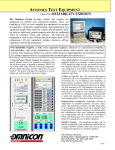
A General-Purpose System Designed for Avionics. The
general purpose avionics test equipment, illustrated
below and on the next page, is designed to exchange
ARINC 429 and AFDX traffic under software-controlled
configuration. Discrete inputs and outputs and other
signal types are easily handled. The system is designed
for expansion to accom-modate any realistic number and
types of signals.
A Low-Risk Solution. Our general purpose avionics test
equipment design is an extremely versatile and powerful
COTS product on which we have successfully
developed and integrated extensive system simulation
and test soft-ware. Equipment is user-friendly,
simulations are easy to control and observe, and
advanced scripting automates equipment operations.
About The Omnicon Group:
The Omnicon Group has been providing engineering services for over 25 years to all industries
developing or requiring mission-critical, revenue-critical, or safety-critical systems and equipment.
With an organization of talented engineers and project managers throughout the United States, Canada
and Europe, we have supported more than 200 companies on over 1,000 projects. Our leadership
position in engineering has been validated by the numerous business awards, citations and testimonials
received, and the long-standing relationships we continue to maintain with our customers.
•
It Runs on Your PC, too. The software development
environment can be run independently on a Windowsor Linux-based PC, so development and integration of
project-specific simulation software can proceed and
be demonstrated before test equipment hardware is
available. The only restriction to PC development is
that real UUT hardware cannot be tested. When the test
equipment is ready for use, developers on your
corporate network can use their PCs to manipulate,
read, and log data manually or under full automation
with scripts. Developers can work simultaneously at
their desks without interference.
Database-Driven Architecture. Simulation software is
independent of simulation quantities and types, object
names, data definitions, constants, and data range
limits, so test equipment validation need not be
repeated when system parameters change. Developers
can add and define new enumerations, data types,
composite relationships (e.g., flight/ground state as a
composite of weight-on-wheels and landing gear lever
states), and much more – simply by changing data in a
simulation database.
DOORS® Friendly. The simulation database can be
derived automatically from requirements maintained in
an IBM Rational DOORS® database rather than
entered directly or maintained separately in a
simulation database.
•
The Omnicon Group Inc.
50 Engineers Road • Hauppauge NY 11788 USA
(631) 436-7918 • Fax: (631) 436-7935
www.OmniconGroup.com
The Omnicon Group Inc.
50 Engineers Road • Hauppauge NY 11788 USA
(631) 436-7918 • Fax: (631) 436-7935
www.OmniconGroup.com
.
GENERAL-PURPOSE AVIONICS TEST EQUIPMENT
Power
Control
Panel
Main VME
Card Chassis
Omnicon general-purpose avionics test equipment provides bottom-line benefits by being more informative
and helpful to users, more automatic, more flexible, and easier to configure and operate.
Capability
Design Feature
Special Circuit
Card Chassis
Signal Conditioning
Card Chassis
Signal Breakout
Jumper Panels
Networking
Client/Server architecture
Test equipment can be operated via any PC on the corporate
network – avoids the need for new terminals, minimizes
crowding in the lab, and provides remote access. Equipment
software and test results can also be exchanged on the network.
Multi-user
Access
Multi-user operation and protection
More efficient use of test equipment by simultaneous users, in
the lab or at their desks, without mutual interference.
System-level
View
Control and read system-level
states as single variables
Enables software developers, hardware designers, testers, and
QA to each view data at appropriate levels – e.g., flight/ground
state (1) as a single variable name, (2) as underlying WOW and
landing gear names, or (3) as binary numbers. Variable names
are automatically mapped to serial message words and discretes.
Generic Data
Display
All available data object parameters
on a single, generic display
Quickly set up one or more tabular displays of real-time data,
and save them for future use.
Data
Development,
Maintenance
Database-driven software
architecture
Simulation software remains independent of data changes. Data
changes have minimal or no impact on simulation software.
Configuration
Configure test setup by GUI
Configure the test equipment for any permutation among
connected real UUTs and simulated UUT hardware items and
software modules by mouse clicks, not wiring.
LCD
Monitor
Optional
Keyboard
Drawer Area
Expansion
VME Card
Chassis
UUT
Connectors
Relay Switches
and Indicator Lamps
(select between
UUT I/O and Test
Equipment)
Wiring Harness
Connectors
UUT Power
Supplies
UUT
Connectors
Sliding UUT
Mounting Panel
(ARINC Trays)
Work with System-Level Concepts. Users observe, control, and record system-level names and values, not 1’s and
0’s. For example, Flight/Ground state can be enumerated as
“Flight” and “Ground” rather than as binary states of weight
on wheels switches and the landing gear lever. When you
change Flight/Ground state, the associated binary states are
changed automatically – and vice versa.
Powerful COTS software provides an operating system,
configuration capabilities, advanced scripting and logging
capabilities, interface drivers for discrete and serial hardware boards, an editor for constructing GUI panel controls
and indicators, and “glue logic” for tying project-specific
simulation software to the COTS capabilities. COTS and
Open Source software additionally make the equipment
easier to configure, easier to operate during testing, and
easier to monitor real-time data. The software tailors the test
equipment to the needs of the project during development
and later for acceptance and production testing.
A GUI toolset and panel editor are invaluable during
engineering development because controls and indicators
can be assembled in minutes for conducting one-time or
repeated tests, experiments, and confidence checks. All
control-indicator panels can be saved for future use.
Test Parts of Your System in any Combination. Any
parts of your prime item equipment can be simulated. You
can test a single hardware UUT or a single software
module, or any combination of simulated and real items
working together.
True OO. All simulation and configuration software is
modular and truly object-oriented to facilitate fault isolation, expansion and future growth.
Designed for Safety. Test equipment power supplies are
overcurrent- and overvoltage-protected. Digital outputs are
current-limited and short-circuit proof. The test equipment’s power control panel includes prime power circuit
breakers and an emergency power-off switch.
•
Logging
User Tools
User Help
The Omnicon Group Inc.
50 Engineers Road • Hauppauge NY 11788 USA
(631) 436-7918 • Fax: (631) 436-7935
www.OmniconGroup.com
1. Display of script progress
1. Watch script operations as they execute, line by line.
2. Auto file saving
2. Scripts automatically save all operations and results to files.
3. Auto file naming for uniqueness
3. File names are composed of script name, date, and time.
4. Single-step mode
4. Helps debug new scripts and prime equipment HW and SW.
5. User prompts and inputs
5. Saves all user input data in script results files.
6. Pass/Fail determination
6. Instantly determines pass/fail results of designated readings.
7. Auto timeout
7. Prevents equipment lockout due to script error hang-up.
8. Auto error and fault handling
8. Scripts can run, pause, or abort on errors or failures.
9. Script libraries
9. Scripts can call other scripts to save development time.
Scripting
It’s Intuitive. A few minutes of demonstration is usually
adequate to start users on the test equipment. User
manuals are excellent but are seldom required.
Powerful Scripting and Logging. You can script almost
any manipulation and reading, and you can script and log
independently. You can even script multiple loggers. Use
scripts to develop acceptance test procedures that can be
run automatically.
Bottom-Line Benefit
Diagnostics
10. Error detection and reporting
10. Clear messages help debug new scripts, troubleshoot UUT.
Multiple, independent loggers that
operate independently of scripts
Log hundreds of signals. Loggers are independently settable for
sample rate, sample mode, file size, triggers, etc. Can include
pre- and post-log data.
Library of GUI controls and
indicators
Set up for manual operations quickly and on the fly. Keep
resulting control panels for future use.
On-line, HTML-based help
Get complete information about any real or simulated parameter
by a mouse click – formal name of parameter, current value,
override value, initial value, value range or enumeration space,
identification of the data object’s “owner,” and more.
Self-test
Performs hardware checks automatically upon turn-on.