1
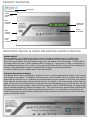
PRODUCT OVERVIEW
PF-ERSMINI-0000000
Serial Number
Device
Identification
Plate
Mains
Power OUT
Connector
Mains
Power IN
Connector
20 LED Power
Bar Indicator
Manual
Boost Button
Current
Clamp
Connection
SWITCHING ON/OFF & USING THE MANUAL BOOST FUNCTION
Switch ON/OFF
During installation, a 20A double pole switch with neon should be installed close to the ERS device.
This acts as an isolation switch should the user wish to isolate the ERS unit from the mains supply.
Ensure the supply MCB is in the ON position, then switch the isolator to the ON position. The blue LED in
the boost button will flash 5 times indicating ERS is booting up. During boot up ERS is performing an
auto calibration procedure and is ready to use once the LED stops flashing. Ensure that the heating load
is switch to the ON position, if export is detected ERS will begin to operate automatically.
To switch off ERS, turn the isolation switch to the OFF position.
Using the Manual Boost Button
The manual boost button is designed to enable the user to provide supplementary power to the heating
load should it be required. To enable the manual boost, push the button once, an audible ‘click’ can be
heard and the LED will turn on indicating the manual boost has been started. At this point a 90 minute
timer will start counting down allowing enough time for the majority of hot water tanks to fully heat the
water. At the end of the timed period, the manual boost will automatically stop, the LED will turn off and
ERS will revert to normal operation. During the timed operation, with the LED illuminated, the timed period
can be manually stopped by pressing the button once. Take note that during manual boost operation ERS
will supply the load with 100% power irrespective of export levels. If no generation is occurring this will
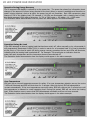
result in importing energy during the timed period. During manual boost, the power bar will not illuminate,
as per the illustration below.